
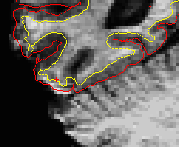
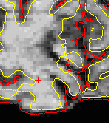
I have not seen a lot of documentation on how to do this. I've attached two images of specific areas where I'd like to have the pial and main surfaces follow the actual surface of the brain. The aux volume OK in both of these cases. The empty space is segmented as white matter. In the past I have tried deleting the segmentation values and saving the segmentation, then running recon-all -autorecon2 -autorecon3 -s <subjid>. Unfortunately it just resegmented the same areas as white matter and the issue was never resolved.
I know about freeview but I do not know how to manually edit surfaces...
What should I be doing here?
jon

Hi Jon
those are probably due to topological defects, the fixing of which forces the surfaces to enclose those spaces. See if you can find the source of the defect - I think fixing it will remove these problems. You can verify they are defects by looking at the filled.mgz. If the spaces aren't filling in it then it is a defect.
cheers Bruce On Mon, 3 Dec 2012, Jonathan Holt wrote:
I have not seen a lot of documentation on how to do this. I've attached two images of specific areas where I'd like to have the pial and main surfaces follow the actual surface of the brain. The aux volume OK in both of these cases. The empty space is segmented as white matter. In the past I have tried deleting the segmentation values and saving the segmentation, then running recon-all -autorecon2 -autorecon3 -s <subjid>. Unfortunately it just resegmented the same areas as white matter and the issue was never resolved.
I know about freeview but I do not know how to manually edit surfaces...
What should I be doing here?
jon
freesurfer@nmr.mgh.harvard.edu
-
 Bruce Fischl
 -
 Jonathan Holt