
Hi Surfers,
I am running recon-all on some subjects and have run into a strange problem. When we go back to look at the WM voxels for editing, the wm.mgz layer has a light blue tint over the whole layer. When we try to edit the WM voxels, we can add , but we cannot delete any WM voxels. Also, all the WM voxels show up as yellow instead of red as we have set them to show up as red. We tried deleting all the FS files and re-doing the recon-all, but it still shows up like this. This has only happened on 3 or 4 subjects out of about 50. I've attached a picture of our problem
Thanks in advance!
Wade Weber, MS Clinical Research Manager Division of Bipolar Disorder Research Department of Psychiatry and Behavioral Neuroscience University of Cincinnati
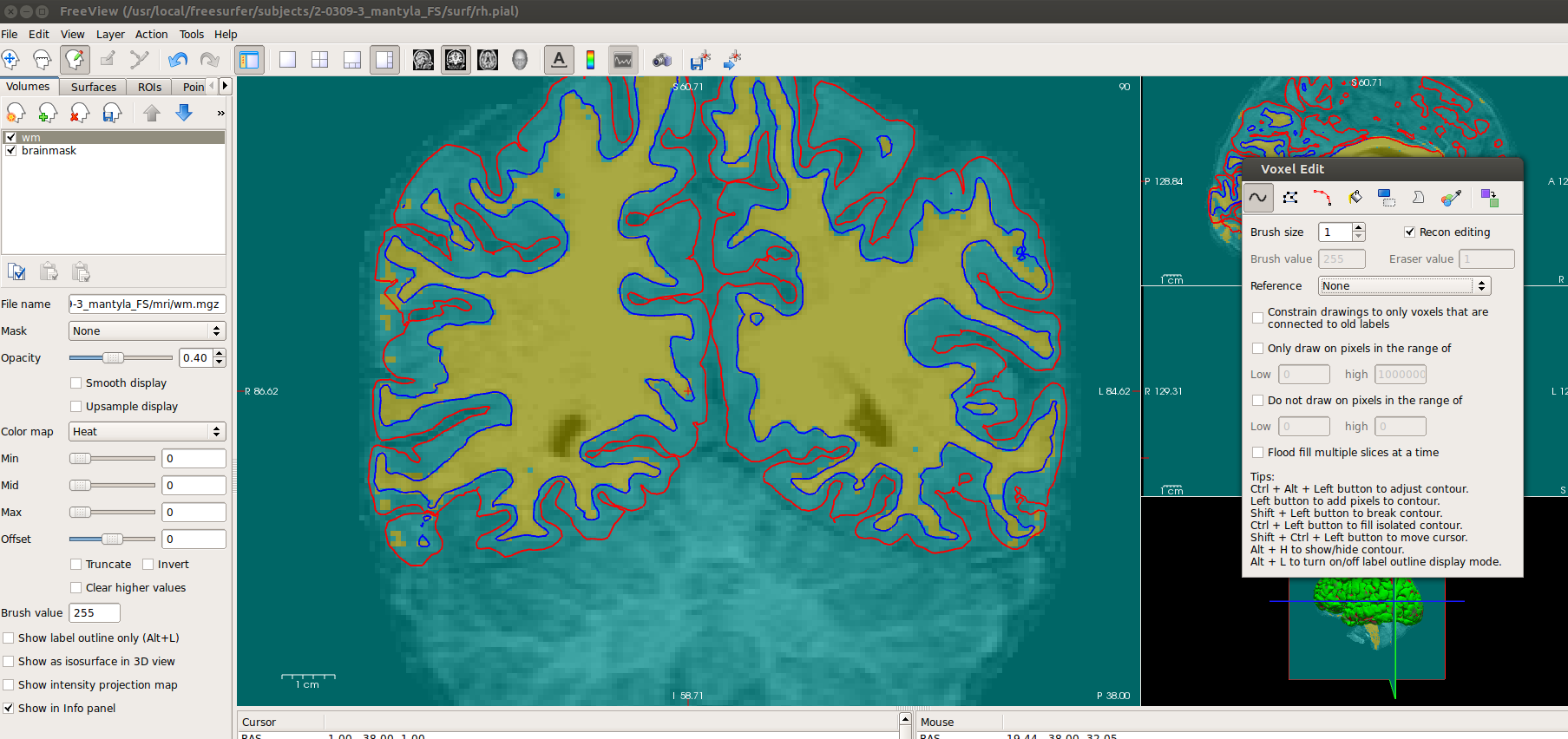

Hi Wade, You just need to adjust the min/mid/max settings for the wm on the sidebar under the Color map drop-down menu. Try using 0/100/255. How are you trying to erase? Either shift+left-click, or enable right-click erasing under Edit->Preferences. -Louis
On Wed, 16 Jul 2014, Weber, Wade (weberw) wrote:
Hi Surfers,
I am running recon-all on some subjects and have run into a strange problem. When we go back to look at the WM voxels for editing, the wm.mgz layer has a light blue tint over the whole layer. When we try to edit the WM voxels, we can add , but we cannot delete any WM voxels. Also, all the WM voxels show up as yellow instead of red as we have set them to show up as red. We tried deleting all the FS files and re-doing the recon-all, but it still shows up like this. This has only happened on 3 or 4 subjects out of about 50. I’ve attached a picture of our problem
Thanks in advance!
Wade Weber, MS
Clinical Research Manager
Division of Bipolar Disorder Research
Department of Psychiatry and Behavioral Neuroscience
University of Cincinnati
freesurfer@nmr.mgh.harvard.edu
-
 Louis Nicholas Vinke
 -
 Weber, Wade (weberw)