
Hi!
I would like to create a 3D rendering of the hippocampal subfields generated by FreeSurfer (as done in the Iglesias paper). I have tried to do this using Slicer, but the results are not that nice (making a model based on the 1mm mgz file). How were the surfaces in the paper generated? Do you have any suggestions for me on how to do this?
Many thanks
Heidi

In Freeview:
to open a subject’s T1-weighted scan and then superimpose the hippocampal subfields segmentations, type in:
freeview
• Select File, Load Volume (or use the Load button on the left toolbar)
• Select the T1.mgz file in the subject’s “mri” directory
• Open another volume (File, Load Volume, or use the Load button [green +])
• Select the left (or right) hippocampal segmentations i.e. lh.hippSfLabels-T1.v10.mgz
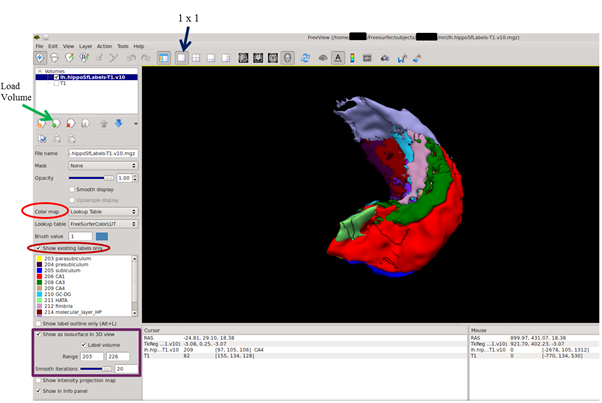
• Change the Color Map (on the left toolbar) to “Lookup Table”. The hippocampal subfields will now appear as different colours.
• Click the box “Show existing labels only”
• To render the subfields without the T1 scan in 3D, unclick the T1 scan (upper left), and then click “Show as isosurface in 3D view”
• In the “Range” boxes, type in 203 and 226 (these are the subfield label numbers). Press Enter.
• Select the 1x1 box (top toolbar)
• Right-click anywhere on the 3D image and select Show Slice Frames (3D View), the frames will now be removed
• Slide the mouse whilst holding down the right mouse button to zoom, the left button to rotate, and the middle button to move the object.
• To generate a smoother rendering, slide the “Smooth iterations” bar to the right (maximum value is 20).
[image: Inline images 1]
Regards,
Jerome
On 15 August 2016 at 06:19, Jacobs H (NP) h.jacobs@maastrichtuniversity.nl wrote:
Hi!
I would like to create a 3D rendering of the hippocampal subfields generated by FreeSurfer (as done in the Iglesias paper). I have tried to do this using Slicer, but the results are not that nice (making a model based on the 1mm mgz file). How were the surfaces in the paper generated? Do you have any suggestions for me on how to do this?
Many thanks
Heidi
Freesurfer mailing list Freesurfer@nmr.mgh.harvard.edu https://mail.nmr.mgh.harvard.edu/mailman/listinfo/freesurfer
The information in this e-mail is intended only for the person to whom it is addressed. If you believe this e-mail was sent to you in error and the e-mail contains patient information, please contact the Partners Compliance HelpLine at http://www.partners.org/complianceline . If the e-mail was sent to you in error but does not contain patient information, please contact the sender and properly dispose of the e-mail.
Thank you so much for the detailed instructions! This works fantastic! Heidi
From: Jerome Maller <jerome.maller@monash.edumailto:jerome.maller@monash.edu> Reply-To: Freesurfer support list <freesurfer@nmr.mgh.harvard.edumailto:freesurfer@nmr.mgh.harvard.edu> Date: Monday, August 15, 2016 at 6:52 AM To: Freesurfer support list <freesurfer@nmr.mgh.harvard.edumailto:freesurfer@nmr.mgh.harvard.edu> Subject: Re: [Freesurfer] Iglesias paper: Hippocampal subfields
In Freeview:
to open a subject's T1-weighted scan and then superimpose the hippocampal subfields segmentations, type in:
freeview
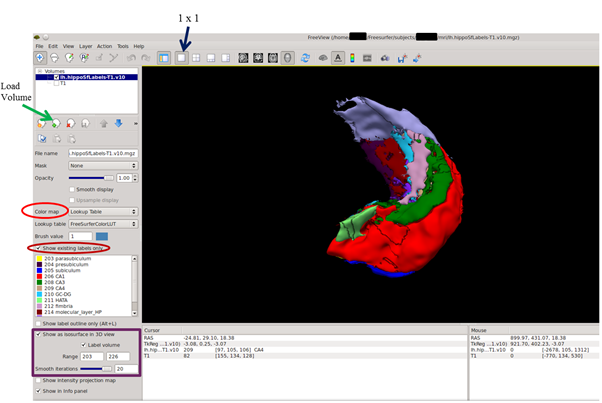
* Select File, Load Volume (or use the Load button on the left toolbar) * Select the T1.mgz file in the subject's "mri" directory * Open another volume (File, Load Volume, or use the Load button [green +]) * Select the left (or right) hippocampal segmentations i.e. lh.hippSfLabels-T1.v10.mgz * Change the Color Map (on the left toolbar) to "Lookup Table". The hippocampal subfields will now appear as different colours. * Click the box "Show existing labels only" * To render the subfields without the T1 scan in 3D, unclick the T1 scan (upper left), and then click "Show as isosurface in 3D view" * In the "Range" boxes, type in 203 and 226 (these are the subfield label numbers). Press Enter. * Select the 1x1 box (top toolbar) * Right-click anywhere on the 3D image and select Show Slice Frames (3D View), the frames will now be removed * Slide the mouse whilst holding down the right mouse button to zoom, the left button to rotate, and the middle button to move the object. * To generate a smoother rendering, slide the "Smooth iterations" bar to the right (maximum value is 20).
[Inline images 1]
Regards,
Jerome
On 15 August 2016 at 06:19, Jacobs H (NP) <h.jacobs@maastrichtuniversity.nlmailto:h.jacobs@maastrichtuniversity.nl> wrote: Hi!
I would like to create a 3D rendering of the hippocampal subfields generated by FreeSurfer (as done in the Iglesias paper). I have tried to do this using Slicer, but the results are not that nice (making a model based on the 1mm mgz file). How were the surfaces in the paper generated? Do you have any suggestions for me on how to do this?
Many thanks
Heidi
_______________________________________________ Freesurfer mailing list Freesurfer@nmr.mgh.harvard.edumailto:Freesurfer@nmr.mgh.harvard.edu https://mail.nmr.mgh.harvard.edu/mailman/listinfo/freesurfer
The information in this e-mail is intended only for the person to whom it is addressed. If you believe this e-mail was sent to you in error and the e-mail contains patient information, please contact the Partners Compliance HelpLine at http://www.partners.org/complianceline . If the e-mail was sent to you in error but does not contain patient information, please contact the sender and properly dispose of the e-mail.
--
Dr Jerome J Maller BSc,GradDipPsych,MSc,PhD
Neuroscientist
Adjunct Senior Research Fellow
Monash Alfred Psychiatry Research Centre (MAPrc)
Central Clinical School, Monash University and Alfred Hospital
4th Floor, 607 St Kilda Rd, Melbourne VIC
Adjunct Associate Professor
Centre for Research on Ageing, Health and Wellbeing, Research School of Population Health, ANU College of Medicine, Biology and Environment at the Australian National University.
T: +61 3 9076 2404
F: +61 3 9076 6588
M: +61 419 221 454
E: jerome.maller@monash.edumailto:jerome.maller@monash.edu
freesurfer@nmr.mgh.harvard.edu
-
 Jacobs H (NP)
 -
 Jerome Maller