
External Email - Use Caution
Dear All,
I tried recon-all with/without T2 image using FS 5.3.0. Then I found that the aseg stats and aparc stats with/without T2 are exactly the same. When I check the pial surfaces, I can see that they are very similar but not the same. So is it reasonable to see exactly the same stats? An example of the pial surfaces with/without T2 is attached here. The red line is lh.pial with T2 and the yellow line is the lh.pial without T2 My command for recon-all with T2 is: recon-all -s ${subject} -i T1.nii -all -T2 T2.nii -T2pial -sd ${T2_dir} My command for recon-all without T2 is: recon-all -s ${subject} -i T1.nii -all -sd ${T1_dir}
Thanks, Jianzhong
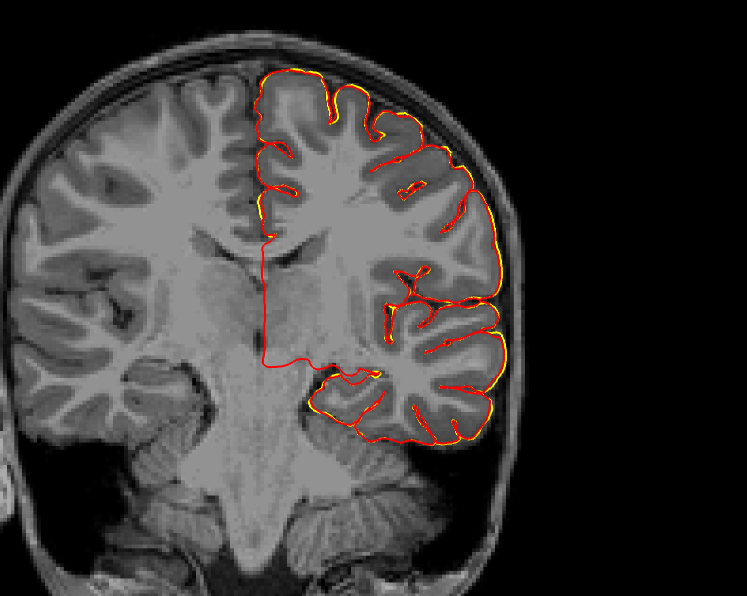

The aseg.stats should be the same since that does not make reference to the surfaces. The aparc stats should have been different because the thickness should have been different. Can you check whether the thickness files are different?
On 10/8/18 9:39 AM, Jianzhong Chen wrote:
External Email - Use Caution
Dear All,
I tried recon-all with/without T2 image using FS 5.3.0. Then I found that the aseg stats and aparc stats with/without T2 are exactly the same. When I check the pial surfaces, I can see that they are very similar but not the same. So is it reasonable to see exactly the same stats? An example of the pial surfaces with/without T2 is attached here. The red line is lh.pial with T2 and the yellow line is the lh.pial without T2 My command for recon-all with T2 is: recon-all -s ${subject} -i T1.nii -all -T2 T2.nii -T2pial -sd ${T2_dir} My command for recon-all without T2 is: recon-all -s ${subject} -i T1.nii -all -sd ${T1_dir}
Thanks, Jianzhong
_______________________________________________ Freesurfer mailing list Freesurfer@nmr.mgh.harvard.edumailto:Freesurfer@nmr.mgh.harvard.edu https://mail.nmr.mgh.harvard.edu/mailman/listinfo/freesurfer
External Email - Use Caution
Hi Dr. Greve,
I checked the lh.aparc.stats and rh.aparc.stats, the thicknesses (and the other measures like volume and area) are all the same.
Thanks, Jianzhong
Greve, Douglas N.,Ph.D. DGREVE@mgh.harvard.edu 于2018年10月9日周二 上午10:16写道:
The aseg.stats should be the same since that does not make reference to the surfaces. The aparc stats should have been different because the thickness should have been different. Can you check whether the thickness files are different?
On 10/8/18 9:39 AM, Jianzhong Chen wrote:
External Email - Use CautionDear All,
I tried recon-all with/without T2 image using FS 5.3.0. Then I found that the aseg stats and aparc stats with/without T2 are exactly the same. When I check the pial surfaces, I can see that they are very similar but not the same. So is it reasonable to see exactly the same stats? An example of the pial surfaces with/without T2 is attached here. The red line is lh.pial with T2 and the yellow line is the lh.pial without T2 My command for recon-all with T2 is: recon-all -s ${subject} -i T1.nii -all -T2 T2.nii -T2pial -sd ${T2_dir} My command for recon-all without T2 is: recon-all -s ${subject} -i T1.nii -all -sd ${T1_dir}
Thanks, Jianzhong
Freesurfer mailing listFreesurfer@nmr.mgh.harvard.eduhttps://mail.nmr.mgh.harvard.edu/mailman/listinfo/freesurfer
Freesurfer mailing list Freesurfer@nmr.mgh.harvard.edu https://mail.nmr.mgh.harvard.edu/mailman/listinfo/freesurfer
But are the lh.thickness files the same or different?

On 10/9/18 1:46 AM, Jianzhong Chen wrote:
External Email - Use Caution
Hi Dr. Greve,
I checked the lh.aparc.stats and rh.aparc.stats, the thicknesses (and the other measures like volume and area) are all the same.
Thanks, Jianzhong
Greve, Douglas N.,Ph.D. <DGREVE@mgh.harvard.edumailto:DGREVE@mgh.harvard.edu> 于2018年10月9日周二 上午10:16写道: The aseg.stats should be the same since that does not make reference to the surfaces. The aparc stats should have been different because the thickness should have been different. Can you check whether the thickness files are different?
On 10/8/18 9:39 AM, Jianzhong Chen wrote:
External Email - Use Caution
Dear All,
I tried recon-all with/without T2 image using FS 5.3.0. Then I found that the aseg stats and aparc stats with/without T2 are exactly the same. When I check the pial surfaces, I can see that they are very similar but not the same. So is it reasonable to see exactly the same stats? An example of the pial surfaces with/without T2 is attached here. The red line is lh.pial with T2 and the yellow line is the lh.pial without T2 My command for recon-all with T2 is: recon-all -s ${subject} -i T1.nii -all -T2 T2.nii -T2pial -sd ${T2_dir} My command for recon-all without T2 is: recon-all -s ${subject} -i T1.nii -all -sd ${T1_dir}
Thanks, Jianzhong
_______________________________________________ Freesurfer mailing list Freesurfer@nmr.mgh.harvard.edumailto:Freesurfer@nmr.mgh.harvard.edu https://mail.nmr.mgh.harvard.edu/mailman/listinfo/freesurfer
_______________________________________________ Freesurfer mailing list Freesurfer@nmr.mgh.harvard.edumailto:Freesurfer@nmr.mgh.harvard.edu https://mail.nmr.mgh.harvard.edu/mailman/listinfo/freesurfer
_______________________________________________ Freesurfer mailing list Freesurfer@nmr.mgh.harvard.edumailto:Freesurfer@nmr.mgh.harvard.edu https://mail.nmr.mgh.harvard.edu/mailman/listinfo/freesurfer
External Email - Use Caution
They are different. I attached two screenshots of lh.thickness overlaying on lh.inflated here.
Greve, Douglas N.,Ph.D. DGREVE@mgh.harvard.edu 于2018年10月9日周二 下午10:22写道:
But are the lh.thickness files the same or different?

On 10/9/18 1:46 AM, Jianzhong Chen wrote:
External Email - Use CautionHi Dr. Greve,
I checked the lh.aparc.stats and rh.aparc.stats, the thicknesses (and the other measures like volume and area) are all the same.
Thanks, Jianzhong
Greve, Douglas N.,Ph.D. DGREVE@mgh.harvard.edu 于2018年10月9日周二 上午10:16写道:
The aseg.stats should be the same since that does not make reference to the surfaces. The aparc stats should have been different because the thickness should have been different. Can you check whether the thickness files are different?
On 10/8/18 9:39 AM, Jianzhong Chen wrote:
External Email - Use CautionDear All,
I tried recon-all with/without T2 image using FS 5.3.0. Then I found that the aseg stats and aparc stats with/without T2 are exactly the same. When I check the pial surfaces, I can see that they are very similar but not the same. So is it reasonable to see exactly the same stats? An example of the pial surfaces with/without T2 is attached here. The red line is lh.pial with T2 and the yellow line is the lh.pial without T2 My command for recon-all with T2 is: recon-all -s ${subject} -i T1.nii -all -T2 T2.nii -T2pial -sd ${T2_dir} My command for recon-all without T2 is: recon-all -s ${subject} -i T1.nii -all -sd ${T1_dir}
Thanks, Jianzhong
Freesurfer mailing listFreesurfer@nmr.mgh.harvard.eduhttps://mail.nmr.mgh.harvard.edu/mailman/listinfo/freesurfer
Freesurfer mailing list Freesurfer@nmr.mgh.harvard.edu https://mail.nmr.mgh.harvard.edu/mailman/listinfo/freesurfer
Freesurfer mailing listFreesurfer@nmr.mgh.harvard.eduhttps://mail.nmr.mgh.harvard.edu/mailman/listinfo/freesurfer
Freesurfer mailing list Freesurfer@nmr.mgh.harvard.edu https://mail.nmr.mgh.harvard.edu/mailman/listinfo/freesurfer
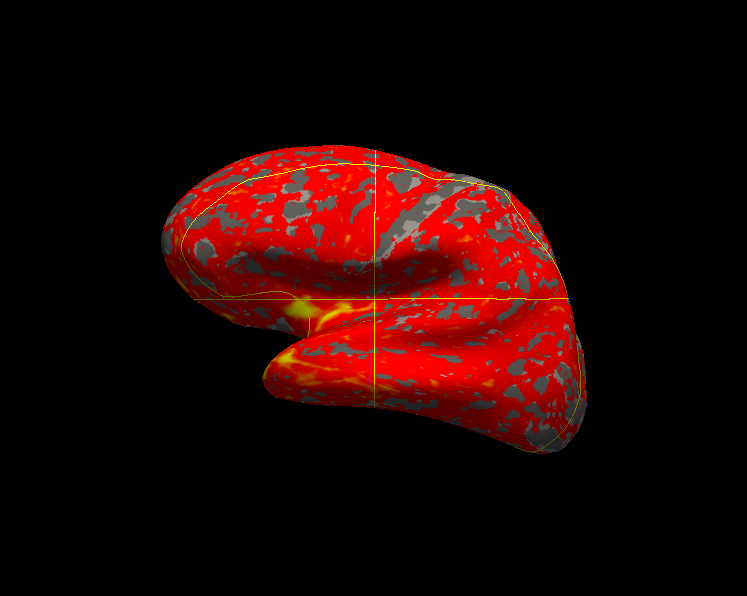
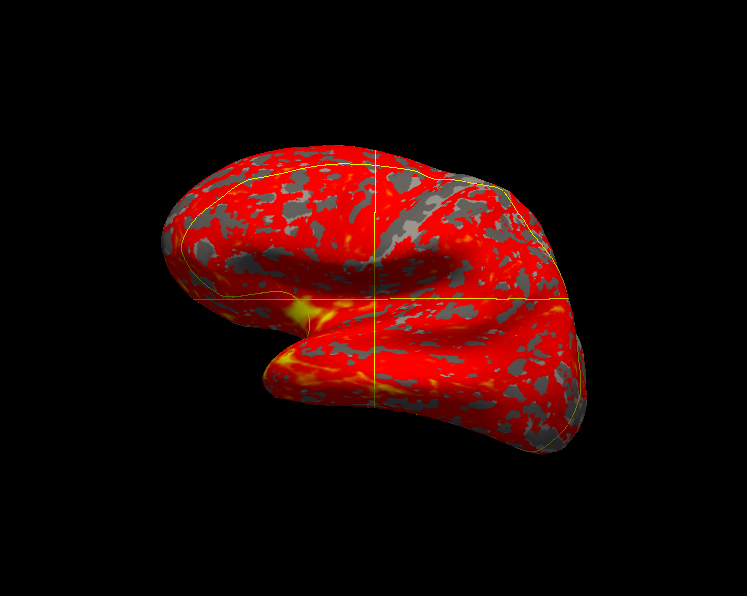
I think this was a bug in 5.3. Try running recon-all like recon-all -s subject -parcstats -parcstats2 -parcstats3 to regenerate the stats files
On 10/09/2018 11:19 PM, Jianzhong Chen wrote:
External Email - Use Caution
They are different. I attached two screenshots of lh.thickness overlaying on lh.inflated here.
Greve, Douglas N.,Ph.D. <DGREVE@mgh.harvard.edu mailto:DGREVE@mgh.harvard.edu> 于2018年10月9日周二 下午10:22写道:
But are the lh.thickness files the same or different? On 10/9/18 1:46 AM, Jianzhong Chen wrote:External Email - Use Caution Hi Dr. Greve, I checked the lh.aparc.stats and rh.aparc.stats, the thicknesses (and the other measures like volume and area) are all the same. Thanks, Jianzhong Greve, Douglas N.,Ph.D. <DGREVE@mgh.harvard.edu <mailto:DGREVE@mgh.harvard.edu>> 于2018年10月9日周二 上午10:16写道: The aseg.stats should be the same since that does not make reference to the surfaces. The aparc stats should have been different because the thickness should have been different. Can you check whether the thickness files are different? On 10/8/18 9:39 AM, Jianzhong Chen wrote:External Email - Use Caution Dear All, I tried recon-all with/without T2 image using FS 5.3.0. Then I found that the aseg stats and aparc stats with/without T2 are exactly the same. When I check the pial surfaces, I can see that they are very similar but not the same. So is it reasonable to see exactly the same stats? An example of the pial surfaces with/without T2 is attached here. The red line is lh.pial with T2 and the yellow line is the lh.pial without T2 My command for recon-all with T2 is: recon-all -s ${subject} -i T1.nii -all -T2 T2.nii -T2pial -sd ${T2_dir} My command for recon-all without T2 is: recon-all -s ${subject} -i T1.nii -all -sd ${T1_dir} Thanks, Jianzhong _______________________________________________ Freesurfer mailing list Freesurfer@nmr.mgh.harvard.edu <mailto:Freesurfer@nmr.mgh.harvard.edu> https://mail.nmr.mgh.harvard.edu/mailman/listinfo/freesurfer_______________________________________________ Freesurfer mailing list Freesurfer@nmr.mgh.harvard.edu <mailto:Freesurfer@nmr.mgh.harvard.edu> https://mail.nmr.mgh.harvard.edu/mailman/listinfo/freesurfer _______________________________________________ Freesurfer mailing list Freesurfer@nmr.mgh.harvard.edu <mailto:Freesurfer@nmr.mgh.harvard.edu> https://mail.nmr.mgh.harvard.edu/mailman/listinfo/freesurfer_______________________________________________ Freesurfer mailing list Freesurfer@nmr.mgh.harvard.edu <mailto:Freesurfer@nmr.mgh.harvard.edu> https://mail.nmr.mgh.harvard.edu/mailman/listinfo/freesurfer
Freesurfer mailing list Freesurfer@nmr.mgh.harvard.edu https://mail.nmr.mgh.harvard.edu/mailman/listinfo/freesurfer
External Email - Use Caution
The aparc stats with T2 changed using this script. Now the stats with/without T2 are different, thanks! It seems that in 5.3 the aparc stats are computed before refining the pial.
Greve, Douglas N.,Ph.D. DGREVE@mgh.harvard.edu 于2018年10月11日周四 上午2:24写道:
I think this was a bug in 5.3. Try running recon-all like recon-all -s subject -parcstats -parcstats2 -parcstats3 to regenerate the stats files
On 10/09/2018 11:19 PM, Jianzhong Chen wrote:
External Email - Use CautionThey are different. I attached two screenshots of lh.thickness overlaying on lh.inflated here.
Greve, Douglas N.,Ph.D. <DGREVE@mgh.harvard.edu mailto:DGREVE@mgh.harvard.edu> 于2018年10月9日周二 下午10:22写道:
But are the lh.thickness files the same or different? On 10/9/18 1:46 AM, Jianzhong Chen wrote:External Email - Use Caution Hi Dr. Greve, I checked the lh.aparc.stats and rh.aparc.stats, the thicknesses (and the other measures like volume and area) are all the same. Thanks, Jianzhong Greve, Douglas N.,Ph.D. <DGREVE@mgh.harvard.edu <mailto:DGREVE@mgh.harvard.edu>> 于2018年10月9日周二 上午10:16写道: The aseg.stats should be the same since that does not make reference to the surfaces. The aparc stats should have been different because the thickness should have been different. Can you check whether the thickness files are different? On 10/8/18 9:39 AM, Jianzhong Chen wrote:External Email - Use Caution Dear All, I tried recon-all with/without T2 image using FS 5.3.0. Then I found that the aseg stats and aparc stats with/without T2 are exactly the same. When I check the pial surfaces, I can see that they are very similar but not the same. So is it reasonable to see exactly the same stats? An example of the pial surfaces with/without T2 is attached here. The red line is lh.pial with T2 and the yellow line is the lh.pial without T2 My command for recon-all with T2 is: recon-all -s ${subject} -i T1.nii -all -T2 T2.nii -T2pial -sd ${T2_dir} My command for recon-all without T2 is: recon-all -s ${subject} -i T1.nii -all -sd ${T1_dir} Thanks, Jianzhong _______________________________________________ Freesurfer mailing list Freesurfer@nmr.mgh.harvard.edu <mailto:Freesurfer@nmr.mgh.harvard.edu> https://mail.nmr.mgh.harvard.edu/mailman/listinfo/freesurfer_______________________________________________ Freesurfer mailing list Freesurfer@nmr.mgh.harvard.edu <mailto:Freesurfer@nmr.mgh.harvard.edu> https://mail.nmr.mgh.harvard.edu/mailman/listinfo/freesurfer _______________________________________________ Freesurfer mailing list Freesurfer@nmr.mgh.harvard.edu <mailto:Freesurfer@nmr.mgh.harvard.edu> https://mail.nmr.mgh.harvard.edu/mailman/listinfo/freesurfer_______________________________________________ Freesurfer mailing list Freesurfer@nmr.mgh.harvard.edu <mailto:Freesurfer@nmr.mgh.harvard.edu>
https://mail.nmr.mgh.harvard.edu/mailman/listinfo/freesurfer
Freesurfer mailing list Freesurfer@nmr.mgh.harvard.edu https://mail.nmr.mgh.harvard.edu/mailman/listinfo/freesurfer
Freesurfer mailing list Freesurfer@nmr.mgh.harvard.edu https://mail.nmr.mgh.harvard.edu/mailman/listinfo/freesurfer
freesurfer@nmr.mgh.harvard.edu
-
 Greve, Douglas N.,Ph.D.
 -
 Jianzhong Chen