
External Email - Use Caution
Dear experts, Could you tell us how to convert label to volume? when I run this command "mri_label2vol --label lh.insular.label --temp /home/zwj/SCH_immune/A001 --identity --o insular.img", errors happened: corRead(): can't open file /home/zwj/SCH_immune/A001/COR-.info ERROR: reading /home/zwj/SCH_immune/A001 header
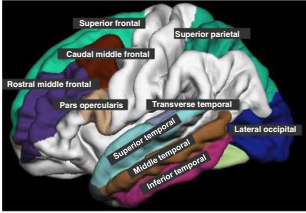
In addtion, I am going to overlay a specific label to the template as following, could you tell me how to do it?
Thanks Best Regards
Wu

External Email - Use Caution
In --temp /home/zwj/SCH_immune/A00 you seem to be missing the last bit of the file name, like .mgz or .nii. This option passes the template volume you want the output volume to match.
For the second question, you can load that annotation and the individual label both in freeview. When you say overlay a label, what is the file format? You can load it as an overlay if it ends with .mgz .nii etc, so if a volume file. I would suggest looking at the freeview manual.
Best Idil ________________________________ From: freesurfer-bounces@nmr.mgh.harvard.edu [freesurfer-bounces@nmr.mgh.harvard.edu] on behalf of Dongsheng Wu [dswuscu@163.com] Sent: Tuesday, July 24, 2018 4:15 PM To: freesurfer@nmr.mgh.harvard.edu Subject: [Freesurfer] How to convert label to volume
External Email - Use Caution
Dear experts, Could you tell us how to convert label to volume? when I run this command "mri_label2vol --label lh.insular.label --temp /home/zwj/SCH_immune/A001 --identity --o insular.img", errors happened: corRead(): can't open file /home/zwj/SCH_immune/A001/COR-.info ERROR: reading /home/zwj/SCH_immune/A001 header
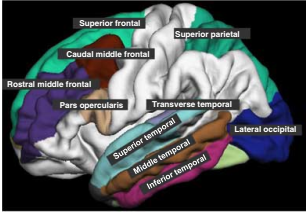
In addtion, I am going to overlay a specific label to the template as following, could you tell me how to do it? [cid:6841681e$1$164cc6e6aa3$Coremail$dswuscu$163.com]
Thanks Best Regards
Wu
freesurfer@nmr.mgh.harvard.edu
-
 Dongsheng Wu
 -
 Yagmur Ozdemir 19