
I need to create an image which overlaps the T1/mgz and the outer surface of the white matter. How do I convert the surface into a mgz volume?

not sure what you mean. Have you looked at the ribbon.mgz file?


On 5/15/17 5:20 PM, Gamaliz wrote:
I need to create an image which overlaps the T1/mgz and the outer surface of the white matter. How do I convert the surface into a mgz volume?
-- gAbE
Freesurfer mailing list Freesurfer@nmr.mgh.harvard.edu https://mail.nmr.mgh.harvard.edu/mailman/listinfo/freesurfer
I looked at the ribbon.mgz, but it is a pial surface, not really delineated white matter the way I need it. There is a command called mri_sur2vol, I have tried to use it, but unsuccessfully, no idea if that is the solution to my problem.
On Mon, May 15, 2017 at 9:57 PM, Douglas Greve greve@nmr.mgh.harvard.edu wrote:
not sure what you mean. Have you looked at the ribbon.mgz file?
On 5/15/17 5:20 PM, Gamaliz wrote:
I need to create an image which overlaps the T1/mgz and the outer surface of the white matter. How do I convert the surface into a mgz volume?
-- gAbE
Freesurfer mailing listFreesurfer@nmr.mgh.harvard.eduhttps://mail.nmr.mgh.harvard.edu/mailman/listinfo/freesurfer
Freesurfer mailing list Freesurfer@nmr.mgh.harvard.edu https://mail.nmr.mgh.harvard.edu/mailman/listinfo/freesurfer
The information in this e-mail is intended only for the person to whom it is addressed. If you believe this e-mail was sent to you in error and the e-mail contains patient information, please contact the Partners Compliance HelpLine at http://www.partners.org/complianceline . If the e-mail was sent to you in error but does not contain patient information, please contact the sender and properly dispose of the e-mail.
  what was your mri_surf2vol cmd line? And what was the terminal
  output?


  On 5/15/17 9:59 PM, Gamaliz wrote:
  I looked at the ribbon.mgz, but it is a pial surface, not
  really delineated white matter the way I need it. There is
  a command called mri_sur2vol, I have tried to use it, but
  unsuccessfully, no idea if that is the solution to my
  problem.
On Mon, May 15, 2017 at 9:57 PM, Douglas Greve <greve@nmr.mgh.harvard.edu mailto:greve@nmr.mgh.harvard.edu> wrote:
not sure what you mean. Have you looked at the ribbon.mgz file? On 5/15/17 5:20 PM, Gamaliz wrote:I need to create an image which overlaps the T1/mgz and the outer surface of the white matter. How do I convert the surface into a mgz volume? -- gAbE _______________________________________________ Freesurfer mailing list Freesurfer@nmr.mgh.harvard.edu <mailto:Freesurfer@nmr.mgh.harvard.edu> https://mail.nmr.mgh.harvard.edu/mailman/listinfo/freesurfer <https://mail.nmr.mgh.harvard.edu/mailman/listinfo/freesurfer>_______________________________________________ Freesurfer mailing list Freesurfer@nmr.mgh.harvard.edu <mailto:Freesurfer@nmr.mgh.harvard.edu> https://mail.nmr.mgh.harvard.edu/mailman/listinfo/freesurfer <https://mail.nmr.mgh.harvard.edu/mailman/listinfo/freesurfer> The information in this e-mail is intended only for the person to whom it is addressed. If you believe this e-mail was sent to you in error and the e-mail contains patient information, please contact the Partners Compliance HelpLine at http://www.partners.org/complianceline <http://www.partners.org/complianceline> . If the e-mail was sent to you in error but does not contain patient information, please contact the sender and properly dispose of the e-mail.-- gAbE
Freesurfer mailing list Freesurfer@nmr.mgh.harvard.edu https://mail.nmr.mgh.harvard.edu/mailman/listinfo/freesurfer
My idea is to convert the registered white surface into a volume, so it can be shown in a volume viewer (not a surface viewer). I need to display a DTI image and mark the edges of the white matter as a line on top if it.
This is not the exact command, I am not sitting in front of my station, but it goes something like it. I tried many combinations, the general error was related to the template files not on the correct format (it could have been they couldn't be found to be opened too, the error seemed generic).
mri_surf2vol --surfval white --hemi lh --outvol test.mgz --template T1.mgz --volreg T1.mgz --sd /home/user/Desktop/sf/sub1
I am at a loss for the --volreg flag.
The sd seems to indicate the directory of freesurfer (but then how is the command aware of the specficic subject I am trying to process? I tried using: --identity subject no luck.
'sub1' us my subject, located not in the default freesurfer directory.
There are no examples or a lot of help using it
https://surfer.nmr.mgh.harvard.edu/fswiki/mri_surf2vol
If this is not enough I can get back to you with the specific error tomorrow.
On Mon, May 15, 2017 at 10:02 PM, Douglas Greve greve@nmr.mgh.harvard.edu wrote:
what was your mri_surf2vol cmd line? And what was the terminal output?
On 5/15/17 9:59 PM, Gamaliz wrote:
I looked at the ribbon.mgz, but it is a pial surface, not really delineated white matter the way I need it. There is a command called mri_sur2vol, I have tried to use it, but unsuccessfully, no idea if that is the solution to my problem.
On Mon, May 15, 2017 at 9:57 PM, Douglas Greve greve@nmr.mgh.harvard.edu wrote:
  not sure what you mean. Have you looked at the
  ribbon.mgz file?


  On 5/15/17 5:20 PM, Gamaliz wrote:
  I need to create an image which overlaps the
  T1/mgz and the outer surface of the white
  matter. How do I convert the surface into a
  mgz volume?
-- gAbE
Freesurfer mailing listFreesurfer@nmr.mgh.harvard.eduhttps://mail.nmr.mgh.harvard.edu/mailman/listinfo/freesurfer
_______________________________________________ Freesurfer mailing list Freesurfer@nmr.mgh.harvard.edu https://mail.nmr.mgh.harvard.e du/mailman/listinfo/freesurfer The information in this e-mail is intended only for the person to whom it is addressed. If you believe this e-mail was sent to you in error and the e-mail contains patient information, please contact the Partners Compliance HelpLine at http://www.partners.org/complianceline . If the e-mail was sent to you in error but does not contain patient information, please contact the sender and properly dispose of the e-mail.
-- gAbE
Freesurfer mailing listFreesurfer@nmr.mgh.harvard.eduhttps://mail.nmr.mgh.harvard.edu/mailman/listinfo/freesurfer
Freesurfer mailing list Freesurfer@nmr.mgh.harvard.edu https://mail.nmr.mgh.harvard.edu/mailman/listinfo/freesurfer
The information in this e-mail is intended only for the person to whom it is addressed. If you believe this e-mail was sent to you in error and the e-mail contains patient information, please contact the Partners Compliance HelpLine at http://www.partners.org/complianceline . If the e-mail was sent to you in error but does not contain patient information, please contact the sender and properly dispose of the e-mail.

Hi gAbE
you could try using mris_fill, or even mris_compute_volume_fractions
cheers Bruce On Mon, 15 May 2017, Gamaliz wrote:
My idea is to convert the registered white surface into a volume, so it can be shown in a volume viewer (not a surface viewer). I need to display a DTI image and mark the edges of the white matter as a line on top if it.
This is not the exact command, I am not sitting in front of my station, but it goes something like it. I tried many combinations, the general error was related to the template files not on the correct format (it could have been they couldn't be found to be opened too, the error seemed generic).
mri_surf2vol --surfval white --hemi lh --outvol test.mgz --template T1.mgz --volreg T1.mgz --sd /home/user/Desktop/sf/sub1
I am at a loss for the --volreg flag.
The sd seems to indicate the directory of freesurfer (but then how is the co mmand aware of the specficic subject I am trying to process? I tried using: --identity subject no luck.
'sub1' us my subject, located not in the default freesurfer directory.
There are no examples or a lot of help using it
https://surfer.nmr.mgh.harvard.edu/fswiki/mri_surf2vol
If this is not enough I can get back to you with the specific error tomorrow .
On Mon, May 15, 2017 at 10:02 PM, Douglas Greve
wrote:
  what was your mri_surf2vol cmd line? And what was the terminal
  output?


  On 5/15/17 9:59 PM, Gamaliz wrote:
  I looked at the ribbon.mgz, but it is a pial surface, not
  really delineated white matter the way I need it. There is
  a command called mri_sur2vol, I have tried to use it, but
  unsuccessfully, no idea if that is the solution to my
  problem.
On Mon, May 15, 2017 at 9:57 PM, Douglas Greve greve@nmr.mgh.harvard.edu wrote:
  not sure what you mean. Have you looked at the
  ribbon.mgz file?


  On 5/15/17 5:20 PM, Gamaliz wrote:
  I need to create an image which overlaps the
  T1/mgz and the outer surface of the white
  matter. How do I convert the surface into a
  mgz volume?
-- gAbE
Freesurfer mailing list Freesurfer@nmr.mgh.harvard.edu https://mail.nmr.mgh.harvard.edu/mailman/listinfo/freesurfer
_______________________________________________ Freesurfer mailing list Freesurfer@nmr.mgh.harvard.edu https://mail.nmr.mgh.harvard.edu/mailman/listinfo/freesurfer The information in this e-mail is intended only for the person to whom it is addressed. If you believe this e-mail was sent to you in error and the e-mail contains patient information, please contact the Partners Compliance HelpLine at http://www.partners.org/complianceline . If the e-mail was sent to you in error but does not contain patient information, please contact the sender and properly dispose of the e-mail.
-- gAbE
Freesurfer mailing list Freesurfer@nmr.mgh.harvard.edu https://mail.nmr.mgh.harvard.edu/mailman/listinfo/freesurfer
Freesurfer mailing list Freesurfer@nmr.mgh.harvard.edu https://mail.nmr.mgh.harvard.edu/mailman/listinfo/freesurfer
The information in this e-mail is intended only for the person to whom it is addressed. If you believe this e-mail was sent to you in error and the e-mail contains patient information, please contact the Partners Compliance HelpLine at http://www.partners.org/complianceline . If the e-mail was sent to you in error but does not contain patient information, please contact the sender and properly dispose of the e-mail.
-- gAbE
If you run it with --help, it will print out examples. Did you try that?
On 5/16/17 9:26 AM, Bruce Fischl wrote:
Hi gAbE
you could try using mris_fill, or even mris_compute_volume_fractions
cheers Bruce On Mon, 15 May 2017, Gamaliz wrote:
My idea is to convert the registered white surface into a volume, so it can be shown in a volume viewer (not a surface viewer). I need to display a DTI image and mark the edges of the white matter as a line on top if it. This is not the exact command, I am not sitting in front of my station, but it goes something like it. I tried many combinations, the general error was related to the template files not on the correct format (it could have been they couldn't be found to be opened too, the error seemed generic). mri_surf2vol --surfval white --hemi lh --outvol test.mgz --template T1.mgz --volreg T1.mgz --sd /home/user/Desktop/sf/sub1 I am at a loss for the --volreg flag. The sd seems to indicate the directory of freesurfer (but then how is the co mmand aware of the specficic subject I am trying to process? I tried using: --identity subject no luck. 'sub1' us my subject, located not in the default freesurfer directory. There are no examples or a lot of help using it https://surfer.nmr.mgh.harvard.edu/fswiki/mri_surf2vol
If this is not enough I can get back to you with the specific error tomorrow . On Mon, May 15, 2017 at 10:02 PM, Douglas Greve
wrote:
  what was your mri_surf2vol cmd line? And what was the terminal
  output?


  On 5/15/17 9:59 PM, Gamaliz wrote:
  I looked at the ribbon.mgz, but it is a pial surface, not
  really delineated white matter the way I need it. There is
  a command called mri_sur2vol, I have tried to use it, but
  unsuccessfully, no idea if that is the solution to my
  problem.
On Mon, May 15, 2017 at 9:57 PM, Douglas Greve greve@nmr.mgh.harvard.edu wrote:
  not sure what you mean. Have you looked at the
  ribbon.mgz file?


  On 5/15/17 5:20 PM, Gamaliz wrote:
  I need to create an image which overlaps the
  T1/mgz and the outer surface of the white
  matter. How do I convert the surface into a
  mgz volume?
-- gAbE
Freesurfer mailing list Freesurfer@nmr.mgh.harvard.edu https://mail.nmr.mgh.harvard.edu/mailman/listinfo/freesurfer
_______________________________________________ Freesurfer mailing list Freesurfer@nmr.mgh.harvard.edu https://mail.nmr.mgh.harvard.edu/mailman/listinfo/freesurfer The information in this e-mail is intended only for the person to whom it is addressed. If you believe this e-mail was sent to you in error and the e-mail contains patient information, please contact the Partners Compliance HelpLine at http://www.partners.org/complianceline . If the e-mail was sent to you in error but does not contain patient information, please contact the sender and properly dispose of the e-mail.
-- gAbE
Freesurfer mailing list Freesurfer@nmr.mgh.harvard.edu https://mail.nmr.mgh.harvard.edu/mailman/listinfo/freesurfer
Freesurfer mailing list Freesurfer@nmr.mgh.harvard.edu https://mail.nmr.mgh.harvard.edu/mailman/listinfo/freesurfer
The information in this e-mail is intended only for the person to whom it is addressed. If you believe this e-mail was sent to you in error and the e-mail contains patient information, please contact the Partners Compliance HelpLine at http://www.partners.org/complianceline . If the e-mail was sent to you in error but does not contain patient information, please contact the sender and properly dispose of the e-mail.
-- gAbE
Freesurfer mailing list Freesurfer@nmr.mgh.harvard.edu https://mail.nmr.mgh.harvard.edu/mailman/listinfo/freesurfer
Bruce, I tried mris_fill, but it gives me a filled white matter volume (I already have that in the mri directory. I need the contour only.
Douglas, Looking into the --help gave me a few ideas. I think the help page (https://surfer.nmr.mgh.harvard.edu/fswiki/mri_surf2vol ) should include this information.
I was able to create the volume by adding --identity, --template, and --mkmask.
The required surfval and volreg, are taken from the -mkmask and identity respectively.
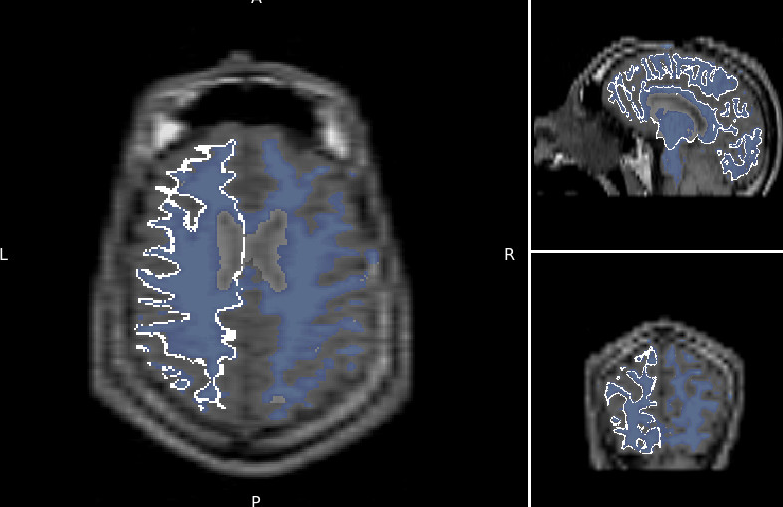
The surface is created using the template from T1.mgz,, -mkmask works for me. However the orientation is wrong (and thus the registration). I wonder which file contains the correct registration (to give it as input to volreg. I tried using fstal 1 (this sets the template to mni305.cor.subfov1res.mgz and registration from mni305.cor.subfov1res.reg: That also gave me an unregistered output.
[image: Inline image 2]
[image: Inline image 1]
I guess the only piece of the puzzle I am missing is which registration file to use, so that the final volume is registered to the T1.mgz. This file must be there, as when loading the images into tkmedit they are registered.
here is the output of the execution. The reg files comes from using --identity. I wonder which reg file can I use.
test@ubuntudev12:~/Desktop/surftovol/user_id$ mri_surf2vol --mkmask --surf white --hemi lh --o out.nii.gz --template mri/T1.mgz --sd /home/test/Desktop/surftovol/ --subject user_id --identity user_id gdiagno = -1 Using identity matrix for registration Overriding reg subject user_id with user_id Qa2v: SurfXYZ to VolCRS: ------------------------------ -1.000 0.000 0.000 128.000; 0.000 0.000 -1.000 128.000; 0.000 1.000 0.000 128.000; 0.000 0.000 0.000 1.000; -------------------------------------------------- subjects dir /home/test/Desktop/surftovol/ hemi lh mksurfmask 1 projfrac 0 outvol path out.nii.gz template path mri/T1.mgz ------- Anat2Vol Registration (TkReg)---- 1.000 0.000 0.000 0.000; 0.000 1.000 0.000 0.000; 0.000 0.000 1.000 0.000; 0.000 0.000 0.000 1.000; ----------------------------------------- height = 256 width = 256 depth = 256 xsize = 1.000000 ysize = 1.000000 zsize = 1.000000 cdc = -1.000000 0.000000 0.000000 rdc = 0.000000 0.000000 -1.000000 sdc = 0.000000 1.000000 -0.000000 xyz0 = -8.411377 8.796127 -0.092697 Gdiag_no -1 Reading surface /home/test/Desktop/surftovol//user_id/surf/lh.white Done reading source surface surf nframes = 1 INFO: mapping vertices to closest voxel INFO: resampling surface to volume INFO: sampled 61045 voxels in the volume INFO: writing output volume to out.nii.gz done test@ubuntudev12:~/Desktop/surftovol/user_id$ mri_surf2vol --mkmask --surf white --hemi lh --o out.nii.gz --template mri/T1.mgz --sd /home/test/Desktop/surftovol/ --subject user_id --identity user_id
On Tue, May 16, 2017 at 11:08 AM, Douglas Greve greve@nmr.mgh.harvard.edu wrote:
If you run it with --help, it will print out examples. Did you try
that?


On 5/16/17 9:26 AM, Bruce Fischl wrote:
Hi gAbE

you could try using mris_fill, or even mris_compute_volume_fractions

cheers
Bruce
On Mon, 15 May 2017, Gamaliz wrote:
My idea is to convert the registered white surface into a volume, so it can be shown in a volume viewer (not a surface viewer). I need to display a DTI image and mark the edges of the white matter as a line on top if it. This is not the exact command, I am not sitting in front of my station, but it goes something like it. I tried many combinations, the general error was related to the template files not on the correct format (it could have been they couldn't be found to be opened too, the error seemed generic). mri_surf2vol --surfval white --hemi lh --outvol test.mgz --template T1.mgz --volreg T1.mgz --sd /home/user/Desktop/sf/sub1 I am at a loss for the --volreg flag. The sd seems to indicate the directory of freesurfer (but then how is the co mmand aware of the specficic subject I am trying to process? I tried using: --identity subject no luck. 'sub1' us my subject, located not in the default freesurfer directory. There are no examples or a lot of help using it https://surfer.nmr.mgh.harvard.edu/fswiki/mri_surf2vol
If this is not enough I can get back to you with the specific error tomorrow . On Mon, May 15, 2017 at 10:02 PM, Douglas Greve
greve@nmr.mgh.harvard.edu greve@nmr.mgh.harvard.edu
wrote:
  what was your mri_surf2vol cmd line? And what was the terminal
  output?


  On 5/15/17 9:59 PM, Gamaliz wrote:
  I looked at the ribbon.mgz, but it is a pial surface, not
  really delineated white matter the way I need it. There is
  a command called mri_sur2vol, I have tried to use it, but
  unsuccessfully, no idea if that is the solution to my
  problem.
On Mon, May 15, 2017 at 9:57 PM, Douglas Greve greve@nmr.mgh.harvard.edu greve@nmr.mgh.harvard.edu wrote:
  not sure what you mean. Have you looked at the
  ribbon.mgz file?


  On 5/15/17 5:20 PM, Gamaliz wrote:
  I need to create an image which overlaps the
  T1/mgz and the outer surface of the white
  matter. How do I convert the surface into a
  mgz volume?
-- gAbE
Freesurfer mailing list Freesurfer@nmr.mgh.harvard.edu https://mail.nmr.mgh.harvard.edu/mailman/listinfo/freesurfer
_______________________________________________ Freesurfer mailing list Freesurfer@nmr.mgh.harvard.edu https://mail.nmr.mgh.harvard.edu/mailman/listinfo/freesurfer The information in this e-mail is intended only for the person to whom it is addressed. If you believe this e-mail was sent to you in error and the e-mail contains patient information, please contact the Partners Compliance HelpLine at http://www.partners.org/complianceline . If the e-mail was sent to you in error but does not contain patient information, please contact the sender and properly dispose of the e-mail.
-- gAbE
Freesurfer mailing list Freesurfer@nmr.mgh.harvard.edu https://mail.nmr.mgh.harvard.edu/mailman/listinfo/freesurfer
Freesurfer mailing list Freesurfer@nmr.mgh.harvard.edu https://mail.nmr.mgh.harvard.edu/mailman/listinfo/freesurfer
The information in this e-mail is intended only for the person to whom it is addressed. If you believe this e-mail was sent to you in error and the e-mail contains patient information, please contact the Partners Compliance HelpLine at http://www.partners.org/complianceline . If the e-mail was sent to you in error but does not contain patient information, please contact the sender and properly dispose of the e-mail.
-- gAbE
Freesurfer mailing listFreesurfer@nmr.mgh.harvard.eduhttps://mail.nmr.mgh.harvard.edu/mailman/listinfo/freesurfer
Freesurfer mailing list Freesurfer@nmr.mgh.harvard.edu https://mail.nmr.mgh.harvard.edu/mailman/listinfo/freesurfer
The information in this e-mail is intended only for the person to whom it is addressed. If you believe this e-mail was sent to you in error and the e-mail contains patient information, please contact the Partners Compliance HelpLine at http://www.partners.org/complianceline . If the e-mail was sent to you in error but does not contain patient information, please contact the sender and properly dispose of the e-mail.
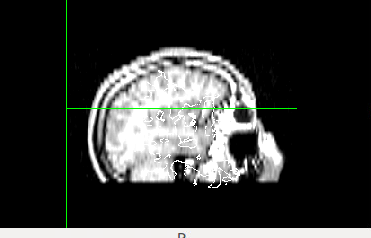
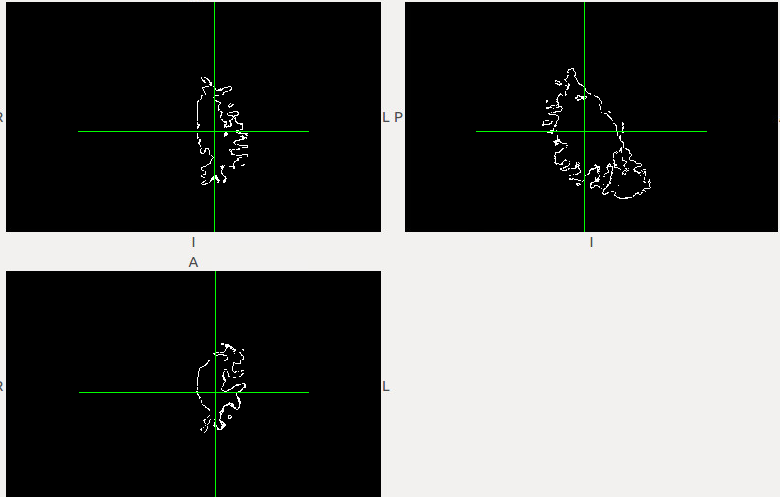
Try visualizing it in freeview instead of fslview.


On 5/16/17 12:11 PM, Gamaliz wrote:
Bruce, I tried mris_fill, but it gives me a filled white matter volume (I already have that in the mri directory. I need the contour only.
Douglas, Looking into the --help gave me a few ideas. I think the help page (https://surfer.nmr.mgh.harvard.edu/fswiki/mri_surf2vol https://surfer.nmr.mgh.harvard.edu/fswiki/mri_surf2vol ) should include this information.
I was able to create the volume by adding --identity, --template, and --mkmask.
The required surfval and volreg, are taken from the -mkmask and identity respectively.
The surface is created using the template from T1.mgz,, -mkmask works for me. However the orientation is wrong (and thus the registration). I wonder which file contains the correct registration (to give it as input to volreg. I tried using fstal 1 (this sets the template to mni305.cor.subfov1res.mgz and registration from mni305.cor.subfov1res.reg: That also gave me an unregistered output.
Inline image 2
Inline image 1
I guess the only piece of the puzzle I am missing is which registration file to use, so that the final volume is registered to the T1.mgz. This file must be there, as when loading the images into tkmedit they are registered.
here is the output of the execution. The reg files comes from using --identity. I wonder which reg file can I use.
test@ubuntudev12:~/Desktop/surftovol/user_id$ mri_surf2vol --mkmask --surf white --hemi lh --o out.nii.gz --template mri/T1.mgz --sd /home/test/Desktop/surftovol/ --subject user_id --identity user_id gdiagno = -1 Using identity matrix for registration Overriding reg subject user_id with user_id Qa2v: SurfXYZ to VolCRS: ------------------------------ -1.000 0.000 0.000 128.000; 0.000 0.000 -1.000 128.000; 0.000 1.000 0.000 128.000; 0.000 0.000 0.000 1.000;
subjects dir /home/test/Desktop/surftovol/ hemi lh mksurfmask 1 projfrac 0 outvol path out.nii.gz template path mri/T1.mgz ------- Anat2Vol Registration (TkReg)---- 1.000 0.000 0.000 0.000; 0.000 1.000 0.000 0.000; 0.000 0.000 1.000 0.000; 0.000 0.000 0.000 1.000;
height = 256 width = 256 depth = 256 xsize = 1.000000 ysize = 1.000000 zsize = 1.000000 cdc = -1.000000 0.000000 0.000000 rdc = 0.000000 0.000000 -1.000000 sdc = 0.000000 1.000000 -0.000000 xyz0 = -8.411377 8.796127 -0.092697 Gdiag_no -1 Reading surface /home/test/Desktop/surftovol//user_id/surf/lh.white Done reading source surface surf nframes = 1 INFO: mapping vertices to closest voxel INFO: resampling surface to volume INFO: sampled 61045 voxels in the volume INFO: writing output volume to out.nii.gz done test@ubuntudev12:~/Desktop/surftovol/user_id$ mri_surf2vol --mkmask --surf white --hemi lh --o out.nii.gz --template mri/T1.mgz --sd /home/test/Desktop/surftovol/ --subject user_id --identity user_id
On Tue, May 16, 2017 at 11:08 AM, Douglas Greve <greve@nmr.mgh.harvard.edu mailto:greve@nmr.mgh.harvard.edu> wrote:
If you run it with --help, it will print out examples. Did you try that? On 5/16/17 9:26 AM, Bruce Fischl wrote:Hi gAbE you could try using mris_fill, or even mris_compute_volume_fractions cheers Bruce On Mon, 15 May 2017, Gamaliz wrote:My idea is to convert the registered white surface into a volume, so it can be shown in a volume viewer (not a surface viewer). I need to display a DTI image and mark the edges of the white matter as a line on top if it. This is not the exact command, I am not sitting in front of my station, but it goes something like it. I tried many combinations, the general error was related to the template files not on the correct format (it could have been they couldn't be found to be opened too, the error seemed generic). mri_surf2vol --surfval white --hemi lh --outvol test.mgz --template T1.mgz --volreg T1.mgz --sd /home/user/Desktop/sf/sub1 I am at a loss for the --volreg flag. The sd seems to indicate the directory of freesurfer (but then how is the co mmand aware of the specficic subject I am trying to process? I tried using: --identity subject no luck. 'sub1' us my subject, located not in the default freesurfer directory. There are no examples or a lot of help using it https://surfer.nmr.mgh.harvard.edu/fswiki/mri_surf2vol <https://surfer.nmr.mgh.harvard.edu/fswiki/mri_surf2vol> If this is not enough I can get back to you with the specific error tomorrow . On Mon, May 15, 2017 at 10:02 PM, Douglas Greve<greve@nmr.mgh.harvard.edu> <mailto:greve@nmr.mgh.harvard.edu>wrote: what was your mri_surf2vol cmd line? And what was the terminal output? On 5/15/17 9:59 PM, Gamaliz wrote: I looked at the ribbon.mgz, but it is a pial surface, not really delineated white matter the way I need it. There is a command called mri_sur2vol, I have tried to use it, but unsuccessfully, no idea if that is the solution to my problem. On Mon, May 15, 2017 at 9:57 PM, Douglas Greve <greve@nmr.mgh.harvard.edu> <mailto:greve@nmr.mgh.harvard.edu> wrote: not sure what you mean. Have you looked at the ribbon.mgz file? On 5/15/17 5:20 PM, Gamaliz wrote: I need to create an image which overlaps the T1/mgz and the outer surface of the white matter. How do I convert the surface into a mgz volume? -- gAbE _______________________________________________ Freesurfer mailing list Freesurfer@nmr.mgh.harvard.edu <mailto:Freesurfer@nmr.mgh.harvard.edu> https://mail.nmr.mgh.harvard.edu/mailman/listinfo/freesurfer <https://mail.nmr.mgh.harvard.edu/mailman/listinfo/freesurfer> _______________________________________________ Freesurfer mailing list Freesurfer@nmr.mgh.harvard.edu <mailto:Freesurfer@nmr.mgh.harvard.edu> https://mail.nmr.mgh.harvard.edu/mailman/listinfo/freesurfer <https://mail.nmr.mgh.harvard.edu/mailman/listinfo/freesurfer> The information in this e-mail is intended only for the person to whom it is addressed. If you believe this e-mail was sent to you in error and the e-mail contains patient information, please contact the Partners Compliance HelpLine at http://www.partners.org/complianceline <http://www.partners.org/complianceline> . If the e-mail was sent to you in error but does not contain patient information, please contact the sender and properly dispose of the e-mail. -- gAbE _______________________________________________ Freesurfer mailing list Freesurfer@nmr.mgh.harvard.edu <mailto:Freesurfer@nmr.mgh.harvard.edu> https://mail.nmr.mgh.harvard.edu/mailman/listinfo/freesurfer <https://mail.nmr.mgh.harvard.edu/mailman/listinfo/freesurfer> _______________________________________________ Freesurfer mailing list Freesurfer@nmr.mgh.harvard.edu <mailto:Freesurfer@nmr.mgh.harvard.edu> https://mail.nmr.mgh.harvard.edu/mailman/listinfo/freesurfer <https://mail.nmr.mgh.harvard.edu/mailman/listinfo/freesurfer> The information in this e-mail is intended only for the person to whom it is addressed. If you believe this e-mail was sent to you in error and the e-mail contains patient information, please contact the Partners Compliance HelpLine at http://www.partners.org/complianceline <http://www.partners.org/complianceline> . If the e-mail was sent to you in error but does not contain patient information, please contact the sender and properly dispose of the e-mail. -- gAbE_______________________________________________ Freesurfer mailing list Freesurfer@nmr.mgh.harvard.edu <mailto:Freesurfer@nmr.mgh.harvard.edu> https://mail.nmr.mgh.harvard.edu/mailman/listinfo/freesurfer <https://mail.nmr.mgh.harvard.edu/mailman/listinfo/freesurfer>_______________________________________________ Freesurfer mailing list Freesurfer@nmr.mgh.harvard.edu <mailto:Freesurfer@nmr.mgh.harvard.edu> https://mail.nmr.mgh.harvard.edu/mailman/listinfo/freesurfer <https://mail.nmr.mgh.harvard.edu/mailman/listinfo/freesurfer> The information in this e-mail is intended only for the person to whom it is addressed. If you believe this e-mail was sent to you in error and the e-mail contains patient information, please contact the Partners Compliance HelpLine at http://www.partners.org/complianceline <http://www.partners.org/complianceline> . If the e-mail was sent to you in error but does not contain patient information, please contact the sender and properly dispose of the e-mail.-- gAbE
Freesurfer mailing list Freesurfer@nmr.mgh.harvard.edu https://mail.nmr.mgh.harvard.edu/mailman/listinfo/freesurfer
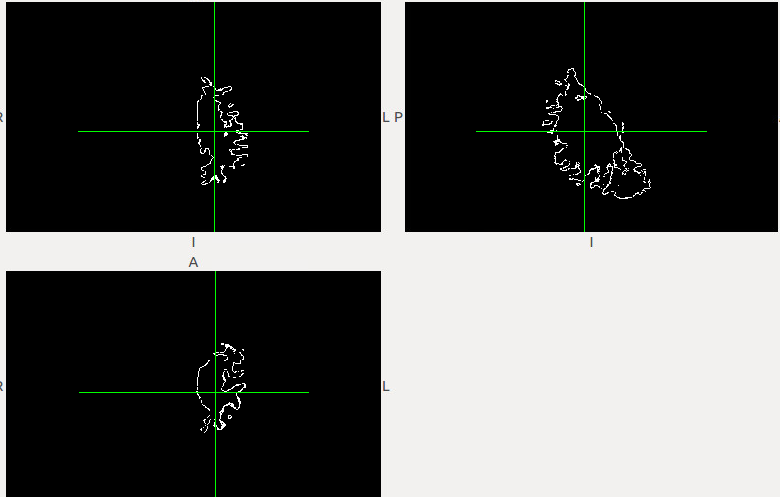
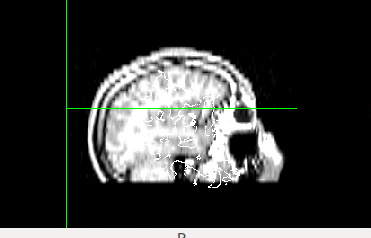
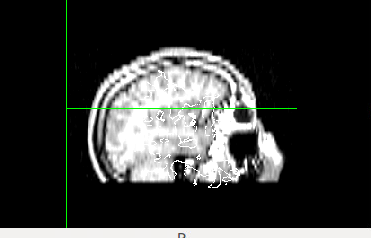
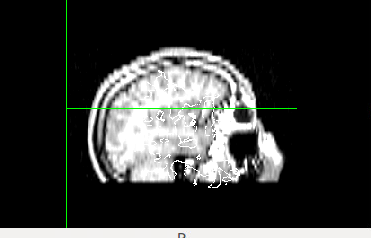
That did it. It also shows properly on my viewer. Where is that registration file that is called by using "--identity" ?
I would like to use this without having to decompress the whole of the freesurfer folder (just give the path to the command line)
Thanks for your help
Gabriel
[image: Inline image 1]
On Tue, May 16, 2017 at 12:24 PM, Douglas Greve greve@nmr.mgh.harvard.edu wrote:
Try visualizing it in freeview instead of fslview.
On 5/16/17 12:11 PM, Gamaliz wrote:
Bruce, I tried mris_fill, but it gives me a filled white matter volume (I already have that in the mri directory. I need the contour only.
Douglas, Looking into the --help gave me a few ideas. I think the help page (https://surfer.nmr.mgh.harvard.edu/fswiki/mri_surf2vol ) should include this information.
I was able to create the volume by adding --identity, --template, and --mkmask.
The required surfval and volreg, are taken from the -mkmask and identity respectively.
The surface is created using the template from T1.mgz,, -mkmask works for me. However the orientation is wrong (and thus the registration). I wonder which file contains the correct registration (to give it as input to volreg. I tried using fstal 1 (this sets the template to mni305.cor.subfov1res.mgz and registration from mni305.cor.subfov1res.reg: That also gave me an unregistered output.
[image: Inline image 2]
[image: Inline image 1]
I guess the only piece of the puzzle I am missing is which registration file to use, so that the final volume is registered to the T1.mgz. This file must be there, as when loading the images into tkmedit they are registered.
here is the output of the execution. The reg files comes from using --identity. I wonder which reg file can I use.
test@ubuntudev12:~/Desktop/surftovol/user_id$ mri_surf2vol --mkmask --surf white --hemi lh --o out.nii.gz --template mri/T1.mgz --sd /home/test/Desktop/surftovol/ --subject user_id --identity user_id gdiagno = -1 Using identity matrix for registration Overriding reg subject user_id with user_id Qa2v: SurfXYZ to VolCRS: ------------------------------ -1.000 0.000 0.000 128.000; 0.000 0.000 -1.000 128.000; 0.000 1.000 0.000 128.000; 0.000 0.000 0.000 1.000;
subjects dir /home/test/Desktop/surftovol/ hemi lh mksurfmask 1 projfrac 0 outvol path out.nii.gz template path mri/T1.mgz ------- Anat2Vol Registration (TkReg)---- 1.000 0.000 0.000 0.000; 0.000 1.000 0.000 0.000; 0.000 0.000 1.000 0.000; 0.000 0.000 0.000 1.000;
height = 256 width = 256 depth = 256 xsize = 1.000000 ysize = 1.000000 zsize = 1.000000 cdc = -1.000000 0.000000 0.000000 rdc = 0.000000 0.000000 -1.000000 sdc = 0.000000 1.000000 -0.000000 xyz0 = -8.411377 8.796127 -0.092697 Gdiag_no -1 Reading surface /home/test/Desktop/surftovol//user_id/surf/lh.white Done reading source surface surf nframes = 1 INFO: mapping vertices to closest voxel INFO: resampling surface to volume INFO: sampled 61045 voxels in the volume INFO: writing output volume to out.nii.gz done test@ubuntudev12:~/Desktop/surftovol/user_id$ mri_surf2vol --mkmask --surf white --hemi lh --o out.nii.gz --template mri/T1.mgz --sd /home/test/Desktop/surftovol/ --subject user_id --identity user_id
On Tue, May 16, 2017 at 11:08 AM, Douglas Greve <greve@nmr.mgh.harvard.edu
wrote:
If you run it with --help, it will print out examples. Did you try that?
On 5/16/17 9:26 AM, Bruce Fischl wrote:
    Hi gAbE

    you could try using mris_fill, or even
    mris_compute_volume_fractions

    cheers
    Bruce
    On Mon, 15 May 2017, Gamaliz wrote:
My idea is to convert the registered white surface into a volume, so it can be shown in a volume viewer (not a surface viewer). I need to display a DTI image and mark the edges of the white matter as a line on top if it. This is not the exact command, I am not sitting in front of my station, but it goes something like it. I tried many combinations, the general error was related to the template files not on the correct format (it could have been they couldn't be found to be opened too, the error seemed generic). mri_surf2vol --surfval white --hemi lh --outvol test.mgz --template T1.mgz --volreg T1.mgz --sd /home/user/Desktop/sf/sub1 I am at a loss for the --volreg flag. The sd seems to indicate the directory of freesurfer (but then how is the co mmand aware of the specficic subject I am trying to process? I tried using: --identity subject no luck. 'sub1' us my subject, located not in the default freesurfer directory. There are no examples or a lot of help using it https://surfer.nmr.mgh.harvard.edu/fswiki/mri_surf2vol
If this is not enough I can get back to you with the specific error tomorrow . On Mon, May 15, 2017 at 10:02 PM, Douglas Greve
greve@nmr.mgh.harvard.edu greve@nmr.mgh.harvard.edu
wrote:
  what was your mri_surf2vol cmd line? And what was the terminal
  output?


  On 5/15/17 9:59 PM, Gamaliz wrote:
  I looked at the ribbon.mgz, but it is a pial surface, not
  really delineated white matter the way I need it. There is
  a command called mri_sur2vol, I have tried to use it, but
  unsuccessfully, no idea if that is the solution to my
  problem.
On Mon, May 15, 2017 at 9:57 PM, Douglas Greve greve@nmr.mgh.harvard.edu greve@nmr.mgh.harvard.edu wrote:
  not sure what you mean. Have you looked at the
  ribbon.mgz file?


  On 5/15/17 5:20 PM, Gamaliz wrote:
  I need to create an image which overlaps the
  T1/mgz and the outer surface of the white
  matter. How do I convert the surface into a
  mgz volume?
-- gAbE
Freesurfer mailing list Freesurfer@nmr.mgh.harvard.edu https://mail.nmr.mgh.harvard.edu/mailman/listinfo/freesurfer
_______________________________________________ Freesurfer mailing list Freesurfer@nmr.mgh.harvard.edu https://mail.nmr.mgh.harvard.edu/mailman/listinfo/freesurfer The information in this e-mail is intended only for the person to whom it is addressed. If you believe this e-mail was sent to you in error and the e-mail contains patient information, please contact the Partners Compliance HelpLine at http://www.partners.org/complianceline . If the e-mail was sent to you in error but does not contain patient information, please contact the sender and properly dispose of the e-mail.
-- gAbE
Freesurfer mailing list Freesurfer@nmr.mgh.harvard.edu https://mail.nmr.mgh.harvard.edu/mailman/listinfo/freesurfer
Freesurfer mailing list Freesurfer@nmr.mgh.harvard.edu https://mail.nmr.mgh.harvard.edu/mailman/listinfo/freesurfer
The information in this e-mail is intended only for the person to whom it is addressed. If you believe this e-mail was sent to you in error and the e-mail contains patient information, please contact the Partners Compliance HelpLine at http://www.partners.org/complianceline . If the e-mail was sent to you in error but does not contain patient information, please contact the sender and properly dispose of the e-mail.
-- gAbE
Freesurfer mailing listFreesurfer@nmr.mgh.harvard.eduhttps://mail.nmr.mgh.harvard.edu/mailman/listinfo/freesurfer
_______________________________________________ Freesurfer mailing list Freesurfer@nmr.mgh.harvard.edu https://mail.nmr.mgh.harvard.e du/mailman/listinfo/freesurfer The information in this e-mail is intended only for the person to whom it is addressed. If you believe this e-mail was sent to you in error and the e-mail contains patient information, please contact the Partners Compliance HelpLine at http://www.partners.org/complianceline . If the e-mail was sent to you in error but does not contain patient information, please contact the sender and properly dispose of the e-mail.
-- gAbE
Freesurfer mailing listFreesurfer@nmr.mgh.harvard.eduhttps://mail.nmr.mgh.harvard.edu/mailman/listinfo/freesurfer
Freesurfer mailing list Freesurfer@nmr.mgh.harvard.edu https://mail.nmr.mgh.harvard.edu/mailman/listinfo/freesurfer
The information in this e-mail is intended only for the person to whom it is addressed. If you believe this e-mail was sent to you in error and the e-mail contains patient information, please contact the Partners Compliance HelpLine at http://www.partners.org/complianceline . If the e-mail was sent to you in error but does not contain patient information, please contact the sender and properly dispose of the e-mail.
It computes the registration file internally (but you can create
one that is the identity matrix).


On 5/16/17 12:31 PM, Gamaliz wrote:
That did it. It also shows properly on my viewer. Where is that registration file that is called by using "--identity" ?
I would like to use this without having to decompress the whole of the freesurfer folder (just give the path to the command line)
Thanks for your help
Gabriel
Inline image 1
On Tue, May 16, 2017 at 12:24 PM, Douglas Greve <greve@nmr.mgh.harvard.edu mailto:greve@nmr.mgh.harvard.edu> wrote:
Try visualizing it in freeview instead of fslview. On 5/16/17 12:11 PM, Gamaliz wrote:Bruce, I tried mris_fill, but it gives me a filled white matter volume (I already have that in the mri directory. I need the contour only. Douglas, Looking into the --help gave me a few ideas. I think the help page (https://surfer.nmr.mgh.harvard.edu/fswiki/mri_surf2vol <https://surfer.nmr.mgh.harvard.edu/fswiki/mri_surf2vol> ) should include this information. I was able to create the volume by adding --identity, --template, and --mkmask. The required surfval and volreg, are taken from the -mkmask and identity respectively. The surface is created using the template from T1.mgz,, -mkmask works for me. However the orientation is wrong (and thus the registration). I wonder which file contains the correct registration (to give it as input to volreg. I tried using fstal 1 (this sets the template to mni305.cor.subfov1res.mgz and registration from mni305.cor.subfov1res.reg: That also gave me an unregistered output. Inline image 2 Inline image 1 I guess the only piece of the puzzle I am missing is which registration file to use, so that the final volume is registered to the T1.mgz. This file must be there, as when loading the images into tkmedit they are registered. here is the output of the execution. The reg files comes from using --identity. I wonder which reg file can I use. test@ubuntudev12:~/Desktop/surftovol/user_id$ mri_surf2vol --mkmask --surf white --hemi lh --o out.nii.gz --template mri/T1.mgz --sd /home/test/Desktop/surftovol/ --subject user_id --identity user_id gdiagno = -1 Using identity matrix for registration Overriding reg subject user_id with user_id Qa2v: SurfXYZ to VolCRS: ------------------------------ -1.000 0.000 0.000 128.000; 0.000 0.000 -1.000 128.000; 0.000 1.000 0.000 128.000; 0.000 0.000 0.000 1.000; -------------------------------------------------- subjects dir /home/test/Desktop/surftovol/ hemi lh mksurfmask 1 projfrac 0 outvol path out.nii.gz template path mri/T1.mgz ------- Anat2Vol Registration (TkReg)---- 1.000 0.000 0.000 0.000; 0.000 1.000 0.000 0.000; 0.000 0.000 1.000 0.000; 0.000 0.000 0.000 1.000; ----------------------------------------- height = 256 width = 256 depth = 256 xsize = 1.000000 ysize = 1.000000 zsize = 1.000000 cdc = -1.000000 0.000000 0.000000 rdc = 0.000000 0.000000 -1.000000 sdc = 0.000000 1.000000 -0.000000 xyz0 = -8.411377 8.796127 -0.092697 Gdiag_no -1 Reading surface /home/test/Desktop/surftovol//user_id/surf/lh.white Done reading source surface surf nframes = 1 INFO: mapping vertices to closest voxel INFO: resampling surface to volume INFO: sampled 61045 voxels in the volume INFO: writing output volume to out.nii.gz done test@ubuntudev12:~/Desktop/surftovol/user_id$ mri_surf2vol --mkmask --surf white --hemi lh --o out.nii.gz --template mri/T1.mgz --sd /home/test/Desktop/surftovol/ --subject user_id --identity user_id On Tue, May 16, 2017 at 11:08 AM, Douglas Greve <greve@nmr.mgh.harvard.edu <mailto:greve@nmr.mgh.harvard.edu>> wrote: If you run it with --help, it will print out examples. Did you try that? On 5/16/17 9:26 AM, Bruce Fischl wrote:Hi gAbE you could try using mris_fill, or even mris_compute_volume_fractions cheers Bruce On Mon, 15 May 2017, Gamaliz wrote:My idea is to convert the registered white surface into a volume, so it can be shown in a volume viewer (not a surface viewer). I need to display a DTI image and mark the edges of the white matter as a line on top if it. This is not the exact command, I am not sitting in front of my station, but it goes something like it. I tried many combinations, the general error was related to the template files not on the correct format (it could have been they couldn't be found to be opened too, the error seemed generic). mri_surf2vol --surfval white --hemi lh --outvol test.mgz --template T1.mgz --volreg T1.mgz --sd /home/user/Desktop/sf/sub1 I am at a loss for the --volreg flag. The sd seems to indicate the directory of freesurfer (but then how is the co mmand aware of the specficic subject I am trying to process? I tried using: --identity subject no luck. 'sub1' us my subject, located not in the default freesurfer directory. There are no examples or a lot of help using it https://surfer.nmr.mgh.harvard.edu/fswiki/mri_surf2vol <https://surfer.nmr.mgh.harvard.edu/fswiki/mri_surf2vol> If this is not enough I can get back to you with the specific error tomorrow . On Mon, May 15, 2017 at 10:02 PM, Douglas Greve<greve@nmr.mgh.harvard.edu> <mailto:greve@nmr.mgh.harvard.edu>wrote: what was your mri_surf2vol cmd line? And what was the terminal output? On 5/15/17 9:59 PM, Gamaliz wrote: I looked at the ribbon.mgz, but it is a pial surface, not really delineated white matter the way I need it. There is a command called mri_sur2vol, I have tried to use it, but unsuccessfully, no idea if that is the solution to my problem. On Mon, May 15, 2017 at 9:57 PM, Douglas Greve <greve@nmr.mgh.harvard.edu> <mailto:greve@nmr.mgh.harvard.edu> wrote: not sure what you mean. Have you looked at the ribbon.mgz file? On 5/15/17 5:20 PM, Gamaliz wrote: I need to create an image which overlaps the T1/mgz and the outer surface of the white matter. How do I convert the surface into a mgz volume? -- gAbE _______________________________________________ Freesurfer mailing list Freesurfer@nmr.mgh.harvard.edu <mailto:Freesurfer@nmr.mgh.harvard.edu> https://mail.nmr.mgh.harvard.edu/mailman/listinfo/freesurfer <https://mail.nmr.mgh.harvard.edu/mailman/listinfo/freesurfer> _______________________________________________ Freesurfer mailing list Freesurfer@nmr.mgh.harvard.edu <mailto:Freesurfer@nmr.mgh.harvard.edu> https://mail.nmr.mgh.harvard.edu/mailman/listinfo/freesurfer <https://mail.nmr.mgh.harvard.edu/mailman/listinfo/freesurfer> The information in this e-mail is intended only for the person to whom it is addressed. If you believe this e-mail was sent to you in error and the e-mail contains patient information, please contact the Partners Compliance HelpLine at http://www.partners.org/complianceline <http://www.partners.org/complianceline> . If the e-mail was sent to you in error but does not contain patient information, please contact the sender and properly dispose of the e-mail. -- gAbE _______________________________________________ Freesurfer mailing list Freesurfer@nmr.mgh.harvard.edu <mailto:Freesurfer@nmr.mgh.harvard.edu> https://mail.nmr.mgh.harvard.edu/mailman/listinfo/freesurfer <https://mail.nmr.mgh.harvard.edu/mailman/listinfo/freesurfer> _______________________________________________ Freesurfer mailing list Freesurfer@nmr.mgh.harvard.edu <mailto:Freesurfer@nmr.mgh.harvard.edu> https://mail.nmr.mgh.harvard.edu/mailman/listinfo/freesurfer <https://mail.nmr.mgh.harvard.edu/mailman/listinfo/freesurfer> The information in this e-mail is intended only for the person to whom it is addressed. If you believe this e-mail was sent to you in error and the e-mail contains patient information, please contact the Partners Compliance HelpLine at http://www.partners.org/complianceline <http://www.partners.org/complianceline> . If the e-mail was sent to you in error but does not contain patient information, please contact the sender and properly dispose of the e-mail. -- gAbE_______________________________________________ Freesurfer mailing list Freesurfer@nmr.mgh.harvard.edu <mailto:Freesurfer@nmr.mgh.harvard.edu> https://mail.nmr.mgh.harvard.edu/mailman/listinfo/freesurfer <https://mail.nmr.mgh.harvard.edu/mailman/listinfo/freesurfer>_______________________________________________ Freesurfer mailing list Freesurfer@nmr.mgh.harvard.edu <mailto:Freesurfer@nmr.mgh.harvard.edu> https://mail.nmr.mgh.harvard.edu/mailman/listinfo/freesurfer <https://mail.nmr.mgh.harvard.edu/mailman/listinfo/freesurfer> The information in this e-mail is intended only for the person to whom it is addressed. If you believe this e-mail was sent to you in error and the e-mail contains patient information, please contact the Partners Compliance HelpLine at http://www.partners.org/complianceline <http://www.partners.org/complianceline> . If the e-mail was sent to you in error but does not contain patient information, please contact the sender and properly dispose of the e-mail. -- gAbE _______________________________________________ Freesurfer mailing list Freesurfer@nmr.mgh.harvard.edu <mailto:Freesurfer@nmr.mgh.harvard.edu> https://mail.nmr.mgh.harvard.edu/mailman/listinfo/freesurfer <https://mail.nmr.mgh.harvard.edu/mailman/listinfo/freesurfer>_______________________________________________ Freesurfer mailing list Freesurfer@nmr.mgh.harvard.edu <mailto:Freesurfer@nmr.mgh.harvard.edu> https://mail.nmr.mgh.harvard.edu/mailman/listinfo/freesurfer <https://mail.nmr.mgh.harvard.edu/mailman/listinfo/freesurfer> The information in this e-mail is intended only for the person to whom it is addressed. If you believe this e-mail was sent to you in error and the e-mail contains patient information, please contact the Partners Compliance HelpLine at http://www.partners.org/complianceline <http://www.partners.org/complianceline> . If the e-mail was sent to you in error but does not contain patient information, please contact the sender and properly dispose of the e-mail.-- gAbE
Freesurfer mailing list Freesurfer@nmr.mgh.harvard.edu https://mail.nmr.mgh.harvard.edu/mailman/listinfo/freesurfer
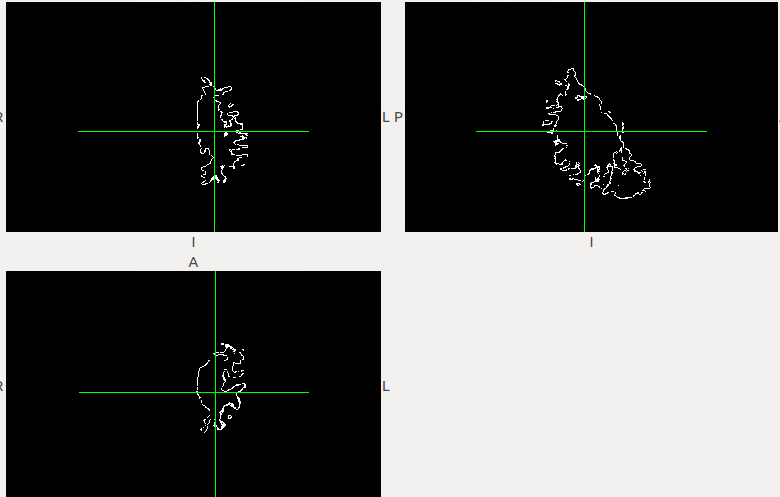
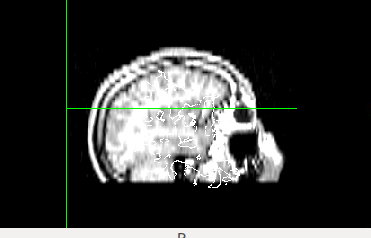
I have tried, and even if an identity matrix is given it requires the orig.mgz and other files in the computation. I also tried using the path to the surface (in stead of the subjectDir, subject_id approach, but it seems to require to access the subjects directory.
I can get it to work like that, it will just take decompressing the freesurfer directory to perform the calculation. I am trying the approach suggested by Bruce. It also looks promising. mri_morphology erode 1, subtract using mris_calc. I will have to see if the created surfaces are equivalent.
Thanks from your help.
Gabriel
On Tue, May 16, 2017 at 1:40 PM, Douglas Greve greve@nmr.mgh.harvard.edu wrote:
It computes the registration file internally (but you can create one that is the identity matrix).
On 5/16/17 12:31 PM, Gamaliz wrote:
That did it. It also shows properly on my viewer. Where is that registration file that is called by using "--identity" ?
I would like to use this without having to decompress the whole of the freesurfer folder (just give the path to the command line)
Thanks for your help
Gabriel
[image: Inline image 1]
On Tue, May 16, 2017 at 12:24 PM, Douglas Greve <greve@nmr.mgh.harvard.edu
wrote:
Try visualizing it in freeview instead of fslview.
On 5/16/17 12:11 PM, Gamaliz wrote:
Bruce, I tried mris_fill, but it gives me a filled white matter volume (I already have that in the mri directory. I need the contour only.
Douglas, Looking into the --help gave me a few ideas. I think the help page (https://surfer.nmr.mgh.harvard.edu/fswiki/mri_surf2vol ) should include this information.
I was able to create the volume by adding --identity, --template, and --mkmask.
The required surfval and volreg, are taken from the -mkmask and identity respectively.
The surface is created using the template from T1.mgz,, -mkmask works for me. However the orientation is wrong (and thus the registration). I wonder which file contains the correct registration (to give it as input to volreg. I tried using fstal 1 (this sets the template to mni305.cor.subfov1res.mgz and registration from mni305.cor.subfov1res.reg: That also gave me an unregistered output.
[image: Inline image 2]
[image: Inline image 1]
I guess the only piece of the puzzle I am missing is which registration file to use, so that the final volume is registered to the T1.mgz. This file must be there, as when loading the images into tkmedit they are registered.
here is the output of the execution. The reg files comes from using --identity. I wonder which reg file can I use.
test@ubuntudev12:~/Desktop/surftovol/user_id$ mri_surf2vol --mkmask --surf white --hemi lh --o out.nii.gz --template mri/T1.mgz --sd /home/test/Desktop/surftovol/ --subject user_id --identity user_id gdiagno = -1 Using identity matrix for registration Overriding reg subject user_id with user_id Qa2v: SurfXYZ to VolCRS: ------------------------------ -1.000 0.000 0.000 128.000; 0.000 0.000 -1.000 128.000; 0.000 1.000 0.000 128.000; 0.000 0.000 0.000 1.000;
subjects dir /home/test/Desktop/surftovol/ hemi lh mksurfmask 1 projfrac 0 outvol path out.nii.gz template path mri/T1.mgz ------- Anat2Vol Registration (TkReg)---- 1.000 0.000 0.000 0.000; 0.000 1.000 0.000 0.000; 0.000 0.000 1.000 0.000; 0.000 0.000 0.000 1.000;
height = 256 width = 256 depth = 256 xsize = 1.000000 ysize = 1.000000 zsize = 1.000000 cdc = -1.000000 0.000000 0.000000 rdc = 0.000000 0.000000 -1.000000 sdc = 0.000000 1.000000 -0.000000 xyz0 = -8.411377 8.796127 -0.092697 Gdiag_no -1 Reading surface /home/test/Desktop/surftovol//user_id/surf/lh.white Done reading source surface surf nframes = 1 INFO: mapping vertices to closest voxel INFO: resampling surface to volume INFO: sampled 61045 voxels in the volume INFO: writing output volume to out.nii.gz done test@ubuntudev12:~/Desktop/surftovol/user_id$ mri_surf2vol --mkmask --surf white --hemi lh --o out.nii.gz --template mri/T1.mgz --sd /home/test/Desktop/surftovol/ --subject user_id --identity user_id
On Tue, May 16, 2017 at 11:08 AM, Douglas Greve < greve@nmr.mgh.harvard.edu> wrote:
If you run it with --help, it will print out examples. Did you try that?
On 5/16/17 9:26 AM, Bruce Fischl wrote:
        Hi gAbE

        you could try using mris_fill, or even
        mris_compute_volume_fractions

        cheers
        Bruce
        On Mon, 15 May 2017, Gamaliz wrote:
My idea is to convert the registered white surface into a volume, so it can be shown in a volume viewer (not a surface viewer). I need to display a DTI image and mark the edges of the white matter as a line on top if it. This is not the exact command, I am not sitting in front of my station, but it goes something like it. I tried many combinations, the general error was related to the template files not on the correct format (it could have been they couldn't be found to be opened too, the error seemed generic). mri_surf2vol --surfval white --hemi lh --outvol test.mgz --template T1.mgz --volreg T1.mgz --sd /home/user/Desktop/sf/sub1 I am at a loss for the --volreg flag. The sd seems to indicate the directory of freesurfer (but then how is the co mmand aware of the specficic subject I am trying to process? I tried using: --identity subject no luck. 'sub1' us my subject, located not in the default freesurfer directory. There are no examples or a lot of help using it https://surfer.nmr.mgh.harvard.edu/fswiki/mri_surf2vol
If this is not enough I can get back to you with the specific error tomorrow . On Mon, May 15, 2017 at 10:02 PM, Douglas Greve
greve@nmr.mgh.harvard.edu greve@nmr.mgh.harvard.edu
wrote:
  what was your mri_surf2vol cmd line? And what was the terminal
  output?


  On 5/15/17 9:59 PM, Gamaliz wrote:
  I looked at the ribbon.mgz, but it is a pial surface, not
  really delineated white matter the way I need it. There is
  a command called mri_sur2vol, I have tried to use it, but
  unsuccessfully, no idea if that is the solution to my
  problem.
On Mon, May 15, 2017 at 9:57 PM, Douglas Greve greve@nmr.mgh.harvard.edu greve@nmr.mgh.harvard.edu wrote:
  not sure what you mean. Have you looked at the
  ribbon.mgz file?


  On 5/15/17 5:20 PM, Gamaliz wrote:
  I need to create an image which overlaps the
  T1/mgz and the outer surface of the white
  matter. How do I convert the surface into a
  mgz volume?
-- gAbE
Freesurfer mailing list Freesurfer@nmr.mgh.harvard.edu https://mail.nmr.mgh.harvard.edu/mailman/listinfo/freesurfer
_______________________________________________ Freesurfer mailing list Freesurfer@nmr.mgh.harvard.edu https://mail.nmr.mgh.harvard.edu/mailman/listinfo/freesurfer The information in this e-mail is intended only for the person to whom it is addressed. If you believe this e-mail was sent to you in error and the e-mail contains patient information, please contact the Partners Compliance HelpLine at http://www.partners.org/complianceline . If the e-mail was sent to you in error but does not contain patient information, please contact the sender and properly dispose of the e-mail.
-- gAbE
Freesurfer mailing list Freesurfer@nmr.mgh.harvard.edu https://mail.nmr.mgh.harvard.edu/mailman/listinfo/freesurfer
Freesurfer mailing list Freesurfer@nmr.mgh.harvard.edu https://mail.nmr.mgh.harvard.edu/mailman/listinfo/freesurfer
The information in this e-mail is intended only for the person to whom it is addressed. If you believe this e-mail was sent to you in error and the e-mail contains patient information, please contact the Partners Compliance HelpLine at http://www.partners.org/complianceline . If the e-mail was sent to you in error but does not contain patient information, please contact the sender and properly dispose of the e-mail.
-- gAbE
Freesurfer mailing listFreesurfer@nmr.mgh.harvard.eduhttps://mail.nmr.mgh.harvard.edu/mailman/listinfo/freesurfer
_______________________________________________ Freesurfer mailing list Freesurfer@nmr.mgh.harvard.edu https://mail.nmr.mgh.harvard.e du/mailman/listinfo/freesurfer The information in this e-mail is intended only for the person to whom it is addressed. If you believe this e-mail was sent to you in error and the e-mail contains patient information, please contact the Partners Compliance HelpLine at http://www.partners.org/complianceline . If the e-mail was sent to you in error but does not contain patient information, please contact the sender and properly dispose of the e-mail.
-- gAbE
Freesurfer mailing listFreesurfer@nmr.mgh.harvard.eduhttps://mail.nmr.mgh.harvard.edu/mailman/listinfo/freesurfer
_______________________________________________ Freesurfer mailing list Freesurfer@nmr.mgh.harvard.edu https://mail.nmr.mgh.harvard.e du/mailman/listinfo/freesurfer The information in this e-mail is intended only for the person to whom it is addressed. If you believe this e-mail was sent to you in error and the e-mail contains patient information, please contact the Partners Compliance HelpLine at http://www.partners.org/complianceline . If the e-mail was sent to you in error but does not contain patient information, please contact the sender and properly dispose of the e-mail.
-- gAbE
Freesurfer mailing listFreesurfer@nmr.mgh.harvard.eduhttps://mail.nmr.mgh.harvard.edu/mailman/listinfo/freesurfer
Freesurfer mailing list Freesurfer@nmr.mgh.harvard.edu https://mail.nmr.mgh.harvard.edu/mailman/listinfo/freesurfer
The information in this e-mail is intended only for the person to whom it is addressed. If you believe this e-mail was sent to you in error and the e-mail contains patient information, please contact the Partners Compliance HelpLine at http://www.partners.org/complianceline . If the e-mail was sent to you in error but does not contain patient information, please contact the sender and properly dispose of the e-mail.
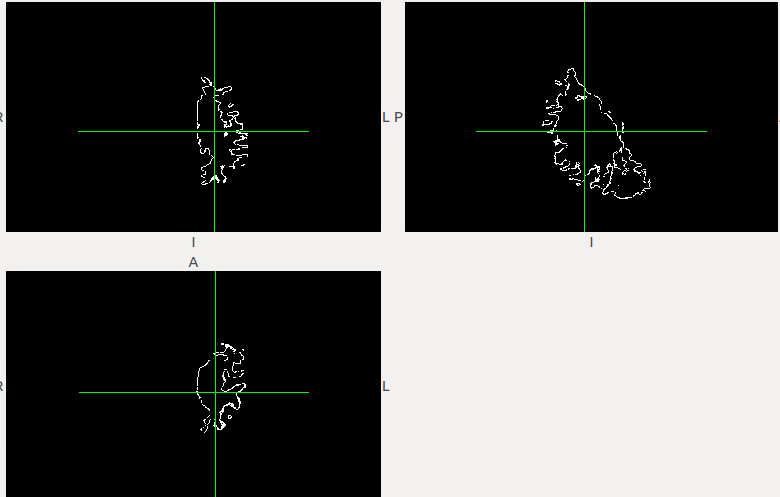
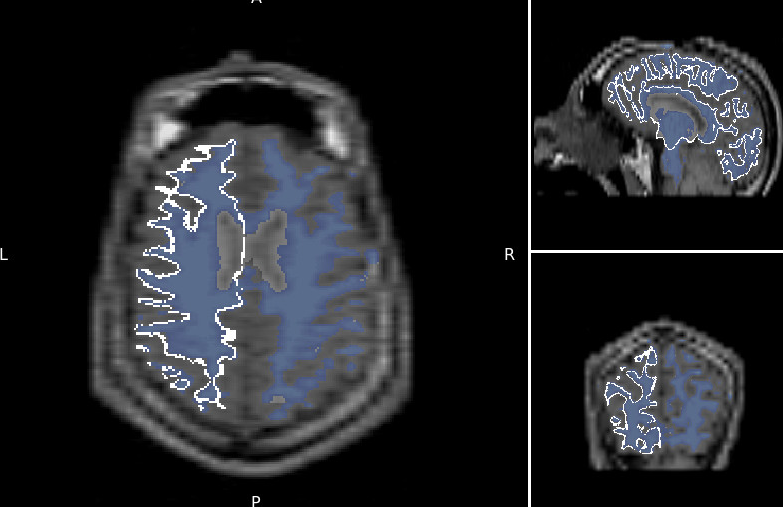
I think it may work with a generic orig.mgz file. In that case you would only need to have a single orig.mgz somewhere
On 5/16/17 1:48 PM, Gamaliz wrote:
I have tried, and even if an identity matrix is given it requires the orig.mgz and other files in the computation. I also tried using the path to the surface (in stead of the subjectDir, subject_id approach, but it seems to require to access the subjects directory.
I can get it to work like that, it will just take decompressing the freesurfer directory to perform the calculation. I am trying the approach suggested by Bruce. It also looks promising. mri_morphology erode 1, subtract using mris_calc. I will have to see if the created surfaces are equivalent.
Thanks from your help.
Gabriel
On Tue, May 16, 2017 at 1:40 PM, Douglas Greve <greve@nmr.mgh.harvard.edu mailto:greve@nmr.mgh.harvard.edu> wrote:
It computes the registration file internally (but you can create one that is the identity matrix). On 5/16/17 12:31 PM, Gamaliz wrote:That did it. It also shows properly on my viewer. Where is that registration file that is called by using "--identity" ? I would like to use this without having to decompress the whole of the freesurfer folder (just give the path to the command line) Thanks for your help Gabriel Inline image 1 On Tue, May 16, 2017 at 12:24 PM, Douglas Greve <greve@nmr.mgh.harvard.edu <mailto:greve@nmr.mgh.harvard.edu>> wrote: Try visualizing it in freeview instead of fslview. On 5/16/17 12:11 PM, Gamaliz wrote:Bruce, I tried mris_fill, but it gives me a filled white matter volume (I already have that in the mri directory. I need the contour only. Douglas, Looking into the --help gave me a few ideas. I think the help page (https://surfer.nmr.mgh.harvard.edu/fswiki/mri_surf2vol <https://surfer.nmr.mgh.harvard.edu/fswiki/mri_surf2vol> ) should include this information. I was able to create the volume by adding --identity, --template, and --mkmask. The required surfval and volreg, are taken from the -mkmask and identity respectively. The surface is created using the template from T1.mgz,, -mkmask works for me. However the orientation is wrong (and thus the registration). I wonder which file contains the correct registration (to give it as input to volreg. I tried using fstal 1 (this sets the template to mni305.cor.subfov1res.mgz and registration from mni305.cor.subfov1res.reg: That also gave me an unregistered output. Inline image 2 Inline image 1 I guess the only piece of the puzzle I am missing is which registration file to use, so that the final volume is registered to the T1.mgz. This file must be there, as when loading the images into tkmedit they are registered. here is the output of the execution. The reg files comes from using --identity. I wonder which reg file can I use. test@ubuntudev12:~/Desktop/surftovol/user_id$ mri_surf2vol --mkmask --surf white --hemi lh --o out.nii.gz --template mri/T1.mgz --sd /home/test/Desktop/surftovol/ --subject user_id --identity user_id gdiagno = -1 Using identity matrix for registration Overriding reg subject user_id with user_id Qa2v: SurfXYZ to VolCRS: ------------------------------ -1.000 0.000 0.000 128.000; 0.000 0.000 -1.000 128.000; 0.000 1.000 0.000 128.000; 0.000 0.000 0.000 1.000; -------------------------------------------------- subjects dir /home/test/Desktop/surftovol/ hemi lh mksurfmask 1 projfrac 0 outvol path out.nii.gz template path mri/T1.mgz ------- Anat2Vol Registration (TkReg)---- 1.000 0.000 0.000 0.000; 0.000 1.000 0.000 0.000; 0.000 0.000 1.000 0.000; 0.000 0.000 0.000 1.000; ----------------------------------------- height = 256 width = 256 depth = 256 xsize = 1.000000 ysize = 1.000000 zsize = 1.000000 cdc = -1.000000 0.000000 0.000000 rdc = 0.000000 0.000000 -1.000000 sdc = 0.000000 1.000000 -0.000000 xyz0 = -8.411377 8.796127 -0.092697 Gdiag_no -1 Reading surface /home/test/Desktop/surftovol//user_id/surf/lh.white Done reading source surface surf nframes = 1 INFO: mapping vertices to closest voxel INFO: resampling surface to volume INFO: sampled 61045 voxels in the volume INFO: writing output volume to out.nii.gz done test@ubuntudev12:~/Desktop/surftovol/user_id$ mri_surf2vol --mkmask --surf white --hemi lh --o out.nii.gz --template mri/T1.mgz --sd /home/test/Desktop/surftovol/ --subject user_id --identity user_id On Tue, May 16, 2017 at 11:08 AM, Douglas Greve <greve@nmr.mgh.harvard.edu <mailto:greve@nmr.mgh.harvard.edu>> wrote: If you run it with --help, it will print out examples. Did you try that? On 5/16/17 9:26 AM, Bruce Fischl wrote:Hi gAbE you could try using mris_fill, or even mris_compute_volume_fractions cheers Bruce On Mon, 15 May 2017, Gamaliz wrote:My idea is to convert the registered white surface into a volume, so it can be shown in a volume viewer (not a surface viewer). I need to display a DTI image and mark the edges of the white matter as a line on top if it. This is not the exact command, I am not sitting in front of my station, but it goes something like it. I tried many combinations, the general error was related to the template files not on the correct format (it could have been they couldn't be found to be opened too, the error seemed generic). mri_surf2vol --surfval white --hemi lh --outvol test.mgz --template T1.mgz --volreg T1.mgz --sd /home/user/Desktop/sf/sub1 I am at a loss for the --volreg flag. The sd seems to indicate the directory of freesurfer (but then how is the co mmand aware of the specficic subject I am trying to process? I tried using: --identity subject no luck. 'sub1' us my subject, located not in the default freesurfer directory. There are no examples or a lot of help using it https://surfer.nmr.mgh.harvard.edu/fswiki/mri_surf2vol <https://surfer.nmr.mgh.harvard.edu/fswiki/mri_surf2vol> If this is not enough I can get back to you with the specific error tomorrow . On Mon, May 15, 2017 at 10:02 PM, Douglas Greve<greve@nmr.mgh.harvard.edu> <mailto:greve@nmr.mgh.harvard.edu>wrote: what was your mri_surf2vol cmd line? And what was the terminal output? On 5/15/17 9:59 PM, Gamaliz wrote: I looked at the ribbon.mgz, but it is a pial surface, not really delineated white matter the way I need it. There is a command called mri_sur2vol, I have tried to use it, but unsuccessfully, no idea if that is the solution to my problem. On Mon, May 15, 2017 at 9:57 PM, Douglas Greve <greve@nmr.mgh.harvard.edu> <mailto:greve@nmr.mgh.harvard.edu> wrote: not sure what you mean. Have you looked at the ribbon.mgz file? On 5/15/17 5:20 PM, Gamaliz wrote: I need to create an image which overlaps the T1/mgz and the outer surface of the white matter. How do I convert the surface into a mgz volume? -- gAbE _______________________________________________ Freesurfer mailing list Freesurfer@nmr.mgh.harvard.edu <mailto:Freesurfer@nmr.mgh.harvard.edu> https://mail.nmr.mgh.harvard.edu/mailman/listinfo/freesurfer <https://mail.nmr.mgh.harvard.edu/mailman/listinfo/freesurfer> _______________________________________________ Freesurfer mailing list Freesurfer@nmr.mgh.harvard.edu <mailto:Freesurfer@nmr.mgh.harvard.edu> https://mail.nmr.mgh.harvard.edu/mailman/listinfo/freesurfer <https://mail.nmr.mgh.harvard.edu/mailman/listinfo/freesurfer> The information in this e-mail is intended only for the person to whom it is addressed. If you believe this e-mail was sent to you in error and the e-mail contains patient information, please contact the Partners Compliance HelpLine at http://www.partners.org/complianceline <http://www.partners.org/complianceline> . If the e-mail was sent to you in error but does not contain patient information, please contact the sender and properly dispose of the e-mail. -- gAbE _______________________________________________ Freesurfer mailing list Freesurfer@nmr.mgh.harvard.edu <mailto:Freesurfer@nmr.mgh.harvard.edu> https://mail.nmr.mgh.harvard.edu/mailman/listinfo/freesurfer <https://mail.nmr.mgh.harvard.edu/mailman/listinfo/freesurfer> _______________________________________________ Freesurfer mailing list Freesurfer@nmr.mgh.harvard.edu <mailto:Freesurfer@nmr.mgh.harvard.edu> https://mail.nmr.mgh.harvard.edu/mailman/listinfo/freesurfer <https://mail.nmr.mgh.harvard.edu/mailman/listinfo/freesurfer> The information in this e-mail is intended only for the person to whom it is addressed. If you believe this e-mail was sent to you in error and the e-mail contains patient information, please contact the Partners Compliance HelpLine at http://www.partners.org/complianceline <http://www.partners.org/complianceline> . If the e-mail was sent to you in error but does not contain patient information, please contact the sender and properly dispose of the e-mail. -- gAbE_______________________________________________ Freesurfer mailing list Freesurfer@nmr.mgh.harvard.edu <mailto:Freesurfer@nmr.mgh.harvard.edu> https://mail.nmr.mgh.harvard.edu/mailman/listinfo/freesurfer <https://mail.nmr.mgh.harvard.edu/mailman/listinfo/freesurfer>_______________________________________________ Freesurfer mailing list Freesurfer@nmr.mgh.harvard.edu <mailto:Freesurfer@nmr.mgh.harvard.edu> https://mail.nmr.mgh.harvard.edu/mailman/listinfo/freesurfer <https://mail.nmr.mgh.harvard.edu/mailman/listinfo/freesurfer> The information in this e-mail is intended only for the person to whom it is addressed. If you believe this e-mail was sent to you in error and the e-mail contains patient information, please contact the Partners Compliance HelpLine at http://www.partners.org/complianceline <http://www.partners.org/complianceline> . If the e-mail was sent to you in error but does not contain patient information, please contact the sender and properly dispose of the e-mail. -- gAbE _______________________________________________ Freesurfer mailing list Freesurfer@nmr.mgh.harvard.edu <mailto:Freesurfer@nmr.mgh.harvard.edu> https://mail.nmr.mgh.harvard.edu/mailman/listinfo/freesurfer <https://mail.nmr.mgh.harvard.edu/mailman/listinfo/freesurfer>_______________________________________________ Freesurfer mailing list Freesurfer@nmr.mgh.harvard.edu <mailto:Freesurfer@nmr.mgh.harvard.edu> https://mail.nmr.mgh.harvard.edu/mailman/listinfo/freesurfer <https://mail.nmr.mgh.harvard.edu/mailman/listinfo/freesurfer> The information in this e-mail is intended only for the person to whom it is addressed. If you believe this e-mail was sent to you in error and the e-mail contains patient information, please contact the Partners Compliance HelpLine at http://www.partners.org/complianceline <http://www.partners.org/complianceline> . If the e-mail was sent to you in error but does not contain patient information, please contact the sender and properly dispose of the e-mail. -- gAbE _______________________________________________ Freesurfer mailing list Freesurfer@nmr.mgh.harvard.edu <mailto:Freesurfer@nmr.mgh.harvard.edu> https://mail.nmr.mgh.harvard.edu/mailman/listinfo/freesurfer <https://mail.nmr.mgh.harvard.edu/mailman/listinfo/freesurfer>_______________________________________________ Freesurfer mailing list Freesurfer@nmr.mgh.harvard.edu <mailto:Freesurfer@nmr.mgh.harvard.edu> https://mail.nmr.mgh.harvard.edu/mailman/listinfo/freesurfer <https://mail.nmr.mgh.harvard.edu/mailman/listinfo/freesurfer> The information in this e-mail is intended only for the person to whom it is addressed. If you believe this e-mail was sent to you in error and the e-mail contains patient information, please contact the Partners Compliance HelpLine at http://www.partners.org/complianceline <http://www.partners.org/complianceline> . If the e-mail was sent to you in error but does not contain patient information, please contact the sender and properly dispose of the e-mail.-- gAbE
Freesurfer mailing list Freesurfer@nmr.mgh.harvard.edu https://mail.nmr.mgh.harvard.edu/mailman/listinfo/freesurfer
Douglas,
I extreacted the whole directory and ran:
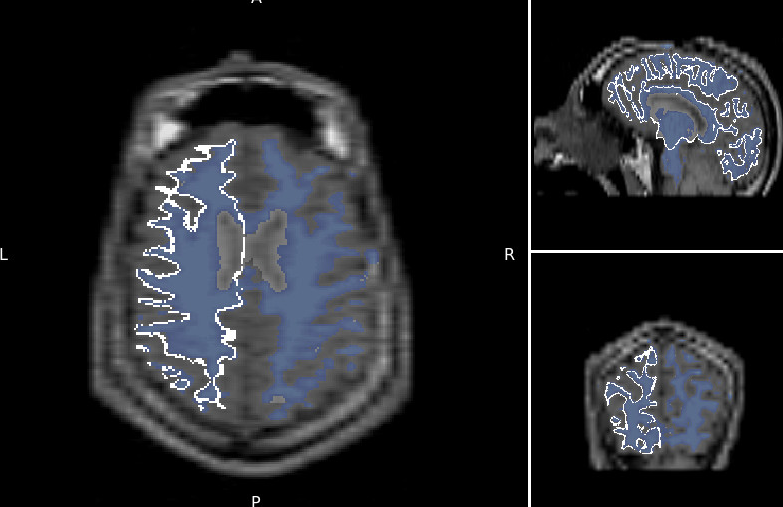
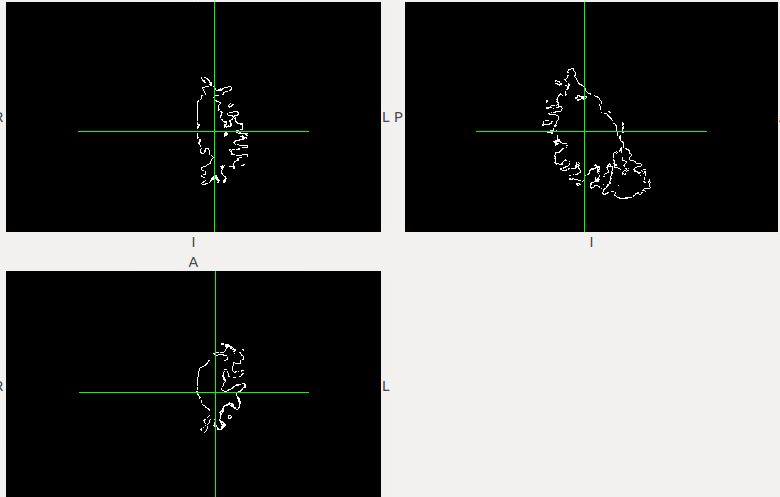
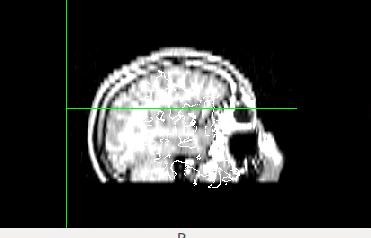
mri_surf2vol --mkmask --surf white --hemi rh --o rh.white.mgz --template ../subjects/subject/mri/T1.mgz --sd ../subjects --subject subject --identity subject gdiagno = -1 Using identity matrix for registration Overriding reg subject subject with subject Qa2v: SurfXYZ to VolCRS: ------------------------------ -1.000 0.000 0.000 128.000; 0.000 0.000 -1.000 128.000; 0.000 1.000 0.000 128.000; 0.000 0.000 0.000 1.000; -------------------------------------------------- subjects dir ../subjects hemi rh mksurfmask 1 projfrac 0 outvol path rh.white.mgz template path ../subjects/subject/mri/T1.mgz ------- Anat2Vol Registration (TkReg)---- 1.000 0.000 0.000 0.000; 0.000 1.000 0.000 0.000; 0.000 0.000 1.000 0.000; 0.000 0.000 0.000 1.000; ----------------------------------------- height = 256 width = 256 depth = 256 xsize = 1.000000 ysize = 1.000000 zsize = 1.000000 cdc = -1.000000 0.000000 0.000000 rdc = 0.000000 0.000000 -1.000000 sdc = 0.000000 1.000000 0.000000 xyz0 = 3.373505 20.515587 -6.721008 Gdiag_no -1 Reading surface ../subjects/subject/surf/rh.white Done reading source surface surf nframes = 1 INFO: mapping vertices to closest voxel INFO: resampling surface to volume INFO: sampled 84160 voxels in the volume INFO: writing output volume to rh.white.mgz done
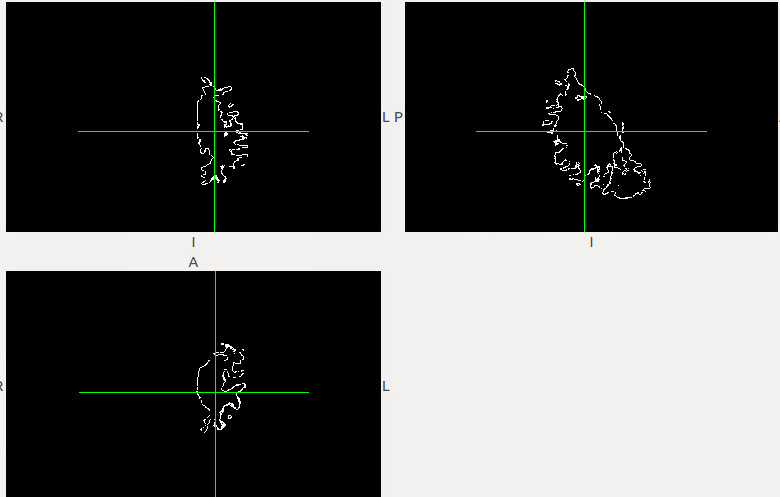
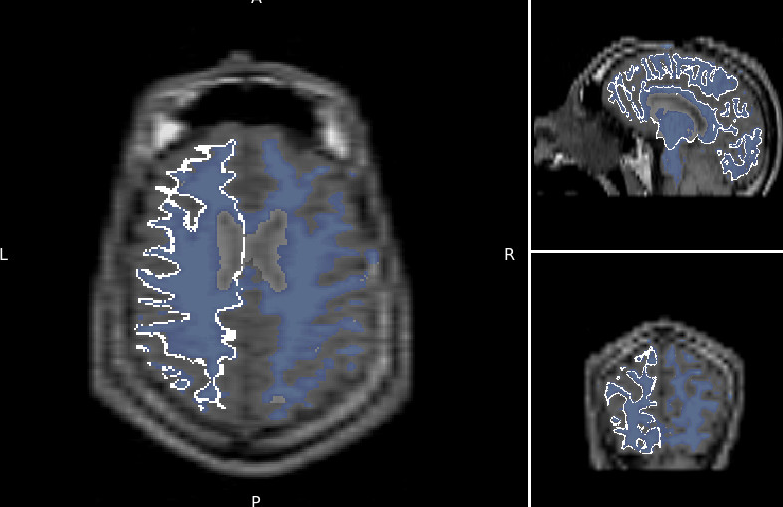
I did both hemispheres, they are not registered. I tried using as template the T1.mgz, and T1 converted to nifti. I also tried output as mgz and then mri_convert to nifti, the also output to nifti.
[image: Inline image 2]
[image: Inline image 1]
On Tue, May 16, 2017 at 1:55 PM, Douglas Greve greve@nmr.mgh.harvard.edu wrote:
I think it may work with a generic orig.mgz file. In that case you would only need to have a single orig.mgz somewhere
On 5/16/17 1:48 PM, Gamaliz wrote:
I have tried, and even if an identity matrix is given it requires the orig.mgz and other files in the computation. I also tried using the path to the surface (in stead of the subjectDir, subject_id approach, but it seems to require to access the subjects directory.
I can get it to work like that, it will just take decompressing the freesurfer directory to perform the calculation. I am trying the approach suggested by Bruce. It also looks promising. mri_morphology erode 1, subtract using mris_calc. I will have to see if the created surfaces are equivalent.
Thanks from your help.
Gabriel
On Tue, May 16, 2017 at 1:40 PM, Douglas Greve greve@nmr.mgh.harvard.edu wrote:
It computes the registration file internally (but you can create one that is the identity matrix).
On 5/16/17 12:31 PM, Gamaliz wrote:
That did it. It also shows properly on my viewer. Where is that registration file that is called by using "--identity" ?
I would like to use this without having to decompress the whole of the freesurfer folder (just give the path to the command line)
Thanks for your help
Gabriel
[image: Inline image 1]
On Tue, May 16, 2017 at 12:24 PM, Douglas Greve < greve@nmr.mgh.harvard.edu> wrote:
Try visualizing it in freeview instead of fslview.
On 5/16/17 12:11 PM, Gamaliz wrote:
Bruce, I tried mris_fill, but it gives me a filled white matter volume (I already have that in the mri directory. I need the contour only.
Douglas, Looking into the --help gave me a few ideas. I think the help page (https://surfer.nmr.mgh.harvard.edu/fswiki/mri_surf2vol ) should include this information.
I was able to create the volume by adding --identity, --template, and --mkmask.
The required surfval and volreg, are taken from the -mkmask and identity respectively.
The surface is created using the template from T1.mgz,, -mkmask works for me. However the orientation is wrong (and thus the registration). I wonder which file contains the correct registration (to give it as input to volreg. I tried using fstal 1 (this sets the template to mni305.cor.subfov1res.mgz and registration from mni305.cor.subfov1res.reg: That also gave me an unregistered output.
[image: Inline image 2]
[image: Inline image 1]
I guess the only piece of the puzzle I am missing is which registration file to use, so that the final volume is registered to the T1.mgz. This file must be there, as when loading the images into tkmedit they are registered.
here is the output of the execution. The reg files comes from using --identity. I wonder which reg file can I use.
test@ubuntudev12:~/Desktop/surftovol/user_id$ mri_surf2vol --mkmask --surf white --hemi lh --o out.nii.gz --template mri/T1.mgz --sd /home/test/Desktop/surftovol/ --subject user_id --identity user_id gdiagno = -1 Using identity matrix for registration Overriding reg subject user_id with user_id Qa2v: SurfXYZ to VolCRS: ------------------------------ -1.000 0.000 0.000 128.000; 0.000 0.000 -1.000 128.000; 0.000 1.000 0.000 128.000; 0.000 0.000 0.000 1.000;
subjects dir /home/test/Desktop/surftovol/ hemi lh mksurfmask 1 projfrac 0 outvol path out.nii.gz template path mri/T1.mgz ------- Anat2Vol Registration (TkReg)---- 1.000 0.000 0.000 0.000; 0.000 1.000 0.000 0.000; 0.000 0.000 1.000 0.000; 0.000 0.000 0.000 1.000;
height = 256 width = 256 depth = 256 xsize = 1.000000 ysize = 1.000000 zsize = 1.000000 cdc = -1.000000 0.000000 0.000000 rdc = 0.000000 0.000000 -1.000000 sdc = 0.000000 1.000000 -0.000000 xyz0 = -8.411377 8.796127 -0.092697 Gdiag_no -1 Reading surface /home/test/Desktop/surftovol//user_id/surf/lh.white Done reading source surface surf nframes = 1 INFO: mapping vertices to closest voxel INFO: resampling surface to volume INFO: sampled 61045 voxels in the volume INFO: writing output volume to out.nii.gz done test@ubuntudev12:~/Desktop/surftovol/user_id$ mri_surf2vol --mkmask --surf white --hemi lh --o out.nii.gz --template mri/T1.mgz --sd /home/test/Desktop/surftovol/ --subject user_id --identity user_id
On Tue, May 16, 2017 at 11:08 AM, Douglas Greve < greve@nmr.mgh.harvard.edu> wrote:
If you run it with --help, it will print out examples. Did you try that?
On 5/16/17 9:26 AM, Bruce Fischl wrote:
Hi gAbE
you could try using mris_fill, or even mris_compute_volume_fractions
cheers Bruce On Mon, 15 May 2017, Gamaliz wrote:
My idea is to convert the registered white surface into a volume, so it can be shown in a volume viewer (not a surface viewer). I need to display a DTI image and mark the edges of the white matter as a line on top if it. This is not the exact command, I am not sitting in front of my station, but it goes something like it. I tried many combinations, the general error was related to the template files not on the correct format (it could have been they couldn't be found to be opened too, the error seemed generic). mri_surf2vol --surfval white --hemi lh --outvol test.mgz --template T1.mgz --volreg T1.mgz --sd /home/user/Desktop/sf/sub1 I am at a loss for the --volreg flag. The sd seems to indicate the directory of freesurfer (but then how is the co mmand aware of the specficic subject I am trying to process? I tried using: --identity subject no luck. 'sub1' us my subject, located not in the default freesurfer directory. There are no examples or a lot of help using it https://surfer.nmr.mgh.harvard.edu/fswiki/mri_surf2vol
If this is not enough I can get back to you with the specific error tomorrow . On Mon, May 15, 2017 at 10:02 PM, Douglas Greve
greve@nmr.mgh.harvard.edu greve@nmr.mgh.harvard.edu
wrote:
what was your mri_surf2vol cmd line? And what was the terminal output? On 5/15/17 9:59 PM, Gamaliz wrote: I looked at the ribbon.mgz, but it is a pial surface, not really delineated white matter the way I need it. There is a command called mri_sur2vol, I have tried to use it, but unsuccessfully, no idea if that is the solution to my problem.On Mon, May 15, 2017 at 9:57 PM, Douglas Greve greve@nmr.mgh.harvard.edu greve@nmr.mgh.harvard.edu wrote:
not sure what you mean. Have you looked at the ribbon.mgz file? On 5/15/17 5:20 PM, Gamaliz wrote: I need to create an image which overlaps the T1/mgz and the outer surface of the white matter. How do I convert the surface into a mgz volume?-- gAbE
Freesurfer mailing list Freesurfer@nmr.mgh.harvard.edu https://mail.nmr.mgh.harvard.edu/mailman/listinfo/freesurfer
_______________________________________________ Freesurfer mailing list Freesurfer@nmr.mgh.harvard.edu https://mail.nmr.mgh.harvard.edu/mailman/listinfo/freesurfer The information in this e-mail is intended only for the person to whom it is addressed. If you believe this e-mail was sent to you in error and the e-mail contains patient information, please contact the Partners Compliance HelpLine at http://www.partners.org/complianceline . If the e-mail was sent to you in error but does not contain patient information, please contact the sender and properly dispose of the e-mail.
-- gAbE
Freesurfer mailing list Freesurfer@nmr.mgh.harvard.edu https://mail.nmr.mgh.harvard.edu/mailman/listinfo/freesurfer
Freesurfer mailing list Freesurfer@nmr.mgh.harvard.edu https://mail.nmr.mgh.harvard.edu/mailman/listinfo/freesurfer
The information in this e-mail is intended only for the person to whom it is addressed. If you believe this e-mail was sent to you in error and the e-mail contains patient information, please contact the Partners Compliance HelpLine at http://www.partners.org/complianceline . If the e-mail was sent to you in error but does not contain patient information, please contact the sender and properly dispose of the e-mail.
-- gAbE
Freesurfer mailing listFreesurfer@nmr.mgh.harvard.eduhttps://mail.nmr.mgh.harvard.edu/mailman/listinfo/freesurfer
_______________________________________________ Freesurfer mailing list Freesurfer@nmr.mgh.harvard.edu https://mail.nmr.mgh.harvard.e du/mailman/listinfo/freesurfer The information in this e-mail is intended only for the person to whom it is addressed. If you believe this e-mail was sent to you in error and the e-mail contains patient information, please contact the Partners Compliance HelpLine at http://www.partners.org/complianceline . If the e-mail was sent to you in error but does not contain patient information, please contact the sender and properly dispose of the e-mail.
-- gAbE
Freesurfer mailing listFreesurfer@nmr.mgh.harvard.eduhttps://mail.nmr.mgh.harvard.edu/mailman/listinfo/freesurfer
_______________________________________________ Freesurfer mailing list Freesurfer@nmr.mgh.harvard.edu https://mail.nmr.mgh.harvard.e du/mailman/listinfo/freesurfer The information in this e-mail is intended only for the person to whom it is addressed. If you believe this e-mail was sent to you in error and the e-mail contains patient information, please contact the Partners Compliance HelpLine at http://www.partners.org/complianceline . If the e-mail was sent to you in error but does not contain patient information, please contact the sender and properly dispose of the e-mail.
-- gAbE
Freesurfer mailing listFreesurfer@nmr.mgh.harvard.eduhttps://mail.nmr.mgh.harvard.edu/mailman/listinfo/freesurfer
_______________________________________________ Freesurfer mailing list Freesurfer@nmr.mgh.harvard.edu https://mail.nmr.mgh.harvard.e du/mailman/listinfo/freesurfer The information in this e-mail is intended only for the person to whom it is addressed. If you believe this e-mail was sent to you in error and the e-mail contains patient information, please contact the Partners Compliance HelpLine at http://www.partners.org/complianceline . If the e-mail was sent to you in error but does not contain patient information, please contact the sender and properly dispose of the e-mail.
-- gAbE
Freesurfer mailing listFreesurfer@nmr.mgh.harvard.eduhttps://mail.nmr.mgh.harvard.edu/mailman/listinfo/freesurfer
Freesurfer mailing list Freesurfer@nmr.mgh.harvard.edu https://mail.nmr.mgh.harvard.edu/mailman/listinfo/freesurfer
The information in this e-mail is intended only for the person to whom it is addressed. If you believe this e-mail was sent to you in error and the e-mail contains patient information, please contact the Partners Compliance HelpLine at http://www.partners.org/complianceline . If the e-mail was sent to you in error but does not contain patient information, please contact the sender and properly dispose of the e-mail.
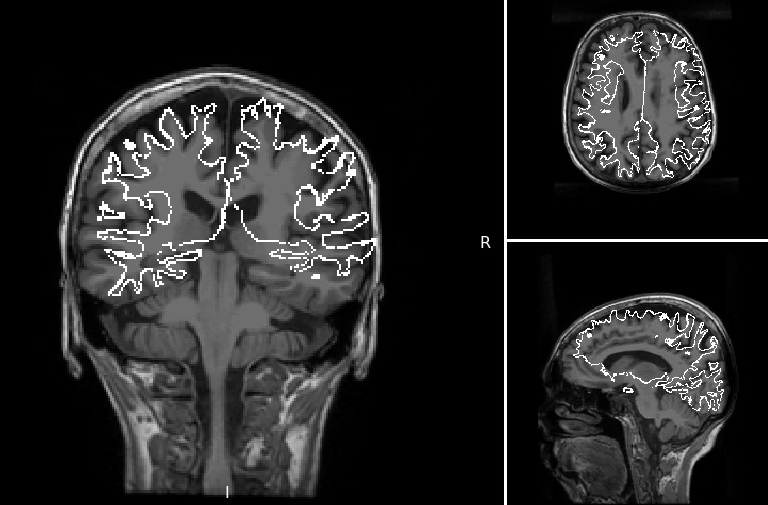
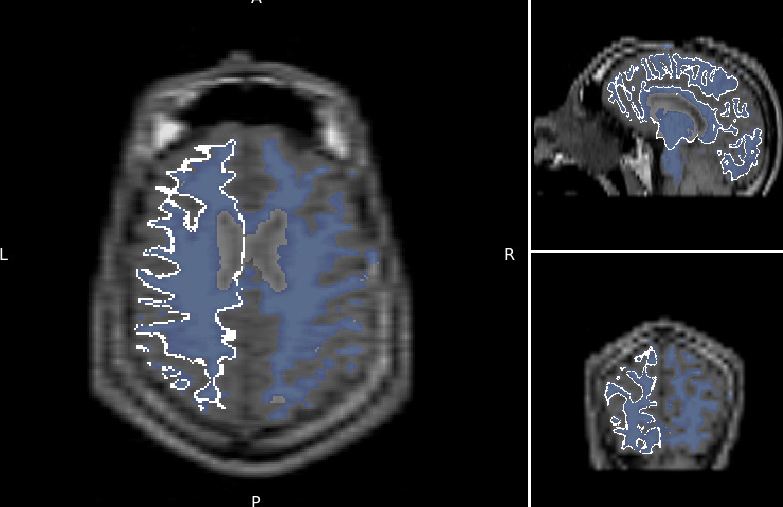
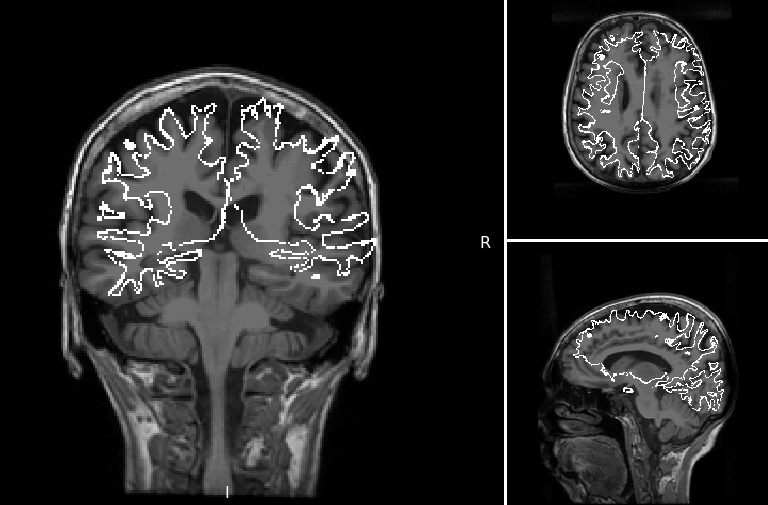
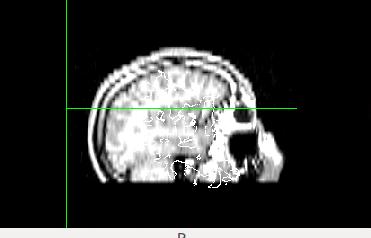
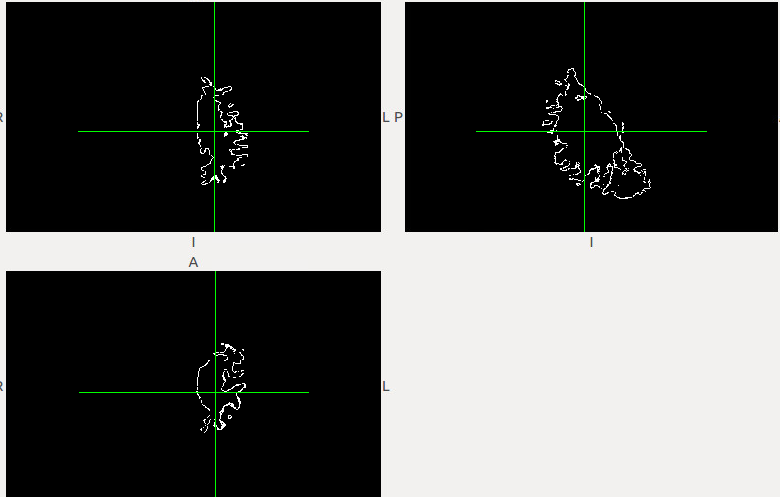
Douglas,
The previous message had an images attached that seemed to be too big. it was "bounced" automatically. I guess too many images were attached.
I ran the command for the rh.white and lh.white and the image is not perfectly registered. I tried a lot of things, but nothing worked. I ended up using the idea from Bruce. I Binarized the aseg+aparc file, extracting the wm regions, eroded, and subtracted. That gave me a surface as a volumen. This also can be done with only the images (no need to extract the whole freesurfer output) The image from mri_surf2vol had better quality, but I couldn't get it to register. If by any chance someone figures this registration problem out, I will use certainly use it.
Thanks for all your help.
Gabriel
previous message:
Douglas,
I extracted the whole directory and ran:
mri_surf2vol --mkmask --surf white --hemi rh --o rh.white.mgz --template ../subjects/subject/mri/T1.mgz --sd ../subjects --subject subject --identity subject gdiagno = -1 Using identity matrix for registration Overriding reg subject subject with subject Qa2v: SurfXYZ to VolCRS: ------------------------------ -1.000 0.000 0.000 128.000; 0.000 0.000 -1.000 128.000; 0.000 1.000 0.000 128.000; 0.000 0.000 0.000 1.000; -------------------------------------------------- subjects dir ../subjects hemi rh mksurfmask 1 projfrac 0 outvol path rh.white.mgz template path ../subjects/subject/mri/T1.mgz ------- Anat2Vol Registration (TkReg)---- 1.000 0.000 0.000 0.000; 0.000 1.000 0.000 0.000; 0.000 0.000 1.000 0.000; 0.000 0.000 0.000 1.000; ----------------------------------------- height = 256 width = 256 depth = 256 xsize = 1.000000 ysize = 1.000000 zsize = 1.000000 cdc = -1.000000 0.000000 0.000000 rdc = 0.000000 0.000000 -1.000000 sdc = 0.000000 1.000000 0.000000 xyz0 = 3.373505 20.515587 -6.721008 Gdiag_no -1 Reading surface ../subjects/subject/surf/rh.white Done reading source surface surf nframes = 1 INFO: mapping vertices to closest voxel INFO: resampling surface to volume INFO: sampled 84160 voxels in the volume INFO: writing output volume to rh.white.mgz done
I did both hemispheres, they are not registered. I tried using as template the T1.mgz, and T1 converted to nifti. I also tried output as mgz and then mri_convert to nifti, the also output to nifti. I always obtained the same volumes, and they were always unregistered.
both hemispheres, they are not registered. I tried using as template the T1.mgz, and T1 converted to nifti. I also tried output as mgz and then mri_convert to nifti, the also output to nifti.
[image: Inline image 2]
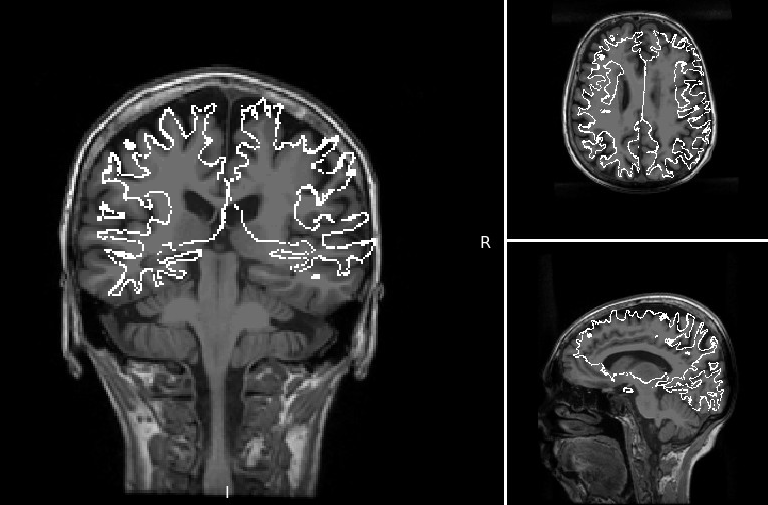
how were you examining the registration? When I run the command, the rh.white.mgz aligns perfectly with the T1.mgz
On 05/16/2017 05:38 PM, Gamaliz wrote:
Douglas,
The previous message had an images attached that seemed to be too big. it was "bounced" automatically. I guess too many images were attached.
I ran the command for the rh.white and lh.white and the image is not perfectly registered. I tried a lot of things, but nothing worked. I ended up using the idea from Bruce. I Binarized the aseg+aparc file, extracting the wm regions, eroded, and subtracted. That gave me a surface as a volumen. This also can be done with only the images (no need to extract the whole freesurfer output) The image from mri_surf2vol had better quality, but I couldn't get it to register. If by any chance someone figures this registration problem out, I will use certainly use it.
Thanks for all your help.
Gabriel
previous message:
Douglas,
I extracted the whole directory and ran:
mri_surf2vol --mkmask --surf white --hemi rh --o rh.white.mgz --template ../subjects/subject/mri/T1.mgz --sd ../subjects --subject subject --identity subject gdiagno = -1 Using identity matrix for registration Overriding reg subject subject with subject Qa2v: SurfXYZ to VolCRS: ------------------------------ -1.000 0.000 0.000 128.000; 0.000 0.000 -1.000 128.000; 0.000 1.000 0.000 128.000; 0.000 0.000 0.000 1.000;
subjects dir ../subjects hemi rh mksurfmask 1 projfrac 0 outvol path rh.white.mgz template path ../subjects/subject/mri/T1.mgz ------- Anat2Vol Registration (TkReg)---- 1.000 0.000 0.000 0.000; 0.000 1.000 0.000 0.000; 0.000 0.000 1.000 0.000; 0.000 0.000 0.000 1.000;
height = 256 width = 256 depth = 256 xsize = 1.000000 ysize = 1.000000 zsize = 1.000000 cdc = -1.000000 0.000000 0.000000 rdc = 0.000000 0.000000 -1.000000 sdc = 0.000000 1.000000 0.000000 xyz0 = 3.373505 20.515587 -6.721008 Gdiag_no -1 Reading surface ../subjects/subject/surf/rh.white Done reading source surface surf nframes = 1 INFO: mapping vertices to closest voxel INFO: resampling surface to volume INFO: sampled 84160 voxels in the volume INFO: writing output volume to rh.white.mgz done
I did both hemispheres, they are not registered. I tried using as template the T1.mgz, and T1 converted to nifti. I also tried output as mgz and then mri_convert to nifti, the also output to nifti. I always obtained the same volumes, and they were always unregistered.
both hemispheres, they are not registered. I tried using as
template the T1.mgz, and T1 converted to nifti. I also tried
output as mgz and then mri_convert to nifti, the also output to
nifti.

Inline image 2
Freesurfer mailing list Freesurfer@nmr.mgh.harvard.edu https://mail.nmr.mgh.harvard.edu/mailman/listinfo/freesurfer
Douglas,
I am looking at them in freeview and mango. They are not aligned. I am able to align them using flirt, and they come out perfect. I have tried 5 cases. 3 of them they are aligned, two were not. I am loading below the wm and lh.wm. They are supposed to be aligned (wm is aligned with T1).
I got a surface by using Bruce's method, but it's much more irregular than the one obtained from mri_surf2vol. I wonder why the inconsistency. I guess I can create the surface and flirt using a solid transform to the T1. It takes longer, but it works.
Gabriel
[image: Inline image 1]
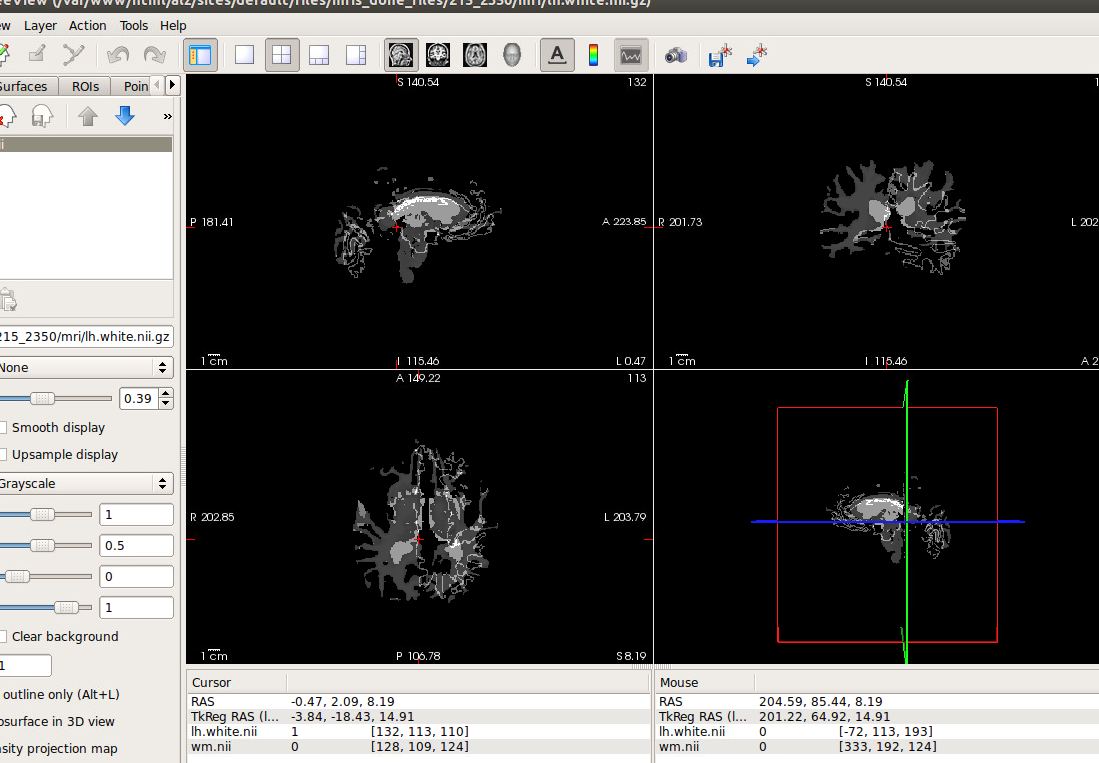
I thing I noticed is that if I change the "--identity" parameter it provides the same result. I am just typing anything and it still produces the same volume that gets created when the subject_id is used.
On Thu, May 18, 2017 at 12:16 PM, Gamaliz gliza002@fiu.edu wrote:
Douglas,
I am looking at them in freeview and mango. They are not aligned. I am able to align them using flirt, and they come out perfect. I have tried 5 cases. 3 of them they are aligned, two were not. I am loading below the wm and lh.wm. They are supposed to be aligned (wm is aligned with T1).
I got a surface by using Bruce's method, but it's much more irregular than the one obtained from mri_surf2vol. I wonder why the inconsistency. I guess I can create the surface and flirt using a solid transform to the T1. It takes longer, but it works.
Gabriel
[image: Inline image 1]
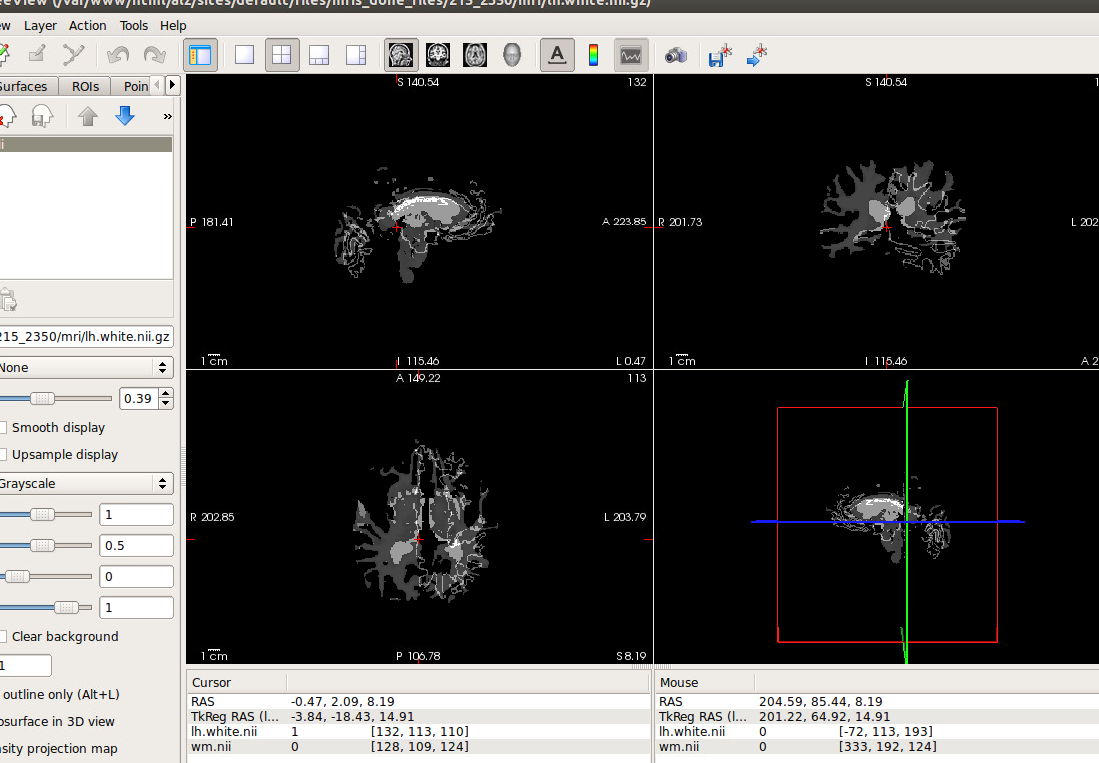
Douglas,
I just realized that I was using the wrong feeesurfer output. I had 3 processed MRIs for the same subject, and I just happened to pick the wrong one. The output of mri_surf2vol is indeed perfectly registered to the T1.mgz. So my problem is resolved. It still bugs me that the --identity works even if you type anything as the subjectid, luckily this does not affect me at all.
Thanks for your help.
On another accord, I used the mri_morphology to erode the white matter and noticed that it erodes quite a lot in a single iteration, is there any other command which provides better controls in how much gets eroded? Also. is the erosion always happening inwards?
Gabriel
On Thu, May 18, 2017 at 12:29 PM, Gamaliz gliza002@fiu.edu wrote:
I thing I noticed is that if I change the "--identity" parameter it provides the same result. I am just typing anything and it still produces the same volume that gets created when the subject_id is used.
On Thu, May 18, 2017 at 12:16 PM, Gamaliz gliza002@fiu.edu wrote:
Douglas,
I am looking at them in freeview and mango. They are not aligned. I am able to align them using flirt, and they come out perfect. I have tried 5 cases. 3 of them they are aligned, two were not. I am loading below the wm and lh.wm. They are supposed to be aligned (wm is aligned with T1).
I got a surface by using Bruce's method, but it's much more irregular than the one obtained from mri_surf2vol. I wonder why the inconsistency. I guess I can create the surface and flirt using a solid transform to the T1. It takes longer, but it works.
Gabriel
[image: Inline image 1]
-- gAbE
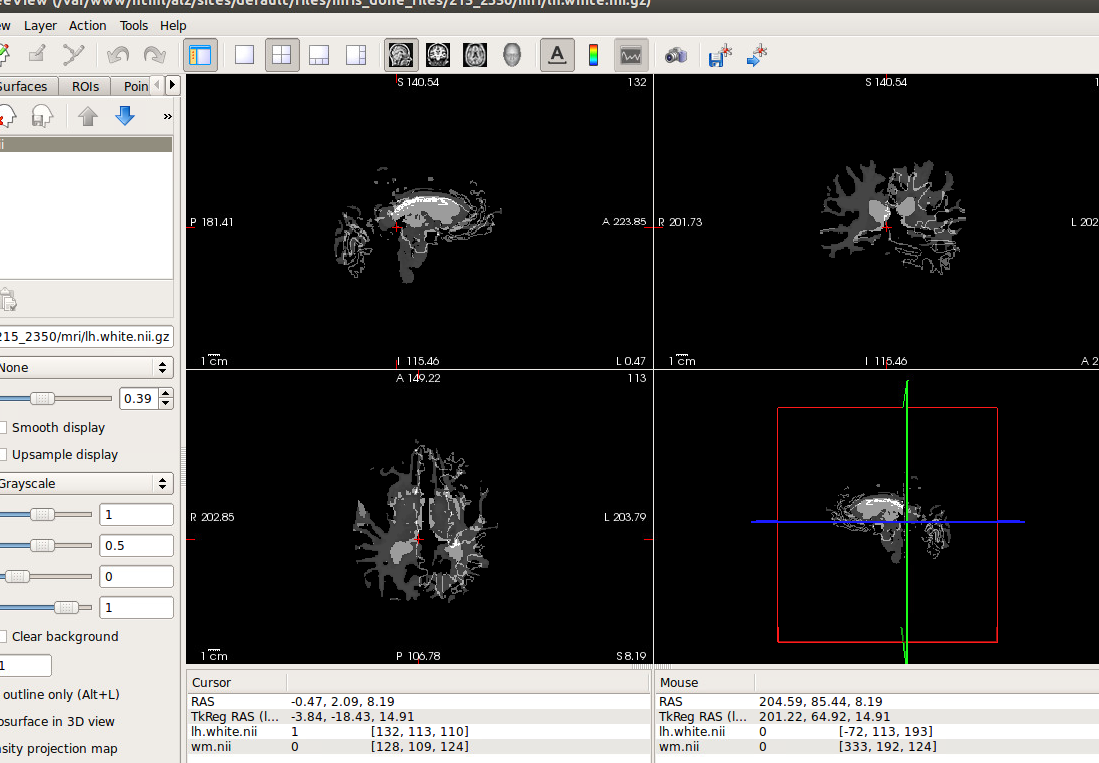
I don't know about mri_morphology, but you can use mri_binarize to erode. It has several options to allow control of how the erosion is done
On 05/22/2017 12:48 PM, Gamaliz wrote:
Douglas,
I just realized that I was using the wrong feeesurfer output. I had 3 processed MRIs for the same subject, and I just happened to pick the wrong one. The output of mri_surf2vol is indeed perfectly registered to the T1.mgz. So my problem is resolved. It still bugs me that the --identity works even if you type anything as the subjectid, luckily this does not affect me at all.
Thanks for your help.
On another accord, I used the mri_morphology to erode the white matter and noticed that it erodes quite a lot in a single iteration, is there any other command which provides better controls in how much gets eroded? Also. is the erosion always happening inwards?
Gabriel
On Thu, May 18, 2017 at 12:29 PM, Gamaliz <gliza002@fiu.edu mailto:gliza002@fiu.edu> wrote:
I thing I noticed is that if I change the  "--identity" parameter
it provides the same result. I am just typing anything and it
still produces the same volume that gets created when the
subject_id is used.

On Thu, May 18, 2017 at 12:16 PM, Gamaliz <gliza002@fiu.edu
<mailto:gliza002@fiu.edu>> wrote:

    Douglas,

    I am looking at them in freeview and mango. They are not
    aligned. I am able to align them using flirt, and they come
    out perfect. I have tried 5 cases. 3 of them they are aligned,
    two were not. I am loading below the wm and lh.wm. They are
    supposed to be aligned (wm is aligned with T1).

    I got a surface by using Bruce's method, but it's much more
    irregular than the one obtained from mri_surf2vol. I wonder
    why the inconsistency. I guess I can create the surface and
    flirt using a solid transform to the T1. It takes longer, but
    it works.

    Gabriel

    Inline image 1


--
gAbE
-- gAbE
Freesurfer mailing list Freesurfer@nmr.mgh.harvard.edu https://mail.nmr.mgh.harvard.edu/mailman/listinfo/freesurfer
freesurfer@nmr.mgh.harvard.edu
-
 Bruce Fischl
 -
 Douglas Greve
 -
Douglas N Greve
-
 Gamaliz