
Hi experts,
I have three questions. I would really appreciate any help.
(1). I ran following commands to estimate relationships between LGI and Behav data:
mris_preproc --fsgd Behav.fsgd --target fsaverage --hemi lh --meas pial_lgi --out lh.Behav_LGI.mgh
mri_surf2surf --hemi lh --s fsaverage --sval lh.Behav_LGI.mgh --fwhm 10 --cortex --tval lh.Behav_LGI.10.mgh
mri_glmfit --y lh.Behav_LGI.10.mgh --fsgd Behav.fsgd dods --C Corr-Behav-cor1.mtx --surf fsaverage lh --cortex --glmdir lh.Behav_LGI_P.glmdir --eres-save
mri_glmfit-sim_nonortho --glmdir lh.Behav_LGI_P.glmdir --sim perm 2000 1.3 permcsd --sim-sign pos --cwpvalthresh .05 --perm-resid --overwrite
Finally, cluster summary gives me one clusters with peak at the fusiform gyrus as following: ClusterNo Max VtxMax Size(mm^2) MNIX MNIY MNIZ CWP CWPLow CWPHi NVtxs WghtVtx Annot 1 -4.045 10153 32101.81 -36.5 -39.5 -15.1 0.00050 0.00000 0.00100 64731 -106698.82 fusiform
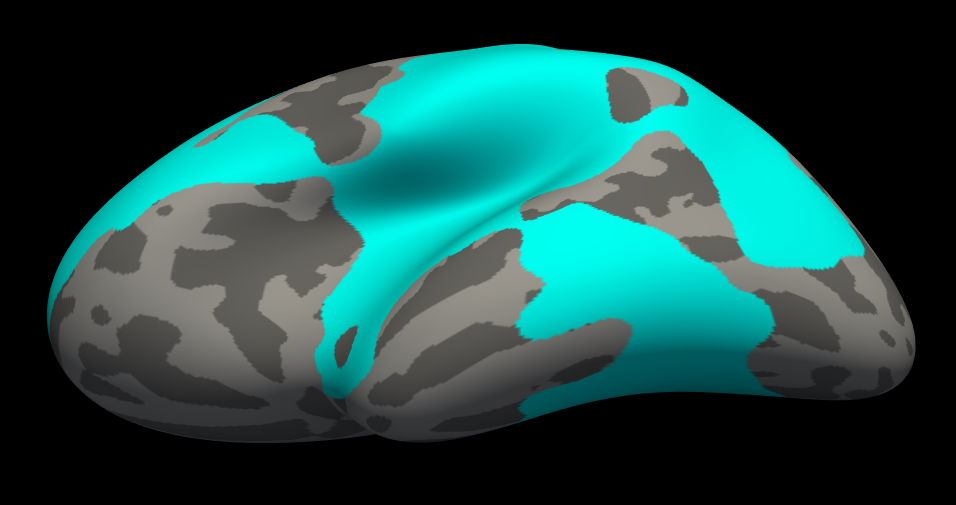
As you can see number of voxels is 64731, so I when I viewed the results in FreeView, its showing me a big cluster, almost all over the brain (please see attached screen shot).
Could you please tell me why I am getting these sort of results, and how can I fix this? If I change cluster forming threshold from 1.3 to 3, would that work? I wanted to make sure before I re-run the analysis because mri_glmfit-sim_nonortho command takes about a day to finish.
(2). How can I save output cluster e.g. fusiform gyrus in above example in NIFTI MNI volume space so that I can use this cluster for functional connectivity analysis?
(3). If I want to use fusiform gyrus from standard FreeSurfer parcellation rather than from my results, how can I save that in standard MNI volume space?
Thank you so much !

On 09/15/2017 02:13 PM, Martin Juneja wrote:
Hi experts,
I have three questions. I would really appreciate any help.
(1). I ran following commands to estimate relationships between LGI and Behav data:
mris_preproc --fsgd Behav.fsgd --target fsaverage --hemi lh --meas pial_lgi --out lh.Behav_LGI.mgh
mri_surf2surf --hemi lh --s fsaverage --sval lh.Behav_LGI.mgh --fwhm 10 --cortex --tval lh.Behav_LGI.10.mgh
mri_glmfit --y lh.Behav_LGI.10.mgh --fsgd Behav.fsgd dods --C Corr-Behav-cor1.mtx --surf fsaverage lh --cortex --glmdir lh.Behav_LGI_P.glmdir --eres-save
mri_glmfit-sim_nonortho --glmdir lh.Behav_LGI_P.glmdir --sim perm 2000 1.3 permcsd --sim-sign pos --cwpvalthresh .05 --perm-resid --overwrite
Finally, cluster summary gives me one clusters with peak at the fusiform gyrus as following: ClusterNo Max VtxMax Size(mm^2) MNIX MNIY MNIZ CWP CWPLow CWPHi NVtxs WghtVtx Annot 1 -4.045 10153 32101.81 -36.5 -39.5 -15.1 0.00050 0.00000 0.00100 64731 -106698.82 fusiform
As you can see number of voxels is 64731, so I when I viewed the results in FreeView, its showing me a big cluster, almost all over the brain (please see attached screen shot).
Could you please tell me why I am getting these sort of results, and how can I fix this? If I change cluster forming threshold from 1.3 to 3, would that work? I wanted to make sure before I re-run the analysis because mri_glmfit-sim_nonortho command takes about a day to finish.
I don't know whether it would work, but it would make it better. You can also just load the sig.mgh file and change the voxel-wise thresholds until you get reasonably sized clusters, then run using that threshold. If you do this, set the glmfti-sim threshold to the value your selected during viewing but add 0.3 (needed because you are using a positive sign).
(2). How can I save output cluster e.g. fusiform gyrus in above example in NIFTI MNI volume space so that I can use this cluster for functional connectivity analysis?
You're probably better of doing your fmri analysis in surface space because mapping back and forth is a little tricky. But if you want to do it, you can do something like mri_label2vol --annot /path/to/annot/in/glmfit/dir --temp $FSLDIR/data/standard/MNI152_T1_2mm.nii.gz --reg $FREESURFER_HOME/average/mni152.register.dat --fill-ribbon --subject fsaverage --hemi lh --o output.segmentation.in.mni152space.nii.gz
The output segmenation will have all the clusters from the annot file. Remember, this mapping is an approximation
(3). If I want to use fusiform gyrus from standard FreeSurfer parcellation rather than from my results, how can I save that in standard MNI volume space?
same as above
Thank you so much !
Freesurfer mailing list Freesurfer@nmr.mgh.harvard.edu https://mail.nmr.mgh.harvard.edu/mailman/listinfo/freesurfer
Dear Douglas,
Thanks a lot for your reply. Could you please clarify why I have to add 0.3 because I am using a positive sign? How did Do you mean if I want to use threshold of 3, then adding 0.3 to this so threshold of 3.3 should be used ?
If I use --sim-sign abs, do you think then there is no need to add a number to threshold? Whats the best approach to run this command?
I am really confused here and would really appreciate any clarification on this.
Thanks a lot.
On Mon, Sep 18, 2017 at 2:20 PM, Douglas N Greve greve@nmr.mgh.harvard.edu wrote:
On 09/15/2017 02:13 PM, Martin Juneja wrote:
Hi experts,
I have three questions. I would really appreciate any help.
(1). I ran following commands to estimate relationships between LGI and Behav data:
mris_preproc --fsgd Behav.fsgd --target fsaverage --hemi lh --meas pial_lgi --out lh.Behav_LGI.mgh
mri_surf2surf --hemi lh --s fsaverage --sval lh.Behav_LGI.mgh --fwhm 10 --cortex --tval lh.Behav_LGI.10.mgh
mri_glmfit --y lh.Behav_LGI.10.mgh --fsgd Behav.fsgd dods --C Corr-Behav-cor1.mtx --surf fsaverage lh --cortex --glmdir lh.Behav_LGI_P.glmdir --eres-save
mri_glmfit-sim_nonortho --glmdir lh.Behav_LGI_P.glmdir --sim perm 2000 1.3 permcsd --sim-sign pos --cwpvalthresh .05 --perm-resid --overwrite
Finally, cluster summary gives me one clusters with peak at the fusiform gyrus as following: ClusterNo Max VtxMax Size(mm^2) MNIX MNIY MNIZ CWP CWPLow CWPHi NVtxs WghtVtx Annot 1 -4.045 10153 32101.81 -36.5 -39.5 -15.1 0.00050 0.00000 0.00100 64731 -106698.82 fusiform
As you can see number of voxels is 64731, so I when I viewed the results in FreeView, its showing me a big cluster, almost all over the brain (please see attached screen shot).
Could you please tell me why I am getting these sort of results, and how can I fix this? If I change cluster forming threshold from 1.3 to 3, would that work? I wanted to make sure before I re-run the analysis because mri_glmfit-sim_nonortho command takes about a day to finish.
I don't know whether it would work, but it would make it better. You can also just load the sig.mgh file and change the voxel-wise thresholds until you get reasonably sized clusters, then run using that threshold. If you do this, set the glmfti-sim threshold to the value your selected during viewing but add 0.3 (needed because you are using a positive sign).
(2). How can I save output cluster e.g. fusiform gyrus in above example in NIFTI MNI volume space so that I can use this cluster for functional connectivity analysis?
You're probably better of doing your fmri analysis in surface space because mapping back and forth is a little tricky. But if you want to do it, you can do something like mri_label2vol --annot /path/to/annot/in/glmfit/dir --temp $FSLDIR/data/standard/MNI152_T1_2mm.nii.gz --reg $FREESURFER_HOME/average/mni152.register.dat --fill-ribbon --subject fsaverage --hemi lh --o output.segmentation.in.mni152space.nii.gz
The output segmenation will have all the clusters from the annot file. Remember, this mapping is an approximation
(3). If I want to use fusiform gyrus from standard FreeSurfer parcellation rather than from my results, how can I save that in standard MNI volume space?
same as above
Thank you so much !
Freesurfer mailing list Freesurfer@nmr.mgh.harvard.edu https://mail.nmr.mgh.harvard.edu/mailman/listinfo/freesurfer
-- Douglas N. Greve, Ph.D. MGH-NMR Center greve@nmr.mgh.harvard.edu Phone Number: 617-724-2358 Fax: 617-726-7422
Bugs: surfer.nmr.mgh.harvard.edu/fswiki/BugReporting FileDrop: https://gate.nmr.mgh.harvard.edu/filedrop2 www.nmr.mgh.harvard.edu/facility/filedrop/index.html Outgoing: ftp://surfer.nmr.mgh.harvard.edu/transfer/outgoing/flat/greve/
Freesurfer mailing list Freesurfer@nmr.mgh.harvard.edu https://mail.nmr.mgh.harvard.edu/mailman/listinfo/freesurfer
The information in this e-mail is intended only for the person to whom it is addressed. If you believe this e-mail was sent to you in error and the e-mail contains patient information, please contact the Partners Compliance HelpLine at http://www.partners.org/complianceline . If the e-mail was sent to you in error but does not contain patient information, please contact the sender and properly dispose of the e-mail.
On 09/18/2017 05:35 PM, Martin Juneja wrote:
Dear Douglas,
Thanks a lot for your reply. Could you please clarify why I have to add 0.3 because I am using a positive sign? How did Do you mean if I want to use threshold of 3, then adding 0.3 to this so threshold of 3.3 should be used ?
The sig map is unsigned. If it were signed, then the p-values would be half, and the sig values would be 0.3 greater (sig=-log10(p)). When you run glmfit-sim with a signed value (pos, neg), then effectively adjusts the p-values to be signed. However, when you view the sig maps, no such adjustment takes place.
If I use --sim-sign abs, do you think then there is no need to add a number to threshold? Whats the best approach to run this command?
Correct, if you use abs, you do not need to adjust because abs is two-tailed. The answer to your second question is totally up to you. Usually, people use a signed test if they had an a priori hypothesis about the direction of the effect.
I am really confused here and would really appreciate any clarification on this.
Thanks a lot.
On Mon, Sep 18, 2017 at 2:20 PM, Douglas N Greve <greve@nmr.mgh.harvard.edu mailto:greve@nmr.mgh.harvard.edu> wrote:
On 09/15/2017 02:13 PM, Martin Juneja wrote:
> Hi experts,
>
> I have three questions. I would really appreciate any help.
>
> (1). I ran following commands to estimate relationships between LGI
> and Behav data:
>
>  mris_preproc --fsgd Behav.fsgd --target fsaverage --hemi lh --meas
> pial_lgi --out lh.Behav_LGI.mgh
>
> mri_surf2surf --hemi lh --s fsaverage --sval lh.Behav_LGI.mgh --fwhm
> 10 --cortex --tval lh.Behav_LGI.10.mgh
>
> mri_glmfit --y lh.Behav_LGI.10.mgh --fsgd Behav.fsgd dods --C
> Corr-Behav-cor1.mtx --surf fsaverage lh --cortex --glmdir
> lh.Behav_LGI_P.glmdir --eres-save
>
> mri_glmfit-sim_nonortho --glmdir lh.Behav_LGI_P.glmdir --sim
perm 2000
> 1.3 permcsd --sim-sign pos --cwpvalthresh .05 --perm-resid
--overwrite
>
> Finally, cluster summary gives me one clusters with peak at the
> fusiform gyrus as following:
> ClusterNo  Max   VtxMax   Size(mm^2)  MNIX   MNIY  MNIZ    CWP
>  CWPLow    CWPHi   NVtxs    WghtVtx   Annot
>    1       -4.045   10153  32101.81    -36.5 -39.5  -15.1  0.00050
>  0.00000  0.00100  64731  -106698.82  fusiform
>
> As you can see number of voxels is 64731, so I when I viewed the
> results in FreeView, its showing me a big cluster, almost all
over the
> brain (please see attached screen shot).
>
> Could you please tell me why I am getting these sort of results, and
> how can I fix this? If I change cluster forming threshold from
1.3 to
> 3, would that work? I wanted to make sure before I re-run the
analysis
> because mri_glmfit-sim_nonortho command takes about a day to finish.
I don't know whether it would work, but it would make it better.
You can
also just load the sig.mgh file and change the voxel-wise thresholds
until you get reasonably sized clusters, then run using that
threshold.
If you do this, set the glmfti-sim threshold to the value your
selected
during viewing but add 0.3 (needed because you are using a
positive sign).
>
> (2). How can I save output cluster e.g. fusiform gyrus in above
> example in NIFTI MNI volume space so that I can use this cluster for
> functional connectivity analysis?
You're probably better of doing your fmri analysis in surface space
because mapping back and forth is a little tricky. But if you want
to do
it, you can do
something like
mri_label2vol --annot /path/to/annot/in/glmfit/dir --temp
$FSLDIR/data/standard/MNI152_T1_2mm.nii.gz --reg
$FREESURFER_HOME/average/mni152.register.dat --fill-ribbon --subject
fsaverage --hemi lh --o output.segmentation.in
<http://output.segmentation.in>.mni152space.nii.gz

The output segmenation will have all the clusters from the annot file.
Remember, this mapping is an approximation

>
> (3). If I want to use fusiform gyrus from standard FreeSurfer
> parcellation rather than from my results, how can I save that in
> standard MNI volume space?
same as above
>
> Thank you so much !
>
>
> _______________________________________________
> Freesurfer mailing list
> Freesurfer@nmr.mgh.harvard.edu
<mailto:Freesurfer@nmr.mgh.harvard.edu>
> https://mail.nmr.mgh.harvard.edu/mailman/listinfo/freesurfer
<https://mail.nmr.mgh.harvard.edu/mailman/listinfo/freesurfer>

--
Douglas N. Greve, Ph.D.
MGH-NMR Center
greve@nmr.mgh.harvard.edu <mailto:greve@nmr.mgh.harvard.edu>
Phone Number: 617-724-2358 <tel:617-724-2358>
Fax: 617-726-7422 <tel:617-726-7422>

Bugs: surfer.nmr.mgh.harvard.edu/fswiki/BugReporting
<http://surfer.nmr.mgh.harvard.edu/fswiki/BugReporting>
FileDrop: https://gate.nmr.mgh.harvard.edu/filedrop2
<https://gate.nmr.mgh.harvard.edu/filedrop2>
www.nmr.mgh.harvard.edu/facility/filedrop/index.html
<http://www.nmr.mgh.harvard.edu/facility/filedrop/index.html>
Outgoing:
ftp://surfer.nmr.mgh.harvard.edu/transfer/outgoing/flat/greve/
<ftp://surfer.nmr.mgh.harvard.edu/transfer/outgoing/flat/greve/>

_______________________________________________
Freesurfer mailing list
Freesurfer@nmr.mgh.harvard.edu <mailto:Freesurfer@nmr.mgh.harvard.edu>
https://mail.nmr.mgh.harvard.edu/mailman/listinfo/freesurfer
<https://mail.nmr.mgh.harvard.edu/mailman/listinfo/freesurfer>


The information in this e-mail is intended only for the person to
whom it is
addressed. If you believe this e-mail was sent to you in error and
the e-mail
contains patient information, please contact the Partners
Compliance HelpLine at
http://www.partners.org/complianceline
<http://www.partners.org/complianceline> . If the e-mail was sent
to you in error
but does not contain patient information, please contact the
sender and properly
dispose of the e-mail.
Freesurfer mailing list Freesurfer@nmr.mgh.harvard.edu https://mail.nmr.mgh.harvard.edu/mailman/listinfo/freesurfer
Thank you so much Douglas. That's really helpful.
On Mon, Sep 18, 2017 at 2:41 PM, Douglas N Greve greve@nmr.mgh.harvard.edu wrote:
On 09/18/2017 05:35 PM, Martin Juneja wrote:
Dear Douglas,
Thanks a lot for your reply. Could you please clarify why I have to add 0.3 because I am using a positive sign? How did Do you mean if I want to use threshold of 3, then adding 0.3 to this so threshold of 3.3 should be used ?
The sig map is unsigned. If it were signed, then the p-values would be half, and the sig values would be 0.3 greater (sig=-log10(p)). When you run glmfit-sim with a signed value (pos, neg), then effectively adjusts the p-values to be signed. However, when you view the sig maps, no such adjustment takes place.
If I use --sim-sign abs, do you think then there is no need to add a number to threshold? Whats the best approach to run this command?
Correct, if you use abs, you do not need to adjust because abs is two-tailed. The answer to your second question is totally up to you. Usually, people use a signed test if they had an a priori hypothesis about the direction of the effect.
I am really confused here and would really appreciate any clarification on this.
Thanks a lot.
On Mon, Sep 18, 2017 at 2:20 PM, Douglas N Greve <greve@nmr.mgh.harvard.edu mailto:greve@nmr.mgh.harvard.edu> wrote:
On 09/15/2017 02:13 PM, Martin Juneja wrote:
> Hi experts,
>
> I have three questions. I would really appreciate any help.
>
> (1). I ran following commands to estimate relationships between LGI
> and Behav data:
>
>  mris_preproc --fsgd Behav.fsgd --target fsaverage --hemi lh --meas
> pial_lgi --out lh.Behav_LGI.mgh
>
> mri_surf2surf --hemi lh --s fsaverage --sval lh.Behav_LGI.mgh
--fwhm
> 10 --cortex --tval lh.Behav_LGI.10.mgh
>
> mri_glmfit --y lh.Behav_LGI.10.mgh --fsgd Behav.fsgd dods --C
> Corr-Behav-cor1.mtx --surf fsaverage lh --cortex --glmdir
> lh.Behav_LGI_P.glmdir --eres-save
>
> mri_glmfit-sim_nonortho --glmdir lh.Behav_LGI_P.glmdir --sim
perm 2000
> 1.3 permcsd --sim-sign pos --cwpvalthresh .05 --perm-resid
--overwrite
>
> Finally, cluster summary gives me one clusters with peak at the
> fusiform gyrus as following:
> ClusterNo  Max   VtxMax   Size(mm^2)  MNIX   MNIY  MNIZ    CWP
>  CWPLow    CWPHi   NVtxs    WghtVtx   Annot
>    1       -4.045   10153  32101.81    -36.5 -39.5  -15.1  0.00050
>  0.00000  0.00100  64731  -106698.82  fusiform
>
> As you can see number of voxels is 64731, so I when I viewed the
> results in FreeView, its showing me a big cluster, almost all
over the
> brain (please see attached screen shot).
>
> Could you please tell me why I am getting these sort of results,
and
> how can I fix this? If I change cluster forming threshold from
1.3 to
> 3, would that work? I wanted to make sure before I re-run the
analysis
> because mri_glmfit-sim_nonortho command takes about a day to
finish.
I don't know whether it would work, but it would make it better.
You can
also just load the sig.mgh file and change the voxel-wise thresholds
until you get reasonably sized clusters, then run using that
threshold.
If you do this, set the glmfti-sim threshold to the value your
selected
during viewing but add 0.3 (needed because you are using a
positive sign).
>
> (2). How can I save output cluster e.g. fusiform gyrus in above
> example in NIFTI MNI volume space so that I can use this cluster
for
> functional connectivity analysis?
You're probably better of doing your fmri analysis in surface space
because mapping back and forth is a little tricky. But if you want
to do
it, you can do
something like
mri_label2vol --annot /path/to/annot/in/glmfit/dir --temp
$FSLDIR/data/standard/MNI152_T1_2mm.nii.gz --reg
$FREESURFER_HOME/average/mni152.register.dat --fill-ribbon --subject
fsaverage --hemi lh --o output.segmentation.in
<http://output.segmentation.in>.mni152space.nii.gz

The output segmenation will have all the clusters from the annot
file.
Remember, this mapping is an approximation

>
> (3). If I want to use fusiform gyrus from standard FreeSurfer
> parcellation rather than from my results, how can I save that in
> standard MNI volume space?
same as above
>
> Thank you so much !
>
>
> _______________________________________________
> Freesurfer mailing list
> Freesurfer@nmr.mgh.harvard.edu
<mailto:Freesurfer@nmr.mgh.harvard.edu>
> https://mail.nmr.mgh.harvard.edu/mailman/listinfo/freesurfer
<https://mail.nmr.mgh.harvard.edu/mailman/listinfo/freesurfer>

--
Douglas N. Greve, Ph.D.
MGH-NMR Center
greve@nmr.mgh.harvard.edu <mailto:greve@nmr.mgh.harvard.edu>
Phone Number: 617-724-2358 <tel:617-724-2358>
Fax: 617-726-7422 <tel:617-726-7422>

Bugs: surfer.nmr.mgh.harvard.edu/fswiki/BugReporting
<http://surfer.nmr.mgh.harvard.edu/fswiki/BugReporting>
FileDrop: https://gate.nmr.mgh.harvard.edu/filedrop2
<https://gate.nmr.mgh.harvard.edu/filedrop2>
www.nmr.mgh.harvard.edu/facility/filedrop/index.html
<http://www.nmr.mgh.harvard.edu/facility/filedrop/index.html>
Outgoing:
ftp://surfer.nmr.mgh.harvard.edu/transfer/outgoing/flat/greve/
<ftp://surfer.nmr.mgh.harvard.edu/transfer/outgoing/flat/greve/>

_______________________________________________
Freesurfer mailing list
Freesurfer@nmr.mgh.harvard.edu <mailto:Freesurfer@nmr.mgh.
harvard.edu>
https://mail.nmr.mgh.harvard.edu/mailman/listinfo/freesurfer
<https://mail.nmr.mgh.harvard.edu/mailman/listinfo/freesurfer>


The information in this e-mail is intended only for the person to
whom it is
addressed. If you believe this e-mail was sent to you in error and
the e-mail
contains patient information, please contact the Partners
Compliance HelpLine at
http://www.partners.org/complianceline
<http://www.partners.org/complianceline> . If the e-mail was sent
to you in error
but does not contain patient information, please contact the
sender and properly
dispose of the e-mail.
Freesurfer mailing list Freesurfer@nmr.mgh.harvard.edu https://mail.nmr.mgh.harvard.edu/mailman/listinfo/freesurfer
-- Douglas N. Greve, Ph.D. MGH-NMR Center greve@nmr.mgh.harvard.edu Phone Number: 617-724-2358 Fax: 617-726-7422
Bugs: surfer.nmr.mgh.harvard.edu/fswiki/BugReporting FileDrop: https://gate.nmr.mgh.harvard.edu/filedrop2 www.nmr.mgh.harvard.edu/facility/filedrop/index.html Outgoing: ftp://surfer.nmr.mgh.harvard.edu/transfer/outgoing/flat/greve/
Freesurfer mailing list Freesurfer@nmr.mgh.harvard.edu https://mail.nmr.mgh.harvard.edu/mailman/listinfo/freesurfer
freesurfer@nmr.mgh.harvard.edu
-
 Douglas N Greve
 -
 Martin Juneja