
Hi, Doug and other FreeSurfer experts:
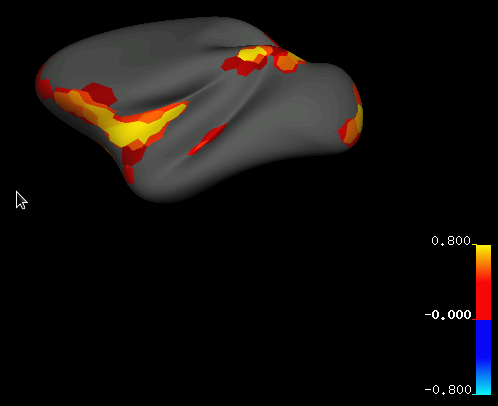
I noticed that the color in a surface file I generated (*.mgh with the values ranging from 0 to 1) does not match that in the color bar (see attached Fig for an example). For example, the low values in the surface file (dark red) are obviously darker than that in the lowest values in the color bar (much brighter red). Is there any remedy for this mismatch?
Thank you in advance!
Longchuan

Hi Longchuan, I think those areas might be identical to 0. Try setting the threshold to something small but above 0. doug
On 11/11/12 8:09 PM, Longchuan Li wrote:
Hi, Doug and other FreeSurfer experts:
I noticed that the color in a surface file I generated (*.mgh with the values ranging from 0 to 1) does not match that in the color bar (see attached Fig for an example). For example, the low values in the surface file (dark red) are obviously darker than that in the lowest values in the color bar (much brighter red). Is there any remedy for this mismatch?
Thank you in advance!
Longchuan
Freesurfer mailing list Freesurfer@nmr.mgh.harvard.edu https://mail.nmr.mgh.harvard.edu/mailman/listinfo/freesurfer
Hi, Doug and other FreeSurfer experts:
I noticed that the color in a surface file I generated (*.mgh with the values ranging from 0 to 1) does not match that in the color bar. For example, the lowest value in the surface file has much darker red hue than the lowest values in the color bar (bright red). Is there any remedy for this mismatch? Also, I intended to attach an image in the email, but was told that the email contains blocked images.
Thank you in advance!
Longchuan
freesurfer@nmr.mgh.harvard.edu
-
 Douglas Greve
 -
 Longchuan Li