
Hi FreeSurfer experts,
My goal is to extract cortical thickness of several ROIs, which are in volume space. I am following instructions from this page: https://surfer.nmr.mgh.harvard.edu/fswiki/VolumeRoiCorticalThickness
My ROIs and T1 image are in the form of binary mask and are already in same standard space (MNIT1.nii). So following the instructions, I am able to perform until step 3 (I created registration file X.dat using fslregister command to register MNIT1.nii with fslaverage).
After that I am using this command: tksurfer fsaverage lh inflated -overlay lh.fsaverage.ROI5.mgh -fthresh 0.5
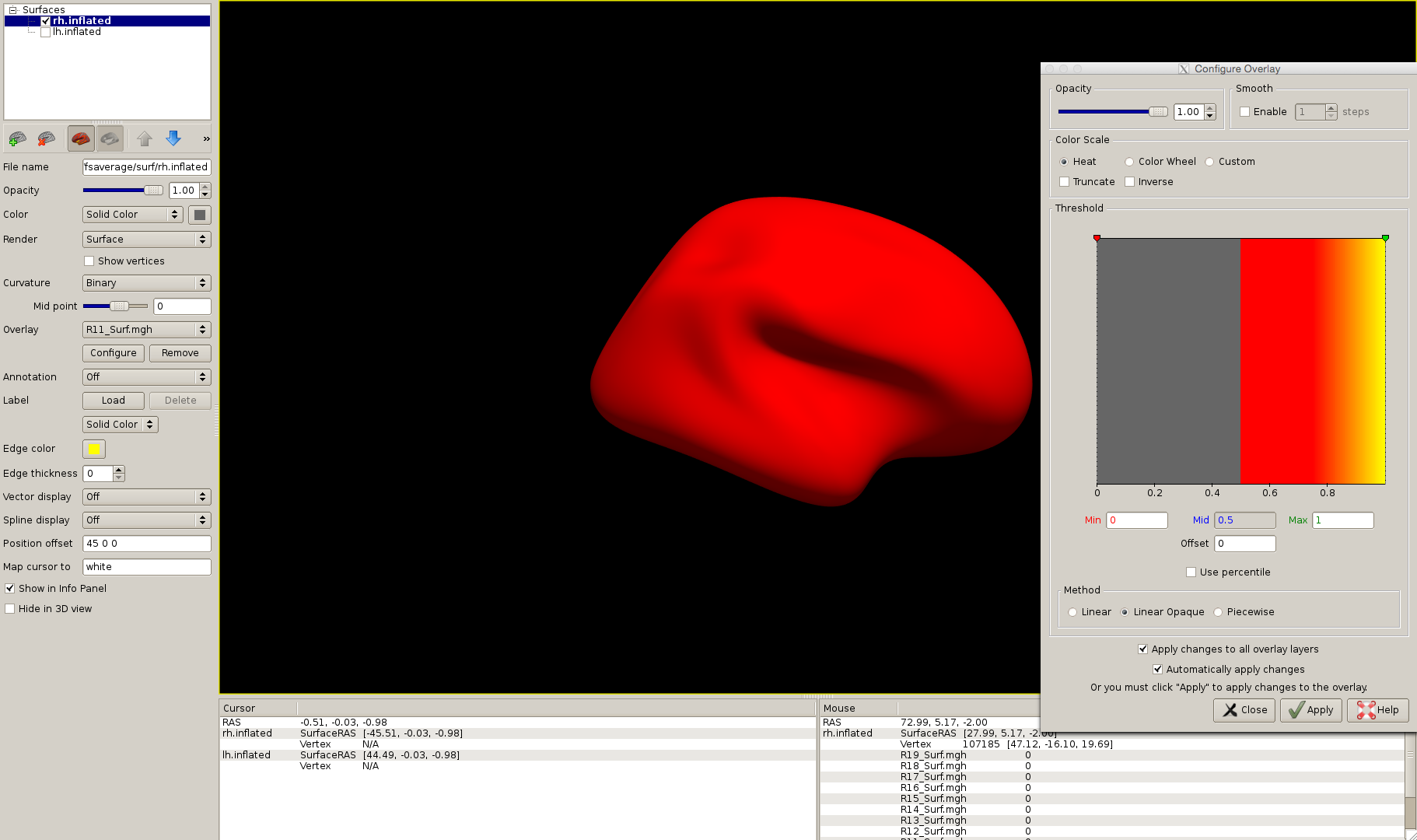
to make sure that the ROI in surface format is at correct place. But after I run this command I do not see the region anywhere on surface. I tried to view it using FreeView also, its giving me attached image. From FreeView it looks like the ROI is now a brain mask and is all over the brain with a constant value everywhere. I am not sure why this is happening.
Next, I have 26 ROIs, 12 on left hemisphere, 12 on right hemisphere and 2 in the midline. Somehow, 11/12 ROIs on left hemisphere and 2 ROIs in the midline are working fine when I view those in tksurfer or FreeView but rest all are showing me value of 1 all over the brain.
For left hemisphere and midline ROIs, I am using exactly same steps as mentioned in the instructions but for right hemisphere, I just replaced 'lh' with 'rh' in step 3.
Any help would be really appreciated.
---------- Forwarded message ---------- From: Martin Juneja mj70481@gmail.com Date: Tue, Jan 31, 2017 at 4:38 PM Subject: Cortical thickness from ROI in volume format To: Freesurfer support list freesurfer@nmr.mgh.harvard.edu
Hi FreeSurfer experts,
My goal is to extract cortical thickness of several ROIs, which are in volume space. I am following instructions from this page: https://surfer.nmr.mgh.harvard.edu/fswiki/VolumeRoiCorticalThickness
My ROIs and T1 image are in the form of binary mask and are already in same standard space (MNIT1.nii). So following the instructions, I am able to perform until step 3 (I created registration file X.dat using fslregister command to register MNIT1.nii with fslaverage).
After that I am using this command: tksurfer fsaverage lh inflated -overlay lh.fsaverage.ROI5.mgh -fthresh 0.5
to make sure that the ROI in surface format is at correct place. But after I run this command I do not see the region anywhere on surface. I tried to view it using FreeView also. From FreeView, it looks like the ROI is now a brain mask and is all over the brain with a constant value of ~0.5 everywhere. I am not sure why this is happening.
Next, I have 26 ROIs, 12 on left hemisphere, 12 on right hemisphere and 2 in the midline. Somehow, 11/12 ROIs on left hemisphere and 2 ROIs in the midline are working fine when I view those in tksurfer or FreeView but rest all are showing me value of 1 all over the brain.
For left hemisphere and midline ROIs, I am using exactly same steps as mentioned in the instructions but for right hemisphere, I just replaced 'lh' with 'rh' in step 3.
Any help would be really appreciated.
Hi,
I am really sorry for re-sending this message. I would really appreciate any response.
Thanks.
Hi FreeSurfer experts,
My goal is to extract cortical thickness of several ROIs, which are in volume space. I am following instructions from this page: https://surfer.nmr.mgh.harvard.edu/fswiki/VolumeRoiCorticalThickness
My ROIs and T1 image are in the form of binary mask and are already in same standard space (MNIT1.nii). So following the instructions, I am able to perform until step 3 (I created registration file X.dat using fslregister command to register MNIT1.nii with fslaverage).
After that I am using this command: tksurfer fsaverage lh inflated -overlay lh.fsaverage.ROI5.mgh -fthresh 0.5
to make sure that the ROI in surface format is at correct place. But after I run this command I do not see the region anywhere on surface. I tried to view it using FreeView also. From FreeView, it looks like the ROI is now a brain mask and is all over the brain with a constant value of ~0.5 everywhere. I am not sure why this is happening.
Next, I have 26 ROIs, 12 on left hemisphere, 12 on right hemisphere and 2 in the midline. Somehow, 11/12 ROIs on left hemisphere and 2 ROIs in the midline are working fine when I view those in tksurfer or FreeView but rest all are showing me value of 1 all over the brain.
For left hemisphere and midline ROIs, I am using exactly same steps as mentioned in the instructions but for right hemisphere, I just replaced 'lh' with 'rh' in step 3.
Any help would be really appreciated.

did you check whether the registration was accurate using that tkmedit command?
On 02/01/2017 02:19 PM, Martin Juneja wrote:
Hi,
I am really sorry for re-sending this message. I would really appreciate any response.
Thanks.
Hi FreeSurfer experts,
My goal is to extract cortical thickness of several ROIs, which are in volume space. I am following instructions from this page: https://surfer.nmr.mgh.harvard.edu/fswiki/VolumeRoiCorticalThickness https://surfer.nmr.mgh.harvard.edu/fswiki/VolumeRoiCorticalThickness
My ROIs and T1 image are in the form of binary mask and are already in same standard space (MNIT1.nii). So following the instructions, I am able to perform until step 3 (I created registration file X.dat using fslregister command to register MNIT1.nii with fslaverage).
After that I am using this command: tksurfer fsaverage lh inflated -overlay lh.fsaverage.ROI5.mgh -fthresh 0.5 to make sure that the ROI in surface format is at correct place. But after I run this command I do not see the region anywhere on surface. I tried to view it using FreeView also. From FreeView, it looks like the ROI is now a brain mask and is all over the brain with a constant value of ~0.5 everywhere. I am not sure why this is happening.
Next, I have 26 ROIs, 12 on left hemisphere, 12 on right hemisphere and 2 in the midline. Somehow, 11/12 ROIs on left hemisphere and 2 ROIs in the midline are working fine when I view those in tksurfer or FreeView but rest all are showing me value of 1 all over the brain.
For left hemisphere and midline ROIs, I am using exactly same steps as mentioned in the instructions but for right hemisphere, I just replaced 'lh' with 'rh' in step 3.
Any help would be really appreciated.
Freesurfer mailing list Freesurfer@nmr.mgh.harvard.edu https://mail.nmr.mgh.harvard.edu/mailman/listinfo/freesurfer
freesurfer@nmr.mgh.harvard.edu
-
 Douglas N Greve
 -
 Martin Juneja