
Hello All,
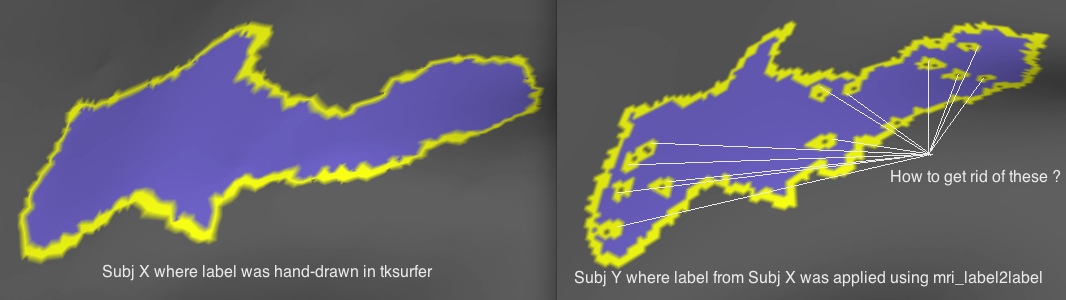
I hand drew a label on subject X's inflated surface using the tools in tksurfer outlined in http://surfer.nmr.mgh.harvard.edu/fswiki/TkSurferGuide/TkSurferWorkingWithDa...,
then I applied the label to Subject Y using mrilabel2label specifically -
mri_label2label --srclabel ROI-subjX.label --srcsubject SubjX --trglabel ROI-subjY.label --trgsubject SubjY --regmethod surface --hemi lh
The problem is on surface of subject Y, when I upload the label, I see these holes inside the label (please see figure attached).
Can anyone tell how do I get rid of them ?
Thanks much
Ri

Hi Ri,
You can try using the dilate and erode label tool in tksurfer. Click on subject Y's label and in the tksurfer tools window,
Tools -> Labels -> Dilate Selected Label Tools -> Labels -> Erode Selected Label
Sita.
On Sun, 10 Oct 2010, Ritobrato Datta wrote:
Hello All,
I hand drew a label on subject X's inflated surface using the tools in tksurfer outlined in http://surfer.nmr.mgh.harvard.edu/fswiki/TkSurferGuide/TkSurferWorkingWithDa...,
then I applied the label to Subject Y using mrilabel2label specifically -
mri_label2label --srclabel ROI-subjX.label --srcsubject SubjX --trglabel ROI-subjY.label --trgsubject SubjY --regmethod surface --hemi lh
The problem is on surface of subject Y, when I upload the label, I see these holes inside the label (please see figure attached).
Can anyone tell how do I get rid of them ?
Thanks much
Ri
freesurfer@nmr.mgh.harvard.edu
-
 Ritobrato Datta
 -
 Sita Kakunoori