
External Email - Use Caution
Hello FreeSurfer developers,
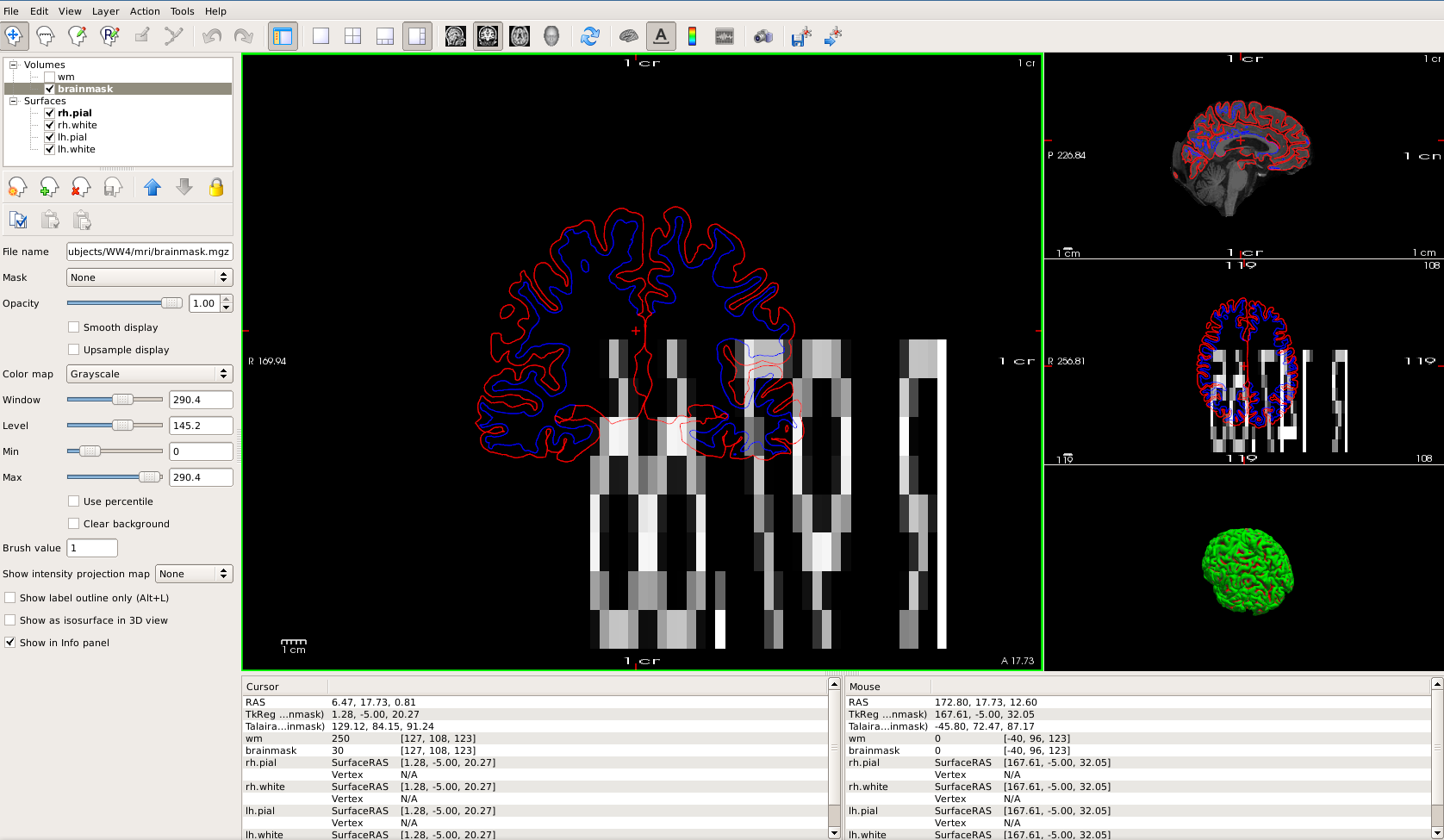
I'm having an odd problem using freeview. When I open a set of volumes (wm and brainmask) and surfaces (both pial and white), everything seems to work fine. However, when I turn off the volumes to look at the 3D view and then turn them back on when switching back to 2D, the situation in Screenshot1 happens. The brainmask volume disappears in the coronal and axial planes but is still there in the sagittal. Also, it looks like a coordinate appears in large text written backwards superimposed over the surface outlines (mirrored, not just in reverse order), but it's not the coordinate from the current slice. For instance, this coronal slice says R 97.66 and the axial slice says R 147.65. If I zoom in or out, the numbers get larger and smaller. The white matter volume is not affected. Everything works normally if I keep the volumes for viewing 3D rendering.
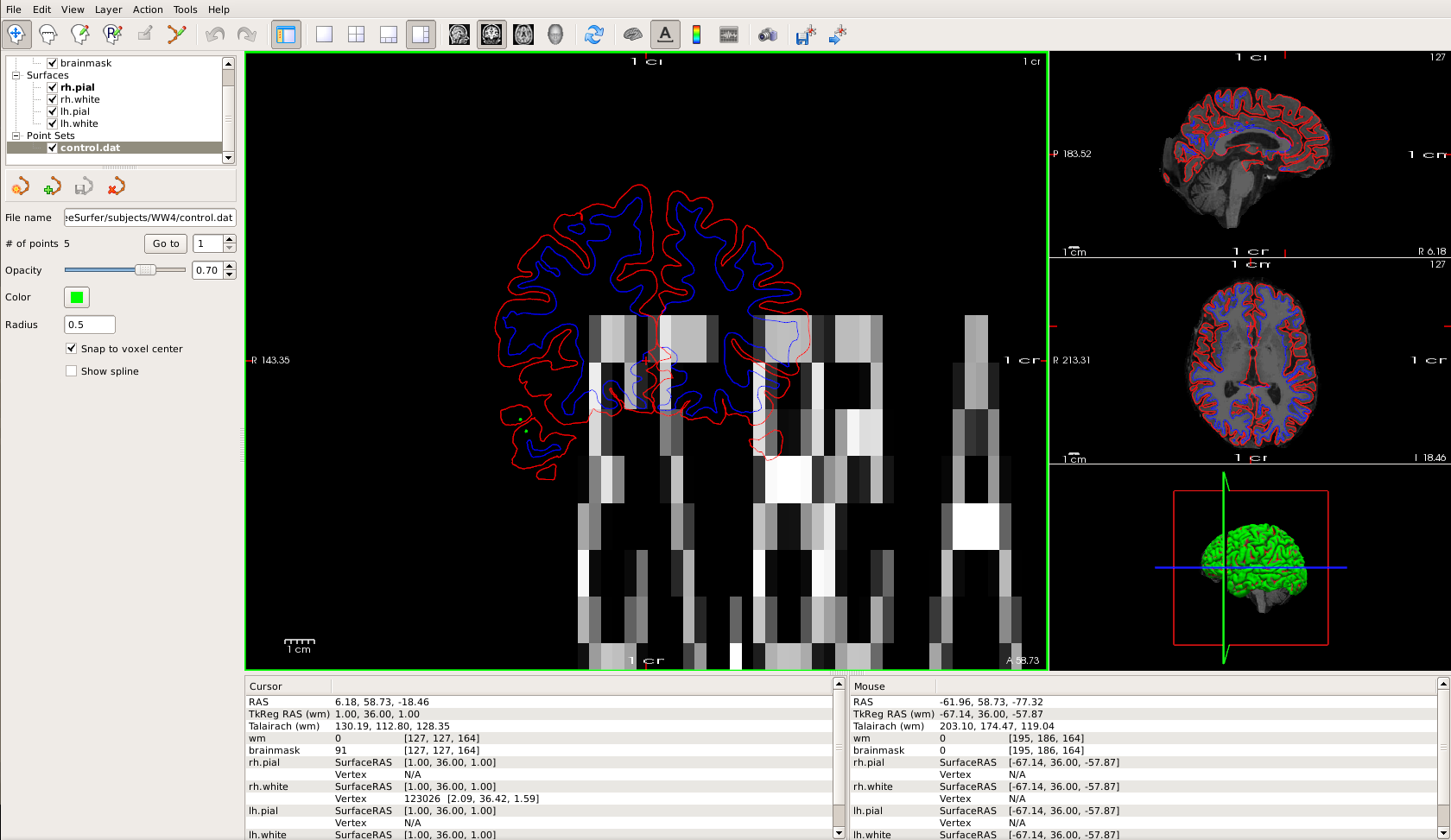
I have a similar thing happen when adding control points (it first happened when creating a new set, but if I load an existing set it happens also). The image is fine until I get to a specific coronal slice (usually just a few slices away from where I put the first control point), then the brainmask volume disappears in the coronal view but is still there in sagittal and axial. This time the displayed number is A 58.73 (mirrored), which is actually the label on the exact slice where brainmask disappears for this subject, but this number does change sometimes when scrolling through slices, but not on most slices and it doesn't change to match the current label.
If I close and re-open freeview with the same set of volumes and surfaces, they come up the way they should and remain as they should unless I turn off the volumes while looking at the 3D rendering or open the control point file again.
This has happened for multiple subjects/sets of files, and no messages appear in the terminal when this happens. I'm using a Linux with CentOS 6.9.
Any idea what could be causing this and/or how to fix it?
Thanks! Rachel

Hi Rachel,
This appears to be some kind of openGL rendering artifact that we are not able to reproduce nor find a definitive solution, unfortunately. It happened to some of us over the years but very very rarely and we were never able to replicate it. It may be a hardware/system glitch. Would it be possible for you to reboot your machine (to flush opengl cache)? or even update your graphics driver?
Best, Ruopeng
On 05/31/2018 02:06 PM, Rachel Smallwood Shoukry wrote:
Hello FreeSurfer developers,
I'm having an odd problem using freeview. When I open a set of volumes (wm and brainmask) and surfaces (both pial and white), everything seems to work fine. However, when I turn off the volumes to look at the 3D view and then turn them back on when switching back to 2D, the situation in Screenshot1 happens. The brainmask volume disappears in the coronal and axial planes but is still there in the sagittal. Also, it looks like a coordinate appears in large text written backwards superimposed over the surface outlines (mirrored, not just in reverse order), but it's not the coordinate from the current slice. For instance, this coronal slice says R 97.66 and the axial slice says R 147.65. If I zoom in or out, the numbers get larger and smaller. The white matter volume is not affected. Everything works normally if I keep the volumes for viewing 3D rendering.
I have a similar thing happen when adding control points (it first happened when creating a new set, but if I load an existing set it happens also). The image is fine until I get to a specific coronal slice (usually just a few slices away from where I put the first control point), then the brainmask volume disappears in the coronal view but is still there in sagittal and axial. This time the displayed number is A 58.73 (mirrored), which is actually the label on the exact slice where brainmask disappears for this subject, but this number does change sometimes when scrolling through slices, but not on most slices and it doesn't change to match the current label.
If I close and re-open freeview with the same set of volumes and surfaces, they come up the way they should and remain as they should unless I turn off the volumes while looking at the 3D rendering or open the control point file again.
This has happened for multiple subjects/sets of files, and no messages appear in the terminal when this happens. I'm using a Linux with CentOS 6.9.
Any idea what could be causing this and/or how to fix it?
Thanks! Rachel
Freesurfer mailing list Freesurfer@nmr.mgh.harvard.edu https://mail.nmr.mgh.harvard.edu/mailman/listinfo/freesurfer
freesurfer@nmr.mgh.harvard.edu
-
 Rachel Smallwood Shoukry
 -
 Ruopeng Wang