
Hi Fred,
yu probably checked the following already, but on the off chance you have not... Maybe you have set X11 to 256 color mode? Start X11.app (from /Applications/Utilities) go to the X11 menu, select Preferences..., switch to the tab called output and see what is selected for Colors. If it is set to 256 Colors you have your root cause, just switch to something higher and all should be fine.
best Sebastian
On May 9, 2010, at 9:00 AM, freesurfer-request@nmr.mgh.harvard.edu wrote:
Send Freesurfer mailing list submissions to freesurfer@nmr.mgh.harvard.edu
To subscribe or unsubscribe via the World Wide Web, visit https://mail.nmr.mgh.harvard.edu/mailman/listinfo/freesurfer or, via email, send a message with subject or body 'help' to freesurfer-request@nmr.mgh.harvard.edu
You can reach the person managing the list at freesurfer-owner@nmr.mgh.harvard.edu
When replying, please edit your Subject line so it is more specific than "Re: Contents of Freesurfer digest..."
Today's Topics:
- tksurfer/tkmedit display color fix in OSX 10.6? (Fred Dick)
Message: 1 Date: Sun, 9 May 2010 15:34:35 +0100 From: Fred Dick fdick@crl.ucsd.edu Subject: [Freesurfer] tksurfer/tkmedit display color fix in OSX 10.6? To: freesurfer@nmr.mgh.harvard.edu Message-ID: 873B33F2-3339-4871-9395-1EFEEC1EFAAB@crl.ucsd.edu Content-Type: text/plain; charset="us-ascii"
Dear all
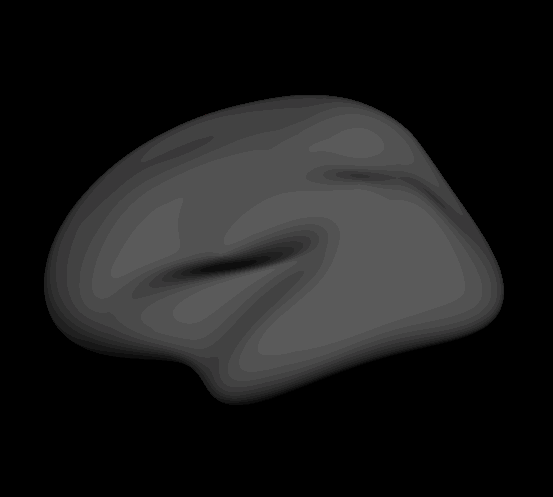
This is a pretty minor issue (except for figure making) - but has anyone experienced and then fixed a display problem in tksurfer/tkmedit in OSX 10.6 (possibly also 10.5) where graphics seem to be drawn only with 256 colors, thereby giving images a kind of contour-plot look? (See attached image below). [Running 10.6.3, i686-apple-darwin10-gcc-4.2.1, tksurfer 1.309 (yes, older), tkmedit v 1.330]
I looked around the mail archives but didn't see anyone else commenting on this, but do know someone else having the same issue, so would be happy for any suggestions.
Thanks, Fred

Hi Sebastian and Bruce
thanks for the Sunday afternoon assists. Unfortunately, not a VNC problem (am running it directly in X11, Xquartz 2.3.5), and yup, did check the color prefs in X11 - even commanding millions of colors didn't work.
Sounds like maybe it's not a very common problem though, so more likely I've done something weird to my X11 setup.
cheers, Fred
On 9 May 2010, at 20:38, Sebastian Moeller wrote:
Hi Fred,
yu probably checked the following already, but on the off chance you have not... Maybe you have set X11 to 256 color mode? Start X11.app (from /Applications/Utilities) go to the X11 menu, select Preferences..., switch to the tab called output and see what is selected for Colors. If it is set to 256 Colors you have your root cause, just switch to something higher and all should be fine.
best Sebastian
On May 9, 2010, at 9:00 AM, freesurfer-request@nmr.mgh.harvard.edu wrote:
Send Freesurfer mailing list submissions to freesurfer@nmr.mgh.harvard.edu
To subscribe or unsubscribe via the World Wide Web, visit https://mail.nmr.mgh.harvard.edu/mailman/listinfo/freesurfer or, via email, send a message with subject or body 'help' to freesurfer-request@nmr.mgh.harvard.edu
You can reach the person managing the list at freesurfer-owner@nmr.mgh.harvard.edu
When replying, please edit your Subject line so it is more specific than "Re: Contents of Freesurfer digest..."
Today's Topics:
- tksurfer/tkmedit display color fix in OSX 10.6? (Fred Dick)
Message: 1 Date: Sun, 9 May 2010 15:34:35 +0100 From: Fred Dick fdick@crl.ucsd.edu Subject: [Freesurfer] tksurfer/tkmedit display color fix in OSX 10.6? To: freesurfer@nmr.mgh.harvard.edu Message-ID: 873B33F2-3339-4871-9395-1EFEEC1EFAAB@crl.ucsd.edu Content-Type: text/plain; charset="us-ascii"
Dear all
This is a pretty minor issue (except for figure making) - but has anyone experienced and then fixed a display problem in tksurfer/tkmedit in OSX 10.6 (possibly also 10.5) where graphics seem to be drawn only with 256 colors, thereby giving images a kind of contour-plot look? (See attached image below). [Running 10.6.3, i686-apple-darwin10-gcc-4.2.1, tksurfer 1.309 (yes, older), tkmedit v 1.330]
I looked around the mail archives but didn't see anyone else commenting on this, but do know someone else having the same issue, so would be happy for any suggestions.
Thanks, Fred

Hi, was this problem ever resolved?
I am seeing the same issue on my mac desktop.
Thanks, Thomas
On Mon, May 10, 2010 at 3:47 AM, Fred Dick fdick@crl.ucsd.edu wrote:
Hi Sebastian and Bruce
thanks for the Sunday afternoon assists. Unfortunately, not a VNC problem (am running it directly in X11, Xquartz 2.3.5), and yup, did check the color prefs in X11 - even commanding millions of colors didn't work.
Sounds like maybe it's not a very common problem though, so more likely I've done something weird to my X11 setup.
cheers, Fred
On 9 May 2010, at 20:38, Sebastian Moeller wrote:
Hi Fred,
yu probably checked the following already, but on the off chance you
have not... Maybe you have set X11 to 256 color mode? Start X11.app (from /Applications/Utilities) go to the X11 menu, select Preferences..., switch to the tab called output and see what is selected for Colors. If it is set to 256 Colors you have your root cause, just switch to something higher and all should be fine.
best Sebastian
On May 9, 2010, at 9:00 AM, freesurfer-request@nmr.mgh.harvard.eduwrote:
Send Freesurfer mailing list submissions to freesurfer@nmr.mgh.harvard.edu
To subscribe or unsubscribe via the World Wide Web, visit https://mail.nmr.mgh.harvard.edu/mailman/listinfo/freesurfer or, via email, send a message with subject or body 'help' to freesurfer-request@nmr.mgh.harvard.edu
You can reach the person managing the list at freesurfer-owner@nmr.mgh.harvard.edu
When replying, please edit your Subject line so it is more specific than "Re: Contents of Freesurfer digest..."
Today's Topics:
- tksurfer/tkmedit display color fix in OSX 10.6? (Fred Dick)
Message: 1 Date: Sun, 9 May 2010 15:34:35 +0100 From: Fred Dick fdick@crl.ucsd.edu Subject: [Freesurfer] tksurfer/tkmedit display color fix in OSX 10.6? To: freesurfer@nmr.mgh.harvard.edu Message-ID: 873B33F2-3339-4871-9395-1EFEEC1EFAAB@crl.ucsd.edu Content-Type: text/plain; charset="us-ascii"
Dear all
This is a pretty minor issue (except for figure making) - but has
anyone experienced and then fixed a display problem in tksurfer/tkmedit in OSX 10.6 (possibly also 10.5) where graphics seem to be drawn only with 256 colors, thereby giving images a kind of contour-plot look? (See attached image below). [Running 10.6.3, i686-apple-darwin10-gcc-4.2.1, tksurfer 1.309 (yes, older), tkmedit v 1.330]
I looked around the mail archives but didn't see anyone else commenting
on this, but do know someone else having the same issue, so would be happy for any suggestions.
Thanks, Fred
Attaching what I am seeing...
On Tue, Jan 17, 2012 at 2:31 PM, Thomas Yeo ythomas@csail.mit.edu wrote:
Hi, was this problem ever resolved?
I am seeing the same issue on my mac desktop.
Thanks, Thomas
On Mon, May 10, 2010 at 3:47 AM, Fred Dick fdick@crl.ucsd.edu wrote:
Hi Sebastian and Bruce
thanks for the Sunday afternoon assists. Unfortunately, not a VNC problem (am running it directly in X11, Xquartz 2.3.5), and yup, did check the color prefs in X11 - even commanding millions of colors didn't work.
Sounds like maybe it's not a very common problem though, so more likely I've done something weird to my X11 setup.
cheers, Fred
On 9 May 2010, at 20:38, Sebastian Moeller wrote:
Hi Fred,
yu probably checked the following already, but on the off chance you
have not... Maybe you have set X11 to 256 color mode? Start X11.app (from /Applications/Utilities) go to the X11 menu, select Preferences..., switch to the tab called output and see what is selected for Colors. If it is set to 256 Colors you have your root cause, just switch to something higher and all should be fine.
best Sebastian
On May 9, 2010, at 9:00 AM, freesurfer-request@nmr.mgh.harvard.eduwrote:
Send Freesurfer mailing list submissions to freesurfer@nmr.mgh.harvard.edu
To subscribe or unsubscribe via the World Wide Web, visit https://mail.nmr.mgh.harvard.edu/mailman/listinfo/freesurfer or, via email, send a message with subject or body 'help' to freesurfer-request@nmr.mgh.harvard.edu
You can reach the person managing the list at freesurfer-owner@nmr.mgh.harvard.edu
When replying, please edit your Subject line so it is more specific than "Re: Contents of Freesurfer digest..."
Today's Topics:
- tksurfer/tkmedit display color fix in OSX 10.6? (Fred Dick)
Message: 1 Date: Sun, 9 May 2010 15:34:35 +0100 From: Fred Dick fdick@crl.ucsd.edu Subject: [Freesurfer] tksurfer/tkmedit display color fix in OSX 10.6? To: freesurfer@nmr.mgh.harvard.edu Message-ID: 873B33F2-3339-4871-9395-1EFEEC1EFAAB@crl.ucsd.edu Content-Type: text/plain; charset="us-ascii"
Dear all
This is a pretty minor issue (except for figure making) - but has
anyone experienced and then fixed a display problem in tksurfer/tkmedit in OSX 10.6 (possibly also 10.5) where graphics seem to be drawn only with 256 colors, thereby giving images a kind of contour-plot look? (See attached image below). [Running 10.6.3, i686-apple-darwin10-gcc-4.2.1, tksurfer 1.309 (yes, older), tkmedit v 1.330]
I looked around the mail archives but didn't see anyone else
commenting on this, but do know someone else having the same issue, so would be happy for any suggestions.
Thanks, Fred
Hi Thomas et al.,
I finally had luck with swapping over to XQuartz (2.7.0) - now the number and depth of colors is back to normal.
cheers, Fred
Hi, was this problem ever resolved?
I am seeing the same issue on my mac desktop.
Thanks, Thomas
On Mon, May 10, 2010 at 3:47 AM, Fred Dick fdick@crl.ucsd.edu wrote:
Hi Sebastian and Bruce
thanks for the Sunday afternoon assists. Unfortunately, not a VNC problem (am running it directly in X11, Xquartz 2.3.5), and yup, did check the color prefs in X11 - even commanding millions of colors didn't work.
Sounds like maybe it's not a very common problem though, so more likely I've done something weird to my X11 setup.
cheers, Fred
On 9 May 2010, at 20:38, Sebastian Moeller wrote:
Hi Fred,
yu probably checked the following already, but on the off chance you
have not... Maybe you have set X11 to 256 color mode? Start X11.app (from /Applications/Utilities) go to the X11 menu, select Preferences..., switch to the tab called output and see what is selected for Colors. If it is set to 256 Colors you have your root cause, just switch to something higher and all should be fine.
best Sebastian
On May 9, 2010, at 9:00 AM,
freesurfer-request@nmr.mgh.harvard.eduwrote:
Send Freesurfer mailing list submissions to freesurfer@nmr.mgh.harvard.edu
To subscribe or unsubscribe via the World Wide Web, visit https://mail.nmr.mgh.harvard.edu/mailman/listinfo/freesurfer or, via email, send a message with subject or body 'help' to freesurfer-request@nmr.mgh.harvard.edu
You can reach the person managing the list at freesurfer-owner@nmr.mgh.harvard.edu
When replying, please edit your Subject line so it is more specific than "Re: Contents of Freesurfer digest..."
Today's Topics:
- tksurfer/tkmedit display color fix in OSX 10.6? (Fred Dick)
Message: 1 Date: Sun, 9 May 2010 15:34:35 +0100 From: Fred Dick fdick@crl.ucsd.edu Subject: [Freesurfer] tksurfer/tkmedit display color fix in OSX 10.6? To: freesurfer@nmr.mgh.harvard.edu Message-ID: 873B33F2-3339-4871-9395-1EFEEC1EFAAB@crl.ucsd.edu Content-Type: text/plain; charset="us-ascii"
Dear all
This is a pretty minor issue (except for figure making) - but has
anyone experienced and then fixed a display problem in tksurfer/tkmedit in OSX 10.6 (possibly also 10.5) where graphics seem to be drawn only with 256 colors, thereby giving images a kind of contour-plot look? (See attached image below). [Running 10.6.3, i686-apple-darwin10-gcc-4.2.1, tksurfer 1.309 (yes, older), tkmedit v 1.330]
I looked around the mail archives but didn't see anyone else
commenting on this, but do know someone else having the same issue, so would be happy for any suggestions.
Thanks, Fred
freesurfer@nmr.mgh.harvard.edu
-
 Fred Dick
 -
 Sebastian Moeller
 -
 Thomas Yeo