
Dear freesurfers,
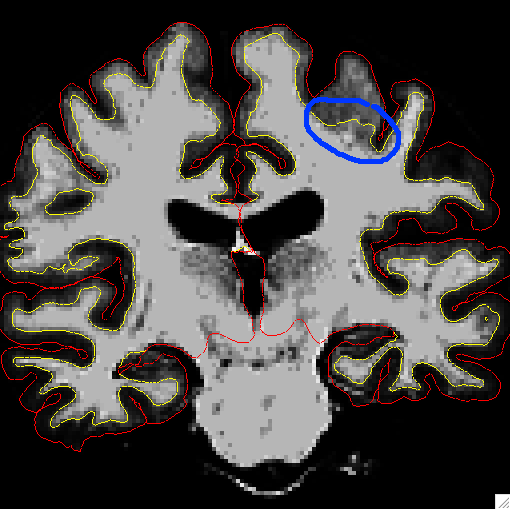
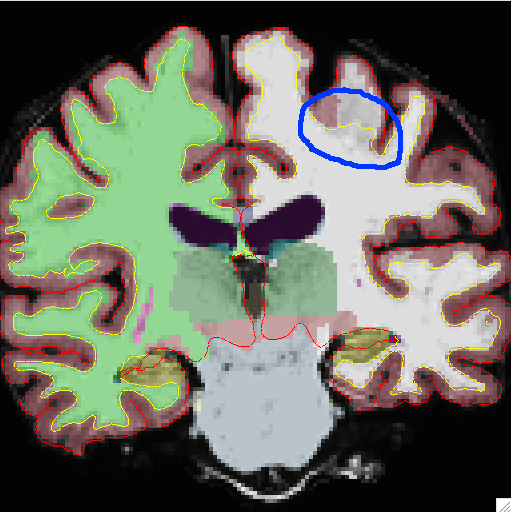
I would like a second eye on my decision to edit wm.mgz. I think that the boundary between the gray and the white is unrealistic (e.g. Coronal.png). Furthermore, there is a discrepancy between -surfs and -surfs -aseg (e.g. attached coronal_aseg.png).
If I indeed need to edit these slices, which way is more preferable, adding voxels or control points?
Thank you very much!
Sincerely, Ye
Dear Freesurfers,
My first attempt of this message somehow didn't make it to the mailing archive. In case it didn't go through, I am sending it again. Sorry to bother you if you received the first message.
Two things I was wondering 1) Why do the surfaces shown in the left and right panels disagree? (The right one has a lot more white matter). 2) Do I need to edit the white matter? It seems unreasonable to have +8mm thick of grey matter. If so, I will probably paint more voxels to wm.mgz.
Thank you very much!
Sincerely, Ye
On Wed, Jul 3, 2013 at 4:33 PM, ye tian tianye730@gmail.com wrote:
Dear freesurfers,
I would like a second eye on my decision to edit wm.mgz. I think that the boundary between the gray and the white is unrealistic (e.g. Coronal.png). Furthermore, there is a discrepancy between -surfs and -surfs -aseg (e.g. attached coronal_aseg.png).
If I indeed need to edit these slices, which way is more preferable, adding voxels or control points?
Thank you very much!
Sincerely, Ye
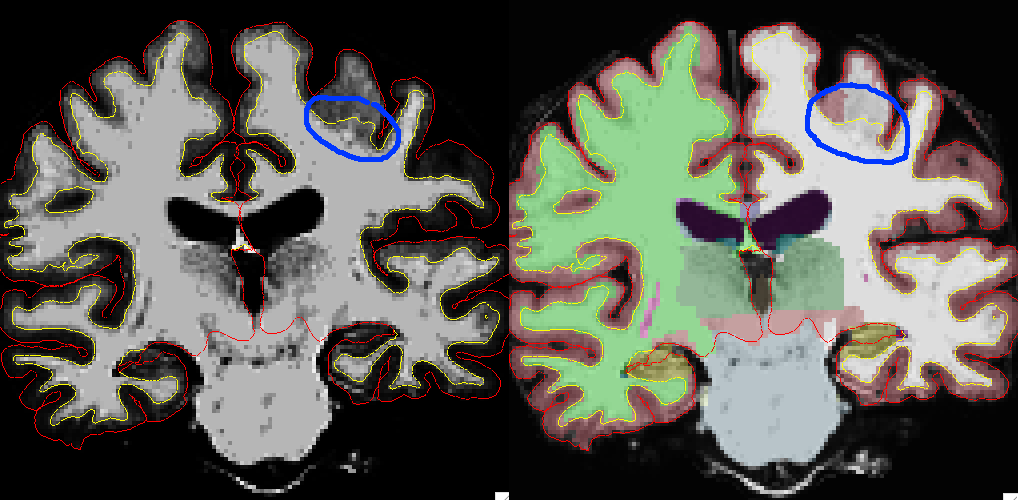

1) The right panel shows the aseg voxels. The surfaces are the same in L and R panels. 2) What do the surrounding slices look like? It may be that the WM surface "fills in" more as you go along.
________________________________________ From: freesurfer-bounces@nmr.mgh.harvard.edu [freesurfer-bounces@nmr.mgh.harvard.edu] on behalf of ye tian [tianye730@gmail.com] Sent: Thursday, July 04, 2013 11:52 AM To: Freesurfer Subject: Re: [Freesurfer] Painting voxels vs. adding control points
Dear Freesurfers,
My first attempt of this message somehow didn't make it to the mailing archive. In case it didn't go through, I am sending it again. Sorry to bother you if you received the first message.
Two things I was wondering 1) Why do the surfaces shown in the left and right panels disagree? (The right one has a lot more white matter). 2) Do I need to edit the white matter? It seems unreasonable to have +8mm thick of grey matter. If so, I will probably paint more voxels to wm.mgz.
Thank you very much!
Sincerely, Ye
On Wed, Jul 3, 2013 at 4:33 PM, ye tian <tianye730@gmail.commailto:tianye730@gmail.com> wrote: Dear freesurfers,
I would like a second eye on my decision to edit wm.mgz. I think that the boundary between the gray and the white is unrealistic (e.g. Coronal.png). Furthermore, there is a discrepancy between -surfs and -surfs -aseg (e.g. attached coronal_aseg.png).
If I indeed need to edit these slices, which way is more preferable, adding voxels or control points?
Thank you very much!
Sincerely, Ye

Hi Ye
one is surface-based and the other is voxel-based. It's impossible to tell which is correct from just a single slice. If you upload the entire subject directory to our ftp server and give us the voxel coords of that point we will take a look
cheers Bruce On Thu, 4 Jul 2013, ye tian wrote:
Dear Freesurfers, My first attempt of this message somehow didn't make it to the mailing archive. In case it didn't go through, I am sending it again. Sorry to bother you if you received the first message. Two things I was wondering
- Why do the surfaces shown in the left and right panels disagree? (The
right one has a lot more white matter). 2) Do I need to edit the white matter? It seems unreasonable to have +8mm thick of grey matter. If so, I will probably paint more voxels to wm.mgz. Thank you very much! Sincerely, Ye
On Wed, Jul 3, 2013 at 4:33 PM, ye tian tianye730@gmail.com wrote: Dear freesurfers, I would like a second eye on my decision to edit wm.mgz. I think that the boundary between the gray and the white is unrealistic (e.g. Coronal.png). Furthermore, there is a discrepancy between -surfs and -surfs -aseg (e.g. attached coronal_aseg.png).
If I indeed need to edit these slices, which way is more preferable, adding voxels or control points?
Thank you very much!
Sincerely, Ye
Dear Bruce and Christopher,
Thank you very much!
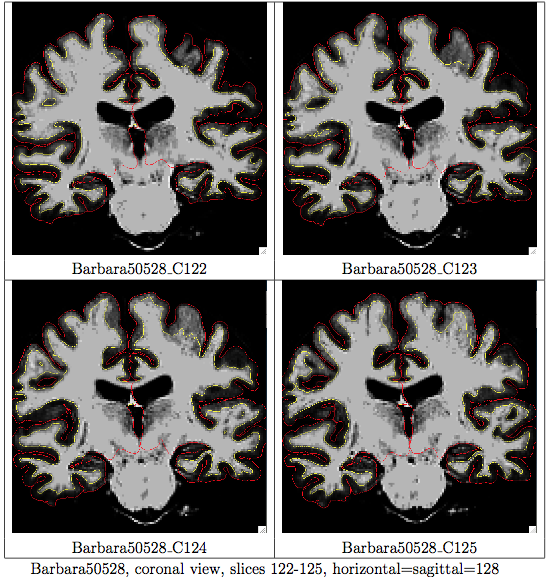
Yes, more white matter starts filling in afterwards. I am attaching the first slice from which the problem starts to the first slice where the problem is gone (4 total in Surfs.png).
I have trouble retrieving voxel coordinates. The command *tkmedit subject orig.mgz -reg register.dat -ov mov.nii -surfs* returns Error: can not find overlay reg register.dat
Is it okay if I just click on the yellow surface and write down the "volume index" under "cursor" in tkmedit tool box?
Sincerely, Ye
On Thu, Jul 4, 2013 at 11:32 AM, Bruce Fischl fischl@nmr.mgh.harvard.eduwrote:
Hi Ye
one is surface-based and the other is voxel-based. It's impossible to tell which is correct from just a single slice. If you upload the entire subject directory to our ftp server and give us the voxel coords of that point we will take a look
cheers Bruce
On Thu, 4 Jul 2013, ye tian wrote:
Dear Freesurfers,
My first attempt of this message somehow didn't make it to the mailing archive. In case it didn't go through, I am sending it again. Sorry to bother you if you received the first message.
Two things I was wondering
- Why do the surfaces shown in the left and right panels disagree? (The
right one has a lot more white matter). 2) Do I need to edit the white matter? It seems unreasonable to have +8mm thick of grey matter. If so, I will probably paint more voxels to wm.mgz.
Thank you very much!
Sincerely, Ye
On Wed, Jul 3, 2013 at 4:33 PM, ye tian tianye730@gmail.com wrote: Dear freesurfers, I would like a second eye on my decision to edit wm.mgz. I think that the boundary between the gray and the white is unrealistic (e.g. Coronal.png). Furthermore, there is a discrepancy between -surfs and -surfs -aseg (e.g. attached coronal_aseg.png).
If I indeed need to edit these slices, which way is more preferable, adding voxels or control points?
Thank you very much!
Sincerely, Ye
The information in this e-mail is intended only for the person to whom it is addressed. If you believe this e-mail was sent to you in error and the e-mail contains patient information, please contact the Partners Compliance HelpLine at http://www.partners.org/**compliancelinehttp://www.partners.org/complianceline. If the e-mail was sent to you in error but does not contain patient information, please contact the sender and properly dispose of the e-mail.
Dear Bruce and Freesurfers,
I am sorry that I am asking you this question, but I have trouble uploading my directory to freesurfer's ftp. I have tried the following
1. put /Path_to_subject/subjectDirectory ----> local: not a plain file 2. put -r /Path_to_subject/subjectDirectory ----> remote: Can't open '-r': No such file or directory 3. mput /Path_to_subject/subjectDirectory ----> [anpqy?] y ----> not a plain file 4. scp -r ytian@university.edu:~/Path_to_subject/subjectDirectory ----> ?Invalid command 5. I compressed the subject directory into subject.zip. *put subject.zip *----> local: Entering extended passive mode; could not create file
Is there any other way to upload a file to ftp without manually "put" all the files in the directories and subdirectories one by one?
I know that this question is unrelated to freesurfer, but I really appreciate it if someone can get me unstuck.
Thank you all for being so patient with me.
Sincerely, Ye
On Thu, Jul 4, 2013 at 2:35 PM, ye tian tianye730@gmail.com wrote:
Dear Bruce and Christopher,
Thank you very much!
Yes, more white matter starts filling in afterwards. I am attaching the first slice from which the problem starts to the first slice where the problem is gone (4 total in Surfs.png).
I have trouble retrieving voxel coordinates. The command *tkmedit subject orig.mgz -reg register.dat -ov mov.nii -surfs* returns Error: can not find overlay reg register.dat
Is it okay if I just click on the yellow surface and write down the "volume index" under "cursor" in tkmedit tool box?
Sincerely, Ye
On Thu, Jul 4, 2013 at 11:32 AM, Bruce Fischl fischl@nmr.mgh.harvard.eduwrote:
Hi Ye
one is surface-based and the other is voxel-based. It's impossible to tell which is correct from just a single slice. If you upload the entire subject directory to our ftp server and give us the voxel coords of that point we will take a look
cheers Bruce
On Thu, 4 Jul 2013, ye tian wrote:
Dear Freesurfers,
My first attempt of this message somehow didn't make it to the mailing archive. In case it didn't go through, I am sending it again. Sorry to bother you if you received the first message.
Two things I was wondering
- Why do the surfaces shown in the left and right panels disagree? (The
right one has a lot more white matter). 2) Do I need to edit the white matter? It seems unreasonable to have +8mm thick of grey matter. If so, I will probably paint more voxels to wm.mgz.
Thank you very much!
Sincerely, Ye
On Wed, Jul 3, 2013 at 4:33 PM, ye tian tianye730@gmail.com wrote: Dear freesurfers, I would like a second eye on my decision to edit wm.mgz. I think that the boundary between the gray and the white is unrealistic (e.g. Coronal.png). Furthermore, there is a discrepancy between -surfs and -surfs -aseg (e.g. attached coronal_aseg.png).
If I indeed need to edit these slices, which way is more preferable, adding voxels or control points?
Thank you very much!
Sincerely, Ye
The information in this e-mail is intended only for the person to whom it is addressed. If you believe this e-mail was sent to you in error and the e-mail contains patient information, please contact the Partners Compliance HelpLine at http://www.partners.org/**compliancelinehttp://www.partners.org/complianceline. If the e-mail was sent to you in error but does not contain patient information, please contact the sender and properly dispose of the e-mail.
Dear Bruce and freesurfers,
Someone has suggested to me that my problem is a result of the poor resolution of the original MPRAGE data. If I know that my volume index of a problematic point is (152,91,124), how can I map it onto my original MPRAGE data and check?
Thank you very much!
Sincerely, Ye
On Thu, Jul 4, 2013 at 4:40 PM, ye tian tianye730@gmail.com wrote:
Dear Bruce and Freesurfers,
I am sorry that I am asking you this question, but I have trouble uploading my directory to freesurfer's ftp. I have tried the following
- put /Path_to_subject/subjectDirectory ----> local: not a plain file
- put -r /Path_to_subject/subjectDirectory ----> remote: Can't open '-r': No such file or directory
- mput /Path_to_subject/subjectDirectory ----> [anpqy?] y ----> not a plain file
- scp -r ytian@university.edu:~/Path_to_subject/subjectDirectory
----> ?Invalid command 5. I compressed the subject directory into subject.zip. *put subject.zip *----> local: Entering extended passive mode; could not create file
Is there any other way to upload a file to ftp without manually "put" all the files in the directories and subdirectories one by one?
I know that this question is unrelated to freesurfer, but I really appreciate it if someone can get me unstuck.
Thank you all for being so patient with me.
Sincerely, Ye
On Thu, Jul 4, 2013 at 2:35 PM, ye tian tianye730@gmail.com wrote:
Dear Bruce and Christopher,
Thank you very much!
Yes, more white matter starts filling in afterwards. I am attaching the first slice from which the problem starts to the first slice where the problem is gone (4 total in Surfs.png).
I have trouble retrieving voxel coordinates. The command *tkmedit subject orig.mgz -reg register.dat -ov mov.nii -surfs* returns Error: can not find overlay reg register.dat
Is it okay if I just click on the yellow surface and write down the "volume index" under "cursor" in tkmedit tool box?
Sincerely, Ye
On Thu, Jul 4, 2013 at 11:32 AM, Bruce Fischl <fischl@nmr.mgh.harvard.edu
wrote:
Hi Ye
one is surface-based and the other is voxel-based. It's impossible to tell which is correct from just a single slice. If you upload the entire subject directory to our ftp server and give us the voxel coords of that point we will take a look
cheers Bruce
On Thu, 4 Jul 2013, ye tian wrote:
Dear Freesurfers,
My first attempt of this message somehow didn't make it to the mailing archive. In case it didn't go through, I am sending it again. Sorry to bother you if you received the first message.
Two things I was wondering
- Why do the surfaces shown in the left and right panels disagree? (The
right one has a lot more white matter). 2) Do I need to edit the white matter? It seems unreasonable to have +8mm thick of grey matter. If so, I will probably paint more voxels to wm.mgz.
Thank you very much!
Sincerely, Ye
On Wed, Jul 3, 2013 at 4:33 PM, ye tian tianye730@gmail.com wrote: Dear freesurfers, I would like a second eye on my decision to edit wm.mgz. I think that the boundary between the gray and the white is unrealistic (e.g. Coronal.png). Furthermore, there is a discrepancy between -surfs and -surfs -aseg (e.g. attached coronal_aseg.png).
If I indeed need to edit these slices, which way is more preferable, adding voxels or control points?
Thank you very much!
Sincerely, Ye
The information in this e-mail is intended only for the person to whom it is addressed. If you believe this e-mail was sent to you in error and the e-mail contains patient information, please contact the Partners Compliance HelpLine at http://www.partners.org/**compliancelinehttp://www.partners.org/complianceline. If the e-mail was sent to you in error but does not contain patient information, please contact the sender and properly dispose of the e-mail.
freesurfer@nmr.mgh.harvard.edu
-
 Bruce Fischl
 -
 Watson, Christopher
 -
 ye tian