
External Email - Use Caution
If you boot into recovery mode, there is an fsck option available there you can try. I will send some screenshots of booting into recovery mode to your email directly. - R.
On Jun 14, 2022, at 21:06, Joanna L Eckhardt <jeckhardt@health.ucsd.edu> wrote: External Email - Use Caution Dear FS Help Team, I run FS on Ubuntu VM Virtualbox 6.1 on Windows. Out of nowhere, my Virtualbox is no longer opening and has errors. See screenshots below. First screen looks like this upon launching the Virtualbox and so I click Ubuntu and then it shows the error /dev/sda1 contains a file system with errors, check forced. I tried doing a website fix that I found online: fsck -f /dev/sda1 but it did not work. Do you have any insights on how to resolve this issue? Thank you very much for your time and assistance!All my best,Joanna <image.png><image.png>Joanna EckhardtNeurosciences Graduate ProgramUniversity of California, San Diego_______________________________________________Freesurfer mailing listFreesurfer@nmr.mgh.harvard.eduhttps://mail.nmr.mgh.harvard.edu/mailman/listinfo/freesurfer%E2%80%8B

External Email - Use Caution
Hi R,
(I tried to reply in the other email thread with fsbuild@contbay.com but it said delivery failure with that email so I am responding here).
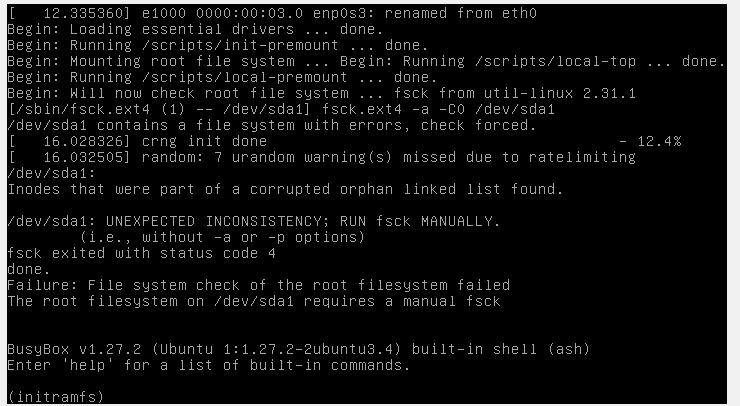
Thank you very much for your response. I was able to get through the first 2 recovery steps but on step 3, it failed, see screenshot below, with the error: "failure: file system check of the root filesystem failed...requires a manual fsck." Would you be able to help me attempt doing the manual fsck?
A few follow up questions:
* I would be fine with making a new VM image, but would that delete all of my current files in the VM? I have some processed scans that are not backed up to my windows drive (from now on, I will make sure to back them up knowing this could happen). * I'll make sure to use the "shutdown signal" button when exiting from now on, as I have always used "power off the machine." Also, I do share a location/path between Windows file system and VM, as this is how I get my processed scans from open science grid (which sends output to windows) onto the VM. If sharing a path between the two could be corrupting the VM, is there another way to get files between them? Also, I am unsure if this is worth mentioning, but the shared path disappears every time I reboot the VM, so I have been just remounting it when I need to fileshare.
Thank you for your time and assistance, Joanna
[cid:ca38917a-754a-4822-a924-a46129590ed7]
--
Joanna Eckhardt
Neurosciences Graduate Program
University of California, San Diego
________________________________ From: freesurfer-bounces@nmr.mgh.harvard.edu freesurfer-bounces@nmr.mgh.harvard.edu on behalf of fsbuild fsbuild@contbay.com Sent: Tuesday, June 14, 2022 8:08 PM To: freesurfer@nmr.mgh.harvard.edu freesurfer@nmr.mgh.harvard.edu Cc: Joanna L Eckhardt jeckhardt@health.ucsd.edu Subject: Re: [Freesurfer] Ubuntu VM Error - /dev/sda1 contains a file system with errors
External Email - Use Caution
If you boot into recovery mode, there is an fsck option available there you can try. I will send some screenshots of booting into recovery mode to your email directly.
- R.
On Jun 14, 2022, at 21:06, Joanna L Eckhardt jeckhardt@health.ucsd.edu wrote:
External Email - Use Caution
Dear FS Help Team,
I run FS on Ubuntu VM Virtualbox 6.1 on Windows. Out of nowhere, my Virtualbox is no longer opening and has errors. See screenshots below. First screen looks like this upon launching the Virtualbox and so I click Ubuntu and then it shows the error /dev/sda1 contains a file system with errors, check forced. I tried doing a website fix that I found online: fsck -f /dev/sda1 but it did not work. Do you have any insights on how to resolve this issue?
Thank you very much for your time and assistance!
All my best, Joanna <image.png> <image.png>
Joanna Eckhardt Neurosciences Graduate Program University of California, San Diego _______________________________________________ Freesurfer mailing list Freesurfer@nmr.mgh.harvard.edumailto:Freesurfer@nmr.mgh.harvard.edu MailScanner has detected a possible fraud attempt from "secure-web.cisco.com" claiming to be https://secure-web.cisco.com/1LpSkCGasUIrUHfaJMTa3xpFoDnPUHqfry7UlaaCNhxsqdD...https://secure-web.cisco.com/1Y01H6MsfIlCCEIUP4xAo1ewsc6Tl0PFqRI6a7cuO7oQT9wmhb3BB-MMVhS5HIt4yrUbZIT4CtszGGAcwX5kM8cIAmh-0p2kdeSt9s36UF37nFAjE0BsWFDTlu-H_deELeX76UKtAob9G-rvwMQW4XLD3wZGrbWaa6tAvuWwNbWOVyBTU64puzUeBntIOd84NDdS6JP-Ztr9bd-4cdT2NQ_TZ2CDhkqrw-dEaYud8XY0pL9tstw6XFgeEt6A-T5V-i3f5CuWUSDaPjiws6oi2IfyTSy474lRQ0k3t9TJQnIAvr9M-0GdpNL5MJwIYX6i5B3d2dy3J0I2aH5KrDLOBVA/https%3A%2F%2Furldefense.com%2Fv3%2F__https%3A%2F%2Fsecure-web.cisco.com%2F1oTT32XvJPdDRMuvLuxJNWXDftuN_wh_oR3bsi4eMV9j-NUMfqGVW7nzNI8-lhcHNOB9e7AZaSIfz0BjwpuC13nKefFE69eQobckOJxfoYNdNlGqvVMFhh0i9z1naWg1uo6nB0uyUOnpJEuGYV6Q_7CJwyLsjlphRRVQa7jVHLkm-AgZ0Rx1hMjq-lHZLwrih6dPM3i9pWUCN0-LI4X2umzQIqhB-YV8LhZDygYS58yzan368pZL6m49G8nzpLUTaTjTIBWlbiha1DU48YtlL6GyDapzibiEEhT7mnFOqnZFk_nMLBqG_blBFjIt7JI9Q%2Fhttps*3A*2F*2Fmail.nmr.mgh.harvard.edu*2Fmailman*2Flistinfo*2Ffreesurfer__;JSUlJSUl!!Mih3wA!D2QfdCVWuKMOc516eihw0e_LN2HnP_jQlaPC7XV2NG2_9Xe0mJ0UkQItSSWzQOa3hFHzdcQNrU60ygJDcdk$
freesurfer@nmr.mgh.harvard.edu
-
 fsbuild
 -
 Joanna L Eckhardt