
External Email - Use Caution
Hi,
Thanks for your email.
I checked the space:
And I also made an empty file as you advised. Is there any specific reason to create this new empty file? Should I move the previous recon-all files to this new folder to successfully view them via freeview?
I’ll have to get into the previous subjects_dir to select specific MRI file to view unless I move them or re-do the recon-all process to the newly created empty folder, right?
Thank you.
H
From: fsbuild <fsbuild@contbay.com mailto:fsbuild@contbay.com > Sent: Tuesday, April 19, 2022 12:40 PM To: freesurfer@nmr.mgh.harvard.edu mailto:freesurfer@nmr.mgh.harvard.edu Cc: hyejung7890@amc.seoul.kr mailto:hyejung7890@amc.seoul.kr Subject: Re: [Freesurfer] Failed to load MRI error
You could try checking some things with these commands,
$ cd /Applications/freesurfer/7.2.0
$ df -h .
Under the column “Avail” it will list how much free disk space you have available. If you are running out of disk space then maybe deleting files you don’t need from your Downloads folder will free up some disk space. (It’s a good idea to keep at least 10G of free space available on your boot drive for MacOS and many people keep 20G - 30G free).
See if you can create a new empty file under that location with,
$ touch /Applications/freesurfer/7.2.0/subjects/211025/empty_file
Without write permission that will fail, and you will probably need to preface the command with “sudo” for it to work and then authenticate with your password. Once your sudo privileges expire, you won’t be able to write files there until you sudo again.
So some users create a new subdirectory for subjects in a location where they always have write permission, like their home subdirectory. For example,
$ cd $HOME
$ mkdir -p subjects/211025
… copy in whatever files you need to that new location and then …
$ export SUBJECTS_DIR=$HOME/subjects/211025
You would need to always set that in your environment to override the default SUBEJCTS_DIR location of /Applications/freesurfer/7.2..0/subjects
- R.
On Apr 18, 2022, at 20:02, HYE JUNG YOUN <hyejung7890@amc.seoul.kr mailto:hyejung7890@amc.seoul.kr > wrote:
External Email - Use Caution
Hi Bruce,
Do you mean that I should re-do the recon-all process?
I tried to re run freeview but it did not work. And Yes I think the files have been overwritten at some point which I am trying to figure out to avoid making the same mistake in the future.
However, the question is I have done the exact same process I always did to view mri files on freeview. I have set and used the same subject directory, used the same code, and etc.
Here’s the code I used:
<image004.png>
Which gives me this:
<image005.png>
Then, when I check mri folder, notice the selected files have been overwritten (I think) and are shown as 0 byte in size.
<image006.png>
Can you see where I went wrong to overwrite those files?
Thank you for your help.
Best, H
From: mailto:freesurfer-bounces@nmr.mgh.harvard.edu freesurfer-bounces@nmr.mgh.harvard.edu < mailto:freesurfer-bounces@nmr.mgh.harvard.edu freesurfer-bounces@nmr.mgh.harvard.edu> On Behalf Of Fischl, Bruce Sent: Monday, April 18, 2022 10:35 PM To: Freesurfer support list < mailto:freesurfer@nmr.mgh.harvard.edu freesurfer@nmr.mgh.harvard.edu> Subject: Re: [Freesurfer] Failed to load MRI error
Is this for a subject that you can’t load the wm.mgz for? It doesn’t show any errors. Is the wm.mgz zero length? I don’t see how those things can both be true unless you overwrote it at some point. If you haven’t manually edited this subject maybe you should just rerun it?
From: mailto:freesurfer-bounces@nmr.mgh.harvard.edu freesurfer-bounces@nmr.mgh.harvard.edu < mailto:freesurfer-bounces@nmr.mgh.harvard.edu freesurfer-bounces@nmr.mgh.harvard.edu> On Behalf Of HYE JUNG YOUN Sent: Monday, April 18, 2022 2:44 AM To: 'Freesurfer support list' < mailto:freesurfer@nmr.mgh.harvard.edu freesurfer@nmr.mgh..harvard.edu> Subject: Re: [Freesurfer] Failed to load MRI error
External Email - Use Caution
Hi Bruce,
Please find the attached log file.
Thanks.
H
_______________________________________________ Freesurfer mailing list mailto:Freesurfer@nmr.mgh.harvard.edu Freesurfer@nmr.mgh.harvard.edu https://secure-web.cisco.com/1lbYaY5CGlZ9b-xDOPo18Ud8lnTXespGfJOrr-fPro1AbjPKtxOmUSoPS_ckfRQ5ob6ckmwdNQBpMe-iS0uFDUYo25D0RzGopvoeXraujE7Ygv29cQnoKOChXIgaK7cPGsosyhzvUcaWhetHAQcdXORDjgPRgt4QRQIzjXG9q3_bLg2YF1xfX-Rr6QCXvEd50Akxkt_ynVtASpj9CZQZVd1Yc-uRrmFxNqo-2n-UVnviUmkNqdKAIHmyOb7_NptxFy1NEOXdadRelJVDNhQAqsFwyVZE6o21L4_0m2VaeieyCq9Ojfsl0LOAsvZkW0-OkEHysGV2E80xh47Uw2BE9Qg/https%3A%2F%2Fmail.nmr.mgh.harvard.edu%2Fmailman%2Flistinfo%2Ffreesurfer https://secure-web.cisco.com/1lbYaY5CGlZ9b-xDOPo18Ud8lnTXespGfJOrr-fPro1AbjP...
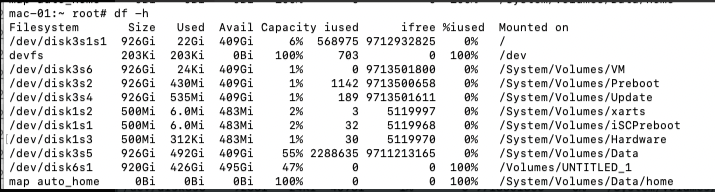

That was to see if you had permission to create files, which it seems like you do. My advice is to rerun one of the subjects that you had this failure on from scratch and see if you can replicate it. If not, maybe there was a network or disk issue that has been resolved.
Cheers Bruce
From: freesurfer-bounces@nmr.mgh.harvard.edu freesurfer-bounces@nmr.mgh.harvard.edu On Behalf Of HYE JUNG YOUN Sent: Wednesday, April 20, 2022 1:50 AM To: 'Freesurfer support list' freesurfer@nmr.mgh.harvard.edu Subject: Re: [Freesurfer] Failed to load MRI error
External Email - Use Caution Hi,
Thanks for your email.
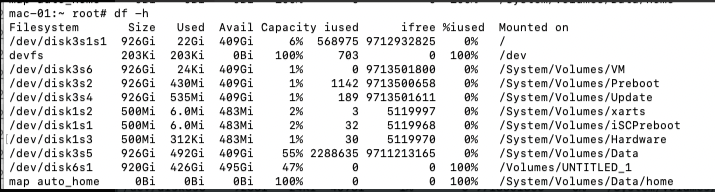
I checked the space: [cid:image001.png@01D854C3.F531B0E0]
And I also made an empty file as you advised. Is there any specific reason to create this new empty file? Should I move the previous recon-all files to this new folder to successfully view them via freeview? I’ll have to get into the previous subjects_dir to select specific MRI file to view unless I move them or re-do the recon-all process to the newly created empty folder, right?
Thank you.
H From: fsbuild <fsbuild@contbay.commailto:fsbuild@contbay.com> Sent: Tuesday, April 19, 2022 12:40 PM To: freesurfer@nmr.mgh.harvard.edumailto:freesurfer@nmr.mgh.harvard.edu Cc: hyejung7890@amc.seoul.krmailto:hyejung7890@amc.seoul.kr Subject: Re: [Freesurfer] Failed to load MRI error
You could try checking some things with these commands,
$ cd /Applications/freesurfer/7.2.0
$ df -h .
Under the column “Avail” it will list how much free disk space you have available. If you are running out of disk space then maybe deleting files you don’t need from your Downloads folder will free up some disk space. (It’s a good idea to keep at least 10G of free space available on your boot drive for MacOS and many people keep 20G - 30G free).
See if you can create a new empty file under that location with,
$ touch /Applications/freesurfer/7.2.0/subjects/211025/empty_file
Without write permission that will fail, and you will probably need to preface the command with “sudo” for it to work and then authenticate with your password. Once your sudo privileges expire, you won’t be able to write files there until you sudo again.
So some users create a new subdirectory for subjects in a location where they always have write permission, like their home subdirectory. For example,
$ cd $HOME $ mkdir -p subjects/211025
… copy in whatever files you need to that new location and then …
$ export SUBJECTS_DIR=$HOME/subjects/211025
You would need to always set that in your environment to override the default SUBEJCTS_DIR location of /Applications/freesurfer/7.2..0/subjects
- R.
On Apr 18, 2022, at 20:02, HYE JUNG YOUN <hyejung7890@amc.seoul.krmailto:hyejung7890@amc.seoul.kr> wrote:
External Email - Use Caution
Hi Bruce,
Do you mean that I should re-do the recon-all process? I tried to re run freeview but it did not work. And Yes I think the files have been overwritten at some point which I am trying to figure out to avoid making the same mistake in the future.
However, the question is I have done the exact same process I always did to view mri files on freeview. I have set and used the same subject directory, used the same code, and etc. Here’s the code I used: <image004.png> Which gives me this: <image005.png>
Then, when I check mri folder, notice the selected files have been overwritten (I think) and are shown as 0 byte in size. <image006.png>
Can you see where I went wrong to overwrite those files?
Thank you for your help.
Best, H From: freesurfer-bounces@nmr.mgh.harvard.edumailto:freesurfer-bounces@nmr.mgh.harvard.edu <freesurfer-bounces@nmr.mgh.harvard.edumailto:freesurfer-bounces@nmr.mgh.harvard.edu> On Behalf Of Fischl, Bruce Sent: Monday, April 18, 2022 10:35 PM To: Freesurfer support list <freesurfer@nmr.mgh.harvard.edumailto:freesurfer@nmr.mgh.harvard.edu> Subject: Re: [Freesurfer] Failed to load MRI error
Is this for a subject that you can’t load the wm.mgz for? It doesn’t show any errors. Is the wm.mgz zero length? I don’t see how those things can both be true unless you overwrote it at some point. If you haven’t manually edited this subject maybe you should just rerun it?
From: freesurfer-bounces@nmr.mgh.harvard.edumailto:freesurfer-bounces@nmr.mgh.harvard.edu <freesurfer-bounces@nmr.mgh.harvard.edumailto:freesurfer-bounces@nmr.mgh.harvard.edu> On Behalf Of HYE JUNG YOUN Sent: Monday, April 18, 2022 2:44 AM To: 'Freesurfer support list' <freesurfer@nmr.mgh..harvard.edumailto:freesurfer@nmr.mgh.harvard.edu> Subject: Re: [Freesurfer] Failed to load MRI error
External Email - Use Caution Hi Bruce, Please find the attached log file.
Thanks.
H _______________________________________________ Freesurfer mailing list Freesurfer@nmr.mgh.harvard.edumailto:Freesurfer@nmr.mgh.harvard.edu MailScanner has detected a possible fraud attempt from "secure-web.cisco.com" claiming to be https://mail.nmr.mgh.harvard.edu/mailman/listinfo/freesurferhttps://secure-web.cisco.com/1lbYaY5CGlZ9b-xDOPo18Ud8lnTXespGfJOrr-fPro1AbjPKtxOmUSoPS_ckfRQ5ob6ckmwdNQBpMe-iS0uFDUYo25D0RzGopvoeXraujE7Ygv29cQnoKOChXIgaK7cPGsosyhzvUcaWhetHAQcdXORDjgPRgt4QRQIzjXG9q3_bLg2YF1xfX-Rr6QCXvEd50Akxkt_ynVtASpj9CZQZVd1Yc-uRrmFxNqo-2n-UVnviUmkNqdKAIHmyOb7_NptxFy1NEOXdadRelJVDNhQAqsFwyVZE6o21L4_0m2VaeieyCq9Ojfsl0LOAsvZkW0-OkEHysGV2E80xh47Uw2BE9Qg/https%3A%2F%2Fmail.nmr.mgh.harvard.edu%2Fmailman%2Flistinfo%2Ffreesurfer
freesurfer@nmr.mgh.harvard.edu
-
 Fischl, Bruce
 -
 HYE JUNG YOUN