
External Email - Use Caution
Hey!
I have recently started using FreeSurfer. I have encountered multiple errors over the past few days, and I would like to mention them all.
1. While testing the installation, the code ran for roughly 4-6 hours and generated the T1 and wm output images. The brainmask image failed to load even after multiple attempts. 2. We have patient data from a Seimens 1.5 T MRI machine. They are DICOM images (about 120-145 images). Running dcmunpack on the directory to locate the suitable T1 weighted image (to pass as the input image to freesurfer) returns an error message 'Element not found'. It fails to generate a list of usable input images. The log file also only mentions the error message. Basically, I am having trouble working with DICOM images using Freesurfer. Please advise me on how to go about it. 3. I tried using the dcm2nii tool on the DICOM images. The software gave out three (nearly identical) nii.gz files as output, each about 7 MB in size. I tried running reconstruction on all three one by one. Only the 'compressed' version output underwent reconstruction for a long time without giving any errors. However, the reconstruction process went on for 150 hours without completion. There were no errors during this time, and the mris_fix_topo process went on for about 74 hours until tonight. It was working on 'correcting defect 48' for most of this time, and then the PC suddenly stopped responding. The process had been utilizing 100% of the CPU and 87% of the RAM for a long time, but the computer was always responding. However it suddenly stopped responding after about 74 hours of mris_fix_topology process. My machine has 8 GB RAM and more than 3.4 GHz processing speed (Acer Veriton). 4. Previously, I tried running reconstruction on a different subject's data after converting it to nifti using dcm2niix. After 70 hours of execution, it terminated with an error which showed that the fsaverage folder was inaccessible. Further digging revealed that the folder was somehow pointing to itself. The original error said failed to read from the label file. I had to eventually reinstall FreeSurfer. 5. I tried running iElvis pipeline. After some time I got an error which said that the sphere.reg file couldn't be opened. I tried fixing this but nothing worked. I kept getting the error that lh.sphere.reg file could not be opened and so on.
Please help. I have been trying to run it for weeks now. I hope you will be able to address each of these problems soon.
Thank You
Sparsh

On 10/11/18 1:58 PM, Sparsh Jain wrote:
External Email - Use Caution
Hey!
I have recently started using FreeSurfer. I have encountered multiple errors over the past few days, and I would like to mention them all.
1. While testing the installation, the code ran for roughly 4-6 hours and generated the T1 and wm output images. The brainmask image failed to load even after multiple attempts. what does "failed to load" mean? Please be more specific, supplying command lines and terminal output 2. We have patient data from a Seimens 1.5 T MRI machine. They are DICOM images (about 120-145 images). Running dcmunpack on the directory to locate the suitable T1 weighted image (to pass as the input image to freesurfer) returns an error message 'Element not found'. It fails to generate a list of usable input images. The log file also only mentions the error message. Basically, I am having trouble working with DICOM images using Freesurfer. Please advise me on how to go about it. This usually means that some part of the DICOM that dcmunpack expects is not there. Again, command line and terminal output would be helpful. 3. I tried using the dcm2nii tool on the DICOM images. The software gave out three (nearly identical) nii.gz files as output, each about 7 MB in size. I tried running reconstruction on all three one by one. Only the 'compressed' version output underwent reconstruction for a long time without giving any errors. However, the reconstruction process went on for 150 hours without completion. There were no errors during this time, and the mris_fix_topo process went on for about 74 hours until tonight. It was working on 'correcting defect 48' for most of this time, and then the PC suddenly stopped responding. The process had been utilizing 100% of the CPU and 87% of the RAM for a long time, but the computer was always responding. However it suddenly stopped responding after about 74 hours of mris_fix_topology process. My machine has 8 GB RAM and more than 3.4 GHz processing speed (Acer Veriton). I don't know what is going on here. Did you look at the nii.gz file in freeview to make sure that it looks ok. What is the size of the volume? 4. Previously, I tried running reconstruction on a different subject's data after converting it to nifti using dcm2niix. After 70 hours of execution, it terminated with an error which showed that the fsaverage folder was inaccessible. Further digging revealed that the folder was somehow pointing to itself. The original error said failed to read from the label file. I had to eventually reinstall FreeSurfer. I don't know how that happened. 5. I tried running iElvis pipeline. After some time I got an error which said that the sphere.reg file couldn't be opened. I tried fixing this but nothing worked. I kept getting the error that lh.sphere.reg file could not be opened and so on. I don't know anything about iElvis
Please help. I have been trying to run it for weeks now. I hope you will be able to address each of these problems soon.
Thank You
Sparsh
_______________________________________________ Freesurfer mailing list Freesurfer@nmr.mgh.harvard.edumailto:Freesurfer@nmr.mgh.harvard.edu https://mail.nmr.mgh.harvard.edu/mailman/listinfo/freesurfer
External Email - Use Caution
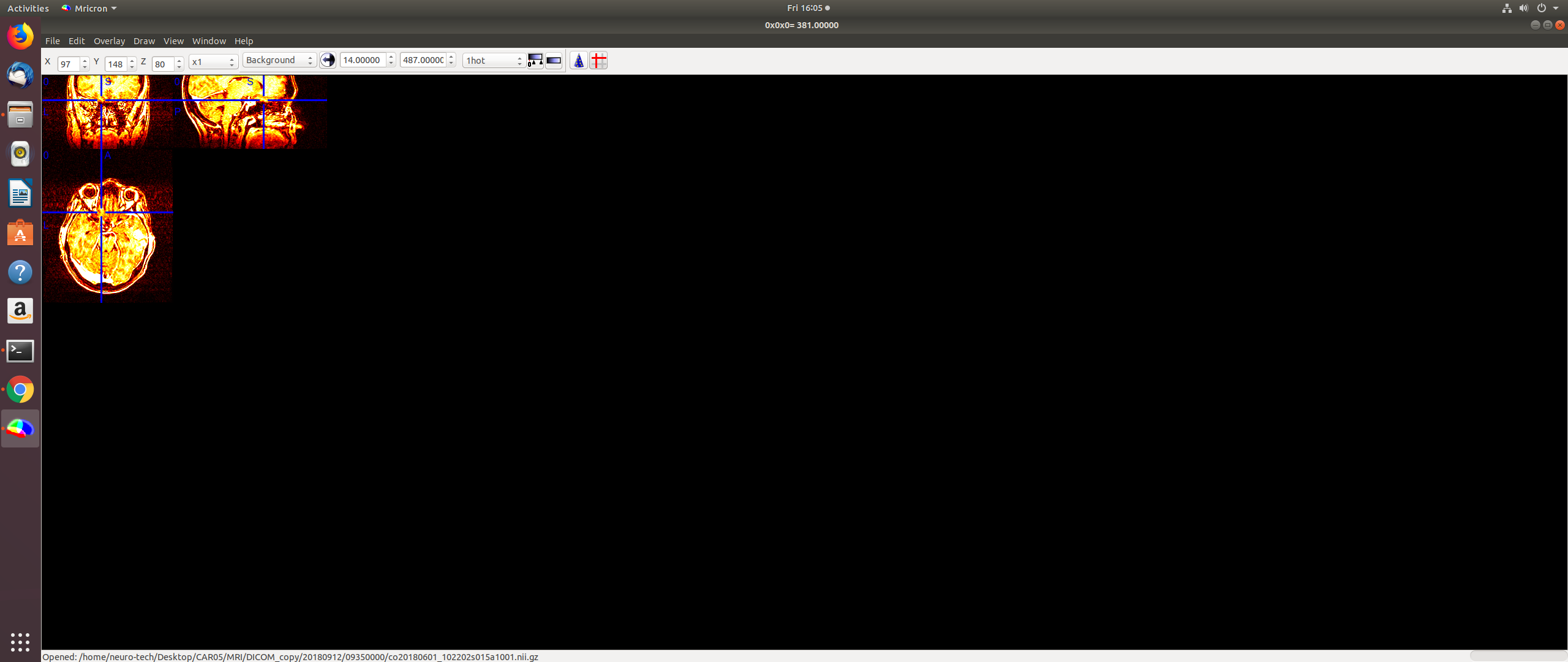
1. The brainmask.mgz file could not be opened by freesurfer. It was not empty, but it could not be read. 2. Please look at the dcmunpack file attached to this mail. It contains the command line and error message that I got. I tried running dcmunpack on three different subjects and I got the same/similar error in each case. 3. The size of the converted nii.gz file is about 9 MB. I looked at the file through freeview. The top part of the head is chopped off. I've attached the screenshot to this mail. I looked at the nii.gz files for my two other subjects and they seem to be okay. The 'chopped' subject has 120 dicom images, whereas the other two subjects have 144 and 176 images respectively. Is this relevant in any way? The MPRAGE sequence was performed for all three of them.
I have also attached the command line text (Freesurfer error log) which contained the error. This was generated when the reconstruction terminated abruptly after running for a few days.
4. Do I have to clean the freesurfer/subjects folder after every patient? I see that the fsaverage folder is present by default (after freesurfer installation). Does that folder keep getting overwritten in any way?
5. Okay, no problem!
Sparsh
On Fri, Oct 12, 2018 at 11:41 AM Greve, Douglas N.,Ph.D. < DGREVE@mgh.harvard.edu> wrote:
On 10/11/18 1:58 PM, Sparsh Jain wrote:
External Email - Use CautionHey!
I have recently started using FreeSurfer. I have encountered multiple errors over the past few days, and I would like to mention them all.
- While testing the installation, the code ran for roughly 4-6 hours and
generated the T1 and wm output images. The brainmask image failed to load even after multiple attempts.
what does "failed to load" mean? Please be more specific, supplying command lines and terminal output
- We have patient data from a Seimens 1.5 T MRI machine. They are DICOM
images (about 120-145 images). Running dcmunpack on the directory to locate the suitable T1 weighted image (to pass as the input image to freesurfer) returns an error message 'Element not found'. It fails to generate a list of usable input images. The log file also only mentions the error message. Basically, I am having trouble working with DICOM images using Freesurfer. Please advise me on how to go about it.
This usually means that some part of the DICOM that dcmunpack expects is not there. Again, command line and terminal output would be helpful.
- I tried using the dcm2nii tool on the DICOM images. The software gave
out three (nearly identical) nii.gz files as output, each about 7 MB in size. I tried running reconstruction on all three one by one. Only the 'compressed' version output underwent reconstruction for a long time without giving any errors. However, the reconstruction process went on for 150 hours without completion. There were no errors during this time, and the mris_fix_topo process went on for about 74 hours until tonight. It was working on 'correcting defect 48' for most of this time, and then the PC suddenly stopped responding. The process had been utilizing 100% of the CPU and 87% of the RAM for a long time, but the computer was always responding. However it suddenly stopped responding after about 74 hours of mris_fix_topology process. My machine has 8 GB RAM and more than 3.4 GHz processing speed (Acer Veriton).
I don't know what is going on here. Did you look at the nii.gz file in freeview to make sure that it looks ok. What is the size of the volume?
- Previously, I tried running reconstruction on a different subject's
data after converting it to nifti using dcm2niix. After 70 hours of execution, it terminated with an error which showed that the fsaverage folder was inaccessible. Further digging revealed that the folder was somehow pointing to itself. The original error said failed to read from the label file. I had to eventually reinstall FreeSurfer.
I don't know how that happened.
- I tried running iElvis pipeline. After some time I got an error which
said that the sphere.reg file couldn't be opened. I tried fixing this but nothing worked. I kept getting the error that lh.sphere.reg file could not be opened and so on.
I don't know anything about iElvis
Please help. I have been trying to run it for weeks now. I hope you will be able to address each of these problems soon.
Thank You
Sparsh
Freesurfer mailing listFreesurfer@nmr.mgh.harvard.eduhttps://mail.nmr.mgh.harvard.edu/mailman/listinfo/freesurfer
Freesurfer mailing list Freesurfer@nmr.mgh.harvard.edu https://mail.nmr.mgh.harvard.edu/mailman/listinfo/freesurfer
External Email - Use Caution
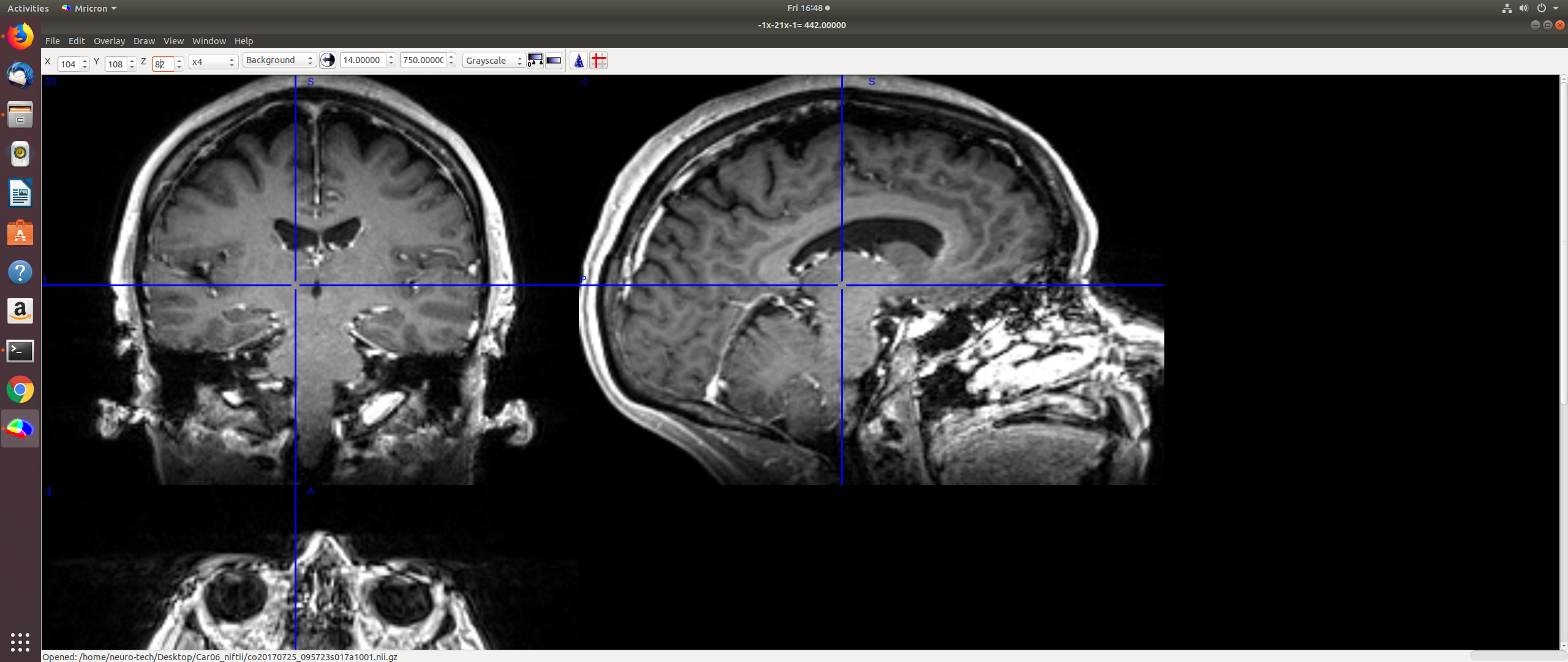
Hey Doug! I would like to show you the screenshots for my other two subjects. 1. [image: Screenshot from 2018-10-12 16-47-35.png]
[image: Screenshot from 2018-10-12 16-48-07.png]
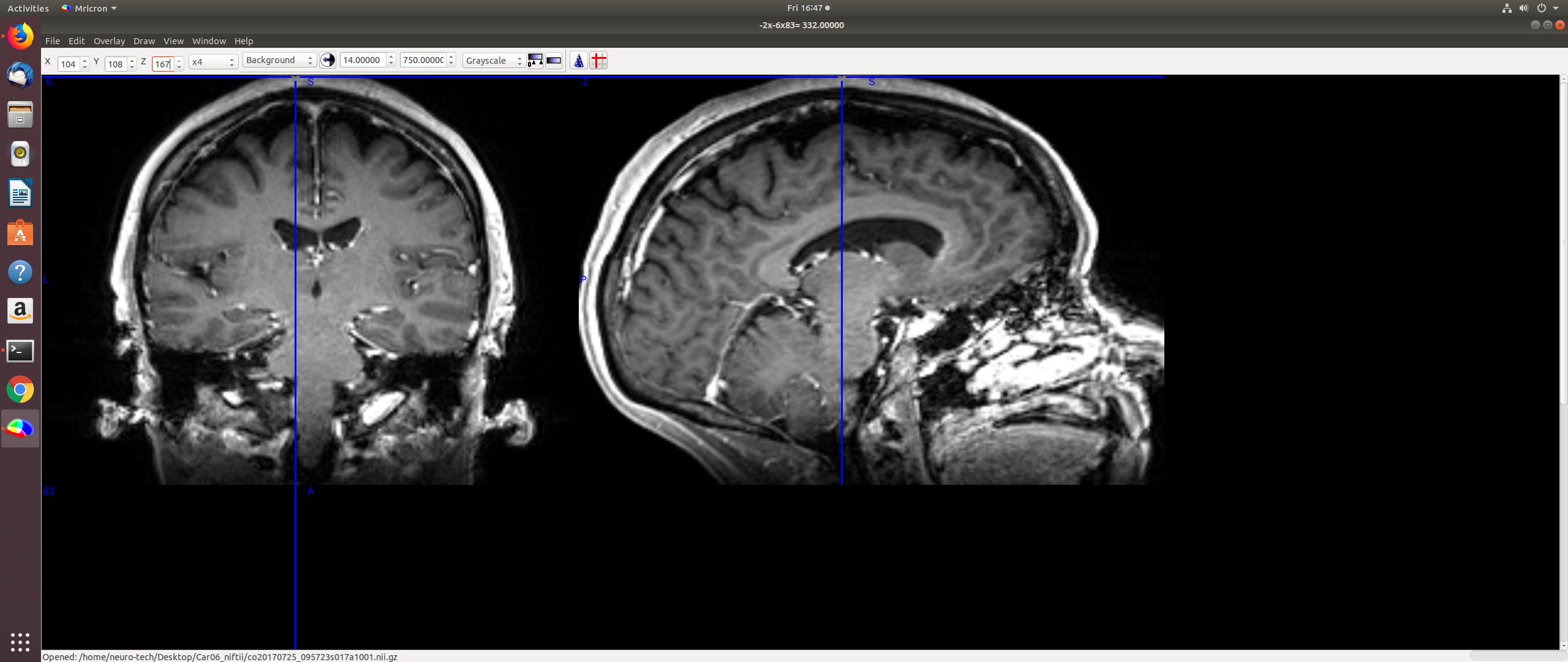
This is from the subject who has 176 dicom images in the mri scan. Reconstruction has been running on this particular subject for the past three hours and so far everything seems to be okay. Do you think that the skull is completely visible, for reconstruction purposes? The z value in the first image goes all the way up to 167.
2. [image: Screenshot from 2018-10-12 16-46-07.png]
[image: Screenshot from 2018-10-12 16-46-40.png]
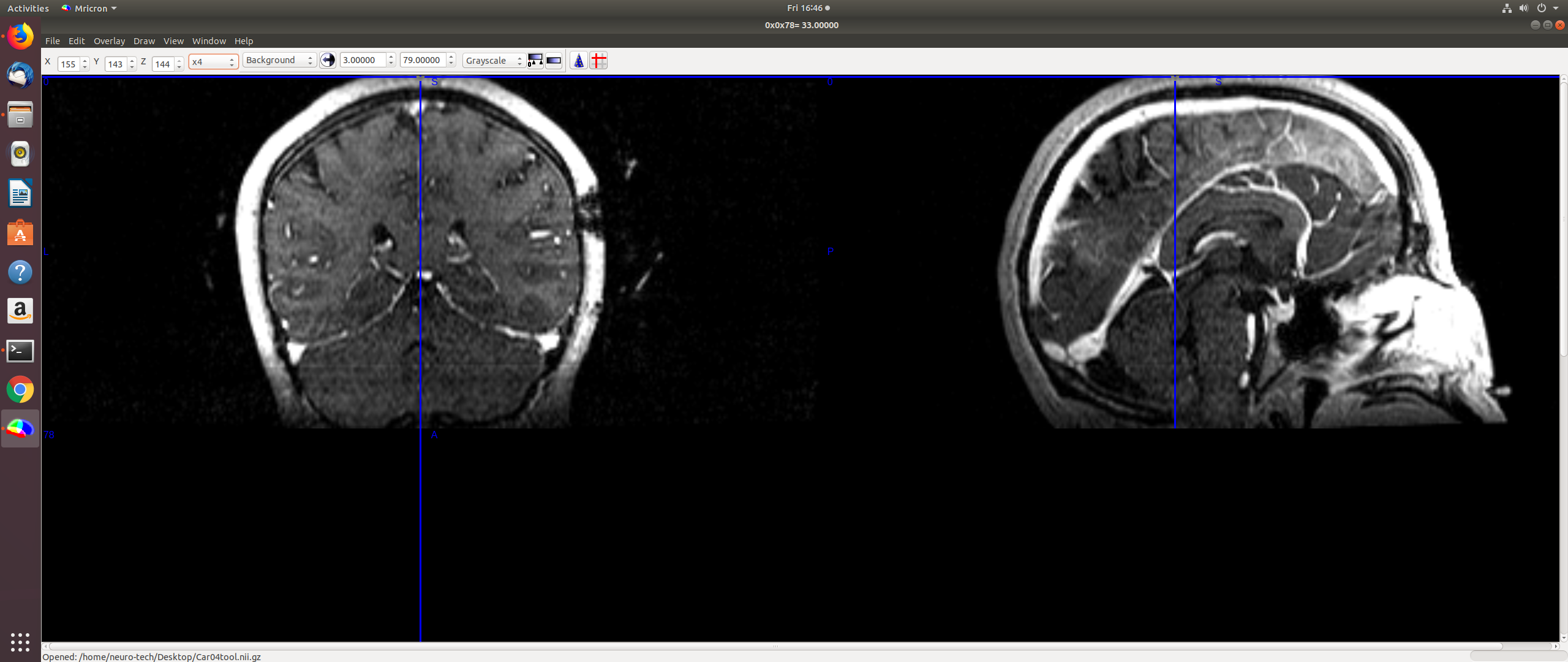
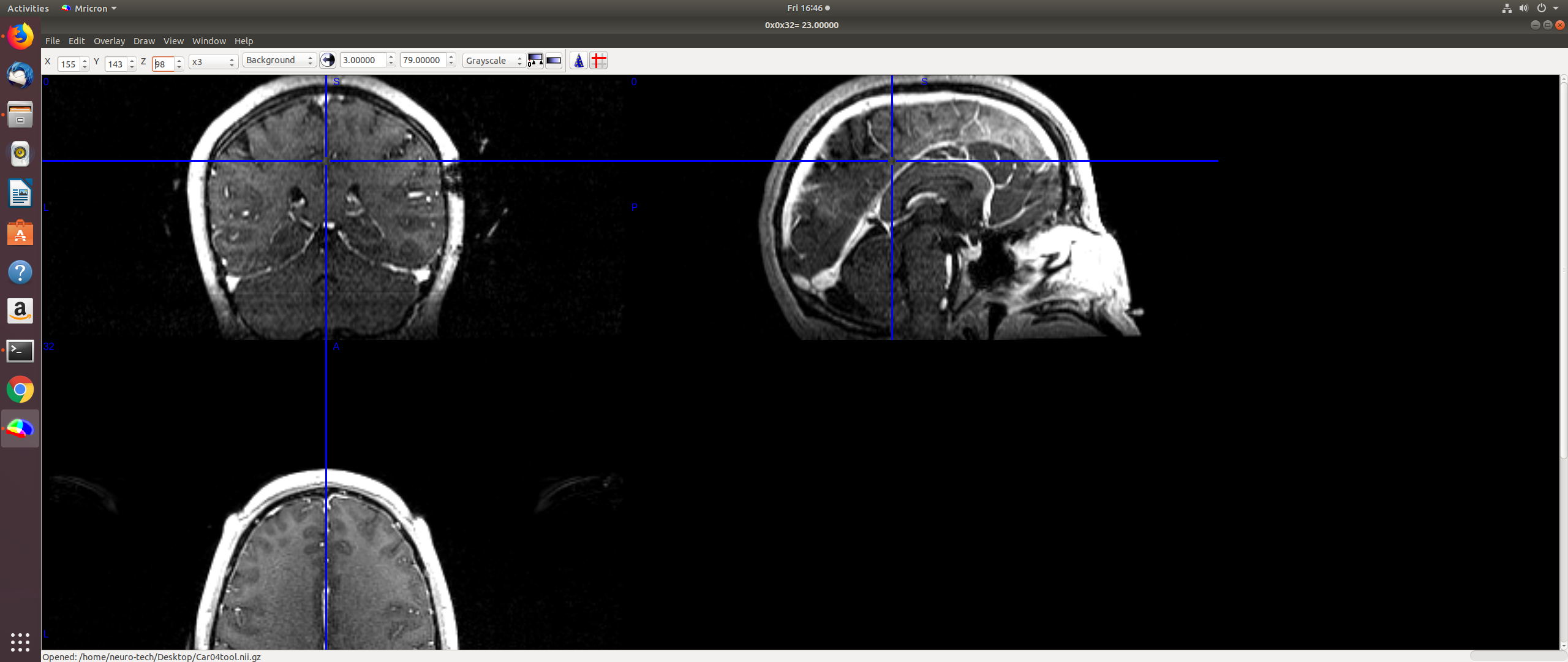
This is from the subject who has 144 dicom images. Note that the z value goes upto 144 (in the first screenshot for this). I began reconstruction on this subject an hour ago, but I kept getting an error (FOV 326> 256. Check orig.mgz to see if the head is fully visible.) :
*root@sparsh:/usr/local/freesurfer/subjects# recon-all -i Car04.nii.gz -s LOOK -all -localGISubject Stamp: freesurfer-Linux-centos6_x86_64-stable-pub-v6.0.0-2beb96cCurrent Stamp: freesurfer-Linux-centos6_x86_64-stable-pub-v6.0.0-2beb96cINFO: SUBJECTS_DIR is /usr/local/freesurfer/subjectsActual FREESURFER_HOME /usr/local/freesurferLinux sparsh 4.15.0-36-generic #39-Ubuntu SMP Mon Sep 24 16:19:09 UTC 2018 x86_64 x86_64 x86_64 GNU/Linux'/usr/local/freesurfer/bin/recon-all' -> '/usr/local/freesurfer/subjects/LOOK/scripts/recon-all.local-copy'/usr/local/freesurfer/subjects/LOOK mri_convert /usr/local/freesurfer/subjects/Car04.nii.gz /usr/local/freesurfer/subjects/LOOK/mri/orig/001.mgz mri_convert.bin /usr/local/freesurfer/subjects/Car04.nii.gz /usr/local/freesurfer/subjects/LOOK/mri/orig/001.mgz $Id: mri_convert.c,v 1.226 2016/02/26 16:15:24 mreuter Exp $reading from /usr/local/freesurfer/subjects/Car04.nii.gz...TR=10.00, TE=0.00, TI=0.00, flip angle=0.00i_ras = (-1, -4.897e-12, 0)j_ras = (4.897e-12, -1, 0)k_ras = (-0, -0, 1)writing to /usr/local/freesurfer/subjects/LOOK/mri/orig/001.mgz...#--------------------------------------------#@# MotionCor Fri Oct 12 16:26:17 EDT 2018Found 1 runs/usr/local/freesurfer/subjects/LOOK/mri/orig/001.mgzChecking for (invalid) multi-frame inputs...WARNING: only one run found. This is OK, but motioncorrection cannot be performed on one run, so I'llcopy the run to rawavg and continue. cp /usr/local/freesurfer/subjects/LOOK/mri/orig/001.mgz /usr/local/freesurfer/subjects/LOOK/mri/rawavg.mgz /usr/local/freesurfer/subjects/LOOK mri_convert /usr/local/freesurfer/subjects/LOOK/mri/rawavg.mgz /usr/local/freesurfer/subjects/LOOK/mri/orig.mgz --conform mri_convert.bin /usr/local/freesurfer/subjects/LOOK/mri/rawavg.mgz /usr/local/freesurfer/subjects/LOOK/mri/orig.mgz --conform WARNING ==================++++++++++++++++++++++++=======================================The physical sizes are (328.00 mm, 328.00 mm, 144.00 mm), which cannot fit in 256^3 mm^3 volume.The resulting volume will have 328 slices.If you find problems, please let us know (freesurfer@nmr.mgh.harvard.edu freesurfer@nmr.mgh.harvard.edu).==================================================++++++++++++++++++++++++===============$Id: mri_convert.c,v 1.226 2016/02/26 16:15:24 mreuter Exp $reading from /usr/local/freesurfer/subjects/LOOK/mri/rawavg.mgz...TR=10.00, TE=0.00, TI=0.00, flip angle=0.00i_ras = (-1, -4.897e-12, 0)j_ras = (4.897e-12, -1, 0)k_ras = (-0, -0, 1)changing data type from short to uchar (noscale = 0)...MRIchangeType: Building histogram Reslicing using trilinear interpolation writing to /usr/local/freesurfer/subjects/LOOK/mri/orig.mgz...****************************************ERROR! FOV=328.000 > 256Include the flag -cw256 with recon-all!Inspect orig.mgz to ensure the head is fully visible.*
So I re-ran the reconstruction command by including the -cw256 flag with recon-all. It has been processing without terminations for the last thirty minutes, and though it showed a 'talairach error detected' line, it didn't stop at that. I have included the log file till this minute with this mail. But I had run reconstruction on this subject using the -cv256 flag last week and that's when I eventually got the error mentioned in point 4. of my original mail. I attached that log file with my previous response.
How is the presence of the complete skull relevant to the reconstruction process. Since the skull stripping step gets rid of the skull anyway, our final output should not depend on the skull scans. So does the absence of the full skull on the scan really terminate the reconstruction process? Both these subjects have the full brain area visible on the images. Only a part of the outer skull is missing for one of them.
Thank You
Sparsh
On Fri, Oct 12, 2018 at 4:11 PM Sparsh Jain sparshj@vt.edu wrote:
- The brainmask.mgz file could not be opened by freesurfer. It was not
empty, but it could not be read. 2. Please look at the dcmunpack file attached to this mail. It contains the command line and error message that I got. I tried running dcmunpack on three different subjects and I got the same/similar error in each case. 3. The size of the converted nii.gz file is about 9 MB. I looked at the file through freeview. The top part of the head is chopped off. I've attached the screenshot to this mail. I looked at the nii.gz files for my two other subjects and they seem to be okay. The 'chopped' subject has 120 dicom images, whereas the other two subjects have 144 and 176 images respectively. Is this relevant in any way? The MPRAGE sequence was performed for all three of them.
I have also attached the command line text (Freesurfer error log) which contained the error. This was generated when the reconstruction terminated abruptly after running for a few days.
- Do I have to clean the freesurfer/subjects folder after every patient?
I see that the fsaverage folder is present by default (after freesurfer installation). Does that folder keep getting overwritten in any way?
- Okay, no problem!
Sparsh
On Fri, Oct 12, 2018 at 11:41 AM Greve, Douglas N.,Ph.D. < DGREVE@mgh.harvard.edu> wrote:
On 10/11/18 1:58 PM, Sparsh Jain wrote:
External Email - Use CautionHey!
I have recently started using FreeSurfer. I have encountered multiple errors over the past few days, and I would like to mention them all.
- While testing the installation, the code ran for roughly 4-6 hours and
generated the T1 and wm output images. The brainmask image failed to load even after multiple attempts.
what does "failed to load" mean? Please be more specific, supplying command lines and terminal output
- We have patient data from a Seimens 1.5 T MRI machine. They are DICOM
images (about 120-145 images). Running dcmunpack on the directory to locate the suitable T1 weighted image (to pass as the input image to freesurfer) returns an error message 'Element not found'. It fails to generate a list of usable input images. The log file also only mentions the error message. Basically, I am having trouble working with DICOM images using Freesurfer. Please advise me on how to go about it.
This usually means that some part of the DICOM that dcmunpack expects is not there. Again, command line and terminal output would be helpful.
- I tried using the dcm2nii tool on the DICOM images. The software gave
out three (nearly identical) nii.gz files as output, each about 7 MB in size. I tried running reconstruction on all three one by one. Only the 'compressed' version output underwent reconstruction for a long time without giving any errors. However, the reconstruction process went on for 150 hours without completion. There were no errors during this time, and the mris_fix_topo process went on for about 74 hours until tonight. It was working on 'correcting defect 48' for most of this time, and then the PC suddenly stopped responding. The process had been utilizing 100% of the CPU and 87% of the RAM for a long time, but the computer was always responding. However it suddenly stopped responding after about 74 hours of mris_fix_topology process. My machine has 8 GB RAM and more than 3.4 GHz processing speed (Acer Veriton).
I don't know what is going on here. Did you look at the nii.gz file in freeview to make sure that it looks ok. What is the size of the volume?
- Previously, I tried running reconstruction on a different subject's
data after converting it to nifti using dcm2niix. After 70 hours of execution, it terminated with an error which showed that the fsaverage folder was inaccessible. Further digging revealed that the folder was somehow pointing to itself. The original error said failed to read from the label file. I had to eventually reinstall FreeSurfer.
I don't know how that happened.
- I tried running iElvis pipeline. After some time I got an error which
said that the sphere.reg file couldn't be opened. I tried fixing this but nothing worked. I kept getting the error that lh.sphere.reg file could not be opened and so on.
I don't know anything about iElvis
Please help. I have been trying to run it for weeks now. I hope you will be able to address each of these problems soon.
Thank You
Sparsh
Freesurfer mailing listFreesurfer@nmr.mgh.harvard.eduhttps://mail.nmr.mgh.harvard.edu/mailman/listinfo/freesurfer
Freesurfer mailing list Freesurfer@nmr.mgh.harvard.edu https://mail.nmr.mgh.harvard.edu/mailman/listinfo/freesurfer
freesurfer@nmr.mgh.harvard.edu
-
 Greve, Douglas N.,Ph.D.
 -
 Sparsh Jain