
Hello ,
I am having strange freeview display problem. The images doesnt appear in gray scale anymore. Please have a look at the attachment. Is there a switch that was turned on that I am not aware of.
Could some one help.
Thanks
Regards Tilak
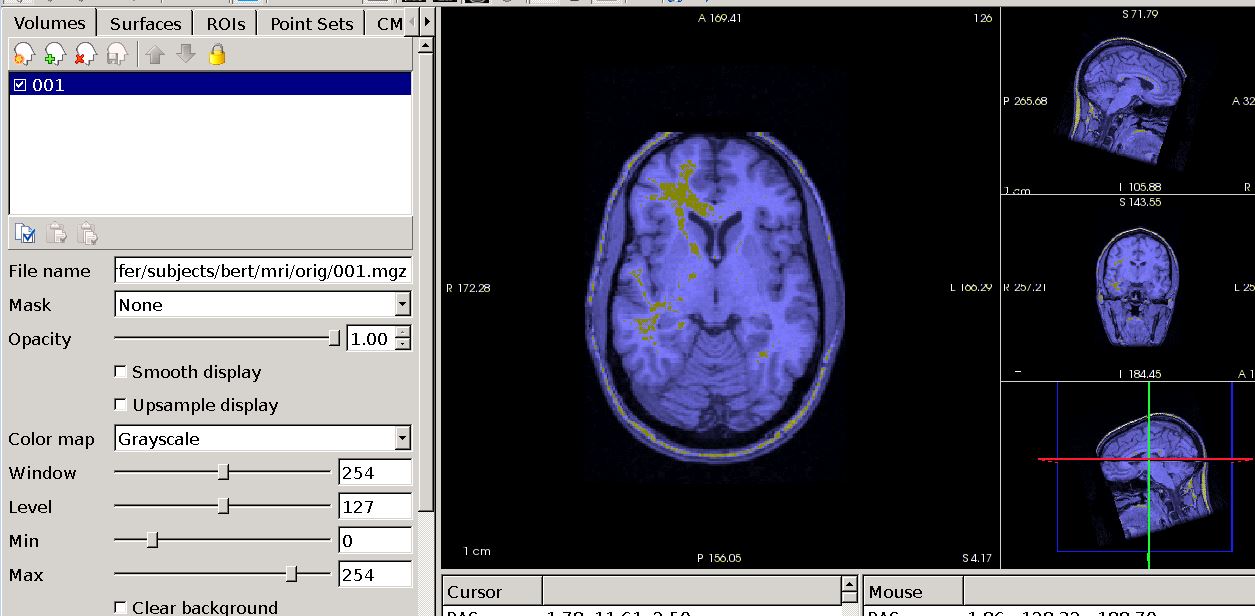

Is there any other layer loaded? It looks like there is at least another overlay on top of the volume layer?
Best, Ruopeng
On Jun 23, 2016, at 2:37 PM, Ramtilak Gattu rgatt@med.wayne.edu wrote:
Hello ,
I am having strange freeview display problem. The images doesnt appear in gray scale anymore. Please have a look at the attachment. Is there a switch that was turned on that I am not aware of.
Could some one help.
Thanks
Regards Tilak <freeview_display.JPG>_______________________________________________ Freesurfer mailing list Freesurfer@nmr.mgh.harvard.edu mailto:Freesurfer@nmr.mgh.harvard.edu https://mail.nmr.mgh.harvard.edu/mailman/listinfo/freesurfer https://mail.nmr.mgh.harvard.edu/mailman/listinfo/freesurfer
That is just one layer the yellow contrast is from when we tune the contrast up or down.
________________________________ From: Ramtilak Gattu Sent: Thursday, June 23, 2016 2:37:36 PM To: freesurfer@nmr.mgh.harvard.edu Subject: freeview display problem
Hello ,
I am having strange freeview display problem. The images doesnt appear in gray scale anymore. Please have a look at the attachment. Is there a switch that was turned on that I am not aware of.
Could some one help.
Thanks
Regards Tilak
That’s indeed strange. I wonder if it is a graphics card issue. Does the blue tone appear all the time? on any volume?
On Jun 23, 2016, at 3:31 PM, Ramtilak Gattu rgatt@med.wayne.edu wrote:
That is just one layer the yellow contrast is from when we tune the contrast up or down. From: Ramtilak Gattu Sent: Thursday, June 23, 2016 2:37:36 PM To: freesurfer@nmr.mgh.harvard.edu Subject: freeview display problem
Hello ,
I am having strange freeview display problem. The images doesnt appear in gray scale anymore. Please have a look at the attachment. Is there a switch that was turned on that I am not aware of.
Could some one help.
Thanks
Regards Tilak _______________________________________________ Freesurfer mailing list Freesurfer@nmr.mgh.harvard.edu https://mail.nmr.mgh.harvard.edu/mailman/listinfo/freesurfer
This issue is only with freesurfer , images on fslview doesnt have this problem.
________________________________ From: Ramtilak Gattu Sent: Thursday, June 23, 2016 3:31:41 PM To: freesurfer@nmr.mgh.harvard.edu Subject: Re: freeview display problem
That is just one layer the yellow contrast is from when we tune the contrast up or down.
________________________________ From: Ramtilak Gattu Sent: Thursday, June 23, 2016 2:37:36 PM To: freesurfer@nmr.mgh.harvard.edu Subject: freeview display problem
Hello ,
I am having strange freeview display problem. The images doesnt appear in gray scale anymore. Please have a look at the attachment. Is there a switch that was turned on that I am not aware of.
Could some one help.
Thanks
Regards Tilak
So it happens with freeview all the time? Freeview uses openGL as backend for rendering, which I believe is not the case for fslview. Would it be possible for you to update your graphics card driver?
On Jun 23, 2016, at 4:10 PM, Ramtilak Gattu rgatt@med.wayne.edu wrote:
This issue is only with freesurfer , images on fslview doesnt have this problem.
From: Ramtilak Gattu Sent: Thursday, June 23, 2016 3:31:41 PM To: freesurfer@nmr.mgh.harvard.edu mailto:freesurfer@nmr.mgh.harvard.edu Subject: Re: freeview display problem
That is just one layer the yellow contrast is from when we tune the contrast up or down. From: Ramtilak Gattu Sent: Thursday, June 23, 2016 2:37:36 PM To: freesurfer@nmr.mgh.harvard.edu mailto:freesurfer@nmr.mgh.harvard.edu Subject: freeview display problem
Hello ,
I am having strange freeview display problem. The images doesnt appear in gray scale anymore. Please have a look at the attachment. Is there a switch that was turned on that I am not aware of.
Could some one help.
Thanks
Regards Tilak _______________________________________________ Freesurfer mailing list Freesurfer@nmr.mgh.harvard.edu mailto:Freesurfer@nmr.mgh.harvard.edu https://mail.nmr.mgh.harvard.edu/mailman/listinfo/freesurfer https://mail.nmr.mgh.harvard.edu/mailman/listinfo/freesurfer
May be thats the problem. I'll try to give it a shot to see if it fixes the problem.
Thanks.
________________________________ From: Ramtilak Gattu Sent: Thursday, June 23, 2016 4:10:28 PM To: freesurfer@nmr.mgh.harvard.edu Subject: Re: freeview display problem
This issue is only with freesurfer , images on fslview doesnt have this problem.
________________________________ From: Ramtilak Gattu Sent: Thursday, June 23, 2016 3:31:41 PM To: freesurfer@nmr.mgh.harvard.edu Subject: Re: freeview display problem
That is just one layer the yellow contrast is from when we tune the contrast up or down.
________________________________ From: Ramtilak Gattu Sent: Thursday, June 23, 2016 2:37:36 PM To: freesurfer@nmr.mgh.harvard.edu Subject: freeview display problem
Hello ,
I am having strange freeview display problem. The images doesnt appear in gray scale anymore. Please have a look at the attachment. Is there a switch that was turned on that I am not aware of.
Could some one help.
Thanks
Regards Tilak
I tried updating my Nvidia drivers. but now whenever I try to open freeview it says " aborted ( core dumped).
please help.
Thanks
Regards
Tilak
________________________________ From: Ramtilak Gattu Sent: Thursday, June 23, 2016 5:27:12 PM To: freesurfer@nmr.mgh.harvard.edu Subject: Re: freeview display problem
May be thats the problem. I'll try to give it a shot to see if it fixes the problem.
Thanks.
________________________________ From: Ramtilak Gattu Sent: Thursday, June 23, 2016 4:10:28 PM To: freesurfer@nmr.mgh.harvard.edu Subject: Re: freeview display problem
This issue is only with freesurfer , images on fslview doesnt have this problem.
________________________________ From: Ramtilak Gattu Sent: Thursday, June 23, 2016 3:31:41 PM To: freesurfer@nmr.mgh.harvard.edu Subject: Re: freeview display problem
That is just one layer the yellow contrast is from when we tune the contrast up or down.
________________________________ From: Ramtilak Gattu Sent: Thursday, June 23, 2016 2:37:36 PM To: freesurfer@nmr.mgh.harvard.edu Subject: freeview display problem
Hello ,
I am having strange freeview display problem. The images doesnt appear in gray scale anymore. Please have a look at the attachment. Is there a switch that was turned on that I am not aware of.
Could some one help.
Thanks
Regards Tilak
Is that all? Are there any other error messages?
On 06/24/2016 10:25 AM, Ramtilak Gattu wrote:
I tried updating my Nvidia drivers. but now whenever I try to open freeview it says " aborted ( core dumped).
please help.
Thanks
Regards
Tilak
*From:* Ramtilak Gattu *Sent:* Thursday, June 23, 2016 5:27:12 PM *To:* freesurfer@nmr.mgh.harvard.edu *Subject:* Re: freeview display problem
May be thats the problem. I'll try to give it a shot to see if it fixes the problem.
Thanks.
*From:* Ramtilak Gattu *Sent:* Thursday, June 23, 2016 4:10:28 PM *To:* freesurfer@nmr.mgh.harvard.edu *Subject:* Re: freeview display problem
This issue is only with freesurfer , images on fslview doesnt have this problem.
*From:* Ramtilak Gattu *Sent:* Thursday, June 23, 2016 3:31:41 PM *To:* freesurfer@nmr.mgh.harvard.edu *Subject:* Re: freeview display problem
That is just one layer the yellow contrast is from when we tune the contrast up or down.
*From:* Ramtilak Gattu *Sent:* Thursday, June 23, 2016 2:37:36 PM *To:* freesurfer@nmr.mgh.harvard.edu *Subject:* freeview display problem
Hello ,
I am having strange freeview display problem. The images doesnt appear in gray scale anymore. Please have a look at the attachment. Is there a switch that was turned on that I am not aware of.
Could some one help.
Thanks
Regards Tilak
Freesurfer mailing list Freesurfer@nmr.mgh.harvard.edu https://mail.nmr.mgh.harvard.edu/mailman/listinfo/freesurfer
That is all . No error messages at all.
________________________________ From: Ramtilak Gattu Sent: Friday, June 24, 2016 10:25:42 AM To: freesurfer@nmr.mgh.harvard.edu Subject: Re: freeview display problem
I tried updating my Nvidia drivers. but now whenever I try to open freeview it says " aborted ( core dumped).
please help.
Thanks
Regards
Tilak
________________________________ From: Ramtilak Gattu Sent: Thursday, June 23, 2016 5:27:12 PM To: freesurfer@nmr.mgh.harvard.edu Subject: Re: freeview display problem
May be thats the problem. I'll try to give it a shot to see if it fixes the problem.
Thanks.
________________________________ From: Ramtilak Gattu Sent: Thursday, June 23, 2016 4:10:28 PM To: freesurfer@nmr.mgh.harvard.edu Subject: Re: freeview display problem
This issue is only with freesurfer , images on fslview doesnt have this problem.
________________________________ From: Ramtilak Gattu Sent: Thursday, June 23, 2016 3:31:41 PM To: freesurfer@nmr.mgh.harvard.edu Subject: Re: freeview display problem
That is just one layer the yellow contrast is from when we tune the contrast up or down.
________________________________ From: Ramtilak Gattu Sent: Thursday, June 23, 2016 2:37:36 PM To: freesurfer@nmr.mgh.harvard.edu Subject: freeview display problem
Hello ,
I am having strange freeview display problem. The images doesnt appear in gray scale anymore. Please have a look at the attachment. Is there a switch that was turned on that I am not aware of.
Could some one help.
Thanks
Regards Tilak
Hey Ruopeng,
I still couldnt figure out whats going on the freeview display. I updated the Nvidia drivers but still its not displaying in gray scale.
please help.
thanks
Regards
Tilak
________________________________ From: Ramtilak Gattu Sent: Friday, June 24, 2016 12:25:50 PM To: freesurfer@nmr.mgh.harvard.edu Subject: Re: freeview display problem
That is all . No error messages at all.
________________________________ From: Ramtilak Gattu Sent: Friday, June 24, 2016 10:25:42 AM To: freesurfer@nmr.mgh.harvard.edu Subject: Re: freeview display problem
I tried updating my Nvidia drivers. but now whenever I try to open freeview it says " aborted ( core dumped).
please help.
Thanks
Regards
Tilak
________________________________ From: Ramtilak Gattu Sent: Thursday, June 23, 2016 5:27:12 PM To: freesurfer@nmr.mgh.harvard.edu Subject: Re: freeview display problem
May be thats the problem. I'll try to give it a shot to see if it fixes the problem.
Thanks.
________________________________ From: Ramtilak Gattu Sent: Thursday, June 23, 2016 4:10:28 PM To: freesurfer@nmr.mgh.harvard.edu Subject: Re: freeview display problem
This issue is only with freesurfer , images on fslview doesnt have this problem.
________________________________ From: Ramtilak Gattu Sent: Thursday, June 23, 2016 3:31:41 PM To: freesurfer@nmr.mgh.harvard.edu Subject: Re: freeview display problem
That is just one layer the yellow contrast is from when we tune the contrast up or down.
________________________________ From: Ramtilak Gattu Sent: Thursday, June 23, 2016 2:37:36 PM To: freesurfer@nmr.mgh.harvard.edu Subject: freeview display problem
Hello ,
I am having strange freeview display problem. The images doesnt appear in gray scale anymore. Please have a look at the attachment. Is there a switch that was turned on that I am not aware of.
Could some one help.
Thanks
Regards Tilak
Do other colormaps (heat scale, jets, etc) look normal?
On Jun 28, 2016, at 2:01 PM, Ramtilak Gattu rgatt@med.wayne.edu wrote:
Hey Ruopeng,
I still couldnt figure out whats going on the freeview display. I updated the Nvidia drivers but still its not displaying in gray scale.
please help.
thanks
Regards Tilak From: Ramtilak Gattu Sent: Friday, June 24, 2016 12:25:50 PM To: freesurfer@nmr.mgh.harvard.edu Subject: Re: freeview display problem
That is all . No error messages at all. From: Ramtilak Gattu Sent: Friday, June 24, 2016 10:25:42 AM To: freesurfer@nmr.mgh.harvard.edu Subject: Re: freeview display problem
I tried updating my Nvidia drivers. but now whenever I try to open freeview it says " aborted ( core dumped).
please help.
Thanks
Regards Tilak From: Ramtilak Gattu Sent: Thursday, June 23, 2016 5:27:12 PM To: freesurfer@nmr.mgh.harvard.edu Subject: Re: freeview display problem
May be thats the problem. I'll try to give it a shot to see if it fixes the problem.
Thanks. From: Ramtilak Gattu Sent: Thursday, June 23, 2016 4:10:28 PM To: freesurfer@nmr.mgh.harvard.edu Subject: Re: freeview display problem
This issue is only with freesurfer , images on fslview doesnt have this problem.
From: Ramtilak Gattu Sent: Thursday, June 23, 2016 3:31:41 PM To: freesurfer@nmr.mgh.harvard.edu Subject: Re: freeview display problem
That is just one layer the yellow contrast is from when we tune the contrast up or down. From: Ramtilak Gattu Sent: Thursday, June 23, 2016 2:37:36 PM To: freesurfer@nmr.mgh.harvard.edu Subject: freeview display problem
Hello ,
I am having strange freeview display problem. The images doesnt appear in gray scale anymore. Please have a look at the attachment. Is there a switch that was turned on that I am not aware of.
Could some one help.
Thanks
Regards Tilak _______________________________________________ Freesurfer mailing list Freesurfer@nmr.mgh.harvard.edu https://mail.nmr.mgh.harvard.edu/mailman/listinfo/freesurfer
Nope they dont look normal they are being displayed in some other colors like heat is showing up as blue , jet as green etc. Even when the surfaces are loaded up the color of the surfaces doesnt look right. when the surface yellow is chosen are red it is being displayed as blue.
Thanks
Regards
Tilak
________________________________ From: Ramtilak Gattu Sent: Tuesday, June 28, 2016 2:01:00 PM To: freesurfer@nmr.mgh.harvard.edu Subject: Re: freeview display problem
Hey Ruopeng,
I still couldnt figure out whats going on the freeview display. I updated the Nvidia drivers but still its not displaying in gray scale.
please help.
thanks
Regards
Tilak
________________________________ From: Ramtilak Gattu Sent: Friday, June 24, 2016 12:25:50 PM To: freesurfer@nmr.mgh.harvard.edu Subject: Re: freeview display problem
That is all . No error messages at all.
________________________________ From: Ramtilak Gattu Sent: Friday, June 24, 2016 10:25:42 AM To: freesurfer@nmr.mgh.harvard.edu Subject: Re: freeview display problem
I tried updating my Nvidia drivers. but now whenever I try to open freeview it says " aborted ( core dumped).
please help.
Thanks
Regards
Tilak
________________________________ From: Ramtilak Gattu Sent: Thursday, June 23, 2016 5:27:12 PM To: freesurfer@nmr.mgh.harvard.edu Subject: Re: freeview display problem
May be thats the problem. I'll try to give it a shot to see if it fixes the problem.
Thanks.
________________________________ From: Ramtilak Gattu Sent: Thursday, June 23, 2016 4:10:28 PM To: freesurfer@nmr.mgh.harvard.edu Subject: Re: freeview display problem
This issue is only with freesurfer , images on fslview doesnt have this problem.
________________________________ From: Ramtilak Gattu Sent: Thursday, June 23, 2016 3:31:41 PM To: freesurfer@nmr.mgh.harvard.edu Subject: Re: freeview display problem
That is just one layer the yellow contrast is from when we tune the contrast up or down.
________________________________ From: Ramtilak Gattu Sent: Thursday, June 23, 2016 2:37:36 PM To: freesurfer@nmr.mgh.harvard.edu Subject: freeview display problem
Hello ,
I am having strange freeview display problem. The images doesnt appear in gray scale anymore. Please have a look at the attachment. Is there a switch that was turned on that I am not aware of.
Could some one help.
Thanks
Regards Tilak
This sounds very likely a video card/driver issue. Would it be possible for you any other program that uses OpenGL/vtk, such as 3D slicer, Paraview? How does glxgears command show?
On Jun 28, 2016, at 2:55 PM, Ramtilak Gattu rgatt@med.wayne.edu wrote:
Nope they dont look normal they are being displayed in some other colors like heat is showing up as blue , jet as green etc. Even when the surfaces are loaded up the color of the surfaces doesnt look right. when the surface yellow is chosen are red it is being displayed as blue.
Thanks
Regards Tilak From: Ramtilak Gattu Sent: Tuesday, June 28, 2016 2:01:00 PM To: freesurfer@nmr.mgh.harvard.edu mailto:freesurfer@nmr.mgh.harvard.edu Subject: Re: freeview display problem
Hey Ruopeng,
I still couldnt figure out whats going on the freeview display. I updated the Nvidia drivers but still its not displaying in gray scale.
please help.
thanks
Regards Tilak From: Ramtilak Gattu Sent: Friday, June 24, 2016 12:25:50 PM To: freesurfer@nmr.mgh.harvard.edu mailto:freesurfer@nmr.mgh.harvard.edu Subject: Re: freeview display problem
That is all . No error messages at all. From: Ramtilak Gattu Sent: Friday, June 24, 2016 10:25:42 AM To: freesurfer@nmr.mgh.harvard.edu mailto:freesurfer@nmr.mgh.harvard.edu Subject: Re: freeview display problem
I tried updating my Nvidia drivers. but now whenever I try to open freeview it says " aborted ( core dumped).
please help.
Thanks
Regards Tilak From: Ramtilak Gattu Sent: Thursday, June 23, 2016 5:27:12 PM To: freesurfer@nmr.mgh.harvard.edu mailto:freesurfer@nmr.mgh.harvard.edu Subject: Re: freeview display problem
May be thats the problem. I'll try to give it a shot to see if it fixes the problem.
Thanks. From: Ramtilak Gattu Sent: Thursday, June 23, 2016 4:10:28 PM To: freesurfer@nmr.mgh.harvard.edu mailto:freesurfer@nmr.mgh.harvard.edu Subject: Re: freeview display problem
This issue is only with freesurfer , images on fslview doesnt have this problem.
From: Ramtilak Gattu Sent: Thursday, June 23, 2016 3:31:41 PM To: freesurfer@nmr.mgh.harvard.edu mailto:freesurfer@nmr.mgh.harvard.edu Subject: Re: freeview display problem
That is just one layer the yellow contrast is from when we tune the contrast up or down. From: Ramtilak Gattu Sent: Thursday, June 23, 2016 2:37:36 PM To: freesurfer@nmr.mgh.harvard.edu mailto:freesurfer@nmr.mgh.harvard.edu Subject: freeview display problem
Hello ,
I am having strange freeview display problem. The images doesnt appear in gray scale anymore. Please have a look at the attachment. Is there a switch that was turned on that I am not aware of.
Could some one help.
Thanks
Regards Tilak _______________________________________________ Freesurfer mailing list Freesurfer@nmr.mgh.harvard.edu mailto:Freesurfer@nmr.mgh.harvard.edu https://mail.nmr.mgh.harvard.edu/mailman/listinfo/freesurfer https://mail.nmr.mgh.harvard.edu/mailman/listinfo/freesurfer
glxgears shows up a screen with three gear wheels in blue, pink and green and frame information rate being printed out on the command window.
________________________________ From: Ramtilak Gattu Sent: Tuesday, June 28, 2016 2:55:32 PM To: freesurfer@nmr.mgh.harvard.edu Subject: Re: freeview display problem
Nope they dont look normal they are being displayed in some other colors like heat is showing up as blue , jet as green etc. Even when the surfaces are loaded up the color of the surfaces doesnt look right. when the surface yellow is chosen are red it is being displayed as blue.
Thanks
Regards
Tilak
________________________________ From: Ramtilak Gattu Sent: Tuesday, June 28, 2016 2:01:00 PM To: freesurfer@nmr.mgh.harvard.edu Subject: Re: freeview display problem
Hey Ruopeng,
I still couldnt figure out whats going on the freeview display. I updated the Nvidia drivers but still its not displaying in gray scale.
please help.
thanks
Regards
Tilak
________________________________ From: Ramtilak Gattu Sent: Friday, June 24, 2016 12:25:50 PM To: freesurfer@nmr.mgh.harvard.edu Subject: Re: freeview display problem
That is all . No error messages at all.
________________________________ From: Ramtilak Gattu Sent: Friday, June 24, 2016 10:25:42 AM To: freesurfer@nmr.mgh.harvard.edu Subject: Re: freeview display problem
I tried updating my Nvidia drivers. but now whenever I try to open freeview it says " aborted ( core dumped).
please help.
Thanks
Regards
Tilak
________________________________ From: Ramtilak Gattu Sent: Thursday, June 23, 2016 5:27:12 PM To: freesurfer@nmr.mgh.harvard.edu Subject: Re: freeview display problem
May be thats the problem. I'll try to give it a shot to see if it fixes the problem.
Thanks.
________________________________ From: Ramtilak Gattu Sent: Thursday, June 23, 2016 4:10:28 PM To: freesurfer@nmr.mgh.harvard.edu Subject: Re: freeview display problem
This issue is only with freesurfer , images on fslview doesnt have this problem.
________________________________ From: Ramtilak Gattu Sent: Thursday, June 23, 2016 3:31:41 PM To: freesurfer@nmr.mgh.harvard.edu Subject: Re: freeview display problem
That is just one layer the yellow contrast is from when we tune the contrast up or down.
________________________________ From: Ramtilak Gattu Sent: Thursday, June 23, 2016 2:37:36 PM To: freesurfer@nmr.mgh.harvard.edu Subject: freeview display problem
Hello ,
I am having strange freeview display problem. The images doesnt appear in gray scale anymore. Please have a look at the attachment. Is there a switch that was turned on that I am not aware of.
Could some one help.
Thanks
Regards Tilak

Hi Tilak,
Do the colors match this: https://en.wikipedia.org/wiki/GLX#/media/File:Xf86_glxgears.png
?
hth d
On 6/28/16 3:46 PM, Ramtilak Gattu wrote:
glxgears shows up a screen with three gear wheels in blue, pink and green and frame information rate being printed out on the command window.
*From:* Ramtilak Gattu *Sent:* Tuesday, June 28, 2016 2:55:32 PM *To:* freesurfer@nmr.mgh.harvard.edu *Subject:* Re: freeview display problem
Nope they dont look normal they are being displayed in some other colors like heat is showing up as blue , jet as green etc. Even when the surfaces are loaded up the color of the surfaces doesnt look right. when the surface yellow is chosen are red it is being displayed as blue.
Thanks
Regards
Tilak
*From:* Ramtilak Gattu *Sent:* Tuesday, June 28, 2016 2:01:00 PM *To:* freesurfer@nmr.mgh.harvard.edu *Subject:* Re: freeview display problem
Hey Ruopeng,
I still couldnt figure out whats going on the freeview display. I updated the Nvidia drivers but still its not displaying in gray scale.
please help.
thanks
Regards
Tilak
*From:* Ramtilak Gattu *Sent:* Friday, June 24, 2016 12:25:50 PM *To:* freesurfer@nmr.mgh.harvard.edu *Subject:* Re: freeview display problem
That is all . No error messages at all.
*From:* Ramtilak Gattu *Sent:* Friday, June 24, 2016 10:25:42 AM *To:* freesurfer@nmr.mgh.harvard.edu *Subject:* Re: freeview display problem
I tried updating my Nvidia drivers. but now whenever I try to open freeview it says " aborted ( core dumped).
please help.
Thanks
Regards
Tilak
*From:* Ramtilak Gattu *Sent:* Thursday, June 23, 2016 5:27:12 PM *To:* freesurfer@nmr.mgh.harvard.edu *Subject:* Re: freeview display problem
May be thats the problem. I'll try to give it a shot to see if it fixes the problem.
Thanks.
*From:* Ramtilak Gattu *Sent:* Thursday, June 23, 2016 4:10:28 PM *To:* freesurfer@nmr.mgh.harvard.edu *Subject:* Re: freeview display problem
This issue is only with freesurfer , images on fslview doesnt have this problem.
*From:* Ramtilak Gattu *Sent:* Thursday, June 23, 2016 3:31:41 PM *To:* freesurfer@nmr.mgh.harvard.edu *Subject:* Re: freeview display problem
That is just one layer the yellow contrast is from when we tune the contrast up or down.
*From:* Ramtilak Gattu *Sent:* Thursday, June 23, 2016 2:37:36 PM *To:* freesurfer@nmr.mgh.harvard.edu *Subject:* freeview display problem
Hello ,
I am having strange freeview display problem. The images doesnt appear in gray scale anymore. Please have a look at the attachment. Is there a switch that was turned on that I am not aware of.
Could some one help.
Thanks
Regards Tilak
Freesurfer mailing list Freesurfer@nmr.mgh.harvard.edu https://mail.nmr.mgh.harvard.edu/mailman/listinfo/freesurfer
The information in this e-mail is intended only for the person to whom it is addressed. If you believe this e-mail was sent to you in error and the e-mail contains patient information, please contact the Partners Compliance HelpLine at http://www.partners.org/complianceline . If the e-mail was sent to you in error but does not contain patient information, please contact the sender and properly dispose of the e-mail.
The color should be red, blue and green. It is your graphics card or graphics driver issue.
Best, Ruopeng
On Jun 28, 2016, at 3:46 PM, Ramtilak Gattu rgatt@med.wayne.edu wrote:
glxgears shows up a screen with three gear wheels in blue, pink and green and frame information rate being printed out on the command window. From: Ramtilak Gattu Sent: Tuesday, June 28, 2016 2:55:32 PM To: freesurfer@nmr.mgh.harvard.edu Subject: Re: freeview display problem
Nope they dont look normal they are being displayed in some other colors like heat is showing up as blue , jet as green etc. Even when the surfaces are loaded up the color of the surfaces doesnt look right. when the surface yellow is chosen are red it is being displayed as blue.
Thanks
Regards Tilak From: Ramtilak Gattu Sent: Tuesday, June 28, 2016 2:01:00 PM To: freesurfer@nmr.mgh.harvard.edu Subject: Re: freeview display problem
Hey Ruopeng,
I still couldnt figure out whats going on the freeview display. I updated the Nvidia drivers but still its not displaying in gray scale.
please help.
thanks
Regards Tilak From: Ramtilak Gattu Sent: Friday, June 24, 2016 12:25:50 PM To: freesurfer@nmr.mgh.harvard.edu Subject: Re: freeview display problem
That is all . No error messages at all. From: Ramtilak Gattu Sent: Friday, June 24, 2016 10:25:42 AM To: freesurfer@nmr.mgh.harvard.edu Subject: Re: freeview display problem
I tried updating my Nvidia drivers. but now whenever I try to open freeview it says " aborted ( core dumped).
please help.
Thanks
Regards Tilak From: Ramtilak Gattu Sent: Thursday, June 23, 2016 5:27:12 PM To: freesurfer@nmr.mgh.harvard.edu Subject: Re: freeview display problem
May be thats the problem. I'll try to give it a shot to see if it fixes the problem.
Thanks. From: Ramtilak Gattu Sent: Thursday, June 23, 2016 4:10:28 PM To: freesurfer@nmr.mgh.harvard.edu Subject: Re: freeview display problem
This issue is only with freesurfer , images on fslview doesnt have this problem.
From: Ramtilak Gattu Sent: Thursday, June 23, 2016 3:31:41 PM To: freesurfer@nmr.mgh.harvard.edu Subject: Re: freeview display problem
That is just one layer the yellow contrast is from when we tune the contrast up or down. From: Ramtilak Gattu Sent: Thursday, June 23, 2016 2:37:36 PM To: freesurfer@nmr.mgh.harvard.edu Subject: freeview display problem
Hello ,
I am having strange freeview display problem. The images doesnt appear in gray scale anymore. Please have a look at the attachment. Is there a switch that was turned on that I am not aware of.
Could some one help.
Thanks
Regards Tilak _______________________________________________ Freesurfer mailing list Freesurfer@nmr.mgh.harvard.edu https://mail.nmr.mgh.harvard.edu/mailman/listinfo/freesurfer
Attached is the screen shot comparison side by side.
I downloaded 3d slicer and even it dispalys images similar to what freeview does.
Thanks
Regards
Tilak
________________________________ From: Ramtilak Gattu Sent: Tuesday, June 28, 2016 3:46:34 PM To: freesurfer@nmr.mgh.harvard.edu Subject: Re: freeview display problem
glxgears shows up a screen with three gear wheels in blue, pink and green and frame information rate being printed out on the command window.
________________________________ From: Ramtilak Gattu Sent: Tuesday, June 28, 2016 2:55:32 PM To: freesurfer@nmr.mgh.harvard.edu Subject: Re: freeview display problem
Nope they dont look normal they are being displayed in some other colors like heat is showing up as blue , jet as green etc. Even when the surfaces are loaded up the color of the surfaces doesnt look right. when the surface yellow is chosen are red it is being displayed as blue.
Thanks
Regards
Tilak
________________________________ From: Ramtilak Gattu Sent: Tuesday, June 28, 2016 2:01:00 PM To: freesurfer@nmr.mgh.harvard.edu Subject: Re: freeview display problem
Hey Ruopeng,
I still couldnt figure out whats going on the freeview display. I updated the Nvidia drivers but still its not displaying in gray scale.
please help.
thanks
Regards
Tilak
________________________________ From: Ramtilak Gattu Sent: Friday, June 24, 2016 12:25:50 PM To: freesurfer@nmr.mgh.harvard.edu Subject: Re: freeview display problem
That is all . No error messages at all.
________________________________ From: Ramtilak Gattu Sent: Friday, June 24, 2016 10:25:42 AM To: freesurfer@nmr.mgh.harvard.edu Subject: Re: freeview display problem
I tried updating my Nvidia drivers. but now whenever I try to open freeview it says " aborted ( core dumped).
please help.
Thanks
Regards
Tilak
________________________________ From: Ramtilak Gattu Sent: Thursday, June 23, 2016 5:27:12 PM To: freesurfer@nmr.mgh.harvard.edu Subject: Re: freeview display problem
May be thats the problem. I'll try to give it a shot to see if it fixes the problem.
Thanks.
________________________________ From: Ramtilak Gattu Sent: Thursday, June 23, 2016 4:10:28 PM To: freesurfer@nmr.mgh.harvard.edu Subject: Re: freeview display problem
This issue is only with freesurfer , images on fslview doesnt have this problem.
________________________________ From: Ramtilak Gattu Sent: Thursday, June 23, 2016 3:31:41 PM To: freesurfer@nmr.mgh.harvard.edu Subject: Re: freeview display problem
That is just one layer the yellow contrast is from when we tune the contrast up or down.
________________________________ From: Ramtilak Gattu Sent: Thursday, June 23, 2016 2:37:36 PM To: freesurfer@nmr.mgh.harvard.edu Subject: freeview display problem
Hello ,
I am having strange freeview display problem. The images doesnt appear in gray scale anymore. Please have a look at the attachment. Is there a switch that was turned on that I am not aware of.
Could some one help.
Thanks
Regards Tilak
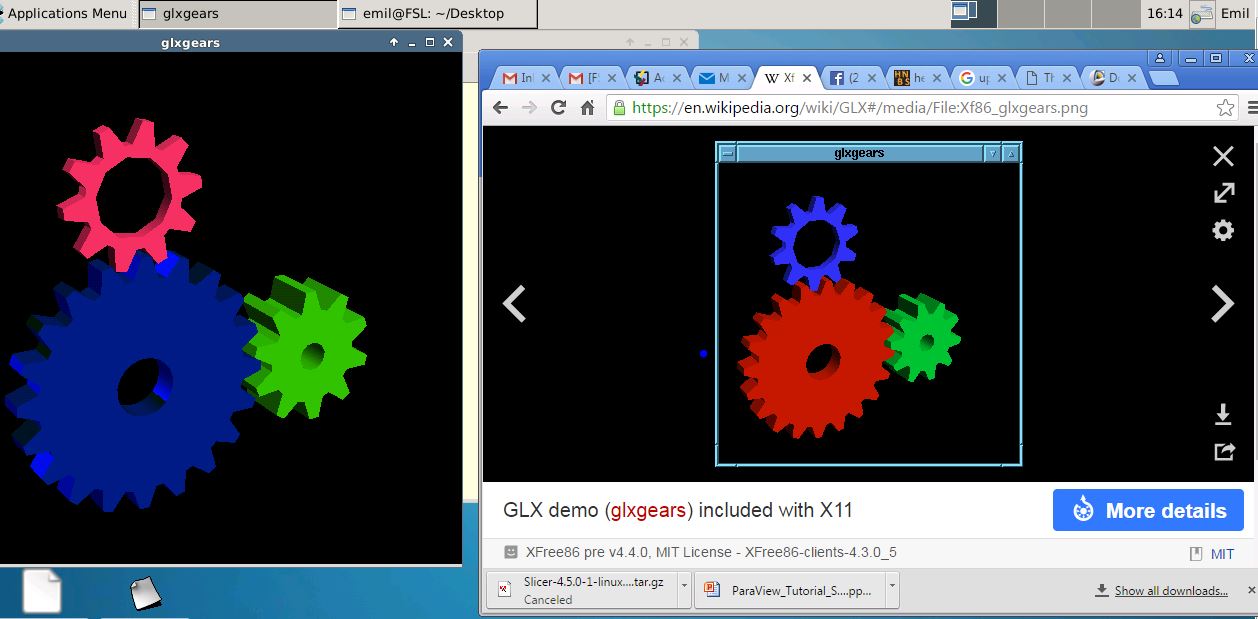
Ok, you should try updating your graphics card driver. There is also chance that your graphics card is broken. Unfortunately we are not able to diagnose that for you. Sorry.
Best, Ruopeng
On Jun 28, 2016, at 4:17 PM, Ramtilak Gattu rgatt@med.wayne.edu wrote:
Attached is the screen shot comparison side by side.
I downloaded 3d slicer and even it dispalys images similar to what freeview does.
Thanks
Regards Tilak From: Ramtilak Gattu Sent: Tuesday, June 28, 2016 3:46:34 PM To: freesurfer@nmr.mgh.harvard.edu mailto:freesurfer@nmr.mgh.harvard.edu Subject: Re: freeview display problem
glxgears shows up a screen with three gear wheels in blue, pink and green and frame information rate being printed out on the command window. From: Ramtilak Gattu Sent: Tuesday, June 28, 2016 2:55:32 PM To: freesurfer@nmr.mgh.harvard.edu mailto:freesurfer@nmr.mgh.harvard.edu Subject: Re: freeview display problem
Nope they dont look normal they are being displayed in some other colors like heat is showing up as blue , jet as green etc. Even when the surfaces are loaded up the color of the surfaces doesnt look right. when the surface yellow is chosen are red it is being displayed as blue.
Thanks
Regards Tilak From: Ramtilak Gattu Sent: Tuesday, June 28, 2016 2:01:00 PM To: freesurfer@nmr.mgh.harvard.edu mailto:freesurfer@nmr.mgh.harvard.edu Subject: Re: freeview display problem
Hey Ruopeng,
I still couldnt figure out whats going on the freeview display. I updated the Nvidia drivers but still its not displaying in gray scale.
please help.
thanks
Regards Tilak From: Ramtilak Gattu Sent: Friday, June 24, 2016 12:25:50 PM To: freesurfer@nmr.mgh.harvard.edu mailto:freesurfer@nmr.mgh.harvard.edu Subject: Re: freeview display problem
That is all . No error messages at all. From: Ramtilak Gattu Sent: Friday, June 24, 2016 10:25:42 AM To: freesurfer@nmr.mgh.harvard.edu mailto:freesurfer@nmr.mgh.harvard.edu Subject: Re: freeview display problem
I tried updating my Nvidia drivers. but now whenever I try to open freeview it says " aborted ( core dumped).
please help.
Thanks
Regards Tilak From: Ramtilak Gattu Sent: Thursday, June 23, 2016 5:27:12 PM To: freesurfer@nmr.mgh.harvard.edu mailto:freesurfer@nmr.mgh.harvard.edu Subject: Re: freeview display problem
May be thats the problem. I'll try to give it a shot to see if it fixes the problem.
Thanks. From: Ramtilak Gattu Sent: Thursday, June 23, 2016 4:10:28 PM To: freesurfer@nmr.mgh.harvard.edu mailto:freesurfer@nmr.mgh.harvard.edu Subject: Re: freeview display problem
This issue is only with freesurfer , images on fslview doesnt have this problem.
From: Ramtilak Gattu Sent: Thursday, June 23, 2016 3:31:41 PM To: freesurfer@nmr.mgh.harvard.edu mailto:freesurfer@nmr.mgh.harvard.edu Subject: Re: freeview display problem
That is just one layer the yellow contrast is from when we tune the contrast up or down. From: Ramtilak Gattu Sent: Thursday, June 23, 2016 2:37:36 PM To: freesurfer@nmr.mgh.harvard.edu mailto:freesurfer@nmr.mgh.harvard.edu Subject: freeview display problem
Hello ,
I am having strange freeview display problem. The images doesnt appear in gray scale anymore. Please have a look at the attachment. Is there a switch that was turned on that I am not aware of.
Could some one help.
Thanks
Regards Tilak <glxgears.JPG>_______________________________________________ Freesurfer mailing list Freesurfer@nmr.mgh.harvard.edu mailto:Freesurfer@nmr.mgh.harvard.edu https://mail.nmr.mgh.harvard.edu/mailman/listinfo/freesurfer https://mail.nmr.mgh.harvard.edu/mailman/listinfo/freesurfer
freesurfer@nmr.mgh.harvard.edu
-
 dgw
dgw -
 Ramtilak Gattu
 -
 Ruopeng Wang