
External Email - Use Caution
Hi there
I have this issue occurring in several hemispheres (See images attached) where a “sulcus” is created because the pial crosses where it shouldn’t, and am wondering what the best way to edit this is. I don’t think it is a matter of adding WM control points as it is not the WM that needs to be corrected but rather the pial. My 2nd image shows how the sulci should look in the pial.
Should it be just a matter of removing voxels in the brainmask.mgz and doing
recon-all -autorecon-pial -subjid
I tried this for one subject and it was not happy. Is there a way to add control points for the pial?
Thank you!
Trisanna Sprung-Much, PhD McGill University Montreal Neurological Institute --
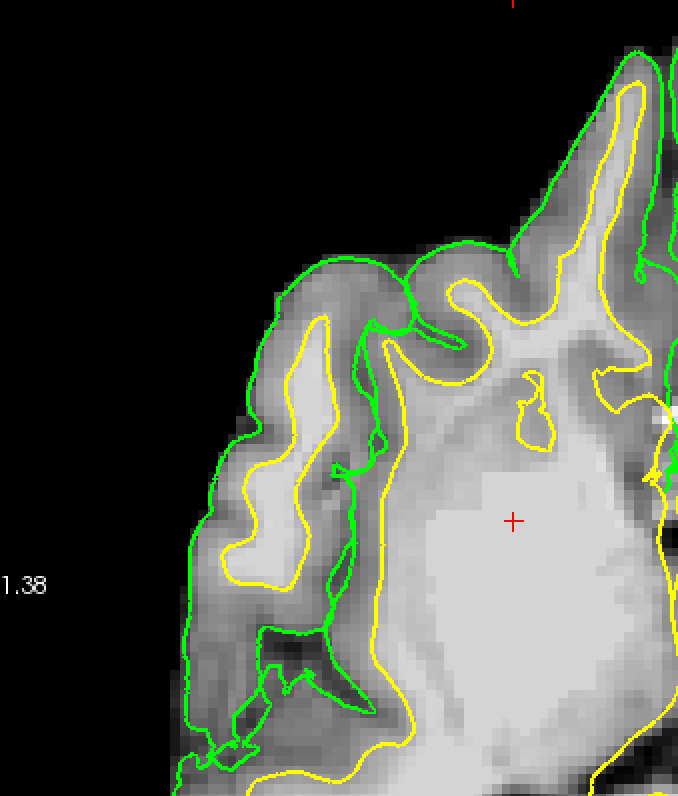
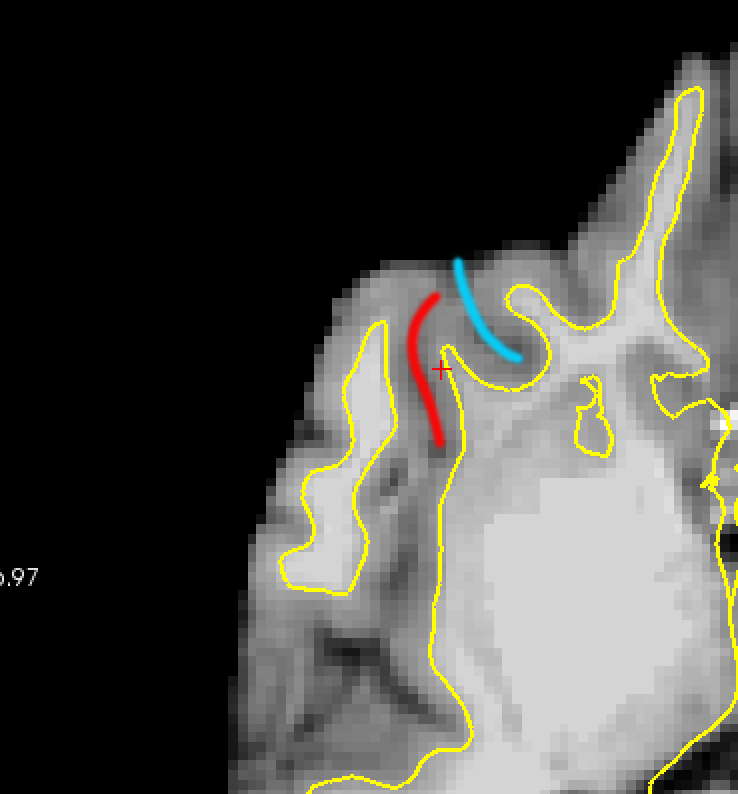
External Email - Use Caution
Hi there, just following up on this. Thank you!
_______________________________ Trisanna Sprung-Much, PhD Research Associate Montreal Neurological Institute [Logo Description automatically generated]
From: freesurfer-bounces@nmr.mgh.harvard.edu freesurfer-bounces@nmr.mgh.harvard.edu on behalf of Trisanna Sprung-Much trisanna.sprung-much@mail.mcgill.ca Date: Wednesday, March 2, 2022 at 11:07 AM To: Freesurfer support list freesurfer@nmr.mgh.harvard.edu Subject: [Freesurfer] Question about editing topology errors
External Email - Use Caution Hi there
I have this issue occurring in several hemispheres (See images attached) where a “sulcus” is created because the pial crosses where it shouldn’t, and am wondering what the best way to edit this is. I don’t think it is a matter of adding WM control points as it is not the WM that needs to be corrected but rather the pial. My 2nd image shows how the sulci should look in the pial.
Should it be just a matter of removing voxels in the brainmask.mgz and doing
recon-all -autorecon-pial -subjid
I tried this for one subject and it was not happy. Is there a way to add control points for the pial?
Thank you!
Trisanna Sprung-Much, PhD McGill University Montreal Neurological Institute --

freesurfer@nmr.mgh.harvard.edu
-
 Trisanna Sprung-Much