
Hi freesurfer community,
We are checking to see the accuracy of our subjects’ white and gray matter parcellation. We have found that for some subjects the contour lines for white matter surface and pial surface are somewhat inaccurate, and have been making modifications using the tutorials.
Specifically, we made changes to the white matter wm.mgz file; this however did not alter the contour lines. We also used control points, and were able to see changes to the white matter surface contour lines using this approach.
How do you recommend that we proceed to obtain the most accurate results? Should we continue making changes to the wm.mgz file as well as adding control points, or is it sufficient just to add control points?
I am attaching a screen shot which shows changes to the contour lines after we added control points.
Best Regards,
Shyam [cid:93CEA6F8-6B62-4483-985C-F540EDDBD2D7] [cid:C981D3FE-7C43-4073-A91F-F26CEDDC4145]
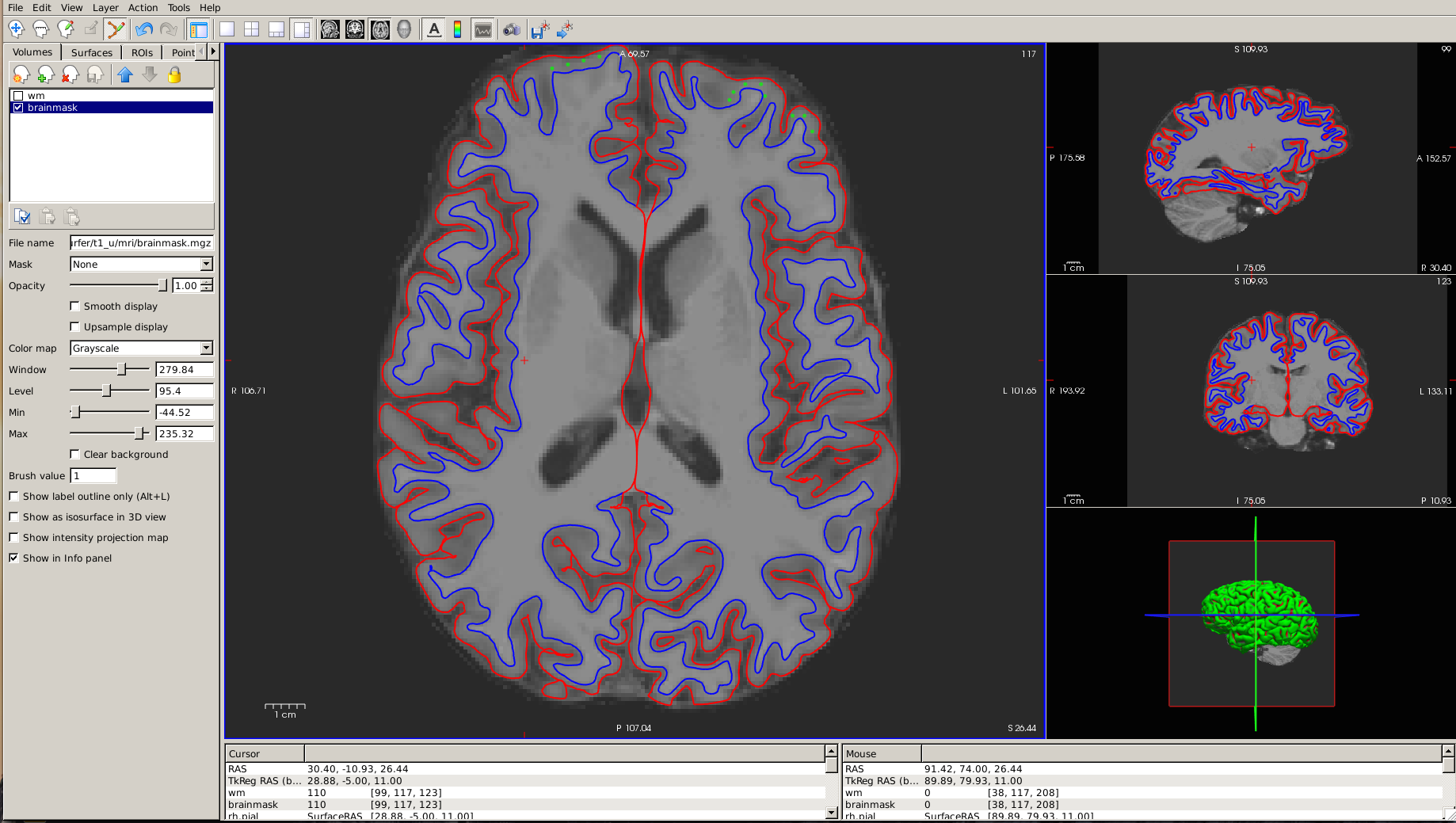
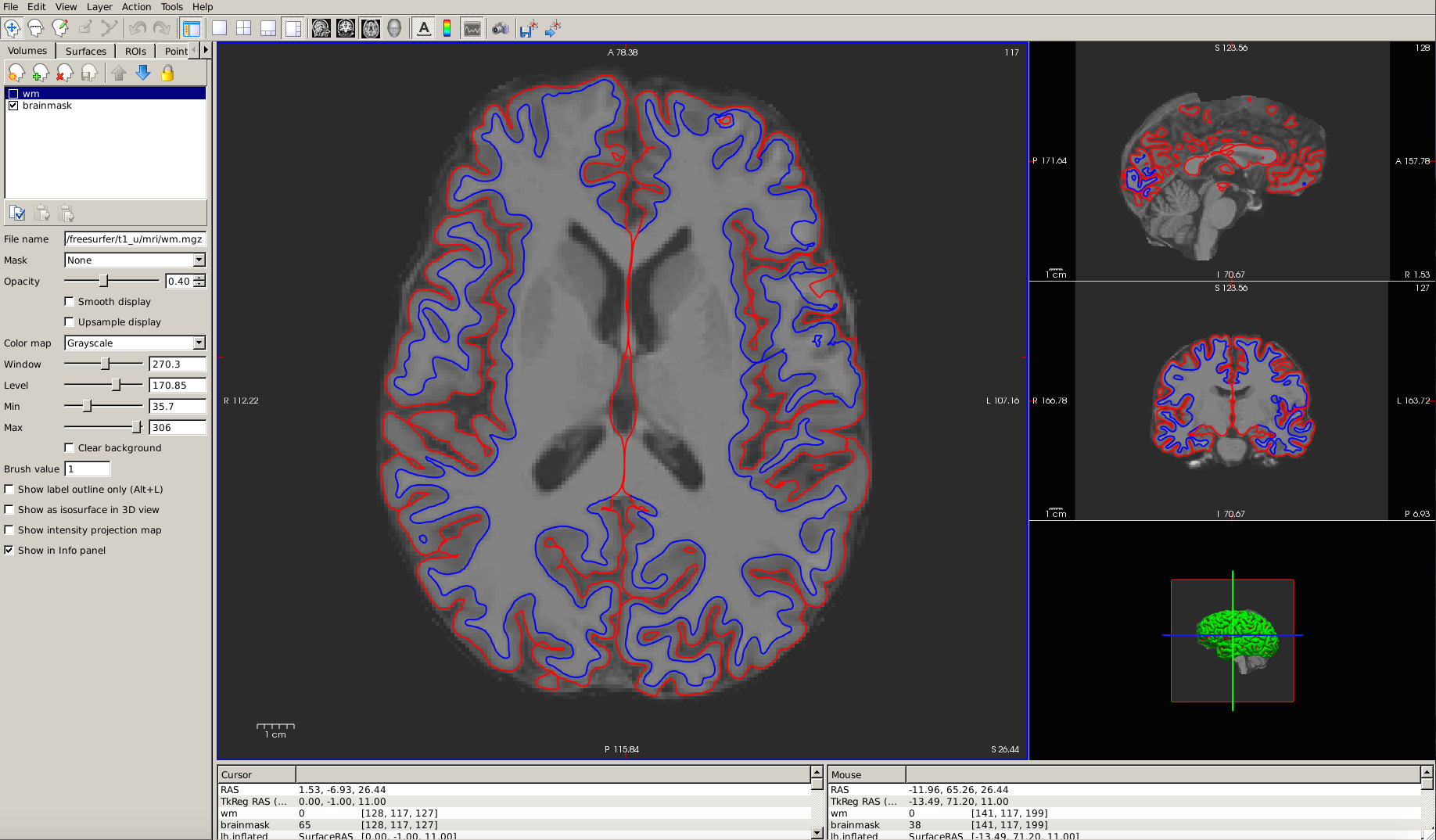

Hi Shyam
can you add arrows to show where you don't think the surfaces are accurate?
And are the green circles meant to be control points? If so, I'm surprised that didn't break everything since they need to be added to the interior of the WM.
cheers Bruce
On Tue, 31 May 2016, Limachia, Gaurang (NIH/NINDS) [F] wrote:
Hi freesurfer community,
We are checking to see the accuracy of our subjects’ white and gray matter parcellation. We have found that for some subjects the contour lines for white matter surface and pial surface are somewhat inaccurate, and have been making modifications using the tutorials.
Specifically, we made changes to the white matter wm.mgz file; this however did not alter the contour lines. We also used control points, and were able to see changes to the white matter surface contour lines using this approach.
How do you recommend that we proceed to obtain the most accurate results? Should we continue making changes to the wm.mgz file as well as adding control points, or is it sufficient just to add control points?
I am attaching a screen shot which shows changes to the contour lines after we added control points.
Best Regards,
Shyam [IMAGE][IMAGE]
Yes the green circles are control points. The control points shown in the picture show surfaces we feel are not accurate.
Additionally, how are we supposed to use the control points, do we place them on the inner most boundary of the WM?
Also, going back to the original questions: How do you recommend that we proceed to obtain the most accurate results? Should we continue making changes to the wm.mgz file as well as adding control points, or is it sufficient just to add control points?
Thanks,
Shyam
On 5/31/16, 3:33 PM, "Bruce Fischl" fischl@nmr.mgh.harvard.edu wrote:
Hi Shyam
can you add arrows to show where you don't think the surfaces are accurate?
And are the green circles meant to be control points? If so, I'm surprised that didn't break everything since they need to be added to the interior of the WM.
cheers Bruce
On Tue, 31 May 2016, Limachia, Gaurang (NIH/NINDS) [F] wrote:
Hi freesurfer community,
We are checking to see the accuracy of our subjects¹ white and gray matter parcellation. We have found that for some subjects the contour lines for white matter surface and pial surface are somewhat inaccurate, and have been making modifications using the tutorials.
Specifically, we made changes to the white matter wm.mgz file; this however did not alter the contour lines. We also used control points, and were able to see changes to the white matter surface contour lines using this approach.
How do you recommend that we proceed to obtain the most accurate results? Should we continue making changes to the wm.mgz file as well as adding control points, or is it sufficient just to add control points?
I am attaching a screen shot which shows changes to the contour lines after we added control points.
Best Regards,
Shyam [IMAGE][IMAGE]
Hi Shyam
it's hard to give you an answer unless I understand what the source of your inaccuracy is. Perhaps you can point an image that is zoomed in on a region with arrows to indicate where you think things need improving? I don't really understand your image. If the green circles are control points, then they are definitely in the wrong place and will mess everything up. Typically we place control points in the white matter where the intensity in the brain.mgz volume is <110, so typically near the gray/white boundary (but not close enough to be voxels that have some gray matter in them).
cheers Bruce
On Tue, 31 May 2016, Limachia, Gaurang (NIH/NINDS) [F] wrote:
Yes the green circles are control points. The control points shown in the picture show surfaces we feel are not accurate.
Additionally, how are we supposed to use the control points, do we place them on the inner most boundary of the WM?
Also, going back to the original questions: How do you recommend that we proceed to obtain the most accurate results? Should we continue making changes to the wm.mgz file as well as adding control points, or is it sufficient just to add control points?
Thanks,
Shyam
On 5/31/16, 3:33 PM, "Bruce Fischl" fischl@nmr.mgh.harvard.edu wrote:
Hi Shyam
can you add arrows to show where you don't think the surfaces are accurate?
And are the green circles meant to be control points? If so, I'm surprised that didn't break everything since they need to be added to the interior of the WM.
cheers Bruce
On Tue, 31 May 2016, Limachia, Gaurang (NIH/NINDS) [F] wrote:
Hi freesurfer community,
We are checking to see the accuracy of our subjects¹ white and gray matter parcellation. We have found that for some subjects the contour lines for white matter surface and pial surface are somewhat inaccurate, and have been making modifications using the tutorials.
Specifically, we made changes to the white matter wm.mgz file; this however did not alter the contour lines. We also used control points, and were able to see changes to the white matter surface contour lines using this approach.
How do you recommend that we proceed to obtain the most accurate results? Should we continue making changes to the wm.mgz file as well as adding control points, or is it sufficient just to add control points?
I am attaching a screen shot which shows changes to the contour lines after we added control points.
Best Regards,
Shyam [IMAGE][IMAGE]
Freesurfer mailing list Freesurfer@nmr.mgh.harvard.edu https://mail.nmr.mgh.harvard.edu/mailman/listinfo/freesurfer
Hi Bruce,
I am attaching a zoomed in version which will hopefully will show what we are trying to do.
Thanks,
Shyam
On 5/31/16, 4:20 PM, "Bruce Fischl" fischl@nmr.mgh.harvard.edu wrote:
Hi Shyam
it's hard to give you an answer unless I understand what the source of your inaccuracy is. Perhaps you can point an image that is zoomed in on a region with arrows to indicate where you think things need improving? I don't really understand your image. If the green circles are control points, then they are definitely in the wrong place and will mess everything up. Typically we place control points in the white matter where the intensity in the brain.mgz volume is <110, so typically near the gray/white boundary (but not close enough to be voxels that have some gray matter in them).
cheers Bruce
On Tue, 31 May 2016, Limachia, Gaurang (NIH/NINDS) [F] wrote:
Yes the green circles are control points. The control points shown in the picture show surfaces we feel are not accurate.
Additionally, how are we supposed to use the control points, do we place them on the inner most boundary of the WM?
Also, going back to the original questions: How do you recommend that we proceed to obtain the most accurate results? Should we continue making changes to the wm.mgz file as well as adding control points, or is it sufficient just to add control points?
Thanks,
Shyam
On 5/31/16, 3:33 PM, "Bruce Fischl" fischl@nmr.mgh.harvard.edu wrote:
Hi Shyam
can you add arrows to show where you don't think the surfaces are accurate?
And are the green circles meant to be control points? If so, I'm surprised that didn't break everything since they need to be added to the interior of the WM.
cheers Bruce
On Tue, 31 May 2016, Limachia, Gaurang (NIH/NINDS) [F] wrote:
Hi freesurfer community,
We are checking to see the accuracy of our subjects¹ white and gray matter parcellation. We have found that for some subjects the contour lines for white matter surface and pial surface are somewhat inaccurate, and have been making modifications using the tutorials.
Specifically, we made changes to the white matter wm.mgz file; this however did not alter the contour lines. We also used control points, and were able to see changes to the white matter surface contour lines using this approach.
How do you recommend that we proceed to obtain the most accurate results? Should we continue making changes to the wm.mgz file as well as adding control points, or is it sufficient just to add control points?
I am attaching a screen shot which shows changes to the contour lines after we added control points.
Best Regards,
Shyam [IMAGE][IMAGE]
Freesurfer mailing list Freesurfer@nmr.mgh.harvard.edu https://mail.nmr.mgh.harvard.edu/mailman/listinfo/freesurfer
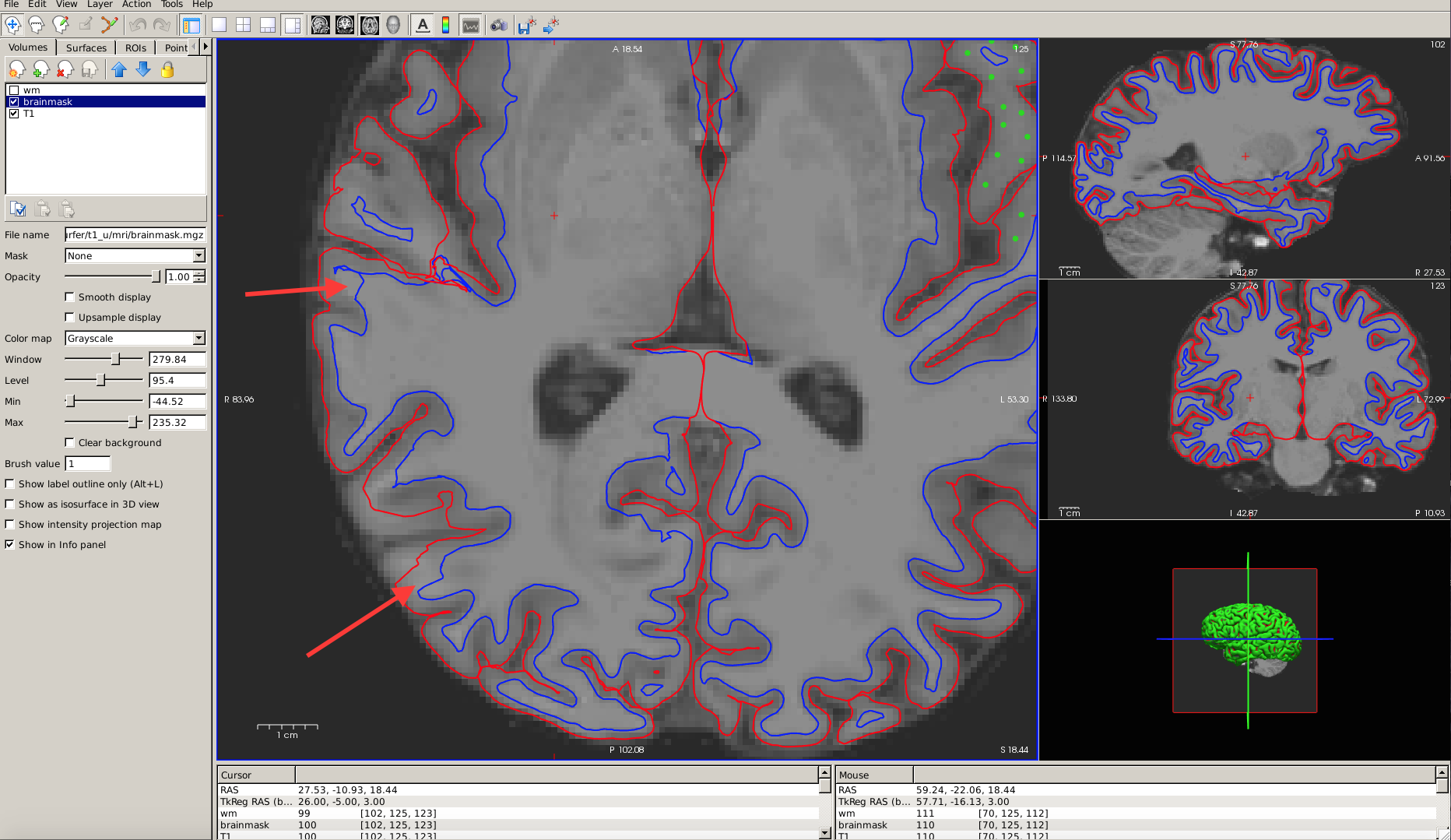
I see. Can you tell us a bit about the input data? It looks pretty blurry. I suspect that you have topological defects that are incorrectly fixed in those regions, probably because a bunch of the white matter was missed. Is the white matter significantly darker than 110 there? You could try some control points in those region (in the interior of the wm, but where it is <<110, say in the 90s or so)
Alternatively, if you upload the subject we will take a look.
On Tue, 31 May 2016, Limachia, Gaurang (NIH/NINDS) [F] wrote:
Hi Bruce,
I am attaching a zoomed in version which will hopefully will show what we are trying to do.
Thanks,
Shyam
On 5/31/16, 4:20 PM, "Bruce Fischl" fischl@nmr.mgh.harvard.edu wrote:
Hi Shyam
it's hard to give you an answer unless I understand what the source of your inaccuracy is. Perhaps you can point an image that is zoomed in on a region with arrows to indicate where you think things need improving? I don't really understand your image. If the green circles are control points, then they are definitely in the wrong place and will mess everything up. Typically we place control points in the white matter where the intensity in the brain.mgz volume is <110, so typically near the gray/white boundary (but not close enough to be voxels that have some gray matter in them).
cheers Bruce
On Tue, 31 May 2016, Limachia, Gaurang (NIH/NINDS) [F] wrote:
Yes the green circles are control points. The control points shown in the picture show surfaces we feel are not accurate.
Additionally, how are we supposed to use the control points, do we place them on the inner most boundary of the WM?
Also, going back to the original questions: How do you recommend that we proceed to obtain the most accurate results? Should we continue making changes to the wm.mgz file as well as adding control points, or is it sufficient just to add control points?
Thanks,
Shyam
On 5/31/16, 3:33 PM, "Bruce Fischl" fischl@nmr.mgh.harvard.edu wrote:
Hi Shyam
can you add arrows to show where you don't think the surfaces are accurate?
And are the green circles meant to be control points? If so, I'm surprised that didn't break everything since they need to be added to the interior of the WM.
cheers Bruce
On Tue, 31 May 2016, Limachia, Gaurang (NIH/NINDS) [F] wrote:
Hi freesurfer community,
We are checking to see the accuracy of our subjects¹ white and gray matter parcellation. We have found that for some subjects the contour lines for white matter surface and pial surface are somewhat inaccurate, and have been making modifications using the tutorials.
Specifically, we made changes to the white matter wm.mgz file; this however did not alter the contour lines. We also used control points, and were able to see changes to the white matter surface contour lines using this approach.
How do you recommend that we proceed to obtain the most accurate results? Should we continue making changes to the wm.mgz file as well as adding control points, or is it sufficient just to add control points?
I am attaching a screen shot which shows changes to the contour lines after we added control points.
Best Regards,
Shyam [IMAGE][IMAGE]
Freesurfer mailing list Freesurfer@nmr.mgh.harvard.edu https://mail.nmr.mgh.harvard.edu/mailman/listinfo/freesurfer
freesurfer@nmr.mgh.harvard.edu
-
 Bruce Fischl
 -
 Limachia, Gaurang (NIH/NINDS) [F]