
External Email - Use Caution
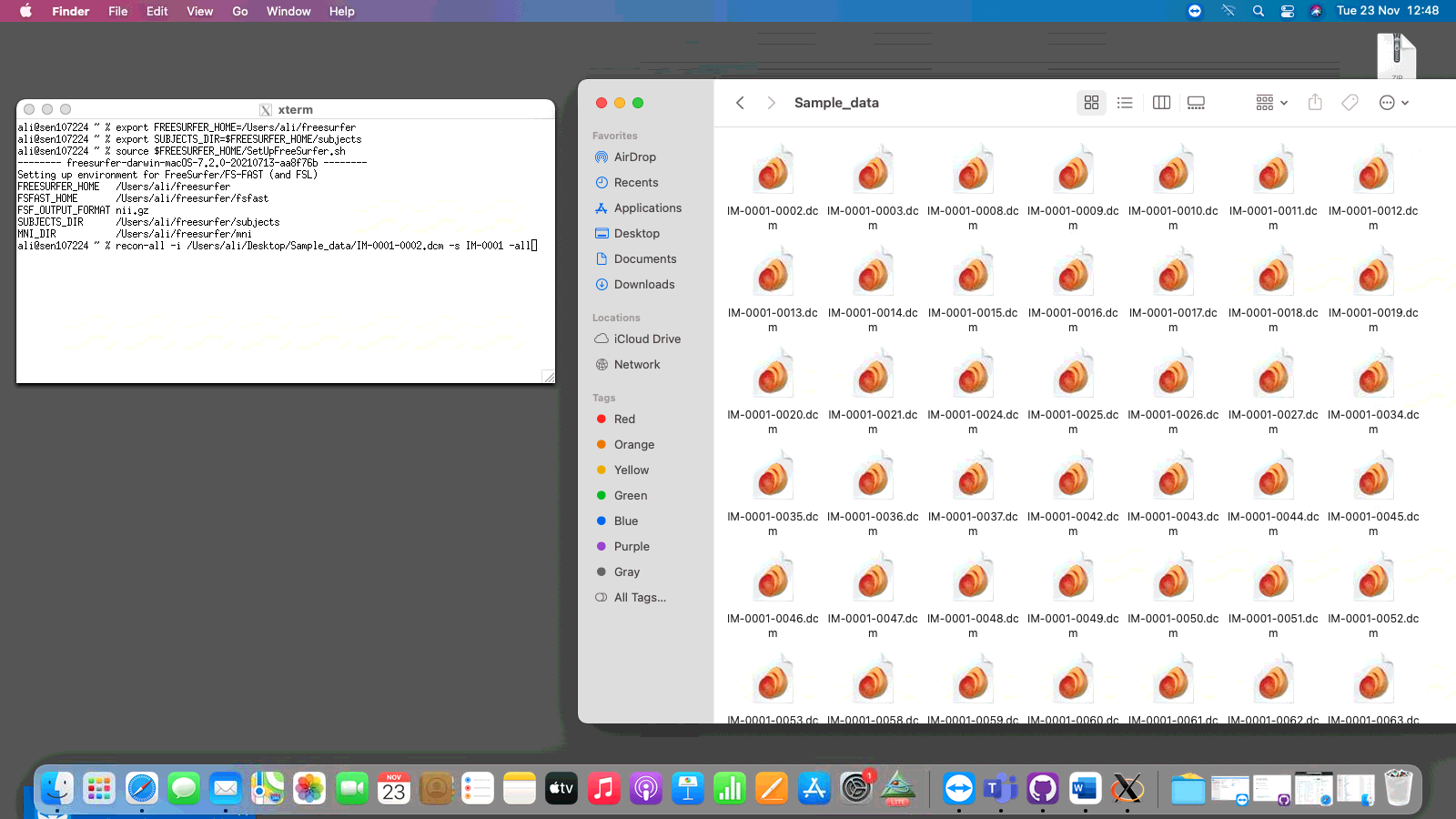
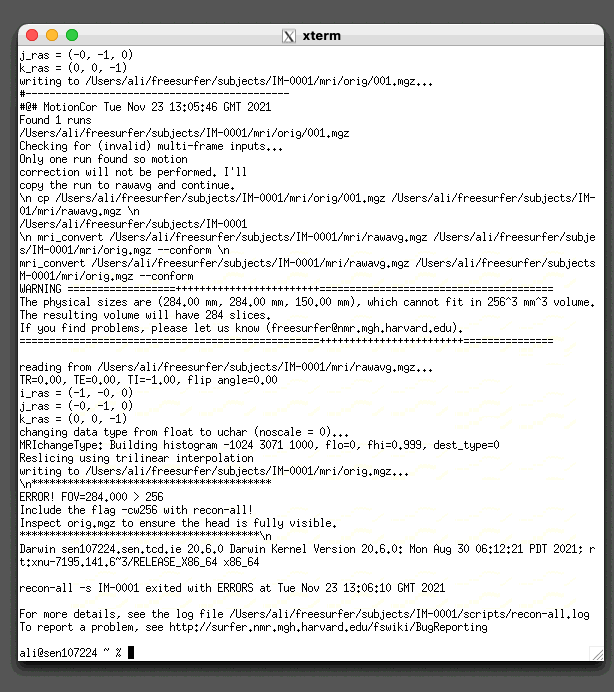
When i run recon all the only thing created is in the mri folder. all the rest are left blank. i have attached all relevant screenshots including one that has the original data being used is in the right format and right place and the recon all log. any advice would be appreciated. this is being done via teamviewer from pc to mac but i cant see why that would cause any issues[image: Xquartz_screenshot.png][image: error_screenshot.png]

External Email - Use Caution
Dear Alison,
Did you already try what is suggested in the error message (include the flag -cw256 with recon-all and inspect orig.mgz)? If so, what were the results?
Best,
Tim
-- Dr. Tim Schäfer Postdoc Computational Neuroimaging Department of Child and Adolescent Psychiatry, Psychosomatics and Psychotherapy University Hospital Frankfurt, Goethe University Frankfurt am Main, Germany
On 11/23/2021 2:15 PM Alison McDonnell amcdonn8@tcd.ie wrote:
External Email - Use Caution
When i run recon all the only thing created is in the mri folder. all the rest are left blank. i have attached all relevant screenshots including one that has the original data being used is in the right format and right place and the recon all log. any advice would be appreciated. this is being done via teamviewer from pc to mac but i cant see why that would cause any issues[image: Xquartz_screenshot.png][image: error_screenshot.png] _______________________________________________ Freesurfer mailing list Freesurfer@nmr.mgh.harvard.edu https://secure-web.cisco.com/1oZ4qG0Lj9xuVFgcyeiGtZkUmbzMdIQG2vOqibUAfB4xnwV...
External Email - Use Caution
Hi Tim,
I looked at orig.mgz and it seemed fine and could see the whole head. i dont know what is meant by the flag -cw256 error. I am taking over a project from someone else so used the same command line as them
Thanks, Ali
On Tue, 23 Nov 2021 at 13:29, Tim Schäfer ts+ml@rcmd.org wrote:
External Email - Use CautionDear Alison,
Did you already try what is suggested in the error message (include the flag -cw256 with recon-all and inspect orig.mgz)? If so, what were the results?
Best,
Tim
-- Dr. Tim Schäfer Postdoc Computational Neuroimaging Department of Child and Adolescent Psychiatry, Psychosomatics and Psychotherapy University Hospital Frankfurt, Goethe University Frankfurt am Main, Germany
On 11/23/2021 2:15 PM Alison McDonnell amcdonn8@tcd.ie wrote:
External Email - Use Caution
When i run recon all the only thing created is in the mri folder. all the rest are left blank. i have attached all relevant screenshots including
one
that has the original data being used is in the right format and right place and the recon all log. any advice would be appreciated. this is
being
done via teamviewer from pc to mac but i cant see why that would cause
any
issues[image: Xquartz_screenshot.png][image: error_screenshot.png] _______________________________________________ Freesurfer mailing list Freesurfer@nmr.mgh.harvard.edu
https://secure-web.cisco.com/1oZ4qG0Lj9xuVFgcyeiGtZkUmbzMdIQG2vOqibUAfB4xnwV...
Freesurfer mailing list Freesurfer@nmr.mgh.harvard.edu https://secure-web.cisco.com/1nlyqcTEn_xHCuM9eTnUKNjQemKntz8K30HNB718LeqUGD1...

Just add -cw256 to the recon-all command line
On 11/23/2021 8:34 AM, Alison McDonnell wrote:
External Email - Use Caution
Hi Tim,
I looked at orig.mgz and it seemed fine and could see the whole head. i dont know what is meant by the flag -cw256 error. I am taking over a project from someone else so used the same command line as them
Thanks, Ali
On Tue, 23 Nov 2021 at 13:29, Tim Schäfer <ts+ml@rcmd.org mailto:ts%2Bml@rcmd.org> wrote:
      External Email - Use Caution

Dear Alison,

Did you already try what is suggested in the error message
(include the flag -cw256 with recon-all and inspect orig.mgz)? If
so, what were the results?

Best,

Tim

--
Dr. Tim Schäfer
Postdoc Computational Neuroimaging
Department of Child and Adolescent Psychiatry, Psychosomatics and
Psychotherapy
University Hospital Frankfurt, Goethe University Frankfurt am
Main, Germany

> On 11/23/2021 2:15 PM Alison McDonnell <amcdonn8@tcd.ie> wrote:
>
>
> External Email - Use Caution
>
> When i run recon all the only thing created is in the mri
folder. all the
> rest are left blank. i have attached all relevant screenshots
including one
> that has the original data being used is in the right format and
right
> place and the recon all log. any advice would be appreciated.
this is being
> done via teamviewer from pc to mac but i cant see why that would
cause any
> issues[image: Xquartz_screenshot.png][image: error_screenshot.png]
> _______________________________________________
> Freesurfer mailing list
> Freesurfer@nmr.mgh.harvard.edu
>
https://secure-web.cisco.com/1oZ4qG0Lj9xuVFgcyeiGtZkUmbzMdIQG2vOqibUAfB4xnwVDpoakmMIcnRaKdoOzhOco7rFZxaA5_tsYjJvmmVn4VRJS3Oc3ixg_tBpd8dFMlHoyqLuszb-wltxb5cwB6mru1CilgFk3GWXljsVF4F8JZ2KbchwoAnuiCsqHgEPx6VzJDwBMN_vDCAy8HrE1Vjfkt2fX1dfdc0SyUN_bWCJUm5q8u--2RRhLo3S-m17bsEU4myWbEeEZGmXgWa3BvMKP4Z_mddhKO6OE4F3noppHm4fL1I9VuDIHXoygyEDC8ZdTJQwOeh_xfr7Fll9W8jk6cAPGwQrswUFvSzB_FMA/https%3A%2F%2Fmail.nmr.mgh.harvard.edu%2Fmailman%2Flistinfo%2Ffreesurfer

_______________________________________________
Freesurfer mailing list
Freesurfer@nmr.mgh.harvard.edu
*MailScanner has detected a possible fraud attempt from
"secure-web.cisco.com" claiming to be*
https://mail.nmr.mgh.harvard.edu/mailman/listinfo/freesurfer
<https://secure-web.cisco.com/1nlyqcTEn_xHCuM9eTnUKNjQemKntz8K30HNB718LeqUGD1B7tFymrWdnxajwBIK4goPLtlNtffwUcVfodgdJRiklh3cgTa3iT-Yi_RzmuHZCgGj06s9oz8Kps5N1e3U3YLPxxBnPi_pGEegaMpPPFEolcLCsgFI7pK7B5dFGjgIOxB8fepPuOKXVX99eAn_K_UwtgG5qfPI_AD1GWaKqpKcpiHffFPzbS4v4B8J-zjNIxqqkk8UU-ZgXfAmB_uE-PmRp8E43BggVi5OTVTZ18f4QMwQrLsNrqkN89IUBrp-1Kvz-rAgWgXl6Q4CSB0fiW17LrM0qJ6NNwbfxAq3kPQ/https%3A%2F%2Fmail.nmr.mgh.harvard.edu%2Fmailman%2Flistinfo%2Ffreesurfer>
Freesurfer mailing list Freesurfer@nmr.mgh.harvard.edu https://mail.nmr.mgh.harvard.edu/mailman/listinfo/freesurfer
freesurfer@nmr.mgh.harvard.edu
-
 Alison McDonnell
 -
 Douglas N. Greve
 -
 Tim Schäfer