
External Email - Use Caution
Hello,
I am trying to view network based maps produced from a meta-analysis using neuroelf on the surface in freesurfer. The meta-analytic maps are thresholded maps that represent the proportion of contrasts that activated at each voxel
I projected my maps on the surface using: mri_vol2surf --src negative_allsocial_proportion.img --regheader mni152_subject --hemi lh --o ./neg_allsocial_lh.nii --projfrac 0.5
Then to view it used: tksurfer mni152_subject lh inflated -overlay ./neg_allsocial_lh.nii -fthresh 0.05
The issue I have is with the fthresh value. I read the wiki and some stuff on archive about the fthresh value but I am unsure what it exactly means and does. My issue is that the display of my maps changes when I change the fthresh value even though the maps have been k-thresholded using neuroelf before exporting them to freesurfer. More area is marked up when I decrease the threshold value from 0.1 to 0.05 and nothing is visible above 0.1
Does anyone have any thoughts about what might be going on there and how I can fix it? Do I need to do something totally different from what I am doing?
Best, Srishti Social/Clinical Research Specialist Child Imaging Research and Life Experiences Lab University of North Carolina at Chapel Hill email (W): srishtig@email.unc.edu skype: srishti.goel12

Hi Srishti
tksurfer has been deprecated for a pretty long time now. Can you try freeview instead?
cheers Bruce On Tue, 22 May 2018, srishti goel wrote:
External Email - Use Caution
Hello, I am trying to view network based maps produced from a meta-analysis using neuroelf on the surface in freesurfer. The meta-analytic maps are thresholded maps that represent the proportion of contrasts that activated at each voxel
I projected my maps on the surface using: mri_vol2surf --src negative_allsocial_proportion.img --regheader mni152_subject --hemi lh --o ./neg_allsocial_lh.nii --projfrac 0.5
Then to view it used: tksurfer mni152_subject lh inflated -overlay ./neg_allsocial_lh.nii -fthresh 0.05
The issue I have is with the fthresh value. I read the wiki and some stuff on archive about the fthresh value but I am unsure what it exactly means and does. My issue is that the display of my maps changes when I change the fthresh value even though the maps have been k-thresholded using neuroelf before exporting them to freesurfer. More area is marked up when I decrease the threshold value from 0.1 to 0.05 and nothing is visible above 0.1
Does anyone have any thoughts about what might be going on there and how I can fix it? Do I need to do something totally different from what I am doing?
Best, Srishti Social/Clinical Research Specialist Child Imaging Research and Life Experiences Lab University of North Carolina at Chapel Hill email (W): srishtig@email.unc.edu skype: srishti.goel12

I don't know anything about neuroelf, but unless your have a binarized map, then the map is going to change when you change the threshold. BTW, if you wan to use freeview, you can run tksurferfv with the same args as tksurfer
On 5/22/18 3:49 PM, srishti goel wrote:
Hello,
I am trying to view network based maps produced from a meta-analysis using neuroelf on the surface in freesurfer. The meta-analytic maps are thresholded maps that represent the proportion of contrasts that activated at each voxel
I projected my maps on the surface using: mri_vol2surf --src negative_allsocial_proportion.img --regheader mni152_subject --hemi lh --o ./neg_allsocial_lh.nii --projfrac 0.5 Then to view it used: tksurfer mni152_subject lh inflated -overlay ./neg_allsocial_lh.nii -fthresh 0.05 The issue I have is with the fthresh value. I read the wiki and some stuff on archive about the fthresh value but I am unsure what it exactly means and does. My issue is that the display of my maps changes when I change the fthresh value even though the maps have been k-thresholded using neuroelf before exporting them to freesurfer. More area is marked up when I decrease the threshold value from 0.1 to 0.05 and nothing is visible above 0.1
Does anyone have any thoughts about what might be going on there and how I can fix it? Do I need to do something totally different from what I am doing?
Best, Srishti Social/Clinical Research Specialist Child Imaging Research and Life Experiences Lab University of North Carolina at Chapel Hill email (W): srishtig@email.unc.edu mailto:srishtig@email.unc.edu skype: srishti.goel12
Freesurfer mailing list Freesurfer@nmr.mgh.harvard.edu https://mail.nmr.mgh.harvard.edu/mailman/listinfo/freesurfer
External Email - Use Caution
Hello,
I did use Freeview but I think using either TkSurfer or Freeview won't matter because what I am trying to figure out is what the fthresh value means for the map. From reading the archive, I understand that, for instance, fthresh value of 0.3 will mean that the overlay displays 50% (1/10^3) threshold based on intensity/ only voxels which are overlaid by 50% of the subjects. In my case, the maps are visible at fthresh 0.1 and below but since these are already thresholded maps from a meta-analysis I am not very clear on how to interpret the fthresh here. Is it voxels overlaid by ~80% of studies?
The other thing I want to figure out is that right now when I view my overlay with two other labels, the labels (when in solid color and not outline) cover my overlay. But I would want it the other way round such that the overlay comes on top of the solid colored labels. Does anyone know how I can achieve that?
Thank you so much!
Best, Srishti
Best, Srishti Social/Clinical Research Specialist Child Imaging Research and Life Experiences Lab University of North Carolina at Chapel Hill email (W): srishtig@email.unc.edu skype: srishti.goel12
On Fri, May 25, 2018 at 10:09 AM, Douglas Greve dgreve@mgh.harvard.edu wrote:
I don't know anything about neuroelf, but unless your have a binarized map, then the map is going to change when you change the threshold. BTW, if you wan to use freeview, you can run tksurferfv with the same args as tksurfer
On 5/22/18 3:49 PM, srishti goel wrote:
Hello,
I am trying to view network based maps produced from a meta-analysis using neuroelf on the surface in freesurfer. The meta-analytic maps are thresholded maps that represent the proportion of contrasts that activated at each voxel
I projected my maps on the surface using: mri_vol2surf --src negative_allsocial_proportion.img --regheader mni152_subject --hemi lh --o ./neg_allsocial_lh.nii --projfrac 0.5 Then to view it used: tksurfer mni152_subject lh inflated -overlay ./neg_allsocial_lh.nii -fthresh 0.05 The issue I have is with the fthresh value. I read the wiki and some stuff on archive about the fthresh value but I am unsure what it exactly means and does. My issue is that the display of my maps changes when I change the fthresh value even though the maps have been k-thresholded using neuroelf before exporting them to freesurfer. More area is marked up when I decrease the threshold value from 0.1 to 0.05 and nothing is visible above 0.1
Does anyone have any thoughts about what might be going on there and how I can fix it? Do I need to do something totally different from what I am doing?
Best, Srishti Social/Clinical Research Specialist Child Imaging Research and Life Experiences Lab University of North Carolina at Chapel Hill email (W): srishtig@email.unc.edu skype: srishti.goel12
Freesurfer mailing listFreesurfer@nmr.mgh.harvard.eduhttps://mail.nmr.mgh.harvard.edu/mailman/listinfo/freesurfer
Freesurfer mailing list Freesurfer@nmr.mgh.harvard.edu https://mail.nmr.mgh.harvard.edu/mailman/listinfo/freesurfer
The information in this e-mail is intended only for the person to whom it is addressed. If you believe this e-mail was sent to you in error and the e-mail contains patient information, please contact the Partners Compliance HelpLine at http://www.partners.org/complianceline . If the e-mail was sent to you in error but does not contain patient information, please contact the sender and properly dispose of the e-mail.

Hi Srishti,

In freeview surface labels are always displayed on top of
overlays. I will add an option to change that.

Best,
Ruopeng
On May 28, 2018, at 9:18 AM, srishti goel 23srishtigoel@gmail.com wrote:
Hello,
I did use Freeview but I think using either TkSurfer or Freeview won't matter because what I am trying to figure out is what the fthresh value means for the map. From reading the archive, I understand that, for instance, fthresh value of 0.3 will mean that the overlay displays 50% (1/10^3) threshold based on intensity/ only voxels which are overlaid by 50% of the subjects. In my case, the maps are visible at fthresh 0.1 and below but since these are already thresholded maps from a meta-analysis I am not very clear on how to interpret the fthresh here. Is it voxels overlaid by ~80% of studies?
The other thing I want to figure out is that right now when I view my overlay with two other labels, the labels (when in solid color and not outline) cover my overlay. But I would want it the other way round such that the overlay comes on top of the solid colored labels. Does anyone know how I can achieve that?
Thank you so much!
Best, Srishti
Best, Srishti Social/Clinical Research Specialist Child Imaging Research and Life Experiences Lab University of North Carolina at Chapel Hill email (W): srishtig@email.unc.edu mailto:srishtig@email.unc.edu skype: srishti.goel12
On Fri, May 25, 2018 at 10:09 AM, Douglas Greve <dgreve@mgh.harvard.edu mailto:dgreve@mgh.harvard.edu> wrote: I don't know anything about neuroelf, but unless your have a binarized map, then the map is going to change when you change the threshold. BTW, if you wan to use freeview, you can run tksurferfv with the same args as tksurfer
On 5/22/18 3:49 PM, srishti goel wrote:
Hello,
I am trying to view network based maps produced from a meta-analysis using neuroelf on the surface in freesurfer. The meta-analytic maps are thresholded maps that represent the proportion of contrasts that activated at each voxel
I projected my maps on the surface using: mri_vol2surf --src negative_allsocial_proportion.img --regheader mni152_subject --hemi lh --o ./neg_allsocial_lh.nii --projfrac 0.5
Then to view it used: tksurfer mni152_subject lh inflated -overlay ./neg_allsocial_lh.nii -fthresh 0.05
The issue I have is with the fthresh value. I read the wiki and some stuff on archive about the fthresh value but I am unsure what it exactly means and does. My issue is that the display of my maps changes when I change the fthresh value even though the maps have been k-thresholded using neuroelf before exporting them to freesurfer. More area is marked up when I decrease the threshold value from 0.1 to 0.05 and nothing is visible above 0.1
Does anyone have any thoughts about what might be going on there and how I can fix it? Do I need to do something totally different from what I am doing?
Best, Srishti Social/Clinical Research Specialist Child Imaging Research and Life Experiences Lab University of North Carolina at Chapel Hill email (W): srishtig@email.unc.edu mailto:srishtig@email.unc.edu skype: srishti.goel12
Freesurfer mailing list Freesurfer@nmr.mgh.harvard.edu mailto:Freesurfer@nmr.mgh.harvard.edu https://mail.nmr.mgh.harvard.edu/mailman/listinfo/freesurfer https://mail.nmr.mgh.harvard.edu/mailman/listinfo/freesurfer
Freesurfer mailing list Freesurfer@nmr.mgh.harvard.edu mailto:Freesurfer@nmr.mgh.harvard.edu https://mail.nmr.mgh.harvard.edu/mailman/listinfo/freesurfer https://mail.nmr.mgh.harvard.edu/mailman/listinfo/freesurfer
The information in this e-mail is intended only for the person to whom it is addressed. If you believe this e-mail was sent to you in error and the e-mail contains patient information, please contact the Partners Compliance HelpLine at http://www.partners.org/complianceline http://www.partners.org/complianceline . If the e-mail was sent to you in error but does not contain patient information, please contact the sender and properly dispose of the e-mail.
Freesurfer mailing list Freesurfer@nmr.mgh.harvard.edu https://mail.nmr.mgh.harvard.edu/mailman/listinfo/freesurfer
External Email - Use Caution
Hi Ruopeng,
Thank you so much! That option will be super helpful. Are you planning to add that option to Freeview soon?
Best, Srishti
Best, Srishti Social/Clinical Research Specialist Child Imaging Research and Life Experiences Lab University of North Carolina at Chapel Hill email (W): srishtig@email.unc.edu skype: srishti.goel12
On Mon, May 28, 2018 at 2:28 PM, Ruopeng Wang rpwang@nmr.mgh.harvard.edu wrote:
Hi Srishti,
In freeview surface labels are always displayed on top of overlays. I will add an option to change that.
Best, Ruopeng
On May 28, 2018, at 9:18 AM, srishti goel 23srishtigoel@gmail.com wrote:
Hello,
I did use Freeview but I think using either TkSurfer or Freeview won't matter because what I am trying to figure out is what the fthresh value means for the map. From reading the archive, I understand that, for instance, fthresh value of 0.3 will mean that the overlay displays 50% (1/10^3) threshold based on intensity/ only voxels which are overlaid by 50% of the subjects. In my case, the maps are visible at fthresh 0.1 and below but since these are already thresholded maps from a meta-analysis I am not very clear on how to interpret the fthresh here. Is it voxels overlaid by ~80% of studies?
The other thing I want to figure out is that right now when I view my overlay with two other labels, the labels (when in solid color and not outline) cover my overlay. But I would want it the other way round such that the overlay comes on top of the solid colored labels. Does anyone know how I can achieve that?
Thank you so much!
Best, Srishti
Best, Srishti Social/Clinical Research Specialist Child Imaging Research and Life Experiences Lab University of North Carolina at Chapel Hill email (W): srishtig@email.unc.edu skype: srishti.goel12
On Fri, May 25, 2018 at 10:09 AM, Douglas Greve dgreve@mgh.harvard.edu wrote:
I don't know anything about neuroelf, but unless your have a binarized map, then the map is going to change when you change the threshold. BTW, if you wan to use freeview, you can run tksurferfv with the same args as tksurfer
On 5/22/18 3:49 PM, srishti goel wrote:
Hello,
I am trying to view network based maps produced from a meta-analysis using neuroelf on the surface in freesurfer. The meta-analytic maps are thresholded maps that represent the proportion of contrasts that activated at each voxel
I projected my maps on the surface using: mri_vol2surf --src negative_allsocial_proportion.img --regheader mni152_subject --hemi lh --o ./neg_allsocial_lh.nii --projfrac 0.5 Then to view it used: tksurfer mni152_subject lh inflated -overlay ./neg_allsocial_lh.nii -fthresh 0.05 The issue I have is with the fthresh value. I read the wiki and some stuff on archive about the fthresh value but I am unsure what it exactly means and does. My issue is that the display of my maps changes when I change the fthresh value even though the maps have been k-thresholded using neuroelf before exporting them to freesurfer. More area is marked up when I decrease the threshold value from 0.1 to 0.05 and nothing is visible above 0.1
Does anyone have any thoughts about what might be going on there and how I can fix it? Do I need to do something totally different from what I am doing?
Best, Srishti Social/Clinical Research Specialist Child Imaging Research and Life Experiences Lab University of North Carolina at Chapel Hill email (W): srishtig@email.unc.edu skype: srishti.goel12
Freesurfer mailing listFreesurfer@nmr.mgh.harvard.eduhttps://mail.nmr.mgh.harvard.edu/mailman/listinfo/freesurfer
Freesurfer mailing list Freesurfer@nmr.mgh.harvard.edu https://mail.nmr.mgh.harvard.edu/mailman/listinfo/freesurfer
The information in this e-mail is intended only for the person to whom it is addressed. If you believe this e-mail was sent to you in error and the e-mail contains patient information, please contact the Partners Compliance HelpLine at http://www.partners.org/complianceline . If the e-mail was sent to you in error but does not contain patient information, please contact the sender and properly dispose of the e-mail.
Freesurfer mailing list Freesurfer@nmr.mgh.harvard.edu https://mail.nmr.mgh.harvard.edu/mailman/listinfo/freesurfer
Freesurfer mailing list Freesurfer@nmr.mgh.harvard.edu https://mail.nmr.mgh.harvard.edu/mailman/listinfo/freesurfer
The information in this e-mail is intended only for the person to whom it is addressed. If you believe this e-mail was sent to you in error and the e-mail contains patient information, please contact the Partners Compliance HelpLine at http://www.partners.org/complianceline . If the e-mail was sent to you in error but does not contain patient information, please contact the sender and properly dispose of the e-mail.
It will be added very soon. I'll let you know when it is ready.
Best, Ruopeng
On 05/28/2018 05:35 PM, srishti goel wrote:
Hi Ruopeng,
Thank you so much! That option will be super helpful. Are you planning to add that option to Freeview soon?
Best, Srishti
Best, Srishti Social/Clinical Research Specialist Child Imaging Research and Life Experiences Lab University of North Carolina at Chapel Hill email (W): srishtig@email.unc.edu mailto:srishtig@email.unc.edu skype: srishti.goel12
On Mon, May 28, 2018 at 2:28 PM, Ruopeng Wang <rpwang@nmr.mgh.harvard.edu mailto:rpwang@nmr.mgh.harvard.edu> wrote:
Hi Srishti, In freeview surface labels are always displayed on top of overlays. I will add an option to change that. Best, RuopengOn May 28, 2018, at 9:18 AM, srishti goel <23srishtigoel@gmail.com <mailto:23srishtigoel@gmail.com>> wrote: Hello, I did use Freeview but I think using either TkSurfer or Freeview won't matter because what I am trying to figure out is what the fthresh value means for the map. From reading the archive, I understand that, for instance, fthresh value of 0.3 will mean that the overlay displays 50% (1/10^3) threshold based on intensity/ only voxels which are overlaid by 50% of the subjects. In my case, the maps are visible at fthresh 0.1 and below but since these are already thresholded maps from a meta-analysis I am not very clear on how to interpret the fthresh here. Is it voxels overlaid by ~80% of studies? The other thing I want to figure out is that right now when I view my overlay with two other labels, the labels (when in solid color and not outline) cover my overlay. But I would want it the other way round such that the overlay comes on top of the solid colored labels. Does anyone know how I can achieve that? Thank you so much! Best, Srishti Best, Srishti Social/Clinical Research Specialist Child Imaging Research and Life Experiences Lab University of North Carolina at Chapel Hill email (W): srishtig@email.unc.edu <mailto:srishtig@email.unc.edu> skype: srishti.goel12 On Fri, May 25, 2018 at 10:09 AM, Douglas Greve <dgreve@mgh.harvard.edu <mailto:dgreve@mgh.harvard.edu>> wrote: I don't know anything about neuroelf, but unless your have a binarized map, then the map is going to change when you change the threshold. BTW, if you wan to use freeview, you can run tksurferfv with the same args as tksurfer On 5/22/18 3:49 PM, srishti goel wrote:Hello, I am trying to view network based maps produced from a meta-analysis using neuroelf on the surface in freesurfer. The meta-analytic maps are thresholded maps that represent the proportion of contrasts that activated at each voxel I projected my maps on the surface using: mri_vol2surf --src negative_allsocial_proportion.img --regheader mni152_subject --hemi lh --o ./neg_allsocial_lh.nii --projfrac 0.5 Then to view it used: tksurfer mni152_subject lh inflated -overlay ./neg_allsocial_lh.nii -fthresh 0.05 The issue I have is with the fthresh value. I read the wiki and some stuff on archive about the fthresh value but I am unsure what it exactly means and does. My issue is that the display of my maps changes when I change the fthresh value even though the maps have been k-thresholded using neuroelf before exporting them to freesurfer. More area is marked up when I decrease the threshold value from 0.1 to 0.05 and nothing is visible above 0.1 Does anyone have any thoughts about what might be going on there and how I can fix it? Do I need to do something totally different from what I am doing? Best, Srishti Social/Clinical Research Specialist Child Imaging Research and Life Experiences Lab University of North Carolina at Chapel Hill email (W): srishtig@email.unc.edu <mailto:srishtig@email.unc.edu> skype: srishti.goel12 _______________________________________________ Freesurfer mailing list Freesurfer@nmr.mgh.harvard.edu <mailto:Freesurfer@nmr.mgh.harvard.edu> https://mail.nmr.mgh.harvard.edu/mailman/listinfo/freesurfer <https://mail.nmr.mgh.harvard.edu/mailman/listinfo/freesurfer>_______________________________________________ Freesurfer mailing list Freesurfer@nmr.mgh.harvard.edu <mailto:Freesurfer@nmr.mgh.harvard.edu> https://mail.nmr.mgh.harvard.edu/mailman/listinfo/freesurfer <https://mail.nmr.mgh.harvard.edu/mailman/listinfo/freesurfer> The information in this e-mail is intended only for the person to whom it is addressed. If you believe this e-mail was sent to you in error and the e-mail contains patient information, please contact the Partners Compliance HelpLine at http://www.partners.org/complianceline <http://www.partners.org/complianceline> . If the e-mail was sent to you in error but does not contain patient information, please contact the sender and properly dispose of the e-mail. _______________________________________________ Freesurfer mailing list Freesurfer@nmr.mgh.harvard.edu <mailto:Freesurfer@nmr.mgh.harvard.edu> https://mail.nmr.mgh.harvard.edu/mailman/listinfo/freesurfer <https://mail.nmr.mgh.harvard.edu/mailman/listinfo/freesurfer>_______________________________________________ Freesurfer mailing list Freesurfer@nmr.mgh.harvard.edu <mailto:Freesurfer@nmr.mgh.harvard.edu> https://mail.nmr.mgh.harvard.edu/mailman/listinfo/freesurfer <https://mail.nmr.mgh.harvard.edu/mailman/listinfo/freesurfer> The information in this e-mail is intended only for the person to whom it is addressed. If you believe this e-mail was sent to you in error and the e-mail contains patient information, please contact the Partners Compliance HelpLine at http://www.partners.org/complianceline <http://www.partners.org/complianceline> . If the e-mail was sent to you in error but does not contain patient information, please contact the sender and properly dispose of the e-mail.
Freesurfer mailing list Freesurfer@nmr.mgh.harvard.edu https://mail.nmr.mgh.harvard.edu/mailman/listinfo/freesurfer
External Email - Use Caution
Thanks a lot Ruopeng, really appreciate it.
Best, Srishti
Best, Srishti Social/Clinical Research Specialist Child Imaging Research and Life Experiences Lab University of North Carolina at Chapel Hill email (W): srishtig@email.unc.edu skype: srishti.goel12
On Tue, May 29, 2018 at 10:40 AM, Ruopeng Wang rpwang@nmr.mgh.harvard.edu wrote:
It will be added very soon. I'll let you know when it is ready.
Best, Ruopeng
On 05/28/2018 05:35 PM, srishti goel wrote:
Hi Ruopeng,
Thank you so much! That option will be super helpful. Are you planning to add that option to Freeview soon?
Best, Srishti
Best, Srishti Social/Clinical Research Specialist Child Imaging Research and Life Experiences Lab University of North Carolina at Chapel Hill email (W): srishtig@email.unc.edu skype: srishti.goel12
On Mon, May 28, 2018 at 2:28 PM, Ruopeng Wang rpwang@nmr.mgh.harvard.edu wrote:
Hi Srishti,
In freeview surface labels are always displayed on top of overlays. I will add an option to change that.
Best, Ruopeng
On May 28, 2018, at 9:18 AM, srishti goel 23srishtigoel@gmail.com wrote:
Hello,
I did use Freeview but I think using either TkSurfer or Freeview won't matter because what I am trying to figure out is what the fthresh value means for the map. From reading the archive, I understand that, for instance, fthresh value of 0.3 will mean that the overlay displays 50% (1/10^3) threshold based on intensity/ only voxels which are overlaid by 50% of the subjects. In my case, the maps are visible at fthresh 0.1 and below but since these are already thresholded maps from a meta-analysis I am not very clear on how to interpret the fthresh here. Is it voxels overlaid by ~80% of studies?
The other thing I want to figure out is that right now when I view my overlay with two other labels, the labels (when in solid color and not outline) cover my overlay. But I would want it the other way round such that the overlay comes on top of the solid colored labels. Does anyone know how I can achieve that?
Thank you so much!
Best, Srishti
Best, Srishti Social/Clinical Research Specialist Child Imaging Research and Life Experiences Lab University of North Carolina at Chapel Hill email (W): srishtig@email.unc.edu skype: srishti.goel12
On Fri, May 25, 2018 at 10:09 AM, Douglas Greve dgreve@mgh.harvard.edu wrote:
I don't know anything about neuroelf, but unless your have a binarized map, then the map is going to change when you change the threshold. BTW, if you wan to use freeview, you can run tksurferfv with the same args as tksurfer
On 5/22/18 3:49 PM, srishti goel wrote:
Hello,
I am trying to view network based maps produced from a meta-analysis using neuroelf on the surface in freesurfer. The meta-analytic maps are thresholded maps that represent the proportion of contrasts that activated at each voxel
I projected my maps on the surface using: mri_vol2surf --src negative_allsocial_proportion.img --regheader mni152_subject --hemi lh --o ./neg_allsocial_lh.nii --projfrac 0.5 Then to view it used: tksurfer mni152_subject lh inflated -overlay ./neg_allsocial_lh.nii -fthresh 0.05 The issue I have is with the fthresh value. I read the wiki and some stuff on archive about the fthresh value but I am unsure what it exactly means and does. My issue is that the display of my maps changes when I change the fthresh value even though the maps have been k-thresholded using neuroelf before exporting them to freesurfer. More area is marked up when I decrease the threshold value from 0.1 to 0.05 and nothing is visible above 0.1
Does anyone have any thoughts about what might be going on there and how I can fix it? Do I need to do something totally different from what I am doing?
Best, Srishti Social/Clinical Research Specialist Child Imaging Research and Life Experiences Lab University of North Carolina at Chapel Hill email (W): srishtig@email.unc.edu skype: srishti.goel12
Freesurfer mailing listFreesurfer@nmr.mgh.harvard.eduhttps://mail.nmr.mgh.harvard.edu/mailman/listinfo/freesurfer
Freesurfer mailing list Freesurfer@nmr.mgh.harvard.edu https://mail.nmr.mgh.harvard.edu/mailman/listinfo/freesurfer
The information in this e-mail is intended only for the person to whom it is addressed. If you believe this e-mail was sent to you in error and the e-mail contains patient information, please contact the Partners Compliance HelpLine at http://www.partners.org/complianceline . If the e-mail was sent to you in error but does not contain patient information, please contact the sender and properly dispose of the e-mail.
Freesurfer mailing list Freesurfer@nmr.mgh.harvard.edu https://mail.nmr.mgh.harvard.edu/mailman/listinfo/freesurfer
Freesurfer mailing list Freesurfer@nmr.mgh.harvard.edu https://mail.nmr.mgh.harvard.edu/mailman/listinfo/freesurfer
The information in this e-mail is intended only for the person to whom it is addressed. If you believe this e-mail was sent to you in error and the e-mail contains patient information, please contact the Partners Compliance HelpLine at http://www.partners.org/complianceline . If the e-mail was sent to you in error but does not contain patient information, please contact the sender and properly dispose of the e-mail.
Freesurfer mailing listFreesurfer@nmr.mgh.harvard.eduhttps://mail.nmr.mgh.harvard.edu/mailman/listinfo/freesurfer
Freesurfer mailing list Freesurfer@nmr.mgh.harvard.edu https://mail.nmr.mgh.harvard.edu/mailman/listinfo/freesurfer
The information in this e-mail is intended only for the person to whom it is addressed. If you believe this e-mail was sent to you in error and the e-mail contains patient information, please contact the Partners Compliance HelpLine at http://www.partners.org/complianceline . If the e-mail was sent to you in error but does not contain patient information, please contact the sender and properly dispose of the e-mail.
External Email - Use Caution
Hi Ruopeng,
I just wanted to check and see if there is any update about adding the option of changing surface labels to come below overlays in Freeview. Thanks!
Best, Srishti
Best, Srishti Social/Clinical Research Specialist Child Imaging Research and Life Experiences Lab University of North Carolina at Chapel Hill email (W): srishtig@email.unc.edu skype: srishti.goel12
On Tue, May 29, 2018 at 2:40 PM, srishti goel 23srishtigoel@gmail.com wrote:
Thanks a lot Ruopeng, really appreciate it.
Best, Srishti
Best, Srishti Social/Clinical Research Specialist Child Imaging Research and Life Experiences Lab University of North Carolina at Chapel Hill email (W): srishtig@email.unc.edu skype: srishti.goel12
On Tue, May 29, 2018 at 10:40 AM, Ruopeng Wang <rpwang@nmr.mgh.harvard.edu
wrote:
It will be added very soon. I'll let you know when it is ready.
Best, Ruopeng
On 05/28/2018 05:35 PM, srishti goel wrote:
Hi Ruopeng,
Thank you so much! That option will be super helpful. Are you planning to add that option to Freeview soon?
Best, Srishti
Best, Srishti Social/Clinical Research Specialist Child Imaging Research and Life Experiences Lab University of North Carolina at Chapel Hill email (W): srishtig@email.unc.edu skype: srishti.goel12
On Mon, May 28, 2018 at 2:28 PM, Ruopeng Wang <rpwang@nmr.mgh.harvard.edu
wrote:
Hi Srishti,
In freeview surface labels are always displayed on top of overlays. I will add an option to change that.
Best, Ruopeng
On May 28, 2018, at 9:18 AM, srishti goel 23srishtigoel@gmail.com wrote:
Hello,
I did use Freeview but I think using either TkSurfer or Freeview won't matter because what I am trying to figure out is what the fthresh value means for the map. From reading the archive, I understand that, for instance, fthresh value of 0.3 will mean that the overlay displays 50% (1/10^3) threshold based on intensity/ only voxels which are overlaid by 50% of the subjects. In my case, the maps are visible at fthresh 0.1 and below but since these are already thresholded maps from a meta-analysis I am not very clear on how to interpret the fthresh here. Is it voxels overlaid by ~80% of studies?
The other thing I want to figure out is that right now when I view my overlay with two other labels, the labels (when in solid color and not outline) cover my overlay. But I would want it the other way round such that the overlay comes on top of the solid colored labels. Does anyone know how I can achieve that?
Thank you so much!
Best, Srishti
Best, Srishti Social/Clinical Research Specialist Child Imaging Research and Life Experiences Lab University of North Carolina at Chapel Hill email (W): srishtig@email.unc.edu skype: srishti.goel12
On Fri, May 25, 2018 at 10:09 AM, Douglas Greve dgreve@mgh.harvard.edu wrote:
I don't know anything about neuroelf, but unless your have a binarized map, then the map is going to change when you change the threshold. BTW, if you wan to use freeview, you can run tksurferfv with the same args as tksurfer
On 5/22/18 3:49 PM, srishti goel wrote:
Hello,
I am trying to view network based maps produced from a meta-analysis using neuroelf on the surface in freesurfer. The meta-analytic maps are thresholded maps that represent the proportion of contrasts that activated at each voxel
I projected my maps on the surface using: mri_vol2surf --src negative_allsocial_proportion.img --regheader mni152_subject --hemi lh --o ./neg_allsocial_lh.nii --projfrac 0.5 Then to view it used: tksurfer mni152_subject lh inflated -overlay ./neg_allsocial_lh.nii -fthresh 0.05 The issue I have is with the fthresh value. I read the wiki and some stuff on archive about the fthresh value but I am unsure what it exactly means and does. My issue is that the display of my maps changes when I change the fthresh value even though the maps have been k-thresholded using neuroelf before exporting them to freesurfer. More area is marked up when I decrease the threshold value from 0.1 to 0.05 and nothing is visible above 0.1
Does anyone have any thoughts about what might be going on there and how I can fix it? Do I need to do something totally different from what I am doing?
Best, Srishti Social/Clinical Research Specialist Child Imaging Research and Life Experiences Lab University of North Carolina at Chapel Hill email (W): srishtig@email.unc.edu skype: srishti.goel12
Freesurfer mailing listFreesurfer@nmr.mgh.harvard.eduhttps://mail.nmr.mgh.harvard.edu/mailman/listinfo/freesurfer
Freesurfer mailing list Freesurfer@nmr.mgh.harvard.edu https://mail.nmr.mgh.harvard.edu/mailman/listinfo/freesurfer
The information in this e-mail is intended only for the person to whom it is addressed. If you believe this e-mail was sent to you in error and the e-mail contains patient information, please contact the Partners Compliance HelpLine at http://www.partners.org/complianceline . If the e-mail was sent to you in error but does not contain patient information, please contact the sender and properly dispose of the e-mail.
Freesurfer mailing list Freesurfer@nmr.mgh.harvard.edu https://mail.nmr.mgh.harvard.edu/mailman/listinfo/freesurfer
Freesurfer mailing list Freesurfer@nmr.mgh.harvard.edu https://mail.nmr.mgh.harvard.edu/mailman/listinfo/freesurfer
The information in this e-mail is intended only for the person to whom it is addressed. If you believe this e-mail was sent to you in error and the e-mail contains patient information, please contact the Partners Compliance HelpLine at http://www.partners.org/complianceline . If the e-mail was sent to you in error but does not contain patient information, please contact the sender and properly dispose of the e-mail.
Freesurfer mailing listFreesurfer@nmr.mgh.harvard.eduhttps://mail.nmr.mgh.harvard.edu/mailman/listinfo/freesurfer
Freesurfer mailing list Freesurfer@nmr.mgh.harvard.edu https://mail.nmr.mgh.harvard.edu/mailman/listinfo/freesurfer
The information in this e-mail is intended only for the person to whom it is addressed. If you believe this e-mail was sent to you in error and the e-mail contains patient information, please contact the Partners Compliance HelpLine at http://www.partners.org/complianceline . If the e-mail was sent to you in error but does not contain patient information, please contact the sender and properly dispose of the e-mail.
Yes, I have put an option called z-order in the GUI to control order of rendering for overlays, labels and annoations. To use it you will need to download and install the nightly build from here:
https://surfer.nmr.mgh.harvard.edu/fswiki/UpdateFreeview https://surfer.nmr.mgh.harvard.edu/fswiki/UpdateFreeview
Best, Ruopeng
On Jun 9, 2018, at 11:04 AM, srishti goel 23srishtigoel@gmail.com wrote:
External Email - Use CautionHi Ruopeng,
I just wanted to check and see if there is any update about adding the option of changing surface labels to come below overlays in Freeview. Thanks!
Best, Srishti
Best, Srishti Social/Clinical Research Specialist Child Imaging Research and Life Experiences Lab University of North Carolina at Chapel Hill email (W): srishtig@email.unc.edu mailto:srishtig@email.unc.edu skype: srishti.goel12
On Tue, May 29, 2018 at 2:40 PM, srishti goel <23srishtigoel@gmail.com mailto:23srishtigoel@gmail.com> wrote: Thanks a lot Ruopeng, really appreciate it.
Best, Srishti
Best, Srishti Social/Clinical Research Specialist Child Imaging Research and Life Experiences Lab University of North Carolina at Chapel Hill email (W): srishtig@email.unc.edu mailto:srishtig@email.unc.edu skype: srishti.goel12
On Tue, May 29, 2018 at 10:40 AM, Ruopeng Wang <rpwang@nmr.mgh.harvard.edu mailto:rpwang@nmr.mgh.harvard.edu> wrote: It will be added very soon. I'll let you know when it is ready.
Best, Ruopeng
On 05/28/2018 05:35 PM, srishti goel wrote:
Hi Ruopeng,
Thank you so much! That option will be super helpful. Are you planning to add that option to Freeview soon?
Best, Srishti
Best, Srishti Social/Clinical Research Specialist Child Imaging Research and Life Experiences Lab University of North Carolina at Chapel Hill email (W): srishtig@email.unc.edu mailto:srishtig@email.unc.edu skype: srishti.goel12
On Mon, May 28, 2018 at 2:28 PM, Ruopeng Wang <rpwang@nmr.mgh.harvard.edu mailto:rpwang@nmr.mgh.harvard.edu> wrote: Hi Srishti,
In freeview surface labels are always displayed on top of overlays. I will add an option to change that.
Best, Ruopeng
On May 28, 2018, at 9:18 AM, srishti goel <23srishtigoel@gmail.com mailto:23srishtigoel@gmail.com> wrote:
Hello,
I did use Freeview but I think using either TkSurfer or Freeview won't matter because what I am trying to figure out is what the fthresh value means for the map. From reading the archive, I understand that, for instance, fthresh value of 0.3 will mean that the overlay displays 50% (1/10^3) threshold based on intensity/ only voxels which are overlaid by 50% of the subjects. In my case, the maps are visible at fthresh 0.1 and below but since these are already thresholded maps from a meta-analysis I am not very clear on how to interpret the fthresh here. Is it voxels overlaid by ~80% of studies?
The other thing I want to figure out is that right now when I view my overlay with two other labels, the labels (when in solid color and not outline) cover my overlay. But I would want it the other way round such that the overlay comes on top of the solid colored labels. Does anyone know how I can achieve that?
Thank you so much!
Best, Srishti
Best, Srishti Social/Clinical Research Specialist Child Imaging Research and Life Experiences Lab University of North Carolina at Chapel Hill email (W): srishtig@email.unc.edu mailto:srishtig@email.unc.edu skype: srishti.goel12
On Fri, May 25, 2018 at 10:09 AM, Douglas Greve <dgreve@mgh.harvard.edu mailto:dgreve@mgh.harvard.edu> wrote: I don't know anything about neuroelf, but unless your have a binarized map, then the map is going to change when you change the threshold. BTW, if you wan to use freeview, you can run tksurferfv with the same args as tksurfer
On 5/22/18 3:49 PM, srishti goel wrote:
Hello,
I am trying to view network based maps produced from a meta-analysis using neuroelf on the surface in freesurfer. The meta-analytic maps are thresholded maps that represent the proportion of contrasts that activated at each voxel
I projected my maps on the surface using: mri_vol2surf --src negative_allsocial_proportion.img --regheader mni152_subject --hemi lh --o ./neg_allsocial_lh.nii --projfrac 0.5
Then to view it used: tksurfer mni152_subject lh inflated -overlay ./neg_allsocial_lh.nii -fthresh 0.05
The issue I have is with the fthresh value. I read the wiki and some stuff on archive about the fthresh value but I am unsure what it exactly means and does. My issue is that the display of my maps changes when I change the fthresh value even though the maps have been k-thresholded using neuroelf before exporting them to freesurfer. More area is marked up when I decrease the threshold value from 0.1 to 0.05 and nothing is visible above 0.1
Does anyone have any thoughts about what might be going on there and how I can fix it? Do I need to do something totally different from what I am doing?
Best, Srishti Social/Clinical Research Specialist Child Imaging Research and Life Experiences Lab University of North Carolina at Chapel Hill email (W): srishtig@email.unc.edu mailto:srishtig@email.unc.edu skype: srishti.goel12
Freesurfer mailing list Freesurfer@nmr.mgh.harvard.edu mailto:Freesurfer@nmr.mgh.harvard.edu https://mail.nmr.mgh.harvard.edu/mailman/listinfo/freesurfer https://mail.nmr.mgh.harvard.edu/mailman/listinfo/freesurfer
Freesurfer mailing list Freesurfer@nmr.mgh.harvard.edu mailto:Freesurfer@nmr.mgh.harvard.edu https://mail.nmr.mgh.harvard.edu/mailman/listinfo/freesurfer https://mail.nmr.mgh.harvard.edu/mailman/listinfo/freesurfer
The information in this e-mail is intended only for the person to whom it is addressed. If you believe this e-mail was sent to you in error and the e-mail contains patient information, please contact the Partners Compliance HelpLine at http://www.partners.org/complianceline http://www.partners.org/complianceline . If the e-mail was sent to you in error but does not contain patient information, please contact the sender and properly dispose of the e-mail.
Freesurfer mailing list Freesurfer@nmr.mgh.harvard.edu mailto:Freesurfer@nmr.mgh.harvard.edu https://mail.nmr.mgh.harvard.edu/mailman/listinfo/freesurfer https://mail.nmr.mgh.harvard.edu/mailman/listinfo/freesurfer
Freesurfer mailing list Freesurfer@nmr.mgh.harvard.edu mailto:Freesurfer@nmr.mgh.harvard.edu https://mail.nmr.mgh.harvard.edu/mailman/listinfo/freesurfer https://mail.nmr.mgh.harvard.edu/mailman/listinfo/freesurfer
The information in this e-mail is intended only for the person to whom it is addressed. If you believe this e-mail was sent to you in error and the e-mail contains patient information, please contact the Partners Compliance HelpLine at http://www.partners.org/complianceline http://www.partners.org/complianceline . If the e-mail was sent to you in error but does not contain patient information, please contact the sender and properly dispose of the e-mail.
Freesurfer mailing list Freesurfer@nmr.mgh.harvard.edu mailto:Freesurfer@nmr.mgh.harvard.edu https://mail.nmr.mgh.harvard.edu/mailman/listinfo/freesurfer https://mail.nmr.mgh.harvard.edu/mailman/listinfo/freesurfer
Freesurfer mailing list Freesurfer@nmr.mgh.harvard.edu mailto:Freesurfer@nmr.mgh.harvard.edu https://mail.nmr.mgh.harvard.edu/mailman/listinfo/freesurfer https://mail.nmr.mgh.harvard.edu/mailman/listinfo/freesurfer
The information in this e-mail is intended only for the person to whom it is addressed. If you believe this e-mail was sent to you in error and the e-mail contains patient information, please contact the Partners Compliance HelpLine at http://www.partners.org/complianceline http://www.partners.org/complianceline . If the e-mail was sent to you in error but does not contain patient information, please contact the sender and properly dispose of the e-mail.
Freesurfer mailing list Freesurfer@nmr.mgh.harvard.edu https://mail.nmr.mgh.harvard.edu/mailman/listinfo/freesurfer
External Email - Use Caution
Hi Rupoeng,
We downloaded the nightly build for that option but I don't see it coming on the GUI. I scrolled through every option on the task bar and also the left panel on the GUI but nothing corresponded to 'z-order'. Could you please direct me to where exactly should I be looking for this option?
Thanks, Srishti
Best, Srishti Social/Clinical Research Specialist Child Imaging Research and Life Experiences Lab University of North Carolina at Chapel Hill email (W): srishtig@email.unc.edu skype: srishti.goel12
On Mon, Jun 11, 2018 at 10:34 AM, Ruopeng Wang rpwang@nmr.mgh.harvard.edu wrote:
Yes, I have put an option called z-order in the GUI to control order of rendering for overlays, labels and annoations. To use it you will need to download and install the nightly build from here:
https://surfer.nmr.mgh.harvard.edu/fswiki/UpdateFreeview
Best, Ruopeng
On Jun 9, 2018, at 11:04 AM, srishti goel 23srishtigoel@gmail.com wrote:
External Email - Use CautionHi Ruopeng,
I just wanted to check and see if there is any update about adding the option of changing surface labels to come below overlays in Freeview. Thanks!
Best, Srishti
Best, Srishti Social/Clinical Research Specialist Child Imaging Research and Life Experiences Lab University of North Carolina at Chapel Hill email (W): srishtig@email.unc.edu skype: srishti.goel12
On Tue, May 29, 2018 at 2:40 PM, srishti goel 23srishtigoel@gmail.com wrote:
Thanks a lot Ruopeng, really appreciate it.
Best, Srishti
Best, Srishti Social/Clinical Research Specialist Child Imaging Research and Life Experiences Lab University of North Carolina at Chapel Hill email (W): srishtig@email.unc.edu skype: srishti.goel12
On Tue, May 29, 2018 at 10:40 AM, Ruopeng Wang < rpwang@nmr.mgh.harvard.edu> wrote:
It will be added very soon. I'll let you know when it is ready.
Best, Ruopeng
On 05/28/2018 05:35 PM, srishti goel wrote:
Hi Ruopeng,
Thank you so much! That option will be super helpful. Are you planning to add that option to Freeview soon?
Best, Srishti
Best, Srishti Social/Clinical Research Specialist Child Imaging Research and Life Experiences Lab University of North Carolina at Chapel Hill email (W): srishtig@email.unc.edu skype: srishti.goel12
On Mon, May 28, 2018 at 2:28 PM, Ruopeng Wang < rpwang@nmr.mgh.harvard.edu> wrote:
Hi Srishti,
In freeview surface labels are always displayed on top of overlays. I will add an option to change that.
Best, Ruopeng
On May 28, 2018, at 9:18 AM, srishti goel 23srishtigoel@gmail.com wrote:
Hello,
I did use Freeview but I think using either TkSurfer or Freeview won't matter because what I am trying to figure out is what the fthresh value means for the map. From reading the archive, I understand that, for instance, fthresh value of 0.3 will mean that the overlay displays 50% (1/10^3) threshold based on intensity/ only voxels which are overlaid by 50% of the subjects. In my case, the maps are visible at fthresh 0.1 and below but since these are already thresholded maps from a meta-analysis I am not very clear on how to interpret the fthresh here. Is it voxels overlaid by ~80% of studies?
The other thing I want to figure out is that right now when I view my overlay with two other labels, the labels (when in solid color and not outline) cover my overlay. But I would want it the other way round such that the overlay comes on top of the solid colored labels. Does anyone know how I can achieve that?
Thank you so much!
Best, Srishti
Best, Srishti Social/Clinical Research Specialist Child Imaging Research and Life Experiences Lab University of North Carolina at Chapel Hill email (W): srishtig@email.unc.edu skype: srishti.goel12
On Fri, May 25, 2018 at 10:09 AM, Douglas Greve <dgreve@mgh.harvard.edu
wrote:
I don't know anything about neuroelf, but unless your have a binarized map, then the map is going to change when you change the threshold. BTW, if you wan to use freeview, you can run tksurferfv with the same args as tksurfer
On 5/22/18 3:49 PM, srishti goel wrote:
Hello,
I am trying to view network based maps produced from a meta-analysis using neuroelf on the surface in freesurfer. The meta-analytic maps are thresholded maps that represent the proportion of contrasts that activated at each voxel
I projected my maps on the surface using: mri_vol2surf --src negative_allsocial_proportion.img --regheader mni152_subject --hemi lh --o ./neg_allsocial_lh.nii --projfrac 0.5 Then to view it used: tksurfer mni152_subject lh inflated -overlay ./neg_allsocial_lh.nii -fthresh 0.05 The issue I have is with the fthresh value. I read the wiki and some stuff on archive about the fthresh value but I am unsure what it exactly means and does. My issue is that the display of my maps changes when I change the fthresh value even though the maps have been k-thresholded using neuroelf before exporting them to freesurfer. More area is marked up when I decrease the threshold value from 0.1 to 0.05 and nothing is visible above 0.1
Does anyone have any thoughts about what might be going on there and how I can fix it? Do I need to do something totally different from what I am doing?
Best, Srishti Social/Clinical Research Specialist Child Imaging Research and Life Experiences Lab University of North Carolina at Chapel Hill email (W): srishtig@email.unc.edu skype: srishti.goel12
Freesurfer mailing listFreesurfer@nmr.mgh.harvard.eduhttps://mail.nmr.mgh.harvard.edu/mailman/listinfo/freesurfer
Freesurfer mailing list Freesurfer@nmr.mgh.harvard.edu https://mail.nmr.mgh.harvard.edu/mailman/listinfo/freesurfer
The information in this e-mail is intended only for the person to whom it is addressed. If you believe this e-mail was sent to you in error and the e-mail contains patient information, please contact the Partners Compliance HelpLine at http://www.partners.org/complianceline . If the e-mail was sent to you in error but does not contain patient information, please contact the sender and properly dispose of the e-mail.
Freesurfer mailing list Freesurfer@nmr.mgh.harvard.edu https://mail.nmr.mgh.harvard.edu/mailman/listinfo/freesurfer
Freesurfer mailing list Freesurfer@nmr.mgh.harvard.edu https://mail.nmr.mgh.harvard.edu/mailman/listinfo/freesurfer
The information in this e-mail is intended only for the person to whom it is addressed. If you believe this e-mail was sent to you in error and the e-mail contains patient information, please contact the Partners Compliance HelpLine at http://www.partners.org/complianceline . If the e-mail was sent to you in error but does not contain patient information, please contact the sender and properly dispose of the e-mail.
Freesurfer mailing listFreesurfer@nmr.mgh.harvard.eduhttps://mail.nmr.mgh.harvard.edu/mailman/listinfo/freesurfer
Freesurfer mailing list Freesurfer@nmr.mgh.harvard.edu https://mail.nmr.mgh.harvard.edu/mailman/listinfo/freesurfer
The information in this e-mail is intended only for the person to whom it is addressed. If you believe this e-mail was sent to you in error and the e-mail contains patient information, please contact the Partners Compliance HelpLine at http://www.partners.org/complianceline . If the e-mail was sent to you in error but does not contain patient information, please contact the sender and properly dispose of the e-mail.
Freesurfer mailing list Freesurfer@nmr.mgh.harvard.edu https://mail.nmr.mgh.harvard.edu/mailman/listinfo/freesurfer
Freesurfer mailing list Freesurfer@nmr.mgh.harvard.edu https://mail.nmr.mgh.harvard.edu/mailman/listinfo/freesurfer
The information in this e-mail is intended only for the person to whom it is addressed. If you believe this e-mail was sent to you in error and the e-mail contains patient information, please contact the Partners Compliance HelpLine at http://www.partners.org/complianceline . If the e-mail was sent to you in error but does not contain patient information, please contact the sender and properly dispose of the e-mail.
After you load the label or overlay you should see it on the left panel.
Best, Ruopeng
On Jul 5, 2018, at 12:54 PM, srishti goel 23srishtigoel@gmail.com wrote:
External Email - Use CautionHi Rupoeng,
We downloaded the nightly build for that option but I don't see it coming on the GUI. I scrolled through every option on the task bar and also the left panel on the GUI but nothing corresponded to 'z-order'. Could you please direct me to where exactly should I be looking for this option?
Thanks, Srishti
Best, Srishti Social/Clinical Research Specialist Child Imaging Research and Life Experiences Lab University of North Carolina at Chapel Hill email (W): srishtig@email.unc.edu mailto:srishtig@email.unc.edu skype: srishti.goel12
On Mon, Jun 11, 2018 at 10:34 AM, Ruopeng Wang <rpwang@nmr.mgh.harvard.edu mailto:rpwang@nmr.mgh.harvard.edu> wrote: Yes, I have put an option called z-order in the GUI to control order of rendering for overlays, labels and annoations. To use it you will need to download and install the nightly build from here:
https://surfer.nmr.mgh.harvard.edu/fswiki/UpdateFreeview https://surfer.nmr.mgh.harvard.edu/fswiki/UpdateFreeview
Best, Ruopeng
On Jun 9, 2018, at 11:04 AM, srishti goel <23srishtigoel@gmail.com mailto:23srishtigoel@gmail.com> wrote:
External Email - Use CautionHi Ruopeng,
I just wanted to check and see if there is any update about adding the option of changing surface labels to come below overlays in Freeview. Thanks!
Best, Srishti
Best, Srishti Social/Clinical Research Specialist Child Imaging Research and Life Experiences Lab University of North Carolina at Chapel Hill email (W): srishtig@email.unc.edu mailto:srishtig@email.unc.edu skype: srishti.goel12
On Tue, May 29, 2018 at 2:40 PM, srishti goel <23srishtigoel@gmail.com mailto:23srishtigoel@gmail.com> wrote: Thanks a lot Ruopeng, really appreciate it.
Best, Srishti
Best, Srishti Social/Clinical Research Specialist Child Imaging Research and Life Experiences Lab University of North Carolina at Chapel Hill email (W): srishtig@email.unc.edu mailto:srishtig@email.unc.edu skype: srishti.goel12
On Tue, May 29, 2018 at 10:40 AM, Ruopeng Wang <rpwang@nmr.mgh.harvard.edu mailto:rpwang@nmr.mgh.harvard.edu> wrote: It will be added very soon. I'll let you know when it is ready.
Best, Ruopeng
On 05/28/2018 05:35 PM, srishti goel wrote:
Hi Ruopeng,
Thank you so much! That option will be super helpful. Are you planning to add that option to Freeview soon?
Best, Srishti
Best, Srishti Social/Clinical Research Specialist Child Imaging Research and Life Experiences Lab University of North Carolina at Chapel Hill email (W): srishtig@email.unc.edu mailto:srishtig@email.unc.edu skype: srishti.goel12
On Mon, May 28, 2018 at 2:28 PM, Ruopeng Wang <rpwang@nmr.mgh.harvard.edu mailto:rpwang@nmr.mgh.harvard.edu> wrote: Hi Srishti,
In freeview surface labels are always displayed on top of overlays. I will add an option to change that.
Best, Ruopeng
On May 28, 2018, at 9:18 AM, srishti goel <23srishtigoel@gmail.com mailto:23srishtigoel@gmail.com> wrote:
Hello,
I did use Freeview but I think using either TkSurfer or Freeview won't matter because what I am trying to figure out is what the fthresh value means for the map. From reading the archive, I understand that, for instance, fthresh value of 0.3 will mean that the overlay displays 50% (1/10^3) threshold based on intensity/ only voxels which are overlaid by 50% of the subjects. In my case, the maps are visible at fthresh 0.1 and below but since these are already thresholded maps from a meta-analysis I am not very clear on how to interpret the fthresh here. Is it voxels overlaid by ~80% of studies?
The other thing I want to figure out is that right now when I view my overlay with two other labels, the labels (when in solid color and not outline) cover my overlay. But I would want it the other way round such that the overlay comes on top of the solid colored labels. Does anyone know how I can achieve that?
Thank you so much!
Best, Srishti
Best, Srishti Social/Clinical Research Specialist Child Imaging Research and Life Experiences Lab University of North Carolina at Chapel Hill email (W): srishtig@email.unc.edu mailto:srishtig@email.unc.edu skype: srishti.goel12
On Fri, May 25, 2018 at 10:09 AM, Douglas Greve <dgreve@mgh.harvard.edu mailto:dgreve@mgh.harvard.edu> wrote: I don't know anything about neuroelf, but unless your have a binarized map, then the map is going to change when you change the threshold. BTW, if you wan to use freeview, you can run tksurferfv with the same args as tksurfer
On 5/22/18 3:49 PM, srishti goel wrote:
Hello,
I am trying to view network based maps produced from a meta-analysis using neuroelf on the surface in freesurfer. The meta-analytic maps are thresholded maps that represent the proportion of contrasts that activated at each voxel
I projected my maps on the surface using: mri_vol2surf --src negative_allsocial_proportion.img --regheader mni152_subject --hemi lh --o ./neg_allsocial_lh.nii --projfrac 0.5
Then to view it used: tksurfer mni152_subject lh inflated -overlay ./neg_allsocial_lh.nii -fthresh 0.05
The issue I have is with the fthresh value. I read the wiki and some stuff on archive about the fthresh value but I am unsure what it exactly means and does. My issue is that the display of my maps changes when I change the fthresh value even though the maps have been k-thresholded using neuroelf before exporting them to freesurfer. More area is marked up when I decrease the threshold value from 0.1 to 0.05 and nothing is visible above 0.1
Does anyone have any thoughts about what might be going on there and how I can fix it? Do I need to do something totally different from what I am doing?
Best, Srishti Social/Clinical Research Specialist Child Imaging Research and Life Experiences Lab University of North Carolina at Chapel Hill email (W): srishtig@email.unc.edu mailto:srishtig@email.unc.edu skype: srishti.goel12
Freesurfer mailing list Freesurfer@nmr.mgh.harvard.edu mailto:Freesurfer@nmr.mgh.harvard.edu https://mail.nmr.mgh.harvard.edu/mailman/listinfo/freesurfer https://mail.nmr.mgh.harvard.edu/mailman/listinfo/freesurfer
Freesurfer mailing list Freesurfer@nmr.mgh.harvard.edu mailto:Freesurfer@nmr.mgh.harvard.edu https://mail.nmr.mgh.harvard.edu/mailman/listinfo/freesurfer https://mail.nmr.mgh.harvard.edu/mailman/listinfo/freesurfer
The information in this e-mail is intended only for the person to whom it is addressed. If you believe this e-mail was sent to you in error and the e-mail contains patient information, please contact the Partners Compliance HelpLine at http://www.partners.org/complianceline http://www.partners.org/complianceline . If the e-mail was sent to you in error but does not contain patient information, please contact the sender and properly dispose of the e-mail.
Freesurfer mailing list Freesurfer@nmr.mgh.harvard.edu mailto:Freesurfer@nmr.mgh.harvard.edu https://mail.nmr.mgh.harvard.edu/mailman/listinfo/freesurfer https://mail.nmr.mgh.harvard.edu/mailman/listinfo/freesurfer
Freesurfer mailing list Freesurfer@nmr.mgh.harvard.edu mailto:Freesurfer@nmr.mgh.harvard.edu https://mail.nmr.mgh.harvard.edu/mailman/listinfo/freesurfer https://mail.nmr.mgh.harvard.edu/mailman/listinfo/freesurfer
The information in this e-mail is intended only for the person to whom it is addressed. If you believe this e-mail was sent to you in error and the e-mail contains patient information, please contact the Partners Compliance HelpLine at http://www.partners.org/complianceline http://www.partners.org/complianceline . If the e-mail was sent to you in error but does not contain patient information, please contact the sender and properly dispose of the e-mail.
Freesurfer mailing list Freesurfer@nmr.mgh.harvard.edu mailto:Freesurfer@nmr.mgh.harvard.edu https://mail.nmr.mgh.harvard.edu/mailman/listinfo/freesurfer https://mail.nmr.mgh.harvard.edu/mailman/listinfo/freesurfer
Freesurfer mailing list Freesurfer@nmr.mgh.harvard.edu mailto:Freesurfer@nmr.mgh.harvard.edu https://mail.nmr.mgh.harvard.edu/mailman/listinfo/freesurfer https://mail.nmr.mgh.harvard.edu/mailman/listinfo/freesurfer
The information in this e-mail is intended only for the person to whom it is addressed. If you believe this e-mail was sent to you in error and the e-mail contains patient information, please contact the Partners Compliance HelpLine at http://www.partners.org/complianceline http://www.partners.org/complianceline . If the e-mail was sent to you in error but does not contain patient information, please contact the sender and properly dispose of the e-mail.
Freesurfer mailing list Freesurfer@nmr.mgh.harvard.edu mailto:Freesurfer@nmr.mgh.harvard.edu https://mail.nmr.mgh.harvard.edu/mailman/listinfo/freesurfer https://mail.nmr.mgh.harvard.edu/mailman/listinfo/freesurfer
Freesurfer mailing list Freesurfer@nmr.mgh.harvard.edu mailto:Freesurfer@nmr.mgh.harvard.edu https://mail.nmr.mgh.harvard.edu/mailman/listinfo/freesurfer https://mail.nmr.mgh.harvard.edu/mailman/listinfo/freesurfer
The information in this e-mail is intended only for the person to whom it is addressed. If you believe this e-mail was sent to you in error and the e-mail contains patient information, please contact the Partners Compliance HelpLine at http://www.partners.org/complianceline http://www.partners.org/complianceline . If the e-mail was sent to you in error but does not contain patient information, please contact the sender and properly dispose of the e-mail.
Freesurfer mailing list Freesurfer@nmr.mgh.harvard.edu https://mail.nmr.mgh.harvard.edu/mailman/listinfo/freesurfer
External Email - Use Caution
Thanks so much Ruopeng
Best, Srishti Social/Clinical Research Specialist Child Imaging Research and Life Experiences Lab University of North Carolina at Chapel Hill email (W): srishtig@email.unc.edu skype: srishti.goel12
On Thu, Jul 5, 2018 at 1:40 PM, Ruopeng Wang rpwang@nmr.mgh.harvard.edu wrote:
After you load the label or overlay you should see it on the left panel.
Best, Ruopeng
On Jul 5, 2018, at 12:54 PM, srishti goel 23srishtigoel@gmail.com wrote:
External Email - Use CautionHi Rupoeng,
We downloaded the nightly build for that option but I don't see it coming on the GUI. I scrolled through every option on the task bar and also the left panel on the GUI but nothing corresponded to 'z-order'. Could you please direct me to where exactly should I be looking for this option?
Thanks, Srishti
Best, Srishti Social/Clinical Research Specialist Child Imaging Research and Life Experiences Lab University of North Carolina at Chapel Hill email (W): srishtig@email.unc.edu skype: srishti.goel12
On Mon, Jun 11, 2018 at 10:34 AM, Ruopeng Wang <rpwang@nmr.mgh.harvard.edu
wrote:
Yes, I have put an option called z-order in the GUI to control order of rendering for overlays, labels and annoations. To use it you will need to download and install the nightly build from here:
https://surfer.nmr.mgh.harvard.edu/fswiki/UpdateFreeview
Best, Ruopeng
On Jun 9, 2018, at 11:04 AM, srishti goel 23srishtigoel@gmail.com wrote:
External Email - Use CautionHi Ruopeng,
I just wanted to check and see if there is any update about adding the option of changing surface labels to come below overlays in Freeview. Thanks!
Best, Srishti
Best, Srishti Social/Clinical Research Specialist Child Imaging Research and Life Experiences Lab University of North Carolina at Chapel Hill email (W): srishtig@email.unc.edu skype: srishti.goel12
On Tue, May 29, 2018 at 2:40 PM, srishti goel 23srishtigoel@gmail.com wrote:
Thanks a lot Ruopeng, really appreciate it.
Best, Srishti
Best, Srishti Social/Clinical Research Specialist Child Imaging Research and Life Experiences Lab University of North Carolina at Chapel Hill email (W): srishtig@email.unc.edu skype: srishti.goel12
On Tue, May 29, 2018 at 10:40 AM, Ruopeng Wang < rpwang@nmr.mgh.harvard.edu> wrote:
It will be added very soon. I'll let you know when it is ready.
Best, Ruopeng
On 05/28/2018 05:35 PM, srishti goel wrote:
Hi Ruopeng,
Thank you so much! That option will be super helpful. Are you planning to add that option to Freeview soon?
Best, Srishti
Best, Srishti Social/Clinical Research Specialist Child Imaging Research and Life Experiences Lab University of North Carolina at Chapel Hill email (W): srishtig@email.unc.edu skype: srishti.goel12
On Mon, May 28, 2018 at 2:28 PM, Ruopeng Wang < rpwang@nmr.mgh.harvard.edu> wrote:
Hi Srishti,
In freeview surface labels are always displayed on top of overlays. I will add an option to change that.
Best, Ruopeng
On May 28, 2018, at 9:18 AM, srishti goel 23srishtigoel@gmail.com wrote:
Hello,
I did use Freeview but I think using either TkSurfer or Freeview won't matter because what I am trying to figure out is what the fthresh value means for the map. From reading the archive, I understand that, for instance, fthresh value of 0.3 will mean that the overlay displays 50% (1/10^3) threshold based on intensity/ only voxels which are overlaid by 50% of the subjects. In my case, the maps are visible at fthresh 0.1 and below but since these are already thresholded maps from a meta-analysis I am not very clear on how to interpret the fthresh here. Is it voxels overlaid by ~80% of studies?
The other thing I want to figure out is that right now when I view my overlay with two other labels, the labels (when in solid color and not outline) cover my overlay. But I would want it the other way round such that the overlay comes on top of the solid colored labels. Does anyone know how I can achieve that?
Thank you so much!
Best, Srishti
Best, Srishti Social/Clinical Research Specialist Child Imaging Research and Life Experiences Lab University of North Carolina at Chapel Hill email (W): srishtig@email.unc.edu skype: srishti.goel12
On Fri, May 25, 2018 at 10:09 AM, Douglas Greve < dgreve@mgh.harvard.edu> wrote:
I don't know anything about neuroelf, but unless your have a binarized map, then the map is going to change when you change the threshold. BTW, if you wan to use freeview, you can run tksurferfv with the same args as tksurfer
On 5/22/18 3:49 PM, srishti goel wrote:
Hello,
I am trying to view network based maps produced from a meta-analysis using neuroelf on the surface in freesurfer. The meta-analytic maps are thresholded maps that represent the proportion of contrasts that activated at each voxel
I projected my maps on the surface using: mri_vol2surf --src negative_allsocial_proportion.img --regheader mni152_subject --hemi lh --o ./neg_allsocial_lh.nii --projfrac 0.5 Then to view it used: tksurfer mni152_subject lh inflated -overlay ./neg_allsocial_lh.nii -fthresh 0.05 The issue I have is with the fthresh value. I read the wiki and some stuff on archive about the fthresh value but I am unsure what it exactly means and does. My issue is that the display of my maps changes when I change the fthresh value even though the maps have been k-thresholded using neuroelf before exporting them to freesurfer. More area is marked up when I decrease the threshold value from 0.1 to 0.05 and nothing is visible above 0.1
Does anyone have any thoughts about what might be going on there and how I can fix it? Do I need to do something totally different from what I am doing?
Best, Srishti Social/Clinical Research Specialist Child Imaging Research and Life Experiences Lab University of North Carolina at Chapel Hill email (W): srishtig@email.unc.edu skype: srishti.goel12
Freesurfer mailing listFreesurfer@nmr.mgh.harvard.eduhttps://mail.nmr.mgh.harvard.edu/mailman/listinfo/freesurfer
Freesurfer mailing list Freesurfer@nmr.mgh.harvard.edu https://mail.nmr.mgh.harvard.edu/mailman/listinfo/freesurfer
The information in this e-mail is intended only for the person to whom it is addressed. If you believe this e-mail was sent to you in error and the e-mail contains patient information, please contact the Partners Compliance HelpLine at http://www.partners.org/complianceline . If the e-mail was sent to you in error but does not contain patient information, please contact the sender and properly dispose of the e-mail.
Freesurfer mailing list Freesurfer@nmr.mgh.harvard.edu https://mail.nmr.mgh.harvard.edu/mailman/listinfo/freesurfer
Freesurfer mailing list Freesurfer@nmr.mgh.harvard.edu https://mail.nmr.mgh.harvard.edu/mailman/listinfo/freesurfer
The information in this e-mail is intended only for the person to whom it is addressed. If you believe this e-mail was sent to you in error and the e-mail contains patient information, please contact the Partners Compliance HelpLine at http://www.partners.org/complianceline . If the e-mail was sent to you in error but does not contain patient information, please contact the sender and properly dispose of the e-mail.
Freesurfer mailing listFreesurfer@nmr.mgh.harvard.eduhttps://mail.nmr.mgh.harvard.edu/mailman/listinfo/freesurfer
Freesurfer mailing list Freesurfer@nmr.mgh.harvard.edu https://mail.nmr.mgh.harvard.edu/mailman/listinfo/freesurfer
The information in this e-mail is intended only for the person to whom it is addressed. If you believe this e-mail was sent to you in error and the e-mail contains patient information, please contact the Partners Compliance HelpLine at http://www.partners.org/complianceline . If the e-mail was sent to you in error but does not contain patient information, please contact the sender and properly dispose of the e-mail.
Freesurfer mailing list Freesurfer@nmr.mgh.harvard.edu https://mail.nmr.mgh.harvard.edu/mailman/listinfo/freesurfer
Freesurfer mailing list Freesurfer@nmr.mgh.harvard.edu https://mail.nmr.mgh.harvard.edu/mailman/listinfo/freesurfer
The information in this e-mail is intended only for the person to whom it is addressed. If you believe this e-mail was sent to you in error and the e-mail contains patient information, please contact the Partners Compliance HelpLine at http://www.partners.org/complianceline . If the e-mail was sent to you in error but does not contain patient information, please contact the sender and properly dispose of the e-mail.
Freesurfer mailing list Freesurfer@nmr.mgh.harvard.edu https://mail.nmr.mgh.harvard.edu/mailman/listinfo/freesurfer
Freesurfer mailing list Freesurfer@nmr.mgh.harvard.edu https://mail.nmr.mgh.harvard.edu/mailman/listinfo/freesurfer
The information in this e-mail is intended only for the person to whom it is addressed. If you believe this e-mail was sent to you in error and the e-mail contains patient information, please contact the Partners Compliance HelpLine at http://www.partners.org/complianceline . If the e-mail was sent to you in error but does not contain patient information, please contact the sender and properly dispose of the e-mail.
External Email - Use Caution
Hi Rupoeng,
I dowloaded the nightly as you had suggested, followed the steps in the link you had sent but I am still not able to see the z-order function. I tried it a couple of time, deleting and re-doing everything again but I can't see the z-order option in Freeview. I have attached two screenshots of what the Freeview looks like to me.
Please let me know what else can I do to check that.
Best, Srishti
Best, Srishti Social/Clinical Research Specialist Child Imaging Research and Life Experiences Lab University of North Carolina at Chapel Hill email (W): srishtig@email.unc.edu skype: srishti.goel12
On Thu, Jul 5, 2018 at 1:43 PM, srishti goel 23srishtigoel@gmail.com wrote:
Thanks so much Ruopeng
Best, Srishti Social/Clinical Research Specialist Child Imaging Research and Life Experiences Lab University of North Carolina at Chapel Hill email (W): srishtig@email.unc.edu skype: srishti.goel12
On Thu, Jul 5, 2018 at 1:40 PM, Ruopeng Wang rpwang@nmr.mgh.harvard.edu wrote:
After you load the label or overlay you should see it on the left panel.
Best, Ruopeng
On Jul 5, 2018, at 12:54 PM, srishti goel 23srishtigoel@gmail.com wrote:
External Email - Use CautionHi Rupoeng,
We downloaded the nightly build for that option but I don't see it coming on the GUI. I scrolled through every option on the task bar and also the left panel on the GUI but nothing corresponded to 'z-order'. Could you please direct me to where exactly should I be looking for this option?
Thanks, Srishti
Best, Srishti Social/Clinical Research Specialist Child Imaging Research and Life Experiences Lab University of North Carolina at Chapel Hill email (W): srishtig@email.unc.edu skype: srishti.goel12
On Mon, Jun 11, 2018 at 10:34 AM, Ruopeng Wang < rpwang@nmr.mgh.harvard.edu> wrote:
Yes, I have put an option called z-order in the GUI to control order of rendering for overlays, labels and annoations. To use it you will need to download and install the nightly build from here:
https://surfer.nmr.mgh.harvard.edu/fswiki/UpdateFreeview
Best, Ruopeng
On Jun 9, 2018, at 11:04 AM, srishti goel 23srishtigoel@gmail.com wrote:
External Email - Use CautionHi Ruopeng,
I just wanted to check and see if there is any update about adding the option of changing surface labels to come below overlays in Freeview. Thanks!
Best, Srishti
Best, Srishti Social/Clinical Research Specialist Child Imaging Research and Life Experiences Lab University of North Carolina at Chapel Hill email (W): srishtig@email.unc.edu skype: srishti.goel12
On Tue, May 29, 2018 at 2:40 PM, srishti goel 23srishtigoel@gmail.com wrote:
Thanks a lot Ruopeng, really appreciate it.
Best, Srishti
Best, Srishti Social/Clinical Research Specialist Child Imaging Research and Life Experiences Lab University of North Carolina at Chapel Hill email (W): srishtig@email.unc.edu skype: srishti.goel12
On Tue, May 29, 2018 at 10:40 AM, Ruopeng Wang < rpwang@nmr.mgh.harvard.edu> wrote:
It will be added very soon. I'll let you know when it is ready.
Best, Ruopeng
On 05/28/2018 05:35 PM, srishti goel wrote:
Hi Ruopeng,
Thank you so much! That option will be super helpful. Are you planning to add that option to Freeview soon?
Best, Srishti
Best, Srishti Social/Clinical Research Specialist Child Imaging Research and Life Experiences Lab University of North Carolina at Chapel Hill email (W): srishtig@email.unc.edu skype: srishti.goel12
On Mon, May 28, 2018 at 2:28 PM, Ruopeng Wang < rpwang@nmr.mgh.harvard.edu> wrote:
Hi Srishti,
In freeview surface labels are always displayed on top of overlays. I will add an option to change that.
Best, Ruopeng
On May 28, 2018, at 9:18 AM, srishti goel 23srishtigoel@gmail.com wrote:
Hello,
I did use Freeview but I think using either TkSurfer or Freeview won't matter because what I am trying to figure out is what the fthresh value means for the map. From reading the archive, I understand that, for instance, fthresh value of 0.3 will mean that the overlay displays 50% (1/10^3) threshold based on intensity/ only voxels which are overlaid by 50% of the subjects. In my case, the maps are visible at fthresh 0.1 and below but since these are already thresholded maps from a meta-analysis I am not very clear on how to interpret the fthresh here. Is it voxels overlaid by ~80% of studies?
The other thing I want to figure out is that right now when I view my overlay with two other labels, the labels (when in solid color and not outline) cover my overlay. But I would want it the other way round such that the overlay comes on top of the solid colored labels. Does anyone know how I can achieve that?
Thank you so much!
Best, Srishti
Best, Srishti Social/Clinical Research Specialist Child Imaging Research and Life Experiences Lab University of North Carolina at Chapel Hill email (W): srishtig@email.unc.edu skype: srishti.goel12
On Fri, May 25, 2018 at 10:09 AM, Douglas Greve < dgreve@mgh.harvard.edu> wrote:
> I don't know anything about neuroelf, but unless your have a > binarized map, then the map is going to change when you change the > threshold. BTW, if you wan to use freeview, you can run tksurferfv with the > same args as tksurfer > > On 5/22/18 3:49 PM, srishti goel wrote: > > > Hello, > > I am trying to view network based maps produced from a meta-analysis > using neuroelf on the surface in freesurfer. The meta-analytic maps are > thresholded maps that represent the proportion of contrasts that activated > at each voxel > > I projected my maps on the surface using: > mri_vol2surf --src negative_allsocial_proportion.img --regheader > mni152_subject --hemi lh --o ./neg_allsocial_lh.nii --projfrac 0.5 > Then to view it used: > tksurfer mni152_subject lh inflated -overlay ./neg_allsocial_lh.nii > -fthresh 0.05 > The issue I have is with the fthresh value. I read the wiki and some > stuff on archive about the fthresh value but I am unsure what it exactly > means and does. My issue is that the display of my maps changes when I > change the fthresh value even though the maps have been k-thresholded using > neuroelf before exporting them to freesurfer. More area is marked up when I > decrease the threshold value from 0.1 to 0.05 and nothing is visible above > 0.1 > > Does anyone have any thoughts about what might be going on there and > how I can fix it? > Do I need to do something totally different from what I am doing? > > Best, > Srishti > Social/Clinical Research Specialist > Child Imaging Research and Life Experiences Lab > University of North Carolina at Chapel Hill > email (W): srishtig@email.unc.edu > skype: srishti.goel12 > > > > _______________________________________________ > Freesurfer mailing listFreesurfer@nmr.mgh.harvard.eduhttps://mail.nmr.mgh.harvard.edu/mailman/listinfo/freesurfer > > > > _______________________________________________ > Freesurfer mailing list > Freesurfer@nmr.mgh.harvard.edu > https://mail.nmr.mgh.harvard.edu/mailman/listinfo/freesurfer > > > The information in this e-mail is intended only for the person to > whom it is > addressed. If you believe this e-mail was sent to you in error and > the e-mail > contains patient information, please contact the Partners Compliance > HelpLine at > http://www.partners.org/complianceline . If the e-mail was sent to > you in error > but does not contain patient information, please contact the sender > and properly > dispose of the e-mail. > > _______________________________________________ Freesurfer mailing list Freesurfer@nmr.mgh.harvard.edu https://mail.nmr.mgh.harvard.edu/mailman/listinfo/freesurfer
Freesurfer mailing list Freesurfer@nmr.mgh.harvard.edu https://mail.nmr.mgh.harvard.edu/mailman/listinfo/freesurfer
The information in this e-mail is intended only for the person to whom it is addressed. If you believe this e-mail was sent to you in error and the e-mail contains patient information, please contact the Partners Compliance HelpLine at http://www.partners.org/complianceline . If the e-mail was sent to you in error but does not contain patient information, please contact the sender and properly dispose of the e-mail.
Freesurfer mailing listFreesurfer@nmr.mgh.harvard.eduhttps://mail.nmr.mgh.harvard.edu/mailman/listinfo/freesurfer
Freesurfer mailing list Freesurfer@nmr.mgh.harvard.edu https://mail.nmr.mgh.harvard.edu/mailman/listinfo/freesurfer
The information in this e-mail is intended only for the person to whom it is addressed. If you believe this e-mail was sent to you in error and the e-mail contains patient information, please contact the Partners Compliance HelpLine at http://www.partners.org/complianceline . If the e-mail was sent to you in error but does not contain patient information, please contact the sender and properly dispose of the e-mail.
Freesurfer mailing list Freesurfer@nmr.mgh.harvard.edu https://mail.nmr.mgh.harvard.edu/mailman/listinfo/freesurfer
Freesurfer mailing list Freesurfer@nmr.mgh.harvard.edu https://mail.nmr.mgh.harvard.edu/mailman/listinfo/freesurfer
The information in this e-mail is intended only for the person to whom it is addressed. If you believe this e-mail was sent to you in error and the e-mail contains patient information, please contact the Partners Compliance HelpLine at http://www.partners.org/complianceline . If the e-mail was sent to you in error but does not contain patient information, please contact the sender and properly dispose of the e-mail.
Freesurfer mailing list Freesurfer@nmr.mgh.harvard.edu https://mail.nmr.mgh.harvard.edu/mailman/listinfo/freesurfer
Freesurfer mailing list Freesurfer@nmr.mgh.harvard.edu https://mail.nmr.mgh.harvard.edu/mailman/listinfo/freesurfer
The information in this e-mail is intended only for the person to whom it is addressed. If you believe this e-mail was sent to you in error and the e-mail contains patient information, please contact the Partners Compliance HelpLine at http://www.partners.org/complianceline . If the e-mail was sent to you in error but does not contain patient information, please contact the sender and properly dispose of the e-mail.
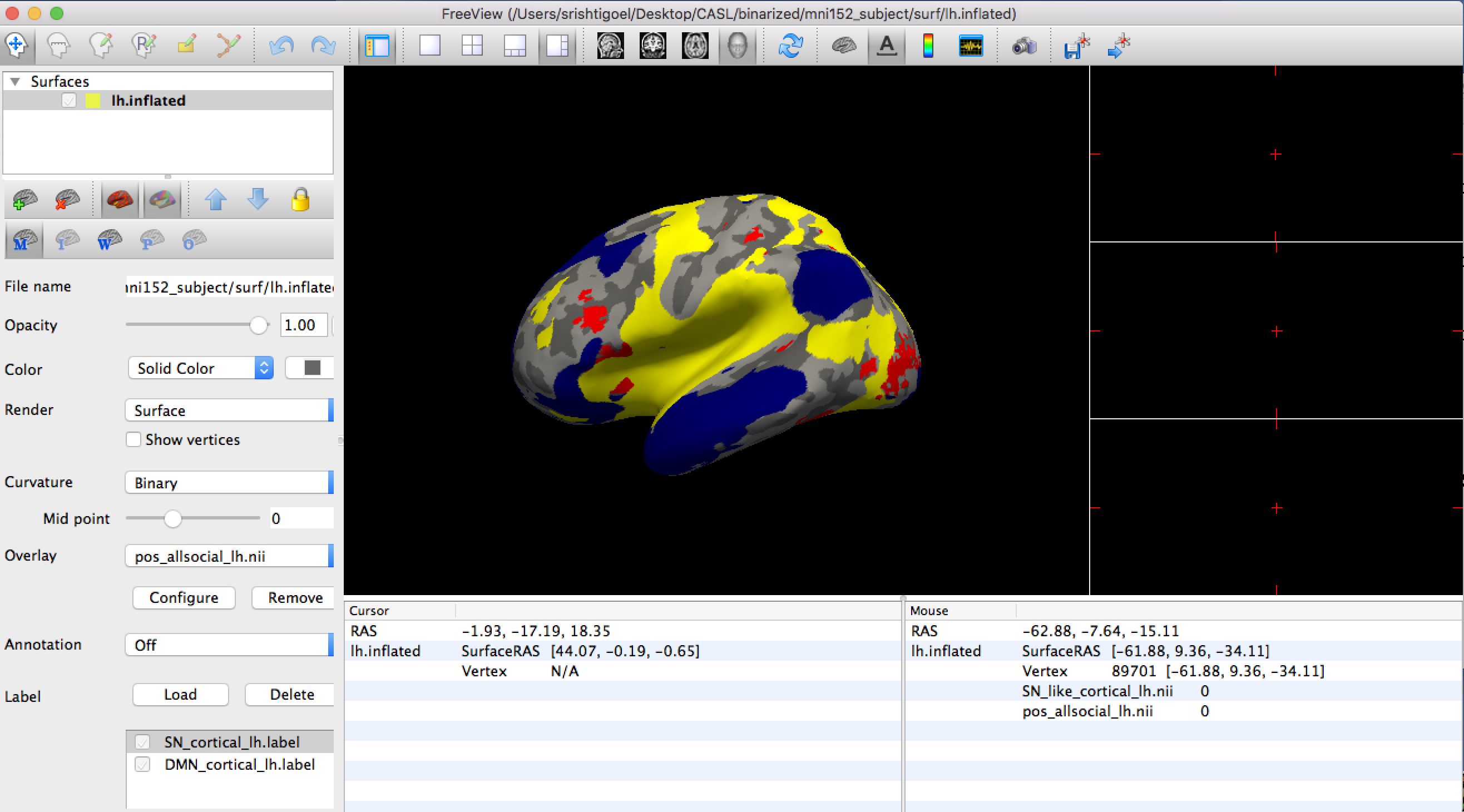
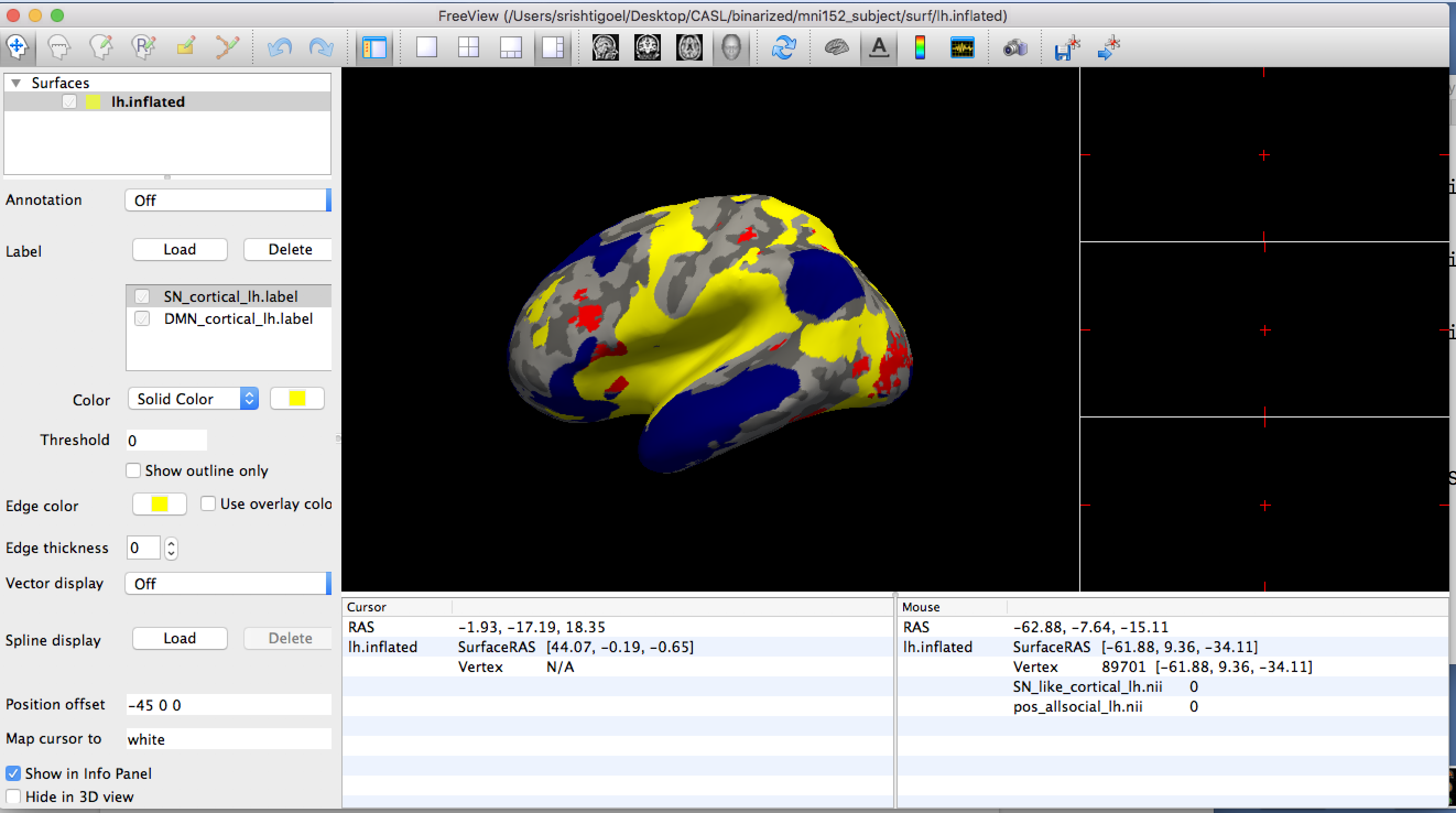
External Email - Use Caution
Hi Rupoeng,
I dowloaded the nightly as you had suggested, followed the steps in the link you had sent but I am still not able to see the z-order function. I tried it a couple of time, deleting and re-doing everything again but I can't see the z-order option in Freeview.
Please let me know what else can I do to check that.
Best, Srishti
Best, Srishti Social/Clinical Research Specialist Child Imaging Research and Life Experiences Lab University of North Carolina at Chapel Hill email (W): srishtig@email.unc.edu skype: srishti.goel12
On Wed, Jul 11, 2018 at 2:59 PM, srishti goel 23srishtigoel@gmail.com wrote:
Hi Rupoeng,
I dowloaded the nightly as you had suggested, followed the steps in the link you had sent but I am still not able to see the z-order function. I tried it a couple of time, deleting and re-doing everything again but I can't see the z-order option in Freeview. I have attached two screenshots of what the Freeview looks like to me.
Please let me know what else can I do to check that.
Best, Srishti
Best, Srishti Social/Clinical Research Specialist Child Imaging Research and Life Experiences Lab University of North Carolina at Chapel Hill email (W): srishtig@email.unc.edu skype: srishti.goel12
On Thu, Jul 5, 2018 at 1:43 PM, srishti goel 23srishtigoel@gmail.com wrote:
Thanks so much Ruopeng
Best, Srishti Social/Clinical Research Specialist Child Imaging Research and Life Experiences Lab University of North Carolina at Chapel Hill email (W): srishtig@email.unc.edu skype: srishti.goel12
On Thu, Jul 5, 2018 at 1:40 PM, Ruopeng Wang rpwang@nmr.mgh.harvard.edu wrote:
After you load the label or overlay you should see it on the left panel.
Best, Ruopeng
On Jul 5, 2018, at 12:54 PM, srishti goel 23srishtigoel@gmail.com wrote:
External Email - Use CautionHi Rupoeng,
We downloaded the nightly build for that option but I don't see it coming on the GUI. I scrolled through every option on the task bar and also the left panel on the GUI but nothing corresponded to 'z-order'. Could you please direct me to where exactly should I be looking for this option?
Thanks, Srishti
Best, Srishti Social/Clinical Research Specialist Child Imaging Research and Life Experiences Lab University of North Carolina at Chapel Hill email (W): srishtig@email.unc.edu skype: srishti.goel12
On Mon, Jun 11, 2018 at 10:34 AM, Ruopeng Wang < rpwang@nmr.mgh.harvard.edu> wrote:
Yes, I have put an option called z-order in the GUI to control order of rendering for overlays, labels and annoations. To use it you will need to download and install the nightly build from here:
https://surfer.nmr.mgh.harvard.edu/fswiki/UpdateFreeview
Best, Ruopeng
On Jun 9, 2018, at 11:04 AM, srishti goel 23srishtigoel@gmail.com wrote:
External Email - Use CautionHi Ruopeng,
I just wanted to check and see if there is any update about adding the option of changing surface labels to come below overlays in Freeview. Thanks!
Best, Srishti
Best, Srishti Social/Clinical Research Specialist Child Imaging Research and Life Experiences Lab University of North Carolina at Chapel Hill email (W): srishtig@email.unc.edu skype: srishti.goel12
On Tue, May 29, 2018 at 2:40 PM, srishti goel 23srishtigoel@gmail.com wrote:
Thanks a lot Ruopeng, really appreciate it.
Best, Srishti
Best, Srishti Social/Clinical Research Specialist Child Imaging Research and Life Experiences Lab University of North Carolina at Chapel Hill email (W): srishtig@email.unc.edu skype: srishti.goel12
On Tue, May 29, 2018 at 10:40 AM, Ruopeng Wang < rpwang@nmr.mgh.harvard.edu> wrote:
It will be added very soon. I'll let you know when it is ready.
Best, Ruopeng
On 05/28/2018 05:35 PM, srishti goel wrote:
Hi Ruopeng,
Thank you so much! That option will be super helpful. Are you planning to add that option to Freeview soon?
Best, Srishti
Best, Srishti Social/Clinical Research Specialist Child Imaging Research and Life Experiences Lab University of North Carolina at Chapel Hill email (W): srishtig@email.unc.edu skype: srishti.goel12
On Mon, May 28, 2018 at 2:28 PM, Ruopeng Wang < rpwang@nmr.mgh.harvard.edu> wrote:
> Hi Srishti, > > In freeview surface labels are always displayed on top of overlays. > I will add an option to change that. > > Best, > Ruopeng > > > On May 28, 2018, at 9:18 AM, srishti goel 23srishtigoel@gmail.com > wrote: > > Hello, > > I did use Freeview but I think using either TkSurfer or Freeview > won't matter because what I am trying to figure out is what the fthresh > value means for the map. > From reading the archive, I understand that, for instance, fthresh > value of 0.3 will mean that the overlay displays 50% (1/10^3) threshold > based on intensity/ only voxels which are overlaid by 50% of the subjects. > In my case, the maps are visible at fthresh 0.1 and below but since these > are already thresholded maps from a meta-analysis I am not very clear on > how to interpret the fthresh here. Is it voxels overlaid by ~80% of studies? > > The other thing I want to figure out is that right now when I view > my overlay with two other labels, the labels (when in solid color and not > outline) cover my overlay. But I would want it the other way round such > that the overlay comes on top of the solid colored labels. Does anyone know > how I can achieve that? > > Thank you so much! > > Best, > Srishti > > Best, > Srishti > Social/Clinical Research Specialist > Child Imaging Research and Life Experiences Lab > University of North Carolina at Chapel Hill > email (W): srishtig@email.unc.edu > skype: srishti.goel12 > > > On Fri, May 25, 2018 at 10:09 AM, Douglas Greve < > dgreve@mgh.harvard.edu> wrote: > >> I don't know anything about neuroelf, but unless your have a >> binarized map, then the map is going to change when you change the >> threshold. BTW, if you wan to use freeview, you can run tksurferfv with the >> same args as tksurfer >> >> On 5/22/18 3:49 PM, srishti goel wrote: >> >> >> Hello, >> >> I am trying to view network based maps produced from a >> meta-analysis using neuroelf on the surface in freesurfer. The >> meta-analytic maps are thresholded maps that represent the proportion of >> contrasts that activated at each voxel >> >> I projected my maps on the surface using: >> mri_vol2surf --src negative_allsocial_proportion.img --regheader >> mni152_subject --hemi lh --o ./neg_allsocial_lh.nii --projfrac 0.5 >> Then to view it used: >> tksurfer mni152_subject lh inflated -overlay ./neg_allsocial_lh.nii >> -fthresh 0.05 >> The issue I have is with the fthresh value. I read the wiki and >> some stuff on archive about the fthresh value but I am unsure what it >> exactly means and does. My issue is that the display of my maps changes >> when I change the fthresh value even though the maps have been >> k-thresholded using neuroelf before exporting them to freesurfer. More area >> is marked up when I decrease the threshold value from 0.1 to 0.05 and >> nothing is visible above 0.1 >> >> Does anyone have any thoughts about what might be going on there >> and how I can fix it? >> Do I need to do something totally different from what I am doing? >> >> Best, >> Srishti >> Social/Clinical Research Specialist >> Child Imaging Research and Life Experiences Lab >> University of North Carolina at Chapel Hill >> email (W): srishtig@email.unc.edu >> skype: srishti.goel12 >> >> >> >> _______________________________________________ >> Freesurfer mailing listFreesurfer@nmr.mgh.harvard.eduhttps://mail.nmr.mgh.harvard.edu/mailman/listinfo/freesurfer >> >> >> >> _______________________________________________ >> Freesurfer mailing list >> Freesurfer@nmr.mgh.harvard.edu >> https://mail.nmr.mgh.harvard.edu/mailman/listinfo/freesurfer >> >> >> The information in this e-mail is intended only for the person to >> whom it is >> addressed. If you believe this e-mail was sent to you in error and >> the e-mail >> contains patient information, please contact the Partners >> Compliance HelpLine at >> http://www.partners.org/complianceline . If the e-mail was sent to >> you in error >> but does not contain patient information, please contact the sender >> and properly >> dispose of the e-mail. >> >> > _______________________________________________ > Freesurfer mailing list > Freesurfer@nmr.mgh.harvard.edu > https://mail.nmr.mgh.harvard.edu/mailman/listinfo/freesurfer > > > > _______________________________________________ > Freesurfer mailing list > Freesurfer@nmr.mgh.harvard.edu > https://mail.nmr.mgh.harvard.edu/mailman/listinfo/freesurfer > > > The information in this e-mail is intended only for the person to > whom it is > addressed. If you believe this e-mail was sent to you in error and > the e-mail > contains patient information, please contact the Partners Compliance > HelpLine at > http://www.partners.org/complianceline . If the e-mail was sent to > you in error > but does not contain patient information, please contact the sender > and properly > dispose of the e-mail. > >
Freesurfer mailing listFreesurfer@nmr.mgh.harvard.eduhttps://mail.nmr.mgh.harvard.edu/mailman/listinfo/freesurfer
Freesurfer mailing list Freesurfer@nmr.mgh.harvard.edu https://mail.nmr.mgh.harvard.edu/mailman/listinfo/freesurfer
The information in this e-mail is intended only for the person to whom it is addressed. If you believe this e-mail was sent to you in error and the e-mail contains patient information, please contact the Partners Compliance HelpLine at http://www.partners.org/complianceline . If the e-mail was sent to you in error but does not contain patient information, please contact the sender and properly dispose of the e-mail.
Freesurfer mailing list Freesurfer@nmr.mgh.harvard.edu https://mail.nmr.mgh.harvard.edu/mailman/listinfo/freesurfer
Freesurfer mailing list Freesurfer@nmr.mgh.harvard.edu https://mail.nmr.mgh.harvard.edu/mailman/listinfo/freesurfer
The information in this e-mail is intended only for the person to whom it is addressed. If you believe this e-mail was sent to you in error and the e-mail contains patient information, please contact the Partners Compliance HelpLine at http://www.partners.org/complianceline . If the e-mail was sent to you in error but does not contain patient information, please contact the sender and properly dispose of the e-mail.
Freesurfer mailing list Freesurfer@nmr.mgh.harvard.edu https://mail.nmr.mgh.harvard.edu/mailman/listinfo/freesurfer
Freesurfer mailing list Freesurfer@nmr.mgh.harvard.edu https://mail.nmr.mgh.harvard.edu/mailman/listinfo/freesurfer
The information in this e-mail is intended only for the person to whom it is addressed. If you believe this e-mail was sent to you in error and the e-mail contains patient information, please contact the Partners Compliance HelpLine at http://www.partners.org/complianceline . If the e-mail was sent to you in error but does not contain patient information, please contact the sender and properly dispose of the e-mail.
Hi Srishti,
The mac build of freeview on our download page appears to be quite old. If you go to About menu, you should see the build time. We will update it shortly.
Best, Ruopeng
On 07/11/2018 03:02 PM, srishti goel wrote:
Hi Rupoeng,
I dowloaded the nightly as you had suggested, followed the steps in the link you had sent but I am still not able to see the z-order function. I tried it a couple of time, deleting and re-doing everything again but I can't see the z-order option in Freeview.
Please let me know what else can I do to check that.
Best, Srishti
Best, Srishti Social/Clinical Research Specialist Child Imaging Research and Life Experiences Lab University of North Carolina at Chapel Hill email (W): srishtig@email.unc.edu mailto:srishtig@email.unc.edu skype: srishti.goel12
On Wed, Jul 11, 2018 at 2:59 PM, srishti goel <23srishtigoel@gmail.com mailto:23srishtigoel@gmail.com> wrote:
Hi Rupoeng, I dowloaded the nightly as you had suggested, followed the steps in the link you had sent but I am still not able to see the z-order function. I tried it a couple of time, deleting and re-doing everything again but I can't see the z-order option in Freeview. I have attached two screenshots of what the Freeview looks like to me. Please let me know what else can I do to check that. Best, Srishti Best, Srishti Social/Clinical Research Specialist Child Imaging Research and Life Experiences Lab University of North Carolina at Chapel Hill email (W): srishtig@email.unc.edu <mailto:srishtig@email.unc.edu> skype: srishti.goel12 On Thu, Jul 5, 2018 at 1:43 PM, srishti goel <23srishtigoel@gmail.com <mailto:23srishtigoel@gmail.com>> wrote: Thanks so much Ruopeng Best, Srishti Social/Clinical Research Specialist Child Imaging Research and Life Experiences Lab University of North Carolina at Chapel Hill email (W): srishtig@email.unc.edu <mailto:srishtig@email.unc.edu> skype: srishti.goel12 On Thu, Jul 5, 2018 at 1:40 PM, Ruopeng Wang <rpwang@nmr.mgh.harvard.edu <mailto:rpwang@nmr.mgh.harvard.edu>> wrote: After you load the label or overlay you should see it on the left panel. Best, RuopengOn Jul 5, 2018, at 12:54 PM, srishti goel <23srishtigoel@gmail.com <mailto:23srishtigoel@gmail.com>> wrote: External Email - Use Caution Hi Rupoeng, We downloaded the nightly build for that option but I don't see it coming on the GUI. I scrolled through every option on the task bar and also the left panel on the GUI but nothing corresponded to 'z-order'. Could you please direct me to where exactly should I be looking for this option? Thanks, Srishti Best, Srishti Social/Clinical Research Specialist Child Imaging Research and Life Experiences Lab University of North Carolina at Chapel Hill email (W): srishtig@email.unc.edu <mailto:srishtig@email.unc.edu> skype: srishti.goel12 On Mon, Jun 11, 2018 at 10:34 AM, Ruopeng Wang <rpwang@nmr.mgh.harvard.edu <mailto:rpwang@nmr.mgh.harvard.edu>> wrote: Yes, I have put an option called z-order in the GUI to control order of rendering for overlays, labels and annoations. To use it you will need to download and install the nightly build from here: https://surfer.nmr.mgh.harvard.edu/fswiki/UpdateFreeview <https://surfer.nmr.mgh.harvard.edu/fswiki/UpdateFreeview> Best, RuopengOn Jun 9, 2018, at 11:04 AM, srishti goel <23srishtigoel@gmail.com <mailto:23srishtigoel@gmail.com>> wrote: External Email - Use Caution Hi Ruopeng, I just wanted to check and see if there is any update about adding the option of changing surface labels to come below overlays in Freeview. Thanks! Best, Srishti Best, Srishti Social/Clinical Research Specialist Child Imaging Research and Life Experiences Lab University of North Carolina at Chapel Hill email (W): srishtig@email.unc.edu <mailto:srishtig@email.unc.edu> skype: srishti.goel12 On Tue, May 29, 2018 at 2:40 PM, srishti goel <23srishtigoel@gmail.com <mailto:23srishtigoel@gmail.com>> wrote: Thanks a lot Ruopeng, really appreciate it. Best, Srishti Best, Srishti Social/Clinical Research Specialist Child Imaging Research and Life Experiences Lab University of North Carolina at Chapel Hill email (W): srishtig@email.unc.edu <mailto:srishtig@email.unc.edu> skype: srishti.goel12 On Tue, May 29, 2018 at 10:40 AM, Ruopeng Wang <rpwang@nmr.mgh.harvard.edu <mailto:rpwang@nmr.mgh.harvard.edu>> wrote: It will be added very soon. I'll let you know when it is ready. Best, Ruopeng On 05/28/2018 05:35 PM, srishti goel wrote:Hi Ruopeng, Thank you so much! That option will be super helpful. Are you planning to add that option to Freeview soon? Best, Srishti Best, Srishti Social/Clinical Research Specialist Child Imaging Research and Life Experiences Lab University of North Carolina at Chapel Hill email (W): srishtig@email.unc.edu <mailto:srishtig@email.unc.edu> skype: srishti.goel12 On Mon, May 28, 2018 at 2:28 PM, Ruopeng Wang <rpwang@nmr.mgh.harvard.edu <mailto:rpwang@nmr.mgh.harvard.edu>> wrote: Hi Srishti, In freeview surface labels are always displayed on top of overlays. I will add an option to change that. Best, RuopengOn May 28, 2018, at 9:18 AM, srishti goel <23srishtigoel@gmail.com <mailto:23srishtigoel@gmail.com>> wrote: Hello, I did use Freeview but I think using either TkSurfer or Freeview won't matter because what I am trying to figure out is what the fthresh value means for the map. From reading the archive, I understand that, for instance, fthresh value of 0.3 will mean that the overlay displays 50% (1/10^3) threshold based on intensity/ only voxels which are overlaid by 50% of the subjects. In my case, the maps are visible at fthresh 0.1 and below but since these are already thresholded maps from a meta-analysis I am not very clear on how to interpret the fthresh here. Is it voxels overlaid by ~80% of studies? The other thing I want to figure out is that right now when I view my overlay with two other labels, the labels (when in solid color and not outline) cover my overlay. But I would want it the other way round such that the overlay comes on top of the solid colored labels. Does anyone know how I can achieve that? Thank you so much! Best, Srishti Best, Srishti Social/Clinical Research Specialist Child Imaging Research and Life Experiences Lab University of North Carolina at Chapel Hill email (W): srishtig@email.unc.edu <mailto:srishtig@email.unc.edu> skype: srishti.goel12 On Fri, May 25, 2018 at 10:09 AM, Douglas Greve <dgreve@mgh.harvard.edu <mailto:dgreve@mgh.harvard.edu>> wrote: I don't know anything about neuroelf, but unless your have a binarized map, then the map is going to change when you change the threshold. BTW, if you wan to use freeview, you can run tksurferfv with the same args as tksurfer On 5/22/18 3:49 PM, srishti goel wrote:Hello, I am trying to view network based maps produced from a meta-analysis using neuroelf on the surface in freesurfer. The meta-analytic maps are thresholded maps that represent the proportion of contrasts that activated at each voxel I projected my maps on the surface using: mri_vol2surf --src negative_allsocial_proportion.img --regheader mni152_subject --hemi lh --o ./neg_allsocial_lh.nii --projfrac 0.5 Then to view it used: tksurfer mni152_subject lh inflated -overlay ./neg_allsocial_lh.nii -fthresh 0.05 The issue I have is with the fthresh value. I read the wiki and some stuff on archive about the fthresh value but I am unsure what it exactly means and does. My issue is that the display of my maps changes when I change the fthresh value even though the maps have been k-thresholded using neuroelf before exporting them to freesurfer. More area is marked up when I decrease the threshold value from 0.1 to 0.05 and nothing is visible above 0.1 Does anyone have any thoughts about what might be going on there and how I can fix it? Do I need to do something totally different from what I am doing? Best, Srishti Social/Clinical Research Specialist Child Imaging Research and Life Experiences Lab University of North Carolina at Chapel Hill email (W): srishtig@email.unc.edu <mailto:srishtig@email.unc.edu> skype: srishti.goel12 _______________________________________________ Freesurfer mailing list Freesurfer@nmr.mgh.harvard.edu <mailto:Freesurfer@nmr.mgh.harvard.edu> https://mail.nmr.mgh.harvard.edu/mailman/listinfo/freesurfer <https://mail.nmr.mgh.harvard.edu/mailman/listinfo/freesurfer>_______________________________________________ Freesurfer mailing list Freesurfer@nmr.mgh.harvard.edu <mailto:Freesurfer@nmr.mgh.harvard.edu> https://mail.nmr.mgh.harvard.edu/mailman/listinfo/freesurfer <https://mail.nmr.mgh.harvard.edu/mailman/listinfo/freesurfer> The information in this e-mail is intended only for the person to whom it is addressed. If you believe this e-mail was sent to you in error and the e-mail contains patient information, please contact the Partners Compliance HelpLine at http://www.partners.org/complianceline <http://www.partners.org/complianceline> . If the e-mail was sent to you in error but does not contain patient information, please contact the sender and properly dispose of the e-mail. _______________________________________________ Freesurfer mailing list Freesurfer@nmr.mgh.harvard.edu <mailto:Freesurfer@nmr.mgh.harvard.edu> https://mail.nmr.mgh.harvard.edu/mailman/listinfo/freesurfer <https://mail.nmr.mgh.harvard.edu/mailman/listinfo/freesurfer>_______________________________________________ Freesurfer mailing list Freesurfer@nmr.mgh.harvard.edu <mailto:Freesurfer@nmr.mgh.harvard.edu> https://mail.nmr.mgh.harvard.edu/mailman/listinfo/freesurfer <https://mail.nmr.mgh.harvard.edu/mailman/listinfo/freesurfer> The information in this e-mail is intended only for the person to whom it is addressed. If you believe this e-mail was sent to you in error and the e-mail contains patient information, please contact the Partners Compliance HelpLine at http://www.partners.org/complianceline <http://www.partners.org/complianceline> . If the e-mail was sent to you in error but does not contain patient information, please contact the sender and properly dispose of the e-mail. _______________________________________________ Freesurfer mailing list Freesurfer@nmr.mgh.harvard.edu <mailto:Freesurfer@nmr.mgh.harvard.edu> https://mail.nmr.mgh.harvard.edu/mailman/listinfo/freesurfer <https://mail.nmr.mgh.harvard.edu/mailman/listinfo/freesurfer>_______________________________________________ Freesurfer mailing list Freesurfer@nmr.mgh.harvard.edu <mailto:Freesurfer@nmr.mgh.harvard.edu> https://mail.nmr.mgh.harvard.edu/mailman/listinfo/freesurfer <https://mail.nmr.mgh.harvard.edu/mailman/listinfo/freesurfer> The information in this e-mail is intended only for the person to whom it is addressed. If you believe this e-mail was sent to you in error and the e-mail contains patient information, please contact the Partners Compliance HelpLine at http://www.partners.org/complianceline <http://www.partners.org/complianceline> . If the e-mail was sent to you in error but does not contain patient information, please contact the sender and properly dispose of the e-mail. _______________________________________________ Freesurfer mailing list Freesurfer@nmr.mgh.harvard.edu <mailto:Freesurfer@nmr.mgh.harvard.edu> https://mail.nmr.mgh.harvard.edu/mailman/listinfo/freesurfer <https://mail.nmr.mgh.harvard.edu/mailman/listinfo/freesurfer>_______________________________________________ Freesurfer mailing list Freesurfer@nmr.mgh.harvard.edu <mailto:Freesurfer@nmr.mgh.harvard.edu> https://mail.nmr.mgh.harvard.edu/mailman/listinfo/freesurfer <https://mail.nmr.mgh.harvard.edu/mailman/listinfo/freesurfer> The information in this e-mail is intended only for the person to whom it is addressed. If you believe this e-mail was sent to you in error and the e-mail contains patient information, please contact the Partners Compliance HelpLine at http://www.partners.org/complianceline <http://www.partners.org/complianceline> . If the e-mail was sent to you in error but does not contain patient information, please contact the sender and properly dispose of the e-mail. _______________________________________________ Freesurfer mailing list Freesurfer@nmr.mgh.harvard.edu <mailto:Freesurfer@nmr.mgh.harvard.edu> https://mail.nmr.mgh.harvard.edu/mailman/listinfo/freesurfer <https://mail.nmr.mgh.harvard.edu/mailman/listinfo/freesurfer>_______________________________________________ Freesurfer mailing list Freesurfer@nmr.mgh.harvard.edu <mailto:Freesurfer@nmr.mgh.harvard.edu> https://mail.nmr.mgh.harvard.edu/mailman/listinfo/freesurfer <https://mail.nmr.mgh.harvard.edu/mailman/listinfo/freesurfer> The information in this e-mail is intended only for the person to whom it is addressed. If you believe this e-mail was sent to you in error and the e-mail contains patient information, please contact the Partners Compliance HelpLine at http://www.partners.org/complianceline <http://www.partners.org/complianceline> . If the e-mail was sent to you in error but does not contain patient information, please contact the sender and properly dispose of the e-mail.
Freesurfer mailing list Freesurfer@nmr.mgh.harvard.edu https://mail.nmr.mgh.harvard.edu/mailman/listinfo/freesurfer
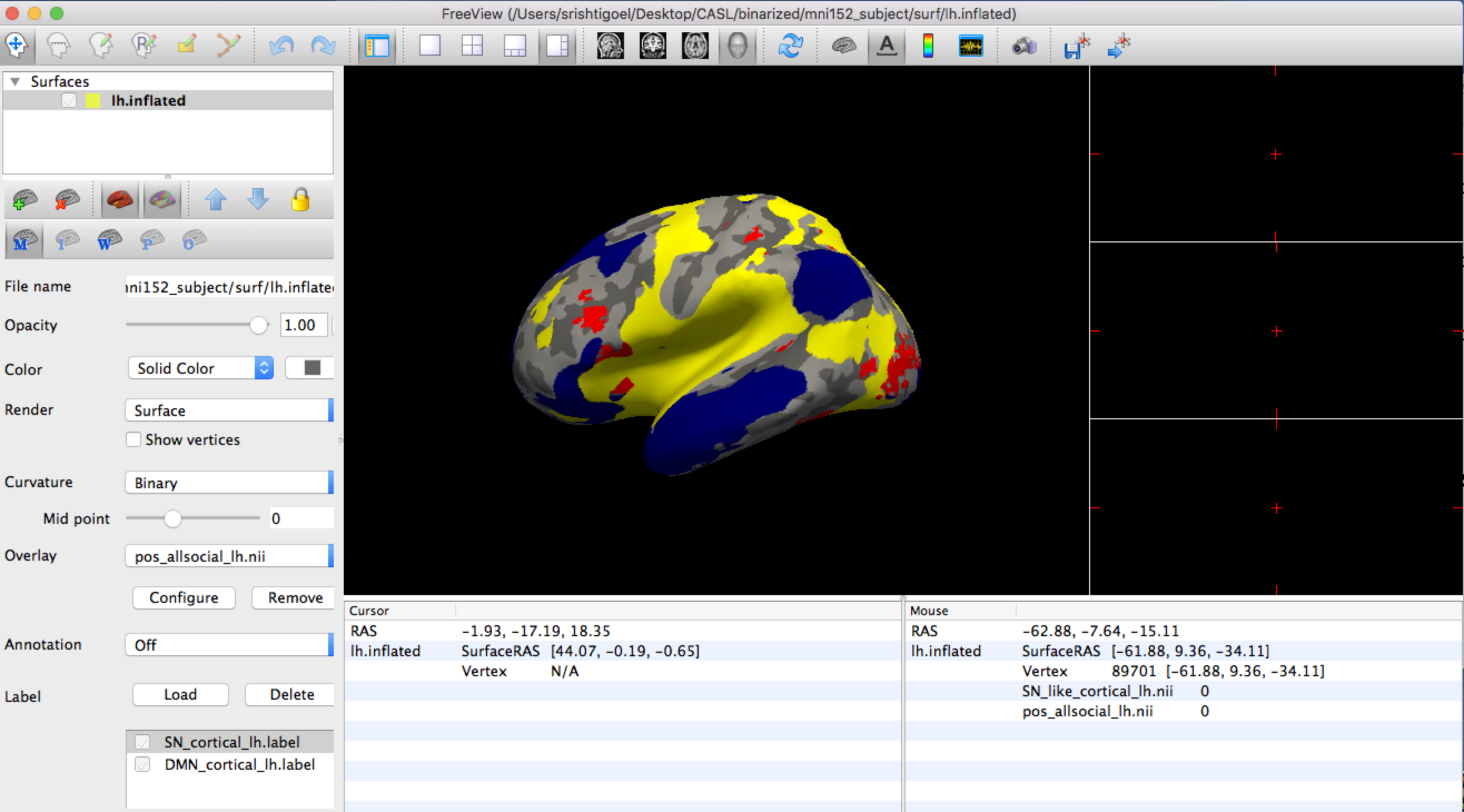
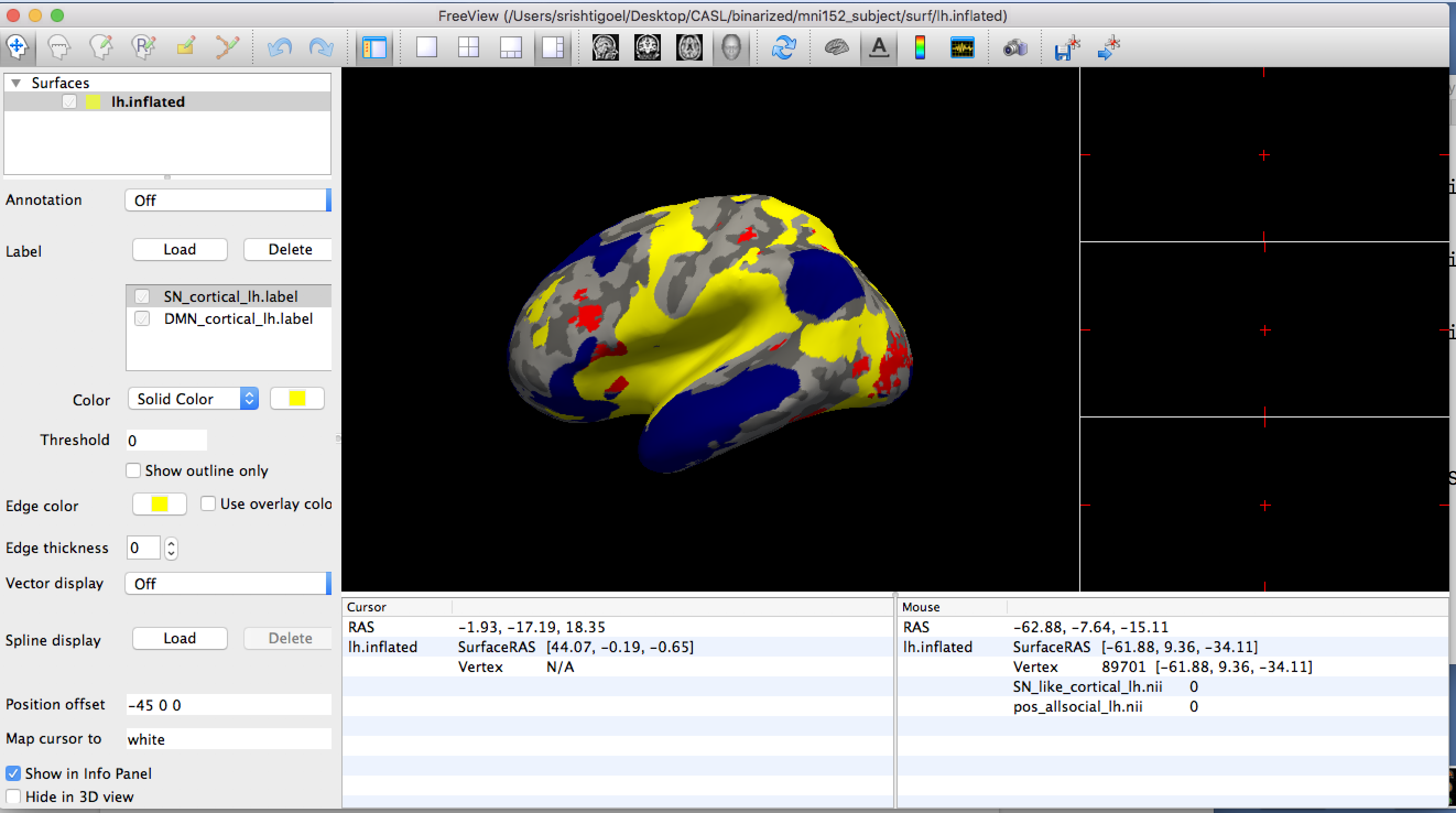
External Email - Use Caution
Hi Rupoeng,
Yes it says built in February 2018.
Could you please tell me once the Mac build of Freeview is updated so I can download the newest version.
Thank you so much, really appreciate it!
Best, Srishti
Best, Srishti Social/Clinical Research Specialist Child Imaging Research and Life Experiences Lab University of North Carolina at Chapel Hill email (W): srishtig@email.unc.edu skype: srishti.goel12
On Wed, Jul 11, 2018 at 3:35 PM, Ruopeng Wang rpwang@nmr.mgh.harvard.edu wrote:
Hi Srishti,
The mac build of freeview on our download page appears to be quite old. If you go to About menu, you should see the build time. We will update it shortly.
Best, Ruopeng
On 07/11/2018 03:02 PM, srishti goel wrote:
Hi Rupoeng,
I dowloaded the nightly as you had suggested, followed the steps in the link you had sent but I am still not able to see the z-order function. I tried it a couple of time, deleting and re-doing everything again but I can't see the z-order option in Freeview.
Please let me know what else can I do to check that.
Best, Srishti
Best, Srishti Social/Clinical Research Specialist Child Imaging Research and Life Experiences Lab University of North Carolina at Chapel Hill email (W): srishtig@email.unc.edu skype: srishti.goel12
On Wed, Jul 11, 2018 at 2:59 PM, srishti goel 23srishtigoel@gmail.com wrote:
Hi Rupoeng,
I dowloaded the nightly as you had suggested, followed the steps in the link you had sent but I am still not able to see the z-order function. I tried it a couple of time, deleting and re-doing everything again but I can't see the z-order option in Freeview. I have attached two screenshots of what the Freeview looks like to me.
Please let me know what else can I do to check that.
Best, Srishti
Best, Srishti Social/Clinical Research Specialist Child Imaging Research and Life Experiences Lab University of North Carolina at Chapel Hill email (W): srishtig@email.unc.edu skype: srishti.goel12
On Thu, Jul 5, 2018 at 1:43 PM, srishti goel 23srishtigoel@gmail.com wrote:
Thanks so much Ruopeng
Best, Srishti Social/Clinical Research Specialist Child Imaging Research and Life Experiences Lab University of North Carolina at Chapel Hill email (W): srishtig@email.unc.edu skype: srishti.goel12
On Thu, Jul 5, 2018 at 1:40 PM, Ruopeng Wang <rpwang@nmr.mgh.harvard.edu
wrote:
After you load the label or overlay you should see it on the left panel.
Best, Ruopeng
On Jul 5, 2018, at 12:54 PM, srishti goel 23srishtigoel@gmail.com wrote:
External Email - Use CautionHi Rupoeng,
We downloaded the nightly build for that option but I don't see it coming on the GUI. I scrolled through every option on the task bar and also the left panel on the GUI but nothing corresponded to 'z-order'. Could you please direct me to where exactly should I be looking for this option?
Thanks, Srishti
Best, Srishti Social/Clinical Research Specialist Child Imaging Research and Life Experiences Lab University of North Carolina at Chapel Hill email (W): srishtig@email.unc.edu skype: srishti.goel12
On Mon, Jun 11, 2018 at 10:34 AM, Ruopeng Wang < rpwang@nmr.mgh.harvard.edu> wrote:
Yes, I have put an option called z-order in the GUI to control order of rendering for overlays, labels and annoations. To use it you will need to download and install the nightly build from here:
https://surfer.nmr.mgh.harvard.edu/fswiki/UpdateFreeview
Best, Ruopeng
On Jun 9, 2018, at 11:04 AM, srishti goel 23srishtigoel@gmail.com wrote:
External Email - Use CautionHi Ruopeng,
I just wanted to check and see if there is any update about adding the option of changing surface labels to come below overlays in Freeview. Thanks!
Best, Srishti
Best, Srishti Social/Clinical Research Specialist Child Imaging Research and Life Experiences Lab University of North Carolina at Chapel Hill email (W): srishtig@email.unc.edu skype: srishti.goel12
On Tue, May 29, 2018 at 2:40 PM, srishti goel <23srishtigoel@gmail.com
wrote:
Thanks a lot Ruopeng, really appreciate it.
Best, Srishti
Best, Srishti Social/Clinical Research Specialist Child Imaging Research and Life Experiences Lab University of North Carolina at Chapel Hill email (W): srishtig@email.unc.edu skype: srishti.goel12
On Tue, May 29, 2018 at 10:40 AM, Ruopeng Wang < rpwang@nmr.mgh.harvard.edu> wrote:
> It will be added very soon. I'll let you know when it is ready. > > Best, > Ruopeng > > On 05/28/2018 05:35 PM, srishti goel wrote: > > Hi Ruopeng, > > Thank you so much! That option will be super helpful. Are you > planning to add that option to Freeview soon? > > Best, > Srishti > > Best, > Srishti > Social/Clinical Research Specialist > Child Imaging Research and Life Experiences Lab > University of North Carolina at Chapel Hill > email (W): srishtig@email.unc.edu > skype: srishti.goel12 > > > On Mon, May 28, 2018 at 2:28 PM, Ruopeng Wang < > rpwang@nmr.mgh.harvard.edu> wrote: > >> Hi Srishti, >> >> In freeview surface labels are always displayed on top of overlays. >> I will add an option to change that. >> >> Best, >> Ruopeng >> >> >> On May 28, 2018, at 9:18 AM, srishti goel 23srishtigoel@gmail.com >> wrote: >> >> Hello, >> >> I did use Freeview but I think using either TkSurfer or Freeview >> won't matter because what I am trying to figure out is what the fthresh >> value means for the map. >> From reading the archive, I understand that, for instance, fthresh >> value of 0.3 will mean that the overlay displays 50% (1/10^3) threshold >> based on intensity/ only voxels which are overlaid by 50% of the subjects. >> In my case, the maps are visible at fthresh 0.1 and below but since these >> are already thresholded maps from a meta-analysis I am not very clear on >> how to interpret the fthresh here. Is it voxels overlaid by ~80% of studies? >> >> The other thing I want to figure out is that right now when I view >> my overlay with two other labels, the labels (when in solid color and not >> outline) cover my overlay. But I would want it the other way round such >> that the overlay comes on top of the solid colored labels. Does anyone know >> how I can achieve that? >> >> Thank you so much! >> >> Best, >> Srishti >> >> Best, >> Srishti >> Social/Clinical Research Specialist >> Child Imaging Research and Life Experiences Lab >> University of North Carolina at Chapel Hill >> email (W): srishtig@email.unc.edu >> skype: srishti.goel12 >> >> >> On Fri, May 25, 2018 at 10:09 AM, Douglas Greve < >> dgreve@mgh.harvard.edu> wrote: >> >>> I don't know anything about neuroelf, but unless your have a >>> binarized map, then the map is going to change when you change the >>> threshold. BTW, if you wan to use freeview, you can run tksurferfv with the >>> same args as tksurfer >>> >>> On 5/22/18 3:49 PM, srishti goel wrote: >>> >>> >>> Hello, >>> >>> I am trying to view network based maps produced from a >>> meta-analysis using neuroelf on the surface in freesurfer. The >>> meta-analytic maps are thresholded maps that represent the proportion of >>> contrasts that activated at each voxel >>> >>> I projected my maps on the surface using: >>> mri_vol2surf --src negative_allsocial_proportion.img --regheader >>> mni152_subject --hemi lh --o ./neg_allsocial_lh.nii --projfrac 0.5 >>> Then to view it used: >>> tksurfer mni152_subject lh inflated -overlay >>> ./neg_allsocial_lh.nii -fthresh 0.05 >>> The issue I have is with the fthresh value. I read the wiki and >>> some stuff on archive about the fthresh value but I am unsure what it >>> exactly means and does. My issue is that the display of my maps changes >>> when I change the fthresh value even though the maps have been >>> k-thresholded using neuroelf before exporting them to freesurfer. More area >>> is marked up when I decrease the threshold value from 0.1 to 0.05 and >>> nothing is visible above 0.1 >>> >>> Does anyone have any thoughts about what might be going on there >>> and how I can fix it? >>> Do I need to do something totally different from what I am doing? >>> >>> Best, >>> Srishti >>> Social/Clinical Research Specialist >>> Child Imaging Research and Life Experiences Lab >>> University of North Carolina at Chapel Hill >>> email (W): srishtig@email.unc.edu >>> skype: srishti.goel12 >>> >>> >>> >>> _______________________________________________ >>> Freesurfer mailing listFreesurfer@nmr.mgh.harvard.eduhttps://mail.nmr.mgh.harvard.edu/mailman/listinfo/freesurfer >>> >>> >>> >>> _______________________________________________ >>> Freesurfer mailing list >>> Freesurfer@nmr.mgh.harvard.edu >>> https://mail.nmr.mgh.harvard.edu/mailman/listinfo/freesurfer >>> >>> >>> The information in this e-mail is intended only for the person to >>> whom it is >>> addressed. If you believe this e-mail was sent to you in error and >>> the e-mail >>> contains patient information, please contact the Partners >>> Compliance HelpLine at >>> http://www.partners.org/complianceline . If the e-mail was sent >>> to you in error >>> but does not contain patient information, please contact the >>> sender and properly >>> dispose of the e-mail. >>> >>> >> _______________________________________________ >> Freesurfer mailing list >> Freesurfer@nmr.mgh.harvard.edu >> https://mail.nmr.mgh.harvard.edu/mailman/listinfo/freesurfer >> >> >> >> _______________________________________________ >> Freesurfer mailing list >> Freesurfer@nmr.mgh.harvard.edu >> https://mail.nmr.mgh.harvard.edu/mailman/listinfo/freesurfer >> >> >> The information in this e-mail is intended only for the person to >> whom it is >> addressed. If you believe this e-mail was sent to you in error and >> the e-mail >> contains patient information, please contact the Partners >> Compliance HelpLine at >> http://www.partners.org/complianceline . If the e-mail was sent to >> you in error >> but does not contain patient information, please contact the sender >> and properly >> dispose of the e-mail. >> >> > > > _______________________________________________ > Freesurfer mailing listFreesurfer@nmr.mgh.harvard.eduhttps://mail.nmr.mgh.harvard.edu/mailman/listinfo/freesurfer > > > > _______________________________________________ > Freesurfer mailing list > Freesurfer@nmr.mgh.harvard.edu > https://mail.nmr.mgh.harvard.edu/mailman/listinfo/freesurfer > > > The information in this e-mail is intended only for the person to > whom it is > addressed. If you believe this e-mail was sent to you in error and > the e-mail > contains patient information, please contact the Partners Compliance > HelpLine at > http://www.partners.org/complianceline . If the e-mail was sent to > you in error > but does not contain patient information, please contact the sender > and properly > dispose of the e-mail. > >
Freesurfer mailing list Freesurfer@nmr.mgh.harvard.edu https://mail.nmr.mgh.harvard.edu/mailman/listinfo/freesurfer
Freesurfer mailing list Freesurfer@nmr.mgh.harvard.edu https://mail.nmr.mgh.harvard.edu/mailman/listinfo/freesurfer
The information in this e-mail is intended only for the person to whom it is addressed. If you believe this e-mail was sent to you in error and the e-mail contains patient information, please contact the Partners Compliance HelpLine at http://www.partners.org/complianceline . If the e-mail was sent to you in error but does not contain patient information, please contact the sender and properly dispose of the e-mail.
Freesurfer mailing list Freesurfer@nmr.mgh.harvard.edu https://mail.nmr.mgh.harvard.edu/mailman/listinfo/freesurfer
Freesurfer mailing list Freesurfer@nmr.mgh.harvard.edu https://mail.nmr.mgh.harvard.edu/mailman/listinfo/freesurfer
The information in this e-mail is intended only for the person to whom it is addressed. If you believe this e-mail was sent to you in error and the e-mail contains patient information, please contact the Partners Compliance HelpLine at http://www.partners.org/complianceline . If the e-mail was sent to you in error but does not contain patient information, please contact the sender and properly dispose of the e-mail.
Freesurfer mailing listFreesurfer@nmr.mgh.harvard.eduhttps://mail.nmr.mgh.harvard.edu/mailman/listinfo/freesurfer
Freesurfer mailing list Freesurfer@nmr.mgh.harvard.edu https://mail.nmr.mgh.harvard.edu/mailman/listinfo/freesurfer
The information in this e-mail is intended only for the person to whom it is addressed. If you believe this e-mail was sent to you in error and the e-mail contains patient information, please contact the Partners Compliance HelpLine at http://www.partners.org/complianceline . If the e-mail was sent to you in error but does not contain patient information, please contact the sender and properly dispose of the e-mail.
HI Srishti,
Please download the latest build from here:
https://surfer.nmr.mgh.harvard.edu/fswiki/UpdateFreeview https://surfer.nmr.mgh.harvard.edu/fswiki/UpdateFreeview
Best, Ruopeng
On Jul 11, 2018, at 3:49 PM, srishti goel <23srishtigoel@gmail.com mailto:23srishtigoel@gmail.com> wrote:
Hi Rupoeng,
Yes it says built in February 2018.
Could you please tell me once the Mac build of Freeview is updated so I can download the newest version.
Thank you so much, really appreciate it!
Best, Srishti
Best, Srishti Social/Clinical Research Specialist Child Imaging Research and Life Experiences Lab University of North Carolina at Chapel Hill email (W): srishtig@email.unc.edu mailto:srishtig@email.unc.edu skype: srishti.goel12
On Wed, Jul 11, 2018 at 3:35 PM, Ruopeng Wang <rpwang@nmr.mgh.harvard.edu mailto:rpwang@nmr.mgh.harvard.edu> wrote: Hi Srishti,
The mac build of freeview on our download page appears to be quite old. If you go to About menu, you should see the build time. We will update it shortly.
Best, Ruopeng
On 07/11/2018 03:02 PM, srishti goel wrote:
Hi Rupoeng,
I dowloaded the nightly as you had suggested, followed the steps in the link you had sent but I am still not able to see the z-order function. I tried it a couple of time, deleting and re-doing everything again but I can't see the z-order option in Freeview.
Please let me know what else can I do to check that.
Best, Srishti
Best, Srishti Social/Clinical Research Specialist Child Imaging Research and Life Experiences Lab University of North Carolina at Chapel Hill email (W): srishtig@email.unc.edu mailto:srishtig@email.unc.edu skype: srishti.goel12
On Wed, Jul 11, 2018 at 2:59 PM, srishti goel <23srishtigoel@gmail.com mailto:23srishtigoel@gmail.com> wrote: Hi Rupoeng,
I dowloaded the nightly as you had suggested, followed the steps in the link you had sent but I am still not able to see the z-order function. I tried it a couple of time, deleting and re-doing everything again but I can't see the z-order option in Freeview. I have attached two screenshots of what the Freeview looks like to me.
Please let me know what else can I do to check that.
Best, Srishti <Screen Shot 2018-07-11 at 2.43.41 PM.png> <Screen Shot 2018-07-11 at 2.44.02 PM.png>
Best, Srishti Social/Clinical Research Specialist Child Imaging Research and Life Experiences Lab University of North Carolina at Chapel Hill email (W): srishtig@email.unc.edu mailto:srishtig@email.unc.edu skype: srishti.goel12
On Thu, Jul 5, 2018 at 1:43 PM, srishti goel <23srishtigoel@gmail.com mailto:23srishtigoel@gmail.com> wrote: Thanks so much Ruopeng
Best, Srishti Social/Clinical Research Specialist Child Imaging Research and Life Experiences Lab University of North Carolina at Chapel Hill email (W): srishtig@email.unc.edu mailto:srishtig@email.unc.edu skype: srishti.goel12
On Thu, Jul 5, 2018 at 1:40 PM, Ruopeng Wang <rpwang@nmr.mgh.harvard.edu mailto:rpwang@nmr.mgh.harvard.edu> wrote: After you load the label or overlay you should see it on the left panel.
Best, Ruopeng
On Jul 5, 2018, at 12:54 PM, srishti goel <23srishtigoel@gmail.com mailto:23srishtigoel@gmail.com> wrote:
External Email - Use CautionHi Rupoeng,
We downloaded the nightly build for that option but I don't see it coming on the GUI. I scrolled through every option on the task bar and also the left panel on the GUI but nothing corresponded to 'z-order'. Could you please direct me to where exactly should I be looking for this option?
Thanks, Srishti
Best, Srishti Social/Clinical Research Specialist Child Imaging Research and Life Experiences Lab University of North Carolina at Chapel Hill email (W): srishtig@email.unc.edu mailto:srishtig@email.unc.edu skype: srishti.goel12
On Mon, Jun 11, 2018 at 10:34 AM, Ruopeng Wang <rpwang@nmr.mgh.harvard.edu mailto:rpwang@nmr.mgh.harvard.edu> wrote: Yes, I have put an option called z-order in the GUI to control order of rendering for overlays, labels and annoations. To use it you will need to download and install the nightly build from here:
https://surfer.nmr.mgh.harvard.edu/fswiki/UpdateFreeview https://surfer.nmr.mgh.harvard.edu/fswiki/UpdateFreeview
Best, Ruopeng
On Jun 9, 2018, at 11:04 AM, srishti goel <23srishtigoel@gmail.com mailto:23srishtigoel@gmail.com> wrote:
External Email - Use CautionHi Ruopeng,
I just wanted to check and see if there is any update about adding the option of changing surface labels to come below overlays in Freeview. Thanks!
Best, Srishti
Best, Srishti Social/Clinical Research Specialist Child Imaging Research and Life Experiences Lab University of North Carolina at Chapel Hill email (W): srishtig@email.unc.edu mailto:srishtig@email.unc.edu skype: srishti.goel12
On Tue, May 29, 2018 at 2:40 PM, srishti goel <23srishtigoel@gmail.com mailto:23srishtigoel@gmail.com> wrote: Thanks a lot Ruopeng, really appreciate it.
Best, Srishti
Best, Srishti Social/Clinical Research Specialist Child Imaging Research and Life Experiences Lab University of North Carolina at Chapel Hill email (W): srishtig@email.unc.edu mailto:srishtig@email.unc.edu skype: srishti.goel12
On Tue, May 29, 2018 at 10:40 AM, Ruopeng Wang <rpwang@nmr.mgh.harvard.edu mailto:rpwang@nmr.mgh.harvard.edu> wrote: It will be added very soon. I'll let you know when it is ready.
Best, Ruopeng
On 05/28/2018 05:35 PM, srishti goel wrote:
Hi Ruopeng,
Thank you so much! That option will be super helpful. Are you planning to add that option to Freeview soon?
Best, Srishti
Best, Srishti Social/Clinical Research Specialist Child Imaging Research and Life Experiences Lab University of North Carolina at Chapel Hill email (W): srishtig@email.unc.edu mailto:srishtig@email.unc.edu skype: srishti.goel12
On Mon, May 28, 2018 at 2:28 PM, Ruopeng Wang <rpwang@nmr.mgh.harvard.edu mailto:rpwang@nmr.mgh.harvard.edu> wrote: Hi Srishti,
In freeview surface labels are always displayed on top of overlays. I will add an option to change that.
Best, Ruopeng
On May 28, 2018, at 9:18 AM, srishti goel <23srishtigoel@gmail.com mailto:23srishtigoel@gmail.com> wrote:
Hello,
I did use Freeview but I think using either TkSurfer or Freeview won't matter because what I am trying to figure out is what the fthresh value means for the map. From reading the archive, I understand that, for instance, fthresh value of 0.3 will mean that the overlay displays 50% (1/10^3) threshold based on intensity/ only voxels which are overlaid by 50% of the subjects. In my case, the maps are visible at fthresh 0.1 and below but since these are already thresholded maps from a meta-analysis I am not very clear on how to interpret the fthresh here. Is it voxels overlaid by ~80% of studies?
The other thing I want to figure out is that right now when I view my overlay with two other labels, the labels (when in solid color and not outline) cover my overlay. But I would want it the other way round such that the overlay comes on top of the solid colored labels. Does anyone know how I can achieve that?
Thank you so much!
Best, Srishti
Best, Srishti Social/Clinical Research Specialist Child Imaging Research and Life Experiences Lab University of North Carolina at Chapel Hill email (W): srishtig@email.unc.edu mailto:srishtig@email.unc.edu skype: srishti.goel12
On Fri, May 25, 2018 at 10:09 AM, Douglas Greve <dgreve@mgh.harvard.edu mailto:dgreve@mgh.harvard.edu> wrote: I don't know anything about neuroelf, but unless your have a binarized map, then the map is going to change when you change the threshold. BTW, if you wan to use freeview, you can run tksurferfv with the same args as tksurfer
On 5/22/18 3:49 PM, srishti goel wrote: > > > Hello, > > I am trying to view network based maps produced from a meta-analysis using neuroelf on the surface in freesurfer. The meta-analytic maps are thresholded maps that represent the proportion of contrasts that activated at each voxel > > I projected my maps on the surface using: > mri_vol2surf --src negative_allsocial_proportion.img --regheader mni152_subject --hemi lh --o ./neg_allsocial_lh.nii --projfrac 0.5 > > Then to view it used: > tksurfer mni152_subject lh inflated -overlay ./neg_allsocial_lh.nii -fthresh 0.05 > > The issue I have is with the fthresh value. I read the wiki and some stuff on archive about the fthresh value but I am unsure what it exactly means and does. My issue is that the display of my maps changes when I change the fthresh value even though the maps have been k-thresholded using neuroelf before exporting them to freesurfer. More area is marked up when I decrease the threshold value from 0.1 to 0.05 and nothing is visible above 0.1 > > Does anyone have any thoughts about what might be going on there and how I can fix it? > Do I need to do something totally different from what I am doing? > > Best, > Srishti > Social/Clinical Research Specialist > Child Imaging Research and Life Experiences Lab > University of North Carolina at Chapel Hill > email (W): srishtig@email.unc.edu mailto:srishtig@email.unc.edu > skype: srishti.goel12 > > > > _______________________________________________ > Freesurfer mailing list > Freesurfer@nmr.mgh.harvard.edu mailto:Freesurfer@nmr.mgh.harvard.edu > https://mail.nmr.mgh.harvard.edu/mailman/listinfo/freesurfer https://mail.nmr.mgh.harvard.edu/mailman/listinfo/freesurfer
Freesurfer mailing list Freesurfer@nmr.mgh.harvard.edu mailto:Freesurfer@nmr.mgh.harvard.edu https://mail.nmr.mgh.harvard.edu/mailman/listinfo/freesurfer https://mail.nmr.mgh.harvard.edu/mailman/listinfo/freesurfer
The information in this e-mail is intended only for the person to whom it is addressed. If you believe this e-mail was sent to you in error and the e-mail contains patient information, please contact the Partners Compliance HelpLine at http://www.partners.org/complianceline http://www.partners.org/complianceline . If the e-mail was sent to you in error but does not contain patient information, please contact the sender and properly dispose of the e-mail.
Freesurfer mailing list Freesurfer@nmr.mgh.harvard.edu mailto:Freesurfer@nmr.mgh.harvard.edu https://mail.nmr.mgh.harvard.edu/mailman/listinfo/freesurfer https://mail.nmr.mgh.harvard.edu/mailman/listinfo/freesurfer
Freesurfer mailing list Freesurfer@nmr.mgh.harvard.edu mailto:Freesurfer@nmr.mgh.harvard.edu https://mail.nmr.mgh.harvard.edu/mailman/listinfo/freesurfer https://mail.nmr.mgh.harvard.edu/mailman/listinfo/freesurfer
The information in this e-mail is intended only for the person to whom it is addressed. If you believe this e-mail was sent to you in error and the e-mail contains patient information, please contact the Partners Compliance HelpLine at http://www.partners.org/complianceline http://www.partners.org/complianceline . If the e-mail was sent to you in error but does not contain patient information, please contact the sender and properly dispose of the e-mail.
Freesurfer mailing list Freesurfer@nmr.mgh.harvard.edu mailto:Freesurfer@nmr.mgh.harvard.edu https://mail.nmr.mgh.harvard.edu/mailman/listinfo/freesurfer https://mail.nmr.mgh.harvard.edu/mailman/listinfo/freesurfer
Freesurfer mailing list Freesurfer@nmr.mgh.harvard.edu mailto:Freesurfer@nmr.mgh.harvard.edu https://mail.nmr.mgh.harvard.edu/mailman/listinfo/freesurfer https://mail.nmr.mgh.harvard.edu/mailman/listinfo/freesurfer
The information in this e-mail is intended only for the person to whom it is addressed. If you believe this e-mail was sent to you in error and the e-mail contains patient information, please contact the Partners Compliance HelpLine at http://www.partners.org/complianceline http://www.partners.org/complianceline . If the e-mail was sent to you in error but does not contain patient information, please contact the sender and properly dispose of the e-mail.
Freesurfer mailing list Freesurfer@nmr.mgh.harvard.edu mailto:Freesurfer@nmr.mgh.harvard.edu https://mail.nmr.mgh.harvard.edu/mailman/listinfo/freesurfer https://mail.nmr.mgh.harvard.edu/mailman/listinfo/freesurfer
Freesurfer mailing list Freesurfer@nmr.mgh.harvard.edu mailto:Freesurfer@nmr.mgh.harvard.edu https://mail.nmr.mgh.harvard.edu/mailman/listinfo/freesurfer https://mail.nmr.mgh.harvard.edu/mailman/listinfo/freesurfer
The information in this e-mail is intended only for the person to whom it is addressed. If you believe this e-mail was sent to you in error and the e-mail contains patient information, please contact the Partners Compliance HelpLine at http://www.partners.org/complianceline http://www.partners.org/complianceline . If the e-mail was sent to you in error but does not contain patient information, please contact the sender and properly dispose of the e-mail.
Freesurfer mailing list Freesurfer@nmr.mgh.harvard.edu mailto:Freesurfer@nmr.mgh.harvard.edu https://mail.nmr.mgh.harvard.edu/mailman/listinfo/freesurfer https://mail.nmr.mgh.harvard.edu/mailman/listinfo/freesurfer
Freesurfer mailing list Freesurfer@nmr.mgh.harvard.edu mailto:Freesurfer@nmr.mgh.harvard.edu https://mail.nmr.mgh.harvard.edu/mailman/listinfo/freesurfer https://mail.nmr.mgh.harvard.edu/mailman/listinfo/freesurfer
The information in this e-mail is intended only for the person to whom it is addressed. If you believe this e-mail was sent to you in error and the e-mail contains patient information, please contact the Partners Compliance HelpLine at http://www.partners.org/complianceline http://www.partners.org/complianceline . If the e-mail was sent to you in error but does not contain patient information, please contact the sender and properly dispose of the e-mail.
Freesurfer mailing list Freesurfer@nmr.mgh.harvard.edu mailto:Freesurfer@nmr.mgh.harvard.edu https://mail.nmr.mgh.harvard.edu/mailman/listinfo/freesurfer https://mail.nmr.mgh.harvard.edu/mailman/listinfo/freesurfer
Freesurfer mailing list Freesurfer@nmr.mgh.harvard.edu mailto:Freesurfer@nmr.mgh.harvard.edu https://mail.nmr.mgh.harvard.edu/mailman/listinfo/freesurfer https://mail.nmr.mgh.harvard.edu/mailman/listinfo/freesurfer
The information in this e-mail is intended only for the person to whom it is addressed. If you believe this e-mail was sent to you in error and the e-mail contains patient information, please contact the Partners Compliance HelpLine at http://www.partners.org/complianceline http://www.partners.org/complianceline . If the e-mail was sent to you in error but does not contain patient information, please contact the sender and properly dispose of the e-mail.
Freesurfer mailing list Freesurfer@nmr.mgh.harvard.edu mailto:Freesurfer@nmr.mgh.harvard.edu https://mail.nmr.mgh.harvard.edu/mailman/listinfo/freesurfer
External Email - Use Caution
Thank you so much Ruopeng, I got it to work. Appreciate all your help with this.
Best, Srishti
Best, Srishti Social/Clinical Research Specialist Child Imaging Research and Life Experiences Lab University of North Carolina at Chapel Hill email (W): srishtig@email.unc.edu skype: srishti.goel12
On Thu, Jul 12, 2018 at 2:48 PM, Ruopeng Wang rpwang@nmr.mgh.harvard.edu wrote:
HI Srishti,
Please download the latest build from here:
https://surfer.nmr.mgh.harvard.edu/fswiki/UpdateFreeview
Best, Ruopeng
On Jul 11, 2018, at 3:49 PM, srishti goel 23srishtigoel@gmail.com wrote:
Hi Rupoeng,
Yes it says built in February 2018.
Could you please tell me once the Mac build of Freeview is updated so I can download the newest version.
Thank you so much, really appreciate it!
Best, Srishti
Best, Srishti Social/Clinical Research Specialist Child Imaging Research and Life Experiences Lab University of North Carolina at Chapel Hill email (W): srishtig@email.unc.edu skype: srishti.goel12
On Wed, Jul 11, 2018 at 3:35 PM, Ruopeng Wang rpwang@nmr.mgh.harvard.edu wrote:
Hi Srishti,
The mac build of freeview on our download page appears to be quite old. If you go to About menu, you should see the build time. We will update it shortly.
Best, Ruopeng
On 07/11/2018 03:02 PM, srishti goel wrote:
Hi Rupoeng,
I dowloaded the nightly as you had suggested, followed the steps in the link you had sent but I am still not able to see the z-order function. I tried it a couple of time, deleting and re-doing everything again but I can't see the z-order option in Freeview.
Please let me know what else can I do to check that.
Best, Srishti
Best, Srishti Social/Clinical Research Specialist Child Imaging Research and Life Experiences Lab University of North Carolina at Chapel Hill email (W): srishtig@email.unc.edu skype: srishti.goel12
On Wed, Jul 11, 2018 at 2:59 PM, srishti goel 23srishtigoel@gmail.com wrote:
Hi Rupoeng,
I dowloaded the nightly as you had suggested, followed the steps in the link you had sent but I am still not able to see the z-order function. I tried it a couple of time, deleting and re-doing everything again but I can't see the z-order option in Freeview. I have attached two screenshots of what the Freeview looks like to me.
Please let me know what else can I do to check that.
Best, Srishti <Screen Shot 2018-07-11 at 2.43.41 PM.png> <Screen Shot 2018-07-11 at 2.44.02 PM.png>
Best, Srishti Social/Clinical Research Specialist Child Imaging Research and Life Experiences Lab University of North Carolina at Chapel Hill email (W): srishtig@email.unc.edu skype: srishti.goel12
On Thu, Jul 5, 2018 at 1:43 PM, srishti goel 23srishtigoel@gmail.com wrote:
Thanks so much Ruopeng
Best, Srishti Social/Clinical Research Specialist Child Imaging Research and Life Experiences Lab University of North Carolina at Chapel Hill email (W): srishtig@email.unc.edu skype: srishti.goel12
On Thu, Jul 5, 2018 at 1:40 PM, Ruopeng Wang < rpwang@nmr.mgh.harvard.edu> wrote:
After you load the label or overlay you should see it on the left panel.
Best, Ruopeng
On Jul 5, 2018, at 12:54 PM, srishti goel 23srishtigoel@gmail.com wrote:
External Email - Use CautionHi Rupoeng,
We downloaded the nightly build for that option but I don't see it coming on the GUI. I scrolled through every option on the task bar and also the left panel on the GUI but nothing corresponded to 'z-order'. Could you please direct me to where exactly should I be looking for this option?
Thanks, Srishti
Best, Srishti Social/Clinical Research Specialist Child Imaging Research and Life Experiences Lab University of North Carolina at Chapel Hill email (W): srishtig@email.unc.edu skype: srishti.goel12
On Mon, Jun 11, 2018 at 10:34 AM, Ruopeng Wang < rpwang@nmr.mgh.harvard.edu> wrote:
Yes, I have put an option called z-order in the GUI to control order of rendering for overlays, labels and annoations. To use it you will need to download and install the nightly build from here:
https://surfer.nmr.mgh.harvard.edu/fswiki/UpdateFreeview
Best, Ruopeng
On Jun 9, 2018, at 11:04 AM, srishti goel 23srishtigoel@gmail.com wrote:
External Email - Use CautionHi Ruopeng,
I just wanted to check and see if there is any update about adding the option of changing surface labels to come below overlays in Freeview. Thanks!
Best, Srishti
Best, Srishti Social/Clinical Research Specialist Child Imaging Research and Life Experiences Lab University of North Carolina at Chapel Hill email (W): srishtig@email.unc.edu skype: srishti.goel12
On Tue, May 29, 2018 at 2:40 PM, srishti goel < 23srishtigoel@gmail.com> wrote:
> Thanks a lot Ruopeng, really appreciate it. > > Best, > Srishti > > Best, > Srishti > Social/Clinical Research Specialist > Child Imaging Research and Life Experiences Lab > University of North Carolina at Chapel Hill > email (W): srishtig@email.unc.edu > skype: srishti.goel12 > > > On Tue, May 29, 2018 at 10:40 AM, Ruopeng Wang < > rpwang@nmr.mgh.harvard.edu> wrote: > >> It will be added very soon. I'll let you know when it is ready. >> >> Best, >> Ruopeng >> >> On 05/28/2018 05:35 PM, srishti goel wrote: >> >> Hi Ruopeng, >> >> Thank you so much! That option will be super helpful. Are you >> planning to add that option to Freeview soon? >> >> Best, >> Srishti >> >> Best, >> Srishti >> Social/Clinical Research Specialist >> Child Imaging Research and Life Experiences Lab >> University of North Carolina at Chapel Hill >> email (W): srishtig@email.unc.edu >> skype: srishti.goel12 >> >> >> On Mon, May 28, 2018 at 2:28 PM, Ruopeng Wang < >> rpwang@nmr.mgh.harvard.edu> wrote: >> >>> Hi Srishti, >>> >>> In freeview surface labels are always displayed on top of >>> overlays. I will add an option to change that. >>> >>> Best, >>> Ruopeng >>> >>> >>> On May 28, 2018, at 9:18 AM, srishti goel 23srishtigoel@gmail.com >>> wrote: >>> >>> Hello, >>> >>> I did use Freeview but I think using either TkSurfer or Freeview >>> won't matter because what I am trying to figure out is what the fthresh >>> value means for the map. >>> From reading the archive, I understand that, for instance, fthresh >>> value of 0.3 will mean that the overlay displays 50% (1/10^3) threshold >>> based on intensity/ only voxels which are overlaid by 50% of the subjects. >>> In my case, the maps are visible at fthresh 0.1 and below but since these >>> are already thresholded maps from a meta-analysis I am not very clear on >>> how to interpret the fthresh here. Is it voxels overlaid by ~80% of studies? >>> >>> The other thing I want to figure out is that right now when I view >>> my overlay with two other labels, the labels (when in solid color and not >>> outline) cover my overlay. But I would want it the other way round such >>> that the overlay comes on top of the solid colored labels. Does anyone know >>> how I can achieve that? >>> >>> Thank you so much! >>> >>> Best, >>> Srishti >>> >>> Best, >>> Srishti >>> Social/Clinical Research Specialist >>> Child Imaging Research and Life Experiences Lab >>> University of North Carolina at Chapel Hill >>> email (W): srishtig@email.unc.edu >>> skype: srishti.goel12 >>> >>> >>> On Fri, May 25, 2018 at 10:09 AM, Douglas Greve < >>> dgreve@mgh.harvard.edu> wrote: >>> >>>> I don't know anything about neuroelf, but unless your have a >>>> binarized map, then the map is going to change when you change the >>>> threshold. BTW, if you wan to use freeview, you can run tksurferfv with the >>>> same args as tksurfer >>>> >>>> On 5/22/18 3:49 PM, srishti goel wrote: >>>> >>>> >>>> Hello, >>>> >>>> I am trying to view network based maps produced from a >>>> meta-analysis using neuroelf on the surface in freesurfer. The >>>> meta-analytic maps are thresholded maps that represent the proportion of >>>> contrasts that activated at each voxel >>>> >>>> I projected my maps on the surface using: >>>> mri_vol2surf --src negative_allsocial_proportion.img --regheader >>>> mni152_subject --hemi lh --o ./neg_allsocial_lh.nii --projfrac 0.5 >>>> Then to view it used: >>>> tksurfer mni152_subject lh inflated -overlay >>>> ./neg_allsocial_lh.nii -fthresh 0.05 >>>> The issue I have is with the fthresh value. I read the wiki and >>>> some stuff on archive about the fthresh value but I am unsure what it >>>> exactly means and does. My issue is that the display of my maps changes >>>> when I change the fthresh value even though the maps have been >>>> k-thresholded using neuroelf before exporting them to freesurfer. More area >>>> is marked up when I decrease the threshold value from 0.1 to 0.05 and >>>> nothing is visible above 0.1 >>>> >>>> Does anyone have any thoughts about what might be going on there >>>> and how I can fix it? >>>> Do I need to do something totally different from what I am doing? >>>> >>>> Best, >>>> Srishti >>>> Social/Clinical Research Specialist >>>> Child Imaging Research and Life Experiences Lab >>>> University of North Carolina at Chapel Hill >>>> email (W): srishtig@email.unc.edu >>>> skype: srishti.goel12 >>>> >>>> >>>> >>>> _______________________________________________ >>>> Freesurfer mailing listFreesurfer@nmr.mgh.harvard.eduhttps://mail.nmr.mgh.harvard.edu/mailman/listinfo/freesurfer >>>> >>>> >>>> >>>> _______________________________________________ >>>> Freesurfer mailing list >>>> Freesurfer@nmr.mgh.harvard.edu >>>> https://mail.nmr.mgh.harvard.edu/mailman/listinfo/freesurfer >>>> >>>> >>>> The information in this e-mail is intended only for the person to >>>> whom it is >>>> addressed. If you believe this e-mail was sent to you in error >>>> and the e-mail >>>> contains patient information, please contact the Partners >>>> Compliance HelpLine at >>>> http://www.partners.org/complianceline . If the e-mail was sent >>>> to you in error >>>> but does not contain patient information, please contact the >>>> sender and properly >>>> dispose of the e-mail. >>>> >>>> >>> _______________________________________________ >>> Freesurfer mailing list >>> Freesurfer@nmr.mgh.harvard.edu >>> https://mail.nmr.mgh.harvard.edu/mailman/listinfo/freesurfer >>> >>> >>> >>> _______________________________________________ >>> Freesurfer mailing list >>> Freesurfer@nmr.mgh.harvard.edu >>> https://mail.nmr.mgh.harvard.edu/mailman/listinfo/freesurfer >>> >>> >>> The information in this e-mail is intended only for the person to >>> whom it is >>> addressed. If you believe this e-mail was sent to you in error and >>> the e-mail >>> contains patient information, please contact the Partners >>> Compliance HelpLine at >>> http://www.partners.org/complianceline . If the e-mail was sent >>> to you in error >>> but does not contain patient information, please contact the >>> sender and properly >>> dispose of the e-mail. >>> >>> >> >> >> _______________________________________________ >> Freesurfer mailing listFreesurfer@nmr.mgh.harvard.eduhttps://mail.nmr.mgh.harvard.edu/mailman/listinfo/freesurfer >> >> >> >> _______________________________________________ >> Freesurfer mailing list >> Freesurfer@nmr.mgh.harvard.edu >> https://mail.nmr.mgh.harvard.edu/mailman/listinfo/freesurfer >> >> >> The information in this e-mail is intended only for the person to >> whom it is >> addressed. If you believe this e-mail was sent to you in error and >> the e-mail >> contains patient information, please contact the Partners >> Compliance HelpLine at >> http://www.partners.org/complianceline . If the e-mail was sent to >> you in error >> but does not contain patient information, please contact the sender >> and properly >> dispose of the e-mail. >> >> > _______________________________________________ Freesurfer mailing list Freesurfer@nmr.mgh.harvard.edu https://mail.nmr.mgh.harvard.edu/mailman/listinfo/freesurfer
Freesurfer mailing list Freesurfer@nmr.mgh.harvard.edu https://mail.nmr.mgh.harvard.edu/mailman/listinfo/freesurfer
The information in this e-mail is intended only for the person to whom it is addressed. If you believe this e-mail was sent to you in error and the e-mail contains patient information, please contact the Partners Compliance HelpLine at http://www.partners.org/complianceline . If the e-mail was sent to you in error but does not contain patient information, please contact the sender and properly dispose of the e-mail.
Freesurfer mailing list Freesurfer@nmr.mgh.harvard.edu https://mail.nmr.mgh.harvard.edu/mailman/listinfo/freesurfer
Freesurfer mailing list Freesurfer@nmr.mgh.harvard.edu https://mail.nmr.mgh.harvard.edu/mailman/listinfo/freesurfer
The information in this e-mail is intended only for the person to whom it is addressed. If you believe this e-mail was sent to you in error and the e-mail contains patient information, please contact the Partners Compliance HelpLine at http://www.partners.org/complianceline . If the e-mail was sent to you in error but does not contain patient information, please contact the sender and properly dispose of the e-mail.
Freesurfer mailing listFreesurfer@nmr.mgh.harvard.eduhttps://mail.nmr.mgh.harvard.edu/mailman/listinfo/freesurfer
Freesurfer mailing list Freesurfer@nmr.mgh.harvard.edu https://mail.nmr.mgh.harvard.edu/mailman/listinfo/freesurfer
The information in this e-mail is intended only for the person to whom it is addressed. If you believe this e-mail was sent to you in error and the e-mail contains patient information, please contact the Partners Compliance HelpLine at http://www.partners.org/complianceline . If the e-mail was sent to you in error but does not contain patient information, please contact the sender and properly dispose of the e-mail.
Freesurfer mailing list Freesurfer@nmr.mgh.harvard.edu https://mail.nmr.mgh.harvard.edu/mailman/listinfo/freesurfer
Freesurfer mailing list Freesurfer@nmr.mgh.harvard.edu https://mail.nmr.mgh.harvard.edu/mailman/listinfo/freesurfer
The information in this e-mail is intended only for the person to whom it is addressed. If you believe this e-mail was sent to you in error and the e-mail contains patient information, please contact the Partners Compliance HelpLine at http://www.partners.org/complianceline . If the e-mail was sent to you in error but does not contain patient information, please contact the sender and properly dispose of the e-mail.
freesurfer@nmr.mgh.harvard.edu
-
 Bruce Fischl
 -
 Douglas Greve
 -
 Ruopeng Wang
 -
 srishti goel