
Hi there
is there a way to view a colour scale bar in Freeview rather than Tksurfer, for instance, for a probability map? I can alter the Min and Max by "Configure Overlay" but cannot seem to display the bar next to my surface.
Many thanks
Trisanna
-- Ph.D. Candidate McGill University Integrated Program in Neuroscience Psychology

There is a color bar button on the toolbar, or you can go to menu View->Show Color Scale.
Ruopeng
On 09/12/2016 03:50 PM, Trisanna Sprung-Much wrote:
Hi there
is there a way to view a colour scale bar in Freeview rather than Tksurfer, for instance, for a probability map? I can alter the Min and Max by "Configure Overlay" but cannot seem to display the bar next to my surface.
Many thanks
Trisanna
-- Ph.D. Candidate McGill University Integrated Program in Neuroscience Psychology
Freesurfer mailing list Freesurfer@nmr.mgh.harvard.edu https://mail.nmr.mgh.harvard.edu/mailman/listinfo/freesurfer
Hi there
yup, so I had seen that. The issue is it looks like this and doesn't seem to change no matter what changes I make in the GUI (heat vs colour map, etc).
Best Trisanna
-- Ph.D. Candidate McGill University Integrated Program in Neuroscience Psychology
On Mon, Sep 12, 2016 at 5:05 PM, Ruopeng Wang rpwang@nmr.mgh.harvard.edu wrote:
There is a color bar button on the toolbar, or you can go to menu View->Show Color Scale.
Ruopeng
On 09/12/2016 03:50 PM, Trisanna Sprung-Much wrote:
Hi there
is there a way to view a colour scale bar in Freeview rather than Tksurfer, for instance, for a probability map? I can alter the Min and Max by "Configure Overlay" but cannot seem to display the bar next to my surface.
Many thanks
Trisanna
-- Ph.D. Candidate McGill University Integrated Program in Neuroscience Psychology
Freesurfer mailing listFreesurfer@nmr.mgh.harvard.eduhttps://mail.nmr.mgh.harvard.edu/mailman/listinfo/freesurfer
Freesurfer mailing list Freesurfer@nmr.mgh.harvard.edu https://mail.nmr.mgh.harvard.edu/mailman/listinfo/freesurfer
The information in this e-mail is intended only for the person to whom it is addressed. If you believe this e-mail was sent to you in error and the e-mail contains patient information, please contact the Partners Compliance HelpLine at http://www.partners.org/complianceline . If the e-mail was sent to you in error but does not contain patient information, please contact the sender and properly dispose of the e-mail.
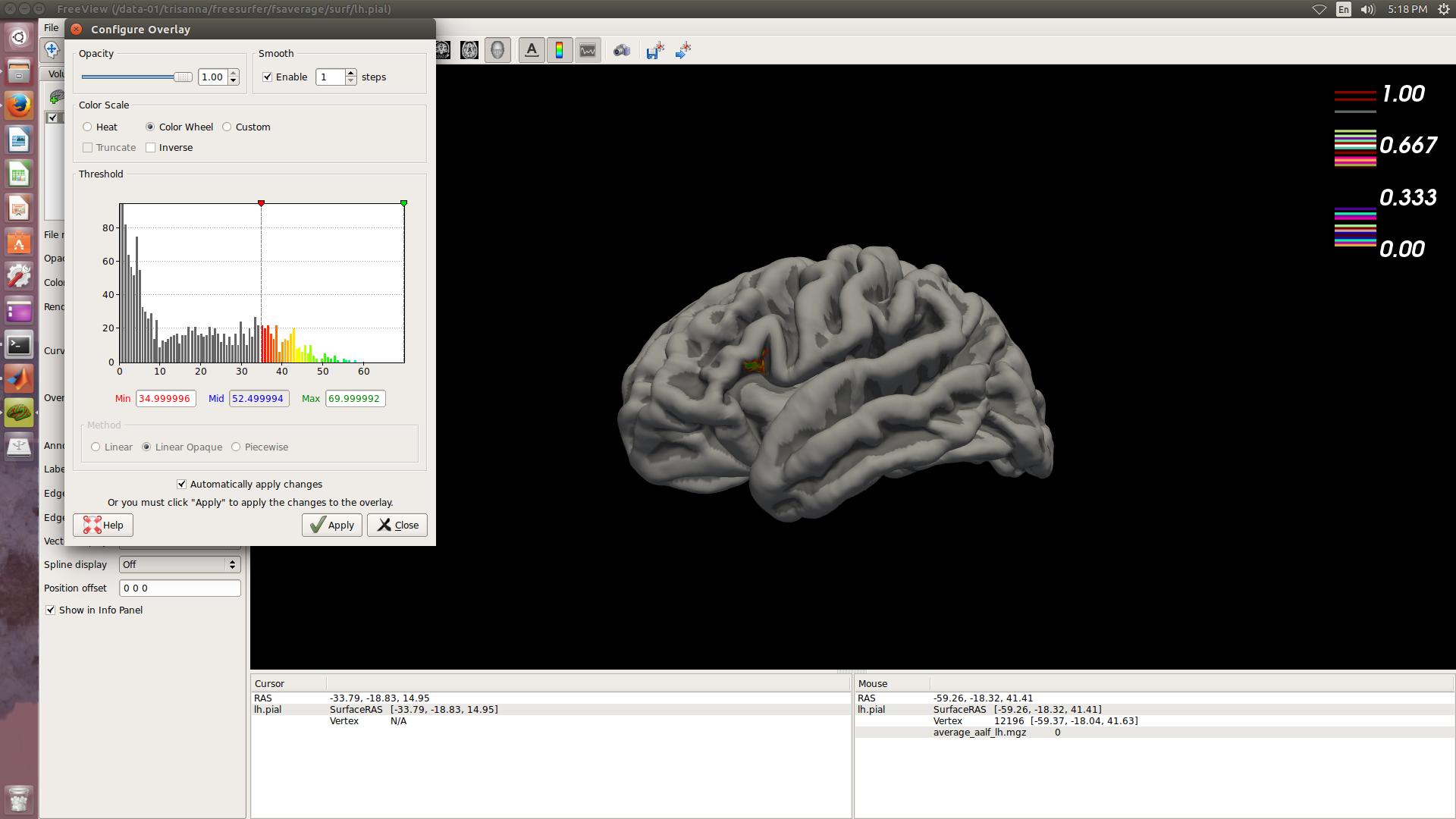
It appears you are running version 5.3. The upcoming 6.0 should fix it.
On Sep 12, 2016, at 5:34 PM, Trisanna Sprung-Much trisanna.sprung-much@mail.mcgill.ca wrote:
Hi there
yup, so I had seen that. The issue is it looks like this and doesn't seem to change no matter what changes I make in the GUI (heat vs colour map, etc).
Best Trisanna
-- Ph.D. Candidate McGill University Integrated Program in Neuroscience Psychology
On Mon, Sep 12, 2016 at 5:05 PM, Ruopeng Wang <rpwang@nmr.mgh.harvard.edu mailto:rpwang@nmr.mgh.harvard.edu> wrote: There is a color bar button on the toolbar, or you can go to menu View->Show Color Scale.
Ruopeng
On 09/12/2016 03:50 PM, Trisanna Sprung-Much wrote:
Hi there
is there a way to view a colour scale bar in Freeview rather than Tksurfer, for instance, for a probability map? I can alter the Min and Max by "Configure Overlay" but cannot seem to display the bar next to my surface.
Many thanks
Trisanna
-- Ph.D. Candidate McGill University Integrated Program in Neuroscience Psychology
Freesurfer mailing list Freesurfer@nmr.mgh.harvard.edu mailto:Freesurfer@nmr.mgh.harvard.edu https://mail.nmr.mgh.harvard.edu/mailman/listinfo/freesurfer https://mail.nmr.mgh.harvard.edu/mailman/listinfo/freesurfer
Freesurfer mailing list Freesurfer@nmr.mgh.harvard.edu mailto:Freesurfer@nmr.mgh.harvard.edu https://mail.nmr.mgh.harvard.edu/mailman/listinfo/freesurfer https://mail.nmr.mgh.harvard.edu/mailman/listinfo/freesurfer
The information in this e-mail is intended only for the person to whom it is addressed. If you believe this e-mail was sent to you in error and the e-mail contains patient information, please contact the Partners Compliance HelpLine at http://www.partners.org/complianceline http://www.partners.org/complianceline . If the e-mail was sent to you in error but does not contain patient information, please contact the sender and properly dispose of the e-mail.
<colour_bar.jpg>_______________________________________________ Freesurfer mailing list Freesurfer@nmr.mgh.harvard.edu https://mail.nmr.mgh.harvard.edu/mailman/listinfo/freesurfer
thanks!
-- Ph.D. Candidate McGill University Integrated Program in Neuroscience Psychology
On Mon, Sep 12, 2016 at 7:24 PM, Ruopeng Wang rpwang@nmr.mgh.harvard.edu wrote:
It appears you are running version 5.3. The upcoming 6.0 should fix it.
On Sep 12, 2016, at 5:34 PM, Trisanna Sprung-Much < trisanna.sprung-much@mail.mcgill.ca> wrote:
Hi there
yup, so I had seen that. The issue is it looks like this and doesn't seem to change no matter what changes I make in the GUI (heat vs colour map, etc).
Best Trisanna
-- Ph.D. Candidate McGill University Integrated Program in Neuroscience Psychology
On Mon, Sep 12, 2016 at 5:05 PM, Ruopeng Wang rpwang@nmr.mgh.harvard.edu wrote:
There is a color bar button on the toolbar, or you can go to menu View->Show Color Scale.
Ruopeng
On 09/12/2016 03:50 PM, Trisanna Sprung-Much wrote:
Hi there
is there a way to view a colour scale bar in Freeview rather than Tksurfer, for instance, for a probability map? I can alter the Min and Max by "Configure Overlay" but cannot seem to display the bar next to my surface.
Many thanks
Trisanna
-- Ph.D. Candidate McGill University Integrated Program in Neuroscience Psychology
Freesurfer mailing listFreesurfer@nmr.mgh.harvard.eduhttps://mail.nmr.mgh.harvard.edu/mailman/listinfo/freesurfer
Freesurfer mailing list Freesurfer@nmr.mgh.harvard.edu https://mail.nmr.mgh.harvard.edu/mailman/listinfo/freesurfer
The information in this e-mail is intended only for the person to whom it is addressed. If you believe this e-mail was sent to you in error and the e-mail contains patient information, please contact the Partners Compliance HelpLine at http://www.partners.org/complianceline . If the e-mail was sent to you in error but does not contain patient information, please contact the sender and properly dispose of the e-mail.
<colour_bar.jpg>_______________________________________________ Freesurfer mailing list Freesurfer@nmr.mgh.harvard.edu https://mail.nmr.mgh.harvard.edu/mailman/listinfo/freesurfer
Freesurfer mailing list Freesurfer@nmr.mgh.harvard.edu https://mail.nmr.mgh.harvard.edu/mailman/listinfo/freesurfer
The information in this e-mail is intended only for the person to whom it is addressed. If you believe this e-mail was sent to you in error and the e-mail contains patient information, please contact the Partners Compliance HelpLine at http://www.partners.org/complianceline . If the e-mail was sent to you in error but does not contain patient information, please contact the sender and properly dispose of the e-mail.
how else would you suggest I generate a colour bar? tksurfer doesn't appear to be working for me either.
Best
Trisanna
-- Ph.D. Candidate McGill University Integrated Program in Neuroscience Psychology
On Mon, Sep 12, 2016 at 7:53 PM, Trisanna Sprung-Much < trisanna.sprung-much@mail.mcgill.ca> wrote:
thanks!
-- Ph.D. Candidate McGill University Integrated Program in Neuroscience Psychology
On Mon, Sep 12, 2016 at 7:24 PM, Ruopeng Wang rpwang@nmr.mgh.harvard.edu wrote:
It appears you are running version 5.3. The upcoming 6.0 should fix it.
On Sep 12, 2016, at 5:34 PM, Trisanna Sprung-Much < trisanna.sprung-much@mail.mcgill.ca> wrote:
Hi there
yup, so I had seen that. The issue is it looks like this and doesn't seem to change no matter what changes I make in the GUI (heat vs colour map, etc).
Best Trisanna
-- Ph.D. Candidate McGill University Integrated Program in Neuroscience Psychology
On Mon, Sep 12, 2016 at 5:05 PM, Ruopeng Wang <rpwang@nmr.mgh.harvard.edu
wrote:
There is a color bar button on the toolbar, or you can go to menu View->Show Color Scale.
Ruopeng
On 09/12/2016 03:50 PM, Trisanna Sprung-Much wrote:
Hi there
is there a way to view a colour scale bar in Freeview rather than Tksurfer, for instance, for a probability map? I can alter the Min and Max by "Configure Overlay" but cannot seem to display the bar next to my surface.
Many thanks
Trisanna
-- Ph.D. Candidate McGill University Integrated Program in Neuroscience Psychology
Freesurfer mailing listFreesurfer@nmr.mgh.harvard.eduhttps://mail.nmr.mgh.harvard.edu/mailman/listinfo/freesurfer
Freesurfer mailing list Freesurfer@nmr.mgh.harvard.edu https://mail.nmr.mgh.harvard.edu/mailman/listinfo/freesurfer
The information in this e-mail is intended only for the person to whom it is addressed. If you believe this e-mail was sent to you in error and the e-mail contains patient information, please contact the Partners Compliance HelpLine at http://www.partners.org/complianceline . If the e-mail was sent to you in error but does not contain patient information, please contact the sender and properly dispose of the e-mail.
<colour_bar.jpg>_______________________________________________ Freesurfer mailing list Freesurfer@nmr.mgh.harvard.edu https://mail.nmr.mgh.harvard.edu/mailman/listinfo/freesurfer
Freesurfer mailing list Freesurfer@nmr.mgh.harvard.edu https://mail.nmr.mgh.harvard.edu/mailman/listinfo/freesurfer
The information in this e-mail is intended only for the person to whom it is addressed. If you believe this e-mail was sent to you in error and the e-mail contains patient information, please contact the Partners Compliance HelpLine at http://www.partners.org/complianceline . If the e-mail was sent to you in error but does not contain patient information, please contact the sender and properly dispose of the e-mail.
Hi there
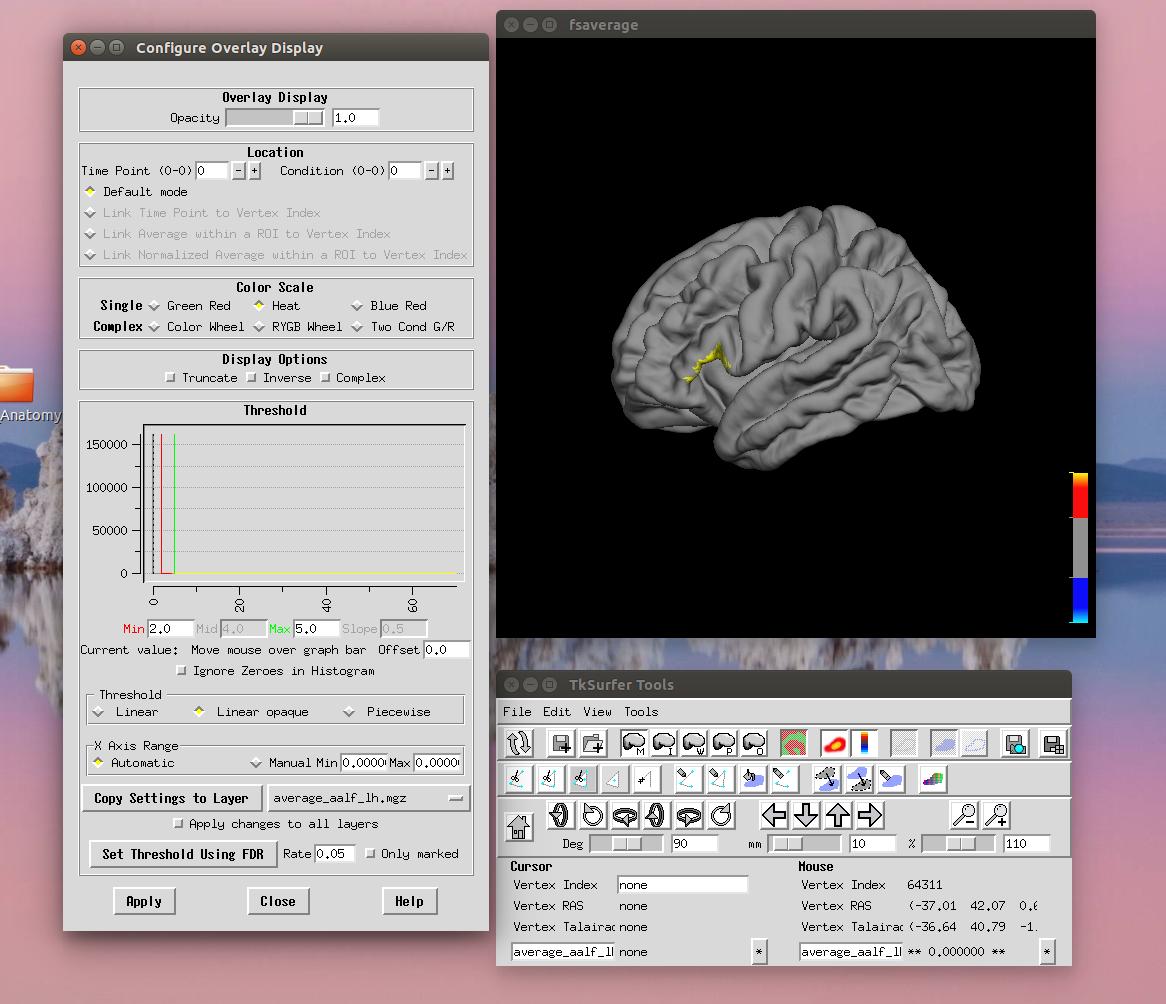
As a follow up to my question, here is what happens when I try to load an overlay ( a probability map ) in tksurfer - the "heat" map doesn't seem to work although I can get the colour bar working. I cannot, however, change the min and max displayed either...
thanks
Trisanna
-- Ph.D. Candidate McGill University Integrated Program in Neuroscience Psychology
On Mon, Sep 12, 2016 at 8:25 PM, Trisanna Sprung-Much < trisanna.sprung-much@mail.mcgill.ca> wrote:
how else would you suggest I generate a colour bar? tksurfer doesn't appear to be working for me either.
Best
Trisanna
-- Ph.D. Candidate McGill University Integrated Program in Neuroscience Psychology
On Mon, Sep 12, 2016 at 7:53 PM, Trisanna Sprung-Much < trisanna.sprung-much@mail.mcgill.ca> wrote:
thanks!
-- Ph.D. Candidate McGill University Integrated Program in Neuroscience Psychology
On Mon, Sep 12, 2016 at 7:24 PM, Ruopeng Wang <rpwang@nmr.mgh.harvard.edu
wrote:
It appears you are running version 5.3. The upcoming 6.0 should fix it.
On Sep 12, 2016, at 5:34 PM, Trisanna Sprung-Much < trisanna.sprung-much@mail.mcgill.ca> wrote:
Hi there
yup, so I had seen that. The issue is it looks like this and doesn't seem to change no matter what changes I make in the GUI (heat vs colour map, etc).
Best Trisanna
-- Ph.D. Candidate McGill University Integrated Program in Neuroscience Psychology
On Mon, Sep 12, 2016 at 5:05 PM, Ruopeng Wang < rpwang@nmr.mgh.harvard.edu> wrote:
There is a color bar button on the toolbar, or you can go to menu View->Show Color Scale.
Ruopeng
On 09/12/2016 03:50 PM, Trisanna Sprung-Much wrote:
Hi there
is there a way to view a colour scale bar in Freeview rather than Tksurfer, for instance, for a probability map? I can alter the Min and Max by "Configure Overlay" but cannot seem to display the bar next to my surface.
Many thanks
Trisanna
-- Ph.D. Candidate McGill University Integrated Program in Neuroscience Psychology
Freesurfer mailing listFreesurfer@nmr.mgh.harvard.eduhttps://mail.nmr.mgh.harvard.edu/mailman/listinfo/freesurfer
Freesurfer mailing list Freesurfer@nmr.mgh.harvard.edu https://mail.nmr.mgh.harvard.edu/mailman/listinfo/freesurfer
The information in this e-mail is intended only for the person to whom it is addressed. If you believe this e-mail was sent to you in error and the e-mail contains patient information, please contact the Partners Compliance HelpLine at http://www.partners.org/complianceline . If the e-mail was sent to you in error but does not contain patient information, please contact the sender and properly dispose of the e-mail.
<colour_bar.jpg>_______________________________________________ Freesurfer mailing list Freesurfer@nmr.mgh.harvard.edu https://mail.nmr.mgh.harvard.edu/mailman/listinfo/freesurfer
Freesurfer mailing list Freesurfer@nmr.mgh.harvard.edu https://mail.nmr.mgh.harvard.edu/mailman/listinfo/freesurfer
The information in this e-mail is intended only for the person to whom it is addressed. If you believe this e-mail was sent to you in error and the e-mail contains patient information, please contact the Partners Compliance HelpLine at http://www.partners.org/complianceline . If the e-mail was sent to you in error but does not contain patient information, please contact the sender and properly dispose of the e-mail.
freesurfer@nmr.mgh.harvard.edu
-
 Ruopeng Wang
 -
 Trisanna Sprung-Much