
Hi Dusan,
setenv is used when you are using tcsh. since you are using bash, you can run this command to set your language:
export LANG=en_US.UTF-8
Hope this helps.
Best, Lee
On Tue, 29 Sep 2015, Dusan Hirjak wrote:
Thank you very much for your suggestion. Now it has worked well. However, I am having trouble running the simulation via:
mri_glmfit-sim --glmdir NSS_3_GR.glmdir --cache 4 abs --cwp 0.05 --2spaces
ERROR: thresh = 4,0, must be 1.3, 2.0, 2.3, 3.0, 3.3, 4.0
Where can I set up the EN language with "setenv LANG en_US.UTF-8"?
I am getting this message:
bash-3.2$ setenv LANG en_US.UTF-8
bash: setenv: command not found
How can I change the language?
Many thanks!
Dusan
From: rpwang@nmr.mgh.harvard.edu Date: Mon, 28 Sep 2015 19:35:12 -0400 To: freesurfer@nmr.mgh.harvard.edu Subject: Re: [Freesurfer] 3_group_comparison
Was the path of the overlay file correct? It looks like it can’t find the file. Try providing the full path of the overlay file in the freeview command.
Best, Ruopeng
On Sep 28, 2015, at 6:46 PM, Dusan Hirjak <dusanhirjak@hotmail.com> wrote:Many thanks!!!, yes, freeview has opened, but I am still not seeing any results, just the "lh.inflated" It says: "Failed to load surface overlay"
and than I got the following message:
bash-3.2$ freeview -f $SUBJECTS_DIR/fsaverage/surf/lh.inflated:annot=aparc.annot:overlay=lh.NSS_3_GR.glmdir/AvG-thickness-Cor/sig.mgh:overlay_threshold=4,5 -viewport 3d 2015-09-29 00:41:53.887 Freeview[22049:303] invalid drawable 2015-09-29 00:41:53.889 Freeview[22049:303] invalid drawable 2015-09-29 00:41:53.905 Freeview[22049:303] invalid drawable 2015-09-29 00:41:53.906 Freeview[22049:303] invalid drawable 2015-09-29 00:41:53.921 Freeview[22049:303] invalid drawable 2015-09-29 00:41:53.922 Freeview[22049:303] invalid drawable 2015-09-29 00:41:53.939 Freeview[22049:303] invalid drawable 2015-09-29 00:41:53.939 Freeview[22049:303] invalid drawable Did not find any volume geometry information in the surface ø;C 8Íÿ¿ø;C È+’Àá
reading colortable from annotation file... colortable with 36 entries read (originally /autofs/space/terrier_001/users/nicks/freesurfer/average/colortable_desikan_killiany.txt) colortable with 36 entries read (originally /autofs/space/terrier_001/users/nicks/freesurfer/average/colortable_desikan_killiany.txt) mghRead(/users/dhirjak/MRI/Freesurfer_2/NSS_LGI/fsaverage/surf/lh.NSS_3_GR.glmdir/AvG-thickness-Cor/sig.mgh, -1): could not open file mghRead(/users/dhirjak/MRI/Freesurfer_2/NSS_LGI/fsaverage/surf/lh.NSS_3_GR.glmdir/AvG-thickness-Cor/sig.mgh, -1): could not open file could not read overlay data from /users/dhirjak/MRI/Freesurfer_2/NSS_LGI/fsaverage/surf/lh.NSS_3_GR.glmdir/AvG-thickness-Cor/sig.mgh mghRead(/users/dhirjak/MRI/Freesurfer_2/NSS_LGI/fsaverage/surf/lh.NSS_3_GR.glmdir/AvG-thickness-Cor/sig.mgh, -1): could not open file 2015-09-29 00:42:02.445 Freeview[22049:303] modalSession has been exited prematurely - check for a reentrant call to endModalSession:
I dont understand the problem. Do you have any ideas???
Thank you!
Dusan
To: freesurfer@nmr.mgh.harvard.edu From: greve@nmr.mgh.harvard.edu Date: Mon, 28 Sep 2015 18:33:50 -0400 Subject: Re: [Freesurfer] 3_group_comparison I think it needs a -f before the surface On 09/28/2015 06:27 PM, Dusan Hirjak wrote:
Many thanks, yes, it did work well.
But, than I ran "freeview $SUBJECTS_DIR/fsaverage/surf/lh.inflated:annot=aparc.annot:overlay=lh.NSS_3_GR.glmdir/AvG-thickness-NSS-Cor/sig.mgh:overlay_threshold=4,5 -viewport 3d"
and got the following message:
bash-3.2$ freeview $SUBJECTS_DIR/fsaverage/surf/lh.inflated:annot=aparc.annot:overlay=lh.NSS_3_GR.glmdir/AvG-thickness-NSS-Cor/sig.mgh:overlay_threshold=4,5 -viewport 3d
2015-09-29 00:23:47.366 Freeview[22019:303] invalid drawable
2015-09-29 00:23:47.367 Freeview[22019:303] invalid drawable
2015-09-29 00:23:47.385 Freeview[22019:303] invalid drawable
2015-09-29 00:23:47.386 Freeview[22019:303] invalid drawable
2015-09-29 00:23:47.399 Freeview[22019:303] invalid drawable
2015-09-29 00:23:47.400 Freeview[22019:303] invalid drawable
2015-09-29 00:23:47.420 Freeview[22019:303] invalid drawable
2015-09-29 00:23:47.421 Freeview[22019:303] invalid drawable
Unrecognized sub-option flag 'annot=aparc.annot'.
Freeview has opened, but it showed no results at all:-(
What should I do? I read that one has to upgrade the newest freeview-version? Is it possible to get the newest version without installing freesurfer again?
Many thanks!
Dusan
Date: Mon, 28 Sep 2015 11:35:50 -0400 From: greve@nmr.mgh.harvard.edu To: freesurfer@nmr.mgh.harvard.edu Subject: Re: [Freesurfer] 3_group_comparison
Did you include the back slashes in your command? If so, remove them and retry.
On 9/25/15 7:11 PM, Dusan Hirjak wrote:
Dear Freesurfer experts,
I am trying to compare 3 groups (aut, sch, ges) according to thickness, area and LGI at once (omnibus test).
I did run the following command:
mris_preproc --fsgd NSS_3_GR.fsgd \ --cache-in thickness.fwhm15.fsaverage \ --target fsaverage --hemi lh \ --out lh.NSS_3_GR.thickness.15.mgh
This step did work properly:-)
Now, Im trying to run the following command, but it does not work:
mri_glmfit \ --y lh.NSS_3_GR.thickness.15.mgh \ --fsgd NSS_3_GR.fsgd dods\ --C contrasts.mtx \ --surf fsaverage lh \ --cortex \ --glmdir NSS_3_GR.glmdir
I got this message: "ERROR: Option--y unknown"
What am I doing wrong?
Thank you for your help!
Best regards
Dusan
Freesurfer mailing list Freesurfer@nmr.mgh.harvard.edu mailto:Freesurfer@nmr.mgh.harvard.edu https://mail.nmr.mgh.harvard.edu/mailman/listinfo/freesurfer
_______________________________________________ Freesurfer mailing list Freesurfer@nmr.mgh.harvard.edu https://mail.nmr.mgh.harvard.edu/mailman/listinfo/freesurfer The information in this e-mail is intended only for the person to whom it is addressed. If you believe this e-mail was sent to you in error and the e-mail contains patient information, please contact the Partners Compliance HelpLine at http://www.partners.org/complianceline . If the e-mail was sent to you in error but does not contain patient information, please contact the sender and properly dispose of the e-mail.
Freesurfer mailing list Freesurfer@nmr.mgh.harvard.edu https://mail.nmr.mgh.harvard.edu/mailman/listinfo/freesurfer
-- Douglas N. Greve, Ph.D. MGH-NMR Center greve@nmr.mgh.harvard.edu Phone Number: 617-724-2358 Fax: 617-726-7422 Bugs: surfer.nmr.mgh.harvard.edu/fswiki/BugReporting FileDrop: https://gate.nmr.mgh.harvard.edu/filedrop2 www.nmr.mgh.harvard.edu/facility/filedrop/index.html Outgoing: ftp://surfer.nmr.mgh.harvard.edu/transfer/outgoing/flat/greve/ _______________________________________________ Freesurfer mailing list Freesurfer@nmr.mgh.harvard.edu https://mail.nmr.mgh.harvard.edu/mailman/listinfo/freesurfer
Freesurfer mailing list Freesurfer@nmr.mgh.harvard.edu https://mail.nmr.mgh.harvard.edu/mailman/listinfo/freesurfer
_______________________________________________ Freesurfer mailing list Freesurfer@nmr.mgh.harvard.edu https://mail.nmr.mgh.harvard.edu/mailman/listinfo/freesurfer The information in this e-mail is intended only for the person to whom it is addressed. If you believe this e-mail was sent to you in error and the e-mail contains patient information, please contact the Partners Compliance HelpLine at http://www.partners.org/complianceline . If the e-mail was sent to you in error but does not contain patient information, please contact the sender and properly dispose of the e-mail.

Dear FS experts.I am having issues when trying to remove non cortical tissue (mostly skull). I load my images as follow:
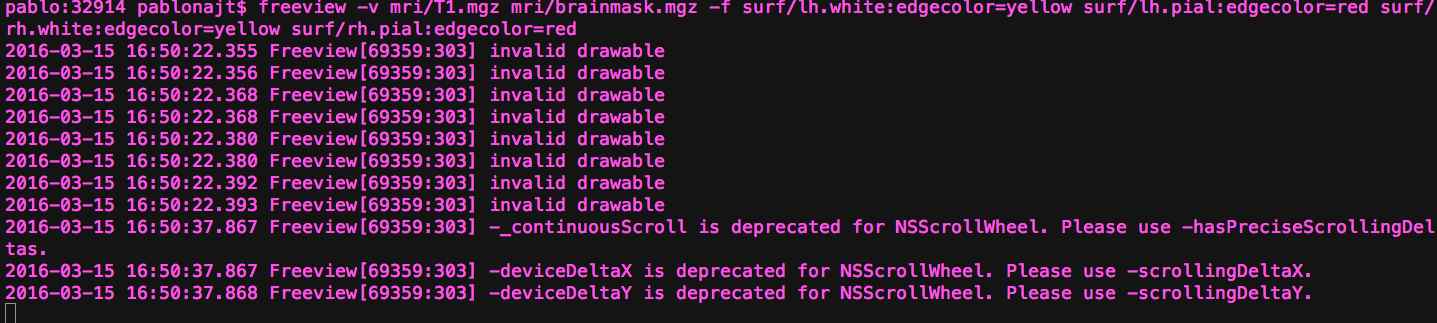
freeview -v mri/T1.mgz mri/brainmask.mgz -f surf/lh.white:edgecolor=yellow surf/lh.pial:edgecolor=red surf/rh.white:edgecolor=yellow surf/rh.pial:edgecolor=r Then I have tried to follow the guide in the tutorial 'Correcting Pial Surfaces'Selected Recon edit free hand option, selected brain mask.mgz hold down the Shift key and left click. This does not change the surface.I am wondering if there is a different key shortcut with O SX. Or if there is anything else I could try. I also tried older instructions with tkmedik and I have the same problem.Any advice will be greatly appreciated.Thanks, Pablo
Dear experts and FS users,I came across the following problem it would be useful help if anyone is able to advice.ThanksPablo I am having issues when trying to remove non cortical tissue (mostly skull). I load my images as follow:
freeview -v mri/T1.mgz mri/brainmask.mgz -f surf/lh.white:edgecolor=yellow surf/lh.pial:edgecolor=red surf/rh.white:edgecolor=yellow surf/rh.pial:edgecolor=r "invalid drawable" error is displayed. Then I have tried to follow the guide in the tutorial 'Correcting Pial Surfaces'Selected Recon edit free hand option, selected brain mask.mgz hold down the Shift key and left click. This does not change the surface.I am wondering if there is a different key shortcut with O SX. Or if there is anything else I could try. I also tried older instructions with tkmedik and I have the same problem.Any advice will be greatly appreciated.Thanks, Pablo
_______________________________________________ Freesurfer mailing list Freesurfer@nmr.mgh.harvard.edu https://mail.nmr.mgh.harvard.edu/mailman/listinfo/freesurfer
The information in this e-mail is intended only for the person to whom it is addressed. If you believe this e-mail was sent to you in error and the e-mail contains patient information, please contact the Partners Compliance HelpLine at http://www.partners.org/complianceline . If the e-mail was sent to you in error but does not contain patient information, please contact the sender and properly dispose of the e-mail.
freesurfer@nmr.mgh.harvard.edu
-
 Lee Tirrell
 -
 pablo najt