
External Email - Use Caution
Dear FreeSurfer experts,
Version: Freesurfer version 6.0
Platform: Ubuntu 14.04 (Via a Windows 10 PC)
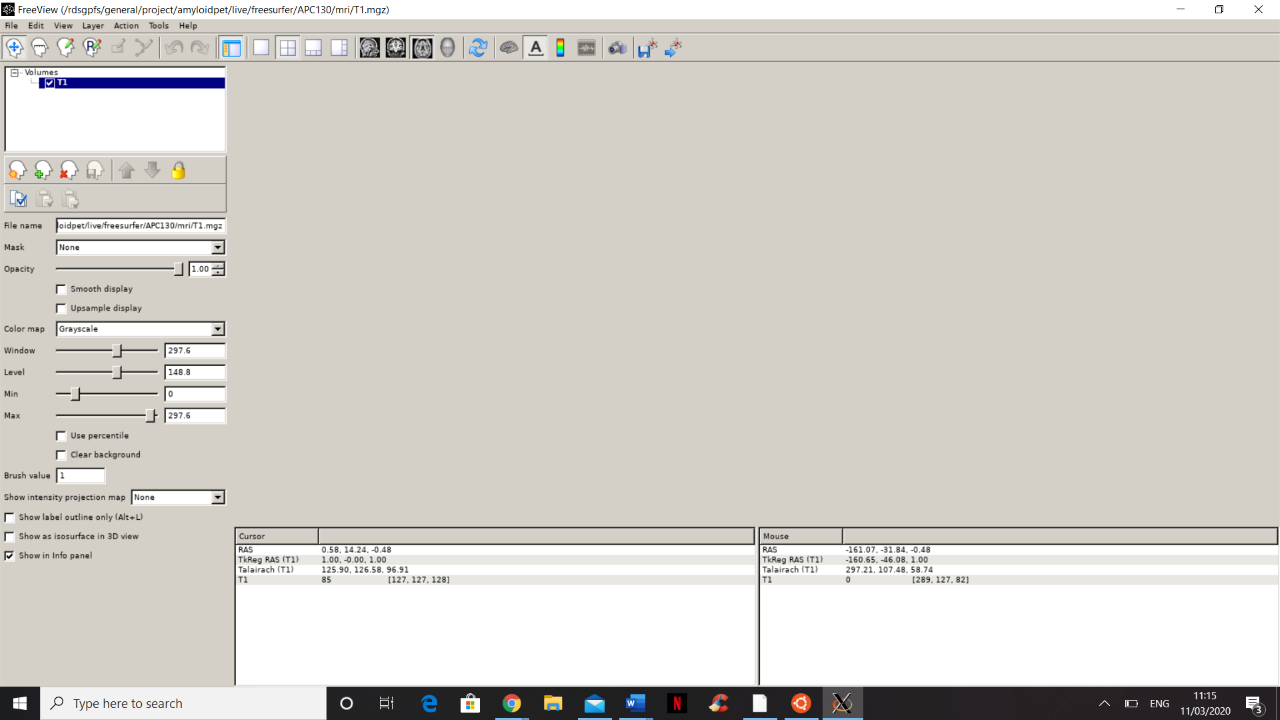
Upon completion of our first FreeSurfer job, in which we ran an array on ~50 subjects, we have tried to view the basic outputs (e.g. T1.mgz) using both freeview -v and FSLview. Upon running freeview -v, the app opens but shows no discernible image (see screengrab below). Upon exiting the viewing platform the command line reads:
X Error: GLXBadContext 150 Extension: 143 (Uknown extension) Minor opcode: 5 (Unknown request) Resource id: 0x8000c8
I have found reference to this error in the archives at: https://www.mail-archive.com/freesurfer@nmr.mgh.harvard.edu/msg30865.html and much like with this original query, we are running freeview remotely via a high-performace-computing system, and when we type glxgears at the command line spinning gears do popup.
Furthermore, (and although this does not relate directly to Freesurfer, it may provide additional useful information) upon trying to view the same T1.mgz file with FSLview rather than freeview we receive the message "missing header/image file" within the viewer but no error in the command line.
We appreciate this may be a simple solution, however as it is our first time running FreeSurfer, it is difficult to know how to proceed. I have attached the recon-all report log for the subject attempting to be viewed in the screengrab below.
[cid:dc363bf5-90e3-4318-820f-38416df60417]
Kind regards, Aleks Duvnjak
freesurfer@nmr.mgh.harvard.edu
-
 Duvnjak, Aleksandar