
External Email - Use Caution
I would like to abuse mris_flatten with a non-cerebrum surface. Will this work? It works for a sphere, but if I make cuts on more complicated shapes, it fails after hundreds of iterations with a "Segmentation fault". Are there any special tricks? Each patch file of cuts requires a different ?h.smoothwm file or h?.smoothwm file. If I copy the original surface to that requested file, the program continues. Is this correct? How can I predict this? I did manage to get one to make a flat.3D file, but display in Freeview or info from mris_info fails for that output, first using up large amounts of memory then crashes with another segmentation fault .
Thanks, Daniel

Hi Daniel
The patches are a somewhat different format than surfaces, so you need to load the surface that you cut it from first, then load the patch afterwards. I would think you could flatten anything if you have the right files in the right places (like the smoothwm as you mentioned)
Cheers Bruce
From: freesurfer-bounces@nmr.mgh.harvard.edu freesurfer-bounces@nmr.mgh.harvard.edu On Behalf Of Glen, Daniel (NIH/NIMH) [E] Sent: Friday, April 18, 2025 5:19 PM To: freesurfer@nmr.mgh.harvard.edu Subject: [Freesurfer] mris_flatten limitations
External Email - Use Caution I would like to abuse mris_flatten with a non-cerebrum surface. Will this work? It works for a sphere, but if I make cuts on more complicated shapes, it fails after hundreds of iterations with a "Segmentation fault". Are there any special tricks? Each patch file of cuts requires a different ?h.smoothwm file or h?.smoothwm file. If I copy the original surface to that requested file, the program continues. Is this correct? How can I predict this? I did manage to get one to make a flat.3D file, but display in Freeview or info from mris_info fails for that output, first using up large amounts of memory then crashes with another segmentation fault .
Thanks, Daniel
External Email - Use Caution
Hi Bruce,
Thanks for that reminder about the flat maps as patches. I typically use the flat maps after conversion to gifti, so they are then their own full surfaces. With the center away from (0,0,0), the patch does indeed show up, but it's out of the usual view, so I have to zoom out to see it. I've recentered the surface to be around 0,0,0 to make this a little easier. It might be helping with the flattening too because I'm getting close to a good result. Sometimes the randomness of the flattening process fails, but a retry can work, occasionally requiring a few tries. The terminal output includes the random seed used, so I can use that if I were to rerun the mris_flatten.
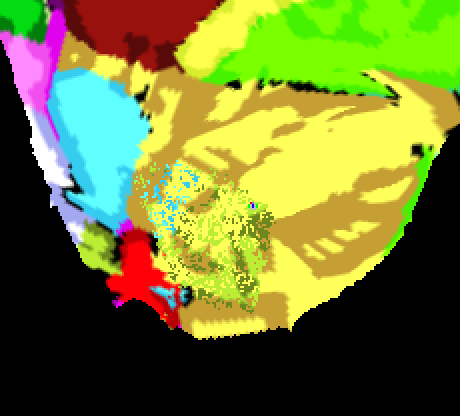
I still have an important issue in that there is an artifact of either one or two round swirls of misplaced nodes. These can be inside the contiguous flat map or even outside the flattened map as a separate circle, away from the rest of the flat surface. For the interior swirls, it's easier to visualize that with some annotation mapped from the original surface to the flat map. I did that visualization with suma because I know that better, but I can see the same swirls in the surface mesh using freeview. These are the steps I've taken so far. Do you have any recommendations?
Thanks, Daniel
mkdir surf # put initial data in the directory cp somedir/isosurf.gii surf/ cd surf mris_convert isosurf.gii lh.smoothwm.3d mv lh.smoothwm.3d lh.smoothwm
# make cuts on surface in GUI freeview # load surface. make series of cuts using GUI (mark points, Scissors - open path) # save as patch lh.mycut.flat.3d
# flatten cut data # increasing the distances to 10 10 and dilation to 8 moves the swirl outside mris_flatten -distances 5 5 -dilate 4 lh.mycut.3d lh.mycut.flat.3d
# convert flat map to gifti surface mris_convert -p lh.mycut.flat.3d lh.smoothwm.flat.gii
# make spec file for suma quickspec -spec my_surfaces.spec -tsnad gii surfacename lh.smoothwm.gii Y SAME \ -tsnad gii flat lh.smoothwm.flat.gii N lh.smoothwm.gii
[cid:image001.png@01DBB780.04F8C230]
Hi Daniel
Well, I have done much flattening recently (like for many years) but the two things to try are:
1. Making sure there isn't still a single edge left that you need to cut that prevents the unfolding. 2. Try including longer range distances, and possibly more of them.
Cheers Bruce
From: freesurfer-bounces@nmr.mgh.harvard.edu freesurfer-bounces@nmr.mgh.harvard.edu On Behalf Of Glen, Daniel (NIH/NIMH) [E] Sent: Sunday, April 27, 2025 4:25 PM To: freesurfer@nmr.mgh.harvard.edu Subject: Re: [Freesurfer] mris_flatten limitations
External Email - Use Caution Hi Bruce,
Thanks for that reminder about the flat maps as patches. I typically use the flat maps after conversion to gifti, so they are then their own full surfaces. With the center away from (0,0,0), the patch does indeed show up, but it's out of the usual view, so I have to zoom out to see it. I've recentered the surface to be around 0,0,0 to make this a little easier. It might be helping with the flattening too because I'm getting close to a good result. Sometimes the randomness of the flattening process fails, but a retry can work, occasionally requiring a few tries. The terminal output includes the random seed used, so I can use that if I were to rerun the mris_flatten.
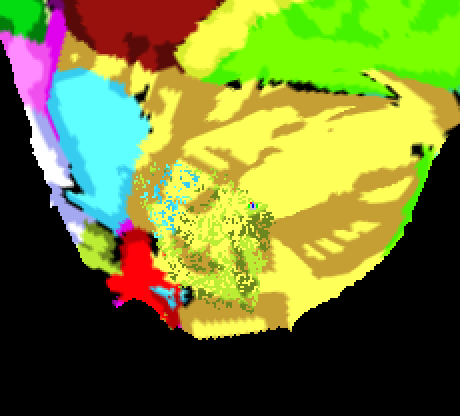
I still have an important issue in that there is an artifact of either one or two round swirls of misplaced nodes. These can be inside the contiguous flat map or even outside the flattened map as a separate circle, away from the rest of the flat surface. For the interior swirls, it's easier to visualize that with some annotation mapped from the original surface to the flat map. I did that visualization with suma because I know that better, but I can see the same swirls in the surface mesh using freeview. These are the steps I've taken so far. Do you have any recommendations?
Thanks, Daniel
mkdir surf # put initial data in the directory cp somedir/isosurf.gii surf/ cd surf mris_convert isosurf.gii lh.smoothwm.3d mv lh.smoothwm.3d lh.smoothwm
# make cuts on surface in GUI freeview # load surface. make series of cuts using GUI (mark points, Scissors - open path) # save as patch lh.mycut.flat.3d
# flatten cut data # increasing the distances to 10 10 and dilation to 8 moves the swirl outside mris_flatten -distances 5 5 -dilate 4 lh.mycut.3d lh.mycut.flat.3d
# convert flat map to gifti surface mris_convert -p lh.mycut.flat.3d lh.smoothwm.flat.gii
# make spec file for suma quickspec -spec my_surfaces.spec -tsnad gii surfacename lh.smoothwm.gii Y SAME \ -tsnad gii flat lh.smoothwm.flat.gii N lh.smoothwm.gii
[cid:image001.png@01DBB865.FACE18A0]
freesurfer@nmr.mgh.harvard.edu
-
 Fischl, Bruce R.,PHD
 -
 Glen, Daniel (NIH/NIMH) [E]