External Email - Use Caution
Hi R,
Thanks for the quick response.
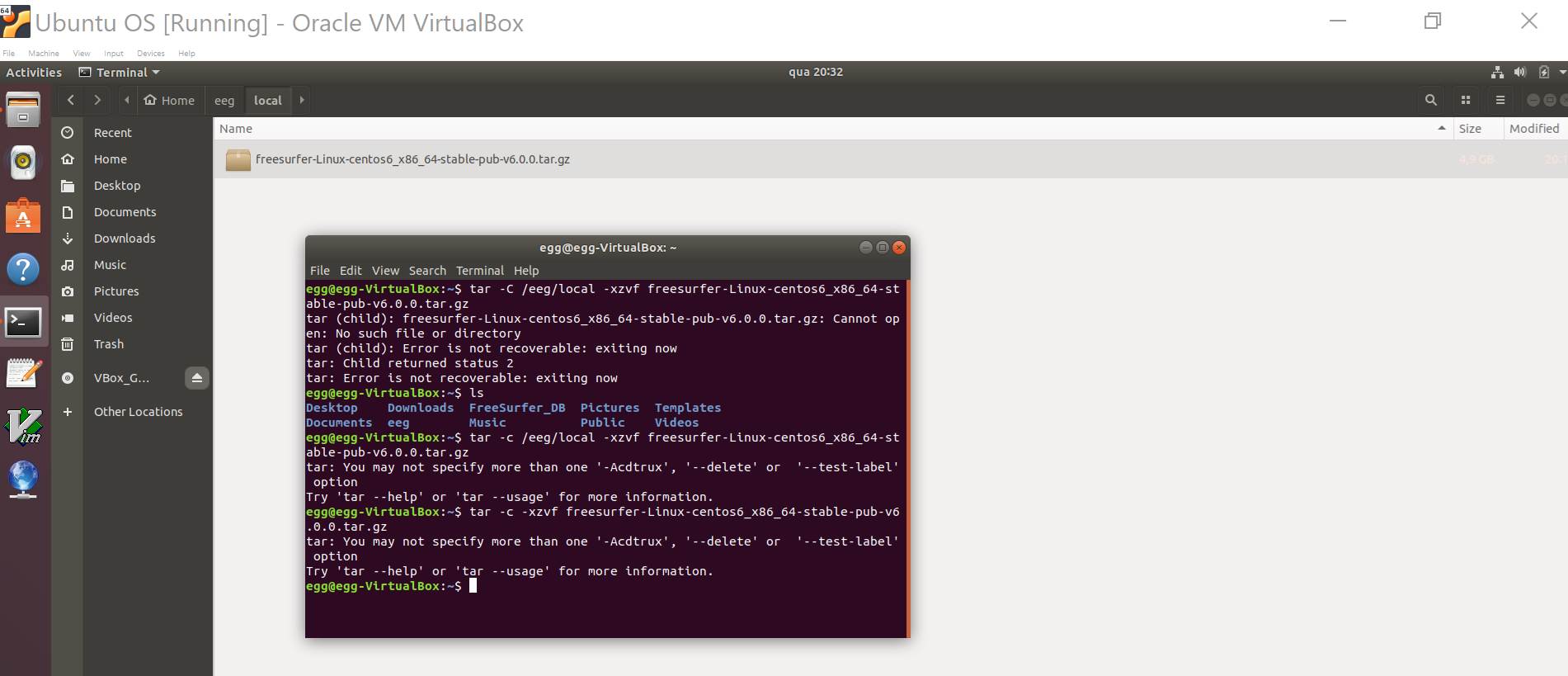
I have but still couldn’t go through the process. I have also read your e-mail but I have no idea what you refer to in your second e-mail.
This is what I have got:
Kind Regards,
Rodrigo Montenegro
+44(0)7503070807
From: freesurfer-bounces@nmr.mgh.harvard.edu [mailto:freesurfer-bounces@nmr.mgh.harvard.edu] On Behalf Of fsbuild Sent: 28 January 2019 23:17 To: freesurfer@nmr.mgh.harvard.edu Cc: rodrigo.montenegro@ndcn.ox.ac.uk Subject: Re: [Freesurfer] Trouble Installing FreeSurfer {Disarmed}
External Email - Use Caution
… Correction - with the v switch “tar -xzvf” it is going to list every fileit expands and then return to the “$” prompt.
- R.
On , at 18:11 1/28/2019, fsbuild <fsbuild@contbay.com mailto:fsbuild@contbay.com > wrote:
External Email - Use Caution /ee
Hello Rodrigo,
Did you download the tar file freesurfer-Linux-centos6_x86_64-stable-pub-v6.0.0.tar.gz from this page, and attempt to follow the steps below ?
https://surfer.nmr.mgh.harvard.edu/fswiki/DownloadAndInstall
If you do not have permission to untar (write files) into /usr/local, you could try using another path.
But usually if the tar command has a problem it will echo some error/text to the terminal, e.g., "Permission denied", or say there was an error.
If the command simply returns to the prompt than it should have succeeded, e.g., success with "$" bash shell prompt.
$ tar -C /usr/local -xzvf freesurfer-Linux-centos6_x86_64-stable-pub-v6.0.0.tar.gz
$
Please try and point out the step that does not work for you.
- R.
On , at 17:47 1/28/2019, Rodrigo Montenegro <rmontenegro11@gmail.com mailto:rmontenegro11@gmail.com > wrote:
External Email - Use Caution
Dear FreeSurfer Team,
I’m a Medicine student at Oxford University and I have just registered to FreeSurfer. I just went through the registration process so I'm very new to FreeSurfer but have only run to problems so far and would like to ask for your help:
1. I have register with FreeSurferWiki but can’t login: it gives me one of the following errors:
i. “Error 403 Login/Edit allowed only on https/SSL connections Login/Edit allowed only on https/SSL connections Guru Meditation: XID: 1153030795 Varnish cache serve”.
ii. Or that it is an “Invalid username or password” (not sure if
2. More importantly I have also tried to install FreeSurfer in Virtual Box (4096 MB Memory; 32 MD Video Memory; Ubuntu 64 Bits) without any success. The Ubuntu system works fine and I have the “freesurfer-Linux-centos6_x86_64-stable-pub-v6.0.0.tar.gz” to install FreeSurfer but the being totally new to Linux I have not had success to install it:
i. I’m not sure if at all the files are unzipped from the .gz file.
ii. And I have been unable to create the Bash files to define the environment for it.
3. Finally, I notice that you do have an installation for Virtual Disk Image but the download for it ( ftp://surfer.nmr.mgh.harvard.edu/pub/dist/freesurfer/5.3.0/freesurfer-Virtualbox-linux-x86-stable-pub-v5.3-full..vdi.gz ftp://surfer.nmr.mgh.harvard.edu/pub/dist/freesurfer/5.3.0/freesurfer-Virtualbox-linux-x86-stable-pub-v5.3-full.vdi.gz) is a gz file not a .vdi file as it should be (see picture below):
<image002.jpg>
So either way I wasn’t able to get through with the installation and any help is appreciated.
Could you please provide some advice?
Many thanks,
Rodrigo Montenegro
+44(0)7503070807
_______________________________________________ Freesurfer mailing list mailto:Freesurfer@nmr.mgh.harvard.edu Freesurfer@nmr.mgh.harvard.edu https://mail.nmr.mgh.harvard.edu/mailman/listinfo/freesurfer MailScanner has detected a possible fraud attempt from "mail.nmr.mgh.harvard.edu" claiming to be https://mail..nmr.mgh.harvard.edu/mailman/listinfo/freesurfer
_______________________________________________ Freesurfer mailing list Freesurfer@nmr.mgh.harvard.edu mailto:Freesurfer@nmr.mgh.harvard.edu https://mail.nmr.mgh.harvard.edu/mailman/listinfo/freesurfer