External Email - Use Caution
Hello Alex,
While I'm (fsbuild) and not Ruopeng, I don't mind being mistaken for such a smart/nice guy ;-) . So I'm cc'ing back to the list so he and others can follow up.
It looks like you already have the commands to set FREESURFER_HOME and source the setup script in your $HOME/.bashrc file - as that information is printed out to the terminal after you run bash. So there should be no need to repeat typing those commands in the terminal window (though it should do no harm)..
I guess one question would be if it works for yo to do:
1) reboot your machine
2) start a new terminal window
3) type "bash"
.... see output from the freesurfer environment and then run the command ...
4) open -a $FREESURFER_HOME/Freeview.app
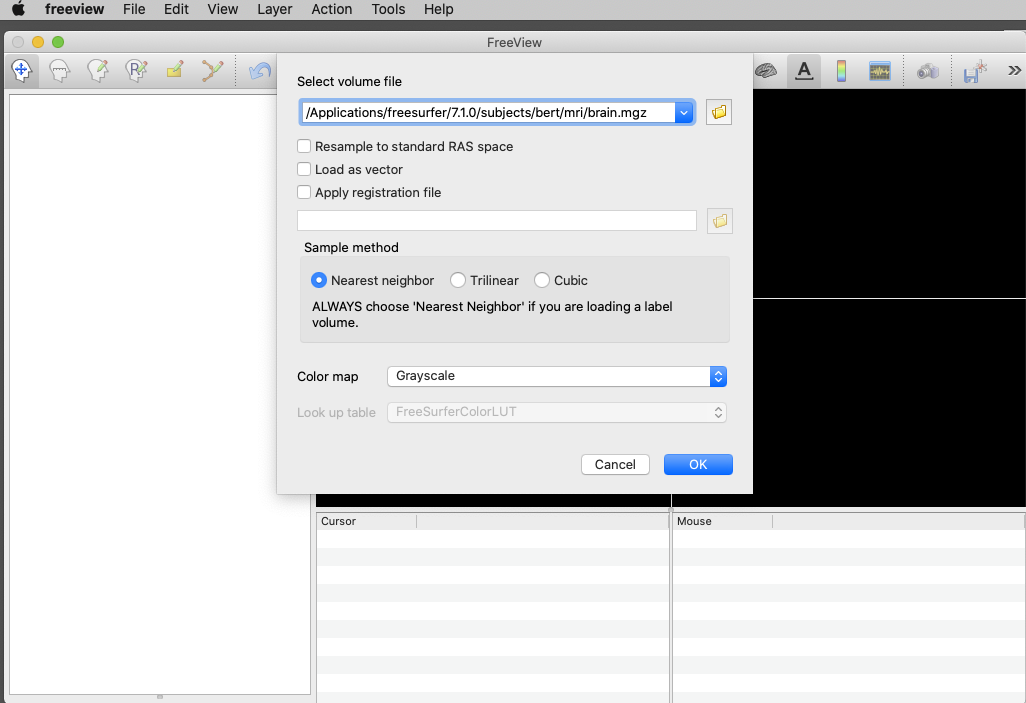
Then try loading a simple volume in freeview. (Under the freeview File pull down menu, select load volume, then you could try navigating to this file and select it, /Applications/freesurfer/7.1.0/subjects/bert/mri/brain.mgz - see screen shot below).
I think Ruopeng wanted to know if after the steps above, it also works for you to double click on Freeview.app in the Finder window and launch it (navigate with the Finder to /Applications/freesurfer/7.1.0).
You could try making bash your default shell with this command in the terminal window, so you don't have to type bash in step (3).
$ chsh -s /bin/bash
- R.
Alex White wrote:
Hello again Ruopeng, I copied those commands into my terminal. To my amazement, Freeview opened successfully with the command open -a $FREESURFER_HOME/Freeview.appIt was also able to load a volume. And then I was able to start Freeview with the simpler command “freeview.” I can’t explain that.. The FREESURFER_HOME variable didn’t change, and my shell init script had already sourced SetUpFreesurfer.sh. However, I restarted my machine and tried again, and then Freeview wouldn’t open with either command, even following the whole sequence of commands you suggested. Then I tried again, and it worked. For some reason it’s only working intermittently. In response to your other question, when I double-clicked on the app bundle to start freeview, there was no crash report generated.Below is the output to the commands you requested. Do you see anything suspicious? Thanks a million! Alexalexlw@gse7359200 ~ % bash-------- freesurfer-darwin-macOS-7.1.0-20200511-813297b --------Setting up environment for FreeSurfer/FS-FAST (and FSL)FREESURFER_HOME /Applications/freesurfer/7.1.0FSFAST_HOME /Applications/freesurfer/7.1.0/fsfastFSF_OUTPUT_FORMAT nii.gzSUBJECTS_DIR /Applications/freesurfer/7.1.0/subjectsMNI_DIR /Applications/freesurfer/7.1.0/mniThe default interactive shell is now zsh.To update your account to use zsh, please run `chsh -s /bin/zsh`.For more details, please visit https://support.apple.com/kb/HT208050.bash-3.2$ sw_versProductName: Mac OS XProductVersion: 10.15.5BuildVersion: 19F101bash-3.2$ echo $PATH | tr -s ':' '\n'/Applications/freesurfer/7.1.0/bin/Applications/freesurfer/7.1.0/fsfast/bin/Applications/freesurfer/7.1.0/mni/bin/Users/alexlw/google-cloud-sdk/bin/Library/Frameworks/Python.framework/Versions/3.8/bin/Applications/freesurfer/7.1.0/bin/Applications/freesurfer/7.1.0/fsfast/bin/Applications/freesurfer/7.1.0/mni/bin/usr/local/bin/usr/bin/bin/usr/sbin/sbin/opt/X11/bin/Users/alexlw/Library/Python/3.8/bin/Users/alexlw/Library/Python/3.8/bin/Users/alexlw/Library/Python/3.8/binbash-3.2$ ls /opt/X11/binX bmtoa font_cache libpng-config resize x11perf xditview xfsinfo xkeystone xmore xstdcmapXephyr cvt fonttosfnt libpng16-config sessreg x11perfcomp xdm xgamma xkill xpr xtermXfake cxpm freetype-config listres setxkbmap xauth xdmshell xgc xload xprop xvinfoXnest editres fslsfonts lndir showfont xbacklight xdpr xhost xlogo xrandr xwdXorg fc-cache fstobdf luit showrgb xcalc xdpyinfo xinit xlsatoms xrdb xwininfoXquartz fc-cat gccmakedep makedepend smproxy xclipboard xedit xinput xlsclients xrefresh xwudXvfb fc-list glxgears mkfontdir startx xclock xev xkbbell xlsfonts xscopeappres fc-match glxinfo mkfontscale sxpm xcmsdb xeyes xkbcomp xmag xsetatobm fc-pattern gtf oclock twm xcompmgr xfd xkbevd xman xsetmodebdftopcf fc-query iceauth png-fix-itxt ucs2any xconsole xfindproxy xkbprint xmessage xsetpointerbdftruncate fc-scan ico pngfix uxterm xcursorgen xfontsel xkbvleds xmh xsetrootbitmap fc-validate koi8rxterm quartz-wm viewres xcutsel xfs xkbwatch xmodmap xsm bash-3.2$ export FREESURFER_HOME=/Applications/freesurfer/7.1.0 bash-3.2$ ls $FREESURFER_HOMEASegStatsLUT.txt SetUpFreeSurfer.csh diffusion matlab tkmeditParcColorsCMADefectLUT.txt SetUpFreeSurfer.sh docs mni trctrainFreeSurferColorLUT.txt Simple_surface_labels2009.txt etc python uninstall.shFreeSurferEnv.csh WMParcStatsLUT.txt fsafd sessionsFreeSurferEnv.sh average fsfast sources.cshFreeview.app bin lib sources.shSegmentNoLUT.txt build-stamp.txt license.txt subjects bash-3.2$ source $FREESURFER_HOME/SetUpFreeSurfer.sh-------- freesurfer-darwin-macOS-7.1.0-20200511-813297b --------Setting up environment for FreeSurfer/FS-FAST (and FSL)FREESURFER_HOME /Applications/freesurfer/7.1.0FSFAST_HOME /Applications/freesurfer/7.1.0/fsfastFSF_OUTPUT_FORMAT nii.gzSUBJECTS_DIR /Applications/freesurfer/7.1..0/subjectsMNI_DIR /Applications/freesurfer/7.1.0/mni bash-3.2$ echo $PATH | tr -s ':' '\n'/Applications/freesurfer/7.1.0/bin/Applications/freesurfer/7.1.0/fsfast/bin/Applications/freesurfer/7.1.0/mni/bin/Applications/freesurfer/7.1.0/bin/Applications/freesurfer/7.1.0/fsfast/bin/Applications/freesurfer/7.1.0/mni/bin/Users/alexlw/google-cloud-sdk/bin/Library/Frameworks/Python.framework/Versions/3.8/bin/Applications/freesurfer/7.1.0/bin/Applications/freesurfer/7..1.0/fsfast/bin/Applications/freesurfer/7.1.0/mni/bin/usr/local/bin/usr/bin/bin/usr/sbin/sbin/opt/X11/bin/Users/alexlw/Library/Python/3.8/bin/Users/alexlw/Library/Python/3.8/bin/Users/alexlw/Library/Python/3.8/binbash-3.2$ open -a $FREESURFER_HOME/Freeview.app Freeview opens…sometimes bash-3.2$ otool -L /Applications/freesurfer/7.1.0/Freeview.app/Contents/MacOS/freeview /Applications/freesurfer/7.1.0/Freeview.app/Contents/MacOS/freeview: /System/Library/Frameworks/Cocoa.framework/Versions/A/Cocoa (compatibility version 1.0.0, current version 23.0.0) /System/Library/Frameworks/IOKit.framework/Versions/A/IOKit (compatibility version 1.0.0, current version 275.0.0) /System/Library/Frameworks/Accelerate.framework/Versions/A/Accelerate (compatibility version 1.0.0, current version 4.0.0) @rpath/QtWidgets.framework/Versions/5/QtWidgets (compatibility version 5.12.0, current version 5.12.7) /System/Library/Frameworks/OpenGL.framework/Versions/A/OpenGL (compatibility version 1.0.0, current version 1.0.0) /usr/lib/libSystem.B.dylib (compatibility version 1.0.0, current version 1252.250.1) /System/Library/Frameworks/ApplicationServices.framework/Versions/A/ApplicationServices (compatibility version 1.0.0, current version 50.1.0) /System/Library/Frameworks/CoreServices.framework/Versions/A/CoreServices (compatibility version 1.0.0, current version 946.0.0) /usr/lib/libz.1.dylib (compatibility version 1.0.0, current version 1.2.11) @rpath/QtGui.framework/Versions/5/QtGui (compatibility version 5.12.0, current version 5.12.7) @rpath/QtCore.framework/Versions/5/QtCore (compatibility version 5.12.0, current version 5.12.7) /usr/lib/libc++.1.dylib (compatibility version 1.0.0, current version 400.9.4) /System/Library/Frameworks/AppKit.framework/Versions/C/AppKit (compatibility version 45.0.0, current version 1671.60.107) /System/Library/Frameworks/CoreFoundation.framework/Versions/A/CoreFoundation (compatibility version 150.0.0, current version 1575.17.0) /System/Library/Frameworks/CoreGraphics.framework/Versions/A/CoreGraphics (compatibility version 64.0.0, current version 1265.9.0) /System/Library/Frameworks/Foundation.framework/Versions/C/Foundation (compatibility version 300.0.0, current version 1575.17.0) /usr/lib/libobjc.A.dylib (compatibility version 1.0.0, current version 228.0.0)On Jun 14, 2020, at 8:49 PM, fsbuild <fsbuild@contbay.com> wrote:Hello Alex,See what you get for results on your Mac with the commands listed below. Your version of MacOS may be slightly different. It should work to cut and paste the commands below.- R.- - - - - buildqa-Mac:/tmp % bashThe default interactive shell is now zsh.To update your account to use zsh, please run `chsh -s /bin/zsh`.For more details, please visit https://support.apple.com/kb/HT208050.buildqa-Mac:/tmp%3E%C2%A0sw_versProduc...: Mac OS XProductVersion: 10.15.2BuildVersion: 19C57buildqa-Mac:/tmp> echo $PATH | tr -s ':' '\n' /usr/local/bin/usr/bin/bin/usr/sbin/sbin/opt/X11/bin/Users/buildqa/binbuildqa-Mac:/tmp> ls /opt/X11/binX@ cvt* freetype-config* lndir* showrgb* xclipboard* xev* xkbcomp* xman* xsetpointer*Xephyr* cxpm* fslsfonts* luit* smproxy* xclock* xeyes* xkbevd* xmessage* xsetroot*Xfake* editres* fstobdf* makedepend* startx* xcmsdb* xfd* xkbprint* xmh* xsm*Xnest* fc-cache* gccmakedep* mkfontdir* sxpm* xcompmgr* xfindproxy* xkbvleds* xmodmap* xstdcmap*Xorg* fc-cat* glxgears* mkfontscale* twm* xconsole* xfontsel* xkbwatch* xmore* xterm*Xquartz* fc-list* glxinfo* oclock* ucs2any* xcursorgen* xfs* xkeystone* xpr* xvinfo*Xvfb* fc-match* gtf* png-fix-itxt* uxterm* xcutsel* xfsinfo* xkill* xprop* xwd*appres* fc-pattern* iceauth* pngfix* viewres* xditview* xgamma* xload* xrandr* xwininfo*atobm* fc-query* ico* quartz-wm* x11perf* xdm* xgc* xlogo* xrdb* xwud*bdftopcf* fc-scan* koi8rxterm* resize* x11perfcomp* xdmshell* xhost* xlsatoms* xrefresh*bdftruncate* fc-validate* libpng-config@ sessreg* xauth* xdpr* xinit* xlsclients* xscope*bitmap* font_cache* libpng16-config* setxkbmap* xbacklight* xdpyinfo* xinput* xlsfonts* xset*bmtoa* fonttosfnt* listres* showfont* xcalc* xedit* xkbbell* xmag* xsetmode*buildqa-Mac:/tmp> export FREESURFER_HOME=/Applications/freesurfer/7.1.0buildqa-Mac:/tmp> ls $FREESURFER_HOMEASegStatsLUT.txt* SetUpFreeSurfer.sh* etc/ sources.csh*DefectLUT.txt* Simple_surface_labels2009.txt* fsafd/ sources.sh*FreeSurferColorLUT.txt* WMParcStatsLUT.txt* fsfast/ subjects/FreeSurferEnv.csh* average/ lib/ tkmeditParcColorsCMA*FreeSurferEnv.sh* bin/ matlab/ trctrain/Freeview.app/ build-stamp.txt* mni/ uninstall.sh*SegmentNoLUT.txt* diffusion/ python/SetUpFreeSurfer.csh* docs/ sessions/buildqa-Mac:/tmp> source $FREESURFER_HOME/SetUpFreeSurfer.sh-------- freesurfer-darwin-macOS-7.1.0-20200511-813297b --------Setting up environment for FreeSurfer/FS-FAST (and FSL)FREESURFER_HOME /Applications/freesurfer/7.1.0FSFAST_HOME /Applications/freesurfer/7.1.0/fsfastFSF_OUTPUT_FORMAT nii..gzSUBJECTS_DIR /Applications/freesurfer/7.1.0/subjectsMNI_DIR /Applications/freesurfer/7.1.0/mnibuildqa-Mac:/tmp> echo $PATH | tr -s ':' '\n'/Applications/freesurfer/7.1.0/bin/Applications/freesurfer/7.1.0/fsfast/bin/Applications/freesurfer/7.1.0/mni/bin/usr/local/bin/usr/bin/bin/usr/sbin/sbin/opt/X11/bin/Users/buildqa/binbuildqa-Mac:/tmp> open -a $FREESURFER_HOME/Freeview.app<...pop up window asking to accept network connections, then freeview should open in a separate window … then exit freeview...>buildqa-Mac:/tmp> otool -L /Applications/freesurfer/7.1.0/Freeview.app/Contents/MacOS/freeview /Applications/freesurfer/7.1.0/Freeview.app/Contents/MacOS/freeview: /System/Library/Frameworks/Cocoa.framework/Versions/A/Cocoa (compatibility version 1.0.0, current version 23.0.0) /System/Library/Frameworks/IOKit.framework/Versions/A/IOKit (compatibility version 1.0.0, current version 275.0.0) /System/Library/Frameworks/Accelerate.framework/Versions/A/Accelerate (compatibility version 1.0.0, current version 4.0.0) @rpath/QtWidgets.framework/Versions/5/QtWidgets (compatibility version 5.12.0, current version 5.12..7) /System/Library/Frameworks/OpenGL.framework/Versions/A/OpenGL (compatibility version 1.0.0, current version 1.0.0) /usr/lib/libSystem.B.dylib (compatibility version 1.0.0, current version 1252.250.1) /System/Library/Frameworks/ApplicationServices.framework/Versions/A/ApplicationServices (compatibility version 1.0.0, current version 50.1.0) /System/Library/Frameworks/CoreServices.framework/Versions/A/CoreServices (compatibility version 1.0.0, current version 946.0.0) /usr/lib/libz.1.dylib (compatibility version 1.0.0, current version 1.2.11) @rpath/QtGui.framework/Versions/5/QtGui (compatibility version 5.12.0, current version 5.12.7) @rpath/QtCore.framework/Versions/5/QtCore (compatibility version 5.12.0, current version 5.12.7) /usr/lib/libc++.1.dylib (compatibility version 1.0.0, current version 400.9.4) /System/Library/Frameworks/AppKit.framework/Versions/C/AppKit (compatibility version 45.0.0, current version 1671.60.107) /System/Library/Frameworks/CoreFoundation.framework/Versions/A/CoreFoundation (compatibility version 150.0.0, current version 1575.17.0) /System/Library/Frameworks/CoreGraphics.framework/Versions/A/CoreGraphics (compatibility version 64.0.0, current version 1265.9..0) /System/Library/Frameworks/Foundation.framework/Versions/C/Foundation (compatibility version 300.0.0, current version 1575.17.0) /usr/lib/libobjc.A.dylib (compatibility version 1.0.0, current version 228.0.0)On Jun 14, 2020, at 18:34, fsbuild <fsbuild@contbay.com> wrote: External Email - Use Caution Hello Alex,Did you try the install with the 7.1.0 release using the .pkg file installer from https://surfer.nmr.mgh.harvard.edu/pub/dist/freesurfer/7.1.0/freesurfer-darw... you did not go thru all the security exemptions (not related to your firewall settings) on Catalina, then something may be blocked from running. The install procedure to follow using the .pkg installer is under,https://surfer.nmr.mgh.harvard.edu/fswiki//FS7_macI did this on my mac running Catalina and had no issues running freeview..- R.On Jun 14, 2020, at 17:45, Alex White <alexander.l.white@gmail.com> wrote: External Email - Use Caution Hi Ruopeng I tried deleting that .plist file, but it did not work, even after restarting the machine. The same PETSC crash occurred when I try to start Freeview either through the terminal or clicking on the icon. Thanks for your continued help, AlexOn Jun 14, 2020, at 2:29 PM, Wang, Ruopeng <RWANG4@mgh.harvard.edu> wrote:Can you delete this file and wait for a minute and then try starting freeview again?/Users/USERNAME/Library/Preferences/edu.harvard.mgh.nmr.FreeView.plistReplace USERNAME with your actual username. On Jun 14, 2020, at 1:47 PM, Alex White <alexander.l.white@gmail.com> wrote: External Email - Use Caution Hello Ruopeng, Thanks for the quick reply! I tried launching Freeview by double-clicking on the app icon, and I tried installing the latest build. The same crash occurs (full output copied again below. Also, I do have XQuartz 2.7.11 and it can run xeyes. And yes, FREESURFER_HOME and SetUpFreesurfer.sh both reference the current version 7.1.0. I didn’t see any LD_LIBRARY_PATH in my shell init file. Here’s what’s in my .bashrc file: % cat .bashrc#set freesurfer directories and set up scriptexport FREESURFER_HOME=/Applications/freesurfer/7.1.0export SUBJECTS_DIR=$FREESURFER_HOME/subjectssource $FREESURFER_HOME/SetUpFreeSurfer.shAny other ideas? Thanks, AlexCrash output: ~ % freeview[0]PETSC ERROR: ------------------------------------------------------------------------[0]PETSC ERROR: Caught signal number 11 SEGV: Segmentation Violation, probably memory access out of range[0]PETSC ERROR: Try option -start_in_debugger or -on_error_attach_debugger[0]PETSC ERROR: or see http://www.mcs.anl.gov/petsc/petsc-as/documentation/troubleshooting.html#Sig...: or try http://valgrind.org%C2%A0on linux or man libgmalloc on Apple to find memory corruption errors[0]PETSC ERROR: configure using --with-debugging=yes, recompile, link, and run [0]PETSC ERROR: to get more information on the crash.[0]PETSC ERROR: --------------------- Error Message ------------------------------------[0]PETSC ERROR: Signal received![0]PETSC ERROR: ------------------------------------------------------------------------[0]PETSC ERROR: Petsc Release Version 2.3.3, Patch 16, Tue Sep 23 10:02:49 CDT 2008 HG revision: 31306062cd1a6f6a2496fccb4878f485c9b91760[0]PETSC ERROR: See docs/changes/index.html for recent updates.[0]PETSC ERROR: See docs/faq.html for hints about trouble shooting.[0]PETSC ERROR: See docs/index.html for manual pages.[0]PETSC ERROR: ------------------------------------------------------------------------[0]PETSC ERROR: Unknown Name on a darwin15. named gse7359200..local by alexlw Sun Jun 14 10:46:00 2020[0]PETSC ERROR: Libraries linked from /autofs/cluster/pubsw/arch/MacOS10.11/packages/petsc/2..3.3/src/petsc/lib/darwin15.6.0-c-opt[0]PETSC ERROR: Configure run at Mon Apr 22 13:14:02 2019[0]PETSC ERROR: Configure options --with-debugging=no --download-f-blas-lapack=0 --download-mpich=1 --with-mpi=1 --with-x=0 --with-gnu-copyright-code=0 --with-shared=0 COPTFLAGS=-O3 CXXOPTFLAGS=-O3 FOPTFLAGS=-O3[0]PETSC ERROR: ------------------------------------------------------------------------[0]PETSC ERROR: User provided function() line 0 in unknown directory unknown file[unset]: aborting job:application called MPI_Abort(MPI_COMM_WORLD, 59) - process 0On Jun 14, 2020, at 6:56 AM, Wang, Ruopeng <RWANG4@mgh.harvard.edu> wrote:HI Alex,Have you tried launching freeview by double-clicking freeview.app bundle? Can you also try the latest build from here?https://surfer.nmr.mgh.harvard.edu/fswiki/UpdateFreeviewBest,RuopengOn Jun 14, 2020, at 12:07 AM, Alex White <alexander.l.white@gmail.com> wrote: External Email - Use Caution Hello freesurfer team! I can’t get Freeview to start up on my Mac (Catalina v 10.15.15). It worked intermittently earlier this year, then stopped working. I updated Freeview, and then all of freesurfer, and still have the same problem. So now I have this version of freesurfer: freesurfer-darwin-macOS-7.1.0-20200511-813297bTyping “freeview” into the terminal generates the following error: [0]PETSC ERROR: ------------------------------------------------------------------------[0]PETSC ERROR: Caught signal number 11 SEGV: Segmentation Violation, probably memory access out of range[0]PETSC ERROR: Try option -start_in_debugger or -on_error_attach_debugger[0]PETSC ERROR: or see http://www.mcs.anl.gov/petsc/petsc-as/documentation/troubleshooting.html#Sig...: or try http://valgrind.org%C2%A0on linux or man libgmalloc on Apple to find memory corruption errors[0]PETSC ERROR: configure using --with-debugging=yes, recompile, link, and run [0]PETSC ERROR: to get more information on the crash.[0]PETSC ERROR: --------------------- Error Message ------------------------------------[0]PETSC ERROR: Signal received![0]PETSC ERROR: ------------------------------------------------------------------------[0]PETSC ERROR: Petsc Release Version 2.3.3, Patch 16, Tue Sep 23 10:02:49 CDT 2008 HG revision: 31306062cd1a6f6a2496fccb4878f485c9b91760[0]PETSC ERROR: See docs/changes/index.html for recent updates.[0]PETSC ERROR: See docs/faq.html for hints about trouble shooting.[0]PETSC ERROR: See docs/index.html for manual pages.[0]PETSC ERROR: ------------------------------------------------------------------------[0]PETSC ERROR: Unknown Name on a darwin15. named gse7359200.local by alexlw Sat Jun 13 20:58:43 2020[0]PETSC ERROR: Libraries linked from /autofs/cluster/pubsw/arch/MacOS10.11/packages/petsc/2.3.3/src/petsc/lib/darwin15.6.0-c-opt[0]PETSC ERROR: Configure run at Mon Apr 22 13:14:02 2019[0]PETSC ERROR: Configure options --with-debugging=no --download-f-blas-lapack=0 --download-mpich=1 --with-mpi=1 --with-x=0 --with-gnu-copyright-code=0 --with-shared=0 COPTFLAGS=-O3 CXXOPTFLAGS=-O3 FOPTFLAGS=-O3[0]PETSC ERROR: ------------------------------------------------------------------------[0]PETSC ERROR: User provided function() line 0 in unknown directory unknown file[unset]: aborting job:application called MPI_Abort(MPI_COMM_WORLD, 59) - process 0I searched through the log of previous emails and found several others with “PETSC errors” but could not discern a common solution. Help? Thank you, Alex White PS: I also can’t get Freeview to launch on a linux machine, and will send a report on that in a separate email. _______________________________________________Freesurfer mailing listFreesurfer@nmr.mgh.harvard.eduhttps://mail.nmr.mgh.harvard.edu/mailman/listinfo/freesurfer________________... mailing listFreesurfer@nmr.mgh.harvard.eduMailScanner has detected a possible fraud attempt from "mail.nmr.mgh..harvard.edu" claiming to be https://mail.nmr.mgh..harvard.edu/mailman/listinfo/freesurfer_______________... mailing listFreesurfer@nmr.mgh.harvard.eduhttps://mail.nmr.mgh.harvard.edu/mailman/listinfo/freesurfer________________... mailing listFreesurfer@nmr.mgh..harvard.eduhttps://mail.nmr.mgh.harvard.edu/mailman/listinfo/freesurfer________________... mailing listFreesurfer@nmr.mgh.harvard.eduhttps://mail.nmr.mgh.harvard.edu/mailman/listinfo/freesurfer________________... mailing listFreesurfer@nmr.mgh.harvard.eduhttps://mail.nmr.mgh.harvard..edu/mailman/listinfo/freesurfer