External Email - Use Caution
Hi Doug,
I used asegstats command as following: asegstats2table --meas volume --subjectsfile Subjects.txt --statsfile sum.LH_Volume.dat --tablefile CV_LH_N5_Regions.txt --common-segs
On Mon, Aug 17, 2020 at 10:13 AM Douglas N. Greve dgreve@mgh.harvard.edu wrote:
what is your mri_segstats command line?
On 8/14/2020 2:57 AM, Martin Juneja wrote:
External Email - Use CautionHi Doug,
I calculated region-specific cortical volume values (e.g. for both the clusters - the orbitofrontal cortex and the temporal pole of the limbic network) using all the above steps. Just to verify everything, when I summed up the volume values of these two clusters, it doesn't come out to be equal to volume of the entire network (i.e. limbic network in this case which I used to get cluster-wise values). Volume of the entire network from Yeo atlas is much greater than the total sum of cluster-wise volume values (e.g., 5776+5271 below).
Also, my clusterwise output looks like below, and I am not sure why I always get number of voxels equal to the volume of the cluster. It seems to me that the Volume_mm3 values below are not the entire cluster values. It seems entire cluster volume value should be the product of Mean and NVoxels below i.e., for Seg0001: 5776*2.4890 and Seg0002: 5271*1.9801. Here (5776*2.4890)+(5271*1.9801) comes out to be closer (although still not exactly the same!) to the entire network volume. ..... # ColHeaders Index SegId NVoxels Volume_mm3 StructName Mean StdDev Min Max Range 1 1 5776 5776.0 Seg0001 2.4890 2.1513 0.0000 30.6004 30.6004 2 2 5271 5271.0 Seg0002 1.9801 1.4990 0.0255 15.5331 15.5077
Any help would be really appreciated.
On Tue, Jul 28, 2020 at 2:35 AM Martin Juneja mj70481@gmail.com wrote:
Thank you so much, Dough. Using --dilate 1 gives me the correct number of clusters.
Thanks again for all your help.
On Mon, Jul 27, 2020 at 10:48 PM Douglas N. Greve dgreve@mgh.harvard.edu wrote:
Load ocn.mgz as an overlay on the surface (set the lower threshold to 0.5 to see all the clusters). When you click on a cluster, the value of the overlay will be the cluster number. You can also use this to figure out why you have 25 clusters instead of 5. Don't worry about the Volume_mm3, that's just what mri_segstats prints out (this is a fairly non-standard use of it)
On 7/27/2020 7:30 PM, Martin Juneja wrote:
External Email - Use CautionDear Doug,
Thanks a lot for providing the instructions. It seems it's working fine now. I have following three follow-up concerns:
*1. The text file for the DMN (which has 5 regions) I get at the end looks like the following. I am not sure why I get values of 25 clusters as follows. Although, it seems the first 5 clusters belong to the 5 regions of the DMN. The rest of the clusters from 6th to 25th show 1 voxel only.* *Could you please confirm if my interpretation is correct that the first five belong to 5 ROIs of the DMN? And, what do the rest represent? Can I just ignore those?* (The same is the case for other networks e.g. for the limbic network (which has 2 regions), I get text file of 12 regions with regions 3rd to 12th only 1 voxel, and there it seems the first two ROIs belong to the limbic network.) ..... # ColHeaders Index SegId NVoxels Volume_mm3 StructName Mean StdDev Min Max Range 1 1 15712 15712.0 Seg0001 2.7525 0.6145 0.9909 4.9323 3.9414 2 2 7026 7026.0 Seg0002 3.1722 0.6279 1.6064 5.0000 3.3936 3 3 6268 6268.0 Seg0003 2.7608 0.5594 0.5501 4.8145 4.2644 4 4 5424 5424.0 Seg0004 2.6581 0.5140 0.7961 4.3648 3.5687 5 5 533 533.0 Seg0005 2.8529 0.7931 0.0000 4.9511 4.9511 6 6 1 1.0 Seg0006 2.9284 0.0000 2.9284 2.9284 0.0000 7 7 1 1.0 Seg0007 2.7651 0.0000 2.7651 2.7651 0.0000 8 8 1 1.0 Seg0008 4.5695 0.0000 4.5695 4.5695 0.0000 9 9 1 1.0 Seg0009 3.3998 0.0000 3.3998 3.3998 0.0000 10 10 1 1.0 Seg0010 2.4130 0.0000 2.4130 2.4130 0.0000 11 11 1 1.0 Seg0011 2.3768 0.0000 2.3768 2.3768 0.0000 12 12 1 1.0 Seg0012 2.0668 0.0000 2.0668 2.0668 0.0000 13 13 1 1.0 Seg0013 2.1846 0.0000 2.1846 2.1846 0.0000 14 14 1 1.0 Seg0014 4.4352 0.0000 4.4352 4.4352 0.0000 15 15 1 1.0 Seg0015 2.1129 0.0000 2.1129 2.1129 0.0000 16 16 1 1.0 Seg0016 1.8682 0.0000 1.8682 1.8682 0.0000 17 17 1 1.0 Seg0017 2.4406 0.0000 2.4406 2.4406 0.0000 18 18 1 1.0 Seg0018 2.3616 0.0000 2.3616 2.3616 0.0000 19 19 1 1.0 Seg0019 2.9061 0.0000 2.9061 2.9061 0.0000 20 20 1 1.0 Seg0020 4.0454 0.0000 4.0454 4.0454 0.0000 21 21 1 1.0 Seg0021 3.3300 0.0000 3.3300 3.3300 0.0000 22 22 1 1.0 Seg0022 2.9533 0.0000 2.9533 2.9533 0.0000 23 23 1 1.0 Seg0023 2.4742 0.0000 2.4742 2.4742 0.0000 24 24 1 1.0 Seg0024 3.4334 0.0000 3.4334 3.4334 0.0000 25 25 1 1.0 Seg0025 4.0615 0.0000 4.0615 4.0615 0.0000
*2. Although I extracted thickness measures as we discussed in the previous email (command # 4), somehow the output text file above shows "Volume_mm3"? Could you please help with this as well whether it's thickness or volume as the output above because I never mentioned volume in the command line?*
*3. As there are 5 ROIs in the DMN, how can I interpret which of the values from the above text file belong to which ROI? For example, in the above text, I am not sure to which ROI "Seg0001" belongs to? When I open ocn.mgz file in FreeView, there I get segmentation numbers at the bottom right corner, maybe those are the same as described in the text file? Could you confirm if that's correct?*
*Thanks!*
On Mon, Jul 27, 2020 at 3:25 PM Douglas N. Greve dgreve@mgh.harvard.edu wrote:
You would have to divide them yourself. You can do this by:
- Creating a label of that network (mri_annotation2label)
- Creating a binary mask of that network by converting the label into
a mask (mri_label2label with --outmask option and --regmethod surface) 3. Divide into individual "clusters" using mri_surfcluster --in mask.mgz --thmin 0.5 --ocn ocn.mgz 4. Get measures for each of the clusters, eg, mri_segstats --excludeid 0 --seg ocn.mgz --i lh.thickness --sum sum.network7.thickness.dat
On 7/27/2020 4:08 PM, Martin Juneja wrote:
External Email - Use CautionHi Doug,
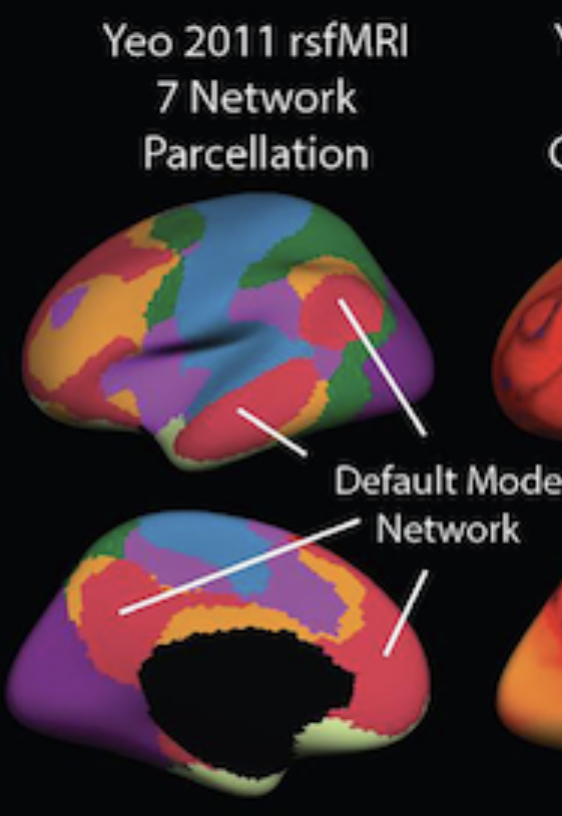
By each region I mean cortical measures of *every individual region that is part of a network*. For example, for the network 7 i.e., DMN, I am interested in getting cortical measures of 4 regions shown in the following screenshot in red color: (and similarly I am interested in getting cortical measures for every individual region of all other 6 networks as well)
[image: DMN_Regions.png]
On Mon, Jul 27, 2020 at 9:33 AM Douglas N. Greve < dgreve@mgh.harvard.edu> wrote:
What do you mean "each region"? Do you mean each vertex?
On 7/27/2020 2:19 AM, Martin Juneja wrote:
External Email - Use CautionDear Doug,
I ran the following command, but it still gives me network-wise cortical measures. But I am actually looking for cortical measures of *each region* within each network:
*mris_anatomical_stats -th3 -mgz -cortex 2500a/label/lh.cortex.label -f 2500a/stats/lh.aparc.Yeo7.stats -b -a **Yeo2011_7Networks_N1000.annot -c 2500a/label/aparc.annot.Yeo7.ctab 2500a lh white*
INFO: using TH3 volume calc
INFO: assuming MGZ format for volumes.
INFO: using 2500a/label/lh.cortex.label as mask to calc cortex NumVert, SurfArea and MeanThickness.
computing statistics for each annotation in Yeo2011_7Networks_N1000.annot.
reading volume /Volumes/HD-DHTR6/01_Project_FreeSurfer/2500a/mri/wm.mgz...
reading input surface /Volumes/HD-DHTR6/01_Project_FreeSurfer/2500a/surf/lh.white...
Using TH3 vertex volume calc
Total face volume 284736
Total vertex volume 281405 (mask=0)
reading input pial surface /Volumes/HD-DHTR6/01_Project_FreeSurfer/2500a/surf/lh.pial...
reading input white surface /Volumes/HD-DHTR6/01_Project_FreeSurfer/2500a/surf/lh.white...
reading colortable from annotation file...
colortable with 8 entries read (originally MyColorLUT)
Saving annotation colortable 2500a/label/aparc.annot.Yeo7.ctab
table columns are:
number of vertices

total surface area (mm^2)

total gray matter volume (mm^3)

average cortical thickness +- standard deviation (mm)

integrated rectified mean curvature

integrated rectified Gaussian curvature

folding index

intrinsic curvature index

structure name
atlas_icv (eTIV) = 1393613 mm^3 (det: 1.397882 )
lhCtxGM: 279618.799 278859.000 diff= 759.8 pctdiff= 0.272
rhCtxGM: 283065.244 282415.000 diff= 650.2 pctdiff= 0.230
lhCtxWM: 221173.591 221952.500 diff= -778.9 pctdiff=-0.352
rhCtxWM: 221330.870 222469.500 diff=-1138.6 pctdiff=-0.514
SubCortGMVol 57065.000
SupraTentVol 1072714.504 (1069458.000) diff=3256.504 pctdiff=0.304
SupraTentVolNotVent 1066020.504 (1062764.000) diff=3256.504 pctdiff=0.305
BrainSegVol 1210413.000 (1208649.000) diff=1764.000 pctdiff=0.146
BrainSegVolNotVent 1201232.000 (1200612.504) diff=619.496 pctdiff=0.052
BrainSegVolNotVent 1201232.000
CerebellumVol 138356.000
VentChorVol 6694.000
3rd4th5thCSF 2487.000
CSFVol 723.000, OptChiasmVol 112.000
MaskVol 1616427.000
8855 5731 2791 0.977 1.446 0.081 0.035 129 14.2 FreeSurfer_Defined_Medial_Wall
28199 18195 45320 2.362 0.630 0.131 0.031 374 34.3 7Networks_1
21313 13976 38622 2.484 0.632 0.119 0.027 239 22.6 7Networks_2
16377 10929 29338 2.522 0.521 0.116 0.024 192 15.7 7Networks_3
12076 8058 25013 2.797 0.650 0.119 0.028 146 13.2 7Networks_4
11151 7626 29041 3.067 0.733 0.127 0.033 167 14.5 7Networks_5
16205 10841 32923 2.607 0.631 0.123 0.028 228 17.6 7Networks_6
34755 23626 78358 2.825 0.621 0.125 0.029 494 39.7 7Networks_7
On Fri, Jul 17, 2020 at 9:35 AM Douglas N. Greve < dgreve@mgh.harvard.edu> wrote:
Try something like mris_anatomical_stats -th3 -mgz -cortex ../label/lh.cortex.label -f ../stats/lh.yeo.stats -b -a ../label/lh.yeo.annot -c ../label/yeo.annot.ctab 1040 lh white
Assuming that your yeo atlas is in $SUBJECTS_DIR/$subject/label/lh.yeo.annot
On 7/15/2020 2:05 PM, Martin Juneja wrote:
External Email - Use CautionDear Doug,
Thanks for your response !
Yes, I have Yeo atlas in the individual space, and recon-all.log has the following command:
mris_anatomical_stats -th3 -mgz -cortex ../label/lh.cortex.label -f ../stats/lh.aparc.stats -b -a ../label/lh.aparc.annot -c ../label/aparc.annot.ctab 1040 lh white \n computing statistics for each annotation in ../label/lh.aparc.annot.
Could you please help me in customizing this because it seems it gives me stats for each annotation e.g. stats for 34 areas (for Desikan atlas) and 7 networks (for Yeo 7 network, I think this is averaged over each network, correct?), but I am looking for stats of the regions which constitute those networks (e.g. stats for the areas which are part of the default mode network i.e., 4 individual stats of 4 individual red colored regions in the following figure).
[image: DMN.png]
On Wed, Jul 15, 2020 at 8:54 AM Douglas N. Greve < dgreve@mgh.harvard.edu> wrote:
> If you have the Yeo atlas in the individual space, you can use > mris_anatomical_stats to compute stats the same as in the Desikan atlas. > Look in recon-all.log for the command line and customize it as needed > > > > On 7/14/2020 5:00 PM, Martin Juneja wrote: > > External Email - Use Caution > Hi experts, > > I extracted network-wise cortical measures (i.e., 7 cortical > thickness values for 7 networks for Yeo atlas). > > I was wondering if there is a way to get the cortical thickness of > each ROI within each of these networks e.g., cortical thickness values of > all the ROIs which constitute default-mode network of Yeo's 7 network > parcellation, and then cortical thickness values of all the ROIs which > constitute limbic network of Yeo's 7 network parcellation, and so on. > > I know Desikan atlas can be used to get morphometry measures of 34 > ROIs per hemisphere. But the problem is that e.g., default-mode ROIs > from Desikan atlas do not completely overlap with the DMN of 7-network > parcellation from Yeo atlas. In other words, superior frontal cortex from > default-mode network of Yeo 7 network parcellation is a big chunk compared > to several small ROIs (some partial and some full) in Desikan atlas, so I > do not see any way how to find ROIs which just match with that superior > frontal cortex of default-mode of Yeo's 7 network. > > Any help would be much appreciated ! > > _______________________________________________ > Freesurfer mailing listFreesurfer@nmr.mgh.harvard.eduhttps://mail.nmr.mgh.harvard.edu/mailman/listinfo/freesurfer > > > _______________________________________________ > Freesurfer mailing list > Freesurfer@nmr.mgh.harvard.edu > https://mail.nmr.mgh.harvard.edu/mailman/listinfo/freesurfer
Freesurfer mailing listFreesurfer@nmr.mgh.harvard.eduhttps://mail.nmr.mgh.harvard.edu/mailman/listinfo/freesurfer
Freesurfer mailing list Freesurfer@nmr.mgh.harvard.edu https://mail.nmr.mgh.harvard.edu/mailman/listinfo/freesurfer
Freesurfer mailing listFreesurfer@nmr.mgh.harvard.eduhttps://mail.nmr.mgh.harvard.edu/mailman/listinfo/freesurfer
Freesurfer mailing list Freesurfer@nmr.mgh.harvard.edu https://mail.nmr.mgh.harvard.edu/mailman/listinfo/freesurfer
Freesurfer mailing listFreesurfer@nmr.mgh.harvard.eduhttps://mail.nmr.mgh.harvard.edu/mailman/listinfo/freesurfer
Freesurfer mailing list Freesurfer@nmr.mgh.harvard.edu https://mail.nmr.mgh.harvard.edu/mailman/listinfo/freesurfer
Freesurfer mailing listFreesurfer@nmr.mgh.harvard.eduhttps://mail.nmr.mgh.harvard.edu/mailman/listinfo/freesurfer
Freesurfer mailing list Freesurfer@nmr.mgh.harvard.edu https://mail.nmr.mgh.harvard.edu/mailman/listinfo/freesurfer
Freesurfer mailing listFreesurfer@nmr.mgh.harvard.eduhttps://mail.nmr.mgh.harvard.edu/mailman/listinfo/freesurfer
Freesurfer mailing list Freesurfer@nmr.mgh.harvard.edu https://mail.nmr.mgh.harvard.edu/mailman/listinfo/freesurfer