External Email - Use Caution
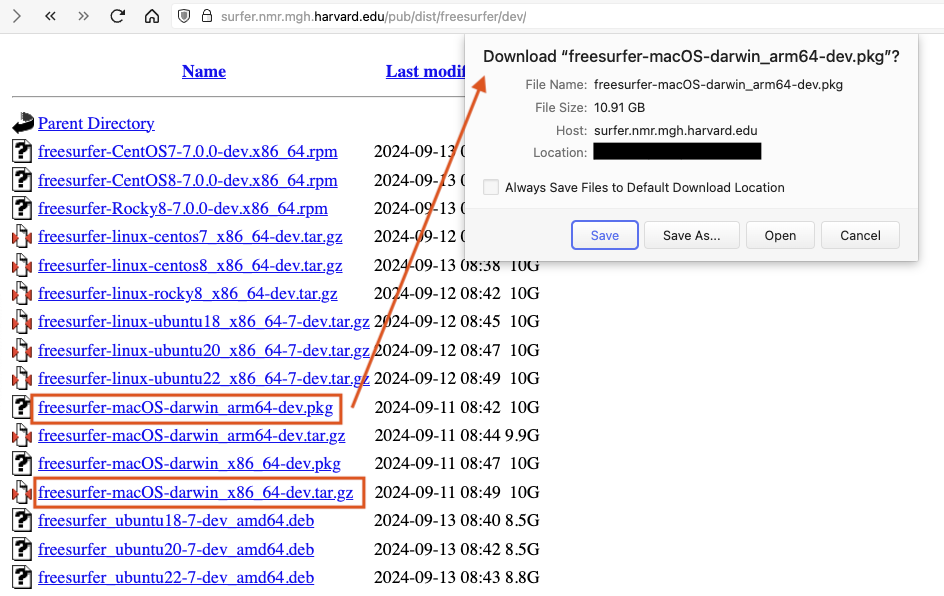
When you navigate in a browser to,https://surfer.nmr.mgh.harvard.edu/pub/dist/freesurfer/dev/- you choose to download the installer package for either an Intel processor Mac (freesurfer-macOS-darwin_x86_64-dev.pkg) or a Silicon Mac with an M1, M2, M3 chip (freesurfer-macOS-darwin_arm64-dev.pkg). My browser preferences are set to ask whether or not to download a file when clicking on a link (see screenshot). You may not see that if your browser is set to block pop-up windows, or you might have some other setting blocking downloads, but I can download either package file. Those files can be refreshed periodically, so you may have to reload the web page in your browser if you have not looked at it recently. But the link should always work. After you have downloaded the .pkg installer and clicked on it to install as described in the previous maill, you should check freeview can open an empty window from the terminal, i.e., don’t try to display and volumes or surfaces. You should see something like what’s listed below when setting up the freesurfer environment in the terminal window. $ bash$ export FREESURFER_HOME=/Applications/freesurfer/dev$ source $FREESURFER_HOME/SetUpFreeSurfer.sh———— freesurfer-macOS-darwin_x86_64-dev-20240909-9ca95c6 ———— <—— this is from the install of the Intel Mac .pkgSetting up environment for FreeSurfer/FS-FAST (and FSL)FREESURFER_HOME. /Applications/freesurfer/devFSFAST_HOME /Applications/freesurfer/dev/fsfastFSF_OUTPUT_FORMAT nii.gzSUBJECTS_DIR /Applications/freesurfer/dev/subjectsMNI_DIR /Applications/freesurfer/dev/mni $ which freeview/Applications/freesurfer/dev/bin/freeview$ freeview <—— this should open an empty freeview window If you get the empty window, then freeview is basically working. - R.
On Sep 13, 2024, at 20:24, Alisha Davis <davis.alisha1999@gmail.com> wrote: External Email - Use Caution
Hello,
I sent an email regarding issues with not being able to get the newest version (or any version, really) of freesurfer to run on my Mac due to the fact that no update can handle MacOS version 14.5. I just received another email from Henry that was sent to an individual having a similar issue, and the link for the download does not work for me yet again. I keep receiving messages that the server cannot be found. I can get the download onto my Mac, but every time I open an MRI, the program immediately crashes. Im not sure if there is another link to try or one with a server that can be found, but any help would be appreciated!
Cheers, Alisha
_______________________________________________ Freesurfer mailing list Freesurfer@nmr.mgh.harvard.edu https://mail.nmr.mgh.harvard.edu/mailman/listinfo/freesurfer