Are you in the funcionals folder when you run your command? If not, you have to specify the session folder with -d /path/to/functionals
What is a command line that fails? Try running the command substituting the command name with gestsesspath and adding -debug as the first option
On 5/23/2020 4:28 AM, Marco Ninghetto wrote:
External Email - Use Caution
Dear experts, I looked through your mailing list, but I cannot find any question like mine. When I run whatever command in my analysis for retinotopy, I have to specify subject after subject using:
-s subj001 -s subj002 -s subj00x
and so on. To avoid that, inside my project directory, I have the "sessid" (actually two sessid files) file in which are listed all the names of the subjects. I don't know why, when I try to run:
-sf sessid1
I get the error, like (random command from my pipeline):
brain@neurodebian:/media/main/fs_pRFs_functionals$ isxconcat-sess -sf sessid1 -a rtopy.fsaverage.lh/ -call -o retgroup_ng ERROR: finding sessions ERROR: cound not find session SUBJ02NG
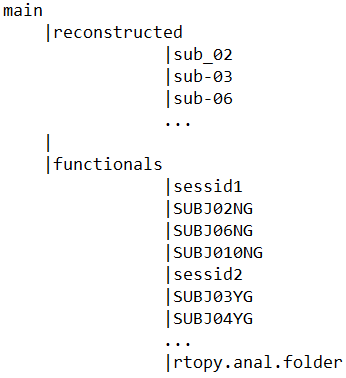
I tried to write differently inside the sessid file, I tried to use the name of the structural folders instead of the functional ones, but nothing seems to work. My sessid file is something like this:
SUBJ02NG SUBJ06NG SUBJ07NG SUBJ08NG
and so on.Each subject's session folder name:
SUBJ02NG SUBJ06NG SUBJ07NG SUBJ08NG
The names listed are the same for the name of the session folder for each subject, but still, FS tells me that it cannot find the session.
tree.png Inside each subject folder, there is the "bold" folder and inside that, together with the runs folders, there is the analysis folder.
Any idea on what I'm doing wrong? Thank you so much, Marco
--
Marco Ninghetto, PhD candidate Laboratory of Neuroplasticity Nencki Institute of Experimental Biology Polish Academy of Sciences 3 Pasteur Street, 02-093 Warsaw, Poland
Freesurfer mailing list Freesurfer@nmr.mgh.harvard.edu https://mail.nmr.mgh.harvard.edu/mailman/listinfo/freesurfer