External Email - Use Caution
Thanks Doug. My correction for multiple comparison using 10000 permutation and abs has been running for 3days. This is strange because i am using the --bg 10 and it usually takes 1hr to finish without the --pvr. how do i solve this? Below is my mri_glmfit and mri_glmfit-sim commands
mri_glmfit --y ${lhpetsurfimg} --fsgd $bothgrpfsgd dods --C $pvr1 --pvr ${wholebrain}/lh.$grp1fsgd.pvr.thickness.mgh \ --pvr ${wholebrain}/lh.$grp2fsgd.pvr.thickness.mgh --surf fsaverage lh --cortex \ --glmdir ${wholebrain}/lh.pet.thickness.glmdir --eres-save
mri_glmfit-sim --glmdir ${wholebrain}/lh.pet.thickness.glmdir --perm 10000 2 abs --perm-force --cwp 0.05 --2spaces --bg 10 --overwrite
On Mon, Aug 12, 2019 at 11:31 AM Greve, Douglas N.,Ph.D. < DGREVE@mgh.harvard.edu> wrote:
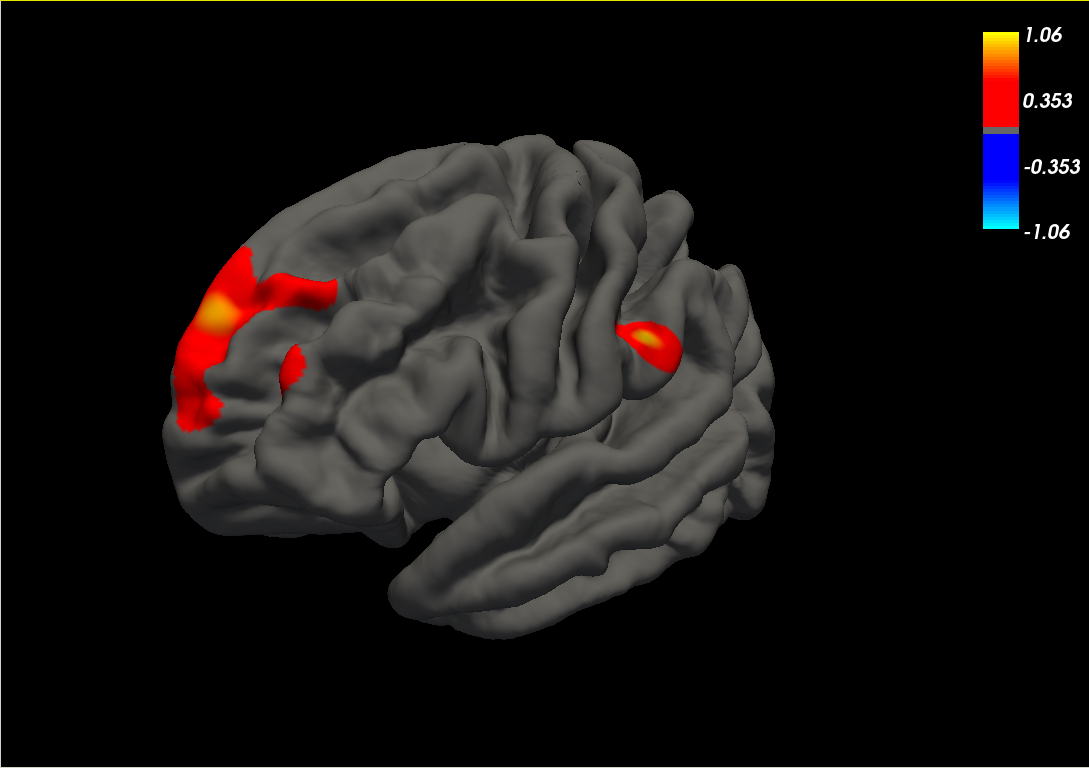
You will have to click on the vertex you are interested in. The value will be -log10(pcorrected) where pcorrected is the corrected p-value
On 8/12/2019 11:24 AM, miracle ozzoude wrote:
External Email - Use Cautionthese regions (please see below) came out significant for the voxel-wise corrected map. I want to know their p-values. mri-glmfit-sim doesn't give summary file for voxel-wise corrected map only for cluster-wise map. [image: image.png]
On Mon, Aug 12, 2019 at 11:19 AM Greve, Douglas N.,Ph.D. < DGREVE@mgh.harvard.edu> wrote:
I'm not sure what you are looking for. The voxel-wise analysis is voxel-wise, so there is no summary file for it
On 8/12/2019 11:13 AM, miracle ozzoude wrote:
External Email - Use CautionThanks Doug. Another question, how do i find the p-values for voxel-wise map corrected for multiple comparisons at a voxel (rather than cluster) level (perm.th40.abs.sig.voxel.mgh). There is no summary file for it. Best, Paul
On Wed, Aug 7, 2019 at 11:08 AM Greve, Douglas N.,Ph.D. < DGREVE@mgh.harvard.edu> wrote:
The 3 spaces is for left hemi, right hemi, and subcortical, so, if you are using all three then correct for all 3
On 8/7/19 9:26 AM, miracle ozzoude wrote:
External Email - Use CautionGot it. Thanks a lot doug. If i have to correct for multiple comparison in surface based pet analysis and mutlimodal analysis (pet and thickness), should i use --3spaces? Thank you.
best, Paul
On Mon, Aug 5, 2019 at 10:19 PM Greve, Douglas N.,Ph.D. <DGREVE@mgh.harvard.edu mailto:DGREVE@mgh.harvard.edu> wrote:
I think there is still something not right. You should just have one mri_glmfit command for each hemisphere in which the input is ?h.thickness.15.mgh, the fsgdfile is project.fsgd, you then specify the pvrs for both groups (--pvr ?h.pvr_grp1_pet.nii.gz --pvr ?h.pvr_grp2_pet.niigz) and then use that first contrast. The second is the same as the first but with a reversed sign, but it is not necessary since we always use unsigned tests and show both signs (but you can still do it). On 8/5/2019 8:14 PM, miracle ozzoude wrote:External Email - Use Caution I think i got it now. Something like this: ## group1 comes first in my fsgd file. removing the effects of age and education ##amyloid-thickness. first pet pvr = 1 for group1 and 0 for group
mri_glmfit --y lh.thickness.15.mgh --fsgd project.fsgd dods --c pvr1.mtx --pvr lh.pvr_grp1_pet.nii.gz \ --pvr allgrp2.lhmgxctx.fsaverage.sm05.zero.nii.gz -surf fsaverage lh --cortex --glmdir lh.pet.thickness.glmdir mri_glmfit --y rh.thickness.15.mgh --fsgd project.fsgd dods --c pvr1.mtx --pvr rh.pvr_grp1_pet.nii.gz \ --pvr allgrp2.rhmgxctx.fsaverage.sm05.zero.nii.gz -surf fsaverage lh --cortex --glmdir rh.pet.thickness.glmdir contrast = 0 0 0 0 0 0 1 -1 ##group 2 is second in my fsgd file. removing the effects of age and education ##amyloid-thickness. first pet pvr = 0 for group1 and 1 for group2 mri_glmfit --y lh.thickness.15.mgh --fsgd project.fsgd dods --c pvr2.mtx --pvr allgrp1.lhmgxctx.fsaverage.sm05.zero.nii.gz \ --pvr lh.pvr_grp2_pet.nii.gz -surf fsaverage lh --cortex --glmdir rh.pet.thickness.glmdir mri_glmfit --y rh.thickness.15.mgh --fsgd project.fsgd dods --c pvr2.mtx --pvr allgrp1.rhmgxctx.fsaverage.sm05.zero.nii.gz \ --pvr rh.pvr_grp2_pet.nii.gz -surf fsaverage lh --cortex --glmdir rh.pet.thickness.glmdir contrast = 0 0 0 0 0 0 -1 1 On Mon, Aug 5, 2019 at 6:47 PM Greve, Douglas N.,Ph.D. <DGREVE@mgh.harvard.edu <mailto:DGREVE@mgh.harvard.edu>> wrote: It still looks like you are using a group specific input (--y). The input should be a simple file with both groups (same input as you would use without pvr) On 8/5/2019 4:39 PM, miracooloz wrote:External Email - Use Caution Thanks Doug. How about the mri_glmfit commands? Since the contrasts are correct, I think the commands should be right. Best, Paul. Sent from my Samsung Galaxy smartphone. -------- Original message -------- From: "Greve, Douglas N.,Ph.D." <DGREVE@mgh.harvard.edu> <mailto:DGREVE@mgh.harvard.edu> Date: 2019-08-05 15:52 (GMT-05:00) To: freesurfer@nmr.mgh.harvard.edu <mailto:freesurfer@nmr.mgh.harvard.edu> Subject: Re: [Freesurfer] Fwd: multimodal analysis (pet and cortical thickness relationship) using --pvr Yes, that contrast is correct. On 8/5/2019 3:11 PM, miracle ozzoude wrote:> > External Email - Use Caution > > Hello Doug, > > Thanks very much for your help. Your assumption was right > in that i want to run a group comparison (i.e. test for a > difference in amyloid-thickness slopes between the two > groups). However, I am having a hard time creating the > correct mri_glmfit and contrasts in this case. Based on > your advice and searching through the forum > (
https://mail.nmr.mgh.harvard.edu/pipermail/freesurfer/2019-January/060029.ht... ), i
> need 2 PVRs for each hemisphere in the mri_glmfit command. > I gave it another shot below. Please let me know if i am > correct. > > Thank you. > Paul. > > ## group1 comes first in my fsgd file. removing the effects > of age and education > ##amyloid-thickness. first pet pvr = 1 for group1 and 0 for > group 2. > mri_glmfit --y lh_pvr_grp1_thickness.mgh --fsgd > project.fsgd dods --c pvr1.mtx --pvr lh.pvr_grp1_pet.nii.gz
\
> --pvr allgrp2.lhmgxctx.fsaverage.sm05.zero.nii.gz -surf > fsaverage lh --cortex --glmdir lh.pet.thickness.glmdir > mri_glmfit --y rh_pvr_grp1_thickness.mgh --fsgd > project.fsgd dods --c pvr1.mtx --pvr rh.pvr_grp1_pet.nii.gz
\
> --pvr allgrp2.rhmgxctx.fsaverage.sm05.zero.nii.gz -surf > fsaverage lh --cortex --glmdir rh.pet.thickness.glmdir > > contrast = 0 0 0 0 0 0 1 -1 > > ##group 2 is second in my fsgd file. removing the effects > of age and education > ##amyloid-thickness. first pet pvr = 0 for group1 and 1 for > group2 > mri_glmfit --y lh_pvr_grp2_thickness.mgh --fsgd > project.fsgd dods --c pvr2.mtx --pvr > allgrp1.lhmgxctx.fsaverage.sm05.zero.nii.gz \ > --pvr lh.pvr_grp2_pet.nii.gz -surf fsaverage lh --cortex > --glmdir rh.pet.thickness.glmdir > mri_glmfit --y rh_pvr_grp2_thickness.mgh --fsgd > project.fsgd dods --c pvr2.mtx --pvr > allgrp1.rhmgxctx.fsaverage.sm05.zero.nii.gz \ > --pvr rh.pvr_grp2_pet.nii.gz -surf fsaverage lh --cortex > --glmdir rh.pet.thickness.glmdir > > contrast = 0 0 0 0 0 0 -1 1 > > > On Mon, Aug 5, 2019 at 12:26 PM Greve, Douglas N.,Ph.D. > <DGREVE@mgh.harvard.edu mailto:DGREVE@mgh.harvard.edu>
wrote:
> > That mostly looks good. > > I would suggest is to change your smoothing command to > something like > mris_fwhm --smooth-only --s fsaverage --hemi lh --fwhm > 5 --cortex --prune --i > allgrp1.rlhmgxctx.fsaverage.sm00.nii.gz > allgrp1.lhmgxctx.fsaverage.sm05.nii.gz > The only difference will be that any vertices that are > 0 in the input will be excluded (pruned) from the > smoothing mask. > > The mri_glmfit command is not right. That command looks > like it is for analyzing each group separately and > independently. If that is what you want to do, then you > don't need to go through all the extra stuff of > creating zero files, etc. I had assumed that you wanted > to do some kind of comparison between groups. If so, > then you would use a single file with all your data in > it (probably what you were using before), and your fsgd > file would have both groups. > > 1) will my fsgd file contain both groups? > yes, see above > 2) If the answer from question is yes, i should have 2 > contrasts (pvr1.mtx for group1 and pvr2.mtx for > group2). yes/no? > Again, if all you want to do is to test the pvr for > each group separately, then you don't need to go > through the processes of creating zero files, etc. In > any event, if you want to test a pvr, then you need a > contrast for it. > 3) below is a sample of my fsgd file. are the > constrasts correct? > hard to say without resolving the questions above. You > will need to have a value in the contrast for each pvr. > > > > On 8/2/2019 3:56 PM, miracle ozzoude wrote: >> >> External Email - Use Caution >> >> Hello Doug, >> >> Thanks for answering. Based on your explanation, i >> wrote out a series of command needed to execute this. >> Please let me know if i made any mistakes/correct. >> ##step1 concatenating the 10 amyloid pet volumes files >> projected to surface using mri_vol2surf for group1 >> mri_concat --f grp1.lhmgxctx --o >> allgrp1.lhmgxctx.fsaverage.sm00.nii.gz --prune >> mri_concat --f grp2.rhmgxctx --o >> allgrp1.rhmgxctx.fsaverage.sm00.nii.gz --prune >> >> ##step2 concatenating the 20 amyloid pet volumes files >> projected to surface using mri_vol2surf for group2 >> mri_concat --f grp2.lhmgxctx --o >> allgrp2.lhmgxctx.fsaverage.sm00.nii.gz --prune >> mri_concat --f grp2.rhmgxctx --o >> allgrp2.rhmgxctx.fsaverage.sm00.nii.gz --prune >> >> ##step3 smooth on the surface for each hemisphere for >> group1 >> mri_surf2surf --hemi lh --s fsaverage --sval >> allgrp1.lhmgxctx.fsaverage.sm00.nii.gz --fwhm 5 >> --cortex --tval allgrp1.lhmgxctx.fsaverage.sm05.nii.gz >> mri_surf2surf --hemi rh --s fsaverage --sval >> allgrp1.rlhmgxctx.fsaverage.sm00.nii.gz --fwhm 5 >> --cortex --tval allgrp1.rhmgxctx.fsaverage.sm05.nii.gz >> >> ##step4 smooth on the surface for each hemisphere for >> group2 >> mri_surf2surf --hemi lh --s fsaverage --sval >> allgrp2.lhmgxctx.fsaverage.sm00.nii.gz --fwhm 5 >> --cortex --tval allgrp2.lhmgxctx.fsaverage.sm05.nii.gz >> mri_surf2surf --hemi rh --s fsaverage --sval >> allgrp2.rlhmgxctx.fsaverage.sm00.nii.gz --fwhm 5 >> --cortex --tval allgrp2.rhmgxctx.fsaverage.sm05.nii.gz >> >> ##step5 create files of zeros for group1 for each >> hemisphere >> fscalc allgrp1.lhmgxctx.fsaverage.sm05.nii.gz mul 0 -o >> allgrp1.lhmgxctx.fsaverage.sm05.zero.nii.gz >> fscalc allgrp1.rhmgxctx.fsaverage.sm05.nii.gz mul 0 -o >> allgrp1.rhmgxctx.fsaverage.sm05.zero.nii.gz >> >> ##step6 create files of zeros for group2 for each >> hemisphere >> fscalc allgrp2.lhmgxctx.fsaverage.sm05.nii.gz mul 0 -o >> allgrp2.lhmgxctx.fsaverage.sm05.zero.nii.gz >> fscalc allgrp2.rhmgxctx.fsaverage.sm05.nii.gz mul 0 -o >> allgrp2.rhmgxctx.fsaverage.sm05.zero.nii.gz >> >> ##step7 create pvr files for group1 for each hemisphere >> mri_concat allgrp1.lhmgxctx.fsaverage.sm05.nii.gz >> allgrp2.lhmgxctx.fsaverage.sm05.zero.nii.gz --o >> lh.pvr_grp1_pet.nii.gz >> mri_concat allgrp1.rhmgxctx.fsaverage.sm05.nii.gz >> allgrp2.rhmgxctx.fsaverage.sm05.zero.nii.gz --o >> rh.pvr_grp1_pet.nii.gz >> >> ##step8 create pvr files for group2 for each hemisphere >> mri_concat allgrp1.lhmgxctx.fsaverage.sm05.zero.nii.gz >> allgrp2.lhmgxctx.fsaverage.sm05.nii.gz --o >> lh.pvr_grp2_pet.nii.gz >> mri_concat allgrp1.rhmgxctx.fsaverage.sm05.zero.nii.gz >> allgrp2.rhmgxctx.fsaverage.sm05.nii.gz --o >> rh.pvr_grp2_pet.nii.gz >> >> ###-----repeat steps 1-8 for cortical thickness------- >> >> ###run glm-fit for group1 >> mri_glmfit --y lh.pvr_grp1_pet.nii.gz --fsgd >> project.fsgd dods --c pvr1.mtx --pvr >> lh_pvr_grp1_thickness.mgh --surf fsaverage lh --cortex >> --glmdir lh.grp1.pet.thickness.glmdir >> mri_glmfit --y rh.pvr_grp1_pet.nii.gz --fsgd >> project.fsgd dods --c pvr1.mtx --pvr >> rh_pvr_grp1_thickness.mgh --surf fsaverage lh --cortex >> --glmdir rh.grp1.pet.thickness.glmdir >> >> ###run glm-fit for group2 >> mri_glmfit --y lh.pvr_grp2_pet.nii.gz --fsgd >> project.fsgd dods --c pvr2.mtx --pvr >> lh_pvr_grp2_thickness.mgh --surf fsaverage lh --cortex >> --glmdir lh.grp2.pet.thickness.glmdir >> mri_glmfit --y rh.pvr_grp2_pet.nii.gz --fsgd >> project.fsgd dods --c pvr2.mtx --pvr >> rh_pvr_grp2_thickness.mgh --surf fsaverage lh --cortex >> --glmdir rh.grp2.pet.thickness.glmdir >> >> My questions. >> 1) will my fsgd file contain both groups? >> 2) If the answer from question is yes, i should have 2 >> contrasts (pvr1.mtx for group1 and pvr2.mtx for >> group2). yes/no? >> 3) below is a sample of my fsgd file. are the >> constrasts correct? >> >> Thank you very much. >> Paul. >> The fsgd file lists: >>
>> GroupDescriptorFile 1 >> Title Relationship Amy-thick reg out age and education >> Class g1 >> Class g2 >> Variable Age Education >> Input XX1 g1 60 16 >> Input YY1 g2 62 20 >>
>> matrix for group1: >> pvr1.mtx= 1 0 0 0 0 0 0 >> is there a relationship between amyloid-thickness in
group1 regressing out age
>> and education? >> matrix for group2: >> pvr2.mtx= 0 1 0 0 0 0 0 >> is there a relationship between amyloid-thickness in
group2 regressing out age
>> and education? >> >> On Thu, Aug 1, 2019 at 9:44 PM Greve, Douglas N.,Ph.D. >> <DGREVE@mgh.harvard.edu >> mailto:DGREVE@mgh.harvard.edu> wrote: >> >> Each PVR adds a single column to the design >> matrix. In a two group design, this can make it >> tricky to set up. Let's say you have 10 of group1 >> and 20 of group2. You will need to create two PVR >> files, each with 30=10+20 frames. In the first >> one, the first 10 frames will be cortical >> thickness (or amyloid sampled on the surface) of >> group1; the next 20 frames will be all zeros. For >> the 2nd PVR, the first 10 frames will be 0s and >> the next 20 frames will be the cortical thickness >> (or amyloid) for group2. I would start by running >> mris_preproc for the two groups separate (so 2 >> files, one with 10 frames the other 20 frames). >> Then create the file of zeros using >> fscalc group2.mgz mul 0 -o group2.zeros.mgz >> Then >> mri_concat group1.mgz group2.zeros.mgz --o pvr1.mgz >> Then create the contrast based on the FSGD, but >> then add two more numbers, one for PVR1 (which >> tests for the within group correlation), and one >> for PVR2 >> >> >> On 8/1/2019 3:14 PM, miracle ozzoude wrote: >>> >>> External Email - Use Caution >>> >>> Please, can anyone help me with this. >>> Thank you >>> >>> Paul >>> >>> ---------- Forwarded message --------- >>> From: *miracle ozzoude* <miracooloz@gmail.com >>> mailto:miracooloz@gmail.com> >>> Date: Wed, Jul 31, 2019 at 2:11 PM >>> Subject: multimodal analysis (pet and cortical >>> thickness relationship) using --pvr >>> To: Douglas N Greve >>> <freesurfer@nmr.mgh.harvard.edu >>> mailto:freesurfer@nmr.mgh.harvard.edu> >>> >>> >>> Hello Experts, >>> >>> I am performing an analysis looking at the >>> relationship between amyloid uptake and cortical >>> thickness using --pvr flag in mri_glmfit. I've 2 >>> groups and 2 variables (age and education). I >>> want to run a within group analysis while >>> regressing out age and education (i.e. Within >>> group 1, is there a negative relationship between >>> amyloid uptake and cortical thickness regressing >>> out the effects of age and education). >>> >>> However, i'm not sure how my pvr contrasts will >>> look like. Below are my fsgd and an attempt at >>> creating contrasts. Please, can you let me know >>> if my contrasts are correct based on my questions. >>> >>> Thank you. >>> >>> Best, >>> Paul >>> >>> The fsgd file lists: >>>
>>> GroupDescriptorFile 1 >>> Title Relationship Amy-thick reg out age and
education
>>> Class g1 >>> Class g2 >>> Variable Age Education >>> Input XX1 g1 60 16 >>> Input XX2 g1 58 14 >>> Input YY1 g2 62 20 >>> Input YY1 g2 62 20 >>>
>>> matrix for group1: >>> pvrgroup1= 1 0 0 0 0 0 0 >>> is there a relationship between amyloid-thickness
in group1 regressing out age
>>> and education? >>> matrix for group2: >>> pvrgroup2= 0 1 0 0 0 0 0 >>> is there a relationship between amyloid-thickness
in group2 regressing out age
>>> and education? >>> >>> >>> >>> >>> _______________________________________________ >>> Freesurfer mailing list >>> Freesurfer@nmr.mgh.harvard.edu <mailto:
Freesurfer@nmr.mgh.harvard.edu>
>>>
https://mail.nmr.mgh.harvard.edu/mailman/listinfo/freesurfer
>> >> _______________________________________________ >> Freesurfer mailing list >> Freesurfer@nmr.mgh.harvard.edu >> mailto:Freesurfer@nmr.mgh.harvard.edu >>
https://mail.nmr.mgh.harvard.edu/mailman/listinfo/freesurfer
>> >> >> _______________________________________________ >> Freesurfer mailing list >> Freesurfer@nmr.mgh.harvard.edu <mailto:
Freesurfer@nmr.mgh.harvard.edu>
>>
https://mail.nmr.mgh.harvard.edu/mailman/listinfo/freesurfer
> > _______________________________________________ > Freesurfer mailing list > Freesurfer@nmr.mgh.harvard.edu > mailto:Freesurfer@nmr.mgh.harvard.edu >
https://mail.nmr.mgh.harvard.edu/mailman/listinfo/freesurfer
> > > _______________________________________________ > Freesurfer mailing list > Freesurfer@nmr.mgh.harvard.edu <mailto:
Freesurfer@nmr.mgh.harvard.edu>
>
https://mail.nmr.mgh.harvard.edu/mailman/listinfo/freesurfer
    _______________________________________________
    Freesurfer mailing list
    Freesurfer@nmr.mgh.harvard.edu  <mailto:
Freesurfer@nmr.mgh.harvard.edu>
https://mail.nmr.mgh.harvard.edu/mailman/listinfo/freesurfer_______________________________________________ Freesurfer mailing list Freesurfer@nmr.mgh.harvard.edu <mailto:Freesurfer@nmr.mgh.harvard.edu> https://mail.nmr.mgh.harvard.edu/mailman/listinfo/freesurfer _______________________________________________ Freesurfer mailing list Freesurfer@nmr.mgh.harvard.edu <mailto:Freesurfer@nmr.mgh.harvard.edu>
https://mail.nmr.mgh.harvard.edu/mailman/listinfo/freesurfer_______________________________________________ Freesurfer mailing list Freesurfer@nmr.mgh.harvard.edu <mailto:Freesurfer@nmr.mgh.harvard.edu>
https://mail.nmr.mgh.harvard.edu/mailman/listinfo/freesurfer
Freesurfer mailing list Freesurfer@nmr.mgh.harvard.edu https://mail.nmr.mgh.harvard.edu/mailman/listinfo/freesurfer
Freesurfer mailing list Freesurfer@nmr.mgh.harvard.edu https://mail.nmr.mgh.harvard.edu/mailman/listinfo/freesurfer
Freesurfer mailing listFreesurfer@nmr.mgh.harvard.eduhttps://mail.nmr.mgh.harvard.edu/mailman/listinfo/freesurfer
Freesurfer mailing list Freesurfer@nmr.mgh.harvard.edu https://mail.nmr.mgh.harvard.edu/mailman/listinfo/freesurfer
Freesurfer mailing listFreesurfer@nmr.mgh.harvard.eduhttps://mail.nmr.mgh.harvard.edu/mailman/listinfo/freesurfer
Freesurfer mailing list Freesurfer@nmr.mgh.harvard.edu https://mail.nmr.mgh.harvard.edu/mailman/listinfo/freesurfer