External Email - Use Caution
The problem is, I'm having the same issue with the Bert sample that comes with the freesurfer download. I'm not able to mri_info the pial surfaces as the function seems to work only with volumes. When I use it with the brainmasks of my own project the work just fine. Also, all files are being displayed just fine at my university desktop. The problem is with my laptop, and I can't figure it out.
Best, Andrei
Em seg., 16 de out. de 2023 às 08:37, Huang, Yujing < YHUANG43@mgh.harvard.edu> escreveu:
How/when was your surface created? Can you send mris_info output of your pial surface? I’m wondering if it has volume geometry information.
Best,
Yujing
*From:* freesurfer-bounces@nmr.mgh.harvard.edu < freesurfer-bounces@nmr.mgh.harvard.edu> *On Behalf Of *Andrei Bieger *Sent:* Sunday, October 15, 2023 11:06 AM *To:* fsbuild fsbuild@contbay.com *Cc:* freesurfer@nmr.mgh.harvard.edu *Subject:* Re: [Freesurfer] Freeview misaligned surfaces "warning matrixinverse failed"
External Email - Use Caution *Hello! Thank you for the reply.
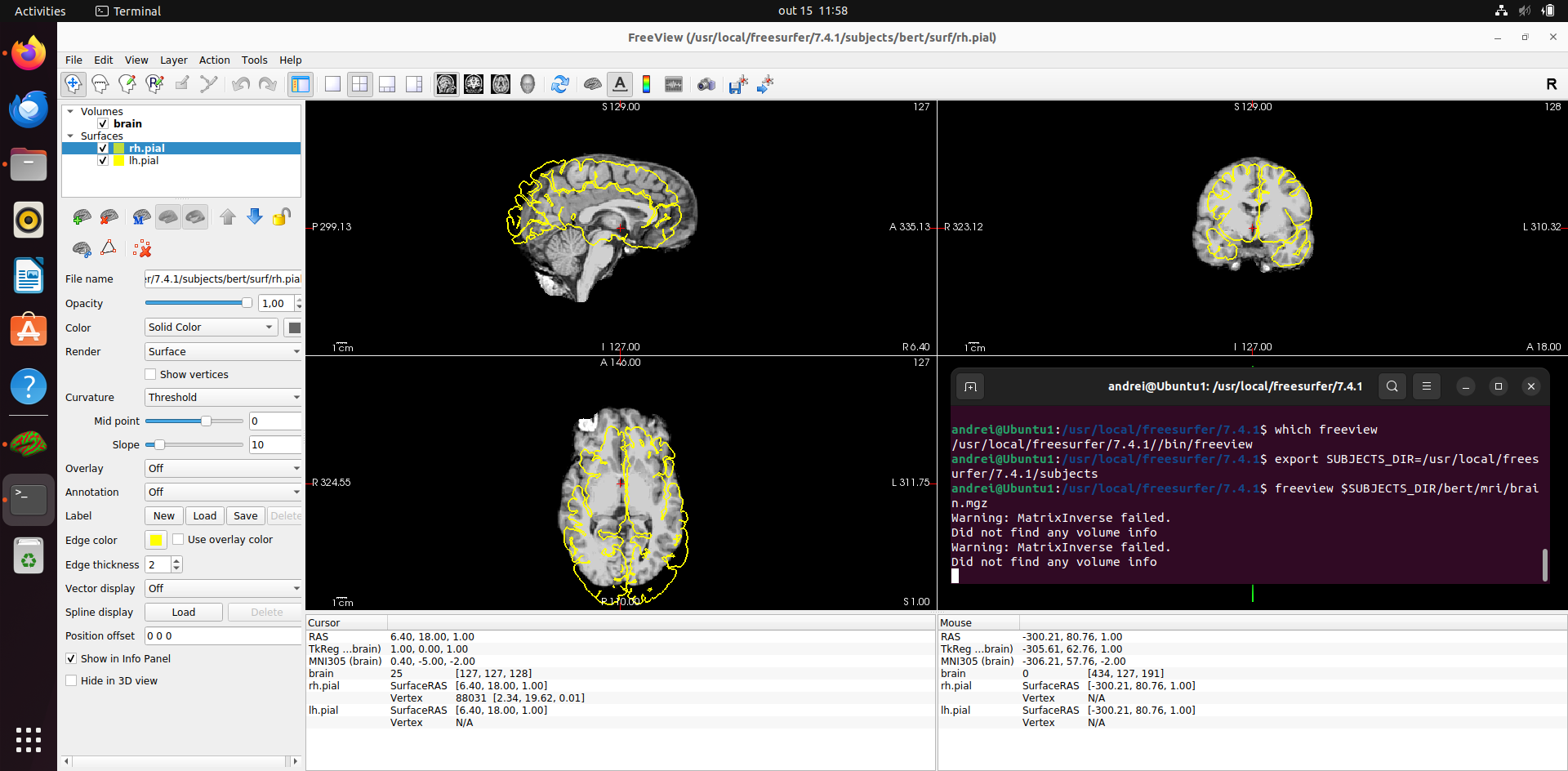
I created a new VM with a fresh Ubuntu 22.04.3 install, got the OS up to date (apt update && upgrade), downloaded and installed the "freesurfer_ubuntu22-7.4.1_amd64.deb" via apt-get as you suggested and the bert/mri volume was displayed just fine on freeview. Yet when I add the subject`s pial surfaces using freeview`s GUI, the same problem happened. Please, see below.
Em dom., 15 de out. de 2023 às 00:23, fsbuild fsbuild@contbay.com escreveu:
Freesurfer 7.4.1 on Ubuntu 20 uses its own versions of Qt libraries and not the system versions. So if your setup is looking for or finding system versions of those libraries, then freesurfer may be installed incorrectly and/or could be finding the wrong Qt libraries via use of environment variables like LD_LIBRRY_PATH or Qt*. (I would try not to set LD_LIBRARY_PATH and Qt environment variables in your shell environment before source’ing the freesurfer setup script).
I suggest you remove whatever freesurfer distribution you have on the machine and do a clean re-install of 7.4.1 using the .deb package installer which you can download via the link, *MailScanner has detected a possible fraud attempt from "secure-web.cisco.com" claiming to be* https://secure-web.cisco.com/1YaPL5xy1e3QtiP1ra0lfzsAsvWOZxmjszEoPXvLcaXma4v... https://secure-web.cisco.com/1kpuTk9_R5kskmqF_6o6rua0GGLqHxifzAoRK6cMSgrTpPDNhGt713qUWGKL3EcQhDe8khRBY-nUPRwl-nZIMHUALIpOT4_EFjQl4LlfzRrOWfqziqqpbGFKxZZfvVS6E8t14OeXwRIzU40NLKf76swGwMc1jGxxZ7R9MtHrCFMFfHuJ8e7pF9EqWBSlZllSh-q_KNKsqUKa272keCfxL1RX4LPT3q14oK3F2tOTUTFlS28k6CKJlUBq6h23xdOOetk6Cz4-bZhpsBkkEl9ATlzTVrGV8LVPQtuT53Kfs7Vl266wbjQ6vih4dyDzsN03V/https%3A%2F%2Fsurfer.nmr.mgh.harvard.edu%2Fpub%2Fdist%2Ffreesurfer%2F7.4.1%2Ffreesurfer_ubuntu20-7.4.1_amd64.deb
If freesurfer was previously installed with the linux package tools then it should work to uninstall it with,
$ sudo apt remove freesurfer
… answer y to all prompts ...
If you unarchived the *..tag.gz file somewhere then “rm -rf” should work on the root freesurfer directory.
With the previous freesurfer installation removed, cd to where you downloaded the freesurfer_ubuntu20-7.4.1_amd64.deb and try,
$ sudo apt-get -y install ./freesurfer_ubuntu20-7-dev_amd64.deb
… wait for install to finish …
$ cd
$ export FREESURFER_HOME=/usr/local/freesurfer/7.4.1
$ source $FREESURFER_HOME/SetUpFreeSurfer.sh
-------- freesurfer-linux-ubuntu20_x86_64-7.4.1-20230614-7eb8460 ————
Setting up environment for FreeSurfer/FS-FAST (and FSL) FREESURFER_HOME /usr/local/freesurfer/7.4.1
FSFAST_HOME /usr/local/freesurfer/7.4.1/fsfast
FSF_OUTPUT_FORMAT nii.gz SUBJECTS_DIR /usr/local/freesurfer/7.4.1/subjects
MNI_DIR /usr/local/freesurfer/7.4.1/mni
$ which freeview /usr/local/freesurfer/7.4.1/bin/freeview
$ freeview
… freeview should open an empty window …
… quit freeview and try opening this example volume …
$ freeview $SUBJECTS_DIR/bert/mri/brain.mgz
If you see the attached image, then freeview/Qt is essentially working.
- R.
On Oct 14, 2023, at 14:14, Andrei Bieger andreibieger@gmail.com wrote:
External Email - Use Caution *Hi, all!
I had to reinstall my VM where I had freesurfer running. Everything was running fine before. It is now a VirtualBox VM running Ubuntu 20.04 on my Windows laptop, where I'm running the version 7.4.1 of Freesurfer.
When I downloaded freesurfer it wouldn't run freeview, with the following output: "Application failed to start because no Qt platform plugin could be initialized. Available plugins are: (...)"
After some research, I tried "sudo apt install qt5-default" and freeview started running. But the thing is, every time I try loading a subject, the surfaces get completely misaligned with the volumes and the following messages show on the terminal: "Warning: MatrixInverse failed" and "Did not find any volume info". Please, see attached image.
<Screenshot from 2023-10-14 15-06-44.png>
I tried using Ubuntu 22 and previous versions of freesurfer but the problem persisted. I also found a message with a similar issue on this list, but the user stopped answering so a solution wasn't proposed. There is also a release note from v5.3.0 saying that on Fedora this message would come up, but this is not the case.
Any help with that?
--
Andrei Bieger
Freesurfer mailing list Freesurfer@nmr.mgh.harvard.edu *MailScanner has detected a possible fraud attempt from "secure-web.cisco.com" claiming to be* https://secure-web.cisco.com/16jM5uI6nNdKgJnJeig_sJtNK4fNbdI1rCyuHZoHNvkI8bG... https://secure-web.cisco.com/10qa5i61mRFQjh_bcTHlgVXeRcNyHdVRN5wzqxX-Dbmh5RkvcYYiGcJF01nDEBIrnpY3oqe5R9ReKMqufLOtskKgCr5hVDnFD9_HFYNZxLmJ02lpf-YMOhD4kzvRgaNhA2Cl9fQp5U9IEvDmmpBPRKDAGP8NGU3T210Fge5FWaL47oxXYCXdaph4-fpe9xgI6VWOi09oUffW9oKJ_BMxF7qNKZzRwNfMUjgWoxWkiekAGamFp2_u_jjtSrE2tNoYyuf7N3O3GkMFr52iTpjo_Yb7FQoJrXPtd3QsFoLuQlqSOPJu0pP9mNILTpeHd3KH-/https%3A%2F%2Fmail.nmr.mgh.harvard.edu%2Fmailman%2Flistinfo%2Ffreesurfer
--
Andrei Bieger _______________________________________________ Freesurfer mailing list Freesurfer@nmr.mgh.harvard.edu https://secure-web.cisco.com/16jM5uI6nNdKgJnJeig_sJtNK4fNbdI1rCyuHZoHNvkI8bG... The information in this e-mail is intended only for the person to whom it is addressed. If you believe this e-mail was sent to you in error and the e-mail contains patient information, please contact the Mass General Brigham Compliance HelpLine at https://secure-web.cisco.com/1oR4SebEQvjfImFCdymGqZRS8RJQhnUBtDCFCQ-9NoNzR_C... < https://secure-web.cisco.com/1oR4SebEQvjfImFCdymGqZRS8RJQhnUBtDCFCQ-9NoNzR_C... .