Hi Yi,
If you update to the latest development build of freeview, you can display a single label or any number of selected labels in aseg. Here is how to update your freeview:
https://surfer.nmr.mgh.harvard.edu/fswiki/UpdateFreeview
Best, Ruopeng
On 3/20/19 3:20 PM, Yi Li wrote:
External Email - Use Caution
Hi,
I want to highlight one known ROI (eg left caudate) in a MR image. I understand known ROIs are already in aseg or aparc and there is a color look up table, but I want to highlight one ROI at a time.
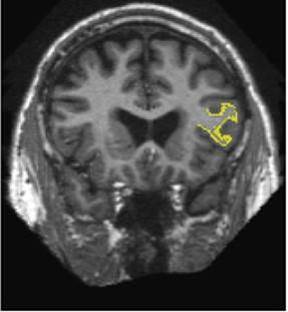
I searched the website, and found the following instructions, but it highlighted the region of lh.BA45 which has label file at $sub/label/lh.BA45.label. I couldn’t find label file at $sub/label/lh.caudate.label. Is there any way to get a known ROI to be highlighted as in the fig below? Thank you so much for the help.
Best Regards
Yi
============================================
https://surfer.nmr.mgh.harvard.edu/fswiki/FsTutorial/AnatomicalROI
cd $SUBJECTS_DIR
mri_label2label \
--srcsubject fsaverage \
--srclabel fsaverage/label/lh.BA45.label \
--trgsubject 004 \
--trglabel 004/label/lh.BA45.label \
--hemi lh \
--regmethod surface
freeview -v 004/mri/orig.mgz
Then on the menu bar click *File > Load ROI loadroi.jpeg *choose* lh.BA45.label* and hit 'Open'. The label is visible in coronal slice 153. To jump to that slice, double click on the coordinates [127,127,128] next to where it says 'orig' in the Cursor window pane. The last number is the slice number. Change it to 153 and hit enter.
The information in this email, including attachments, may be confidential and is intended solely for the addressee(s). If you believe you received this email by mistake, please notify the sender by return email as soon as possible.
Freesurfer mailing list Freesurfer@nmr.mgh.harvard.edu https://mail.nmr.mgh.harvard.edu/mailman/listinfo/freesurfer