Hello Bruce,
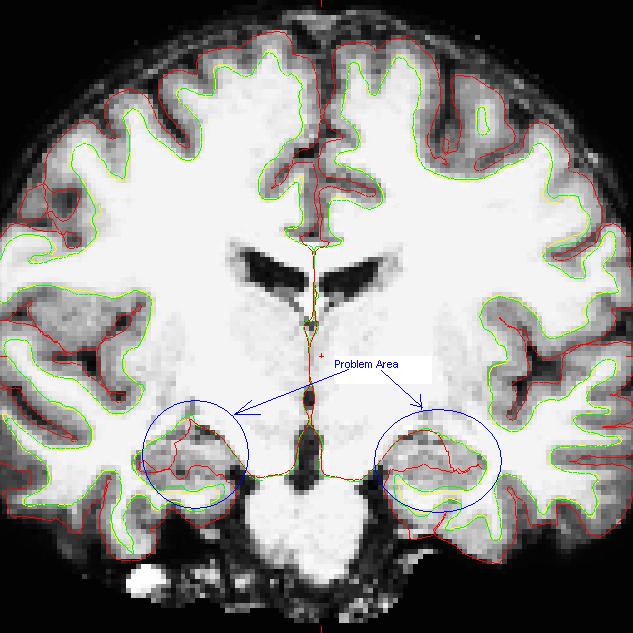
Thanks for your reply. I attached a slice of the image here. The problem areas are highlighted by blue circle. It seems that the gray matter is not classified correctly, so is the pial surface. If the pial surface is not correct, it means that the gray matter volume is questionable, is that right? I wonder how I can manually edit the surface of this area. Hope your help, thanks a lot.
Aize
Date: Fri, 16 Jul 2010 17:24:07 -0400 From: fischl@nmr.mgh.harvard.edu To: caoaize@hotmail.com CC: freesurfer@nmr.mgh.harvard.edu Subject: Re: [Freesurfer] Question about manually editing pial surface
Hi Aize,
can you send us an image to show what you mean? Is the white surface accurate there/ Bruce On Sat, 17 Jul 2010, caoaize wrote:
Hello Freesurfer expert, I have a question on how to manually edit the pial surface. My structure data are fully processed using recon-all -all. Then I go back to look at the white/pial surface and sub-cortical boundaries. In some data, I found the gray matter is not included in the pial surface. I looked at the freesurfer archive, got some idea of how to edit the pial surface by removing and painting the brainmask.mgz and T1.mgz, but it does not tell me how to change the pial surface to include the gray matter that should be inside pial surface. May someone please give me a help? Thanks. Aize
ÏëÖªµÀÃ÷ÌìÌìÆøÈçºÎ£¿±ØÓ¦¸æËßÄ㣡 http://cn.bing.com/search?q=%E5%A4%A9%E6%B0%94%E9%A2%84%E6%8A%A5&form=MI...
The information in this e-mail is intended only for the person to whom it is addressed. If you believe this e-mail was sent to you in error and the e-mail contains patient information, please contact the Partners Compliance HelpLine at http://www.partners.org/complianceline . If the e-mail was sent to you in error but does not contain patient information, please contact the sender and properly dispose of the e-mail.
_________________________________________________________________ 约会说不清地方?来试试微软地图最新msn互动功能! http://ditu.live.com/?form=TL&swm=1