Hello again,
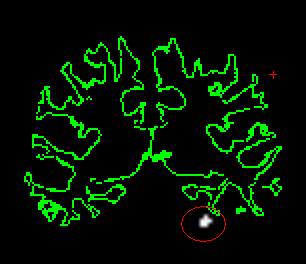
I am stuck again in my analysis and I am not sure that my code is right. I want to do the following. With a Monte Carlo simulation I search for significant clusters within a particular ROI in my all conditions vs baseline contrast. Then I want to translate this functional cluster to each individuals native space (as a label) and extract percent signal change for each condition separately from that label. This is no problem in my surface analysis, but I am not sure how to do this in the volume. I ran the Monte Carlo simulation within the mask, which provides a segmentation called mc-z.pos.23.lh.sig.ocn.mgh. I assume that this would be the label that would go into mri_vol2vol to translate the cluster to native space. I found on the website, however, that you need to use tkregister first. So I used the following code, but I am doubtful about whether I am doing this right.
tkregister2 --mov /home/sooster1/Desktop/FALSE_FEEDBACK_imaging/DATA/feedback_functional/ff_image/feedback_gamma_image_vol /omnibus/glm.amygdala/osgm/mc-z.pos.23.lh.sig.ocn.mgh --s ff_01_030512 --regheader --reg ff_01_030512/register.dat --surf
The results of this command do not look good at all....(see attached image). The cluster in the -mov file does not overlap with the amygdala. For the next step, I assumed to use mri_vol2vol to save the cluster as a native space label, although I'd like to make sure the first step is correct before continuing with this step.
mri_vol2vol --mov /home/sooster1/Desktop/FALSE_FEEDBACK_imaging/DATA/feedback_functional/ff_image/feedback_gamma_image_vol
/omnibus/glm.amygdala/osgm/mc-z.pos.23.lh.sig.ocn.mgh --reg ff_01_030512/register.dat --fstarg --interp nearest --o ff_01_030512/label/lh.amygdala.imact.mgz --s ff_01_030512
What am I missing? Is the translation off because I did something wrong, or does that point to a deeper issue?
Any help is much appreciated!
Suzanne
On Tue, Oct 29, 2013 at 6:04 PM, Douglas N Greve greve@nmr.mgh.harvard.eduwrote:
Hi suzanne, you'll need to use the 2mm version fsaverage/mri.2mm/aseg.mgz doug
On 10/29/2013 11:46 AM, Suzanne Oosterwijk wrote:
Hello all,
I want to run a Monte Carlo simulation within a volume ROI and I am running into a problem when I use the --mask flag while running glmfit. My question is very similar to the question asked in "[Freesurfer] Volume-based Monte Carlo Restricted to a within mask area" but I could not find the response to this question.
Here is my code.
First, I created a volume mask with mri_binarize:
mri_binarize --match 18 --i
home/sooster1/Desktop/FALSE_FEEDBACK_imaging/DATA/feedback_structural/fsaverage/mri/aseg.mgz
--o
/home/sooster1/Desktop/FALSE_FEEDBACK_imaging/DATA/feedback_structural/ROI_handmade_labels/amygdala_lh.mgz
I checked the mask and it looked good. Then I use the mask in glmfit.
mri_glmfit --y ces.nii.gz --osgm --glmdir glm.amygdala_lh --mask
/home/sooster1/Desktop/FALSE_FEEDBACK_imaging/DATA/feedback_structural/ROI_handmade_labels/amygdala_lh.mgz
When I do this, I get the following error:
ERROR: dimension mismatch 1 between y and mask
I guess this means that the ces.nii.gz file and mask file don't match, but I have no idea how to solve this. Any thoughts?
Thanks! Suzanne
--
Suzanne Oosterwijk, Ph.D.
Postdoctoral Researcher
Department of Social Psychology
University of Amsterdam
s.oosterwijk@u mailto:s.oosterwijk@neu.eduva.nl http://va.nl
https://sites.google.com/site/suzanneoosterwijk/
Freesurfer mailing list Freesurfer@nmr.mgh.harvard.edu https://mail.nmr.mgh.harvard.edu/mailman/listinfo/freesurfer
-- Douglas N. Greve, Ph.D. MGH-NMR Center greve@nmr.mgh.harvard.edu Phone Number: 617-724-2358 Fax: 617-726-7422
Bugs: surfer.nmr.mgh.harvard.edu/fswiki/BugReporting FileDrop: https://gate.nmr.mgh.harvard.edu/filedrop2 www.nmr.mgh.harvard.edu/facility/filedrop/index.html Outgoing: ftp://surfer.nmr.mgh.harvard.edu/transfer/outgoing/flat/greve/
Freesurfer mailing list Freesurfer@nmr.mgh.harvard.edu https://mail.nmr.mgh.harvard.edu/mailman/listinfo/freesurfer
The information in this e-mail is intended only for the person to whom it is addressed. If you believe this e-mail was sent to you in error and the e-mail contains patient information, please contact the Partners Compliance HelpLine at http://www.partners.org/complianceline . If the e-mail was sent to you in error but does not contain patient information, please contact the sender and properly dispose of the e-mail.