
External Email - Use Caution
Dear freesurfer developers,
I’m attempting to analyze my resting -state fMRI data, and I followed procedures on your functional connectivity page. When I tried to run preprocessing with my data, but it turns out that default mri_coreg did not register my fMRI template volume onto anatomical scan well. So, I went on to register fMRI to anatomical space on my own using bbregister with (init-rr method - rigid transformation). I re-ran preprocessing without registration (-noreg) to correct motion and slice-timing. My commands looked like below: #bbregister —mov fMRI_template_volume —bold —s subject —init-rr —lta functional2anatomical.lta #preproc-sess -s sess01 -fsd rest -stc siemens -noreg -surface fsaverage lhrh -surf-fwhm 5 -mni305-2mm -vol-fwhm 0 -per-run -force
Then, I configured seeds (ex. Hippocampus), and ran following commands: #fcseed-config -segid 17 -fcname left_hippocampus.dat -fsd rest -mean -cfg left_hippocampus.config #fcseed-sess -s sess01 -cfg left_hippocampus.config
It did run smoothly, but what I noticed from fcseed-sess script was it was transforming anatomical aseg mask into functional space. I am confused on this part, because during processing step, we only make registration file for transformation from functional space to anatomical space, but fcseed-sess command needs registration file that moves anatomical scan to functional scan.
# Convert segmentation to native functional space (##from fcseed-sess script##)
  set cmd = (mri_label2vol --seg $seganat \

     --reg $reg --temp $template --fillthresh $FillThresh \

     --o $seg --pvf $pvf);

  echo $cmd | tee -a $LLF
Then, Later, during mkanalysis-sess step, the command seems to use functional 2 anatomical transformation. Could you please clarify which registration file it uses to process each step that I talked about above? Do I also need to make anatomical to functional transformation registration?
I deeply appreciate your help.
Sincerely,
Wenzhen

On 9/15/2020 11:26 AM, Wenzhen Zhao wrote:
External Email - Use Caution
Dear freesurfer developers,

I’m attempting to analyze my resting -state fMRI data, and I
followed procedures on your functional connectivity page. When I
tried to run preprocessing with my data, but it turns out that
default mri_coreg did not register my fMRI template volume onto
anatomical scan well. So, I went on to register fMRI to anatomical
space on my own using bbregister with (init-rr method - rigid
transformation). I re-ran preprocessing without registration
(-noreg) to correct motion and slice-timing. My commands looked
like below:
#bbregister —mov fMRI_template_volume —bold —s subject —init-rr
—lta functional2anatomical.lta
#preproc-sess -s sess01 -fsd rest -stc siemens -noreg -surface
fsaverage lhrh -surf-fwhm 5 -mni305-2mm -vol-fwhm 0 -per-run -force

Then, I configured seeds (ex. Hippocampus), and ran following
commands:
#fcseed-config -segid 17  -fcname left_hippocampus.dat -fsd rest
-mean -cfg left_hippocampus.config
#fcseed-sess -s sess01 -cfg left_hippocampus.config

It did run smoothly, but what I noticed from fcseed-sess script
was it was transforming anatomical aseg mask into functional
space. I am confused on this part, because during processing step,
we only make registration file for transformation from functional
space to anatomical space, but fcseed-sess command needs
registration file that moves anatomical scan to functional scan.
Yes, it just inverts the transform to go in the opposite direction
# Convert segmentation to native functional space (##from fcseed-sess script##)

       set cmd = (mri_label2vol --seg $seganat \

          --reg $reg --temp $template --fillthresh $FillThresh \

          --o $seg --pvf $pvf);

       echo $cmd | tee -a $LLF

Then, Later, during mkanalysis-sess step, the command seems to use functional 2 anatomical transformation. Could you please clarify which registration file it uses to process each step that I talked about above? Do I also need to make anatomical to functional transformation registration?
No, once it has a transformation in one direction, it has it in both directions
I deeply appreciate your help.

Sincerely,

Wenzhen
Freesurfer mailing list Freesurfer@nmr.mgh.harvard.edu https://mail.nmr.mgh.harvard.edu/mailman/listinfo/freesurfer
External Email - Use Caution
Dear Douglas,
Thank you for your quick response. I just have one more question.
Does the “both-way” transformation only done through mri_coreg command that is embedded in preproc-sess command? Or does “bbregister —init-rr “ rigid transformation also does both-way transformation?
Best, Wenzhen
On Sep 15, 2020, at 11:34 AM, Douglas N. Greve dgreve@mgh.harvard.edu wrote:
On 9/15/2020 11:26 AM, Wenzhen Zhao wrote:
External Email - Use CautionDear freesurfer developers,
I’m attempting to analyze my resting -state fMRI data, and I followed procedures on your functional connectivity page. When I tried to run preprocessing with my data, but it turns out that default mri_coreg did not register my fMRI template volume onto anatomical scan well. So, I went on to register fMRI to anatomical space on my own using bbregister with (init-rr method - rigid transformation). I re-ran preprocessing without registration (-noreg) to correct motion and slice-timing. My commands looked like below: #bbregister —mov fMRI_template_volume —bold —s subject —init-rr —lta functional2anatomical.lta #preproc-sess -s sess01 -fsd rest -stc siemens -noreg -surface fsaverage lhrh -surf-fwhm 5 -mni305-2mm -vol-fwhm 0 -per-run -force
Then, I configured seeds (ex. Hippocampus), and ran following commands: #fcseed-config -segid 17 -fcname left_hippocampus.dat -fsd rest -mean -cfg left_hippocampus.config #fcseed-sess -s sess01 -cfg left_hippocampus.config
It did run smoothly, but what I noticed from fcseed-sess script was it was transforming anatomical aseg mask into functional space. I am confused on this part, because during processing step, we only make registration file for transformation from functional space to anatomical space, but fcseed-sess command needs registration file that moves anatomical scan to functional scan.
Yes, it just inverts the transform to go in the opposite direction
# Convert segmentation to native functional space (##from fcseed-sess script##)
  set cmd = (mri_label2vol --seg $seganat \

     --reg $reg --temp $template --fillthresh $FillThresh \

     --o $seg --pvf $pvf);

  echo $cmd | tee -a $LLF
Then, Later, during mkanalysis-sess step, the command seems to use functional 2 anatomical transformation. Could you please clarify which registration file it uses to process each step that I talked about above? Do I also need to make anatomical to functional transformation registration?
No, once it has a transformation in one direction, it has it in both directions
I deeply appreciate your help. Sincerely, Wenzhen
Freesurfer mailing list Freesurfer@nmr.mgh.harvard.edu mailto:Freesurfer@nmr.mgh.harvard.edu https://mail.nmr.mgh.harvard.edu/mailman/listinfo/freesurfer https://mail.nmr.mgh.harvard.edu/mailman/listinfo/freesurfer
Freesurfer mailing list Freesurfer@nmr.mgh.harvard.edu https://mail.nmr.mgh.harvard.edu/mailman/listinfo/freesurfer
Both do both ways. I would recommend not using the --init-rr option for BOLD images
On 9/15/2020 11:42 AM, Wenzhen Zhao wrote:
External Email - Use Caution
Dear Douglas,
Thank you for your quick response. I just have one more question.
Does the “both-way” transformation only done through mri_coreg command that is embedded in preproc-sess command? Or does “bbregister —init-rr “ rigid transformation also does both-way transformation?
Best, Wenzhen
On Sep 15, 2020, at 11:34 AM, Douglas N. Greve <dgreve@mgh.harvard.edu mailto:dgreve@mgh.harvard.edu> wrote:
On 9/15/2020 11:26 AM, Wenzhen Zhao wrote:
External Email - Use Caution
Dear freesurfer developers,

I’m attempting to analyze my resting -state fMRI data, and I
followed procedures on your functional connectivity page. When I
tried to run preprocessing with my data, but it turns out that
default mri_coreg did not register my fMRI template volume onto
anatomical scan well. So, I went on to register fMRI to
anatomical space on my own using bbregister with (init-rr method
- rigid transformation). I re-ran preprocessing without
registration (-noreg) to correct motion and slice-timing. My
commands looked like below:
#bbregister —mov fMRI_template_volume —bold —s subject —init-rr
—lta functional2anatomical.lta
#preproc-sess -s sess01 -fsd rest -stc siemens -noreg -surface
fsaverage lhrh -surf-fwhm 5 -mni305-2mm -vol-fwhm 0 -per-run -force

Then, I configured seeds (ex. Hippocampus), and ran following
commands:
#fcseed-config -segid 17  -fcname left_hippocampus.dat -fsd rest
-mean -cfg left_hippocampus.config
#fcseed-sess -s sess01 -cfg left_hippocampus.config

It did run smoothly, but what I noticed from fcseed-sess script
was it was transforming anatomical aseg mask into functional
space. I am confused on this part, because during processing
step, we only make registration file for transformation from
functional space to anatomical space, but fcseed-sess command
needs registration file that moves anatomical scan to functional
scan.
Yes, it just inverts the transform to go in the opposite direction
# Convert segmentation to native functional space (##from fcseed-sess script##)

       set cmd = (mri_label2vol --seg $seganat \

          --reg $reg --temp $template --fillthresh $FillThresh \

          --o $seg --pvf $pvf);

       echo $cmd | tee -a $LLF

Then, Later, during mkanalysis-sess step, the command seems to use functional 2 anatomical transformation. Could you please clarify which registration file it uses to process each step that I talked about above? Do I also need to make anatomical to functional transformation registration?
No, once it has a transformation in one direction, it has it in both directions
I deeply appreciate your help.

Sincerely,

Wenzhen
Freesurfer mailing list Freesurfer@nmr.mgh.harvard.edu https://mail.nmr.mgh.harvard.edu/mailman/listinfo/freesurfer
Freesurfer mailing list Freesurfer@nmr.mgh.harvard.edu mailto:Freesurfer@nmr.mgh.harvard.edu https://mail.nmr.mgh.harvard.edu/mailman/listinfo/freesurfer
Freesurfer mailing list Freesurfer@nmr.mgh.harvard.edu https://mail.nmr.mgh.harvard.edu/mailman/listinfo/freesurfer
External Email - Use Caution
Dear Douglas,
Do you have any recommendation on which registration method to use? If I use default or init-spm, I would not get a correct orientation. Below is the images I got using the following command:
freeview -v $SUBJECTS_DIR/subject/mri/orig.mgz:visible=0 sess01/rest/001/template.nii.gz:reg=sess01/rest/register.dof6.lta -f $SUBJECTS_DIR/subject/surf/lh.white $SUBJECTS_DIR/subject/surf/rh.white -viewport cor -transform-volume
Thanks, Wenzhen
On Sep 15, 2020, at 12:59 PM, Douglas N. Greve dgreve@mgh.harvard.edu wrote:
Both do both ways. I would recommend not using the --init-rr option for BOLD images
On 9/15/2020 11:42 AM, Wenzhen Zhao wrote:
External Email - Use CautionDear Douglas,
Thank you for your quick response. I just have one more question.
Does the “both-way” transformation only done through mri_coreg command that is embedded in preproc-sess command? Or does “bbregister —init-rr “ rigid transformation also does both-way transformation?
Best, Wenzhen
On Sep 15, 2020, at 11:34 AM, Douglas N. Greve <dgreve@mgh.harvard.edu mailto:dgreve@mgh.harvard.edu> wrote:
On 9/15/2020 11:26 AM, Wenzhen Zhao wrote:
External Email - Use CautionDear freesurfer developers,
I’m attempting to analyze my resting -state fMRI data, and I followed procedures on your functional connectivity page. When I tried to run preprocessing with my data, but it turns out that default mri_coreg did not register my fMRI template volume onto anatomical scan well. So, I went on to register fMRI to anatomical space on my own using bbregister with (init-rr method - rigid transformation). I re-ran preprocessing without registration (-noreg) to correct motion and slice-timing. My commands looked like below: #bbregister —mov fMRI_template_volume —bold —s subject —init-rr —lta functional2anatomical.lta #preproc-sess -s sess01 -fsd rest -stc siemens -noreg -surface fsaverage lhrh -surf-fwhm 5 -mni305-2mm -vol-fwhm 0 -per-run -force
Then, I configured seeds (ex. Hippocampus), and ran following commands: #fcseed-config -segid 17 -fcname left_hippocampus.dat -fsd rest -mean -cfg left_hippocampus.config #fcseed-sess -s sess01 -cfg left_hippocampus.config
It did run smoothly, but what I noticed from fcseed-sess script was it was transforming anatomical aseg mask into functional space. I am confused on this part, because during processing step, we only make registration file for transformation from functional space to anatomical space, but fcseed-sess command needs registration file that moves anatomical scan to functional scan.
Yes, it just inverts the transform to go in the opposite direction
# Convert segmentation to native functional space (##from fcseed-sess script##)
  set cmd = (mri_label2vol --seg $seganat \

     --reg $reg --temp $template --fillthresh $FillThresh \

     --o $seg --pvf $pvf);

  echo $cmd | tee -a $LLF
Then, Later, during mkanalysis-sess step, the command seems to use functional 2 anatomical transformation. Could you please clarify which registration file it uses to process each step that I talked about above? Do I also need to make anatomical to functional transformation registration?
No, once it has a transformation in one direction, it has it in both directions
I deeply appreciate your help. Sincerely, Wenzhen
Freesurfer mailing list Freesurfer@nmr.mgh.harvard.edu mailto:Freesurfer@nmr.mgh.harvard.edu https://mail.nmr.mgh.harvard.edu/mailman/listinfo/freesurfer https://mail.nmr.mgh.harvard.edu/mailman/listinfo/freesurfer
Freesurfer mailing list Freesurfer@nmr.mgh.harvard.edu mailto:Freesurfer@nmr.mgh.harvard.edu https://mail.nmr.mgh.harvard.edu/mailman/listinfo/freesurfer https://mail.nmr.mgh.harvard.edu/mailman/listinfo/freesurfer
Freesurfer mailing list Freesurfer@nmr.mgh.harvard.edu mailto:Freesurfer@nmr.mgh.harvard.edu https://mail.nmr.mgh.harvard.edu/mailman/listinfo/freesurfer https://mail.nmr.mgh.harvard.edu/mailman/listinfo/freesurfer
Freesurfer mailing list Freesurfer@nmr.mgh.harvard.edu https://mail.nmr.mgh.harvard.edu/mailman/listinfo/freesurfer
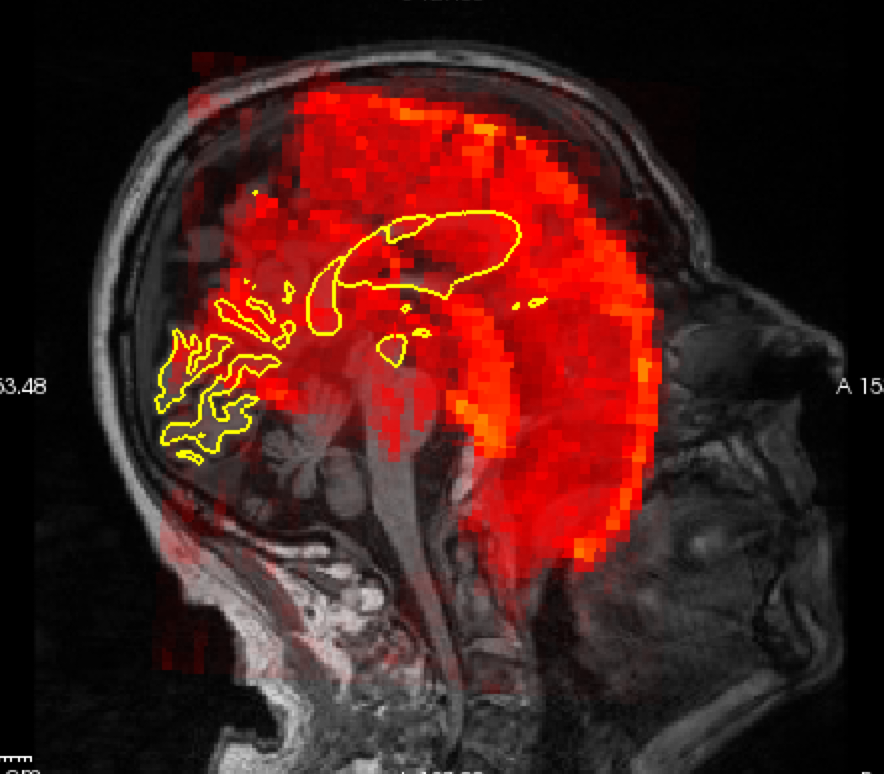
What version of FS are you using? Try using bbregister without an init option. Also make sure you are specifying --t2 And send your full command lines next time
On 9/15/2020 1:44 PM, Wenzhen Zhao wrote:
External Email - Use Caution
Dear Douglas,
Do you have any recommendation on which registration method to use? If I use default or init-spm, I would not get a correct orientation. Below is the images I got using the following command:
freeview -v $SUBJECTS_DIR/subject/mri/orig.mgz:visible=0 sess01/rest/001/template.nii.gz:reg=sess01/rest/register.dof6.lta -f $SUBJECTS_DIR/subject/surf/lh.white $SUBJECTS_DIR/subject/surf/rh.white -viewport cor -transform-volume
Thanks, Wenzhen
On Sep 15, 2020, at 12:59 PM, Douglas N. Greve <dgreve@mgh.harvard.edu mailto:dgreve@mgh.harvard.edu> wrote:
Both do both ways. I would recommend not using the --init-rr option for BOLD images
On 9/15/2020 11:42 AM, Wenzhen Zhao wrote:
External Email - Use Caution
Dear Douglas,
Thank you for your quick response. I just have one more question.
Does the “both-way” transformation only done through mri_coreg command that is embedded in preproc-sess command? Or does “bbregister —init-rr “ rigid transformation also does both-way transformation?
Best, Wenzhen
On Sep 15, 2020, at 11:34 AM, Douglas N. Greve <dgreve@mgh.harvard.edu mailto:dgreve@mgh.harvard.edu> wrote:
On 9/15/2020 11:26 AM, Wenzhen Zhao wrote:
External Email - Use Caution
Dear freesurfer developers,

I’m attempting to analyze my resting -state fMRI data, and I
followed procedures on your functional connectivity page. When
I tried to run preprocessing with my data, but it turns out
that default mri_coreg did not register my fMRI template
volume onto anatomical scan well. So, I went on to register
fMRI to anatomical space on my own using bbregister with
(init-rr method - rigid transformation). I re-ran
preprocessing without registration (-noreg) to correct motion
and slice-timing. My commands looked like below:
#bbregister —mov fMRI_template_volume —bold —s subject
—init-rr —lta functional2anatomical.lta
#preproc-sess -s sess01 -fsd rest -stc siemens -noreg -surface
fsaverage lhrh -surf-fwhm 5 -mni305-2mm -vol-fwhm 0 -per-run
-force

Then, I configured seeds (ex. Hippocampus), and ran following
commands:
#fcseed-config -segid 17  -fcname left_hippocampus.dat -fsd
rest -mean -cfg left_hippocampus.config
#fcseed-sess -s sess01 -cfg left_hippocampus.config

It did run smoothly, but what I noticed from fcseed-sess
script was it was transforming anatomical aseg mask into
functional space. I am confused on this part, because during
processing step, we only make registration file for
transformation from functional space to anatomical space, but
fcseed-sess command needs registration file that moves
anatomical scan to functional scan.
Yes, it just inverts the transform to go in the opposite direction
# Convert segmentation to native functional space (##from fcseed-sess script##)

       set cmd = (mri_label2vol --seg $seganat \

          --reg $reg --temp $template --fillthresh $FillThresh \

          --o $seg --pvf $pvf);

       echo $cmd | tee -a $LLF

Then, Later, during mkanalysis-sess step, the command seems to use functional 2 anatomical transformation. Could you please clarify which registration file it uses to process each step that I talked about above? Do I also need to make anatomical to functional transformation registration?
No, once it has a transformation in one direction, it has it in both directions
I deeply appreciate your help.

Sincerely,

Wenzhen
Freesurfer mailing list Freesurfer@nmr.mgh.harvard.edu https://mail.nmr.mgh.harvard.edu/mailman/listinfo/freesurfer
Freesurfer mailing list Freesurfer@nmr.mgh.harvard.edu mailto:Freesurfer@nmr.mgh.harvard.edu https://mail.nmr.mgh.harvard.edu/mailman/listinfo/freesurfer
Freesurfer mailing list Freesurfer@nmr.mgh.harvard.edu https://mail.nmr.mgh.harvard.edu/mailman/listinfo/freesurfer
Freesurfer mailing list Freesurfer@nmr.mgh.harvard.edu mailto:Freesurfer@nmr.mgh.harvard.edu https://mail.nmr.mgh.harvard.edu/mailman/listinfo/freesurfer
Freesurfer mailing list Freesurfer@nmr.mgh.harvard.edu https://mail.nmr.mgh.harvard.edu/mailman/listinfo/freesurfer
External Email - Use Caution
Dear Douglas,
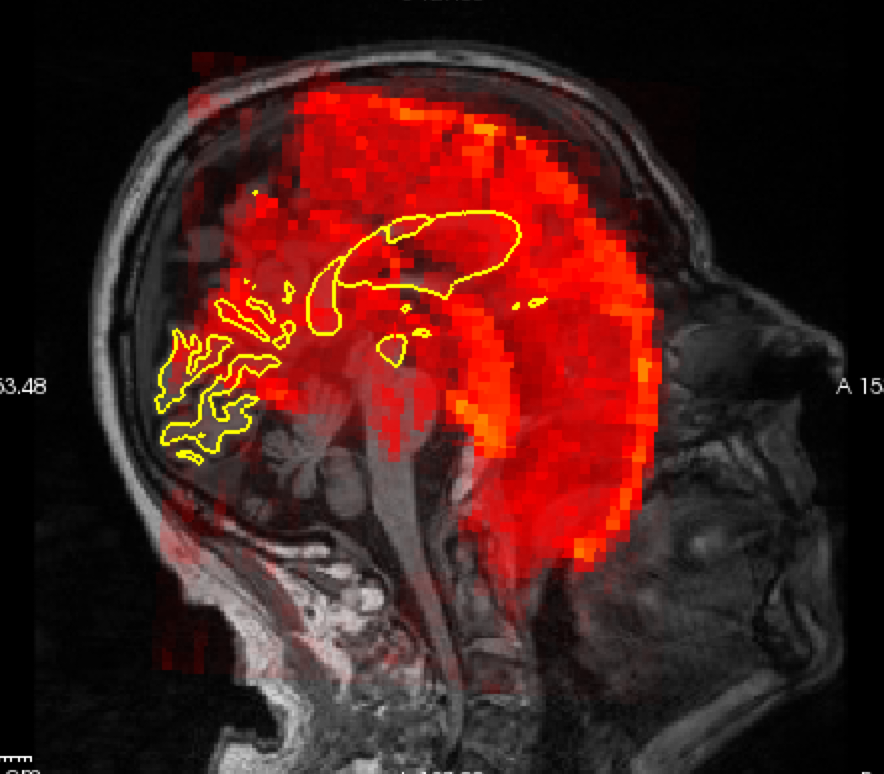
I am using freesurfer 6. I used following command to register fMRI data to anatomical scan. $ bbregister --mov sess01/rest/001/template.nii.gz --t2 --s subject --lta register.dof6.lta
I used following command to visualize the output; red: functional scan; overlaid on orig.mgz structural scan. $ tkregisterfv --mov sess01/rest/001/template.nii.gz --reg register.dof6.lta --surfs
It seems like two are not aligning well. Is there any step that I should take to improve? Again, thank you so much for helping.
Best, Wenzhen
On Sep 15, 2020, at 1:47 PM, Douglas N. Greve dgreve@mgh.harvard.edu wrote:
What version of FS are you using? Try using bbregister without an init option. Also make sure you are specifying --t2 And send your full command lines next time
On 9/15/2020 1:44 PM, Wenzhen Zhao wrote:
External Email - Use CautionDear Douglas,
Do you have any recommendation on which registration method to use? If I use default or init-spm, I would not get a correct orientation. Below is the images I got using the following command:
freeview -v $SUBJECTS_DIR/subject/mri/orig.mgz:visible=0 sess01/rest/001/template.nii.gz:reg=sess01/rest/register.dof6.lta -f $SUBJECTS_DIR/subject/surf/lh.white $SUBJECTS_DIR/subject/surf/rh.white -viewport cor -transform-volume
Thanks, Wenzhen <Screen Shot 2020-09-15 at 1.42.34 PM.png>
On Sep 15, 2020, at 12:59 PM, Douglas N. Greve <dgreve@mgh.harvard.edu mailto:dgreve@mgh.harvard.edu> wrote:
Both do both ways. I would recommend not using the --init-rr option for BOLD images
On 9/15/2020 11:42 AM, Wenzhen Zhao wrote:
External Email - Use CautionDear Douglas,
Thank you for your quick response. I just have one more question.
Does the “both-way” transformation only done through mri_coreg command that is embedded in preproc-sess command? Or does “bbregister —init-rr “ rigid transformation also does both-way transformation?
Best, Wenzhen
On Sep 15, 2020, at 11:34 AM, Douglas N. Greve <dgreve@mgh.harvard.edu mailto:dgreve@mgh.harvard.edu> wrote:
On 9/15/2020 11:26 AM, Wenzhen Zhao wrote:
External Email - Use CautionDear freesurfer developers,
I’m attempting to analyze my resting -state fMRI data, and I followed procedures on your functional connectivity page. When I tried to run preprocessing with my data, but it turns out that default mri_coreg did not register my fMRI template volume onto anatomical scan well. So, I went on to register fMRI to anatomical space on my own using bbregister with (init-rr method - rigid transformation). I re-ran preprocessing without registration (-noreg) to correct motion and slice-timing. My commands looked like below: #bbregister —mov fMRI_template_volume —bold —s subject —init-rr —lta functional2anatomical.lta #preproc-sess -s sess01 -fsd rest -stc siemens -noreg -surface fsaverage lhrh -surf-fwhm 5 -mni305-2mm -vol-fwhm 0 -per-run -force
Then, I configured seeds (ex. Hippocampus), and ran following commands: #fcseed-config -segid 17 -fcname left_hippocampus.dat -fsd rest -mean -cfg left_hippocampus.config #fcseed-sess -s sess01 -cfg left_hippocampus.config
It did run smoothly, but what I noticed from fcseed-sess script was it was transforming anatomical aseg mask into functional space. I am confused on this part, because during processing step, we only make registration file for transformation from functional space to anatomical space, but fcseed-sess command needs registration file that moves anatomical scan to functional scan.
Yes, it just inverts the transform to go in the opposite direction
# Convert segmentation to native functional space (##from fcseed-sess script##)
  set cmd = (mri_label2vol --seg $seganat \

     --reg $reg --temp $template --fillthresh $FillThresh \

     --o $seg --pvf $pvf);

  echo $cmd | tee -a $LLF
Then, Later, during mkanalysis-sess step, the command seems to use functional 2 anatomical transformation. Could you please clarify which registration file it uses to process each step that I talked about above? Do I also need to make anatomical to functional transformation registration?
No, once it has a transformation in one direction, it has it in both directions
I deeply appreciate your help. Sincerely, Wenzhen
Freesurfer mailing list Freesurfer@nmr.mgh.harvard.edu mailto:Freesurfer@nmr.mgh.harvard.edu https://mail.nmr.mgh.harvard.edu/mailman/listinfo/freesurfer https://mail.nmr.mgh.harvard.edu/mailman/listinfo/freesurfer
Freesurfer mailing list Freesurfer@nmr.mgh.harvard.edu mailto:Freesurfer@nmr.mgh.harvard.edu https://mail.nmr.mgh.harvard.edu/mailman/listinfo/freesurfer https://mail.nmr.mgh.harvard.edu/mailman/listinfo/freesurfer
Freesurfer mailing list Freesurfer@nmr.mgh.harvard.edu mailto:Freesurfer@nmr.mgh.harvard.edu https://mail.nmr.mgh.harvard.edu/mailman/listinfo/freesurfer https://mail.nmr.mgh.harvard.edu/mailman/listinfo/freesurfer
Freesurfer mailing list Freesurfer@nmr.mgh.harvard.edu mailto:Freesurfer@nmr.mgh.harvard.edu https://mail.nmr.mgh.harvard.edu/mailman/listinfo/freesurfer https://mail.nmr.mgh.harvard.edu/mailman/listinfo/freesurfer
Freesurfer mailing list Freesurfer@nmr.mgh.harvard.edu mailto:Freesurfer@nmr.mgh.harvard.edu https://mail.nmr.mgh.harvard.edu/mailman/listinfo/freesurfer https://mail.nmr.mgh.harvard.edu/mailman/listinfo/freesurfer
Freesurfer mailing list Freesurfer@nmr.mgh.harvard.edu https://mail.nmr.mgh.harvard.edu/mailman/listinfo/freesurfer
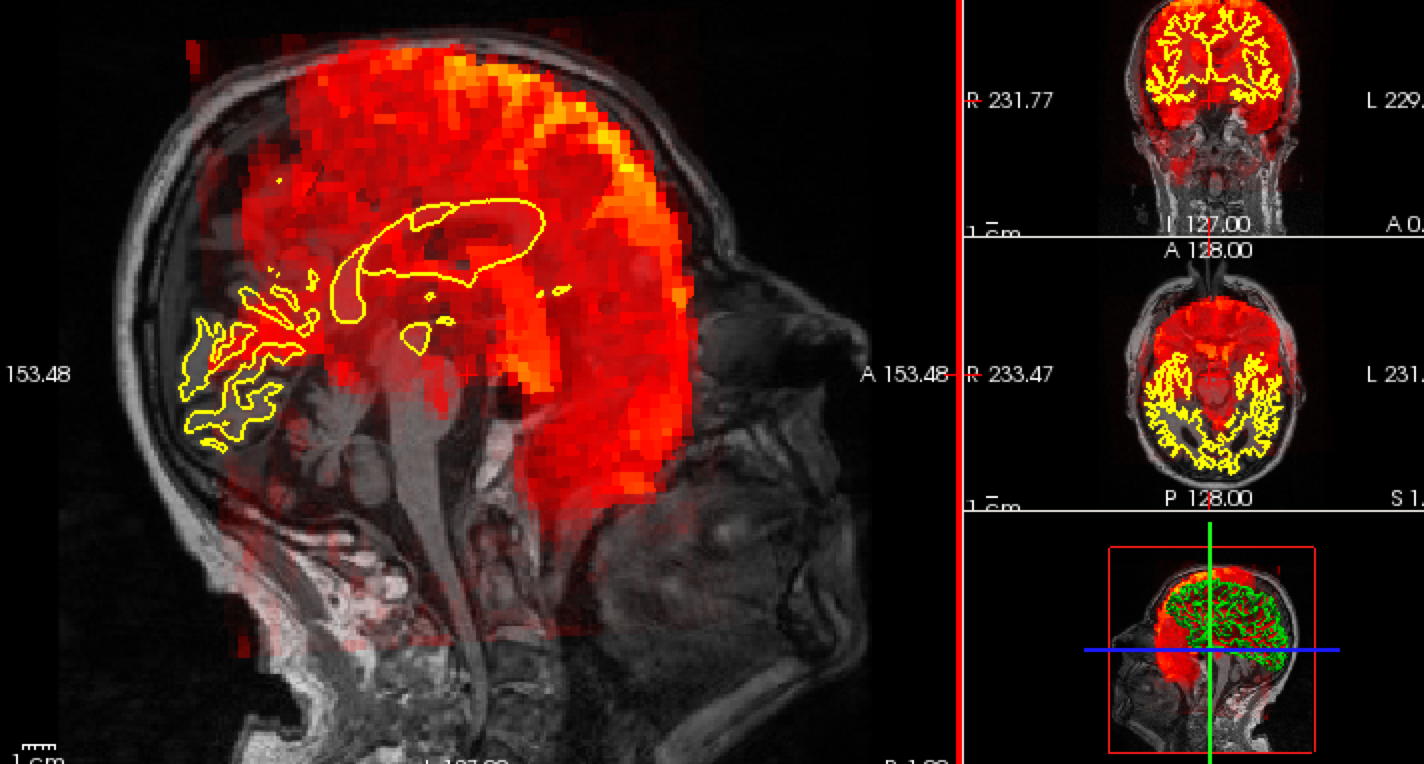
Is the fmri scan properly oriented? Eg, run freeview template.nii.gz and see of it is oriented correctly in the FV window
On 9/15/20 2:57 PM, Wenzhen Zhao wrote:
External Email - Use Caution
Dear Douglas,
I am using freesurfer 6. I used following command to register fMRI data to anatomical scan. $ bbregister --mov sess01/rest/001/template.nii.gz --t2 --s subject --lta register.dof6.lta
I used following command to visualize the output; red: functional scan; overlaid on orig.mgz structural scan. $ tkregisterfv --mov sess01/rest/001/template.nii.gz --reg register.dof6.lta --surfs
It seems like two are not aligning well. Is there any step that I should take to improve? Again, thank you so much for helping.
Best, Wenzhen
On Sep 15, 2020, at 1:47 PM, Douglas N. Greve <dgreve@mgh.harvard.edu mailto:dgreve@mgh.harvard.edu> wrote:
What version of FS are you using? Try using bbregister without an init option. Also make sure you are specifying --t2 And send your full command lines next time
On 9/15/2020 1:44 PM, Wenzhen Zhao wrote:
External Email - Use Caution
Dear Douglas,
Do you have any recommendation on which registration method to use? If I use default or init-spm, I would not get a correct orientation. Below is the images I got using the following command:
freeview -v $SUBJECTS_DIR/subject/mri/orig.mgz:visible=0 sess01/rest/001/template.nii.gz:reg=sess01/rest/register.dof6.lta -f $SUBJECTS_DIR/subject/surf/lh.white $SUBJECTS_DIR/subject/surf/rh.white -viewport cor -transform-volume
Thanks, Wenzhen <Screen Shot 2020-09-15 at 1.42.34 PM.png>
On Sep 15, 2020, at 12:59 PM, Douglas N. Greve <dgreve@mgh.harvard.edu mailto:dgreve@mgh.harvard.edu> wrote:
Both do both ways. I would recommend not using the --init-rr option for BOLD images
On 9/15/2020 11:42 AM, Wenzhen Zhao wrote:
External Email - Use Caution
Dear Douglas,
Thank you for your quick response. I just have one more question.
Does the “both-way” transformation only done through mri_coreg command that is embedded in preproc-sess command? Or does “bbregister —init-rr “ rigid transformation also does both-way transformation?
Best, Wenzhen
On Sep 15, 2020, at 11:34 AM, Douglas N. Greve <dgreve@mgh.harvard.edu mailto:dgreve@mgh.harvard.edu> wrote:
On 9/15/2020 11:26 AM, Wenzhen Zhao wrote: > > External Email - Use Caution > > > Dear freesurfer developers, > > I’m attempting to analyze my resting -state fMRI data, and I > followed procedures on your functional connectivity page. > When I tried to run preprocessing with my data, but it turns > out that default mri_coreg did not register my fMRI template > volume onto anatomical scan well. So, I went on to register > fMRI to anatomical space on my own using bbregister with > (init-rr method - rigid transformation). I re-ran > preprocessing without registration (-noreg) to correct > motion and slice-timing. My commands looked like below: > #bbregister —mov fMRI_template_volume —bold —s subject > —init-rr —lta functional2anatomical.lta > #preproc-sess -s sess01 -fsd rest -stc siemens -noreg > -surface fsaverage lhrh -surf-fwhm 5 -mni305-2mm -vol-fwhm 0 > -per-run -force > > Then, I configured seeds (ex. Hippocampus), and ran > following commands: > #fcseed-config -segid 17 -fcname left_hippocampus.dat -fsd > rest -mean -cfg left_hippocampus.config > #fcseed-sess -s sess01 -cfg left_hippocampus.config > > It did run smoothly, but what I noticed from fcseed-sess > script was it was transforming anatomical aseg mask into > functional space. I am confused on this part, because during > processing step, we only make registration file for > transformation from functional space to anatomical space, > but fcseed-sess command needs registration file that moves > anatomical scan to functional scan. > Yes, it just inverts the transform to go in the opposite direction > > # Convert segmentation to native functional space (##from fcseed-sess script##) > > set cmd = (mri_label2vol --seg $seganat \ > > --reg $reg --temp $template --fillthresh $FillThresh \ > > --o $seg --pvf $pvf); > > echo $cmd | tee -a $LLF > > Then, Later, during mkanalysis-sess step, the command seems to use functional 2 anatomical transformation. Could you please clarify which registration file it uses to process each step that I talked about above? Do I also need to make anatomical to functional transformation registration? > No, once it has a transformation in one direction, it has it in both directions > > I deeply appreciate your help. > > Sincerely, > > Wenzhen > > > _______________________________________________ > Freesurfer mailing list > Freesurfer@nmr.mgh.harvard.edu > https://mail.nmr.mgh.harvard.edu/mailman/listinfo/freesurfer
Freesurfer mailing list Freesurfer@nmr.mgh.harvard.edu mailto:Freesurfer@nmr.mgh.harvard.edu https://mail.nmr.mgh.harvard.edu/mailman/listinfo/freesurfer
Freesurfer mailing list Freesurfer@nmr.mgh.harvard.edu https://mail.nmr.mgh.harvard.edu/mailman/listinfo/freesurfer
Freesurfer mailing list Freesurfer@nmr.mgh.harvard.edu mailto:Freesurfer@nmr.mgh.harvard.edu https://mail.nmr.mgh.harvard.edu/mailman/listinfo/freesurfer
Freesurfer mailing list Freesurfer@nmr.mgh.harvard.edu https://mail.nmr.mgh.harvard.edu/mailman/listinfo/freesurfer
Freesurfer mailing list Freesurfer@nmr.mgh.harvard.edu mailto:Freesurfer@nmr.mgh.harvard.edu https://mail.nmr.mgh.harvard.edu/mailman/listinfo/freesurfer
Freesurfer mailing list Freesurfer@nmr.mgh.harvard.edu https://mail.nmr.mgh.harvard.edu/mailman/listinfo/freesurfer
External Email - Use Caution
Dear Douglas,
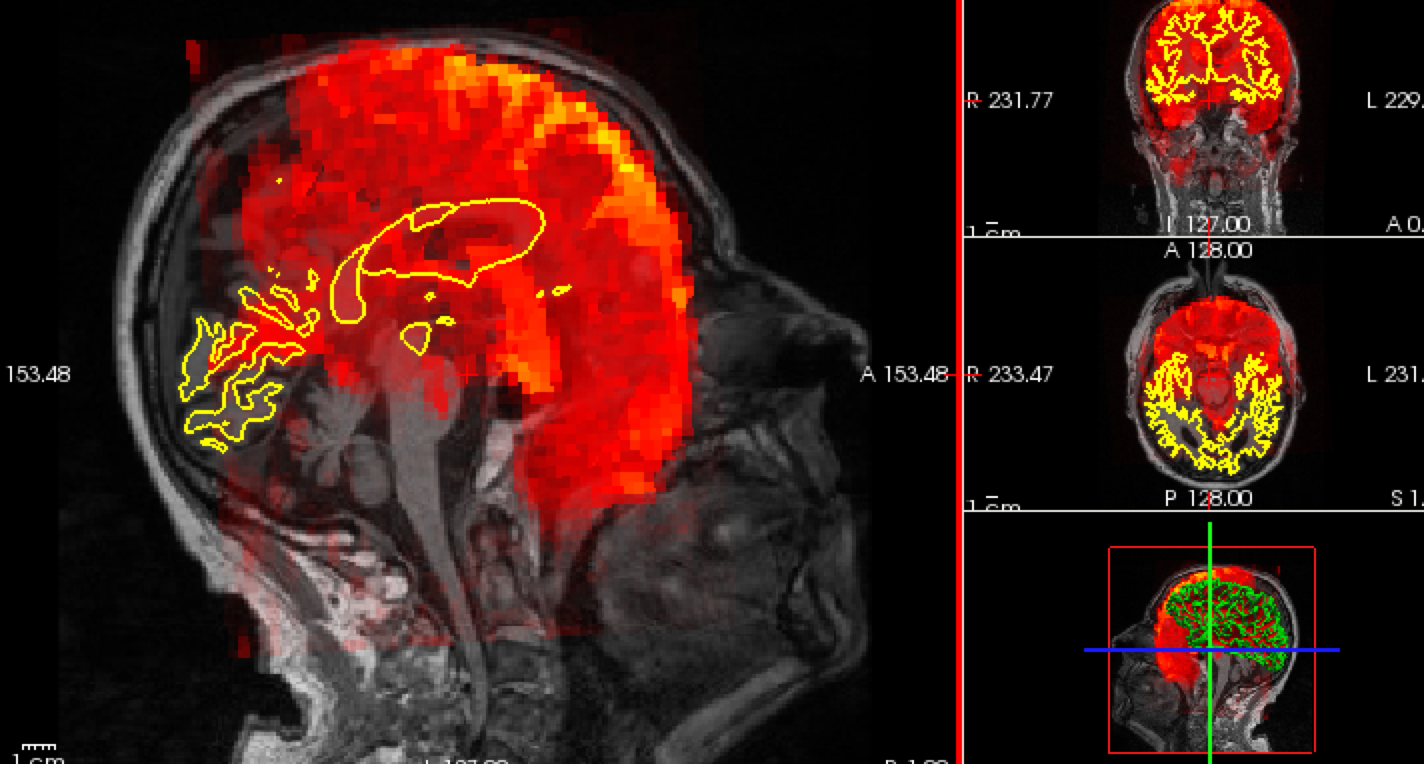
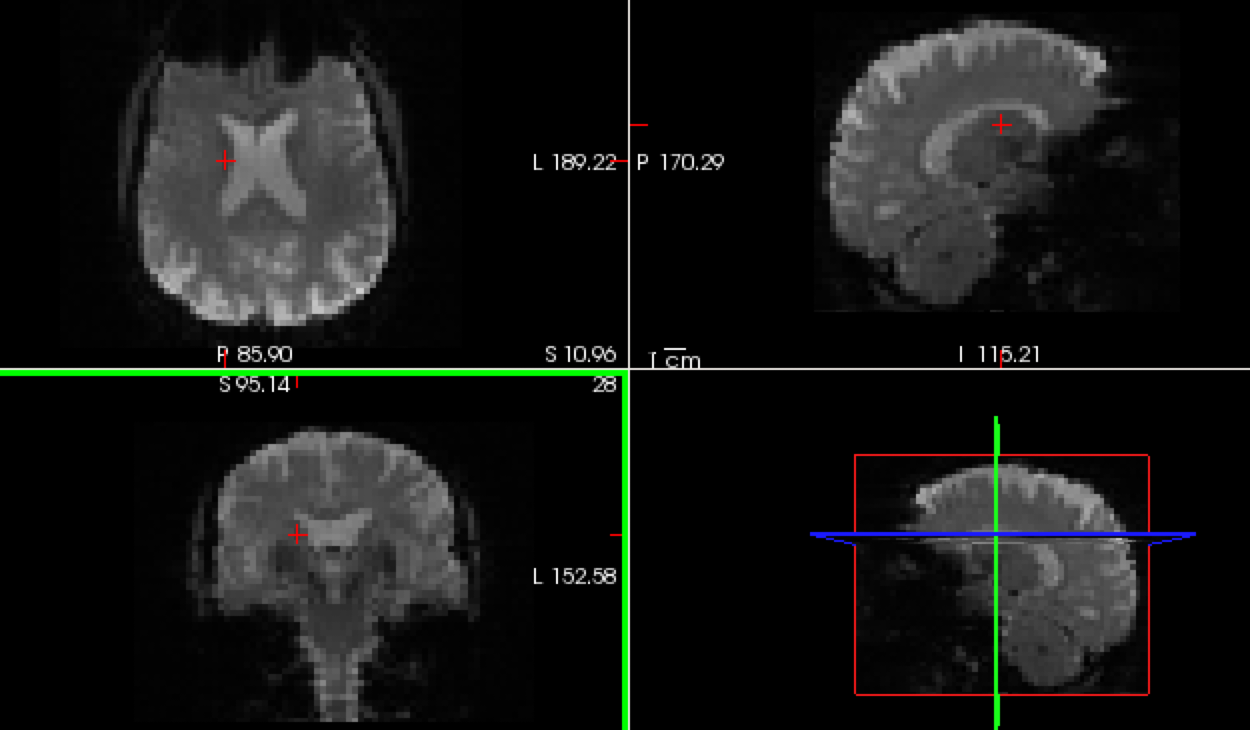
Yes, they do look properly oriented to me.one thing I noticed is that when I switch over coronal view, sagittal view, and axial view, brains seem to shift back and forth in horizontal direction. If you see the picture below, brains are not in the same spot. I am not sure if this is an issue.
Best, Wenzhen
On Sep 18, 2020, at 10:47 AM, Douglas Greve dgreve@mgh.harvard.edu wrote:
Is the fmri scan properly oriented? Eg, run freeview template.nii.gz and see of it is oriented correctly in the FV window
On 9/15/20 2:57 PM, Wenzhen Zhao wrote:
External Email - Use Caution
Dear Douglas,
I am using freesurfer 6. I used following command to register fMRI data to anatomical scan. $ bbregister --mov sess01/rest/001/template.nii.gz --t2 --s subject --lta register.dof6.lta
I used following command to visualize the output; red: functional scan; overlaid on orig.mgz structural scan. $ tkregisterfv --mov sess01/rest/001/template.nii.gz --reg register.dof6.lta --surfs
It seems like two are not aligning well. Is there any step that I should take to improve? Again, thank you so much for helping.
Best, Wenzhen
<Screen Shot 2020-09-15 at 2.51.32 PM.png>
On Sep 15, 2020, at 1:47 PM, Douglas N. Greve <dgreve@mgh.harvard.edu mailto:dgreve@mgh.harvard.edu> wrote:
What version of FS are you using? Try using bbregister without an init option. Also make sure you are specifying --t2 And send your full command lines next time
On 9/15/2020 1:44 PM, Wenzhen Zhao wrote:
External Email - Use CautionDear Douglas,
Do you have any recommendation on which registration method to use? If I use default or init-spm, I would not get a correct orientation. Below is the images I got using the following command:
freeview -v $SUBJECTS_DIR/subject/mri/orig.mgz:visible=0 sess01/rest/001/template.nii.gz:reg=sess01/rest/register.dof6.lta -f $SUBJECTS_DIR/subject/surf/lh.white $SUBJECTS_DIR/subject/surf/rh.white -viewport cor -transform-volume
Thanks, Wenzhen <Screen Shot 2020-09-15 at 1.42.34 PM.png>
On Sep 15, 2020, at 12:59 PM, Douglas N. Greve <dgreve@mgh.harvard.edu mailto:dgreve@mgh.harvard.edu> wrote:
Both do both ways. I would recommend not using the --init-rr option for BOLD images
On 9/15/2020 11:42 AM, Wenzhen Zhao wrote:
External Email - Use CautionDear Douglas,
Thank you for your quick response. I just have one more question.
Does the “both-way” transformation only done through mri_coreg command that is embedded in preproc-sess command? Or does “bbregister —init-rr “ rigid transformation also does both-way transformation?
Best, Wenzhen
> On Sep 15, 2020, at 11:34 AM, Douglas N. Greve <dgreve@mgh.harvard.edu mailto:dgreve@mgh.harvard.edu> wrote: > > > > On 9/15/2020 11:26 AM, Wenzhen Zhao wrote: >> External Email - Use Caution >> >> >> Dear freesurfer developers, >> >> I’m attempting to analyze my resting -state fMRI data, and I followed procedures on your functional connectivity page. When I tried to run preprocessing with my data, but it turns out that default mri_coreg did not register my fMRI template volume onto anatomical scan well. So, I went on to register fMRI to anatomical space on my own using bbregister with (init-rr method - rigid transformation). I re-ran preprocessing without registration (-noreg) to correct motion and slice-timing. My commands looked like below: >> #bbregister —mov fMRI_template_volume —bold —s subject —init-rr —lta functional2anatomical.lta >> #preproc-sess -s sess01 -fsd rest -stc siemens -noreg -surface fsaverage lhrh -surf-fwhm 5 -mni305-2mm -vol-fwhm 0 -per-run -force >> >> Then, I configured seeds (ex. Hippocampus), and ran following commands: >> #fcseed-config -segid 17 -fcname left_hippocampus.dat -fsd rest -mean -cfg left_hippocampus.config >> #fcseed-sess -s sess01 -cfg left_hippocampus.config >> >> It did run smoothly, but what I noticed from fcseed-sess script was it was transforming anatomical aseg mask into functional space. I am confused on this part, because during processing step, we only make registration file for transformation from functional space to anatomical space, but fcseed-sess command needs registration file that moves anatomical scan to functional scan. > Yes, it just inverts the transform to go in the opposite direction >> # Convert segmentation to native functional space (##from fcseed-sess script##) >> >> set cmd = (mri_label2vol --seg $seganat \ >> >> --reg $reg --temp $template --fillthresh $FillThresh \ >> >> --o $seg --pvf $pvf); >> >> echo $cmd | tee -a $LLF >> Then, Later, during mkanalysis-sess step, the command seems to use functional 2 anatomical transformation. Could you please clarify which registration file it uses to process each step that I talked about above? Do I also need to make anatomical to functional transformation registration? > No, once it has a transformation in one direction, it has it in both directions >> I deeply appreciate your help. >> Sincerely, >> Wenzhen >> >> >> _______________________________________________ >> Freesurfer mailing list >> Freesurfer@nmr.mgh.harvard.edu mailto:Freesurfer@nmr.mgh.harvard.edu >> https://mail.nmr.mgh.harvard.edu/mailman/listinfo/freesurfer https://mail.nmr.mgh.harvard.edu/mailman/listinfo/freesurfer > _______________________________________________ > Freesurfer mailing list > Freesurfer@nmr.mgh.harvard.edu mailto:Freesurfer@nmr.mgh.harvard.edu > https://mail.nmr.mgh.harvard.edu/mailman/listinfo/freesurfer https://mail.nmr.mgh.harvard.edu/mailman/listinfo/freesurfer
Freesurfer mailing list Freesurfer@nmr.mgh.harvard.edu mailto:Freesurfer@nmr.mgh.harvard.edu https://mail.nmr.mgh.harvard.edu/mailman/listinfo/freesurfer https://mail.nmr.mgh.harvard.edu/mailman/listinfo/freesurfer
Freesurfer mailing list Freesurfer@nmr.mgh.harvard.edu mailto:Freesurfer@nmr.mgh.harvard.edu https://mail.nmr.mgh.harvard.edu/mailman/listinfo/freesurfer https://mail.nmr.mgh.harvard.edu/mailman/listinfo/freesurfer
Freesurfer mailing list Freesurfer@nmr.mgh.harvard.edu mailto:Freesurfer@nmr.mgh.harvard.edu https://mail.nmr.mgh.harvard.edu/mailman/listinfo/freesurfer https://mail.nmr.mgh.harvard.edu/mailman/listinfo/freesurfer
Freesurfer mailing list Freesurfer@nmr.mgh.harvard.edu mailto:Freesurfer@nmr.mgh.harvard.edu https://mail.nmr.mgh.harvard.edu/mailman/listinfo/freesurfer https://mail.nmr.mgh.harvard.edu/mailman/listinfo/freesurfer
Freesurfer mailing list Freesurfer@nmr.mgh.harvard.edu mailto:Freesurfer@nmr.mgh.harvard.edu https://mail.nmr.mgh.harvard.edu/mailman/listinfo/freesurfer https://mail.nmr.mgh.harvard.edu/mailman/listinfo/freesurfer
Freesurfer mailing list Freesurfer@nmr.mgh.harvard.edu https://mail.nmr.mgh.harvard.edu/mailman/listinfo/freesurfer
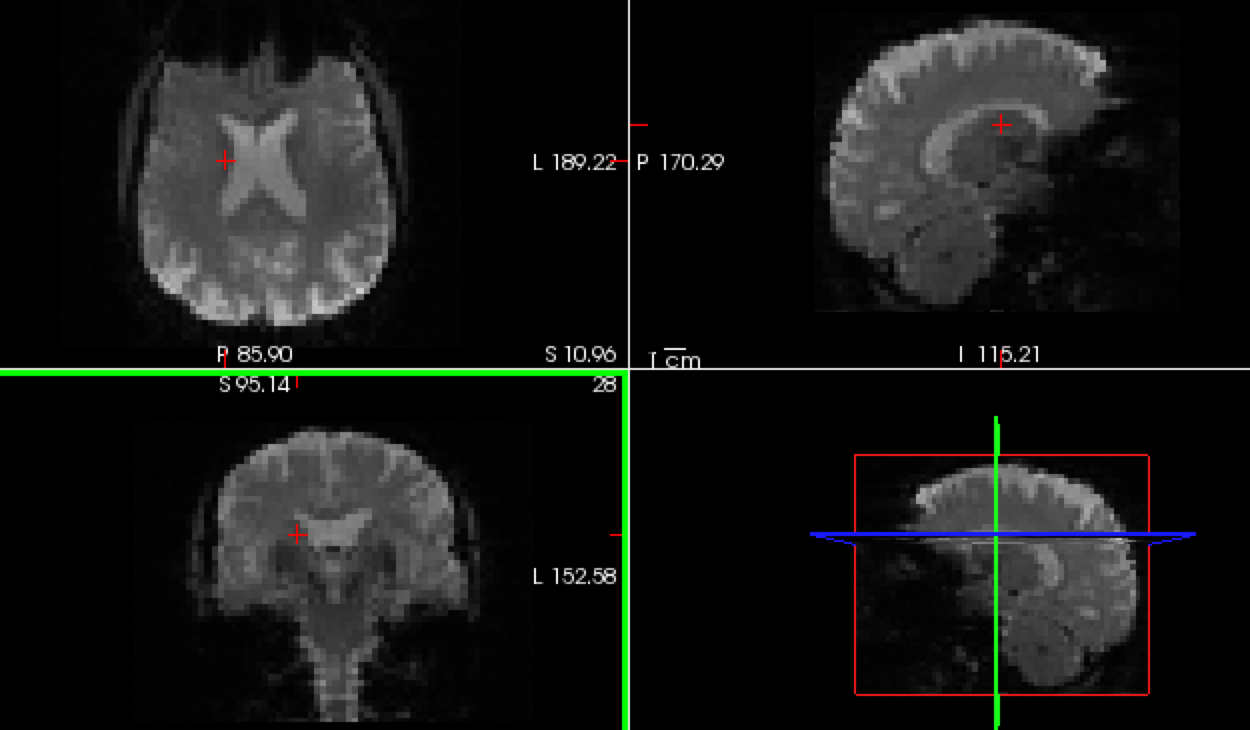
I can't figure out what is going on unless I have the data. Can you upload it? All I need is the subject's dir (output of recon-all) and the template.nii.gz. You can follow the instructions below
From the linux command line, Create the file you want to upload, eg, cd $SUBJECTS_DIR tar cvfz subject.tar.gz ./subject Now log into our anonymous FTP site: ftp surfer.nmr.mgh.harvard.edu It will ask you for a user name: use "anonymous" (no quotes) It will ask you for a password: use "anonymous" (no quotes) cd transfer/incoming binary put subject.tar.gz Send an email that the file has been and the name of the file.
On 9/18/2020 12:15 PM, Wenzhen Zhao wrote:
External Email - Use Caution
Dear Douglas,
Yes, they do look properly oriented to me.one thing I noticed is that when I switch over coronal view, sagittal view, and axial view, brains seem to shift back and forth in horizontal direction. If you see the picture below, brains are not in the same spot. I am not sure if this is an issue.
Best, Wenzhen
On Sep 18, 2020, at 10:47 AM, Douglas Greve <dgreve@mgh.harvard.edu mailto:dgreve@mgh.harvard.edu> wrote:
Is the fmri scan properly oriented? Eg, run freeview template.nii.gz and see of it is oriented correctly in the FV window
On 9/15/20 2:57 PM, Wenzhen Zhao wrote:
External Email - Use Caution
Dear Douglas,
I am using freesurfer 6. I used following command to register fMRI data to anatomical scan. $ bbregister --mov sess01/rest/001/template.nii.gz --t2 --s subject --lta register.dof6.lta
I used following command to visualize the output; red: functional scan; overlaid on orig.mgz structural scan. $ tkregisterfv --mov sess01/rest/001/template.nii.gz --reg register.dof6.lta --surfs
It seems like two are not aligning well. Is there any step that I should take to improve? Again, thank you so much for helping.
Best, Wenzhen
<Screen Shot 2020-09-15 at 2.51.32 PM.png>
On Sep 15, 2020, at 1:47 PM, Douglas N. Greve <dgreve@mgh.harvard.edu mailto:dgreve@mgh.harvard.edu> wrote:
What version of FS are you using? Try using bbregister without an init option. Also make sure you are specifying --t2 And send your full command lines next time
On 9/15/2020 1:44 PM, Wenzhen Zhao wrote:
External Email - Use Caution
Dear Douglas,
Do you have any recommendation on which registration method to use? If I use default or init-spm, I would not get a correct orientation. Below is the images I got using the following command:
freeview -v $SUBJECTS_DIR/subject/mri/orig.mgz:visible=0 sess01/rest/001/template.nii.gz:reg=sess01/rest/register.dof6.lta -f $SUBJECTS_DIR/subject/surf/lh.white $SUBJECTS_DIR/subject/surf/rh.white -viewport cor -transform-volume
Thanks, Wenzhen <Screen Shot 2020-09-15 at 1.42.34 PM.png>
On Sep 15, 2020, at 12:59 PM, Douglas N. Greve <dgreve@mgh.harvard.edu mailto:dgreve@mgh.harvard.edu> wrote:
Both do both ways. I would recommend not using the --init-rr option for BOLD images
On 9/15/2020 11:42 AM, Wenzhen Zhao wrote: > > External Email - Use Caution > > Dear Douglas, > > Thank you for your quick response. I just have one more question. > > Does the “both-way” transformation only done through mri_coreg > command that is embedded in preproc-sess command? Or does > “bbregister —init-rr “ rigid transformation also does both-way > transformation? > > Best, > Wenzhen > >> On Sep 15, 2020, at 11:34 AM, Douglas N. Greve >> <dgreve@mgh.harvard.edu mailto:dgreve@mgh.harvard.edu> wrote: >> >> >> >> On 9/15/2020 11:26 AM, Wenzhen Zhao wrote: >>> >>> External Email - Use Caution >>> >>> >>> Dear freesurfer developers, >>> >>> I’m attempting to analyze my resting -state fMRI data, and >>> I followed procedures on your functional connectivity >>> page. When I tried to run preprocessing with my data, but >>> it turns out that default mri_coreg did not register my >>> fMRI template volume onto anatomical scan well. So, I went >>> on to register fMRI to anatomical space on my own using >>> bbregister with (init-rr method - rigid transformation). I >>> re-ran preprocessing without registration (-noreg) to >>> correct motion and slice-timing. My commands looked like >>> below: >>> #bbregister —mov fMRI_template_volume —bold —s subject >>> —init-rr —lta functional2anatomical.lta >>> #preproc-sess -s sess01 -fsd rest -stc siemens -noreg >>> -surface fsaverage lhrh -surf-fwhm 5 -mni305-2mm -vol-fwhm >>> 0 -per-run -force >>> >>> Then, I configured seeds (ex. Hippocampus), and ran >>> following commands: >>> #fcseed-config -segid 17 -fcname left_hippocampus.dat >>> -fsd rest -mean -cfg left_hippocampus.config >>> #fcseed-sess -s sess01 -cfg left_hippocampus.config >>> >>> It did run smoothly, but what I noticed from fcseed-sess >>> script was it was transforming anatomical aseg mask into >>> functional space. I am confused on this part, because >>> during processing step, we only make registration file for >>> transformation from functional space to anatomical space, >>> but fcseed-sess command needs registration file that moves >>> anatomical scan to functional scan. >>> >> Yes, it just inverts the transform to go in the opposite direction >>> >>> # Convert segmentation to native functional space (##from fcseed-sess script##) >>> >>> set cmd = (mri_label2vol --seg $seganat \ >>> >>> --reg $reg --temp $template --fillthresh $FillThresh \ >>> >>> --o $seg --pvf $pvf); >>> >>> echo $cmd | tee -a $LLF >>> >>> Then, Later, during mkanalysis-sess step, the command seems to use functional 2 anatomical transformation. Could you please clarify which registration file it uses to process each step that I talked about above? Do I also need to make anatomical to functional transformation registration? >>> >> No, once it has a transformation in one direction, it has it in >> both directions >>> >>> I deeply appreciate your help. >>> >>> Sincerely, >>> >>> Wenzhen >>> >>> >>> _______________________________________________ >>> Freesurfer mailing list >>> Freesurfer@nmr.mgh.harvard.edu >>> https://mail.nmr.mgh.harvard.edu/mailman/listinfo/freesurfer >> >> _______________________________________________ >> Freesurfer mailing list >> Freesurfer@nmr.mgh.harvard.edu >> mailto:Freesurfer@nmr.mgh.harvard.edu >> https://mail.nmr.mgh.harvard.edu/mailman/listinfo/freesurfer > > > _______________________________________________ > Freesurfer mailing list > Freesurfer@nmr.mgh.harvard.edu > https://mail.nmr.mgh.harvard.edu/mailman/listinfo/freesurfer
Freesurfer mailing list Freesurfer@nmr.mgh.harvard.edu mailto:Freesurfer@nmr.mgh.harvard.edu https://mail.nmr.mgh.harvard.edu/mailman/listinfo/freesurfer
Freesurfer mailing list Freesurfer@nmr.mgh.harvard.edu https://mail.nmr.mgh.harvard.edu/mailman/listinfo/freesurfer
Freesurfer mailing list Freesurfer@nmr.mgh.harvard.edu mailto:Freesurfer@nmr.mgh.harvard.edu https://mail.nmr.mgh.harvard.edu/mailman/listinfo/freesurfer
Freesurfer mailing list Freesurfer@nmr.mgh.harvard.edu https://mail.nmr.mgh.harvard.edu/mailman/listinfo/freesurfer
Freesurfer mailing list Freesurfer@nmr.mgh.harvard.edu mailto:Freesurfer@nmr.mgh.harvard.edu https://mail.nmr.mgh.harvard.edu/mailman/listinfo/freesurfer
Freesurfer mailing list Freesurfer@nmr.mgh.harvard.edu https://mail.nmr.mgh.harvard.edu/mailman/listinfo/freesurfer
External Email - Use Caution
Dear Douglas,
I uploaded the file and the file name is wenzhen.tar.gz. the file has freesurfer_results and template.nii.gz.
Thank you for looking into the problem. Please let me know if you need anything.
Best, Wenzhen
On Sep 18, 2020, at 12:40 PM, Douglas N. Greve dgreve@mgh.harvard.edu wrote:
I can't figure out what is going on unless I have the data. Can you upload it? All I need is the subject's dir (output of recon-all) and the template.nii.gz. You can follow the instructions below
From the linux command line, Create the file you want to upload, eg, cd $SUBJECTS_DIR tar cvfz subject.tar.gz ./subject Now log into our anonymous FTP site: ftp surfer.nmr.mgh.harvard.edu It will ask you for a user name: use "anonymous" (no quotes) It will ask you for a password: use "anonymous" (no quotes) cd transfer/incoming binary put subject.tar.gz Send an email that the file has been and the name of the file.
On 9/18/2020 12:15 PM, Wenzhen Zhao wrote:
External Email - Use CautionDear Douglas,
Yes, they do look properly oriented to me.one thing I noticed is that when I switch over coronal view, sagittal view, and axial view, brains seem to shift back and forth in horizontal direction. If you see the picture below, brains are not in the same spot. I am not sure if this is an issue.
Best, Wenzhen <Screen Shot 2020-09-18 at 12.04.54 PM.png>
On Sep 18, 2020, at 10:47 AM, Douglas Greve <dgreve@mgh.harvard.edu mailto:dgreve@mgh.harvard.edu> wrote:
Is the fmri scan properly oriented? Eg, run freeview template.nii.gz and see of it is oriented correctly in the FV window
On 9/15/20 2:57 PM, Wenzhen Zhao wrote:
External Email - Use CautionDear Douglas,
I am using freesurfer 6. I used following command to register fMRI data to anatomical scan. $ bbregister --mov sess01/rest/001/template.nii.gz --t2 --s subject --lta register.dof6.lta
I used following command to visualize the output; red: functional scan; overlaid on orig.mgz structural scan. $ tkregisterfv --mov sess01/rest/001/template.nii.gz --reg register.dof6.lta --surfs
It seems like two are not aligning well. Is there any step that I should take to improve? Again, thank you so much for helping.
Best, Wenzhen
<Screen Shot 2020-09-15 at 2.51.32 PM.png>
On Sep 15, 2020, at 1:47 PM, Douglas N. Greve <dgreve@mgh.harvard.edu mailto:dgreve@mgh.harvard.edu> wrote:
What version of FS are you using? Try using bbregister without an init option. Also make sure you are specifying --t2 And send your full command lines next time
On 9/15/2020 1:44 PM, Wenzhen Zhao wrote:
External Email - Use CautionDear Douglas,
Do you have any recommendation on which registration method to use? If I use default or init-spm, I would not get a correct orientation. Below is the images I got using the following command:
freeview -v $SUBJECTS_DIR/subject/mri/orig.mgz:visible=0 sess01/rest/001/template.nii.gz:reg=sess01/rest/register.dof6.lta -f $SUBJECTS_DIR/subject/surf/lh.white $SUBJECTS_DIR/subject/surf/rh.white -viewport cor -transform-volume
Thanks, Wenzhen <Screen Shot 2020-09-15 at 1.42.34 PM.png> > On Sep 15, 2020, at 12:59 PM, Douglas N. Greve <dgreve@mgh.harvard.edu mailto:dgreve@mgh.harvard.edu> wrote: > > Both do both ways. I would recommend not using the --init-rr option for BOLD images > > On 9/15/2020 11:42 AM, Wenzhen Zhao wrote: >> External Email - Use Caution >> >> Dear Douglas, >> >> Thank you for your quick response. I just have one more question. >> >> Does the “both-way” transformation only done through mri_coreg command that is embedded in preproc-sess command? Or does “bbregister —init-rr “ rigid transformation also does both-way transformation? >> >> Best, >> Wenzhen >> >>> On Sep 15, 2020, at 11:34 AM, Douglas N. Greve <dgreve@mgh.harvard.edu mailto:dgreve@mgh.harvard.edu> wrote: >>> >>> >>> >>> On 9/15/2020 11:26 AM, Wenzhen Zhao wrote: >>>> External Email - Use Caution >>>> >>>> >>>> Dear freesurfer developers, >>>> >>>> I’m attempting to analyze my resting -state fMRI data, and I followed procedures on your functional connectivity page. When I tried to run preprocessing with my data, but it turns out that default mri_coreg did not register my fMRI template volume onto anatomical scan well. So, I went on to register fMRI to anatomical space on my own using bbregister with (init-rr method - rigid transformation). I re-ran preprocessing without registration (-noreg) to correct motion and slice-timing. My commands looked like below: >>>> #bbregister —mov fMRI_template_volume —bold —s subject —init-rr —lta functional2anatomical.lta >>>> #preproc-sess -s sess01 -fsd rest -stc siemens -noreg -surface fsaverage lhrh -surf-fwhm 5 -mni305-2mm -vol-fwhm 0 -per-run -force >>>> >>>> Then, I configured seeds (ex. Hippocampus), and ran following commands: >>>> #fcseed-config -segid 17 -fcname left_hippocampus.dat -fsd rest -mean -cfg left_hippocampus.config >>>> #fcseed-sess -s sess01 -cfg left_hippocampus.config >>>> >>>> It did run smoothly, but what I noticed from fcseed-sess script was it was transforming anatomical aseg mask into functional space. I am confused on this part, because during processing step, we only make registration file for transformation from functional space to anatomical space, but fcseed-sess command needs registration file that moves anatomical scan to functional scan. >>> Yes, it just inverts the transform to go in the opposite direction >>>> # Convert segmentation to native functional space (##from fcseed-sess script##) >>>> >>>> set cmd = (mri_label2vol --seg $seganat \ >>>> >>>> --reg $reg --temp $template --fillthresh $FillThresh \ >>>> >>>> --o $seg --pvf $pvf); >>>> >>>> echo $cmd | tee -a $LLF >>>> Then, Later, during mkanalysis-sess step, the command seems to use functional 2 anatomical transformation. Could you please clarify which registration file it uses to process each step that I talked about above? Do I also need to make anatomical to functional transformation registration? >>> No, once it has a transformation in one direction, it has it in both directions >>>> I deeply appreciate your help. >>>> Sincerely, >>>> Wenzhen >>>> >>>> >>>> _______________________________________________ >>>> Freesurfer mailing list >>>> Freesurfer@nmr.mgh.harvard.edu mailto:Freesurfer@nmr.mgh.harvard.edu >>>> https://mail.nmr.mgh.harvard.edu/mailman/listinfo/freesurfer https://mail.nmr.mgh.harvard.edu/mailman/listinfo/freesurfer >>> _______________________________________________ >>> Freesurfer mailing list >>> Freesurfer@nmr.mgh.harvard.edu mailto:Freesurfer@nmr.mgh.harvard.edu >>> https://mail.nmr.mgh.harvard.edu/mailman/listinfo/freesurfer https://mail.nmr.mgh.harvard.edu/mailman/listinfo/freesurfer >> >> >> _______________________________________________ >> Freesurfer mailing list >> Freesurfer@nmr.mgh.harvard.edu mailto:Freesurfer@nmr.mgh.harvard.edu >> https://mail.nmr.mgh.harvard.edu/mailman/listinfo/freesurfer https://mail.nmr.mgh.harvard.edu/mailman/listinfo/freesurfer > _______________________________________________ > Freesurfer mailing list > Freesurfer@nmr.mgh.harvard.edu mailto:Freesurfer@nmr.mgh.harvard.edu > https://mail.nmr.mgh.harvard.edu/mailman/listinfo/freesurfer https://mail.nmr.mgh.harvard.edu/mailman/listinfo/freesurfer
Freesurfer mailing list Freesurfer@nmr.mgh.harvard.edu mailto:Freesurfer@nmr.mgh.harvard.edu https://mail.nmr.mgh.harvard.edu/mailman/listinfo/freesurfer https://mail.nmr.mgh.harvard.edu/mailman/listinfo/freesurfer
Freesurfer mailing list Freesurfer@nmr.mgh.harvard.edu mailto:Freesurfer@nmr.mgh.harvard.edu https://mail.nmr.mgh.harvard.edu/mailman/listinfo/freesurfer https://mail.nmr.mgh.harvard.edu/mailman/listinfo/freesurfer
Freesurfer mailing list Freesurfer@nmr.mgh.harvard.edu mailto:Freesurfer@nmr.mgh.harvard.edu https://mail.nmr.mgh.harvard.edu/mailman/listinfo/freesurfer https://mail.nmr.mgh.harvard.edu/mailman/listinfo/freesurfer
Freesurfer mailing list Freesurfer@nmr.mgh.harvard.edu mailto:Freesurfer@nmr.mgh.harvard.edu https://mail.nmr.mgh.harvard.edu/mailman/listinfo/freesurfer https://mail.nmr.mgh.harvard.edu/mailman/listinfo/freesurfer
Freesurfer mailing list Freesurfer@nmr.mgh.harvard.edu mailto:Freesurfer@nmr.mgh.harvard.edu https://mail.nmr.mgh.harvard.edu/mailman/listinfo/freesurfer https://mail.nmr.mgh.harvard.edu/mailman/listinfo/freesurfer
Freesurfer mailing list Freesurfer@nmr.mgh.harvard.edu https://mail.nmr.mgh.harvard.edu/mailman/listinfo/freesurfer
Does this happen on a lot of your subjects? I'm not entire sure why it is happening to this one, but one reason may be that there is more torso (eg, shoulders) than the usual scan. I was able to get it working if I initialized it by hand. This would be ok for one subject, but you would not have to do so with many subjects.
On 9/18/2020 3:58 PM, Wenzhen Zhao wrote:
External Email - Use Caution
Dear Douglas,
I uploaded the file and the file name is wenzhen.tar.gz. the file has freesurfer_results and template.nii.gz.
Thank you for looking into the problem. Please let me know if you need anything.
Best, Wenzhen
On Sep 18, 2020, at 12:40 PM, Douglas N. Greve <dgreve@mgh.harvard.edu mailto:dgreve@mgh.harvard.edu> wrote:
I can't figure out what is going on unless I have the data. Can you upload it? All I need is the subject's dir (output of recon-all) and the template.nii.gz. You can follow the instructions below
From the linux command line, Create the file you want to upload, eg, cd $SUBJECTS_DIR tar cvfz subject.tar.gz ./subject Now log into our anonymous FTP site: ftp surfer.nmr.mgh.harvard.edu http://surfer.nmr.mgh.harvard.edu It will ask you for a user name: use "anonymous" (no quotes) It will ask you for a password: use "anonymous" (no quotes) cd transfer/incoming binary put subject.tar.gz Send an email that the file has been and the name of the file.
On 9/18/2020 12:15 PM, Wenzhen Zhao wrote:
External Email - Use Caution
Dear Douglas,
Yes, they do look properly oriented to me.one thing I noticed is that when I switch over coronal view, sagittal view, and axial view, brains seem to shift back and forth in horizontal direction. If you see the picture below, brains are not in the same spot. I am not sure if this is an issue.
Best, Wenzhen <Screen Shot 2020-09-18 at 12.04.54 PM.png>
On Sep 18, 2020, at 10:47 AM, Douglas Greve <dgreve@mgh.harvard.edu mailto:dgreve@mgh.harvard.edu> wrote:
Is the fmri scan properly oriented? Eg, run freeview template.nii.gz and see of it is oriented correctly in the FV window
On 9/15/20 2:57 PM, Wenzhen Zhao wrote:
External Email - Use Caution
Dear Douglas,
I am using freesurfer 6. I used following command to register fMRI data to anatomical scan. $ bbregister --mov sess01/rest/001/template.nii.gz --t2 --s subject --lta register.dof6.lta
I used following command to visualize the output; red: functional scan; overlaid on orig.mgz structural scan. $ tkregisterfv --mov sess01/rest/001/template.nii.gz --reg register.dof6.lta --surfs
It seems like two are not aligning well. Is there any step that I should take to improve? Again, thank you so much for helping.
Best, Wenzhen
<Screen Shot 2020-09-15 at 2.51.32 PM.png>
On Sep 15, 2020, at 1:47 PM, Douglas N. Greve <dgreve@mgh.harvard.edu mailto:dgreve@mgh.harvard.edu> wrote:
What version of FS are you using? Try using bbregister without an init option. Also make sure you are specifying --t2 And send your full command lines next time
On 9/15/2020 1:44 PM, Wenzhen Zhao wrote: > > External Email - Use Caution > > Dear Douglas, > > Do you have any recommendation on which registration method to > use? If I use default or init-spm, I would not get a correct > orientation. Below is the images I got using the following command: > > freeview -v $SUBJECTS_DIR/subject/mri/orig.mgz:visible=0 > sess01/rest/001/template.nii.gz:reg=sess01/rest/register.dof6.lta > -f $SUBJECTS_DIR/subject/surf/lh.white > $SUBJECTS_DIR/subject/surf/rh.white -viewport cor -transform-volume > > > Thanks, > Wenzhen > <Screen Shot 2020-09-15 at 1.42.34 PM.png> >> On Sep 15, 2020, at 12:59 PM, Douglas N. Greve >> <dgreve@mgh.harvard.edu mailto:dgreve@mgh.harvard.edu> wrote: >> >> Both do both ways. I would recommend not using the --init-rr >> option for BOLD images >> >> On 9/15/2020 11:42 AM, Wenzhen Zhao wrote: >>> >>> External Email - Use Caution >>> >>> Dear Douglas, >>> >>> Thank you for your quick response. I just have one more question. >>> >>> Does the “both-way” transformation only done through mri_coreg >>> command that is embedded in preproc-sess command? Or does >>> “bbregister —init-rr “ rigid transformation also does both-way >>> transformation? >>> >>> Best, >>> Wenzhen >>> >>>> On Sep 15, 2020, at 11:34 AM, Douglas N. Greve >>>> <dgreve@mgh.harvard.edu mailto:dgreve@mgh.harvard.edu> wrote: >>>> >>>> >>>> >>>> On 9/15/2020 11:26 AM, Wenzhen Zhao wrote: >>>>> >>>>> External Email - Use Caution >>>>> >>>>> >>>>> Dear freesurfer developers, >>>>> >>>>> I’m attempting to analyze my resting -state fMRI data, >>>>> and I followed procedures on your functional >>>>> connectivity page. When I tried to run preprocessing >>>>> with my data, but it turns out that default mri_coreg >>>>> did not register my fMRI template volume onto anatomical >>>>> scan well. So, I went on to register fMRI to anatomical >>>>> space on my own using bbregister with (init-rr method - >>>>> rigid transformation). I re-ran preprocessing without >>>>> registration (-noreg) to correct motion and >>>>> slice-timing. My commands looked like below: >>>>> #bbregister —mov fMRI_template_volume —bold —s subject >>>>> —init-rr —lta functional2anatomical.lta >>>>> #preproc-sess -s sess01 -fsd rest -stc siemens -noreg >>>>> -surface fsaverage lhrh -surf-fwhm 5 -mni305-2mm >>>>> -vol-fwhm 0 -per-run -force >>>>> >>>>> Then, I configured seeds (ex. Hippocampus), and ran >>>>> following commands: >>>>> #fcseed-config -segid 17 -fcname left_hippocampus.dat >>>>> -fsd rest -mean -cfg left_hippocampus.config >>>>> #fcseed-sess -s sess01 -cfg left_hippocampus.config >>>>> >>>>> It did run smoothly, but what I noticed from fcseed-sess >>>>> script was it was transforming anatomical aseg mask into >>>>> functional space. I am confused on this part, because >>>>> during processing step, we only make registration file >>>>> for transformation from functional space to anatomical >>>>> space, but fcseed-sess command needs registration file >>>>> that moves anatomical scan to functional scan. >>>>> >>>> Yes, it just inverts the transform to go in the opposite >>>> direction >>>>> >>>>> # Convert segmentation to native functional space (##from fcseed-sess script##) >>>>> >>>>> set cmd = (mri_label2vol --seg $seganat \ >>>>> >>>>> --reg $reg --temp $template --fillthresh $FillThresh \ >>>>> >>>>> --o $seg --pvf $pvf); >>>>> >>>>> echo $cmd | tee -a $LLF >>>>> >>>>> Then, Later, during mkanalysis-sess step, the command seems to use functional 2 anatomical transformation. Could you please clarify which registration file it uses to process each step that I talked about above? Do I also need to make anatomical to functional transformation registration? >>>>> >>>> No, once it has a transformation in one direction, it has it >>>> in both directions >>>>> >>>>> I deeply appreciate your help. >>>>> >>>>> Sincerely, >>>>> >>>>> Wenzhen >>>>> >>>>> >>>>> _______________________________________________ >>>>> Freesurfer mailing list >>>>> Freesurfer@nmr.mgh.harvard.edu >>>>> https://mail.nmr.mgh.harvard.edu/mailman/listinfo/freesurfer >>>> >>>> _______________________________________________ >>>> Freesurfer mailing list >>>> Freesurfer@nmr.mgh.harvard.edu >>>> mailto:Freesurfer@nmr.mgh.harvard.edu >>>> https://mail.nmr.mgh.harvard.edu/mailman/listinfo/freesurfer >>> >>> >>> _______________________________________________ >>> Freesurfer mailing list >>> Freesurfer@nmr.mgh.harvard.edu >>> https://mail.nmr.mgh.harvard.edu/mailman/listinfo/freesurfer >> >> _______________________________________________ >> Freesurfer mailing list >> Freesurfer@nmr.mgh.harvard.edu >> mailto:Freesurfer@nmr.mgh.harvard.edu >> https://mail.nmr.mgh.harvard.edu/mailman/listinfo/freesurfer > > > _______________________________________________ > Freesurfer mailing list > Freesurfer@nmr.mgh.harvard.edu > https://mail.nmr.mgh.harvard.edu/mailman/listinfo/freesurfer
Freesurfer mailing list Freesurfer@nmr.mgh.harvard.edu mailto:Freesurfer@nmr.mgh.harvard.edu https://mail.nmr.mgh.harvard.edu/mailman/listinfo/freesurfer
Freesurfer mailing list Freesurfer@nmr.mgh.harvard.edu https://mail.nmr.mgh.harvard.edu/mailman/listinfo/freesurfer
Freesurfer mailing list Freesurfer@nmr.mgh.harvard.edu mailto:Freesurfer@nmr.mgh.harvard.edu https://mail.nmr.mgh.harvard.edu/mailman/listinfo/freesurfer
Freesurfer mailing list Freesurfer@nmr.mgh.harvard.edu https://mail.nmr.mgh.harvard.edu/mailman/listinfo/freesurfer
Freesurfer mailing list Freesurfer@nmr.mgh.harvard.edu mailto:Freesurfer@nmr.mgh.harvard.edu https://mail.nmr.mgh.harvard.edu/mailman/listinfo/freesurfer
Freesurfer mailing list Freesurfer@nmr.mgh.harvard.edu https://mail.nmr.mgh.harvard.edu/mailman/listinfo/freesurfer
External Email - Use Caution
Dear Douglas,
Yes, it happens with almost every subject I have (n=53). Is there a way to apply the method to all the participants? If you could instruct me on initializing by hand, I can manually do them on all subjects.
Thank you for your help!
Best, Wenzhen On Mon, Sep 21, 2020 at 10:48 AM Douglas N. Greve dgreve@mgh.harvard.edu wrote:
Does this happen on a lot of your subjects? I'm not entire sure why
it is happening to this one, but one reason may be that there is
more torso (eg, shoulders) than the usual scan. I was able to get it
working if I initialized it by hand. This would be ok for one
subject, but you would not have to do so with many subjects.
On 9/18/2020 3:58 PM, Wenzhen Zhao
wrote:
External Email - UseCaution
Dear Douglas,
I uploaded the file and the file name is
wenzhen.tar.gz. the file has freesurfer_results and
template.nii.gz.
Thank you for looking into the problem. Please let
me know if you need anything.
Best,
Wenzhen
On Sep 18, 2020, at 12:40 PM, Douglas N. Greve
wrote:
I can't figure out what is going on unless
I have the data. Can you upload it? All I need is the
subject's dir (output of recon-all) and the
template.nii.gz. You can follow the instructions below
From the linux command line,
Create the file you want to upload, eg,
cd $SUBJECTS_DIR
tar cvfz subject.tar.gz ./subject
Now log into our anonymous FTP site:
ftp surfer.nmr.mgh.harvard.edu
It will ask you for a user name: use "anonymous" (no
quotes)
It will ask you for a password: use "anonymous" (no
quotes)
cd transfer/incoming
binary
put subject.tar.gz
Send an email that the file has been and the name of the
file.
On 9/18/2020 12:15 PM,
Wenzhen Zhao wrote:
External Email - UseCaution
Dear Douglas,
Yes, they do look properly oriented to
me.one thing I noticed is that when I switch over
coronal view, sagittal view, and axial view, brains
seem to shift back and forth in horizontal
direction. If you see the picture below, brains are
not in the same spot. I am not sure if this is an
issue.
Best,
Wenzhen
<Screen
Shot 2020-09-18 at 12.04.54 PM.png>
On Sep 18, 2020, at 10:47 AM,
Douglas Greve dgreve@mgh.harvard.edu
wrote:
Is the fmri scan properly
oriented? Eg, run freeview template.nii.gz
and see of it is oriented correctly in the
FV window
On 9/15/20 2:57
PM, Wenzhen Zhao wrote:
ExternalEmail - Use Caution
Dear Douglas,
I am using freesurfer 6. I
used following command to register fMRI
data to anatomical scan.
$ bbregister --mov
sess01/rest/001/template.nii.gz --t2 --s
subject --lta register.dof6.lta
I used following command to
visualize the output; red: functional
scan; overlaid on orig.mgz structural
scan.
$ tkregisterfv --mov
sess01/rest/001/template.nii.gz --reg
register.dof6.lta --surfs
It seems like two are not
aligning well. Is there any step that I
should take to improve?
Again, thank you so much for
helping.
Best,
Wenzhen
<Screen Shot 2020-09-15 at
2.51.32 PM.png>
On Sep 15, 2020, at 1:47
PM, Douglas N. Greve dgreve@mgh.harvard.edu
wrote:
What version of FS
are you using? Try using
bbregister without an init option.
Also make sure you are specifying
--t2
And send your full command lines
next time
On
9/15/2020 1:44 PM, Wenzhen Zhao
wrote:
ExternalEmail - Use Caution
Dear Douglas,
Do you have any
recommendation on which
registration method to use? If
I use default or init-spm, I
would not get a correct
orientation. Below is the
images I got using the
following command:
freeview -v
$SUBJECTS_DIR/subject/mri/orig.mgz:visible=0
sess01/rest/001/template.nii.gz:reg=sess01/rest/register.dof6.lta -f
$SUBJECTS_DIR/subject/surf/lh.white
$SUBJECTS_DIR/subject/surf/rh.white -viewport cor -transform-volume
Thanks,
Wenzhen
<Screen Shot
2020-09-15 at 1.42.34
PM.png>
On Sep 15,
2020, at 12:59 PM,
Douglas N. Greve dgreve@mgh.harvard.edu
wrote:
Both do
both ways. I would
recommend not using
the --init-rr option
for BOLD images
On
9/15/2020 11:42 AM,
Wenzhen Zhao wrote:
ExternalEmail - Use
Caution
Dear Douglas,
Thank
you for your quick
response. I just
have one more
question.
Does
the “both-way”
transformation
only done through
mri_coreg command
that is embedded
in preproc-sess
command? Or does
“bbregister
—init-rr “ rigid
transformation
also does both-way
transformation?
Best,
Wenzhen
On
Sep 15, 2020,
at 11:34 AM,
Douglas N.
Greve dgreve@mgh.harvard.edu
wrote:
On
9/15/2020
11:26 AM,
Wenzhen Zhao
wrote:
External Email - UseCaution
Dear
freesurfer
developers,
I’m
attempting to
analyze my
resting -state
fMRI data, and
I followed
procedures on
your
functional
connectivity
page. When I
tried to run
preprocessing
with my data,
but it turns
out that
default
mri_coreg did
not register
my fMRI
template
volume onto
anatomical
scan well. So,
I went on to
register fMRI
to anatomical
space on my
own using
bbregister
with (init-rr
method - rigid
transformation). I re-ran preprocessing without registration (-noreg) to
correct motion
and
slice-timing.
My commands
looked like
below:
#bbregister
—mov
fMRI_template_volume
—bold —s
subject
—init-rr —lta
functional2anatomical.lta
#preproc-sess
-s sess01 -fsd
rest -stc
siemens -noreg
-surface
fsaverage lhrh
-surf-fwhm 5
-mni305-2mm
-vol-fwhm 0
-per-run
-force
Then,
I configured
seeds (ex.
Hippocampus),
and ran
following
commands:
#fcseed-config
-segid 17
-fcname
left_hippocampus.dat
-fsd rest
-mean -cfg
left_hippocampus.config
#fcseed-sess
-s sess01 -cfg
left_hippocampus.config
It
did run
smoothly, but
what I noticed
from
fcseed-sess
script was it
was
transforming
anatomical
aseg mask into
functional
space. I am
confused on
this part,
because during
processing
step, we only
make
registration
file for
transformation
from
functional
space to
anatomical
space, but
fcseed-sess
command needs
registration
file that
moves
anatomical
scan to
functional
scan.
Yes, it just
inverts the
transform to
go in the
opposite
direction
# Convert segmentation to native functional space (##from fcseed-sess script##)
  set cmd = (mri_label2vol --seg $seganat \


     --reg $reg --temp $template --fillthresh $FillThresh \


     --o $seg --pvf $pvf);


  echo $cmd | tee -a $LLF
Then, Later, during mkanalysis-sess step, the command seems to use functional 2 anatomical transformation. Could you please clarify which registration file it uses to process each step that I talked about above? Do I also need to make anatomical to functional transformation registration?
No, once it
has a
transformation
in one
direction, it
has it in both
directions
I deeply appreciate your help.
Sincerely,
Wenzhen
Freesurfer mailing list
Freesurfer@nmr.mgh.harvard.edu
https://mail.nmr.mgh.harvard.edu/mailman/listinfo/freesurfer
Freesurfer
mailing list
Freesurfer@nmr.mgh.harvard.edu
https://mail.nmr.mgh.harvard.edu/mailman/listinfo/freesurfer
Freesurfer mailing list
Freesurfer@nmr.mgh.harvard.edu
https://mail.nmr.mgh.harvard.edu/mailman/listinfo/freesurfer
Freesurfer mailing list
Freesurfer@nmr.mgh.harvard.edu
https://mail.nmr.mgh.harvard.edu/mailman/listinfo/freesurfer
Freesurfer mailing list
Freesurfer@nmr.mgh.harvard.edu
https://mail.nmr.mgh.harvard.edu/mailman/listinfo/freesurfer
Freesurfer mailing list
Freesurfer@nmr.mgh.harvard.edu
https://mail.nmr.mgh.harvard.edu/mailman/listinfo/freesurfer
Freesurfer mailing list
Freesurfer@nmr.mgh.harvard.edu
https://mail.nmr.mgh.harvard.edu/mailman/listinfo/freesurfer
Freesurfer mailing list
Freesurfer@nmr.mgh.harvard.edu
https://mail.nmr.mgh.harvard.edu/mailman/listinfo/freesurfer
Freesurfer mailing list
Freesurfer@nmr.mgh.harvard.edu
https://mail.nmr.mgh.harvard.edu/mailman/listinfo/freesurfer
Freesurfer mailing list
Freesurfer@nmr.mgh.harvard.edu
https://mail.nmr.mgh.harvard.edu/mailman/listinfo/freesurfer
Freesurfer mailing list
Freesurfer@nmr.mgh.harvard.edu
https://mail.nmr.mgh.harvard.edu/mailman/listinfo/freesurfer
Freesurfer mailing list
Freesurfer@nmr.mgh.harvard.edu
https://mail.nmr.mgh.harvard.edu/mailman/listinfo/freesurfer
You can try following this tutorial https://surfer.nmr.mgh.harvard.edu/fswiki/FsTutorial/MultiModalRegistration_...
Eg, run tkregisterfv --s subject --mov template.nii.gz --regheader --reg reg.manual.lta Adjust the registration so that it is relatively close (does not need to be exact) Then run bbregister --mov template.nii.gz --init-reg reg.manual.lta --reg register.dof6.lta --t2
On 9/21/2020 10:55 AM, Wenzhen Zhao wrote:
External Email - Use Caution
Dear Douglas,
Yes, it happens with almost every subject I have (n=53). Is there a way to apply the method to all the participants? If you could instruct me on initializing by hand, I can manually do them on all subjects.
Thank you for your help!
Best, Wenzhen On Mon, Sep 21, 2020 at 10:48 AM Douglas N. Greve <dgreve@mgh.harvard.edu mailto:dgreve@mgh.harvard.edu> wrote:
Does this happen on a lot of your subjects? I'm not entire sure why it is happening to this one, but one reason may be that there is more torso (eg, shoulders) than the usual scan. I was able to get it working if I initialized it by hand. This would be ok for one subject, but you would not have to do so with many subjects. On 9/18/2020 3:58 PM, Wenzhen Zhao wrote:External Email - Use Caution Dear Douglas, I uploaded the file and the file name is wenzhen.tar.gz. the file has freesurfer_results and template.nii.gz. Thank you for looking into the problem. Please let me know if you need anything. Best, WenzhenOn Sep 18, 2020, at 12:40 PM, Douglas N. Greve <dgreve@mgh.harvard.edu <mailto:dgreve@mgh.harvard.edu>> wrote: I can't figure out what is going on unless I have the data. Can you upload it? All I need is the subject's dir (output of recon-all) and the template.nii.gz. You can follow the instructions below From the linux command line, Create the file you want to upload, eg, cd $SUBJECTS_DIR tar cvfz subject.tar.gz ./subject Now log into our anonymous FTP site: ftp surfer.nmr.mgh.harvard.edu <http://surfer.nmr.mgh.harvard.edu> It will ask you for a user name: use "anonymous" (no quotes) It will ask you for a password: use "anonymous" (no quotes) cd transfer/incoming binary put subject.tar.gz Send an email that the file has been and the name of the file. On 9/18/2020 12:15 PM, Wenzhen Zhao wrote:External Email - Use Caution Dear Douglas, Yes, they do look properly oriented to me.one thing I noticed is that when I switch over coronal view, sagittal view, and axial view, brains seem to shift back and forth in horizontal direction. If you see the picture below, brains are not in the same spot. I am not sure if this is an issue. Best, Wenzhen <Screen Shot 2020-09-18 at 12.04.54 PM.png>On Sep 18, 2020, at 10:47 AM, Douglas Greve <dgreve@mgh.harvard.edu <mailto:dgreve@mgh.harvard.edu>> wrote: Is the fmri scan properly oriented? Eg, run freeview template.nii.gz and see of it is oriented correctly in the FV window On 9/15/20 2:57 PM, Wenzhen Zhao wrote:External Email - Use CautionDear Douglas, I am using freesurfer 6. I used following command to register fMRI data to anatomical scan. $ bbregister --mov sess01/rest/001/template.nii.gz --t2 --s subject --lta register.dof6.lta I used following command to visualize the output; red: functional scan; overlaid on orig.mgz structural scan. $ tkregisterfv --mov sess01/rest/001/template.nii.gz --reg register.dof6.lta --surfs It seems like two are not aligning well. Is there any step that I should take to improve? Again, thank you so much for helping. Best, Wenzhen <Screen Shot 2020-09-15 at 2.51.32 PM.png>> > > On Sep 15, 2020, at 1:47 > > PM, Douglas N. Greve <dgreve@mgh.harvard.edu > mailto:dgreve@mgh.harvard.edu> > > wrote: > > > > > > > > What version of FS > > are you using? Try using > > bbregister without an init option. > > Also make sure you are specifying > > --t2 > > > And send your full command lines > > next time > > > > > > On > > 9/15/2020 1:44 PM, Wenzhen Zhao > > wrote: > > > > >> >> >> External >> >> Email - Use Caution >> >> >> >> Dear Douglas, >> >> >> >> >> >> >> Do you have any >> >> recommendation on which >> >> registration method to use? If >> >> I use default or init-spm, I >> >> would not get a correct >> >> orientation. Below is the >> >> images I got using the >> >> following command: >> >> >> >> >> >> >> >> >> >> freeview -v >> >> $SUBJECTS_DIR/subject/mri/orig.mgz:visible=0 >> >> sess01/rest/001/template.nii.gz:reg=sess01/rest/register.dof6.lta >> -f >> >> $SUBJECTS_DIR/subject/surf/lh.white >> >> $SUBJECTS_DIR/subject/surf/rh.white -viewport cor >> -transform-volume >> >> >> >> >> >> >> >> >> >> >> >> >> Thanks, >> >> >> Wenzhen >> >> >> <Screen Shot >> >> 2020-09-15 at 1.42.34 >> >> PM.png> >> >> >>> >>> >>> On Sep 15, >>> >>> 2020, at 12:59 PM, >>> >>> Douglas N. Greve <dgreve@mgh.harvard.edu >>> mailto:dgreve@mgh.harvard.edu> >>> >>> wrote: >>> >>> >>> >>> >>> >>> >>> >>> Both do >>> >>> both ways. I would >>> >>> recommend not using >>> >>> the --init-rr option >>> >>> for BOLD images >>> >>> >>> >>> >>> >>> On >>> >>> 9/15/2020 11:42 AM, >>> >>> Wenzhen Zhao wrote: >>> >>> >>> >>> >>>> >>>> >>>> External >>>> >>>> Email - Use >>>> >>>> Caution >>>> >>>> >>>> >>>> Dear Douglas, >>>> >>>> >>>> >>>> >>>> >>>> >>>> Thank >>>> >>>> you for your quick >>>> >>>> response. I just >>>> >>>> have one more >>>> >>>> question. >>>> >>>> >>>> >>>> >>>> >>>> >>>> >>>> Does >>>> >>>> the “both-way” >>>> >>>> transformation >>>> >>>> only done through >>>> >>>> mri_coreg command >>>> >>>> that is embedded >>>> >>>> in preproc-sess >>>> >>>> command? Or does >>>> >>>> “bbregister >>>> >>>> —init-rr “ rigid >>>> >>>> transformation >>>> >>>> also does both-way >>>> >>>> transformation? >>>> >>>> >>>> >>>> >>>> >>>> >>>> >>>> Best, >>>> >>>> >>>> Wenzhen >>>> >>>> >>>> >>>> >>>> >>>> >>>> >>>>> >>>>> >>>>> On >>>>> >>>>> Sep 15, 2020, >>>>> >>>>> at 11:34 AM, >>>>> >>>>> Douglas N. >>>>> >>>>> Greve <dgreve@mgh.harvard.edu >>>>> mailto:dgreve@mgh.harvard.edu> >>>>> >>>>> wrote: >>>>> >>>>> >>>>> >>>>> >>>>> >>>>> >>>>> >>>>> >>>>> >>>>> >>>>> >>>>> >>>>> >>>>> >>>>> >>>>> On >>>>> >>>>> 9/15/2020 >>>>> >>>>> 11:26 AM, >>>>> >>>>> Wenzhen Zhao >>>>> >>>>> wrote: >>>>> >>>>> >>>>> >>>>> >>>>>> >>>>>> >>>>>> External Email - Use >>>>>> >>>>>> Caution >>>>>> >>>>>> >>>>>> >>>>>> >>>>>> >>>>>> >>>>>> >>>>>> >>>>>> >>>>>> >>>>>> >>>>>> >>>>>> >>>>>> >>>>>> Dear >>>>>> >>>>>> freesurfer >>>>>> >>>>>> developers, >>>>>> >>>>>> >>>>>> >>>>>> >>>>>> >>>>>> >>>>>> I’m >>>>>> >>>>>> attempting to >>>>>> >>>>>> analyze my >>>>>> >>>>>> resting -state >>>>>> >>>>>> fMRI data, and >>>>>> >>>>>> I followed >>>>>> >>>>>> procedures on >>>>>> >>>>>> your >>>>>> >>>>>> functional >>>>>> >>>>>> connectivity >>>>>> >>>>>> page. When I >>>>>> >>>>>> tried to run >>>>>> >>>>>> preprocessing >>>>>> >>>>>> with my data, >>>>>> >>>>>> but it turns >>>>>> >>>>>> out that >>>>>> >>>>>> default >>>>>> >>>>>> mri_coreg did >>>>>> >>>>>> not register >>>>>> >>>>>> my fMRI >>>>>> >>>>>> template >>>>>> >>>>>> volume onto >>>>>> >>>>>> anatomical >>>>>> >>>>>> scan well. So, >>>>>> >>>>>> I went on to >>>>>> >>>>>> register fMRI >>>>>> >>>>>> to anatomical >>>>>> >>>>>> space on my >>>>>> >>>>>> own using >>>>>> >>>>>> bbregister >>>>>> >>>>>> with (init-rr >>>>>> >>>>>> method - rigid >>>>>> >>>>>> transformation). I re-ran preprocessing without >>>>>> registration (-noreg) to >>>>>> >>>>>> correct motion >>>>>> >>>>>> and >>>>>> >>>>>> slice-timing. >>>>>> >>>>>> My commands >>>>>> >>>>>> looked like >>>>>> >>>>>> below: >>>>>> >>>>>> >>>>>> #bbregister >>>>>> >>>>>> —mov >>>>>> >>>>>> fMRI_template_volume >>>>>> >>>>>> —bold —s >>>>>> >>>>>> subject >>>>>> >>>>>> —init-rr —lta >>>>>> >>>>>> functional2anatomical.lta >>>>>> >>>>>> >>>>>> #preproc-sess >>>>>> >>>>>> -s sess01 -fsd >>>>>> >>>>>> rest -stc >>>>>> >>>>>> siemens -noreg >>>>>> >>>>>> -surface >>>>>> >>>>>> fsaverage lhrh >>>>>> >>>>>> -surf-fwhm 5 >>>>>> >>>>>> -mni305-2mm >>>>>> >>>>>> -vol-fwhm 0 >>>>>> >>>>>> -per-run >>>>>> >>>>>> -force >>>>>> >>>>>> >>>>>> >>>>>> >>>>>> >>>>>> >>>>>> >>>>>> Then, >>>>>> >>>>>> I configured >>>>>> >>>>>> seeds (ex. >>>>>> >>>>>> Hippocampus), >>>>>> >>>>>> and ran >>>>>> >>>>>> following >>>>>> >>>>>> commands: >>>>>> >>>>>> >>>>>> #fcseed-config >>>>>> >>>>>> -segid 17 >>>>>> >>>>>> -fcname >>>>>> >>>>>> left_hippocampus.dat >>>>>> >>>>>> -fsd rest >>>>>> >>>>>> -mean -cfg >>>>>> >>>>>> left_hippocampus.config >>>>>> >>>>>> >>>>>> #fcseed-sess >>>>>> >>>>>> -s sess01 -cfg >>>>>> >>>>>> left_hippocampus.config >>>>>> >>>>>> >>>>>> >>>>>> >>>>>> >>>>>> >>>>>> >>>>>> It >>>>>> >>>>>> did run >>>>>> >>>>>> smoothly, but >>>>>> >>>>>> what I noticed >>>>>> >>>>>> from >>>>>> >>>>>> fcseed-sess >>>>>> >>>>>> script was it >>>>>> >>>>>> was >>>>>> >>>>>> transforming >>>>>> >>>>>> anatomical >>>>>> >>>>>> aseg mask into >>>>>> >>>>>> functional >>>>>> >>>>>> space. I am >>>>>> >>>>>> confused on >>>>>> >>>>>> this part, >>>>>> >>>>>> because during >>>>>> >>>>>> processing >>>>>> >>>>>> step, we only >>>>>> >>>>>> make >>>>>> >>>>>> registration >>>>>> >>>>>> file for >>>>>> >>>>>> transformation >>>>>> >>>>>> from >>>>>> >>>>>> functional >>>>>> >>>>>> space to >>>>>> >>>>>> anatomical >>>>>> >>>>>> space, but >>>>>> >>>>>> fcseed-sess >>>>>> >>>>>> command needs >>>>>> >>>>>> registration >>>>>> >>>>>> file that >>>>>> >>>>>> moves >>>>>> >>>>>> anatomical >>>>>> >>>>>> scan to >>>>>> >>>>>> functional >>>>>> >>>>>> scan. >>>>>> >>>>>> >>>>>> >>>>>> >>>>>> >>>>>> >>>>>> >>>>>> >>>>>> >>>>>> >>>>>> >>>>>> >>>>> >>>>> >>>>> Yes, it just >>>>> >>>>> inverts the >>>>> >>>>> transform to >>>>> >>>>> go in the >>>>> >>>>> opposite >>>>> >>>>> direction >>>>> >>>>> >>>>>> >>>>>> >>>>>> >>>>>> >>>>>> >>>>>> >>>>>> >>>>>> >>>>>> >>>>>> >>>>>> >>>>>> >>>>>> # Convert segmentation to native functional space (##from fcseed-sess script##) >>>>>> >>>>>> >>>>>> >>>>>> set cmd = (mri_label2vol --seg $seganat \ >>>>>> >>>>>> >>>>>> >>>>>> --reg $reg --temp $template --fillthresh $FillThresh \ >>>>>> >>>>>> >>>>>> >>>>>> --o $seg --pvf $pvf); >>>>>> >>>>>> >>>>>> >>>>>> echo $cmd | tee -a $LLF >>>>>> >>>>>> >>>>>> >>>>>> Then, Later, during mkanalysis-sess step, the command seems to use functional 2 anatomical transformation. Could you please clarify which registration file it uses to process each step that I talked about above? Do I also need to make anatomical to functional transformation registration? >>>>>> >>>>>> >>>>>> >>>>>> >>>>>> >>>>>> >>>>>> >>>>>> >>>>>> >>>>>> >>>>>> >>>>>> >>>>>> >>>>> >>>>> >>>>> No, once it >>>>> >>>>> has a >>>>> >>>>> transformation >>>>> >>>>> in one >>>>> >>>>> direction, it >>>>> >>>>> has it in both >>>>> >>>>> directions >>>>> >>>>> >>>>>> >>>>>> >>>>>> >>>>>> >>>>>> >>>>>> >>>>>> >>>>>> >>>>>> >>>>>> >>>>>> >>>>>> >>>>>> I deeply appreciate your help. >>>>>> >>>>>> >>>>>> >>>>>> Sincerely, >>>>>> >>>>>> >>>>>> >>>>>> >>>>>> >>>>>> >>>>>> >>>>>> >>>>>> >>>>>> >>>>>> >>>>>> Wenzhen >>>>>> >>>>>> >>>>>> >>>>>> >>>>>> >>>>>> >>>>>> >>>>>> >>>>>> >>>>>> >>>>>> >>>>>> >>>>>> >>>>>> >>>>>> >>>>>> >>>>>> >>>>>> >>>>>> _______________________________________________ >>>>>> >>>>>> Freesurfer mailing list >>>>>> >>>>>> Freesurfer@nmr.mgh.harvard.edu mailto:Freesurfer@nmr.mgh.harvard.edu >>>>>> >>>>>> https://mail.nmr.mgh.harvard.edu/mailman/listinfo/freesurfer >>>>>> >>>>>> >>>>> >>>>> >>>>> >>>>> >>>>> >>>>> >>>>> >>>>> _______________________________________________ >>>>> >>>>> >>>>> Freesurfer >>>>> >>>>> mailing list >>>>> >>>>> >>>>> Freesurfer@nmr.mgh.harvard.edu >>>>> mailto:Freesurfer@nmr.mgh.harvard.edu >>>>> >>>>> >>>>> https://mail.nmr.mgh.harvard.edu/mailman/listinfo/freesurfer >>>>> >>>>> >>>> >>>> >>>> >>>> >>>> >>>> >>>> >>>> >>>> >>>> >>>> >>>> >>>> >>>> >>>> _______________________________________________ >>>> >>>> Freesurfer mailing list >>>> >>>> Freesurfer@nmr.mgh.harvard.edu mailto:Freesurfer@nmr.mgh.harvard.edu >>>> >>>> https://mail.nmr.mgh.harvard.edu/mailman/listinfo/freesurfer >>>> >>>> >>> >>> >>> >>> >>> >>> >>> >>> _______________________________________________ >>> >>> >>> Freesurfer mailing list >>> >>> >>> Freesurfer@nmr.mgh.harvard.edu >>> mailto:Freesurfer@nmr.mgh.harvard.edu >>> >>> >>> https://mail.nmr.mgh.harvard.edu/mailman/listinfo/freesurfer >>> >>> >> >> >> >> >> >> >> >> >> >> >> >> >> >> >> _______________________________________________ >> >> Freesurfer mailing list >> >> Freesurfer@nmr.mgh.harvard.edu mailto:Freesurfer@nmr.mgh.harvard.edu >> >> https://mail.nmr.mgh.harvard.edu/mailman/listinfo/freesurfer >> >> > > > > > > > > _______________________________________________ > > > Freesurfer mailing list > > > Freesurfer@nmr.mgh.harvard.edu > mailto:Freesurfer@nmr.mgh.harvard.edu > > > https://mail.nmr.mgh.harvard.edu/mailman/listinfo/freesurfer > >
_______________________________________________

Freesurfer mailing list

Freesurfer@nmr.mgh.harvard.edu  <mailto:Freesurfer@nmr.mgh.harvard.edu>

https://mail.nmr.mgh.harvard.edu/mailman/listinfo/freesurfer
_______________________________________________ Freesurfer mailing list Freesurfer@nmr.mgh.harvard.edu <mailto:Freesurfer@nmr.mgh.harvard.edu> https://mail.nmr.mgh.harvard.edu/mailman/listinfo/freesurfer_______________________________________________ Freesurfer mailing list Freesurfer@nmr.mgh.harvard.edu <mailto:Freesurfer@nmr.mgh.harvard.edu> https://mail.nmr.mgh.harvard.edu/mailman/listinfo/freesurfer_______________________________________________ Freesurfer mailing list Freesurfer@nmr.mgh.harvard.edu <mailto:Freesurfer@nmr.mgh.harvard.edu> https://mail.nmr.mgh.harvard.edu/mailman/listinfo/freesurfer_______________________________________________ Freesurfer mailing list Freesurfer@nmr.mgh.harvard.edu <mailto:Freesurfer@nmr.mgh.harvard.edu> https://mail.nmr.mgh.harvard.edu/mailman/listinfo/freesurfer_______________________________________________ Freesurfer mailing list Freesurfer@nmr.mgh.harvard.edu <mailto:Freesurfer@nmr.mgh.harvard.edu> https://mail.nmr.mgh.harvard.edu/mailman/listinfo/freesurfer
Freesurfer mailing list Freesurfer@nmr.mgh.harvard.edu https://mail.nmr.mgh.harvard.edu/mailman/listinfo/freesurfer
freesurfer@nmr.mgh.harvard.edu
-
 Douglas Greve
 -
Douglas N. Greve
-
 Wenzhen Zhao