
Hi:
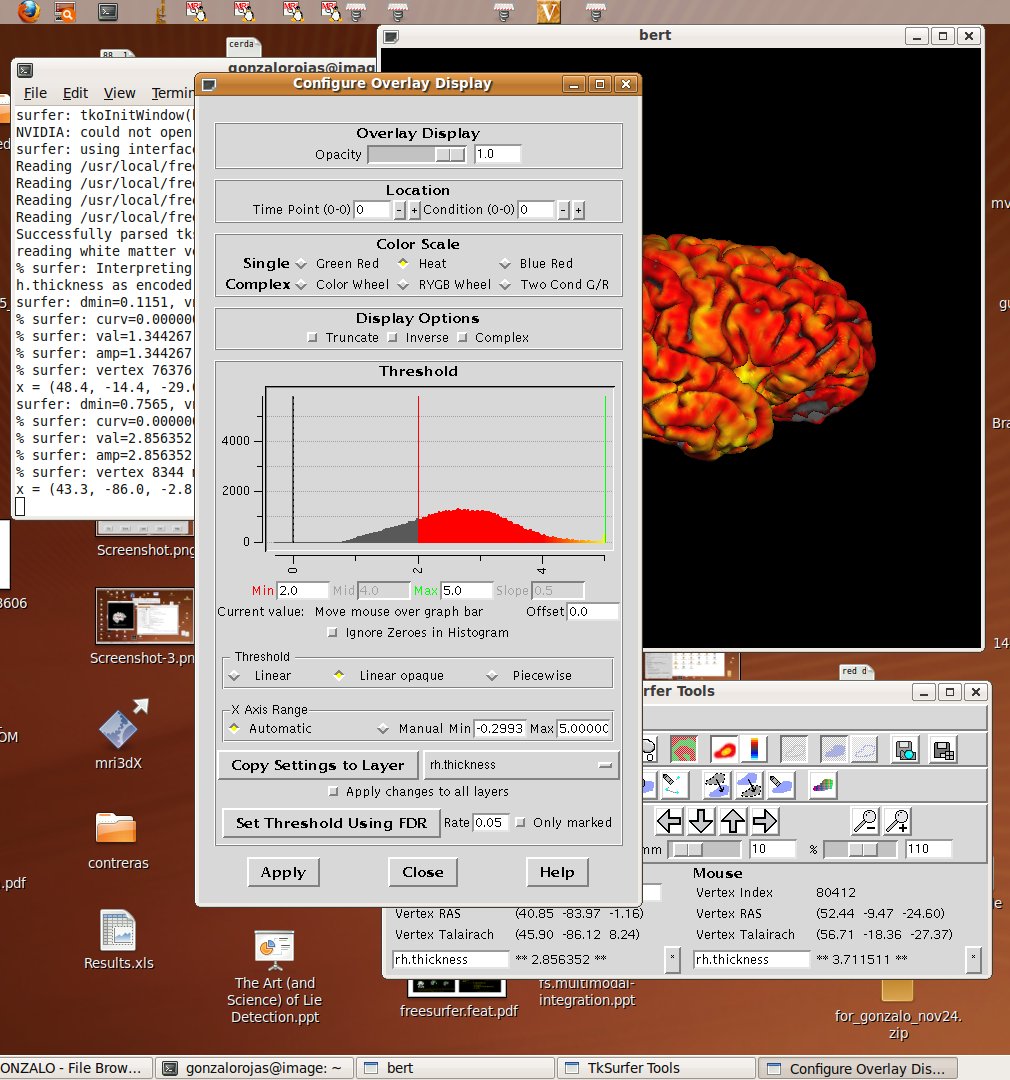
I have an ubuntu based computer with Freesurfer 5.0.0, and the lowest part of the View->Configure->Overlay window of tksurfer didn't appears (see attached image)... How can I correct it ?... The PC has 1440x900 of screen resolution... How can I view the complete window ?...
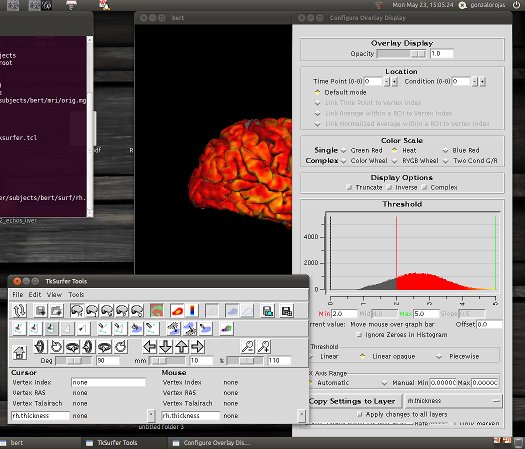
In another PC with 1920x1080 of screen resolution, Freesurfer 4.5.0 and another Ubuntu version, that tksurfer window looks ok (see atached image)...
Sincerely,
Gonzalo Rojas Costa Laboratory for Advanced Medical Image Processing Department of Radiology Las Condes Clinic Lo Fontecilla 441, Las Condes, Santiago, Chile. Tel: 56-2-2105170 Cel: 56-9-97771785 www.clc.cl

Sorry, this is a known bug. I'll send an email once it's fixed
Best Krish
On May 23, 2011, at 3:21 PM, Gonzalo Rojas Costa wrote:
Hi:
I have an ubuntu based computer with Freesurfer 5.0.0, and the lowest part of the View->Configure->Overlay window of tksurfer didn't appears (see attached image)... How can I correct it ?... The PC has 1440x900 of screen resolution... How can I view the complete window ?...
In another PC with 1920x1080 of screen resolution, Freesurfer 4.5.0 and another Ubuntu version, that tksurfer window looks ok (see atached image)...
Sincerely,
Gonzalo Rojas Costa Laboratory for Advanced Medical Image Processing Department of Radiology Las Condes Clinic Lo Fontecilla 441, Las Condes, Santiago, Chile. Tel: 56-2-2105170 Cel: 56-9-97771785 www.clc.cl
< Screenshot -4 .jpg><Screenshot-5.jpg>_______________________________________________ Freesurfer mailing list Freesurfer@nmr.mgh.harvard.edu https://mail.nmr.mgh.harvard.edu/mailman/listinfo/freesurfer

if the problem is that the 'Apply' button is not visible (which is the case where this screen doesnt fit at smaller resolutions) a workaround is to press the space bar, which does the same thing as pressing 'Apply'.
n.
On Mon, 2011-05-23 at 15:35 -0400, Krish Subramaniam wrote:
Sorry, this is a known bug. I'll send an email once it's fixed
Best Krish
On May 23, 2011, at 3:21 PM, Gonzalo Rojas Costa wrote:
Hi:
I have an ubuntu based computer with Freesurfer 5.0.0, and the lowest part of the View->Configure->Overlay window of tksurfer didn't appears (see attached image)... How can I correct it ?... The PC has 1440x900 of screen resolution... How can I view the complete window ?...
In another PC with 1920x1080 of screen resolution, Freesurfer 4.5.0 and another Ubuntu version, that tksurfer window looks ok (see atached image)...
Sincerely,
Gonzalo Rojas Costa Laboratory for Advanced Medical Image Processing Department of Radiology Las Condes Clinic Lo Fontecilla 441, Las Condes, Santiago, Chile. Tel: 56-2-2105170 Cel: 56-9-97771785 www.clc.cl
< Screenshot -4 .jpg><Screenshot-5.jpg>_______________________________________________ Freesurfer mailing list Freesurfer@nmr.mgh.harvard.edu https://mail.nmr.mgh.harvard.edu/mailman/listinfo/freesurfer
Freesurfer mailing list Freesurfer@nmr.mgh.harvard.edu https://mail.nmr.mgh.harvard.edu/mailman/listinfo/freesurfer
freesurfer@nmr.mgh.harvard.edu
-
 Gonzalo Rojas Costa
 -
 Krish Subramaniam
 -
 Nick Schmansky