
External Email - Use Caution
Dear Freesurfer developers, We have a series of MRI scans and we are trying to extract cortical thickness in certain regions of interest. The ROIs already exist - some are in .img and some in NIFTI format - and we want to tranform them into labels and then register them on fsaverage. The problem is that the ROIs are in MNI152 space (from SPM), with voxel size=2mm. We have tried various commands to register one of the .img ROIs on fsaverage, but they all failed:
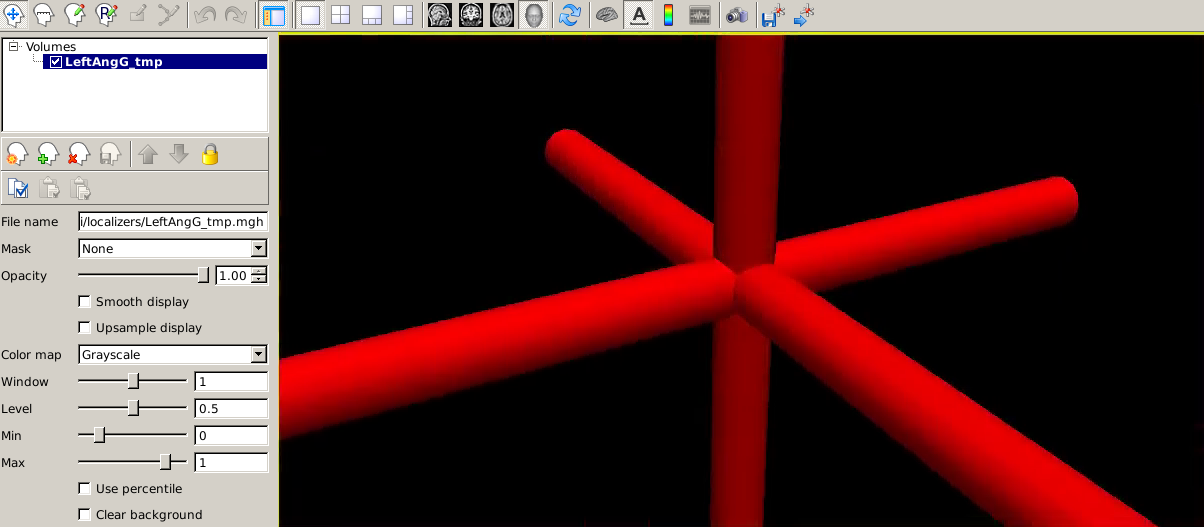
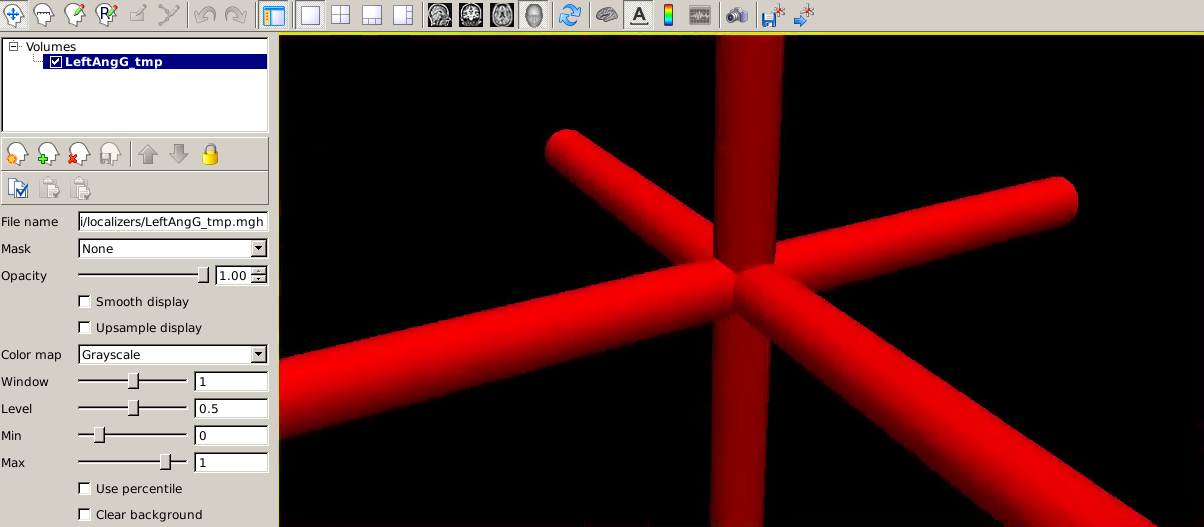
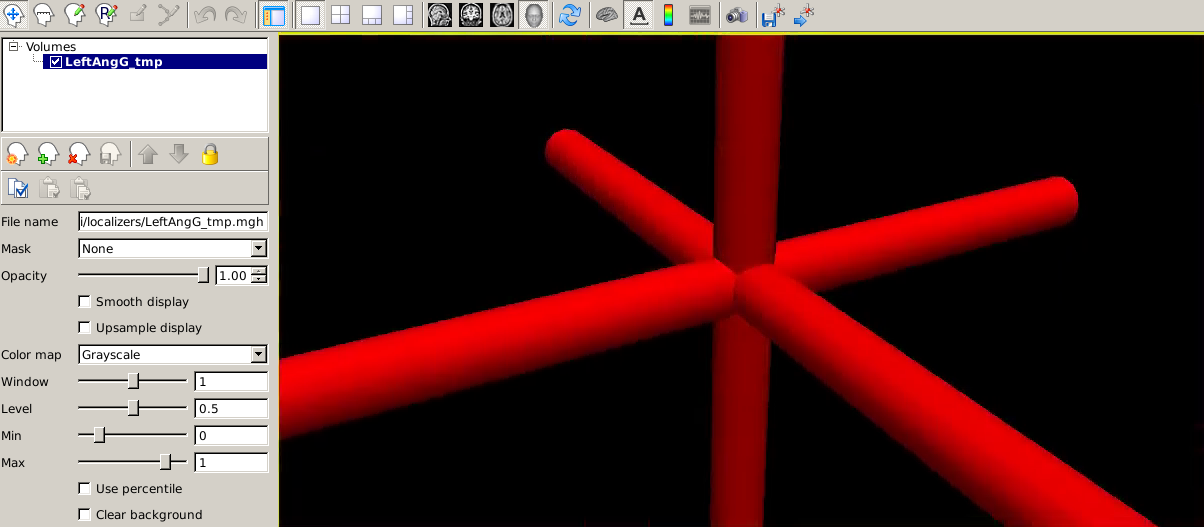
- $ fslregister --s fsaverage --mov ROI_set1/LeftAnGG.img --reg tmp.dat - $ tkmedit fsaverage T1.mgz -overlay ROI_set1/LeftAngG.img -overlay-reg tmp.dat - $ mri_vol2surf --mov ROI_set1/LeftAngG.img --reg tmp.dat --interp nearest --hemi lh --out Left_AngG_tmp.mgh --projdist-max 0 1 0.1 --noreshape - $ mri_vol2surf --mov ROI_set1/LeftAngG.img --reg tmp.dat --interp nearest --hemi lh --out Left_AngG_tmp.mgh --targ $SUBJECTS_DIR/fsaverage/mri/orig.mgz The result is that the ROI is either not in the right place, or the right size or we just end up with a weird 3D cross shape in freeview. Could you please suggest something that we could do to fix this? Thank you so much in advance! Best regards,Eleni

Try running recon-all on the MNI152. Load the ROI onto the reconned MNI152; load the surfaces as well and make sure that the ROI intersects with the surface, then use #3 below with --regheader MNI152 instead of --reg tmp.dat. You can also specify --trgsubject fsaverage and mri_vol2surf will map the ROI all the way onto the fsaverage surface
On 7/1/2020 10:03 AM, Eleni Nikalexi wrote:
External Email - Use Caution
Dear Freesurfer developers,
We have a series of MRI scans and we are trying to extract cortical thickness in certain regions of interest. The ROIs already exist - some are in .img and some in NIFTI format - and we want to tranform them into labels and then register them on fsaverage. The problem is that the ROIs are in MNI152 space (from SPM), with voxel size=2mm. We have tried various commands to register one of the .img ROIs on fsaverage, but they all failed:
- $ fslregister --s fsaverage --mov ROI_set1/LeftAnGG.img --reg tmp.dat
- $ tkmedit fsaverage T1.mgz -overlay ROI_set1/LeftAngG.img -overlay-reg tmp.dat
- $ mri_vol2surf --mov ROI_set1/LeftAngG.img --reg tmp.dat --interp nearest --hemi lh --out Left_AngG_tmp.mgh --projdist-max 0 1 0.1 --noreshape
- $ mri_vol2surf --mov ROI_set1/LeftAngG.img --reg tmp.dat --interp nearest --hemi lh --out Left_AngG_tmp.mgh --targ $SUBJECTS_DIR/fsaverage/mri/orig.mgz
The result is that the ROI is either not in the right place, or the right size or we just end up with a weird 3D cross shape in freeview.
Could you please suggest something that we could do to fix this?
Thank you so much in advance!
Best regards, Eleni
Freesurfer mailing list Freesurfer@nmr.mgh.harvard.edu https://mail.nmr.mgh.harvard.edu/mailman/listinfo/freesurfer
External Email - Use Caution
Dear Douglas,thank you very much for your help; I run the recon of MNI152_T1_1mm_brain.nii.gz (which I moved into a directory called MNI_1mm).Then I run the following command, as you suggested:$mri_vol2surf --mov ROI_set1/LeftAngG.img --regheader MNI_1mm --interp nearest --hemilh --out LeftAngG_tmp.mgh --projdist-max 0 1 0.1 --noreshape But then, in freeview I get the following result:
I also get an error when I try to load it as a surface:"LeftAngG_tmp.mgh' has 0 vertices!Probably trying to use a scalar data file as a surface!" What could be the mistake? Best regards,Eleni
On Thursday, July 2, 2020, 04:25:54 PM GMT+3, Douglas N. Greve dgreve@mgh.harvard.edu wrote:
Try running recon-all on the MNI152. Load the ROI onto the reconned MNI152; load the surfaces as well and make sure that the ROI intersects with the surface, then use #3 below with --regheader MNI152 instead of --reg tmp.dat. You can also specify --trgsubject fsaverage and mri_vol2surf will map the ROI all the way onto the fsaverage surface
On 7/1/2020 10:03 AM, Eleni Nikalexi wrote:
External Email - Use Caution Dear Freesurfer developers, We have a series of MRI scans and we are trying to extract cortical thickness in certain regions of interest. The ROIs already exist - some are in .img and some in NIFTI format - and we want to tranform them into labels and then register them on fsaverage. The problem is that the ROIs are in MNI152 space (from SPM), with voxel size=2mm. We have tried various commands to register one of the .img ROIs on fsaverage, but they all failed:
- $ fslregister --s fsaverage --mov ROI_set1/LeftAnGG.img --reg tmp.dat - $ tkmedit fsaverage T1.mgz -overlay ROI_set1/LeftAngG.img -overlay-reg tmp.dat - $ mri_vol2surf --mov ROI_set1/LeftAngG.img --reg tmp.dat --interp nearest --hemi lh --out Left_AngG_tmp.mgh --projdist-max 0 1 0.1 --noreshape - $ mri_vol2surf --mov ROI_set1/LeftAngG.img --reg tmp.dat --interp nearest --hemi lh --out Left_AngG_tmp.mgh --targ $SUBJECTS_DIR/fsaverage/mri/orig.mgz The result is that the ROI is either not in the right place, or the right size or we just end up with a weird 3D cross shape in freeview. Could you please suggest something that we could do to fix this? Thank you so much in advance! Best regards, Eleni
_______________________________________________ Freesurfer mailing list Freesurfer@nmr.mgh.harvard.edu https://mail.nmr.mgh.harvard.edu/mailman/listinfo/freesurfer
_______________________________________________ Freesurfer mailing list Freesurfer@nmr.mgh.harvard.edu https://mail.nmr.mgh.harvard.edu/mailman/listinfo/freesurfer

Hi Eleni
What is your freeview command line? Note that in this case the output of mri_vol2surf is *not* a surface, but rather a scalar field over the surface (that is, a file with one or more values per vertex location). To visualize it you need to load a surface, then load your overlay on top of it. Look at the freeview help on overlays, but it should be something like:
Freeview -f lh.inflated:overlay=LeftAngG_tmp.mgh
Cheers Bruce
From: freesurfer-bounces@nmr.mgh.harvard.edu freesurfer-bounces@nmr.mgh.harvard.edu On Behalf Of Eleni Nikalexi Sent: Friday, July 3, 2020 10:11 AM To: Freesurfer support list freesurfer@nmr.mgh.harvard.edu Subject: Re: [Freesurfer] Label on fsaverage failure
External Email - Use Caution Dear Douglas, thank you very much for your help; I run the recon of MNI152_T1_1mm_brain.nii.gz (which I moved into a directory called MNI_1mm). Then I run the following command, as you suggested: $ mri_vol2surf --mov ROI_set1/LeftAngG.img --regheader MNI_1mm --interp nearest --hemi lh --out LeftAngG_tmp.mgh --projdist-max 0 1 0.1 --noreshape
But then, in freeview I get the following result:
[Inline image]
I also get an error when I try to load it as a surface: "LeftAngG_tmp.mgh' has 0 vertices! Probably trying to use a scalar data file as a surface!"
What could be the mistake?
Best regards, Eleni
On Thursday, July 2, 2020, 04:25:54 PM GMT+3, Douglas N. Greve <dgreve@mgh.harvard.edumailto:dgreve@mgh.harvard.edu> wrote:
Try running recon-all on the MNI152. Load the ROI onto the reconned MNI152; load the surfaces as well and make sure that the ROI intersects with the surface, then use #3 below with --regheader MNI152 instead of --reg tmp.dat. You can also specify --trgsubject fsaverage and mri_vol2surf will map the ROI all the way onto the fsaverage surface On 7/1/2020 10:03 AM, Eleni Nikalexi wrote:
External Email - Use Caution Dear Freesurfer developers,
We have a series of MRI scans and we are trying to extract cortical thickness in certain regions of interest. The ROIs already exist - some are in .img and some in NIFTI format - and we want to tranform them into labels and then register them on fsaverage. The problem is that the ROIs are in MNI152 space (from SPM), with voxel size=2mm. We have tried various commands to register one of the .img ROIs on fsaverage, but they all failed:
1. $ fslregister --s fsaverage --mov ROI_set1/LeftAnGG.img --reg tmp.dat 2. $ tkmedit fsaverage T1.mgz -overlay ROI_set1/LeftAngG.img -overlay-reg tmp.dat 3. $ mri_vol2surf --mov ROI_set1/LeftAngG.img --reg tmp.dat --interp nearest --hemi lh --out Left_AngG_tmp.mgh --projdist-max 0 1 0.1 --noreshape 4. $ mri_vol2surf --mov ROI_set1/LeftAngG.img --reg tmp.dat --interp nearest --hemi lh --out Left_AngG_tmp.mgh --targ $SUBJECTS_DIR/fsaverage/mri/orig.mgz The result is that the ROI is either not in the right place, or the right size or we just end up with a weird 3D cross shape in freeview.
Could you please suggest something that we could do to fix this?
Thank you so much in advance!
Best regards, Eleni
_______________________________________________
Freesurfer mailing list
Freesurfer@nmr.mgh.harvard.edumailto:Freesurfer@nmr.mgh.harvard.edu
https://mail.nmr.mgh.harvard.edu/mailman/listinfo/freesurfer
_______________________________________________ Freesurfer mailing list Freesurfer@nmr.mgh.harvard.edumailto:Freesurfer@nmr.mgh.harvard.edu https://mail.nmr.mgh.harvard.edu/mailman/listinfo/freesurfer
External Email - Use Caution
Dear Bruce and Douglas,Thank you very much for the prompt, indeed it worked. Since the ROIs were originally obtained in 2mm voxel size, I used the vol2surf command as you suggested, in order map the ROI all the way onto the fsaverage surface:
$mri_vol2surf --mov ROI_set1/LeftAngG.img --regheaderMNI_1mm --interp nearest --hemi lh --out Left_AngG_tmpfs.mgh --projdist-max 0 10.1 --noreshape --trgsubject fsaverage
I checked the result using: $ freeview -f../data/scans/subject/fsaverage/surf/lh.inflated:overlay=Left_AngG_tmpfs.mgh
and the overlay is correct.Then, I tried to transform the Left_AngG_tmpfs.mgh to a label using the fsaverage as a reference. The command I used was: $ mri_vol2label --i Left_AngG_tmpfs.mgh --id 1 --l LeftAngG_tmp.label --surf fsaverage lh white
but permission was denied. If I try to use one of my subjects as a reference I get: ERROR: dim mismatch between surface (117900) and input (163842).What would you suggest? Thank you in advance,Best wishes,Eleni On Friday, July 3, 2020, 06:35:05 PM GMT+3, Fischl, Bruce bfischl@mgh.harvard.edu wrote:
#yiv2641346477 #yiv2641346477 -- _filtered {} _filtered {} _filtered {} _filtered {} _filtered {}#yiv2641346477 #yiv2641346477 p.yiv2641346477MsoNormal, #yiv2641346477 li.yiv2641346477MsoNormal, #yiv2641346477 div.yiv2641346477MsoNormal {margin:0in;margin-bottom:.0001pt;font-size:11.0pt;font-family:sans-serif;}#yiv2641346477 a:link, #yiv2641346477 span.yiv2641346477MsoHyperlink {color:blue;text-decoration:underline;}#yiv2641346477 a:visited, #yiv2641346477 span.yiv2641346477MsoHyperlinkFollowed {color:purple;text-decoration:underline;}#yiv2641346477 pre {margin:0in;margin-bottom:.0001pt;font-size:10.0pt;}#yiv2641346477 p.yiv2641346477msonormal0, #yiv2641346477 li.yiv2641346477msonormal0, #yiv2641346477 div.yiv2641346477msonormal0 {margin-right:0in;margin-left:0in;font-size:11.0pt;font-family:sans-serif;}#yiv2641346477 span.yiv2641346477HTMLPreformattedChar {font-family:Consolas;}#yiv2641346477 span.yiv2641346477EmailStyle22 {font-family:sans-serif;color:windowtext;}#yiv2641346477 .yiv2641346477MsoChpDefault {font-size:10.0pt;} _filtered {}#yiv2641346477 div.yiv2641346477WordSection1 {}#yiv2641346477 _filtered {}#yiv2641346477 ol {margin-bottom:0in;}#yiv2641346477 ul {margin-bottom:0in;}#yiv2641346477 Hi Eleni
What is your freeview command line? Note that in this case the output of mri_vol2surf is *not* a surface, but rather a scalar field over the surface (that is, a file with one or more values per vertex location). To visualize it you need to load a surface, then load your overlay on top of it. Look at the freeview help on overlays, but it should be something like:
Freeview -f lh.inflated:overlay=LeftAngG_tmp.mgh
Cheers
Bruce
From: freesurfer-bounces@nmr.mgh.harvard.edu freesurfer-bounces@nmr.mgh.harvard.eduOn Behalf Of Eleni Nikalexi Sent: Friday, July 3, 2020 10:11 AM To: Freesurfer support list freesurfer@nmr.mgh.harvard.edu Subject: Re: [Freesurfer] Label on fsaverage failure
External Email - Use Caution
Dear Douglas,
thank you very much for your help; I run the recon of MNI152_T1_1mm_brain.nii.gz (which I moved into a directory called MNI_1mm).
Then I run the following command, as you suggested:
$ mri_vol2surf --mov ROI_set1/LeftAngG.img --regheader MNI_1mm --interp nearest --hemi lh --out LeftAngG_tmp.mgh --projdist-max 0 1 0.1 --noreshape
But then, in freeview I get the following result:
I also get an error when I try to load it as a surface:
"LeftAngG_tmp.mgh' has 0 vertices!
Probably trying to use a scalar data file as a surface!"
What could be the mistake?
Best regards,
Eleni
On Thursday, July 2, 2020, 04:25:54 PM GMT+3, Douglas N. Greve dgreve@mgh.harvard.edu wrote:
Try running recon-all on the MNI152. Load the ROI onto the reconned MNI152; load the surfaces as well and make sure that the ROI intersects with the surface, then use #3 below with --regheader MNI152 instead of --reg tmp.dat. You can also specify --trgsubject fsaverage and mri_vol2surf will map the ROI all the way onto the fsaverage surface
On 7/1/2020 10:03 AM, Eleni Nikalexi wrote:
External Email - Use Caution
Dear Freesurfer developers,
We have a series of MRI scans and we are trying to extract cortical thickness in certain regions of interest. The ROIs already exist - some are in .img and some in NIFTI format - and we want to tranform them into labels and then register them on fsaverage. The problem is that the ROIs are in MNI152 space (from SPM), with voxel size=2mm.
We have tried various commands to register one of the .img ROIs on fsaverage, but they all failed:
- $ fslregister --s fsaverage --mov ROI_set1/LeftAnGG.img --reg tmp.dat - $ tkmedit fsaverage T1.mgz -overlay ROI_set1/LeftAngG.img -overlay-reg tmp.dat - $ mri_vol2surf --mov ROI_set1/LeftAngG.img --reg tmp.dat --interp nearest --hemi lh --out Left_AngG_tmp.mgh --projdist-max 0 1 0.1 --noreshape - $ mri_vol2surf --mov ROI_set1/LeftAngG.img --reg tmp.dat --interp nearest --hemi lh --out Left_AngG_tmp.mgh --targ $SUBJECTS_DIR/fsaverage/mri/orig.mgz
The result is that the ROI is either not in the right place, or the right size or we just end up with a weird 3D cross shape in freeview.
Could you please suggest something that we could do to fix this?
Thank you so much in advance!
Best regards,
Eleni
_______________________________________________ Freesurfer mailing list Freesurfer@nmr.mgh.harvard.edu https://mail.nmr.mgh.harvard.edu/mailman/listinfo/freesurfer
_______________________________________________ Freesurfer mailing list Freesurfer@nmr.mgh.harvard.edu https://mail.nmr.mgh.harvard.edu/mailman/listinfo/freesurfer _______________________________________________ Freesurfer mailing list Freesurfer@nmr.mgh.harvard.edu https://mail.nmr.mgh.harvard.edu/mailman/listinfo/freesurfer
It has to be loaded as an overlay to a surface, not a surface itself.
On 7/3/2020 10:10 AM, Eleni Nikalexi wrote:
External Email - Use Caution
Dear Douglas, thank you very much for your help; I run the recon of MNI152_T1_1mm_brain.nii.gz (which I moved into a directory called MNI_1mm). Then I run the following command, as you suggested: $ mri_vol2surf --mov ROI_set1/LeftAngG.img--regheader MNI_1mm --interp nearest --hemi lh --out LeftAngG_tmp.mgh --projdist-max 0 1 0.1 --noreshape
But then, in freeview I get the following result:
Inline image
I also get an error when I try to load it as a surface: "LeftAngG_tmp.mgh' has 0 vertices! Probably trying to use a scalar data file as a surface!"
What could be the mistake?
Best regards, Eleni
On Thursday, July 2, 2020, 04:25:54 PM GMT+3, Douglas N. Greve dgreve@mgh.harvard.edu wrote:
Try running recon-all on the MNI152. Load the ROI onto the reconned MNI152; load the surfaces as well and make sure that the ROI intersects with the surface, then use #3 below with --regheader MNI152 instead of --reg tmp.dat. You can also specify --trgsubject fsaverage and mri_vol2surf will map the ROI all the way onto the fsaverage surface
On 7/1/2020 10:03 AM, Eleni Nikalexi wrote:
External Email - Use Caution
Dear Freesurfer developers,
We have a series of MRI scans and we are trying to extract cortical thickness in certain regions of interest. The ROIs already exist - some are in .img and some in NIFTI format - and we want to tranform them into labels and then register them on fsaverage. The problem is that the ROIs are in MNI152 space (from SPM), with voxel size=2mm. We have tried various commands to register one of the .img ROIs on fsaverage, but they all failed:
- $ fslregister --s fsaverage --mov ROI_set1/LeftAnGG.img --reg tmp.dat
- $ tkmedit fsaverage T1.mgz -overlay ROI_set1/LeftAngG.img -overlay-reg tmp.dat
- $ mri_vol2surf --mov ROI_set1/LeftAngG.img --reg tmp.dat --interp nearest --hemi lh --out Left_AngG_tmp.mgh --projdist-max 0 1 0.1 --noreshape
- $ mri_vol2surf --mov ROI_set1/LeftAngG.img --reg tmp.dat --interp nearest --hemi lh --out Left_AngG_tmp.mgh --targ $SUBJECTS_DIR/fsaverage/mri/orig.mgz
The result is that the ROI is either not in the right place, or the right size or we just end up with a weird 3D cross shape in freeview.
Could you please suggest something that we could do to fix this?
Thank you so much in advance!
Best regards, Eleni
Freesurfer mailing list Freesurfer@nmr.mgh.harvard.edu mailto:Freesurfer@nmr.mgh.harvard.edu https://mail.nmr.mgh.harvard.edu/mailman/listinfo/freesurfer
Freesurfer mailing list Freesurfer@nmr.mgh.harvard.edu mailto:Freesurfer@nmr.mgh.harvard.edu https://mail.nmr.mgh.harvard.edu/mailman/listinfo/freesurfer
Freesurfer mailing list Freesurfer@nmr.mgh.harvard.edu https://mail.nmr.mgh.harvard.edu/mailman/listinfo/freesurfer
freesurfer@nmr.mgh.harvard.edu
-
 Douglas N. Greve
 -
 Eleni Nikalexi
 -
 Fischl, Bruce