Hi Eleni
What is your freeview command line? Note that in this case the output of mri_vol2surf is *not* a surface, but rather a scalar field over the surface (that is, a file with one or more values per vertex location). To visualize it you need to load a surface, then load your overlay on top of it. Look at the freeview help on overlays, but it should be something like:
Freeview -f lh.inflated:overlay=LeftAngG_tmp.mgh
Cheers Bruce
From: freesurfer-bounces@nmr.mgh.harvard.edu freesurfer-bounces@nmr.mgh.harvard.edu On Behalf Of Eleni Nikalexi Sent: Friday, July 3, 2020 10:11 AM To: Freesurfer support list freesurfer@nmr.mgh.harvard.edu Subject: Re: [Freesurfer] Label on fsaverage failure
External Email - Use Caution Dear Douglas, thank you very much for your help; I run the recon of MNI152_T1_1mm_brain.nii.gz (which I moved into a directory called MNI_1mm). Then I run the following command, as you suggested: $ mri_vol2surf --mov ROI_set1/LeftAngG.img --regheader MNI_1mm --interp nearest --hemi lh --out LeftAngG_tmp.mgh --projdist-max 0 1 0.1 --noreshape
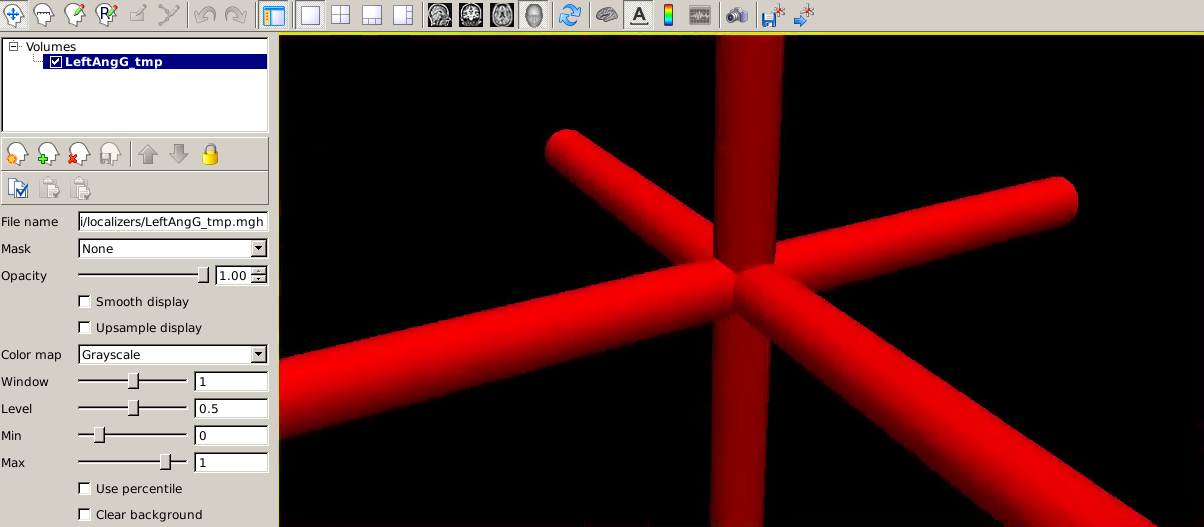
But then, in freeview I get the following result:
[Inline image]
I also get an error when I try to load it as a surface: "LeftAngG_tmp.mgh' has 0 vertices! Probably trying to use a scalar data file as a surface!"
What could be the mistake?
Best regards, Eleni
On Thursday, July 2, 2020, 04:25:54 PM GMT+3, Douglas N. Greve <dgreve@mgh.harvard.edumailto:dgreve@mgh.harvard.edu> wrote:
Try running recon-all on the MNI152. Load the ROI onto the reconned MNI152; load the surfaces as well and make sure that the ROI intersects with the surface, then use #3 below with --regheader MNI152 instead of --reg tmp.dat. You can also specify --trgsubject fsaverage and mri_vol2surf will map the ROI all the way onto the fsaverage surface On 7/1/2020 10:03 AM, Eleni Nikalexi wrote:
External Email - Use Caution Dear Freesurfer developers,
We have a series of MRI scans and we are trying to extract cortical thickness in certain regions of interest. The ROIs already exist - some are in .img and some in NIFTI format - and we want to tranform them into labels and then register them on fsaverage. The problem is that the ROIs are in MNI152 space (from SPM), with voxel size=2mm. We have tried various commands to register one of the .img ROIs on fsaverage, but they all failed:
1. $ fslregister --s fsaverage --mov ROI_set1/LeftAnGG.img --reg tmp.dat 2. $ tkmedit fsaverage T1.mgz -overlay ROI_set1/LeftAngG.img -overlay-reg tmp.dat 3. $ mri_vol2surf --mov ROI_set1/LeftAngG.img --reg tmp.dat --interp nearest --hemi lh --out Left_AngG_tmp.mgh --projdist-max 0 1 0.1 --noreshape 4. $ mri_vol2surf --mov ROI_set1/LeftAngG.img --reg tmp.dat --interp nearest --hemi lh --out Left_AngG_tmp.mgh --targ $SUBJECTS_DIR/fsaverage/mri/orig.mgz The result is that the ROI is either not in the right place, or the right size or we just end up with a weird 3D cross shape in freeview.
Could you please suggest something that we could do to fix this?
Thank you so much in advance!
Best regards, Eleni
_______________________________________________
Freesurfer mailing list
Freesurfer@nmr.mgh.harvard.edumailto:Freesurfer@nmr.mgh.harvard.edu
https://mail.nmr.mgh.harvard.edu/mailman/listinfo/freesurfer
_______________________________________________ Freesurfer mailing list Freesurfer@nmr.mgh.harvard.edumailto:Freesurfer@nmr.mgh.harvard.edu https://mail.nmr.mgh.harvard.edu/mailman/listinfo/freesurfer