
Hi FreeSurfer community,
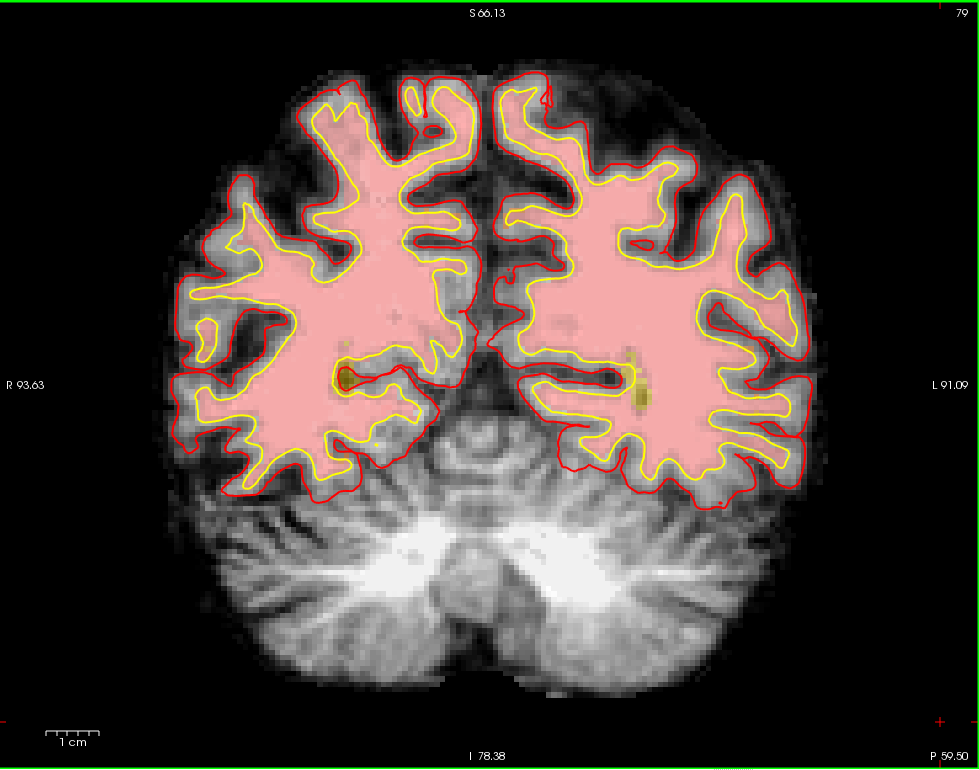
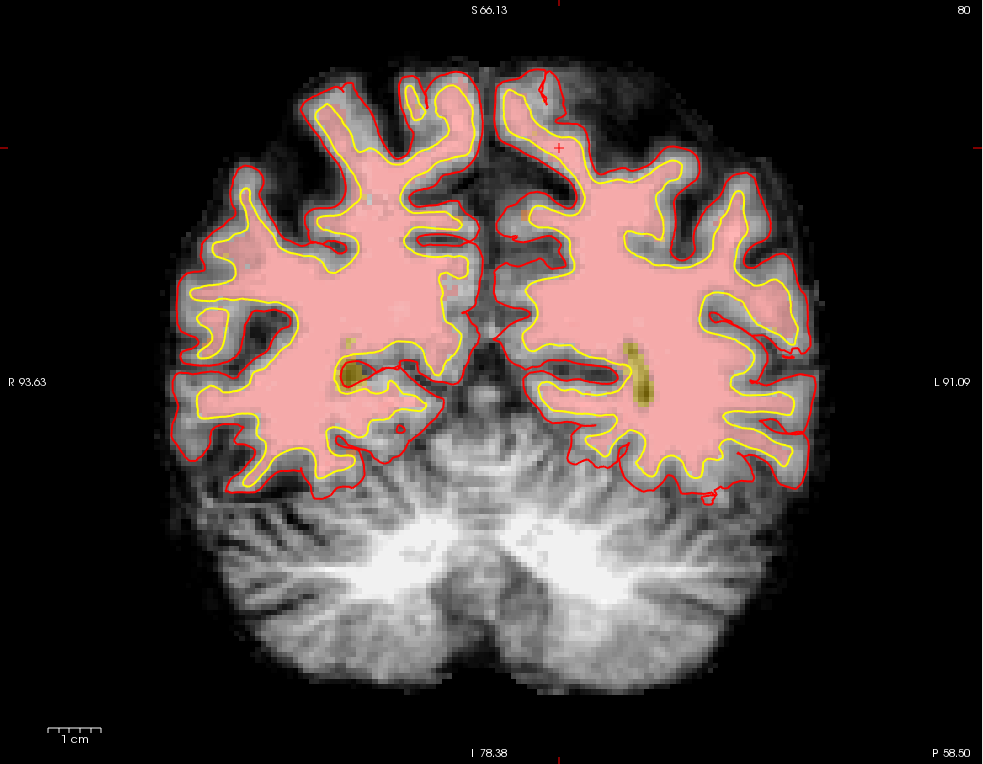
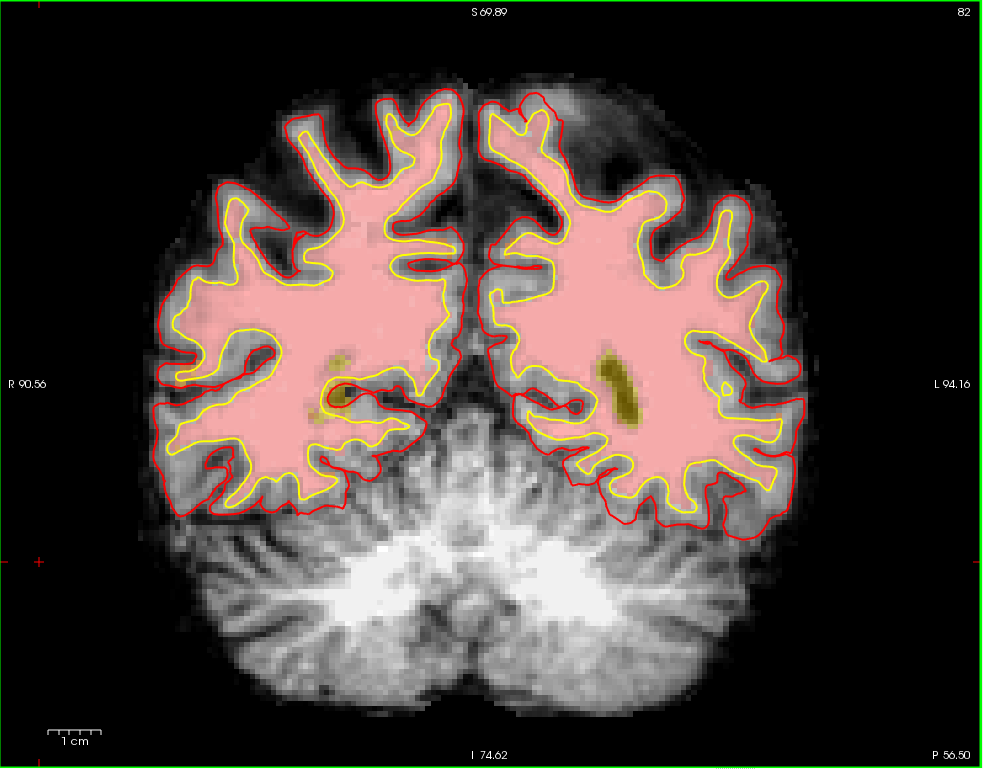
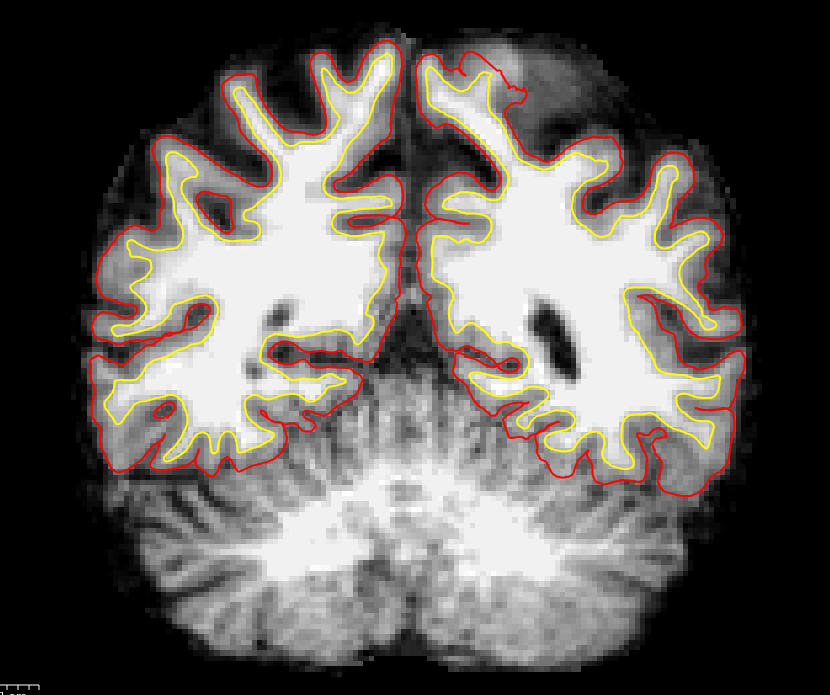
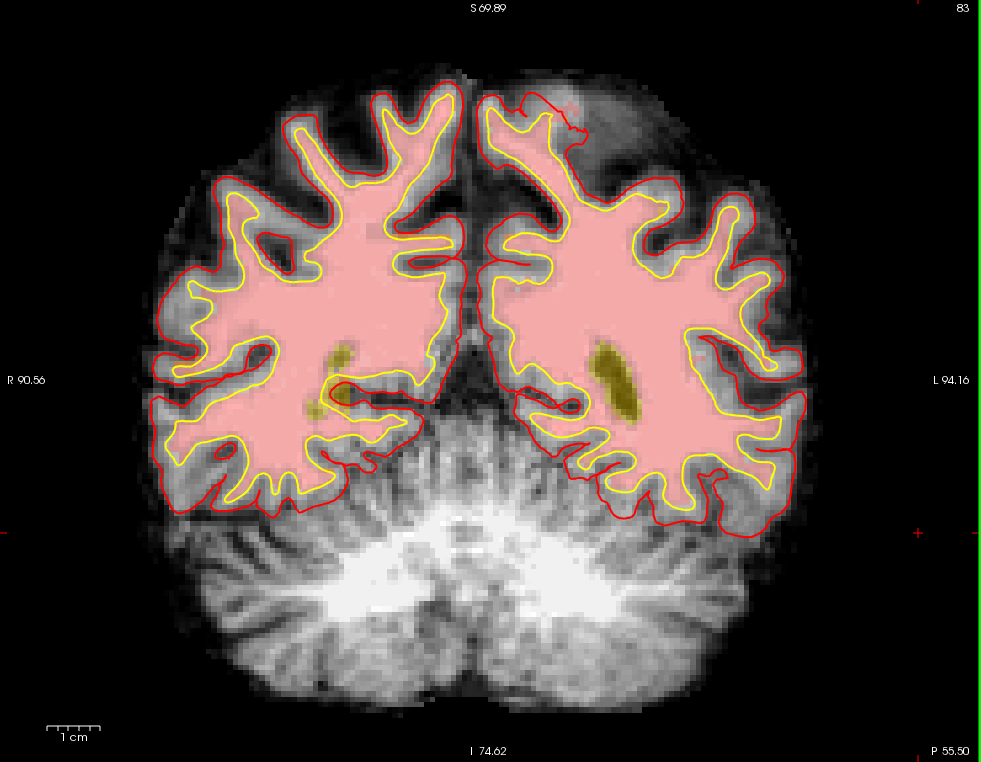
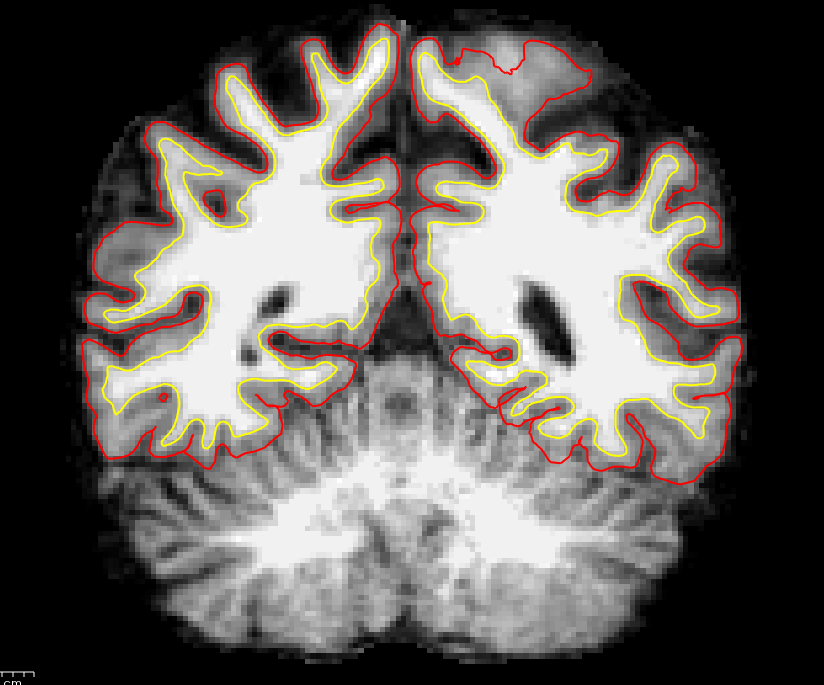
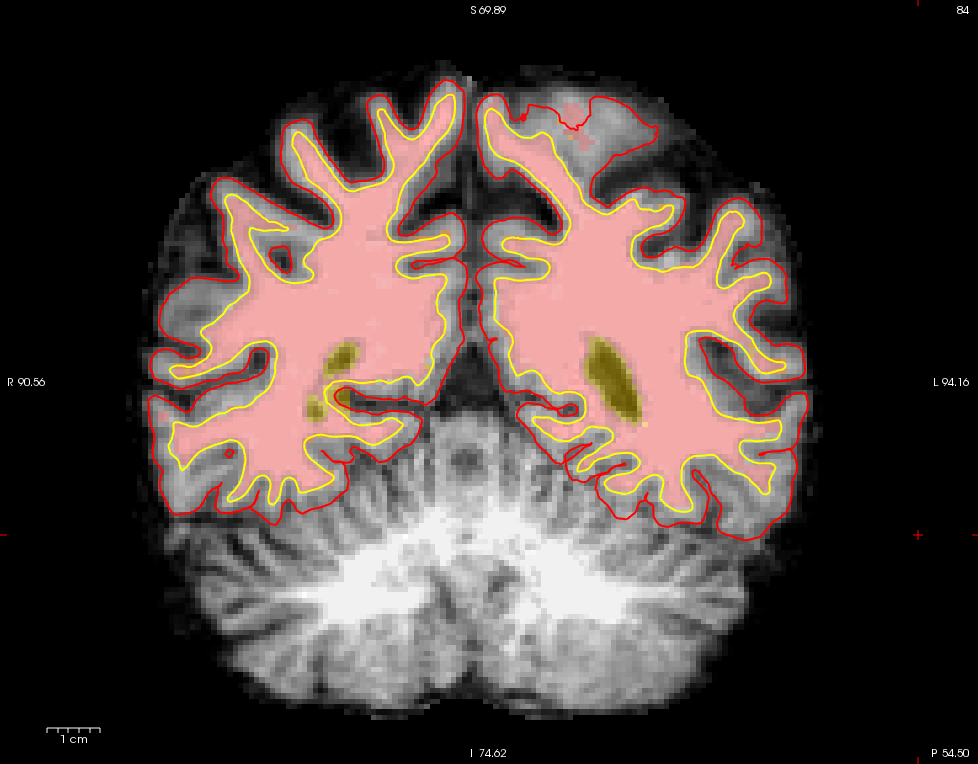
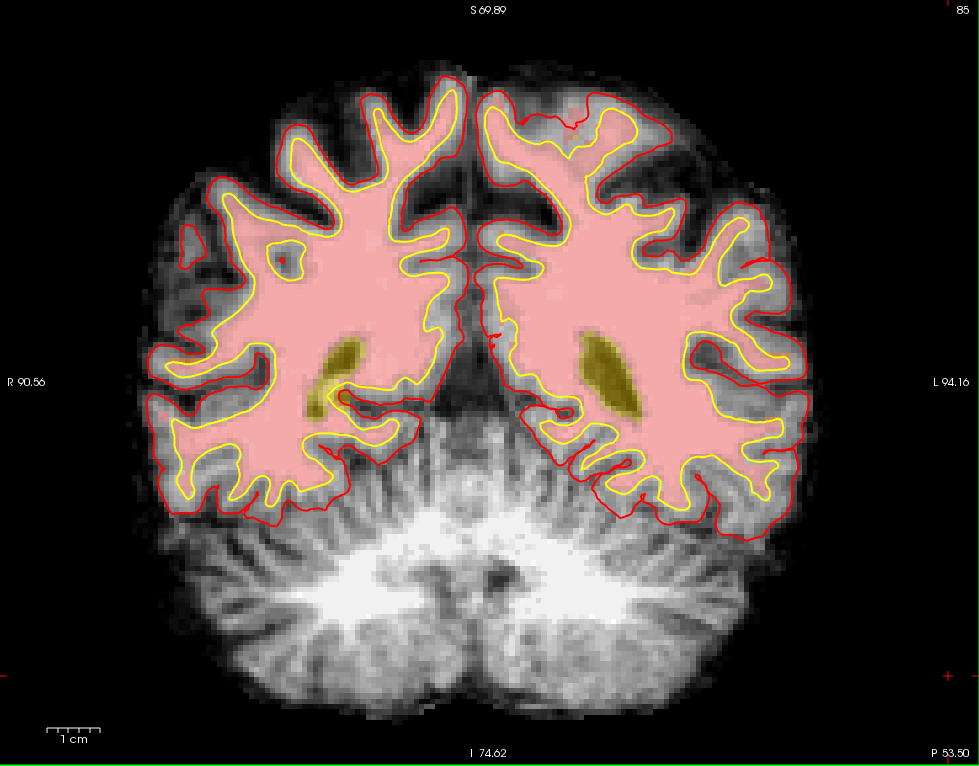
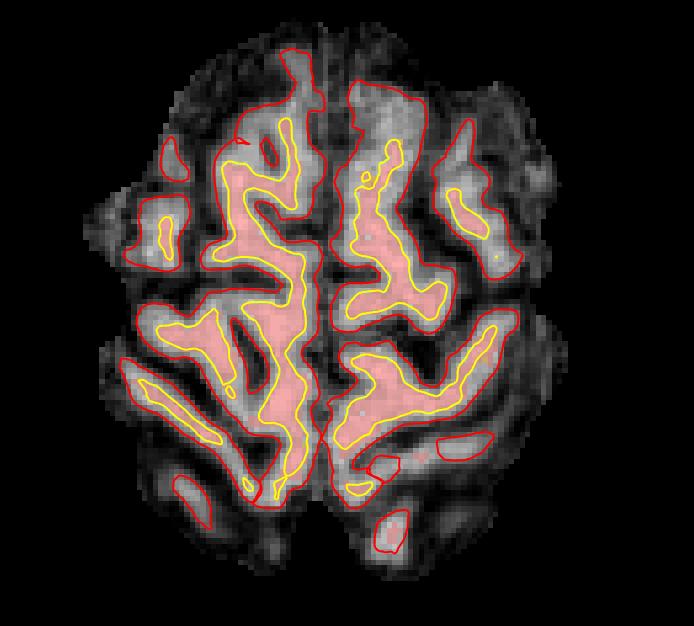
I am relatively new to manually editing and am having some questions dealing with editing the wm.mgz. Occasionally, white matter and grey matter are being incorrectly cut out, but I cannot edit WM voxels in the area (lh postcentral) because they are already considered WM in the heat map (but excluded from the boundary). I have attached images. How would I go about fixing this? Would control points work here?
And would the segmentation error in slices 79-81(lh postcentral) be edited by adding wm voxels (I can't really add any to slice 79)?
(This is an elderly brain.)
Thank you,
Emily



Probably a topological defect but we would need the data to tell. Feel free to ftp it to us and we will take a look Cheers Bruce
On Feb 8, 2018, at 12:19 PM, Emily Schwartz emily.schwartz@einstein.yu.edu wrote:
Hi FreeSurfer community,
I am relatively new to manually editing and am having some questions dealing with editing the wm.mgz. Occasionally, white matter and grey matter are being incorrectly cut out, but I cannot edit WM voxels in the area (lh postcentral) because they are already considered WM in the heat map (but excluded from the boundary). I have attached images. How would I go about fixing this? Would control points work here?
And would the segmentation error in slices 79-81(lh postcentral) be edited by adding wm voxels (I can't really add any to slice 79)?
(This is an elderly brain.)
Thank you,
Emily
<slice79_wm.png> <slice80_wm.png> <slice81_wm.png> <slice82_wm.png> <slice83_bm.png> <slice83_wm.png> <slice84_bm.png> <slice84_wm.png> <slice85_wm.png> <sliceax83_wm.png> <sliceax84_wm.png> _______________________________________________ Freesurfer mailing list Freesurfer@nmr.mgh.harvard.edu https://mail.nmr.mgh.harvard.edu/mailman/listinfo/freesurfer
Hi Bruce,
Thanks for getting back to me. I am trying to upload the data via ftp, but I either get the error " 200 PORT command successful. Consider using PASV. 553 Could not create file." or when I try epsv "?Invalid command."
Here is the session history:
Name (surfer.nmr.mgh.harvard.edu:admin): anonymous 331 Please specify the password. Password: 230 Login successful. Remote system type is UNIX. Using binary mode to transfer files. ftp> cd transfer/incoming 250 Directory successfully changed. ftp> put /home/admin/Desktop/FS_data_1.zip local: /home/admin/Desktop/FS_data_1.zip remote: /home/admin/Desktop/FS_data_1.zip 200 PORT command successful. Consider using PASV. 553 Could not create file. ftp> EPSV ?Invalid command ftp> PASV ?Invalid command ftp> ls 200 PORT command successful. Consider using PASV. 150 Here comes the directory listing. 226 Transfer done (but failed to open directory). ftp> pwd 257 "/transfer/incoming" ftp> put /home/admin/Desktop/FS_data_1.zip local: /home/admin/Desktop/FS_data_1.zip remote: /home/admin/Desktop/FS_data_1.zip 200 PORT command successful. Consider using PASV. 553 Could not create file. ftp> PASV ?Invalid command ftp> pasv ?Invalid command ftp> cd /home/admin/Desktop 550 Failed to change directory. ftp>
Do you have any advice on how to fix this?
Best,
Emily ________________________________________ From: freesurfer-bounces@nmr.mgh.harvard.edu [freesurfer-bounces@nmr.mgh.harvard.edu] on behalf of Bruce Fischl [fischl@nmr.mgh.harvard.edu] Sent: Thursday, February 08, 2018 11:16 PM To: Freesurfer support list Subject: Re: [Freesurfer] Wm.mgz editing
Probably a topological defect but we would need the data to tell. Feel free to ftp it to us and we will take a look Cheers Bruce
On Feb 8, 2018, at 12:19 PM, Emily Schwartz emily.schwartz@einstein.yu.edu wrote:
Hi FreeSurfer community,
I am relatively new to manually editing and am having some questions dealing with editing the wm.mgz. Occasionally, white matter and grey matter are being incorrectly cut out, but I cannot edit WM voxels in the area (lh postcentral) because they are already considered WM in the heat map (but excluded from the boundary). I have attached images. How would I go about fixing this? Would control points work here?
And would the segmentation error in slices 79-81(lh postcentral) be edited by adding wm voxels (I can't really add any to slice 79)?
(This is an elderly brain.)
Thank you,
Emily
<slice79_wm.png> <slice80_wm.png> <slice81_wm.png> <slice82_wm.png> <slice83_bm.png> <slice83_wm.png> <slice84_bm.png> <slice84_wm.png> <slice85_wm.png> <sliceax83_wm.png> <sliceax84_wm.png> _______________________________________________ Freesurfer mailing list Freesurfer@nmr.mgh.harvard.edu https://mail.nmr.mgh.harvard.edu/mailman/listinfo/freesurfer
_______________________________________________ Freesurfer mailing list Freesurfer@nmr.mgh.harvard.edu https://mail.nmr.mgh.harvard.edu/mailman/listinfo/freesurfer
The information in this e-mail is intended only for the person to whom it is addressed. If you believe this e-mail was sent to you in error and the e-mail contains patient information, please contact the Partners Compliance HelpLine at http://www.partners.org/complianceline . If the e-mail was sent to you in error but does not contain patient information, please contact the sender and properly dispose of the e-mail.

Hi Emily,
Another user had this problem recently, and we weren’t able to resolve it. For now, if your upload is less than 2GiB, I suggest sending your data via the Martinos file drop (directions at the bottom of this page: https://surfer.nmr.mgh.harvard.edu/fswiki/FtpFileExchange)
Let me know if this doesn’t work
best Andrew
On February 9, 2018 at 10:10:51 AM, Emily Schwartz (emily.schwartz@einstein.yu.edumailto:emily.schwartz@einstein.yu.edu) wrote:
Hi Bruce,
Thanks for getting back to me. I am trying to upload the data via ftp, but I either get the error " 200 PORT command successful. Consider using PASV. 553 Could not create file." or when I try epsv "?Invalid command."
Here is the session history:
Name (surfer.nmr.mgh.harvard.edu:admin): anonymous 331 Please specify the password. Password: 230 Login successful. Remote system type is UNIX. Using binary mode to transfer files. ftp> cd transfer/incoming 250 Directory successfully changed. ftp> put /home/admin/Desktop/FS_data_1.zip local: /home/admin/Desktop/FS_data_1.zip remote: /home/admin/Desktop/FS_data_1.zip 200 PORT command successful. Consider using PASV. 553 Could not create file. ftp> EPSV ?Invalid command ftp> PASV ?Invalid command ftp> ls 200 PORT command successful. Consider using PASV. 150 Here comes the directory listing. 226 Transfer done (but failed to open directory). ftp> pwd 257 "/transfer/incoming" ftp> put /home/admin/Desktop/FS_data_1.zip local: /home/admin/Desktop/FS_data_1.zip remote: /home/admin/Desktop/FS_data_1.zip 200 PORT command successful. Consider using PASV. 553 Could not create file. ftp> PASV ?Invalid command ftp> pasv ?Invalid command ftp> cd /home/admin/Desktop 550 Failed to change directory. ftp>
Do you have any advice on how to fix this?
Best,
Emily ________________________________________ From: freesurfer-bounces@nmr.mgh.harvard.edu [freesurfer-bounces@nmr.mgh.harvard.edu] on behalf of Bruce Fischl [fischl@nmr.mgh.harvard.edu] Sent: Thursday, February 08, 2018 11:16 PM To: Freesurfer support list Subject: Re: [Freesurfer] Wm.mgz editing
Probably a topological defect but we would need the data to tell. Feel free to ftp it to us and we will take a look Cheers Bruce
On Feb 8, 2018, at 12:19 PM, Emily Schwartz emily.schwartz@einstein.yu.edu wrote:
Hi FreeSurfer community,
I am relatively new to manually editing and am having some questions dealing with editing the wm.mgz. Occasionally, white matter and grey matter are being incorrectly cut out, but I cannot edit WM voxels in the area (lh postcentral) because they are already considered WM in the heat map (but excluded from the boundary). I have attached images. How would I go about fixing this? Would control points work here?
And would the segmentation error in slices 79-81(lh postcentral) be edited by adding wm voxels (I can't really add any to slice 79)?
(This is an elderly brain.)
Thank you,
Emily
<slice79_wm.png> <slice80_wm.png> <slice81_wm.png> <slice82_wm.png> <slice83_bm.png> <slice83_wm.png> <slice84_bm.png> <slice84_wm.png> <slice85_wm.png> <sliceax83_wm.png> <sliceax84_wm.png> _______________________________________________ Freesurfer mailing list Freesurfer@nmr.mgh.harvard.edu https://mail.nmr.mgh.harvard.edu/mailman/listinfo/freesurfer
_______________________________________________ Freesurfer mailing list Freesurfer@nmr.mgh.harvard.edu https://mail.nmr.mgh.harvard.edu/mailman/listinfo/freesurfer
The information in this e-mail is intended only for the person to whom it is addressed. If you believe this e-mail was sent to you in error and the e-mail contains patient information, please contact the Partners Compliance HelpLine at http://www.partners.org/complianceline . If the e-mail was sent to you in error but does not contain patient information, please contact the sender and properly dispose of the e-mail.
_______________________________________________ Freesurfer mailing list Freesurfer@nmr.mgh.harvard.edu https://mail.nmr.mgh.harvard.edu/mailman/listinfo/freesurfer
freesurfer@nmr.mgh.harvard.edu
-
 Bruce Fischl
 -
 Emily Schwartz
 -
 Hoopes, Andrew