
External Email - Use Caution
Dear freesurfer team,
I want to overlay the activation map that I got from SPM on the inflated surface. The command I use is:
"mri_vol2surf --mov spmT_funcmap.nii --ref subj01/mri/orig.mgz. --reg tk.dat --hemi rh --o flodername"
in which, I got the registration file (tk.dat) by aligning my functional mean image to the orig.mgz in tkregisterfv.
now the problem is when I overlay the activation map on the inflated surface, I can only see the voxels with positive t-values. I can't see the negative ones. I cannot change the threshold values provided by "configure overlay" to negative values. Also, changing the "z-score" option next to the overlay configuration doesn't make any difference. can you help me with this, please?
Thanks a lot,
Atena

Have you tried adjusting the threshold. Open the configure overlay
option. Also, sending a pic would be helpful (and the contents of
tk.dat)

On 11/22/2023 11:29 AM, Atena Akbari wrote:
External Email - Use Caution
Dear freesurfer team,
I want to overlay the activation map that I got from SPM on the inflated surface. The command I use is:
"mri_vol2surf --mov spmT_funcmap.nii --ref subj01/mri/orig.mgz. --reg tk.dat --hemi rh --o flodername"
in which, I got the registration file (tk.dat) by aligning my functional mean image to the orig.mgz in tkregisterfv.
now the problem is when I overlay the activation map on the inflated surface, I can only see the voxels with positive t-values. I can't see the negative ones. I cannot change the threshold values provided by "configure overlay" to negative values. Also, changing the "z-score" option next to the overlay configuration doesn't make any difference. can you help me with this, please?
Thanks a lot,
Atena
Freesurfer mailing list Freesurfer@nmr.mgh.harvard.edu https://mail.nmr.mgh.harvard.edu/mailman/listinfo/freesurfer
External Email - Use Caution
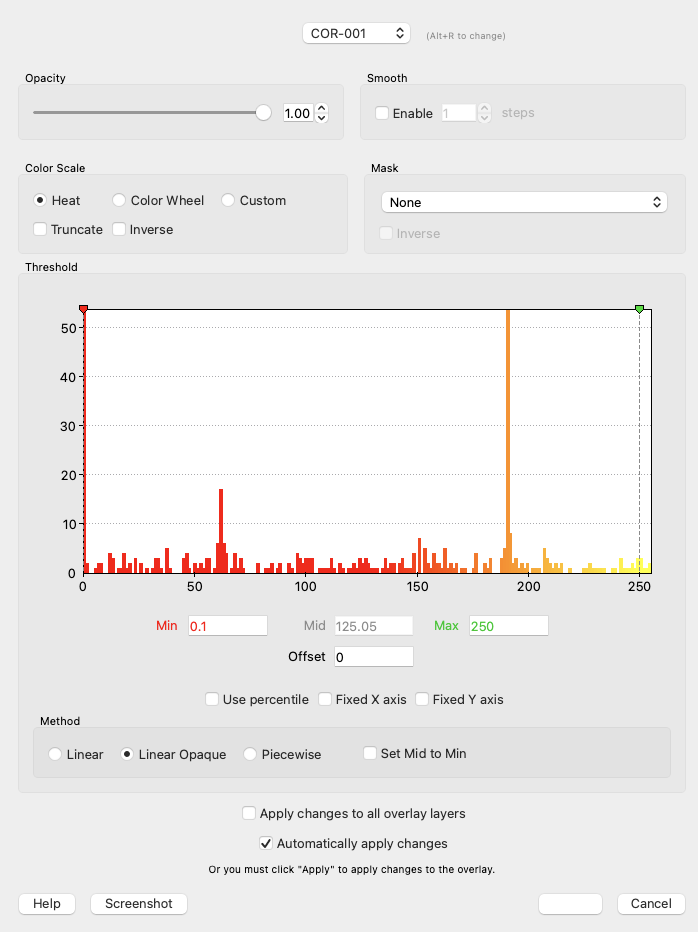
[image: Screenshot 2023-11-22 at 1.32.53 PM.png] doesn't allow me to adjust the threshold to negative values, for example t-values between -3 and 3.
On Wed, Nov 22, 2023 at 1:26 PM Douglas N. Greve dgreve@mgh.harvard.edu wrote:
Have you tried adjusting the threshold. Open the configure overlay option. Also, sending a pic would be helpful (and the contents of tk.dat)
On 11/22/2023 11:29 AM, Atena Akbari wrote:
External Email - Use CautionDear freesurfer team,
I want to overlay the activation map that I got from SPM on the inflated surface. The command I use is:
"mri_vol2surf --mov spmT_funcmap.nii --ref subj01/mri/orig.mgz. --reg tk.dat --hemi rh --o flodername"
in which, I got the registration file (tk.dat) by aligning my functional mean image to the orig.mgz in tkregisterfv.
now the problem is when I overlay the activation map on the inflated surface, I can only see the voxels with positive t-values. I can't see the negative ones. I cannot change the threshold values provided by "configure overlay" to negative values. Also, changing the "z-score" option next to the overlay configuration doesn't make any difference. can you help me with this, please?
Thanks a lot,
Atena
Freesurfer mailing listFreesurfer@nmr.mgh.harvard.eduhttps://mail.nmr.mgh.harvard.edu/mailman/listinfo/freesurfer
Freesurfer mailing list Freesurfer@nmr.mgh.harvard.edu https://secure-web.cisco.com/1IVPIDMFljkbz03OWhhpL1VpAXdX7qCtOHbekm0TiQFRGhN... The information in this e-mail is intended only for the person to whom it is addressed. If you believe this e-mail was sent to you in error and the e-mail contains patient information, please contact the Mass General Brigham Compliance HelpLine at https://secure-web.cisco.com/1P0Nb7TleS5WyZJu-srhx4FTx8V-yKXC6caZoWiHRciFkMi... < https://secure-web.cisco.com/1P0Nb7TleS5WyZJu-srhx4FTx8V-yKXC6caZoWiHRciFkMi... .
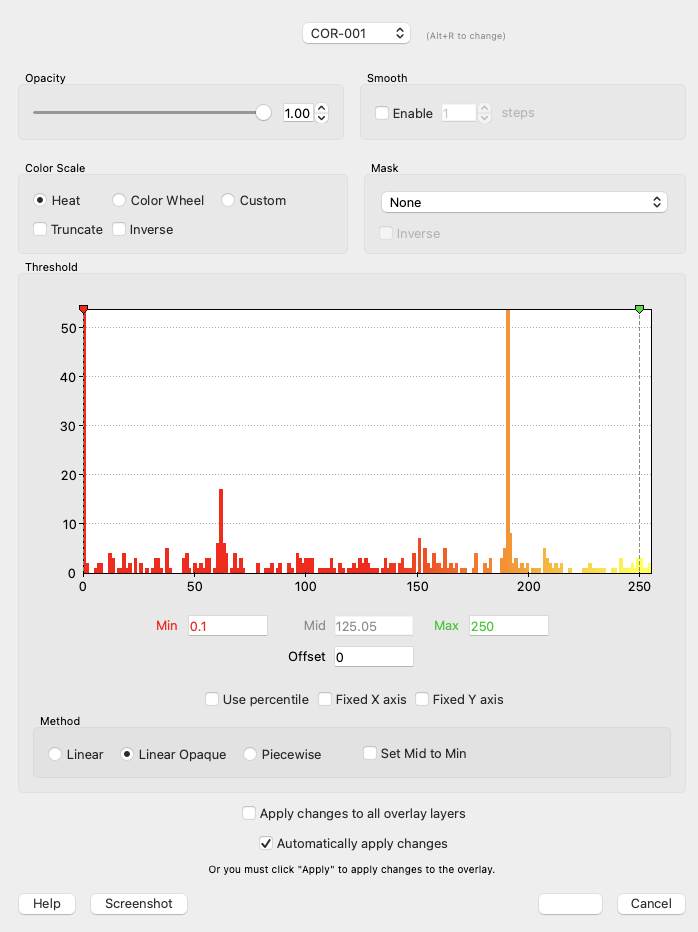
Those thresholds apply to both pos and neg. Eg, what you have there will show values between +0.1 and +250 AND between -0.1 and -250. It appears that you don't have any negative values in that map
On 11/22/2023 1:34 PM, Atena Akbari wrote:
External Email - Use Caution
Screenshot 2023-11-22 at 1.32.53 PM.png doesn't allow me to adjust the threshold to negative values, for example t-values between -3 and 3.
On Wed, Nov 22, 2023 at 1:26 PM Douglas N. Greve dgreve@mgh.harvard.edu wrote:
Have you tried adjusting the threshold. Open the configure overlay option. Also, sending a pic would be helpful (and the contents of tk.dat) On 11/22/2023 11:29 AM, Atena Akbari wrote:External Email - Use Caution Dear freesurfer team, I want to overlay the activation map that I got from SPM on the inflated surface. The command I use is: "mri_vol2surf --mov spmT_funcmap.nii --ref subj01/mri/orig.mgz. --reg tk.dat --hemi rh --o flodername" in which, I got the registration file (tk.dat) by aligning my functional mean image to the orig.mgz in tkregisterfv. now the problem is when I overlay the activation map on the inflated surface, I can only see the voxels with positive t-values. I can't see the negative ones. I cannot change the threshold values provided by "configure overlay" to negative values. Also, changing the "z-score" option next to the overlay configuration doesn't make any difference. can you help me with this, please? Thanks a lot, Atena _______________________________________________ Freesurfer mailing list Freesurfer@nmr.mgh.harvard.edu *MailScanner has detected a possible fraud attempt from "secure-web.cisco.com" claiming to be* https://mail.nmr.mgh.harvard.edu/mailman/listinfo/freesurfer <https://secure-web.cisco.com/1IVPIDMFljkbz03OWhhpL1VpAXdX7qCtOHbekm0TiQFRGhN6pDQSWMYqFMIg11x7H0RSn55S0mPKkcGBfgShDP4Fa1uJGvv471Pu7A3lvXY03naNTsfXmoVy1gE75cKQsOU0JolHEvTZQ3RUy7NKl6mob802-R1J8lHPmdpAQYi8cQ3IuOzLsR7uoWqjzINd7rLry7o93NtTv6gI3CLqN56QnaJcTM6r_bPY3Czb-f2QMJgOiuggpckVZTpsW64nmItJn9SxHgNbqNY5y0WuNE70ew-iq046b_Nmg3mcrOETzh0FFrIfOoB8WpO-XAzFGos3eBKRHQX9CCRxPvioOKQ/https%3A%2F%2Fmail.nmr.mgh.harvard.edu%2Fmailman%2Flistinfo%2Ffreesurfer>_______________________________________________ Freesurfer mailing list Freesurfer@nmr.mgh.harvard.edu *MailScanner has detected a possible fraud attempt from "secure-web.cisco.com" claiming to be* https://mail.nmr.mgh.harvard.edu/mailman/listinfo/freesurfer <https://secure-web.cisco.com/1IVPIDMFljkbz03OWhhpL1VpAXdX7qCtOHbekm0TiQFRGhN6pDQSWMYqFMIg11x7H0RSn55S0mPKkcGBfgShDP4Fa1uJGvv471Pu7A3lvXY03naNTsfXmoVy1gE75cKQsOU0JolHEvTZQ3RUy7NKl6mob802-R1J8lHPmdpAQYi8cQ3IuOzLsR7uoWqjzINd7rLry7o93NtTv6gI3CLqN56QnaJcTM6r_bPY3Czb-f2QMJgOiuggpckVZTpsW64nmItJn9SxHgNbqNY5y0WuNE70ew-iq046b_Nmg3mcrOETzh0FFrIfOoB8WpO-XAzFGos3eBKRHQX9CCRxPvioOKQ/https%3A%2F%2Fmail.nmr.mgh.harvard.edu%2Fmailman%2Flistinfo%2Ffreesurfer> The information in this e-mail is intended only for the person to whom it is addressed. If you believe this e-mail was sent to you in error and the e-mail contains patient information, please contact the Mass General Brigham Compliance HelpLine at *MailScanner has detected a possible fraud attempt from "secure-web.cisco.com" claiming to be* https://www.massgeneralbrigham.org/complianceline <https://secure-web.cisco.com/1P0Nb7TleS5WyZJu-srhx4FTx8V-yKXC6caZoWiHRciFkMiTVRveY3mckTiQUbHyEwZtJAVyJmSBir2L6fG6yYUf-k_NFt2fIsgZzvmwM6PeQW36670jLmpRz3oA_L4sG8F1pSfLtwUfXT6xVGaJ2pYQnsDNox5aT51A9Syuc7cXoLW5P0yL5XthqjTdONXbgHCI9wZi6d57x9CG6s06kCl0Boja8N7t8IokkeDCdtMnqEpALkfA3qc2c04ekb8RLkU5F36hYO1S2-nyiZXyZIsM0dfNB46yd1jAALCmh1bAFAnToieKOT-eucGl9bFRgfxziMWp30ZUGffcOJvN5-A/https%3A%2F%2Fwww.massgeneralbrigham.org%2Fcomplianceline> <*MailScanner has detected a possible fraud attempt from "secure-web.cisco.com" claiming to be* https://www.massgeneralbrigham.org/complianceline <https://secure-web.cisco.com/1P0Nb7TleS5WyZJu-srhx4FTx8V-yKXC6caZoWiHRciFkMiTVRveY3mckTiQUbHyEwZtJAVyJmSBir2L6fG6yYUf-k_NFt2fIsgZzvmwM6PeQW36670jLmpRz3oA_L4sG8F1pSfLtwUfXT6xVGaJ2pYQnsDNox5aT51A9Syuc7cXoLW5P0yL5XthqjTdONXbgHCI9wZi6d57x9CG6s06kCl0Boja8N7t8IokkeDCdtMnqEpALkfA3qc2c04ekb8RLkU5F36hYO1S2-nyiZXyZIsM0dfNB46yd1jAALCmh1bAFAnToieKOT-eucGl9bFRgfxziMWp30ZUGffcOJvN5-A/https%3A%2F%2Fwww.massgeneralbrigham.org%2Fcomplianceline>> .
Freesurfer mailing list Freesurfer@nmr.mgh.harvard.edu https://mail.nmr.mgh.harvard.edu/mailman/listinfo/freesurfer
freesurfer@nmr.mgh.harvard.edu
-
 Atena Akbari
 -
 Douglas N. Greve