
External Email - Use Caution
Dear Freesurfer experts,
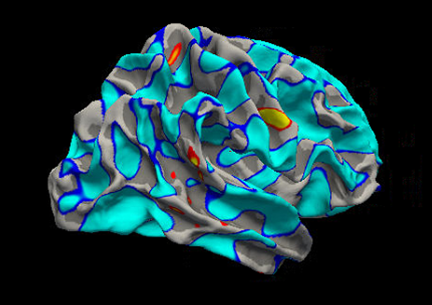
I am running a linear regression analysis and found a significant result showing below (cache.th20.abs.sig.cluster.summary file).
[image: image.png]
I ran the below script to get this result. Right hemisphere was focused for this analysis.
      mri_glmfit-sim --glmdir rh.thickness.10.glmdir \
      --cache 2 abs \
      --cwp 0.05
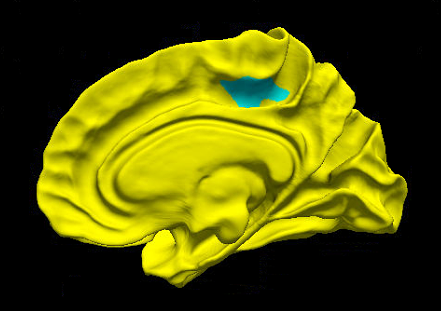
But, when visualizing the cache.th20.abs.sig.cluster.mgh file, it shows below - the hemisphere is in yellow.
[image: image.png]
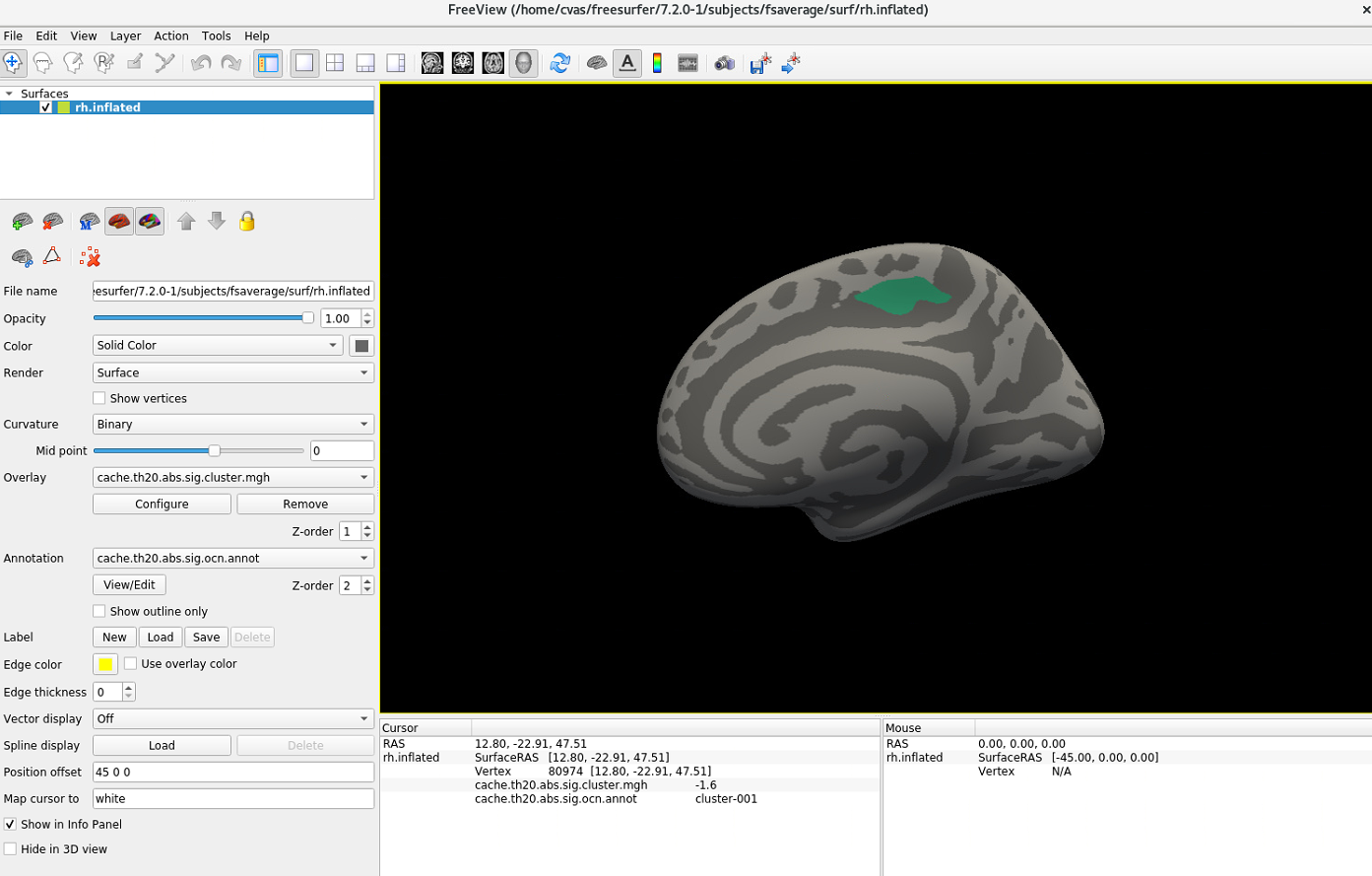
The below is a visualization of sig.mgh. The underlay should be gray but I am not sure why the underlay looks yellow when overlaying the thresholded result.
[image: image.png]
I saw somebody posted the same issue here ( https://secure-web.cisco.com/1OHcN_bRSEDk0roNAjIAfufCwrh4xf7rzgQtoclY3flDVpC...), but I was not able to find the solution from here. Could you please let me know what is an issue and how to resolve this?
Best, Jun


You can adjust overlay thresholds in Configure Overlay window.
Ruopeng
On Oct 6, 2022, at 10:49 AM, Jun Yeon Won <won25@umd.edumailto:won25@umd.edu> wrote:
External Email - Use Caution
Dear Freesurfer experts,
I am running a linear regression analysis and found a significant result showing below (cache.th20.abs.sig.cluster.summary file).
<image.png> I ran the below script to get this result. Right hemisphere was focused for this analysis.
      mri_glmfit-sim --glmdir rh.thickness.10.glmdir \
      --cache 2 abs \
      --cwp 0.05
But, when visualizing the cache.th20.abs.sig.cluster.mgh file, it shows below - the hemisphere is in yellow.
<image.png>
The below is a visualization of sig.mgh. The underlay should be gray but I am not sure why the underlay looks yellow when overlaying the thresholded result.
<image.png>
I saw somebody posted the same issue here (MailScanner has detected a possible fraud attempt from "secure-web.cisco.com" claiming to be https://www.mail-archive.com/freesurfer@nmr.mgh.harvard.edu/msg46328.htmlhttps://secure-web.cisco.com/1OHcN_bRSEDk0roNAjIAfufCwrh4xf7rzgQtoclY3flDVpCe2znW_Z-NEpNRC5ahFScfL8n7RZ7746EG5EibldfK0DyeuD8DOWxlEyzUiN6n_d2y4MRqLtRR8U2w2JQKD1dWyZjSMMQFhQKdnQGw_18koHPTGIRMmENF2G45P9aleWGnIh9S5DkSuIB8fqjPlWZZf9mEfzCdZl1dfoU5zRunt_p6sTDDJbI1pdAK_fiffsZyrD7IoVFSicGxBcz_6P8d2ROKxTtCbnNCmdL3Cw_CbU505e2Yr2rrdrRUWeHs1bWHNGTWzCNfcxGeiA2Zd/https%3A%2F%2Fwww.mail-archive.com%2Ffreesurfer%40nmr.mgh.harvard.edu%2Fmsg46328.html), but I was not able to find the solution from here. Could you please let me know what is an issue and how to resolve this?
Best, Jun
_______________________________________________ Freesurfer mailing list Freesurfer@nmr.mgh.harvard.edumailto:Freesurfer@nmr.mgh.harvard.edu https://mail.nmr.mgh.harvard.edu/mailman/listinfo/freesurfer
External Email - Use Caution
Hi Ruopeng,
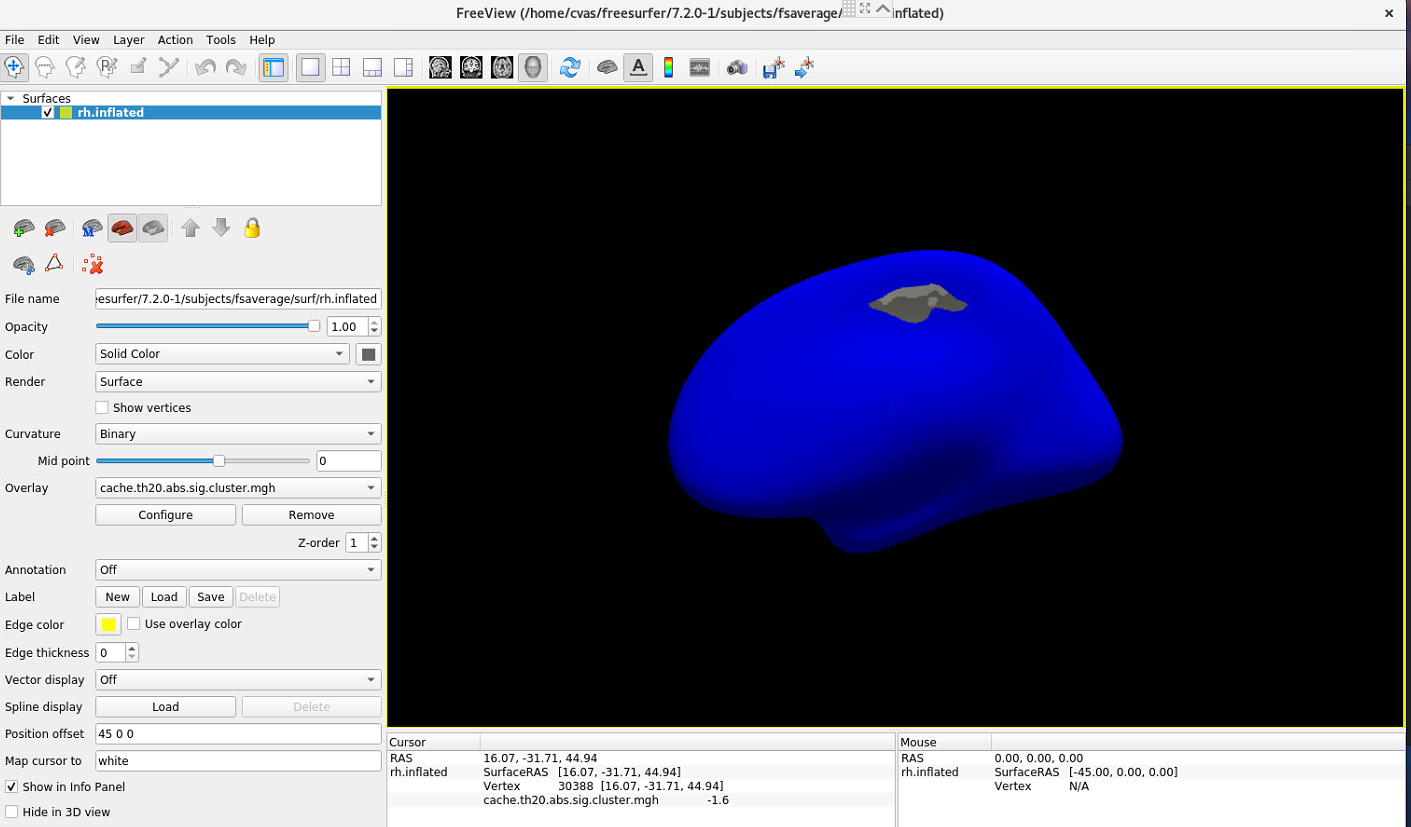
I tried to adjust overlay thresholds in the Configure Overlay window, but I think it still looks weird. The gray part should be blue and the blue part should be gray since when I clicked the gray part it showed -1.6 and the blue 0. Could you please let me know how to flip this?
[image: image.png]
I also tried to overlay annot file according to the instruction on this page (https://secure-web.cisco.com/1GtdxN3OBQUG-GAQeHnvyIEHYFqFakZTImx2fOZLeWBHrbe...) using the below script.
freeview -f $SUBJECTS_DIR/fsaverage/surf/rh.inflated:overlay=cache.th20.abs.sig.cluster.mgh:overlay_threshold=2,5:annot=cache.th20.abs.sig.ocn.annot -viewport 3d
[image: image.png]
So this result shows the gray part in the first photo should be blue. Could you please advise?
Best, Jun
On Thu, Oct 6, 2022 at 4:38 PM Wang, Ruopeng RWANG4@mgh.harvard.edu wrote:
You can adjust overlay thresholds in Configure Overlay window.
Ruopeng
On Oct 6, 2022, at 10:49 AM, Jun Yeon Won won25@umd.edu wrote:
External Email - Use CautionDear Freesurfer experts,
I am running a linear regression analysis and found a significant result showing below (cache.th20.abs.sig.cluster.summary file).
<image.png> I ran the below script to get this result. Right hemisphere was focused for this analysis.
mri_glmfit-sim --glmdir rh.thickness.10.glmdir \ --cache 2 abs \ --cwp 0.05But, when visualizing the cache.th20.abs.sig.cluster.mgh file, it shows below - the hemisphere is in yellow.
<image.png>
The below is a visualization of sig.mgh. The underlay should be gray but I am not sure why the underlay looks yellow when overlaying the thresholded result.
<image.png>
I saw somebody posted the same issue here (*MailScanner has detected a possible fraud attempt from "secure-web.cisco.com" claiming to be* https://secure-web.cisco.com/12Wi-IEpe4k4W6gFnp2O5uPymxVG0BNLl1FX2p4Qp2l96lK... https://secure-web.cisco.com/1OHcN_bRSEDk0roNAjIAfufCwrh4xf7rzgQtoclY3flDVpCe2znW_Z-NEpNRC5ahFScfL8n7RZ7746EG5EibldfK0DyeuD8DOWxlEyzUiN6n_d2y4MRqLtRR8U2w2JQKD1dWyZjSMMQFhQKdnQGw_18koHPTGIRMmENF2G45P9aleWGnIh9S5DkSuIB8fqjPlWZZf9mEfzCdZl1dfoU5zRunt_p6sTDDJbI1pdAK_fiffsZyrD7IoVFSicGxBcz_6P8d2ROKxTtCbnNCmdL3Cw_CbU505e2Yr2rrdrRUWeHs1bWHNGTWzCNfcxGeiA2Zd/https%3A%2F%2Fwww.mail-archive.com%2Ffreesurfer%40nmr.mgh.harvard.edu%2Fmsg46328.html), but I was not able to find the solution from here. Could you please let me know what is an issue and how to resolve this?
Best, Jun
Freesurfer mailing list Freesurfer@nmr.mgh.harvard.edu https://secure-web.cisco.com/13NEvITjKAgurs-U1UnvIfWvlvqnLo9_QMysNMNzDnZZ_-r...
Freesurfer mailing list Freesurfer@nmr.mgh.harvard.edu https://secure-web.cisco.com/13NEvITjKAgurs-U1UnvIfWvlvqnLo9_QMysNMNzDnZZ_-r... The information in this e-mail is intended only for the person to whom it is addressed. If you believe this e-mail was sent to you in error and the e-mail contains patient information, please contact the Mass General Brigham Compliance HelpLine at https://secure-web.cisco.com/19sMtHybNLtCo8ojm1GWpSoKA174P5ZeBhE92krel4HQl9D... < https://secure-web.cisco.com/19sMtHybNLtCo8ojm1GWpSoKA174P5ZeBhE92krel4HQl9D... . Please note that this e-mail is not secure (encrypted). If you do not wish to continue communication over unencrypted e-mail, please notify the sender of this message immediately. Continuing to send or respond to e-mail after receiving this message means you understand and accept this risk and wish to continue to communicate over unencrypted e-mail.
Would it be possible to send me the overlay file?
On Oct 7, 2022, at 1:27 PM, Jun Yeon Won <won25@umd.edumailto:won25@umd.edu> wrote:
External Email - Use Caution
Hi Ruopeng,
I tried to adjust overlay thresholds in the Configure Overlay window, but I think it still looks weird. The gray part should be blue and the blue part should be gray since when I clicked the gray part it showed -1.6 and the blue 0. Could you please let me know how to flip this?
<image.png>
I also tried to overlay annot file according to the instruction on this page (MailScanner has detected a possible fraud attempt from "secure-web.cisco.com" claiming to be https://surfer.nmr.mgh.harvard.edu/fswiki/FsTutorial/GroupAnalysishttps://secure-web.cisco.com/1GtdxN3OBQUG-GAQeHnvyIEHYFqFakZTImx2fOZLeWBHrbeeD5eHeJNCNdcRnHDFlzKC4C6WqiSc1P6sVBdo2LOAFE49Rwe2LOipeR4A5RrWeILCZiNICXMCdMi4A7igYMhCM67ZBs9bHRCHqLvIair3rqIDAEtpO7qO3nSnTcFO7kNs--7M7CczPJsfsyGcGnLx4t_98XrAAJLZ0GVzjH_XBSJv01OA-vuPn9MSB4hCXo1kLUBqmNhuQYOPk-Xpnd11wgFzXieOqRiSpPFD408-YUiFo21kUgn5nwWyCtHKkh-_Voz_1E8Wj3gZ9mz-w/https%3A%2F%2Fsurfer.nmr.mgh.harvard.edu%2Ffswiki%2FFsTutorial%2FGroupAnalysis) using the below script.
freeview -f $SUBJECTS_DIR/fsaverage/surf/rh.inflated:overlay=cache.th20.abs.sig.cluster.mgh:overlay_threshold=2,5:annot=cache.th20.abs.sig.ocn.annot -viewport 3d
<image.png>
So this result shows the gray part in the first photo should be blue. Could you please advise?
Best, Jun
On Thu, Oct 6, 2022 at 4:38 PM Wang, Ruopeng <RWANG4@mgh.harvard.edumailto:RWANG4@mgh.harvard.edu> wrote: You can adjust overlay thresholds in Configure Overlay window.
Ruopeng
On Oct 6, 2022, at 10:49 AM, Jun Yeon Won <won25@umd.edumailto:won25@umd.edu> wrote:
External Email - Use Caution
Dear Freesurfer experts,
I am running a linear regression analysis and found a significant result showing below (cache.th20.abs.sig.cluster.summary file).
<image.png> I ran the below script to get this result. Right hemisphere was focused for this analysis.
mri_glmfit-sim --glmdir rh.thickness.10.glmdir \ --cache 2 abs \ --cwp 0.05
But, when visualizing the cache.th20.abs.sig.cluster.mgh file, it shows below - the hemisphere is in yellow.
<image.png>
The below is a visualization of sig.mgh. The underlay should be gray but I am not sure why the underlay looks yellow when overlaying the thresholded result.
<image.png>
I saw somebody posted the same issue here (MailScanner has detected a possible fraud attempt from "secure-web.cisco.com" claiming to be https://www.mail-archive.com/freesurfer@nmr.mgh.harvard.edu/msg46328.htmlhttps://secure-web.cisco.com/1OHcN_bRSEDk0roNAjIAfufCwrh4xf7rzgQtoclY3flDVpCe2znW_Z-NEpNRC5ahFScfL8n7RZ7746EG5EibldfK0DyeuD8DOWxlEyzUiN6n_d2y4MRqLtRR8U2w2JQKD1dWyZjSMMQFhQKdnQGw_18koHPTGIRMmENF2G45P9aleWGnIh9S5DkSuIB8fqjPlWZZf9mEfzCdZl1dfoU5zRunt_p6sTDDJbI1pdAK_fiffsZyrD7IoVFSicGxBcz_6P8d2ROKxTtCbnNCmdL3Cw_CbU505e2Yr2rrdrRUWeHs1bWHNGTWzCNfcxGeiA2Zd/https%3A%2F%2Fwww.mail-archive.com%2Ffreesurfer%40nmr.mgh.harvard.edu%2Fmsg46328.html), but I was not able to find the solution from here. Could you please let me know what is an issue and how to resolve this?
Best, Jun
_______________________________________________ Freesurfer mailing list Freesurfer@nmr.mgh.harvard.edumailto:Freesurfer@nmr.mgh.harvard.edu MailScanner has detected a possible fraud attempt from "secure-web.cisco.com" claiming to be https://mail.nmr.mgh.harvard.edu/mailman/listinfo/freesurferhttps://secure-web.cisco.com/13NEvITjKAgurs-U1UnvIfWvlvqnLo9_QMysNMNzDnZZ_-r9hApfR8XVvFxDK4dm91A_n7ksKt1BVI4PmdQ0Aotow7HfHIVPvfo0blahKmEWwPpWC0ISlL_BVdwkaUPX_HSLCHINhCn1ilpBs7hzwUXkKLHxwO4fkNbq7xHdqvlFeLbacf-SOj9xFNNBktBWPwFBcDEJoUkEFTujdahsDNruGsWUQOlGIGkL9E9RcjLSRdvFl2rJHLJif3mU_63F81KvU8xZpWcfXdSOSaP8bzRGohuouOWydO4KVIVpLcY6v1cILJq1svy4rvHInImo-/https%3A%2F%2Fmail.nmr.mgh.harvard.edu%2Fmailman%2Flistinfo%2Ffreesurfer
_______________________________________________ Freesurfer mailing list Freesurfer@nmr.mgh.harvard.edumailto:Freesurfer@nmr.mgh.harvard.edu MailScanner has detected a possible fraud attempt from "secure-web.cisco.com" claiming to be https://mail.nmr.mgh.harvard.edu/mailman/listinfo/freesurferhttps://secure-web.cisco.com/13NEvITjKAgurs-U1UnvIfWvlvqnLo9_QMysNMNzDnZZ_-r9hApfR8XVvFxDK4dm91A_n7ksKt1BVI4PmdQ0Aotow7HfHIVPvfo0blahKmEWwPpWC0ISlL_BVdwkaUPX_HSLCHINhCn1ilpBs7hzwUXkKLHxwO4fkNbq7xHdqvlFeLbacf-SOj9xFNNBktBWPwFBcDEJoUkEFTujdahsDNruGsWUQOlGIGkL9E9RcjLSRdvFl2rJHLJif3mU_63F81KvU8xZpWcfXdSOSaP8bzRGohuouOWydO4KVIVpLcY6v1cILJq1svy4rvHInImo-/https%3A%2F%2Fmail.nmr.mgh.harvard.edu%2Fmailman%2Flistinfo%2Ffreesurfer The information in this e-mail is intended only for the person to whom it is addressed. If you believe this e-mail was sent to you in error and the e-mail contains patient information, please contact the Mass General Brigham Compliance HelpLine at MailScanner has detected a possible fraud attempt from "secure-web.cisco.com" claiming to be https://www.massgeneralbrigham.org/compliancelinehttps://secure-web.cisco.com/19sMtHybNLtCo8ojm1GWpSoKA174P5ZeBhE92krel4HQl9DKGAGSbKgJqHNSNFGgMKPxmU1wCYP8yoI3V9alARe-fvEZ1n3oDZ1YMowtpxcpb-AOvvlbeQ_O6QDsqoCUnZN0HuwvOJYof1LP3RwR6CpkMkur4NaHmxwweydu00YvUF0HIPsdRv9vx2S6L3gbCM2WyqbBQOjhb7xMmOazriFOPAGWyazNi3YXmczWyD6r0WVIKdhG6WL5RJT22TBH3iZ1N78XQ_8ZWe13HEk5mc_4-dOQEhF0Gl6i1tke8Nwm5yxF_FSnXSedUdc1oZPa6/https%3A%2F%2Fwww.massgeneralbrigham.org%2Fcomplianceline <MailScanner has detected a possible fraud attempt from "secure-web.cisco.com" claiming to be https://www.massgeneralbrigham.org/compliancelinehttps://secure-web.cisco.com/19sMtHybNLtCo8ojm1GWpSoKA174P5ZeBhE92krel4HQl9DKGAGSbKgJqHNSNFGgMKPxmU1wCYP8yoI3V9alARe-fvEZ1n3oDZ1YMowtpxcpb-AOvvlbeQ_O6QDsqoCUnZN0HuwvOJYof1LP3RwR6CpkMkur4NaHmxwweydu00YvUF0HIPsdRv9vx2S6L3gbCM2WyqbBQOjhb7xMmOazriFOPAGWyazNi3YXmczWyD6r0WVIKdhG6WL5RJT22TBH3iZ1N78XQ_8ZWe13HEk5mc_4-dOQEhF0Gl6i1tke8Nwm5yxF_FSnXSedUdc1oZPa6/https%3A%2F%2Fwww.massgeneralbrigham.org%2Fcomplianceline> . Please note that this e-mail is not secure (encrypted). If you do not wish to continue communication over unencrypted e-mail, please notify the sender of this message immediately. Continuing to send or respond to e-mail after receiving this message means you understand and accept this risk and wish to continue to communicate over unencrypted e-mail. _______________________________________________ Freesurfer mailing list Freesurfer@nmr.mgh.harvard.edumailto:Freesurfer@nmr.mgh.harvard.edu https://mail.nmr.mgh.harvard.edu/mailman/listinfo/freesurfer
External Email - Use Caution
I sent it to your email. Thanks!
Best, Jun
On Fri, Oct 7, 2022 at 4:02 PM Wang, Ruopeng RWANG4@mgh.harvard.edu wrote:
Would it be possible to send me the overlay file?
On Oct 7, 2022, at 1:27 PM, Jun Yeon Won won25@umd.edu wrote:
External Email - Use CautionHi Ruopeng,
I tried to adjust overlay thresholds in the Configure Overlay window, but I think it still looks weird. The gray part should be blue and the blue part should be gray since when I clicked the gray part it showed -1.6 and the blue 0. Could you please let me know how to flip this?
<image.png>
I also tried to overlay annot file according to the instruction on this page (*MailScanner has detected a possible fraud attempt from "secure-web.cisco.com" claiming to be* https://secure-web.cisco.com/1XzMKerJeglZz3x3-wrT6B9w3X6pj99LPdLlPJdPdoAKfNM... https://secure-web.cisco.com/1GtdxN3OBQUG-GAQeHnvyIEHYFqFakZTImx2fOZLeWBHrbeeD5eHeJNCNdcRnHDFlzKC4C6WqiSc1P6sVBdo2LOAFE49Rwe2LOipeR4A5RrWeILCZiNICXMCdMi4A7igYMhCM67ZBs9bHRCHqLvIair3rqIDAEtpO7qO3nSnTcFO7kNs--7M7CczPJsfsyGcGnLx4t_98XrAAJLZ0GVzjH_XBSJv01OA-vuPn9MSB4hCXo1kLUBqmNhuQYOPk-Xpnd11wgFzXieOqRiSpPFD408-YUiFo21kUgn5nwWyCtHKkh-_Voz_1E8Wj3gZ9mz-w/https%3A%2F%2Fsurfer.nmr.mgh.harvard.edu%2Ffswiki%2FFsTutorial%2FGroupAnalysis) using the below script.
freeview -f $SUBJECTS_DIR/fsaverage/surf/rh.inflated:overlay=cache.th20.abs.sig.cluster.mgh:overlay_threshold=2,5:annot=cache.th20.abs.sig.ocn.annot -viewport 3d
<image.png>
So this result shows the gray part in the first photo should be blue. Could you please advise?
Best, Jun
On Thu, Oct 6, 2022 at 4:38 PM Wang, Ruopeng RWANG4@mgh.harvard.edu wrote:
You can adjust overlay thresholds in Configure Overlay window.
Ruopeng
On Oct 6, 2022, at 10:49 AM, Jun Yeon Won won25@umd.edu wrote:
External Email - Use CautionDear Freesurfer experts,
I am running a linear regression analysis and found a significant result showing below (cache.th20.abs.sig.cluster.summary file).
<image.png> I ran the below script to get this result. Right hemisphere was focused for this analysis.
mri_glmfit-sim --glmdir rh.thickness.10.glmdir \ --cache 2 abs \ --cwp 0.05But, when visualizing the cache.th20.abs.sig.cluster.mgh file, it shows below - the hemisphere is in yellow.
<image.png>
The below is a visualization of sig.mgh. The underlay should be gray but I am not sure why the underlay looks yellow when overlaying the thresholded result.
<image.png>
I saw somebody posted the same issue here (*MailScanner has detected a possible fraud attempt from "secure-web.cisco.com" claiming to be* https://secure-web.cisco.com/1kC5DdyBBttyfizE7ked3fdziDdK0MIVn-qrawMrp4rjenx... https://secure-web.cisco.com/1OHcN_bRSEDk0roNAjIAfufCwrh4xf7rzgQtoclY3flDVpCe2znW_Z-NEpNRC5ahFScfL8n7RZ7746EG5EibldfK0DyeuD8DOWxlEyzUiN6n_d2y4MRqLtRR8U2w2JQKD1dWyZjSMMQFhQKdnQGw_18koHPTGIRMmENF2G45P9aleWGnIh9S5DkSuIB8fqjPlWZZf9mEfzCdZl1dfoU5zRunt_p6sTDDJbI1pdAK_fiffsZyrD7IoVFSicGxBcz_6P8d2ROKxTtCbnNCmdL3Cw_CbU505e2Yr2rrdrRUWeHs1bWHNGTWzCNfcxGeiA2Zd/https%3A%2F%2Fwww.mail-archive.com%2Ffreesurfer%40nmr.mgh.harvard.edu%2Fmsg46328.html), but I was not able to find the solution from here. Could you please let me know what is an issue and how to resolve this?
Best, Jun
Freesurfer mailing list Freesurfer@nmr.mgh.harvard.edu *MailScanner has detected a possible fraud attempt from "secure-web.cisco.com" claiming to be* https://secure-web.cisco.com/1wbwFcKICiaPMpvMX0Rpf-oSDktZAM4yQ0Jlzc-aunC3x9I... https://secure-web.cisco.com/13NEvITjKAgurs-U1UnvIfWvlvqnLo9_QMysNMNzDnZZ_-r9hApfR8XVvFxDK4dm91A_n7ksKt1BVI4PmdQ0Aotow7HfHIVPvfo0blahKmEWwPpWC0ISlL_BVdwkaUPX_HSLCHINhCn1ilpBs7hzwUXkKLHxwO4fkNbq7xHdqvlFeLbacf-SOj9xFNNBktBWPwFBcDEJoUkEFTujdahsDNruGsWUQOlGIGkL9E9RcjLSRdvFl2rJHLJif3mU_63F81KvU8xZpWcfXdSOSaP8bzRGohuouOWydO4KVIVpLcY6v1cILJq1svy4rvHInImo-/https%3A%2F%2Fmail.nmr.mgh.harvard.edu%2Fmailman%2Flistinfo%2Ffreesurfer
Freesurfer mailing list Freesurfer@nmr.mgh.harvard.edu *MailScanner has detected a possible fraud attempt from "secure-web.cisco.com" claiming to be* https://secure-web.cisco.com/1wbwFcKICiaPMpvMX0Rpf-oSDktZAM4yQ0Jlzc-aunC3x9I... https://secure-web.cisco.com/13NEvITjKAgurs-U1UnvIfWvlvqnLo9_QMysNMNzDnZZ_-r9hApfR8XVvFxDK4dm91A_n7ksKt1BVI4PmdQ0Aotow7HfHIVPvfo0blahKmEWwPpWC0ISlL_BVdwkaUPX_HSLCHINhCn1ilpBs7hzwUXkKLHxwO4fkNbq7xHdqvlFeLbacf-SOj9xFNNBktBWPwFBcDEJoUkEFTujdahsDNruGsWUQOlGIGkL9E9RcjLSRdvFl2rJHLJif3mU_63F81KvU8xZpWcfXdSOSaP8bzRGohuouOWydO4KVIVpLcY6v1cILJq1svy4rvHInImo-/https%3A%2F%2Fmail.nmr.mgh.harvard.edu%2Fmailman%2Flistinfo%2Ffreesurfer The information in this e-mail is intended only for the person to whom it is addressed. If you believe this e-mail was sent to you in error and the e-mail contains patient information, please contact the Mass General Brigham Compliance HelpLine at *MailScanner has detected a possible fraud attempt from "secure-web.cisco.com" claiming to be* https://secure-web.cisco.com/1-yLAbQF-2O5NFn65pKqGE4i9kXvPwPLj15qw-N-J6F8XZu... https://secure-web.cisco.com/19sMtHybNLtCo8ojm1GWpSoKA174P5ZeBhE92krel4HQl9DKGAGSbKgJqHNSNFGgMKPxmU1wCYP8yoI3V9alARe-fvEZ1n3oDZ1YMowtpxcpb-AOvvlbeQ_O6QDsqoCUnZN0HuwvOJYof1LP3RwR6CpkMkur4NaHmxwweydu00YvUF0HIPsdRv9vx2S6L3gbCM2WyqbBQOjhb7xMmOazriFOPAGWyazNi3YXmczWyD6r0WVIKdhG6WL5RJT22TBH3iZ1N78XQ_8ZWe13HEk5mc_4-dOQEhF0Gl6i1tke8Nwm5yxF_FSnXSedUdc1oZPa6/https%3A%2F%2Fwww.massgeneralbrigham.org%2Fcomplianceline <*MailScanner has detected a possible fraud attempt from "secure-web.cisco.com" claiming to be* https://secure-web.cisco.com/1-yLAbQF-2O5NFn65pKqGE4i9kXvPwPLj15qw-N-J6F8XZu... https://secure-web.cisco.com/19sMtHybNLtCo8ojm1GWpSoKA174P5ZeBhE92krel4HQl9DKGAGSbKgJqHNSNFGgMKPxmU1wCYP8yoI3V9alARe-fvEZ1n3oDZ1YMowtpxcpb-AOvvlbeQ_O6QDsqoCUnZN0HuwvOJYof1LP3RwR6CpkMkur4NaHmxwweydu00YvUF0HIPsdRv9vx2S6L3gbCM2WyqbBQOjhb7xMmOazriFOPAGWyazNi3YXmczWyD6r0WVIKdhG6WL5RJT22TBH3iZ1N78XQ_8ZWe13HEk5mc_4-dOQEhF0Gl6i1tke8Nwm5yxF_FSnXSedUdc1oZPa6/https%3A%2F%2Fwww.massgeneralbrigham.org%2Fcomplianceline> . Please note that this e-mail is not secure (encrypted). If you do not wish to continue communication over unencrypted e-mail, please notify the sender of this message immediately. Continuing to send or respond to e-mail after receiving this message means you understand and accept this risk and wish to continue to communicate over unencrypted e-mail.
Freesurfer mailing list Freesurfer@nmr.mgh.harvard.edu https://secure-web.cisco.com/1wbwFcKICiaPMpvMX0Rpf-oSDktZAM4yQ0Jlzc-aunC3x9I...
Freesurfer mailing list Freesurfer@nmr.mgh.harvard.edu https://secure-web.cisco.com/1wbwFcKICiaPMpvMX0Rpf-oSDktZAM4yQ0Jlzc-aunC3x9I... The information in this e-mail is intended only for the person to whom it is addressed. If you believe this e-mail was sent to you in error and the e-mail contains patient information, please contact the Mass General Brigham Compliance HelpLine at https://secure-web.cisco.com/1-yLAbQF-2O5NFn65pKqGE4i9kXvPwPLj15qw-N-J6F8XZu... < https://secure-web.cisco.com/1-yLAbQF-2O5NFn65pKqGE4i9kXvPwPLj15qw-N-J6F8XZu... . Please note that this e-mail is not secure (encrypted). If you do not wish to continue communication over unencrypted e-mail, please notify the sender of this message immediately. Continuing to send or respond to e-mail after receiving this message means you understand and accept this risk and wish to continue to communicate over unencrypted e-mail.
freesurfer@nmr.mgh.harvard.edu
-
 Jun Yeon Won
 -
 Wang, Ruopeng