
Hello,
I'm working with T1 weighted scans obtained at 7T and have a problem with a subject. I preprocess the images to deal with the B1 inhomogeneity (normalize to PD and mask noisy pixels), and have successfully segmented about 20 scans. I often need to use control points, but they normally work just as I expect. However, I have one subject where large areas of the brain are completely excluded from the segmentation (basically the entire occipital lobe). I added control points and re-ran, to no effect.
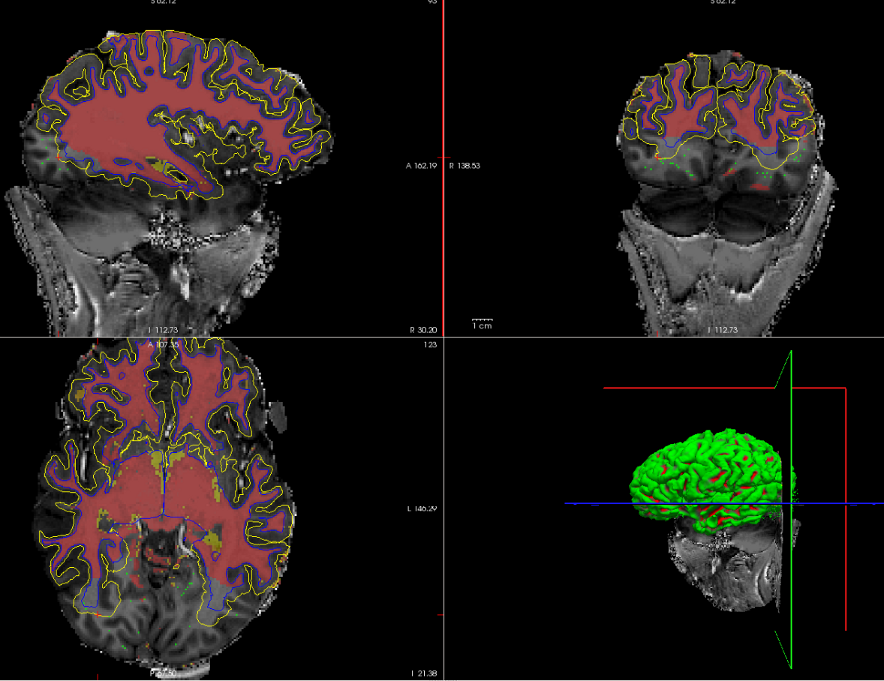
I'm attaching a screenshot of the brainmask with surfaces, my control points, and the white matter mask. Clearly, the skull stripping wasn't very successful (I adjusted the watershed threshold manually, but at one value I got the current result and at a single integer lower I lost half the brain). I have successfully segmented other subjects with equally poor skull strips, though, so I don't believe this has any bearing on the current issue.
Is editing the white matter mask the only way to fix this? If so, do I need to carefully fill in on every slice, or can I just brush in here and there to sort of "goose" the white matter into that region? I can do the slice by slice fix, but if there's a way to avoid the several hours it will take me, I would love to know!
Thanks,
Andrea
----- Andrea Grant Visual Neuroimaging Technologist Center for Magnetic Resonance Research, University of Minnesota 2021 6th St. SE, Minneapolis, MN 55455, 612-626-4948 gran0260@umn.edu umn.edu/~gran0260 http://umn.edu/%7Egran0260

Hi Andrea, You can use the contour tool in the voxel edit mode to quickly and roughly fill in wm. Use the tool with the wm.mgz selected in the volume layer list but set the brainmask (or T1) as the reference. Set brush value to 255, and then do crtl+alt+leftbutton while dragging the mouse to adjust the contour, and then crtl+leftclick to fill in selected regions. Note that the cerebellar white matter may be outlined by the contour as well, but if it doesn't connect with the cortical wm then it won't be filled in. -Louis
On Thu, 6 Mar 2014, Andrea Grant wrote:
Hello,
I'm working with T1 weighted scans obtained at 7T and have a problem with a subject. I preprocess the images to deal with the B1 inhomogeneity (normalize to PD and mask noisy pixels), and have successfully segmented about 20 scans. I often need to use control points, but they normally work just as I expect. However, I have one subject where large areas of the brain are completely excluded from the segmentation (basically the entire occipital lobe). I added control points and re-ran, to no effect.
I'm attaching a screenshot of the brainmask with surfaces, my control points, and the white matter mask. Clearly, the skull stripping wasn't very successful (I adjusted the watershed threshold manually, but at one value I got the current result and at a single integer lower I lost half the brain). I have successfully segmented other subjects with equally poor skull strips, though, so I don't believe this has any bearing on the current issue.
Is editing the white matter mask the only way to fix this? If so, do I need to carefully fill in on every slice, or can I just brush in here and there to sort of "goose" the white matter into that region? I can do the slice by slice fix, but if there's a way to avoid the several hours it will take me, I would love to know!
Thanks,
Andrea
Andrea Grant Visual Neuroimaging Technologist Center for Magnetic Resonance Research, University of Minnesota 2021 6th St. SE, Minneapolis, MN 55455, 612-626-4948 gran0260@umn.edu umn.edu/~gran0260
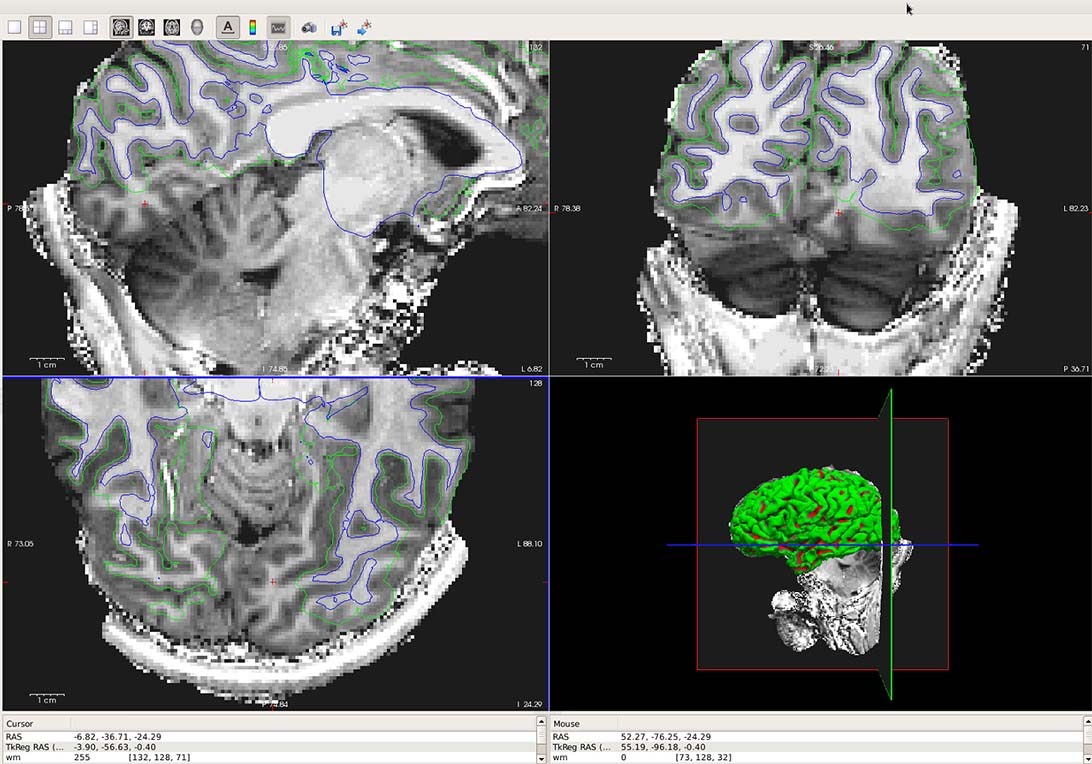
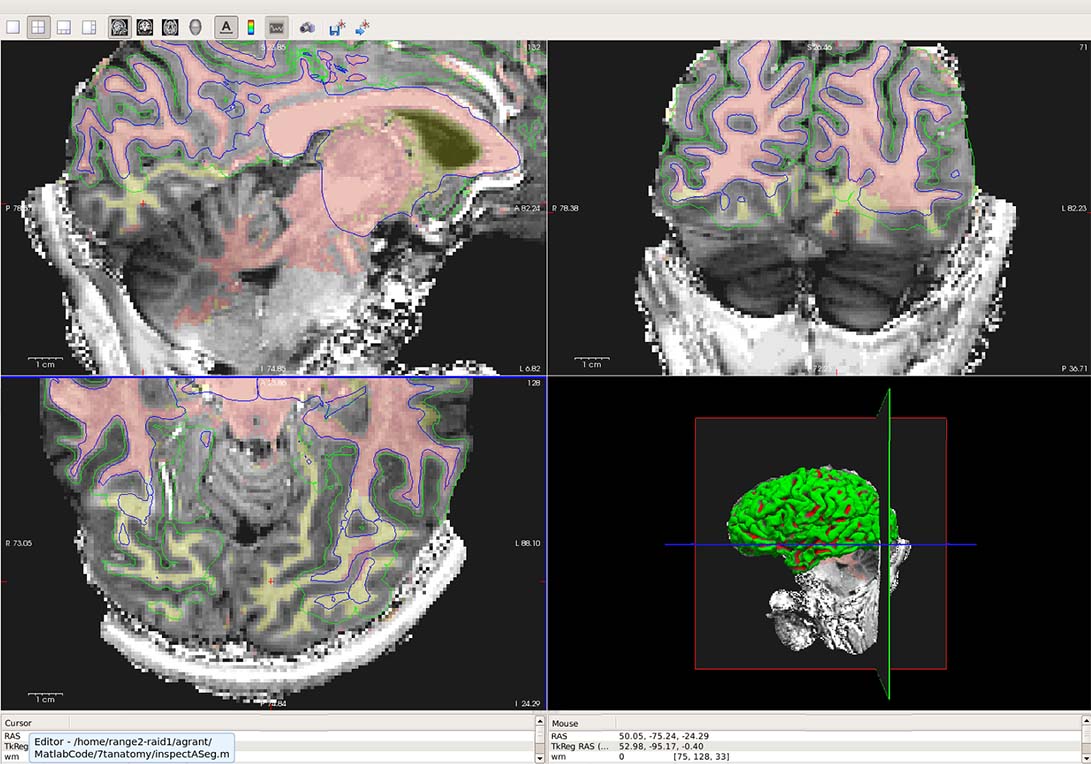
I was able to quickly edit my WM.mgz file using the contour edit that Louis suggested. However, when I then re-run the recon-all with -autorecon2-wm and -autorecon3, it doesn't correct the problem. I'm attaching two figures (with and without the edited WM.mgz overlay). What are my next steps to correct the segmentation?
Thanks,
Andrea
On Fri, Mar 7, 2014 at 3:25 PM, Louis Nicholas Vinke < vinke@nmr.mgh.harvard.edu> wrote:
Hi Andrea, You can use the contour tool in the voxel edit mode to quickly and roughly fill in wm. Use the tool with the wm.mgz selected in the volume layer list but set the brainmask (or T1) as the reference. Set brush value to 255, and then do crtl+alt+leftbutton while dragging the mouse to adjust the contour, and then crtl+leftclick to fill in selected regions. Note that the cerebellar white matter may be outlined by the contour as well, but if it doesn't connect with the cortical wm then it won't be filled in. -Louis
Hi Andrea, Take a look at the ?h.orig.nofix surfaces. Does it look like the wm edits were picked up in those initial surfaces? Also, just check that the edits to the wm.mgz were 255 and that there are no major disconnects anywhere. -Louis
On Fri, 4 Apr 2014, Andrea Grant wrote:
I was able to quickly edit my WM.mgz file using the contour edit that Louis suggested. However, when I then re-run the recon-all with -autorecon2-wm and -autorecon3, it doesn't correct the problem. I'm attaching two figures (with and without the edited WM.mgz overlay). What are my next steps to correct the segmentation?
Thanks,
Andrea
On Fri, Mar 7, 2014 at 3:25 PM, Louis Nicholas Vinke vinke@nmr.mgh.harvard.edu wrote: Hi Andrea, You can use the contour tool in the voxel edit mode to quickly and roughly fill in wm. Use the tool with the wm.mgz selected in the volume layer list but set the brainmask (or T1) as the reference. Set brush value to 255, and then do crtl+alt+leftbutton while dragging the mouse to adjust the contour, and then crtl+leftclick to fill in selected regions. Note that the cerebellar white matter may be outlined by the contour as well, but if it doesn't connect with the cortical wm then it won't be filled in. -Louis
freesurfer@nmr.mgh.harvard.edu
-
 Andrea Grant
 -
 Louis Nicholas Vinke