
Hello Freesurfer Developers, I have had last September Freesurfer course. When I operated my data following that stream I met some problem in reon-all -all step. Because I need put some screenshout to exaplain that problems, I add word document in attachment. Thanks very much! Best Regards, Qian Ran

  Hi Qian, things will be a lot easier if you imbed your comments
  and images in the email. From the text, I can't tell what you
  want exactly. The first question had to do with skull stripping.
  It looks like you had to make a manual edit. This is expected
  sometimes.  If it is more than that, what is the problem. In the
  second question, you had some problem with the quality of the
  white/pial surfaces, but there was not much detail or a picture.


  On 2/7/17 8:22 AM, 冉倩 wrote:
  Hello Freesurfer Developers,
I have had last September Freesurfer course. When I operated my data following that stream I met some problem in reon-all -all step. Because I need put some screenshout to exaplain that problems, I add word document in attachment. Thanks very much! Best Regards, Qian Ran
Freesurfer mailing list Freesurfer@nmr.mgh.harvard.edu https://mail.nmr.mgh.harvard.edu/mailman/listinfo/freesurfer
Dear Prof.Douglas Greve, Thanks for your reply. I add parts of problem screenshot of white/pial surface.
When I did freesurfer for structure analysis, I was confused by some steps and results. The analysis stream was:
1st: check data orientation
2nd : convert nii.gz to mgz
3rd: recon-all –all –subjid sub01
After these steps finished , I checked skullstrip, segmentation quality. The problems as following:
1st: skullstrip result not very well, almost need manually operation.
After manually operation, I run:
recon-all –autorecon2 –autorecon3 –subjid sub01
2nd: parts of white surface and pial surface not very exactly. I only did adding control points to modify white surface, then I run:
Recon-all –autorecon2-cp –autorecon3 –subjid sub01 brainmask.mgz
Several parts of pial surface exit errors. I added these as screenshot:
So when I met such issues, I should add control points for pial surface as white surface did (or how I correct or edit pial; still use tkmedit tool?) ? Then I run:
recon-all –autorecon2-pial –autorecon3 sub01 ?
If white surface and pial surface all needed manually operated, whether I could do like this: I add control points (-cp), edit wm (-wm), correct pial (-pial ) at the same time, then I run:
recon-all –autorecon2-cp –autorecon2-wm –autorecon2-pail –autorecon3 sub01 or recon-all -autorecon2-cp brainmask.mgz -autorecon2-wm -autorecon2-pial -autorecon3 sub01?
or any other suggestions?
Thanks very much! Best Regards, Qian Ran
At 2017-02-08 07:18:51, "Douglas Greve" greve@nmr.mgh.harvard.edu wrote:
  Hi Qian, things will be a lot easier if you imbed your comments
  and images in the email. From the text, I can't tell what you
  want exactly. The first question had to do with skull stripping.
  It looks like you had to make a manual edit. This is expected
  sometimes.  If it is more than that, what is the problem. In the
  second question, you had some problem with the quality of the
  white/pial surfaces, but there was not much detail or a picture.


  On 2/7/17 8:22 AM, 冉倩 wrote:
  Hello Freesurfer Developers,
I have had last September Freesurfer course. When I operated my data following that stream I met some problem in reon-all -all step. Because I need put some screenshout to exaplain that problems, I add word document in attachment. Thanks very much! Best Regards, Qian Ran
_______________________________________________ Freesurfer mailing list Freesurfer@nmr.mgh.harvard.eduhttps://mail.nmr.mgh.harvard.edu/mailman/listinfo/freesurfer

Hi Qian
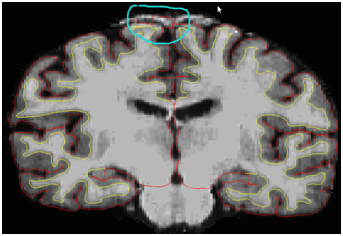
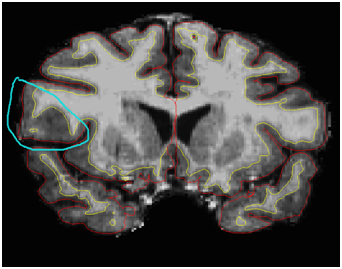
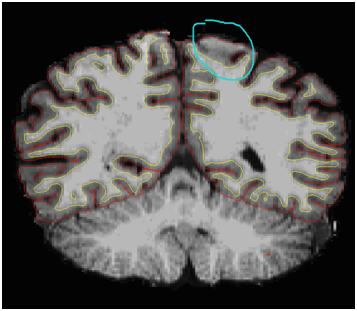
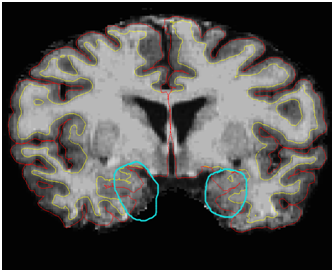
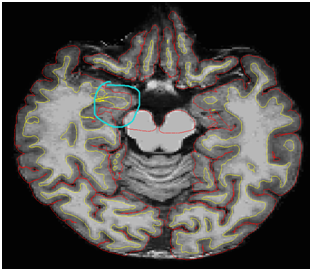
I'm not sure I understand what you think is wrong in the images you included. The first two locations look quite accurate to me, and I'm not positive but I think the third image the locations you circle are amygdala, so not neocortical at all
cheers Bruce
On Wed, 8 Feb 2017, 冉倩 wrote:
Dear Prof.Douglas Greve, Thanks for your reply. I add parts of problem screenshot of white/pial surface.
When I did freesurfer for structure analysis, I was confused by some steps and results. The analysis stream was:
1st: check data orientation
2nd : convert nii.gz to mgz
3rd: recon-all –all –subjid sub01
After these steps finished , I checked skullstrip, segmentation quality. The problems as following:
1st: skullstrip result not very well, almost need manually operation.
After manually operation, I run:
recon-all –autorecon2 –autorecon3 –subjid sub01
2nd: parts of white surface and pial surface not very exactly. I only did adding control points to modify white surface, then I run:
Recon-all –autorecon2-cp –autorecon3 –subjid sub01 brainmask.mgz
Several parts of pial surface exit errors. I added these as screenshot:
[IMAGE]
[IMAGE] [IMAGE] [IMAGE]
[IMAGE]
So when I met such issues, I should add control points for pial surface as white surface did (or how I correct or edit pial; still use tkmedit tool?) ? Then I run:
recon-all –autorecon2-pial –autorecon3 sub01 ?
If white surface and pial surface all needed manually operated, whether I could do like this: I add control points (-cp), edit wm (-wm), correct pial (-pial ) at the same time, then I run:
recon-all –autorecon2-cp –autorecon2-wm –autorecon2-pail –autorecon3 sub01 or recon-all -autorecon2-cp brainmask.mgz -autorecon2-wm -autorecon2-pial -autorecon3 sub01?
or any other suggestions?
Thanks very much! Best Regards, Qian Ran
At 2017-02-08 07:18:51, "Douglas Greve" greve@nmr.mgh.harvard.edu wrote:
  Hi Qian, things will be a lot easier if you imbed your comments
  and images in the email. From the text, I can't tell what you
  want exactly. The first question had to do with skull stripping.
  It looks like you had to make a manual edit. This is expected
  sometimes.  If it is more than that, what is the problem. In the
  second question, you had some problem with the quality of the
  white/pial surfaces, but there was not much detail or a picture.


  On 2/7/17 8:22 AM, 冉倩 wrote:
  Hello Freesurfer Developers,
I have had last September Freesurfer course. When I operated my data following that stream I met some problem in reon-all -all step. Because I need put some screenshout to exaplain that problems, I add word document in attachment. Thanks very much! Best Regards, Qian Ran
Freesurfer mailing list Freesurfer@nmr.mgh.harvard.edu https://mail.nmr.mgh.harvard.edu/mailman/listinfo/freesurfer
Hi Bruce, Thanks for your reply.
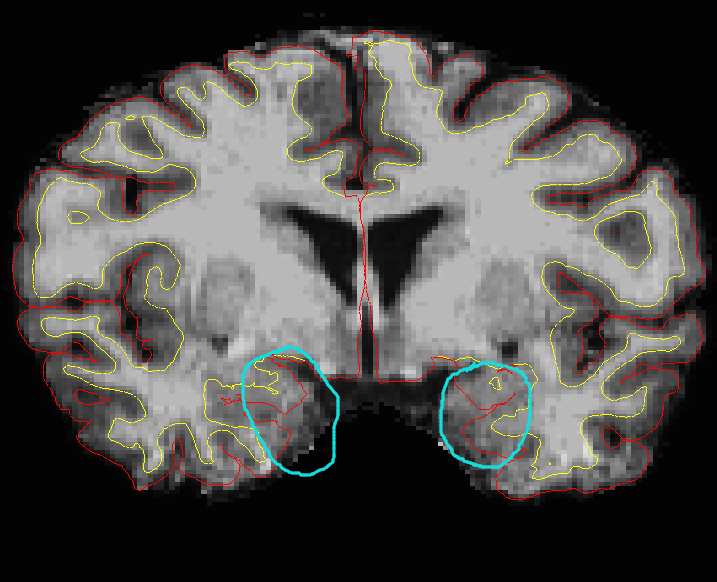
For this, I think pial surface (the location where I circle) already located outside of brain. For this, pail surface (near hippcamps I think) located inside of cortical I think.
I mean if I manually modify surface, how do it? Thanks very much! Best Regards, Qian Ran
At 2017-02-08 09:54:30, "Bruce Fischl" fischl@nmr.mgh.harvard.edu wrote:
Hi Qian
I'm not sure I understand what you think is wrong in the images you included. The first two locations look quite accurate to me, and I'm not positive but I think the third image the locations you circle are amygdala, so not neocortical at all
cheers Bruce
On Wed, 8 Feb 2017, 冉倩 wrote:
Dear Prof.Douglas Greve, Thanks for your reply. I add parts of problem screenshot of white/pial surface.
When I did freesurfer for structure analysis, I was confused by some steps and results. The analysis stream was:
1st: check data orientation
2nd : convert nii.gz to mgz
3rd: recon-all –all –subjid sub01
After these steps finished , I checked skullstrip, segmentation quality. The problems as following:
1st: skullstrip result not very well, almost need manually operation.
After manually operation, I run:recon-all –autorecon2 –autorecon3 –subjid sub01
2nd: parts of white surface and pial surface not very exactly. I only did adding control points to modify white surface, then I run:
Recon-all –autorecon2-cp –autorecon3 –subjid sub01 brainmask.mgzSeveral parts of pial surface exit errors. I added these as screenshot:
[IMAGE]
[IMAGE] [IMAGE] [IMAGE]
[IMAGE]
So when I met such issues, I should add control points for pial surface as white surface did (or how I correct or edit pial; still use tkmedit tool?) ? Then I run:
recon-all –autorecon2-pial –autorecon3 sub01 ?
If white surface and pial surface all needed manually operated, whether I could do like this: I add control points (-cp), edit wm (-wm), correct pial (-pial ) at the same time, then I run:
recon-all –autorecon2-cp –autorecon2-wm –autorecon2-pail –autorecon3 sub01 or recon-all -autorecon2-cp brainmask.mgz -autorecon2-wm -autorecon2-pial -autorecon3 sub01?
or any other suggestions?
Thanks very much! Best Regards, Qian Ran
At 2017-02-08 07:18:51, "Douglas Greve" greve@nmr.mgh.harvard.edu wrote:
  Hi Qian, things will be a lot easier if you imbed your comments
  and images in the email. From the text, I can't tell what you
  want exactly. The first question had to do with skull stripping.
  It looks like you had to make a manual edit. This is expected
  sometimes.  If it is more than that, what is the problem. In the
  second question, you had some problem with the quality of the
  white/pial surfaces, but there was not much detail or a picture.


  On 2/7/17 8:22 AM, 冉倩 wrote:
  Hello Freesurfer Developers,
I have had last September Freesurfer course. When I operated my data following that stream I met some problem in reon-all -all step. Because I need put some screenshout to exaplain that problems, I add word document in attachment. Thanks very much! Best Regards, Qian Ran
Freesurfer mailing list Freesurfer@nmr.mgh.harvard.edu https://mail.nmr.mgh.harvard.edu/mailman/listinfo/freesurfer
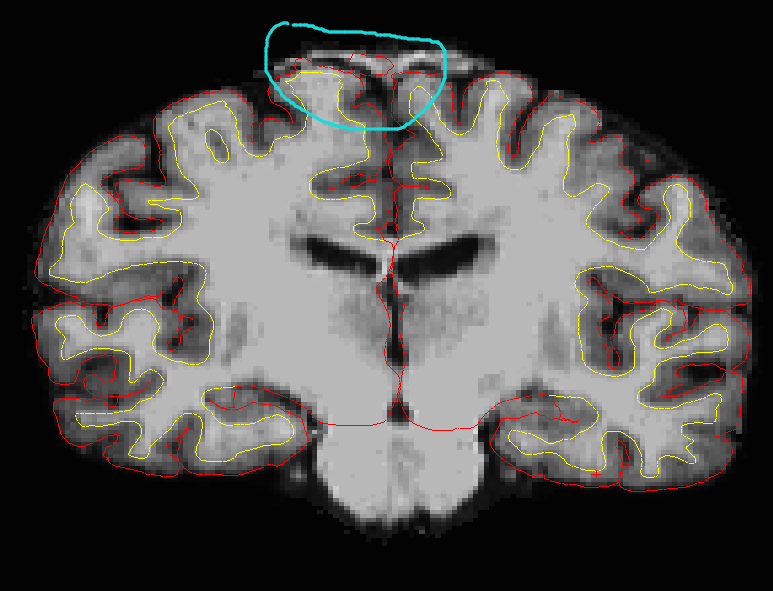
oh yes, it's grabbing a bit of dura. If you have a 1mm-ish T2 or FLAIR you can use it to automatically correct this type of problem. Or you can erase the dura in those regions on the brainmask.mgz and recreate the pial surface
cheers Bruce
On Wed, 8 Feb 2017, 冉倩 wrote:
Hi Bruce, Thanks for your reply.
[IMAGE] For this, I think pial surface (the location where I circle) already located outside of brain. [IMAGE] For this, pail surface (near hippcamps I think) located inside of cortical I think.
I mean if I manually modify surface, how do it? Thanks very much! Best Regards, Qian Ran
At 2017-02-08 09:54:30, "Bruce Fischl" fischl@nmr.mgh.harvard.edu wrote:
Hi Qian
I'm not sure I understand what you think is wrong in the images you included. The first two locations look quite accurate to me, and I'm not positive but I think the third image the locations you circle are amygdala,
so not neocortical at all
cheers Bruce
On Wed, 8 Feb 2017, 冉倩 wrote:
Dear Prof.Douglas Greve, Thanks for your reply. I add parts of problem screenshot of white/pial surface.
When I did freesurfer for structure analysis, I was confused by some st
eps
and results. The analysis stream was:
1st: check data orientation
2nd : convert nii.gz to mgz
3rd: recon-all –all –subjid sub01
After these steps finished , I checked skullstrip, segmentation quality.
The
problems as following:
1st: skullstrip result not very well, almost need manually operation.
After manually operation, I run:
recon-all –autorecon2 –autorecon3 –subjid sub01
2nd: parts of white surface and pial surface not very exactly. I only did adding control points to modify white surface, then I run:
Recon-all –autorecon2-cp –autorecon3 –subjid sub01 brainmask.mgz
Several parts of pial surface exit errors. I added these as screenshot:
[IMAGE]
[IMAGE] [IMAGE] [IMAGE]
[IMAGE]
So when I met such issues, I should add control points for pial surface
as
white surface did (or how I correct or edit pial; still use tkmedit tool?
) ?
Then I run:
recon-all –autorecon2-pial –autorecon3 sub01 ?
If white surface and pial surface all needed manually operated, whether I could do like this: I add control points (-cp), edit wm (-wm), correct pi
al
(-pial ) at the same time, then I run:
recon-all –autorecon2-cp –autorecon2-wm –autorecon2-pail –autorecon3 sub0
1
or recon-all -autorecon2-cp brainmask.mgz -autorecon2-wm -autorecon2-pial -autorecon3 sub01?
or any other suggestions?
Thanks very much! Best Regards, Qian Ran
At 2017-02-08 07:18:51, "Douglas Greve" greve@nmr.mgh.harvard.edu wrote
:
  Hi Qian, things will be a lot easier if you imbed your comments
  and images in the email. From the text, I can't tell what you
  want exactly. The first question had to do with skull
stripping. It looks like you had to make a manual edit. This is expected sometimes. If it is more than that, what is the problem. In the second question, you had some problem with the quality of the white/pial surfaces, but there was not much detail or a picture. On 2/7/17 8:22 AM, 冉倩 wrote: Hello Freesurfer Developers,I have had last September Freesurfer course. When I operated my data following that stream I met some problem in reon-all -all step. Because I need put some screenshout to exaplain that problems, I add word document in attachment. Thanks very much! Best Regards, Qian Ran
Freesurfer mailing list Freesurfer@nmr.mgh.harvard.edu https://mail.nmr.mgh.harvard.edu/mailman/listinfo/freesurfer
Hi Bruce, Thanks for your suggestions. If I manually erase ( whether I can modfiy control point just like modify wm) the dura on the brainmask.mgz to correct pial surface. Then I shoud re-run command: recon-all -autorecon2 -autorecon-3 sub01? or just recon-all -autorecon2-pial -autorecon3 sub01? Thnanks! Best Regards, Qian Ran
At 2017-02-08 10:57:23, "Bruce Fischl" fischl@nmr.mgh.harvard.edu wrote:
oh yes, it's grabbing a bit of dura. If you have a 1mm-ish T2 or FLAIR you can use it to automatically correct this type of problem. Or you can erase the dura in those regions on the brainmask.mgz and recreate the pial surface
cheers Bruce
On Wed, 8 Feb 2017, 冉倩 wrote:
Hi Bruce, Thanks for your reply.
[IMAGE] For this, I think pial surface (the location where I circle) already located outside of brain. [IMAGE] For this, pail surface (near hippcamps I think) located inside of cortical I think.
I mean if I manually modify surface, how do it? Thanks very much! Best Regards, Qian Ran
At 2017-02-08 09:54:30, "Bruce Fischl" fischl@nmr.mgh.harvard.edu wrote:
Hi Qian
I'm not sure I understand what you think is wrong in the images you included. The first two locations look quite accurate to me, and I'm not positive but I think the third image the locations you circle are amygdala,
so not neocortical at all
cheers Bruce
On Wed, 8 Feb 2017, 冉倩 wrote:
Dear Prof.Douglas Greve, Thanks for your reply. I add parts of problem screenshot of white/pial surface.
When I did freesurfer for structure analysis, I was confused by some st
eps
and results. The analysis stream was:
1st: check data orientation
2nd : convert nii.gz to mgz
3rd: recon-all –all –subjid sub01
After these steps finished , I checked skullstrip, segmentation quality.
The
problems as following:
1st: skullstrip result not very well, almost need manually operation.
After manually operation, I run:recon-all –autorecon2 –autorecon3 –subjid sub01
2nd: parts of white surface and pial surface not very exactly. I only did adding control points to modify white surface, then I run:
Recon-all –autorecon2-cp –autorecon3 –subjid sub01 brainmask.mgzSeveral parts of pial surface exit errors. I added these as screenshot:
[IMAGE]
[IMAGE] [IMAGE] [IMAGE]
[IMAGE]
So when I met such issues, I should add control points for pial surface
as
white surface did (or how I correct or edit pial; still use tkmedit tool?
) ?
Then I run:
recon-all –autorecon2-pial –autorecon3 sub01 ?
If white surface and pial surface all needed manually operated, whether I could do like this: I add control points (-cp), edit wm (-wm), correct pi
al
(-pial ) at the same time, then I run:
recon-all –autorecon2-cp –autorecon2-wm –autorecon2-pail –autorecon3 sub0
1
or recon-all -autorecon2-cp brainmask.mgz -autorecon2-wm -autorecon2-pial -autorecon3 sub01?
or any other suggestions?
Thanks very much! Best Regards, Qian Ran
At 2017-02-08 07:18:51, "Douglas Greve" greve@nmr.mgh.harvard.edu wrote
:
Hi Qian, things will be a lot easier if you imbed your comments and images in the email. From the text, I can't tell what you want exactly. The first question had to do with skull stripping. It looks like you had to make a manual edit. This is expected sometimes. If it is more than that, what is the problem. In the second question, you had some problem with the quality of the white/pial surfaces, but there was not much detail or a picture. On 2/7/17 8:22 AM, 冉倩 wrote: Hello Freesurfer Developers,I have had last September Freesurfer course. When I operated my data following that stream I met some problem in reon-all -all step. Because I need put some screenshout to exaplain that problems, I add word document in attachment. Thanks very much! Best Regards, Qian Ran
Freesurfer mailing list Freesurfer@nmr.mgh.harvard.edu https://mail.nmr.mgh.harvard.edu/mailman/listinfo/freesurfer
I think Bruce is referring only to the first image. For the second image, it looks like most of the problematic surface is going through the amygdala or hippocampus in which case it does not need to be fixed.
On 2/7/17 9:57 PM, Bruce Fischl wrote:
oh yes, it's grabbing a bit of dura. If you have a 1mm-ish T2 or FLAIR you can use it to automatically correct this type of problem. Or you can erase the dura in those regions on the brainmask.mgz and recreate the pial surface
cheers Bruce
On Wed, 8 Feb 2017, 冉倩 wrote:
Hi Bruce, Thanks for your reply.
[IMAGE] For this, I think pial surface (the location where I circle) already located outside of brain. [IMAGE] For this, pail surface (near hippcamps I think) located inside of cortical I think.
I mean if I manually modify surface, how do it? Thanks very much! Best Regards, Qian Ran
At 2017-02-08 09:54:30, "Bruce Fischl" fischl@nmr.mgh.harvard.edu wrote:
Hi Qian
I'm not sure I understand what you think is wrong in the images you included. The first two locations look quite accurate to me, and I'm
not >positive but I think the third image the locations you circle are amygdala,
so not neocortical at all
cheers Bruce
On Wed, 8 Feb 2017, 冉倩 wrote:
>> Dear Prof.Douglas Greve,
Thanks for your reply. I add parts of problem screenshot of
white/pial
surface.
When I did freesurfer for structure analysis, I was confused
by some st eps
and results. The analysis stream was:
1st: check data orientation 2nd : convert nii.gz to mgz 3rd: recon-all –all –subjid sub01 After these steps finished , I checked skullstrip, segmentation
quality. The
problems as following:
1st: skullstrip result not very well, almost need manually
operation.
After manually operation, I run:recon-all –autorecon2 –autorecon3 –subjid sub01 2nd: parts of white surface and pial surface not very exactly.
I only did
adding control points to modify white surface, then I run:
Recon-all –autorecon2-cp –autorecon3 –subjid sub01brainmask.mgz
Several parts of pial surface exit errors. I added these as
screenshot:
>> >> >> [IMAGE] [IMAGE]
[IMAGE] [IMAGE]
[IMAGE] So when I met such issues, I should add control points for pial
surface as
white surface did (or how I correct or edit pial; still use
tkmedit tool? ) ?
Then I run:
recon-all –autorecon2-pial –autorecon3 sub01 ? If white surface and pial surface all needed manually operated,
whether I
could do like this: I add control points (-cp), edit wm (-wm),
correct pi al
(-pial ) at the same time, then I run:
recon-all –autorecon2-cp –autorecon2-wm –autorecon2-pail
–autorecon3 sub0 1
or recon-all -autorecon2-cp brainmask.mgz -autorecon2-wm
-autorecon2-pial
-autorecon3 sub01?
or any other suggestions? Thanks very much!
Best Regards, Qian Ran
At 2017-02-08 07:18:51, "Douglas Greve"
greve@nmr.mgh.harvard.edu wrote :
Hi Qian, things will be a lot easier if you imbed your comments and images in the email. From the text, I can't tell what you want exactly. The first question had to do with skullstripping.
  It looks like you had to make a manual edit. This is expected
  sometimes.  If it is more than that, what is the problem. In
the
  second question, you had some problem with the quality of the
  white/pial surfaces, but there was not much detail or a
picture.
>>
  On 2/7/17 8:22 AM, 冉倩 wrote:
  Hello Freesurfer Developers,
I have had last September Freesurfer course. When I operated my data following that stream I met some problem in reon-all -all step. Because I need put some screenshout to exaplain that problems, I add word document in attachment. Thanks very much! Best Regards, Qian Ran
>> >> >> _______________________________________________
Freesurfer mailing list Freesurfer@nmr.mgh.harvard.edu https://mail.nmr.mgh.harvard.edu/mailman/listinfo/freesurfer
>> >> >> >>
Freesurfer mailing list Freesurfer@nmr.mgh.harvard.edu https://mail.nmr.mgh.harvard.edu/mailman/listinfo/freesurfer
Hi Prof.Douglas Greve,
Yes, probematic surface normally existed near supeiror dura ( aroun superior frontal lobe or parietal lobe or central gry area). Just now I am confused about the next steps. If I manually erase ( whether I can modfiy control point just like modify wm) the dura on the brainmask.mgz to correct pial surface. Then I shoud re-run command: recon-all -autorecon2 -autorecon-3 sub01? or just recon-all -autorecon2-pial -autorecon3 sub01? Thanks!
Best Regards, Qian Ran
At 2017-02-08 11:21:57, "Douglas Greve" greve@nmr.mgh.harvard.edu wrote:
I think Bruce is referring only to the first image. For the second image, it looks like most of the problematic surface is going through the amygdala or hippocampus in which case it does not need to be fixed.
On 2/7/17 9:57 PM, Bruce Fischl wrote:
oh yes, it's grabbing a bit of dura. If you have a 1mm-ish T2 or FLAIR you can use it to automatically correct this type of problem. Or you can erase the dura in those regions on the brainmask.mgz and recreate the pial surface
cheers Bruce
On Wed, 8 Feb 2017, 冉倩 wrote:
Hi Bruce, Thanks for your reply.
[IMAGE] For this, I think pial surface (the location where I circle) already located outside of brain. [IMAGE] For this, pail surface (near hippcamps I think) located inside of cortical I think.
I mean if I manually modify surface, how do it? Thanks very much! Best Regards, Qian Ran
At 2017-02-08 09:54:30, "Bruce Fischl" fischl@nmr.mgh.harvard.edu wrote:
Hi Qian
I'm not sure I understand what you think is wrong in the images you >included. The first two locations look quite accurate to me, and I'm not >positive but I think the third image the locations you circle are amygdala,
so not neocortical at all
cheers Bruce
On Wed, 8 Feb 2017, 冉倩 wrote:
Dear Prof.Douglas Greve,
Thanks for your reply. I add parts of problem screenshot of white/pial surface.
When I did freesurfer for structure analysis, I was confused by some st
eps
and results. The analysis stream was:
1st: check data orientation 2nd : convert nii.gz to mgz 3rd: recon-all –all –subjid sub01 After these steps finished , I checked skullstrip, segmentation quality. The
problems as following:
1st: skullstrip result not very well, almost need manually operation. After manually operation, I run: recon-all –autorecon2 –autorecon3 –subjid sub01 2nd: parts of white surface and pial surface not very exactly. I only did
adding control points to modify white surface, then I run:
Recon-all –autorecon2-cp –autorecon3 –subjid sub01 brainmask.mgzSeveral parts of pial surface exit errors. I added these as screenshot:
>> >> [IMAGE]
[IMAGE]
[IMAGE] [IMAGE]
[IMAGE] So when I met such issues, I should add control points for pial surface as
white surface did (or how I correct or edit pial; still use tkmedit tool?
) ?
Then I run:
recon-all –autorecon2-pial –autorecon3 sub01 ? If white surface and pial surface all needed manually operated, whether I
could do like this: I add control points (-cp), edit wm (-wm), correct pi
al
(-pial ) at the same time, then I run:
recon-all –autorecon2-cp –autorecon2-wm –autorecon2-pail –autorecon3 sub0
1
or recon-all -autorecon2-cp brainmask.mgz -autorecon2-wm -autorecon2-pial -autorecon3 sub01?
or any other suggestions? Thanks very much!
Best Regards, Qian Ran
At 2017-02-08 07:18:51, "Douglas Greve" greve@nmr.mgh.harvard.edu wrote
:
Hi Qian, things will be a lot easier if you imbed your comments and images in the email. From the text, I can't tell what you want exactly. The first question had to do with skull stripping. It looks like you had to make a manual edit. This is expected sometimes. If it is more than that, what is the problem. In the second question, you had some problem with the quality of the white/pial surfaces, but there was not much detail or a picture.On 2/7/17 8:22 AM, 冉倩 wrote: Hello Freesurfer Developers,I have had last September Freesurfer course. When I operated my data following that stream I met some problem in reon-all -all step. Because I need put some screenshout to exaplain that problems, I add word document in attachment. Thanks very much! Best Regards, Qian Ran
>> _______________________________________________
Freesurfer mailing list Freesurfer@nmr.mgh.harvard.edu https://mail.nmr.mgh.harvard.edu/mailman/listinfo/freesurfer
>> >>
_______________________________________________ Freesurfer mailing list Freesurfer@nmr.mgh.harvard.eduhttps://mail.nmr.mgh.harvard.edu/mailman/listinfo/freesurfer
You should edit the brain.finalsurfs.mgz to remove the non-brain then run with -autorecon-pial
On 2/7/17 10:37 PM, 冉倩 wrote:
Hi Prof.Douglas Greve,
Yes, probematic surface normally existed near supeiror dura ( aroun superior frontal lobe or parietal lobe or central gry area). Just now I am confused about the next steps. If I manually erase ( whether I can modfiy control point just like modify wm) the dura on the brainmask.mgz to correct pial surface. Then I shoud re-run command: recon-all -autorecon2 -autorecon-3 sub01? or just recon-all -autorecon2-pial -autorecon3 sub01? Thanks!
Best Regards, Qian Ran
At 2017-02-08 11:21:57, "Douglas Greve" greve@nmr.mgh.harvard.edu wrote:
I think Bruce is referring only to the first image. For the second image, it looks like most of the problematic surface is going through the amygdala or hippocampus in which case it does not need to be fixed. On 2/7/17 9:57 PM, Bruce Fischl wrote:oh yes, it's grabbing a bit of dura. If you have a 1mm-ish T2 or FLAIR you can use it to automatically correct this type of problem. Or you can erase the dura in those regions on the brainmask.mgz and recreate the pial surface cheers Bruce On Wed, 8 Feb 2017, 冉倩 wrote:Hi Bruce, Thanks for your reply. [IMAGE] For this, I think pial surface (the location where I circle) already located outside of brain. [IMAGE] For this, pail surface (near hippcamps I think) located inside of cortical I think. I mean if I manually modify surface, how do it? Thanks very much! Best Regards, Qian Ran At 2017-02-08 09:54:30, "Bruce Fischl" <fischl@nmr.mgh.harvard.edu> wrote: >Hi Qian > >I'm not sure I understand what you think is wrong in the images you >included. The first two locations look quite accurate to me, and I'm not >positive but I think the third image the locations you circle are amygdala, >so not neocortical at all > >cheers >Bruce > > > > > >On Wed, 8 Feb 2017, 冉倩 wrote: > >> >> >> Dear Prof.Douglas Greve, >> Thanks for your reply. I add parts of problem screenshot of white/pial >> surface. >> >> When I did freesurfer for structure analysis, I was confused by some st eps >> and results. The analysis stream was: >> >> 1st: check data orientation >> >> 2nd : convert nii.gz to mgz >> >> 3rd: recon-all –all –subjid sub01 >> >> After these steps finished , I checked skullstrip, segmentation quality. The >> problems as following: >> >> 1st: skullstrip result not very well, almost need manually operation. >> >> After manually operation, I run: >> >> recon-all –autorecon2 –autorecon3 –subjid sub01 >> >> 2nd: parts of white surface and pial surface not very exactly. I only did >> adding control points to modify white surface, then I run: >> >> Recon-all –autorecon2-cp –autorecon3 –subjid sub01 brainmask.mgz >> >> Several parts of pial surface exit errors. I added these as screenshot: >> >> >> >> >> [IMAGE] >> >> [IMAGE] >> [IMAGE] >> [IMAGE] >> >> [IMAGE] >> >> So when I met such issues, I should add control points for pial surface as >> white surface did (or how I correct or edit pial; still use tkmedit tool? ) ? >> Then I run: >> >> recon-all –autorecon2-pial –autorecon3 sub01 ? >> >> If white surface and pial surface all needed manually operated, whether I >> could do like this: I add control points (-cp), edit wm (-wm), correct pi al >> (-pial ) at the same time, then I run: >> >> recon-all –autorecon2-cp –autorecon2-wm –autorecon2-pail –autorecon3 sub0 1 >> or recon-all -autorecon2-cp brainmask.mgz -autorecon2-wm -autorecon2-pial >> -autorecon3 sub01? >> >> or any other suggestions? >> >> Thanks very much! >> Best Regards, >> Qian Ran >> >> At 2017-02-08 07:18:51, "Douglas Greve" <greve@nmr.mgh.harvard.edu> wrote : >> >> Hi Qian, things will be a lot easier if you imbed your comments >> and images in the email. From the text, I can't tell what you >> want exactly. The first question had to do with skull stripping. >> It looks like you had to make a manual edit. This is expected >> sometimes. If it is more than that, what is the problem. In the >> second question, you had some problem with the quality of the >> white/pial surfaces, but there was not much detail or a picture. >> >> >> >> On 2/7/17 8:22 AM, 冉倩 wrote: >> Hello Freesurfer Developers, >> I have had last September Freesurfer course. When I operated my >> data following that stream I met some problem in reon-all -all >> step. Because I need put some screenshout to exaplain that >> problems, I add word document in attachment. Thanks very much! >> Best Regards, >> Qian Ran >> >> >> >> >> >> >> _______________________________________________ >> Freesurfer mailing list >> Freesurfer@nmr.mgh.harvard.edu >> https://mail.nmr.mgh.harvard.edu/mailman/listinfo/freesurfer >> >> >> >> >> >> >> >>_______________________________________________ Freesurfer mailing list Freesurfer@nmr.mgh.harvard.edu https://mail.nmr.mgh.harvard.edu/mailman/listinfo/freesurfer
Freesurfer mailing list Freesurfer@nmr.mgh.harvard.edu https://mail.nmr.mgh.harvard.edu/mailman/listinfo/freesurfer
brain.finalsurfs.mgz? not brainmask.mgz? or brain.finalsurfs.mgz for pial surface edit and brainmask for wm surface edit?
At 2017-02-08 11:41:40, "Douglas Greve" greve@nmr.mgh.harvard.edu wrote:
You should edit the brain.finalsurfs.mgz to remove the non-brain then run with -autorecon-pial
On 2/7/17 10:37 PM, 冉倩 wrote:
Hi Prof.Douglas Greve,
Yes, probematic surface normally existed near supeiror dura ( aroun superior frontal lobe or parietal lobe or central gry area). Just now I am confused about the next steps. If I manually erase ( whether I can modfiy control point just like modify wm) the dura on the brainmask.mgz to correct pial surface. Then I shoud re-run command: recon-all -autorecon2 -autorecon-3 sub01? or just recon-all -autorecon2-pial -autorecon3 sub01? Thanks!
Best Regards, Qian Ran
At 2017-02-08 11:21:57, "Douglas Greve" greve@nmr.mgh.harvard.edu wrote:
I think Bruce is referring only to the first image. For the second image, it looks like most of the problematic surface is going through the amygdala or hippocampus in which case it does not need to be fixed.
On 2/7/17 9:57 PM, Bruce Fischl wrote:
oh yes, it's grabbing a bit of dura. If you have a 1mm-ish T2 or
FLAIR you can use it to automatically correct this type of
problem. Or you can erase the dura in those regions on the
brainmask.mgz and recreate the pial surface

cheers
Bruce


On Wed, 8 Feb 2017, 冉倩 wrote:
Hi Bruce, Thanks for your reply.
[IMAGE] For this, I think pial surface (the location where I circle) already located outside of brain. [IMAGE] For this, pail surface (near hippcamps I think) located inside of cortical I think.
I mean if I manually modify surface, how do it? Thanks very much! Best Regards, Qian Ran
At 2017-02-08 09:54:30, "Bruce Fischl" fischl@nmr.mgh.harvard.edu wrote:
Hi Qian
I'm not sure I understand what you think is wrong in the images you >included. The first two locations look quite accurate to me, and I'm not >positive but I think the third image the locations you circle are amygdala,
so not neocortical at all
cheers Bruce
On Wed, 8 Feb 2017, 冉倩 wrote:
Dear Prof.Douglas Greve,
Thanks for your reply. I add parts of problem screenshot of white/pial surface.
When I did freesurfer for structure analysis, I was confused by some st
eps
and results. The analysis stream was:
1st: check data orientation 2nd : convert nii.gz to mgz 3rd: recon-all –all –subjid sub01 After these steps finished , I checked skullstrip, segmentation quality. The
problems as following:
1st: skullstrip result not very well, almost need manually operation. After manually operation, I run: recon-all –autorecon2 –autorecon3 –subjid sub01 2nd: parts of white surface and pial surface not very exactly. I only did
adding control points to modify white surface, then I run:
Recon-all –autorecon2-cp –autorecon3 –subjid sub01 brainmask.mgzSeveral parts of pial surface exit errors. I added these as screenshot:
>> >> [IMAGE]
[IMAGE]
[IMAGE] [IMAGE]
[IMAGE] So when I met such issues, I should add control points for pial surface as
white surface did (or how I correct or edit pial; still use tkmedit tool?
) ?
Then I run:
recon-all –autorecon2-pial –autorecon3 sub01 ? If white surface and pial surface all needed manually operated, whether I
could do like this: I add control points (-cp), edit wm (-wm), correct pi
al
(-pial ) at the same time, then I run:
recon-all –autorecon2-cp –autorecon2-wm –autorecon2-pail –autorecon3 sub0
1
or recon-all -autorecon2-cp brainmask.mgz -autorecon2-wm -autorecon2-pial -autorecon3 sub01?
or any other suggestions? Thanks very much!
Best Regards, Qian Ran
At 2017-02-08 07:18:51, "Douglas Greve" greve@nmr.mgh.harvard.edu wrote
:
Hi Qian, things will be a lot easier if you imbed your comments and images in the email. From the text, I can't tell what you want exactly. The first question had to do with skull stripping. It looks like you had to make a manual edit. This is expected sometimes. If it is more than that, what is the problem. In the second question, you had some problem with the quality of the white/pial surfaces, but there was not much detail or a picture.On 2/7/17 8:22 AM, 冉倩 wrote: Hello Freesurfer Developers,I have had last September Freesurfer course. When I operated my data following that stream I met some problem in reon-all -all step. Because I need put some screenshout to exaplain that problems, I add word document in attachment. Thanks very much! Best Regards, Qian Ran
>> _______________________________________________
Freesurfer mailing list Freesurfer@nmr.mgh.harvard.edu https://mail.nmr.mgh.harvard.edu/mailman/listinfo/freesurfer
>> >>
_______________________________________________ Freesurfer mailing list Freesurfer@nmr.mgh.harvard.eduhttps://mail.nmr.mgh.harvard.edu/mailman/listinfo/freesurfer
_______________________________________________ Freesurfer mailing list Freesurfer@nmr.mgh.harvard.eduhttps://mail.nmr.mgh.harvard.edu/mailman/listinfo/freesurfer
brain.finalsurfs is fine if you are just rerunning the pial. Edit brainmask if you are starting earlier so all the downstream volumes including brain.finalsurfs will have the dura removed Cheers Bruce
On Feb 7, 2017, at 10:45 PM, 冉倩 fskrq002076@163.com wrote:
brain.finalsurfs.mgz? not brainmask.mgz? or brain.finalsurfs.mgz for pial surface edit and brainmask for wm surface edit?
At 2017-02-08 11:41:40, "Douglas Greve" greve@nmr.mgh.harvard.edu wrote: You should edit the brain.finalsurfs.mgz to remove the non-brain then run with -autorecon-pial
On 2/7/17 10:37 PM, 冉倩 wrote:
Hi Prof.Douglas Greve,
Yes, probematic surface normally existed near supeiror dura ( aroun superior frontal lobe or parietal lobe or central gry area). Just now I am confused about the next steps. If I manually erase ( whether I can modfiy control point just like modify wm) the dura on the brainmask.mgz to correct pial surface. Then I shoud re-run command: recon-all -autorecon2 -autorecon-3 sub01? or just recon-all -autorecon2-pial -autorecon3 sub01? Thanks!
Best Regards, Qian Ran
At 2017-02-08 11:21:57, "Douglas Greve" greve@nmr.mgh.harvard.edu wrote: I think Bruce is referring only to the first image. For the second image, it looks like most of the problematic surface is going through the amygdala or hippocampus in which case it does not need to be fixed.
On 2/7/17 9:57 PM, Bruce Fischl wrote: oh yes, it's grabbing a bit of dura. If you have a 1mm-ish T2 or FLAIR you can use it to automatically correct this type of problem. Or you can erase the dura in those regions on the brainmask.mgz and recreate the pial surface
cheers Bruce
On Wed, 8 Feb 2017, 冉倩 wrote:
Hi Bruce, Thanks for your reply.
[IMAGE] For this, I think pial surface (the location where I circle) already located outside of brain. [IMAGE] For this, pail surface (near hippcamps I think) located inside of cortical I think.
I mean if I manually modify surface, how do it? Thanks very much! Best Regards, Qian Ran
At 2017-02-08 09:54:30, "Bruce Fischl" fischl@nmr.mgh.harvard.edu wrote:
Hi Qian
I'm not sure I understand what you think is wrong in the images you >included. The first two locations look quite accurate to me, and I'm not >positive but I think the third image the locations you circle are amygdala,
so not neocortical at all
cheers Bruce
On Wed, 8 Feb 2017, 冉倩 wrote:
>> >> Dear Prof.Douglas Greve, Thanks for your reply. I add parts of problem screenshot of white/pial surface. >> When I did freesurfer for structure analysis, I was confused by some st
eps
and results. The analysis stream was: >> 1st: check data orientation >> 2nd : convert nii.gz to mgz >> 3rd: recon-all –all –subjid sub01 >> After these steps finished , I checked skullstrip, segmentation quality. The problems as following: >> 1st: skullstrip result not very well, almost need manually operation. >> After manually operation, I run: >> recon-all –autorecon2 –autorecon3 –subjid sub01 >> 2nd: parts of white surface and pial surface not very exactly. I only did adding control points to modify white surface, then I run: >> Recon-all –autorecon2-cp –autorecon3 –subjid sub01 brainmask.mgz >> Several parts of pial surface exit errors. I added these as screenshot: >> >> >> >> [IMAGE] >> [IMAGE] [IMAGE] [IMAGE] >> [IMAGE] >> So when I met such issues, I should add control points for pial surface as white surface did (or how I correct or edit pial; still use tkmedit tool?
) ?
Then I run: >> recon-all –autorecon2-pial –autorecon3 sub01 ? >> If white surface and pial surface all needed manually operated, whether I could do like this: I add control points (-cp), edit wm (-wm), correct pi
al
(-pial ) at the same time, then I run: >> recon-all –autorecon2-cp –autorecon2-wm –autorecon2-pail –autorecon3 sub0
1
or recon-all -autorecon2-cp brainmask.mgz -autorecon2-wm -autorecon2-pial -autorecon3 sub01? >> or any other suggestions? >> Thanks very much! Best Regards, Qian Ran >> At 2017-02-08 07:18:51, "Douglas Greve" greve@nmr.mgh.harvard.edu wrote
:
Hi Qian, things will be a lot easier if you imbed your comments and images in the email. From the text, I can't tell what you want exactly. The first question had to do with skull stripping. It looks like you had to make a manual edit. This is expected sometimes. If it is more than that, what is the problem. In the second question, you had some problem with the quality of the white/pial surfaces, but there was not much detail or a picture.>> >> On 2/7/17 8:22 AM, 冉倩 wrote: Hello Freesurfer Developers, I have had last September Freesurfer course. When I operated my data following that stream I met some problem in reon-all -all step. Because I need put some screenshout to exaplain that problems, I add word document in attachment. Thanks very much! Best Regards, Qian Ran >> >> >> >> >> _______________________________________________ Freesurfer mailing list Freesurfer@nmr.mgh.harvard.edu https://mail.nmr.mgh.harvard.edu/mailman/listinfo/freesurfer >> >> >> >> >> >>
Freesurfer mailing list Freesurfer@nmr.mgh.harvard.edu https://mail.nmr.mgh.harvard.edu/mailman/listinfo/freesurfer
Freesurfer mailing list Freesurfer@nmr.mgh.harvard.edu https://mail.nmr.mgh.harvard.edu/mailman/listinfo/freesurfer
Freesurfer mailing list Freesurfer@nmr.mgh.harvard.edu https://mail.nmr.mgh.harvard.edu/mailman/listinfo/freesurfer
Hi Bruce, If I use brain.finalsurfs, then I run recon-all -autorecon2-pial -subjid sub01 or recon-all -autorecon2-pial -autorecon3 -subjid sub01? autorecon3 still need rerunning? Thanks! Best Regards, Qian Ran
At 2017-02-08 12:19:35, "Bruce Fischl" fischl@nmr.mgh.harvard.edu wrote:
brain.finalsurfs is fine if you are just rerunning the pial. Edit brainmask if you are starting earlier so all the downstream volumes including brain.finalsurfs will have the dura removed Cheers Bruce
On Feb 7, 2017, at 10:45 PM, 冉倩 fskrq002076@163.com wrote:
brain.finalsurfs.mgz? not brainmask.mgz? or brain.finalsurfs.mgz for pial surface edit and brainmask for wm surface edit?
At 2017-02-08 11:41:40, "Douglas Greve" greve@nmr.mgh.harvard.edu wrote:
You should edit the brain.finalsurfs.mgz to remove the non-brain then run with -autorecon-pial
On 2/7/17 10:37 PM, 冉倩 wrote:
Hi Prof.Douglas Greve,
Yes, probematic surface normally existed near supeiror dura ( aroun superior frontal lobe or parietal lobe or central gry area). Just now I am confused about the next steps. If I manually erase ( whether I can modfiy control point just like modify wm) the dura on the brainmask.mgz to correct pial surface. Then I shoud re-run command: recon-all -autorecon2 -autorecon-3 sub01? or just recon-all -autorecon2-pial -autorecon3 sub01? Thanks!
Best Regards, Qian Ran
At 2017-02-08 11:21:57, "Douglas Greve" greve@nmr.mgh.harvard.edu wrote:
I think Bruce is referring only to the first image. For the second image, it looks like most of the problematic surface is going through the amygdala or hippocampus in which case it does not need to be fixed.
On 2/7/17 9:57 PM, Bruce Fischl wrote:
oh yes, it's grabbing a bit of dura. If you have a 1mm-ish T2 or FLAIR you can use it to automatically correct this type of problem. Or you can erase the dura in those regions on the brainmask.mgz and recreate the pial surface
cheers Bruce
On Wed, 8 Feb 2017, 冉倩 wrote:
Hi Bruce, Thanks for your reply.
[IMAGE] For this, I think pial surface (the location where I circle) already located outside of brain. [IMAGE] For this, pail surface (near hippcamps I think) located inside of cortical I think.
I mean if I manually modify surface, how do it? Thanks very much! Best Regards, Qian Ran
At 2017-02-08 09:54:30, "Bruce Fischl" fischl@nmr.mgh.harvard.edu wrote:
Hi Qian
I'm not sure I understand what you think is wrong in the images you >included. The first two locations look quite accurate to me, and I'm not >positive but I think the third image the locations you circle are amygdala,
so not neocortical at all
cheers Bruce
On Wed, 8 Feb 2017, 冉倩 wrote:
Dear Prof.Douglas Greve,
Thanks for your reply. I add parts of problem screenshot of white/pial surface.
When I did freesurfer for structure analysis, I was confused by some st
eps
and results. The analysis stream was:
1st: check data orientation 2nd : convert nii.gz to mgz 3rd: recon-all –all –subjid sub01 After these steps finished , I checked skullstrip, segmentation quality. The
problems as following:
1st: skullstrip result not very well, almost need manually operation. After manually operation, I run: recon-all –autorecon2 –autorecon3 –subjid sub01 2nd: parts of white surface and pial surface not very exactly. I only did
adding control points to modify white surface, then I run:
Recon-all –autorecon2-cp –autorecon3 –subjid sub01 brainmask.mgzSeveral parts of pial surface exit errors. I added these as screenshot:
>> >> [IMAGE]
[IMAGE]
[IMAGE] [IMAGE]
[IMAGE] So when I met such issues, I should add control points for pial surface as
white surface did (or how I correct or edit pial; still use tkmedit tool?
) ?
Then I run:
recon-all –autorecon2-pial –autorecon3 sub01 ? If white surface and pial surface all needed manually operated, whether I
could do like this: I add control points (-cp), edit wm (-wm), correct pi
al
(-pial ) at the same time, then I run:
recon-all –autorecon2-cp –autorecon2-wm –autorecon2-pail –autorecon3 sub0
1
or recon-all -autorecon2-cp brainmask.mgz -autorecon2-wm -autorecon2-pial -autorecon3 sub01?
or any other suggestions? Thanks very much!
Best Regards, Qian Ran
At 2017-02-08 07:18:51, "Douglas Greve" greve@nmr.mgh.harvard.edu wrote
:
Hi Qian, things will be a lot easier if you imbed your comments and images in the email. From the text, I can't tell what you want exactly. The first question had to do with skull stripping. It looks like you had to make a manual edit. This is expected sometimes. If it is more than that, what is the problem. In the second question, you had some problem with the quality of the white/pial surfaces, but there was not much detail or a picture.On 2/7/17 8:22 AM, 冉倩 wrote: Hello Freesurfer Developers,I have had last September Freesurfer course. When I operated my data following that stream I met some problem in reon-all -all step. Because I need put some screenshout to exaplain that problems, I add word document in attachment. Thanks very much! Best Regards, Qian Ran
>> _______________________________________________
Freesurfer mailing list Freesurfer@nmr.mgh.harvard.edu https://mail.nmr.mgh.harvard.edu/mailman/listinfo/freesurfer
>> >>
_______________________________________________ Freesurfer mailing list Freesurfer@nmr.mgh.harvard.eduhttps://mail.nmr.mgh.harvard.edu/mailman/listinfo/freesurfer
_______________________________________________ Freesurfer mailing list Freesurfer@nmr.mgh.harvard.eduhttps://mail.nmr.mgh.harvard.edu/mailman/listinfo/freesurfer
_______________________________________________
Freesurfer mailing list
Freesurfer@nmr.mgh.harvard.edu
https://mail.nmr.mgh.harvard.edu/mailman/listinfo/freesurfer
Hi Qian
if you just want to regenerate the pial, then yes, edit the brain.finalsurfs.mgz and run:
recon-all -autrecon-pial -s <subject id> -sd <subjects_dir>
note that it is NOT autorecon2-pial, but just autorecon-pial (leave out the '2')
cheeers Bruce
On Thu, 9 Feb 2017, 冉倩 wrote:
Hi Bruce, If I use brain.finalsurfs, then I run recon-all -autorecon2-pial -subjid sub01 or recon-all -autorecon2-pial -autorecon3 -subjid sub01? autorecon3 still need rerunning? Thanks! Best Regards, Qian Ran
At 2017-02-08 12:19:35, "Bruce Fischl" fischl@nmr.mgh.harvard.edu wrote: brain.finalsurfs is fine if you are just rerunning the pial. Edit brainmask if you are starting earlier so all the downstream volumes including brain.finalsurfs will have the dura removed Cheers Bruce
On Feb 7, 2017, at 10:45 PM, 冉倩 fskrq002076@163.com wrote:
brain.finalsurfs.mgz? not brainmask.mgz?or brain.finalsurfs.mgz for pial surface edit and brainmask for wm surface edit?
At 2017-02-08 11:41:40, "Douglas Greve" greve@nmr.mgh.harvard.edu wrote:
  You should edit the brain.finalsurfs.mgz to remove
  the non-brain then run with -autorecon-pial


  On 2/7/17 10:37 PM, 冉倩 wrote:


  Hi Prof.Douglas Greve,
Yes, probematic surface normally existed near supeiror dura ( aroun superior frontal lobe or parietal lobe or central gry area). Just now I am confused about the next steps. If I manually erase ( whether I can modfiy control point just like modify wm) the dura on the brainmask.mgz to correct pial surface. Then I shoud re-run command: recon-all -autorecon2 -autorecon-3 sub01? or just recon-all -autorecon2-pial -autorecon3 sub01? Thanks!
Best Regards, Qian Ran
At 2017-02-08 11:21:57, "Douglas Greve" greve@nmr.mgh.harvard.edu wrote:
  I think Bruce is referring only to the
  first image. For the second image, it
  looks like most of the problematic
  surface is going through the amygdala or
  hippocampus in which case it does not
  need to be fixed.


  On 2/7/17 9:57 PM, Bruce Fischl wrote:
  oh yes, it's grabbing a bit of
  dura. If you have a 1mm-ish T2 or
  FLAIR you can use it to
  automatically correct this type of
  problem. Or you can erase the dura
  in those regions on the
  brainmask.mgz and recreate the
  pial surface

  cheers
  Bruce


  On Wed, 8 Feb 2017, 冉倩 wrote:

        Hi Bruce,
        Thanks for your reply.

        [IMAGE]
        For this, I think pial
        surface  (the location
        where I circle)
         already
        located outside of
        brain.
        [IMAGE]
        For this, pail surface
        (near hippcamps I
        think) located inside
        of cortical I
        think.

        I mean if I manually
        modify surface, how do
        it? Thanks very much!
        Best Regards,
        Qian Ran

        At 2017-02-08
        09:54:30, "Bruce
        Fischl"
        <fischl@nmr.mgh.harvard.edu>
        wrote:
        >Hi Qian
        >
        >I'm not sure I
        understand what you
        think is wrong in the
        images you >included.
        The first two
        locations look quite
        accurate to me, and
        I'm not >positive but
        I think the third
        image the locations
        you circle are
        amygdala,

        >so not neocortical at
        all
        >
        >cheers
        >Bruce
        >
        >
        >
        >
        >
        >On Wed, 8 Feb 2017,
        冉倩 wrote:
        >
        >> >> >> Dear
        Prof.Douglas Greve,
        >>  Thanks for your
        reply. I add parts of
        problem screenshot of
        white/pial
        >> surface.
        >> >>   When I did
        freesurfer for
        structure analysis, I
        was confused by some
        st
        eps
        >> and results. The
        analysis stream was:
        >> >> 1st: check data
        orientation
        >> >> 2nd : convert
        nii.gz  to mgz
        >> >> 3rd: recon-all
        –all –subjid sub01
        >> >> After these
        steps finished , I
        checked skullstrip,
        segmentation quality.
        The
        >> problems as
        following:
        >> >> 1st: skullstrip
        result not very well,
        almost need manually
        operation.
        >> >>      After
        manually operation, I
        run:
        >> >>  recon-all
        –autorecon2
        –autorecon3 –subjid
        sub01
        >> >> 2nd: parts of
        white surface and pial
        surface not very
        exactly. I only did
        >> adding control
        points to modify white
        surface, then I run:
        >> >>        Recon-all
        –autorecon2-cp
        –autorecon3 –subjid
        sub01 brainmask.mgz
        >> >> Several parts of
        pial surface exit
        errors. I added these
        as screenshot:
        >> >> >> >> >> [IMAGE]
        >> >> [IMAGE]
        >> [IMAGE]
        >> [IMAGE]
        >> >> [IMAGE]
        >> >> So when I met
        such issues, I should
        add control points for
        pial surface  as
        >> white surface did
        (or how I correct or
        edit pial; still use
        tkmedit tool?
        ) ?
        >> Then I run:
        >> >> recon-all
        –autorecon2-pial
        –autorecon3 sub01 ?
        >> >> If white surface
        and pial surface all
        needed manually
        operated, whether I
        >> could do like this:
        I add control points
        (-cp), edit wm (-wm),
        correct pi
        al
        >> (-pial ) at the
        same time, then I run:
        >> >> recon-all
        –autorecon2-cp
        –autorecon2-wm
        –autorecon2-pail
        –autorecon3 sub0
        1
        >> or recon-all
        -autorecon2-cp brainmask.mgz
        -autorecon2-wm
        -autorecon2-pial
        >> -autorecon3 sub01?
        >> >> or any other
        suggestions?
        >> >> Thanks very
        much!
        >> Best Regards,
        >> Qian Ran
        >> >> At 2017-02-08
        07:18:51, "Douglas
        Greve"
        <greve@nmr.mgh.harvard.edu>
        wrote
        :
        >>
        >>       Hi Qian,
        things will be a lot
        easier if you imbed
        your comments
        >>       and images in
        the email. From the
        text, I can't tell
        what you
        >>       want exactly.
        The first question had
        to do with skull
        stripping.
        >>       It looks like
        you had to make a
        manual edit. This is
        expected
        >>       sometimes.
        If it is more than
        that, what is the
        problem. In the
        >>       second
        question, you had some
        problem with the
        quality of the
        >>       white/pial
        surfaces, but there
        was not much detail or
        a picture.
        >> >> >>
        >>       On 2/7/17
        8:22 AM, 冉倩 wrote:
        >>       Hello
        Freesurfer Developers,
        >> I have had last
        September Freesurfer
        course. When I
        operated my
        >> data following that
        stream I met some
        problem in reon-all
        -all
        >> step. Because I
        need put some
        screenshout to
        exaplain that
        >> problems, I add
        word document in
        attachment. Thanks
        very much!
        >> Best Regards,
        >> Qian Ran
        >> >> >>
        >> >> >> >>
        _______________________________________________
        >> Freesurfer mailing
        list
        >>
        Freesurfer@nmr.mgh.harvard.edu
        >>
        https://mail.nmr.mgh.harvard.edu/mailman/listinfo/freesurfer
        >> >> >> >> >>
        >> >> >>
Freesurfer mailing list Freesurfer@nmr.mgh.harvard.edu https://mail.nmr.mgh.harvard.edu/mailman/listinfo/freesurfer
Freesurfer mailing list Freesurfer@nmr.mgh.harvard.edu https://mail.nmr.mgh.harvard.edu/mailman/listinfo/freesurfer
  _______________________________________________
  Freesurfer mailing list
  Freesurfer@nmr.mgh.harvard.edu
  https://mail.nmr.mgh.harvard.edu/mailman/listinfo/freesurfer
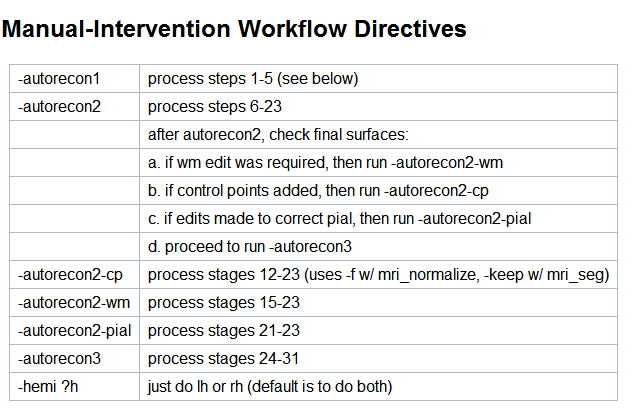
Hi Bruce, I am a little confused about it. I found 'Manual-Intervention Workflow Directives' on recon-all free surfer wiki web. It said if edits made to correct pial, run-autorecon2-pial. If I only edit pial, I run >recon-all -autrecon-pial -s <subject id> -sd <subjects_dir> to fix this issue, I also should rerunning autorecon3? or which command I should use to continue to next step? Thanks a lot. Best Regards, Qian Ran
At 2017-02-09 08:55:34, "Bruce Fischl" fischl@nmr.mgh.harvard.edu wrote:
Hi Qian
if you just want to regenerate the pial, then yes, edit the brain.finalsurfs.mgz and run:
recon-all -autrecon-pial -s <subject id> -sd <subjects_dir>
note that it is NOT autorecon2-pial, but just autorecon-pial (leave out the '2')
cheeers Bruce
On Thu, 9 Feb 2017, 冉倩 wrote:
Hi Bruce, If I use brain.finalsurfs, then I run recon-all -autorecon2-pial -subjid sub01 or recon-all -autorecon2-pial -autorecon3 -subjid sub01? autorecon3 still need rerunning? Thanks! Best Regards, Qian Ran
At 2017-02-08 12:19:35, "Bruce Fischl" fischl@nmr.mgh.harvard.edu wrote: brain.finalsurfs is fine if you are just rerunning the pial. Edit brainmask if you are starting earlier so all the downstream volumes including brain.finalsurfs will have the dura removed Cheers Bruce
On Feb 7, 2017, at 10:45 PM, 冉倩 fskrq002076@163.com wrote:
brain.finalsurfs.mgz? not brainmask.mgz?or brain.finalsurfs.mgz for pial surface edit and brainmask for wm surface edit?
At 2017-02-08 11:41:40, "Douglas Greve" greve@nmr.mgh.harvard.edu wrote:
  You should edit the brain.finalsurfs.mgz to remove
  the non-brain then run with -autorecon-pial


  On 2/7/17 10:37 PM, 冉倩 wrote:


  Hi Prof.Douglas Greve,
Yes, probematic surface normally existed near supeiror dura ( aroun superior frontal lobe or parietal lobe or central gry area). Just now I am confused about the next steps. If I manually erase ( whether I can modfiy control point just like modify wm) the dura on the brainmask.mgz to correct pial surface. Then I shoud re-run command: recon-all -autorecon2 -autorecon-3 sub01? or just recon-all -autorecon2-pial -autorecon3 sub01? Thanks!
Best Regards, Qian Ran
At 2017-02-08 11:21:57, "Douglas Greve" greve@nmr.mgh.harvard.edu wrote:
  I think Bruce is referring only to the
  first image. For the second image, it
  looks like most of the problematic
  surface is going through the amygdala or
  hippocampus in which case it does not
  need to be fixed.


  On 2/7/17 9:57 PM, Bruce Fischl wrote:
  oh yes, it's grabbing a bit of
  dura. If you have a 1mm-ish T2 or
  FLAIR you can use it to
  automatically correct this type of
  problem. Or you can erase the dura
  in those regions on the
  brainmask.mgz and recreate the
  pial surface

  cheers
  Bruce


  On Wed, 8 Feb 2017, 冉倩 wrote:

        Hi Bruce,
        Thanks for your reply.

        [IMAGE]
        For this, I think pial
        surface  (the location
        where I circle)
         already
        located outside of
        brain.
        [IMAGE]
        For this, pail surface
        (near hippcamps I
        think) located inside
        of cortical I
        think.

        I mean if I manually
        modify surface, how do
        it? Thanks very much!
        Best Regards,
        Qian Ran

        At 2017-02-08
        09:54:30, "Bruce
        Fischl"
        <fischl@nmr.mgh.harvard.edu>
        wrote:
        >Hi Qian
        >
        >I'm not sure I
        understand what you
        think is wrong in the
        images you >included.
        The first two
        locations look quite
        accurate to me, and
        I'm not >positive but
        I think the third
        image the locations
        you circle are
        amygdala,

        >so not neocortical at
        all
        >
        >cheers
        >Bruce
        >
        >
        >
        >
        >
        >On Wed, 8 Feb 2017,
        冉倩 wrote:
        >
        >> >> >> Dear
        Prof.Douglas Greve,
        >>  Thanks for your
        reply. I add parts of
        problem screenshot of
        white/pial
        >> surface.
        >> >>   When I did
        freesurfer for
        structure analysis, I
        was confused by some
        st
        eps
        >> and results. The
        analysis stream was:
        >> >> 1st: check data
        orientation
        >> >> 2nd : convert
        nii.gz  to mgz
        >> >> 3rd: recon-all
        –all –subjid sub01
        >> >> After these
        steps finished , I
        checked skullstrip,
        segmentation quality.
        The
        >> problems as
        following:
        >> >> 1st: skullstrip
        result not very well,
        almost need manually
        operation.
        >> >>      After
        manually operation, I
        run:
        >> >>  recon-all
        –autorecon2
        –autorecon3 –subjid
        sub01
        >> >> 2nd: parts of
        white surface and pial
        surface not very
        exactly. I only did
        >> adding control
        points to modify white
        surface, then I run:
        >> >>        Recon-all
        –autorecon2-cp
        –autorecon3 –subjid
        sub01 brainmask.mgz
        >> >> Several parts of
        pial surface exit
        errors. I added these
        as screenshot:
        >> >> >> >> >> [IMAGE]
        >> >> [IMAGE]
        >> [IMAGE]
        >> [IMAGE]
        >> >> [IMAGE]
        >> >> So when I met
        such issues, I should
        add control points for
        pial surface  as
        >> white surface did
        (or how I correct or
        edit pial; still use
        tkmedit tool?
        ) ?
        >> Then I run:
        >> >> recon-all
        –autorecon2-pial
        –autorecon3 sub01 ?
        >> >> If white surface
        and pial surface all
        needed manually
        operated, whether I
        >> could do like this:
        I add control points
        (-cp), edit wm (-wm),
        correct pi
        al
        >> (-pial ) at the
        same time, then I run:
        >> >> recon-all
        –autorecon2-cp
        –autorecon2-wm
        –autorecon2-pail
        –autorecon3 sub0
        1
        >> or recon-all
        -autorecon2-cp brainmask.mgz
        -autorecon2-wm
        -autorecon2-pial
        >> -autorecon3 sub01?
        >> >> or any other
        suggestions?
        >> >> Thanks very
        much!
        >> Best Regards,
        >> Qian Ran
        >> >> At 2017-02-08
        07:18:51, "Douglas
        Greve"
        <greve@nmr.mgh.harvard.edu>
        wrote
        :
        >>
        >>       Hi Qian,
        things will be a lot
        easier if you imbed
        your comments
        >>       and images in
        the email. From the
        text, I can't tell
        what you
        >>       want exactly.
        The first question had
        to do with skull
        stripping.
        >>       It looks like
        you had to make a
        manual edit. This is
        expected
        >>       sometimes.
        If it is more than
        that, what is the
        problem. In the
        >>       second
        question, you had some
        problem with the
        quality of the
        >>       white/pial
        surfaces, but there
        was not much detail or
        a picture.
        >> >> >>
        >>       On 2/7/17
        8:22 AM, 冉倩 wrote:
        >>       Hello
        Freesurfer Developers,
        >> I have had last
        September Freesurfer
        course. When I
        operated my
        >> data following that
        stream I met some
        problem in reon-all
        -all
        >> step. Because I
        need put some
        screenshout to
        exaplain that
        >> problems, I add
        word document in
        attachment. Thanks
        very much!
        >> Best Regards,
        >> Qian Ran
        >> >> >>
        >> >> >> >>
        _______________________________________________
        >> Freesurfer mailing
        list
        >>
        Freesurfer@nmr.mgh.harvard.edu
        >>
        https://mail.nmr.mgh.harvard.edu/mailman/listinfo/freesurfer
        >> >> >> >> >>
        >> >> >>
Freesurfer mailing list Freesurfer@nmr.mgh.harvard.edu https://mail.nmr.mgh.harvard.edu/mailman/listinfo/freesurfer
Freesurfer mailing list Freesurfer@nmr.mgh.harvard.edu https://mail.nmr.mgh.harvard.edu/mailman/listinfo/freesurfer
  _______________________________________________
  Freesurfer mailing list
  Freesurfer@nmr.mgh.harvard.edu
  https://mail.nmr.mgh.harvard.edu/mailman/listinfo/freesurfer
Hi Qian
if you look at the recon-all help you will see:
USAGE: recon-all
Required Arguments: -subjid <subjid> -<process directive>
Fully-Automated Directive: -all : performs all stages of cortical reconstruction -autorecon-all : same as -all
Manual-Intervention Workflow Directives: -autorecon1 : process stages 1-5 (see below) -autorecon2 : process stages 6-23 after autorecon2, check white surfaces: a. if wm edit was required, then run -autorecon2-wm b. if control points added, then run -autorecon2-cp c. proceed to run -autorecon3 -autorecon2-cp : process stages 12-23 (uses -f w/ mri_normalize, -keep w/ mri_seg) -autorecon2-wm : process stages 15-23 -autorecon2-inflate1 : 6-18 -autorecon2-perhemi : tess, sm1, inf1, q, fix, sm2, inf2, finalsurf, ribbon -autorecon3 : process stages 24-34 if edits made to correct pial, then run -autorecon-pial -hemi ?h : just do lh or rh (default is to do both)
the pial surface regeneration is now part of autorecon3
cheers Bruce
On Thu, 9 Feb 2017, 冉倩 wrote:
Hi Bruce, I am a little confused about it. I found 'Manual-Intervention Workflow Directives' on recon-all free surfer wiki web. [IMAGE] It said if edits made to correct pial, run-autorecon2-pial. If I only edit pial, I run >recon-all -autrecon-pial -s <subject id> -sd <subjects_dir> to fix this issue, I also should rerunning autorecon3? or which command I should use to continue to next step? Thanks a lot. Best Regards, Qian Ran
At 2017-02-09 08:55:34, "Bruce Fischl" fischl@nmr.mgh.harvard.edu wrote:
Hi Qian
if you just want to regenerate the pial, then yes, edit the brain.finalsurfs.mgz and run:
recon-all -autrecon-pial -s <subject id> -sd <subjects_dir>
note that it is NOT autorecon2-pial, but just autorecon-pial (leave out the
'2')
cheeers Bruce
On Thu, 9 Feb 2017, 冉倩 wrote:
Hi Bruce, If I use brain.finalsurfs, then I run recon-all -autorecon2-pial -subjid sub01 or recon-all -autorecon2-pial -autorecon3 -subjid sub01? autorecon3 still need rerunning? Thanks! Best Regards, Qian Ran
At 2017-02-08 12:19:35, "Bruce Fischl" fischl@nmr.mgh.harvard.edu wrote
:
brain.finalsurfs is fine if you are just rerunning the pial. Edit brainmask if you are starting earlier so all the downstream volumes including brain.finalsurfs will have the dura removed Cheers Bruce
On Feb 7, 2017, at 10:45 PM, 冉倩 fskrq002076@163.com wrote:
brain.finalsurfs.mgz? not brainmask.mgz?or brain.finalsurfs.mgz for pial surface edit and brainmask for wm surface edit?
At 2017-02-08 11:41:40, "Douglas Greve" greve@nmr.mgh.harvard.edu wrote:
  You should edit the brain.finalsurfs.mgz to remove
  the non-brain then run with -autorecon-pial


  On 2/7/17 10:37 PM, 冉倩 wrote:


  Hi Prof.Douglas Greve,
Yes, probematic surface normally existed near supeiror dura ( aroun superior frontal lobe or parietal lobe or central gry area). Just now I am confused about the next steps. If I manually erase ( whether I can modfiy control point just like modify wm) the dura on the brainmask.mgz to correct pial surface. Then I shoud re-run command: recon-all -autorecon2 -autorecon-3 sub01? or just recon-all -autorecon2-pial -autorecon3 sub01? Thanks!
Best Regards, Qian Ran
At 2017-02-08 11:21:57, "Douglas Greve" greve@nmr.mgh.harvard.edu wrote:
  I think Bruce is referring only to the
  first image. For the second image, it
  looks like most of the problematic
  surface is going through the amygdala or
  hippocampus in which case it does not
  need to be fixed.


  On 2/7/17 9:57 PM, Bruce Fischl wrote:
  oh yes, it's grabbing a bit of
  dura. If you have a 1mm-ish T2 or
  FLAIR you can use it to
  automatically correct this type of
  problem. Or you can erase the dura
  in those regions on the
  brainmask.mgz and recreate the
  pial surface

  cheers
  Bruce


  On Wed, 8 Feb 2017, 冉倩 wrote:

        Hi Bruce,
        Thanks for your reply.

        [IMAGE]
        For this, I think pial
        surface  (the location
        where I circle)
         already
        located outside of
        brain.
        [IMAGE]
        For this, pail surface
        (near hippcamps I
        think) located inside
        of cortical I
        think.

        I mean if I manually
        modify surface, how do
        it? Thanks very much!
        Best Regards,
        Qian Ran

        At 2017-02-08
        09:54:30, "Bruce
        Fischl"
        <fischl@nmr.mgh.harvard.edu>
        wrote:
        >Hi Qian
        >
        >I'm not sure I
        understand what you
        think is wrong in the
        images you >included.
        The first two
        locations look quite
        accurate to me, and
        I'm not >positive but
        I think the third
        image the locations
        you circle are
        amygdala,

        >so not neocortical at
        all
        >
        >cheers
        >Bruce
        >
        >
        >
        >
        >
        >On Wed, 8 Feb 2017,
        冉倩 wrote:
        >
        >> >> >> Dear
        Prof.Douglas Greve,
        >>  Thanks for your
        reply. I add parts of
        problem screenshot of
        white/pial
        >> surface.
        >> >>   When I did
        freesurfer for
        structure analysis, I
        was confused by some
        st
        eps
        >> and results. The
        analysis stream was:
        >> >> 1st: check data
        orientation
        >> >> 2nd : convert
        nii.gz  to mgz
        >> >> 3rd: recon-all
        –all –subjid sub01
        >> >> After these
        steps finished , I
        checked skullstrip,
        segmentation quality.
        The
        >> problems as
        following:
        >> >> 1st: skullstrip
        result not very well,
        almost need manually
        operation.
        >> >>      After
        manually operation, I
        run:
        >> >>  recon-all
        –autorecon2
        –autorecon3 –subjid
        sub01
        >> >> 2nd: parts of
        white surface and pial
        surface not very
        exactly. I only did
        >> adding control
        points to modify white
        surface, then I run:
        >> >>        Recon-all
        –autorecon2-cp
        –autorecon3 –subjid
        sub01 brainmask.mgz
        >> >> Several parts of
        pial surface exit
        errors. I added these
        as screenshot:
        >> >> >> >> >> [IMAGE]
        >> >> [IMAGE]
        >> [IMAGE]
        >> [IMAGE]
        >> >> [IMAGE]
        >> >> So when I met
        such issues, I should
        add control points for
        pial surface  as
        >> white surface did
        (or how I correct or
        edit pial; still use
        tkmedit tool?
        ) ?
        >> Then I run:
        >> >> recon-all
        –autorecon2-pial
        –autorecon3 sub01 ?
        >> >> If white surface
        and pial surface all
        needed manually
        operated, whether I
        >> could do like this:
        I add control points
        (-cp), edit wm (-wm),
        correct pi
        al
        >> (-pial ) at the
        same time, then I run:
        >> >> recon-all
        –autorecon2-cp
        –autorecon2-wm
        –autorecon2-pail
        –autorecon3 sub0
        1
        >> or recon-all
        -autorecon2-cp brainmask.mgz
        -autorecon2-wm
        -autorecon2-pial
        >> -autorecon3 sub01?
        >> >> or any other
        suggestions?
        >> >> Thanks very
        much!
        >> Best Regards,
        >> Qian Ran
        >> >> At 2017-02-08
        07:18:51, "Douglas
        Greve"
        <greve@nmr.mgh.harvard.edu>
        wrote
        :
        >>
        >>       Hi Qian,
        things will be a lot
        easier if you imbed
        your comments
        >>       and images in
        the email. From the
        text, I can't tell
        what you
        >>       want exactly.
        The first question had
        to do with skull
        stripping.
        >>       It looks like
        you had to make a
        manual edit. This is
        expected
        >>       sometimes.
        If it is more than
        that, what is the
        problem. In the
        >>       second
        question, you had some
        problem with the
        quality of the
        >>       white/pial
        surfaces, but there
        was not much detail or
        a picture.
        >> >> >>
        >>       On 2/7/17
        8:22 AM, 冉倩 wrote:
        >>       Hello
        Freesurfer Developers,
        >> I have had last
        September Freesurfer
        course. When I
        operated my
        >> data following that
        stream I met some
        problem in reon-all
        -all
        >> step. Because I
        need put some
        screenshout to
        exaplain that
        >> problems, I add
        word document in
        attachment. Thanks
        very much!
        >> Best Regards,
        >> Qian Ran
        >> >> >>
        >> >> >> >>
        _______________________________________________
        >> Freesurfer mailing
        list
        >>
        Freesurfer@nmr.mgh.harvard.edu
        >>
        https://mail.nmr.mgh.harvard.edu/mailman/listinfo/freesurfer
        >> >> >> >> >>
        >> >> >>
Freesurfer mailing list Freesurfer@nmr.mgh.harvard.edu https://mail.nmr.mgh.harvard.edu/mailman/listinfo/freesurfer
Freesurfer mailing list Freesurfer@nmr.mgh.harvard.edu https://mail.nmr.mgh.harvard.edu/mailman/listinfo/freesurfer
  _______________________________________________
  Freesurfer mailing list
  Freesurfer@nmr.mgh.harvard.edu
  https://mail.nmr.mgh.harvard.edu/mailman/listinfo/freesurfer
freesurfer@nmr.mgh.harvard.edu
-
 Bruce Fischl
 -
 Douglas Greve
 -
 冉倩
冉倩