
To whom it may concern,
I am to attend the upcoming Freesurfer course session in Boston, and I would like to ask a few preliminary questions. I am currently attempting to run Freesurfer 5.3 on a windows unit via the Oracle VM VirtualBox Manager. I have tried to follow the instructions of the tutorial thus far, but am having trouble properly downloading the tutorial data into Freesurfer (the data I am attempting to acquire can be found at http://surfer.nmr.mgh.harvard.edu/fswiki/FsTutorial/OutputData_freeview). I have tried setting up a shared folder and placing the data in a "Machine Folder", but I still cannot interact with the data. Do you know why this may be? I see that a license key must first be obtained in some instances; perhaps this is the reason there are issues. Also, what is the best way to download the most recent version of Freesurfer on windows? Thank you.
Sincerely,
Jason Ledesma Staff Research Associate Phone: 1(424)571-7755 E-mail: jason.ledesma@labiomed.orgmailto:jason.ledesma@labiomed.org
________________________________ LA BioMed Warning: This email (and any attachments) is intended for the use of the person to which it is addressed. It may contain information that is privileged and confidential. As the recipient, you are obligated to maintain it in a safe, secure and confidential manner. Unauthorized disclosure or failure to maintain confidentiality may subject you to governmental penalties. Should you not be the intended recipient, please notify us by return email, and delete this message from your computer at once. ________________________________

Hi Jason
can you elaborate about what you mean by you "cannot interact with the data"?
In general, please send us the full command you ran and all its screen output including whatever errros you encountered
cheers Bruce On Wed, 30 Aug 2017, Ledesma, Jason wrote:
To whom it may concern,
I am to attend the upcoming Freesurfer course session in Boston, and I would like to ask a few preliminary questions. I am currently attempting to run Freesurfer 5.3 on a windows unit via the Oracle VM VirtualBox Manager. I have tried to follow the instructions of the tutorial thus far, but am having trouble properly downloading the tutorial data into Freesurfer (the data I am attempting to acquire can be found at http://surfer.nmr.mgh.harvard.edu/fswiki/FsTutorial/OutputData_freeview). I have tried setting up a shared folder and placing the data in a "Machine Folder", but I still cannot interact with the data. Do you know why this may be? I see that a license key must first be obtained in some instances; perhaps this is the reason there are issues. Also, what is the best way to download the most recent version of Freesurfer on windows? Thank you.
Sincerely,
Jason Ledesma Staff Research Associate Phone: 1(424)571-7755 E-mail: jason.ledesma@labiomed.org
LA BioMed Warning: This email (and any attachments) is intended for the use of the person to which it is addressed. It may contain information that is privileged and confidential. As the recipient, you are obligated to maintain it in a safe, secure and confidential manner. Unauthorized disclosure or failure to maintain confidentiality may subject you to governmental penalties. Should you not be the intended recipient, please notify us by return email, and delete this message from your computer at once.
Hi Bruce,
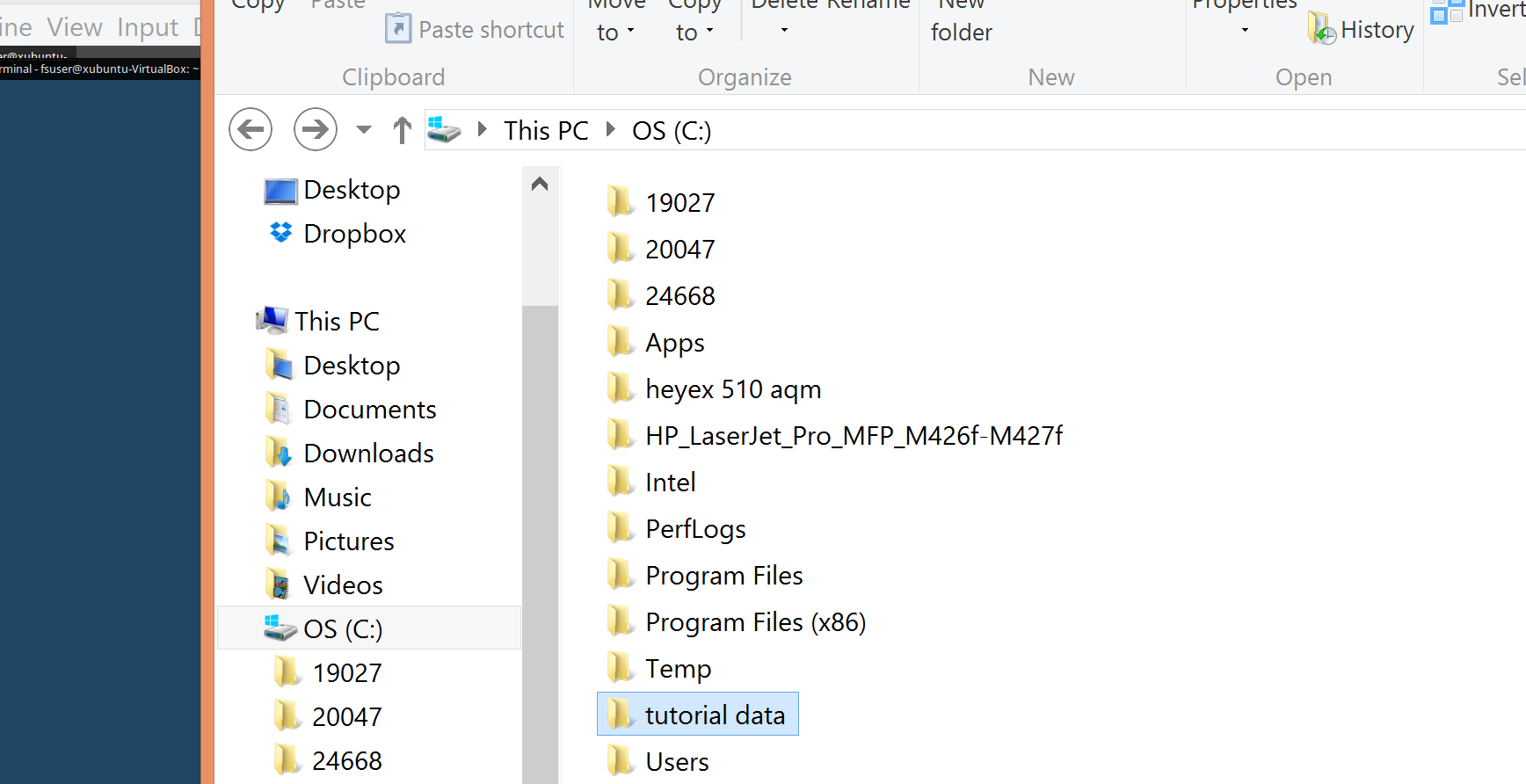
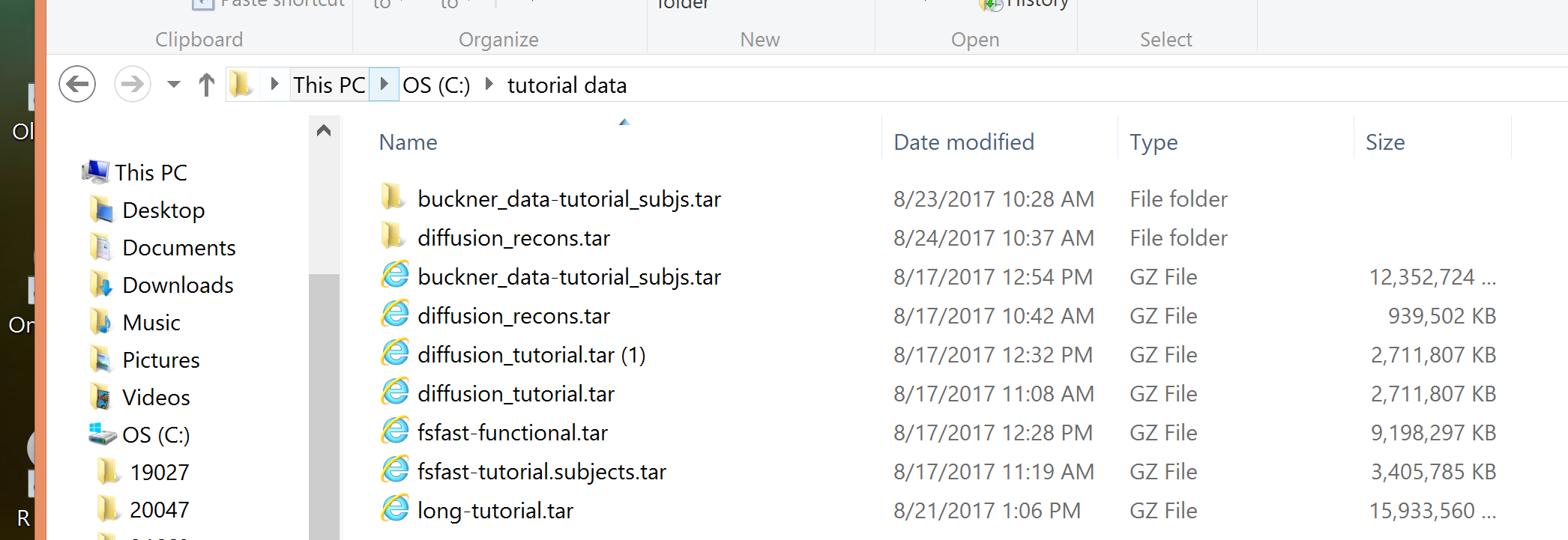
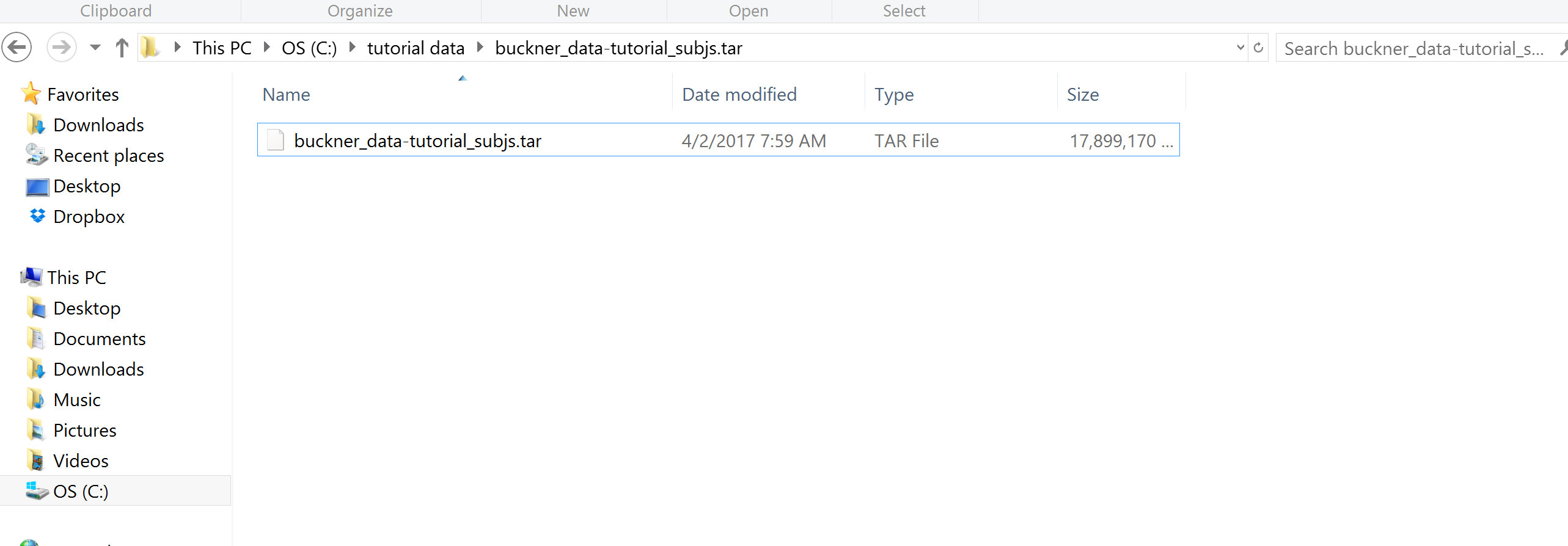
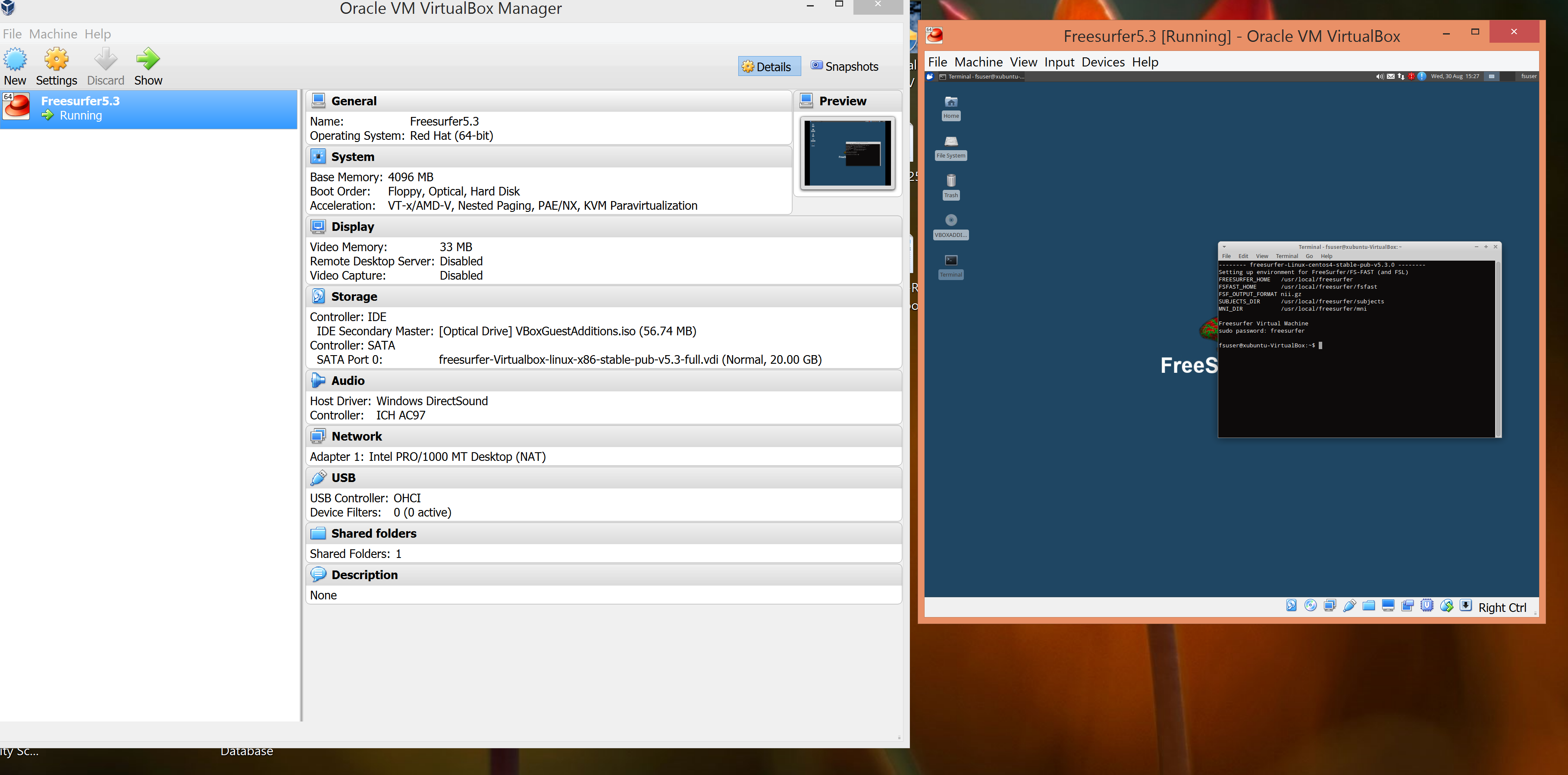
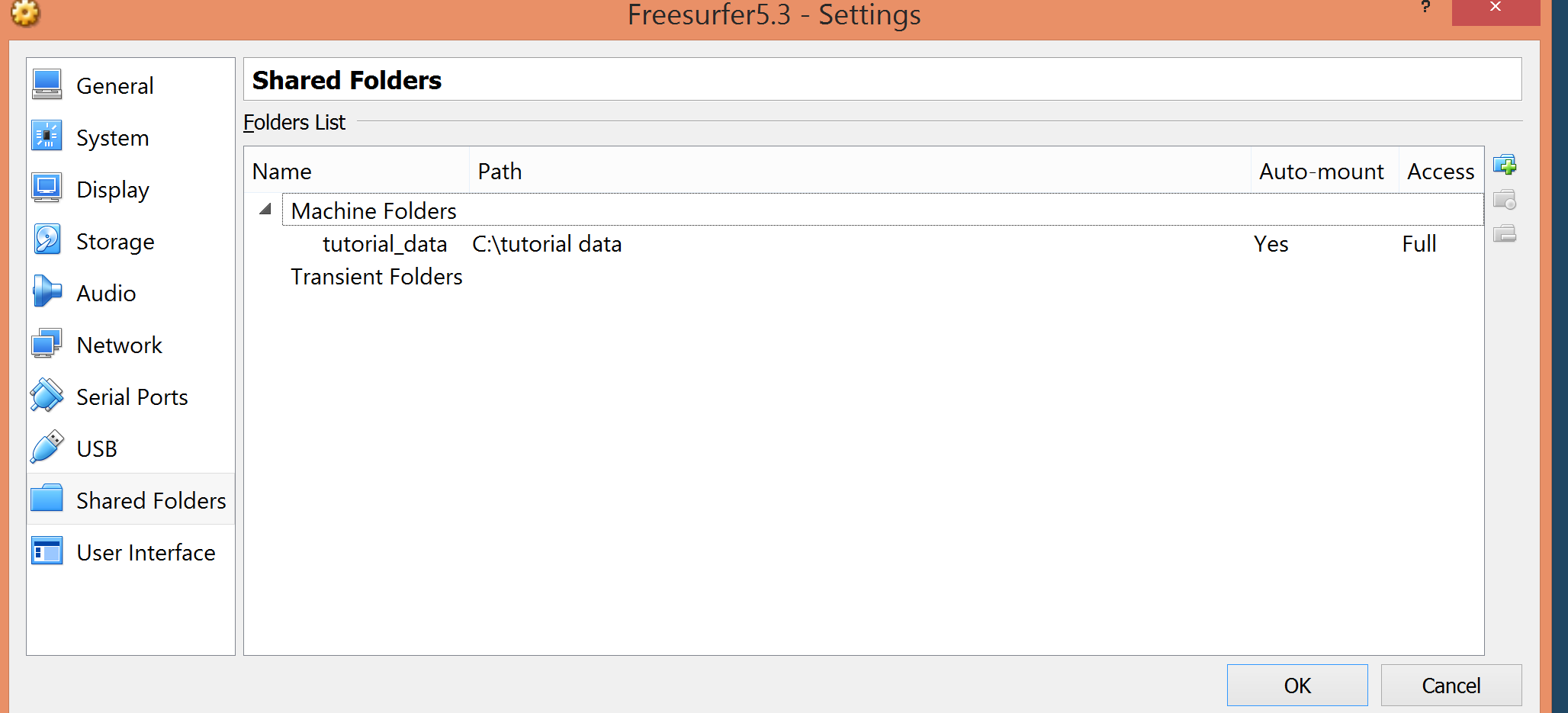
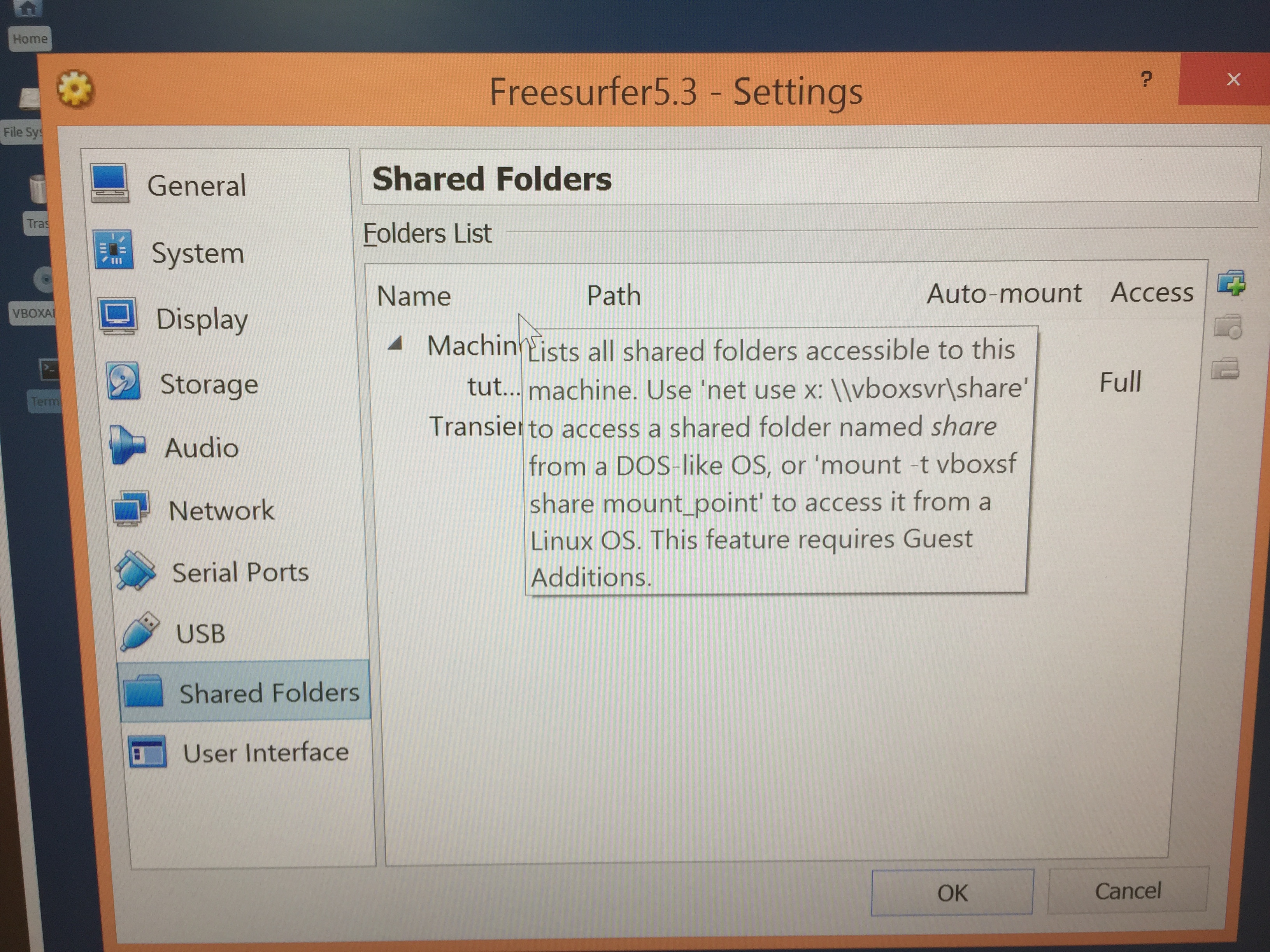
Thank you for your quick response. Attached are photos in number order which should help to explain my situation. The first three photos depict the tutorial data as they are downloaded into my computer. Photo 4 illustrates the version of Freesurfer that I am using. Photos 5 and 6 express how the downloaded tutorial data folder has been shared to Freesurfer. Photo 7 illustrates an example of the commands I have used. I have tried other pathways as well but am still unsure which the proper command should be. Unix is in fact new to me. Let me know if you require any other details. Looking forward to hearing your thoughts.
Sincerely,
Jason Ledesma Staff Research Associate Phone: 1(424)571-7755 E-mail: jason.ledesma@labiomed.orgmailto:jason.ledesma@labiomed.org
________________________________ From: freesurfer-bounces@nmr.mgh.harvard.edu freesurfer-bounces@nmr.mgh.harvard.edu on behalf of Bruce Fischl fischl@nmr.mgh.harvard.edu Sent: Wednesday, August 30, 2017 12:10:24 PM To: Freesurfer support list Subject: Re: [Freesurfer] Freesurfer Preliminary Questions
Hi Jason
can you elaborate about what you mean by you "cannot interact with the data"?
In general, please send us the full command you ran and all its screen output including whatever errros you encountered
cheers Bruce On Wed, 30 Aug 2017, Ledesma, Jason wrote:
To whom it may concern,
I am to attend the upcoming Freesurfer course session in Boston, and I would like to ask a few preliminary questions. I am currently attempting to run Freesurfer 5.3 on a windows unit via the Oracle VM VirtualBox Manager. I have tried to follow the instructions of the tutorial thus far, but am having trouble properly downloading the tutorial data into Freesurfer (the data I am attempting to acquire can be found at http://surfer.nmr.mgh.harvard.edu/fswiki/FsTutorial/OutputData_freeview). I have tried setting up a shared folder and placing the data in a "Machine Folder", but I still cannot interact with the data. Do you know why this may be? I see that a license key must first be obtained in some instances; perhaps this is the reason there are issues. Also, what is the best way to download the most recent version of Freesurfer on windows? Thank you.
Sincerely,
Jason Ledesma Staff Research Associate Phone: 1(424)571-7755 E-mail: jason.ledesma@labiomed.org
LA BioMed Warning: This email (and any attachments) is intended for the use of the person to which it is addressed. It may contain information that is privileged and confidential. As the recipient, you are obligated to maintain it in a safe, secure and confidential manner. Unauthorized disclosure or failure to maintain confidentiality may subject you to governmental penalties. Should you not be the intended recipient, please notify us by return email, and delete this message from your computer at once.
Hi Jason
in general it is much easier for us if you can cut and paste text into the email. Pictures are useful for showing things in the data and such
cheers Bruce On Wed, 30 Aug 2017, Ledesma, Jason wrote:
Hi Bruce,
Thank you for your quick response. Attached are photos in number order which should help to explain my situation. The first three photos depict the tutorial data as they are downloaded into my computer. Photo 4 illustrates the version of Freesurfer that I am using. Photos 5 and 6 express how the downloaded tutorial data folder has been shared to Freesurfer. Photo 7 illustrates an example of the commands I have used. I have tried other pathways as well but am still unsure which the proper command should be. Unix is in fact new to me. Let me know if you require any other details. Looking forward to hearing your thoughts.
Sincerely,
Jason Ledesma Staff Research Associate Phone: 1(424)571-7755 E-mail: jason.ledesma@labiomed.org
From: freesurfer-bounces@nmr.mgh.harvard.edu freesurfer-bounces@nmr.mgh.harvard.edu on behalf of Bruce Fischl fischl@nmr.mgh.harvard.edu Sent: Wednesday, August 30, 2017 12:10:24 PM To: Freesurfer support list Subject: Re: [Freesurfer] Freesurfer Preliminary Questions Hi Jason
can you elaborate about what you mean by you "cannot interact with the data"?
In general, please send us the full command you ran and all its screen output including whatever errros you encountered
cheers Bruce On Wed, 30 Aug 2017, Ledesma, Jason wrote:
To whom it may concern,
I am to attend the upcoming Freesurfer course session in Boston, and I would like to ask a few preliminary questions. I am currently attempting to run Freesurfer 5.3 on a windows unit via the Oracle VM VirtualBox Manager. I have tried to follow the instructions of the tutorial thus far, but am having trouble properly downloading
the
tutorial data into Freesurfer (the data I am attempting to acquire can be found at http://surfer.nmr.mgh.harvard.edu/fswiki/FsTutorial/OutputData_freeview). I have tried setting up a shared folder and placing the data in a "Machine Folder", but I still cannot interact with the data. Do you know why this may be? I see that a license key must first be obtained in some instances; perhaps this is the reason there are issues. Also, what is the best way to download the most recent version of Freesurfer on windows? Thank you.
Sincerely,
Jason Ledesma Staff Research Associate Phone: 1(424)571-7755 E-mail: jason.ledesma@labiomed.org
_
LA BioMed Warning: This email (and any attachments) is intended for the use of the person to which it is addressed. It may contain information that is privileged and confidential. As the recipient, you are obligated to maintain it in a safe, secure and confidential manner. Unauthorized disclosure or failure to maintain confidentiality may subject you to governmental penalties. Should you not be the intended recipient, please notify us by return email, and delete this message from
your
computer at once.
_
Hi Bruce,
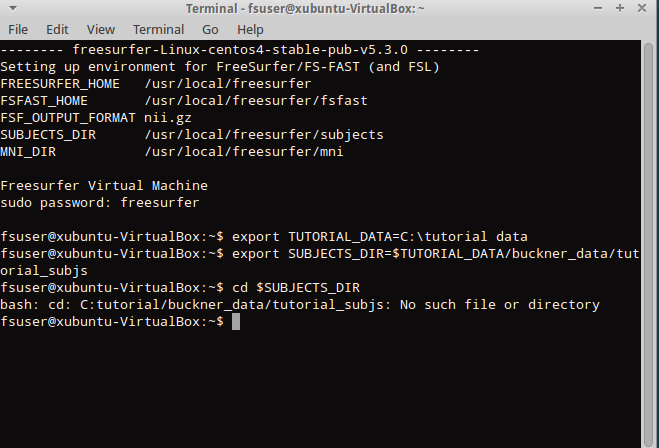
Here is the command that I tried and the resulting output/error message:
fsuser@xubuntu-VirtualBox:~$ export TUTORIAL_DATA=C:\tutorial data fsuser@xubuntu-VirtualBox:~$ export SUBJECTS_DIR=$TUTORIAL_DATA/buckner_data/tutorial_subjs fsuser@xubuntu-VirtualBox:~$ cd $SUBJECTS_DIR bash: cd: C:tutorial/buckner_data/tutorial_subjs: No such file or directory fsuser@xubuntu-VirtualBox:~$ ^C fsuser@xubuntu-VirtualBox:~$
Sincerely,
Jason Ledesma Staff Research Associate Phone: 1(424)571-7755 E-mail: jason.ledesma@labiomed.orgmailto:jason.ledesma@labiomed.org
________________________________ From: freesurfer-bounces@nmr.mgh.harvard.edu freesurfer-bounces@nmr.mgh.harvard.edu on behalf of Bruce Fischl fischl@nmr.mgh.harvard.edu Sent: Wednesday, August 30, 2017 1:24:12 PM To: Freesurfer support list Subject: Re: [Freesurfer] Freesurfer Preliminary Questions
Hi Jason
in general it is much easier for us if you can cut and paste text into the email. Pictures are useful for showing things in the data and such
cheers Bruce On Wed, 30 Aug 2017, Ledesma, Jason wrote:
Hi Bruce,
Thank you for your quick response. Attached are photos in number order which should help to explain my situation. The first three photos depict the tutorial data as they are downloaded into my computer. Photo 4 illustrates the version of Freesurfer that I am using. Photos 5 and 6 express how the downloaded tutorial data folder has been shared to Freesurfer. Photo 7 illustrates an example of the commands I have used. I have tried other pathways as well but am still unsure which the proper command should be. Unix is in fact new to me. Let me know if you require any other details. Looking forward to hearing your thoughts.
Sincerely,
Jason Ledesma Staff Research Associate Phone: 1(424)571-7755 E-mail: jason.ledesma@labiomed.org
From: freesurfer-bounces@nmr.mgh.harvard.edu freesurfer-bounces@nmr.mgh.harvard.edu on behalf of Bruce Fischl fischl@nmr.mgh.harvard.edu Sent: Wednesday, August 30, 2017 12:10:24 PM To: Freesurfer support list Subject: Re: [Freesurfer] Freesurfer Preliminary Questions Hi Jason
can you elaborate about what you mean by you "cannot interact with the data"?
In general, please send us the full command you ran and all its screen output including whatever errros you encountered
cheers Bruce On Wed, 30 Aug 2017, Ledesma, Jason wrote:
To whom it may concern,
I am to attend the upcoming Freesurfer course session in Boston, and I would like to ask a few preliminary questions. I am currently attempting to run Freesurfer 5.3 on a windows unit via the Oracle VM VirtualBox Manager. I have tried to follow the instructions of the tutorial thus far, but am having trouble properly downloading
the
tutorial data into Freesurfer (the data I am attempting to acquire can be found at http://surfer.nmr.mgh.harvard.edu/fswiki/FsTutorial/OutputData_freeview). I have tried setting up a shared folder and placing the data in a "Machine Folder", but I still cannot interact with the data. Do you know why this may be? I see that a license key must first be obtained in some instances; perhaps this is the reason there are issues. Also, what is the best way to download the most recent version of Freesurfer on windows? Thank you.
Sincerely,
Jason Ledesma Staff Research Associate Phone: 1(424)571-7755 E-mail: jason.ledesma@labiomed.org
_
LA BioMed Warning: This email (and any attachments) is intended for the use of the person to which it is addressed. It may contain information that is privileged and confidential. As the recipient, you are obligated to maintain it in a safe, secure and confidential manner. Unauthorized disclosure or failure to maintain confidentiality may subject you to governmental penalties. Should you not be the intended recipient, please notify us by return email, and delete this message from
your
computer at once.
_
thanks Jason
does that directory exist? What happens if you try to ls it?
Bruce On Wed, 30 Aug 2017, Ledesma, Jason wrote:
Hi Bruce,
Here is the command that I tried and the resulting output/error message:
fsuser@xubuntu-VirtualBox:~$ export TUTORIAL_DATA=C:\tutorial data fsuser@xubuntu-VirtualBox:~$ export SUBJECTS_DIR=$TUTORIAL_DATA/buckner_data/tutorial_subjs fsuser@xubuntu-VirtualBox:~$ cd $SUBJECTS_DIR bash: cd: C:tutorial/buckner_data/tutorial_subjs: No such file or directory fsuser@xubuntu-VirtualBox:~$ ^C fsuser@xubuntu-VirtualBox:~$
Sincerely,
Jason Ledesma Staff Research Associate Phone: 1(424)571-7755 E-mail: jason.ledesma@labiomed.org
From: freesurfer-bounces@nmr.mgh.harvard.edu freesurfer-bounces@nmr.mgh.harvard.edu on behalf of Bruce Fischl fischl@nmr.mgh.harvard.edu Sent: Wednesday, August 30, 2017 1:24:12 PM To: Freesurfer support list Subject: Re: [Freesurfer] Freesurfer Preliminary Questions Hi Jason
in general it is much easier for us if you can cut and paste text into the email. Pictures are useful for showing things in the data and such
cheers Bruce On Wed, 30 Aug 2017, Ledesma, Jason wrote:
Hi Bruce,
Thank you for your quick response. Attached are photos in number order which should help to
explain my situation. The first three photos depict the tutorial data as
they are downloaded into my computer. Photo 4 illustrates the version of Freesurfer that I am
using. Photos 5 and 6 express how the downloaded tutorial data folder has
been shared to Freesurfer. Photo 7 illustrates an example of the commands I have used. I have
tried other pathways as well but am still unsure which the proper command
should be. Unix is in fact new to me. Let me know if you require any other details. Looking
forward to hearing your thoughts.
Sincerely,
Jason Ledesma Staff Research Associate Phone: 1(424)571-7755 E-mail: jason.ledesma@labiomed.org
From: freesurfer-bounces@nmr.mgh.harvard.edu freesurfer-bounces@nmr.mgh.harvard.edu on behalf of
Bruce Fischl fischl@nmr.mgh.harvard.edu
Sent: Wednesday, August 30, 2017 12:10:24 PM To: Freesurfer support list Subject: Re: [Freesurfer] Freesurfer Preliminary Questions Hi Jason
can you elaborate about what you mean by you "cannot interact with the data"?
In general, please send us the full command you ran and all its screen output including whatever errros you encountered
cheers Bruce On Wed, 30 Aug 2017, Ledesma, Jason wrote:
To whom it may concern,
I am to attend the upcoming Freesurfer course session in Boston, and I would like to ask a few
preliminary questions. I am currently attempting to run Freesurfer 5.3
on a windows unit via the Oracle VM VirtualBox Manager. I have tried to follow the instructions
of the tutorial thus far, but am having trouble properly downloading
the
tutorial data into Freesurfer (the data I am attempting to acquire can
be found at http://surfer.nmr.mgh.harvard.edu/fswiki/FsTutorial/OutputData_freeview). I have
tried setting up a shared folder and placing the data in a "Machine Folder", but I still cannot
interact with the data. Do you know why this may be? I see that a
license key must first be obtained in some instances; perhaps this is the reason there are
issues. Also, what is the best way to download the most recent version of
Freesurfer on windows? Thank you.
Sincerely,
Jason Ledesma Staff Research Associate Phone: 1(424)571-7755 E-mail: jason.ledesma@labiomed.org
_
LA BioMed Warning: This email (and any attachments) is intended for the use of the person to
which it is addressed. It may contain information that is privileged and
confidential. As the recipient, you are obligated to maintain it in a safe, secure and
confidential manner. Unauthorized disclosure or failure to maintain
confidentiality may subject you to governmental penalties. Should you not be the intended
recipient, please notify us by return email, and delete this message from
your
computer at once.
_
Bruce,
It appears that the directory does not exist. See the following:
fsuser@xubuntu-VirtualBox:~$ ls C:\tutorial data ls: cannot access C:tutorial: No such file or directory ls: cannot access data: No such file or directory
fsuser@xubuntu-VirtualBox:~$ ls tutorial data ls: cannot access tutorial: No such file or directory ls: cannot access data: No such file or directory
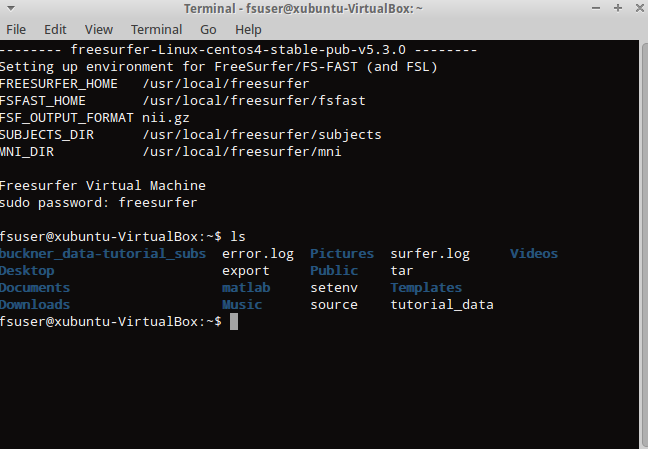
Here is what happens when doing a general ls command:
fsuser@xubuntu-VirtualBox:~$ ls buckner_data-tutorial_subs error.log Pictures surfer.log Videos Desktop export Public tar Documents matlab setenv Templates Downloads Music source tutorial_data fsuser@xubuntu-VirtualBox:~$ ^C fsuser@xubuntu-VirtualBox:~$ ^C fsuser@xubuntu-VirtualBox:~$
Sincerely,
Jason Ledesma Staff Research Associate Phone: 1(424)571-7755 E-mail: jason.ledesma@labiomed.orgmailto:jason.ledesma@labiomed.org
________________________________ From: freesurfer-bounces@nmr.mgh.harvard.edu freesurfer-bounces@nmr.mgh.harvard.edu on behalf of Bruce Fischl fischl@nmr.mgh.harvard.edu Sent: Wednesday, August 30, 2017 1:35:49 PM To: Freesurfer support list Subject: Re: [Freesurfer] Freesurfer Preliminary Questions
thanks Jason
does that directory exist? What happens if you try to ls it?
Bruce On Wed, 30 Aug 2017, Ledesma, Jason wrote:
Hi Bruce,
Here is the command that I tried and the resulting output/error message:
fsuser@xubuntu-VirtualBox:~$ export TUTORIAL_DATA=C:\tutorial data fsuser@xubuntu-VirtualBox:~$ export SUBJECTS_DIR=$TUTORIAL_DATA/buckner_data/tutorial_subjs fsuser@xubuntu-VirtualBox:~$ cd $SUBJECTS_DIR bash: cd: C:tutorial/buckner_data/tutorial_subjs: No such file or directory fsuser@xubuntu-VirtualBox:~$ ^C fsuser@xubuntu-VirtualBox:~$
Sincerely,
Jason Ledesma Staff Research Associate Phone: 1(424)571-7755 E-mail: jason.ledesma@labiomed.org
From: freesurfer-bounces@nmr.mgh.harvard.edu freesurfer-bounces@nmr.mgh.harvard.edu on behalf of Bruce Fischl fischl@nmr.mgh.harvard.edu Sent: Wednesday, August 30, 2017 1:24:12 PM To: Freesurfer support list Subject: Re: [Freesurfer] Freesurfer Preliminary Questions Hi Jason
in general it is much easier for us if you can cut and paste text into the email. Pictures are useful for showing things in the data and such
cheers Bruce On Wed, 30 Aug 2017, Ledesma, Jason wrote:
Hi Bruce,
Thank you for your quick response. Attached are photos in number order which should help to
explain my situation. The first three photos depict the tutorial data as
they are downloaded into my computer. Photo 4 illustrates the version of Freesurfer that I am
using. Photos 5 and 6 express how the downloaded tutorial data folder has
been shared to Freesurfer. Photo 7 illustrates an example of the commands I have used. I have
tried other pathways as well but am still unsure which the proper command
should be. Unix is in fact new to me. Let me know if you require any other details. Looking
forward to hearing your thoughts.
Sincerely,
Jason Ledesma Staff Research Associate Phone: 1(424)571-7755 E-mail: jason.ledesma@labiomed.org
From: freesurfer-bounces@nmr.mgh.harvard.edu freesurfer-bounces@nmr.mgh.harvard.edu on behalf of
Bruce Fischl fischl@nmr.mgh.harvard.edu
Sent: Wednesday, August 30, 2017 12:10:24 PM To: Freesurfer support list Subject: Re: [Freesurfer] Freesurfer Preliminary Questions Hi Jason
can you elaborate about what you mean by you "cannot interact with the data"?
In general, please send us the full command you ran and all its screen output including whatever errros you encountered
cheers Bruce On Wed, 30 Aug 2017, Ledesma, Jason wrote:
To whom it may concern,
I am to attend the upcoming Freesurfer course session in Boston, and I would like to ask a few
preliminary questions. I am currently attempting to run Freesurfer 5.3
on a windows unit via the Oracle VM VirtualBox Manager. I have tried to follow the instructions
of the tutorial thus far, but am having trouble properly downloading
the
tutorial data into Freesurfer (the data I am attempting to acquire can
be found at http://surfer.nmr.mgh.harvard.edu/fswiki/FsTutorial/OutputData_freeview). I have
tried setting up a shared folder and placing the data in a "Machine Folder", but I still cannot
interact with the data. Do you know why this may be? I see that a
license key must first be obtained in some instances; perhaps this is the reason there are
issues. Also, what is the best way to download the most recent version of
Freesurfer on windows? Thank you.
Sincerely,
Jason Ledesma Staff Research Associate Phone: 1(424)571-7755 E-mail: jason.ledesma@labiomed.org
_
LA BioMed Warning: This email (and any attachments) is intended for the use of the person to
which it is addressed. It may contain information that is privileged and
confidential. As the recipient, you are obligated to maintain it in a safe, secure and
confidential manner. Unauthorized disclosure or failure to maintain
confidentiality may subject you to governmental penalties. Should you not be the intended
recipient, please notify us by return email, and delete this message from
your
computer at once.
_
Hi Bruce,
Do you have any suggestions as to how to determine the correct directory and pathway to use?
Sincerely,
Jason Ledesma Staff Research Associate Phone: 1(424)571-7755 E-mail: jason.ledesma@labiomed.orgmailto:jason.ledesma@labiomed.org
________________________________ From: freesurfer-bounces@nmr.mgh.harvard.edu freesurfer-bounces@nmr.mgh.harvard.edu on behalf of Ledesma, Jason jason.ledesma@labiomed.org Sent: Wednesday, August 30, 2017 1:39:30 PM To: Freesurfer support list Subject: Re: [Freesurfer] Freesurfer Preliminary Questions
Bruce,
It appears that the directory does not exist. See the following:
fsuser@xubuntu-VirtualBox:~$ ls C:\tutorial data ls: cannot access C:tutorial: No such file or directory ls: cannot access data: No such file or directory
fsuser@xubuntu-VirtualBox:~$ ls tutorial data ls: cannot access tutorial: No such file or directory ls: cannot access data: No such file or directory
Here is what happens when doing a general ls command:
fsuser@xubuntu-VirtualBox:~$ ls buckner_data-tutorial_subs error.log Pictures surfer.log Videos Desktop export Public tar Documents matlab setenv Templates Downloads Music source tutorial_data fsuser@xubuntu-VirtualBox:~$ ^C fsuser@xubuntu-VirtualBox:~$ ^C fsuser@xubuntu-VirtualBox:~$
Sincerely,
Jason Ledesma Staff Research Associate Phone: 1(424)571-7755 E-mail: jason.ledesma@labiomed.orgmailto:jason.ledesma@labiomed.org
________________________________ From: freesurfer-bounces@nmr.mgh.harvard.edu freesurfer-bounces@nmr.mgh.harvard.edu on behalf of Bruce Fischl fischl@nmr.mgh.harvard.edu Sent: Wednesday, August 30, 2017 1:35:49 PM To: Freesurfer support list Subject: Re: [Freesurfer] Freesurfer Preliminary Questions
thanks Jason
does that directory exist? What happens if you try to ls it?
Bruce On Wed, 30 Aug 2017, Ledesma, Jason wrote:
Hi Bruce,
Here is the command that I tried and the resulting output/error message:
fsuser@xubuntu-VirtualBox:~$ export TUTORIAL_DATA=C:\tutorial data fsuser@xubuntu-VirtualBox:~$ export SUBJECTS_DIR=$TUTORIAL_DATA/buckner_data/tutorial_subjs fsuser@xubuntu-VirtualBox:~$ cd $SUBJECTS_DIR bash: cd: C:tutorial/buckner_data/tutorial_subjs: No such file or directory fsuser@xubuntu-VirtualBox:~$ ^C fsuser@xubuntu-VirtualBox:~$
Sincerely,
Jason Ledesma Staff Research Associate Phone: 1(424)571-7755 E-mail: jason.ledesma@labiomed.org
From: freesurfer-bounces@nmr.mgh.harvard.edu freesurfer-bounces@nmr.mgh.harvard.edu on behalf of Bruce Fischl fischl@nmr.mgh.harvard.edu Sent: Wednesday, August 30, 2017 1:24:12 PM To: Freesurfer support list Subject: Re: [Freesurfer] Freesurfer Preliminary Questions Hi Jason
in general it is much easier for us if you can cut and paste text into the email. Pictures are useful for showing things in the data and such
cheers Bruce On Wed, 30 Aug 2017, Ledesma, Jason wrote:
Hi Bruce,
Thank you for your quick response. Attached are photos in number order which should help to
explain my situation. The first three photos depict the tutorial data as
they are downloaded into my computer. Photo 4 illustrates the version of Freesurfer that I am
using. Photos 5 and 6 express how the downloaded tutorial data folder has
been shared to Freesurfer. Photo 7 illustrates an example of the commands I have used. I have
tried other pathways as well but am still unsure which the proper command
should be. Unix is in fact new to me. Let me know if you require any other details. Looking
forward to hearing your thoughts.
Sincerely,
Jason Ledesma Staff Research Associate Phone: 1(424)571-7755 E-mail: jason.ledesma@labiomed.org
From: freesurfer-bounces@nmr.mgh.harvard.edu freesurfer-bounces@nmr.mgh.harvard.edu on behalf of
Bruce Fischl fischl@nmr.mgh.harvard.edu
Sent: Wednesday, August 30, 2017 12:10:24 PM To: Freesurfer support list Subject: Re: [Freesurfer] Freesurfer Preliminary Questions Hi Jason
can you elaborate about what you mean by you "cannot interact with the data"?
In general, please send us the full command you ran and all its screen output including whatever errros you encountered
cheers Bruce On Wed, 30 Aug 2017, Ledesma, Jason wrote:
To whom it may concern,
I am to attend the upcoming Freesurfer course session in Boston, and I would like to ask a few
preliminary questions. I am currently attempting to run Freesurfer 5.3
on a windows unit via the Oracle VM VirtualBox Manager. I have tried to follow the instructions
of the tutorial thus far, but am having trouble properly downloading
the
tutorial data into Freesurfer (the data I am attempting to acquire can
be found at http://surfer.nmr.mgh.harvard.edu/fswiki/FsTutorial/OutputData_freeview). I have
tried setting up a shared folder and placing the data in a "Machine Folder", but I still cannot
interact with the data. Do you know why this may be? I see that a
license key must first be obtained in some instances; perhaps this is the reason there are
issues. Also, what is the best way to download the most recent version of
Freesurfer on windows? Thank you.
Sincerely,
Jason Ledesma Staff Research Associate Phone: 1(424)571-7755 E-mail: jason.ledesma@labiomed.org
_
LA BioMed Warning: This email (and any attachments) is intended for the use of the person to
which it is addressed. It may contain information that is privileged and
confidential. As the recipient, you are obligated to maintain it in a safe, secure and
confidential manner. Unauthorized disclosure or failure to maintain
confidentiality may subject you to governmental penalties. Should you not be the intended
recipient, please notify us by return email, and delete this message from
your
computer at once.
_

you have to create the directory before you can cd to it. If you don't know how to create a directory in unix, then you should take some time to learn unix before trying to run FS.
On 08/31/2017 12:22 PM, Ledesma, Jason wrote:
Hi Bruce,
Do you have any suggestions as to how to determine the correct directory and pathway to use?
Sincerely,
Jason Ledesma Staff Research Associate Phone: 1(424)571-7755 E-mail: jason.ledesma@labiomed.org mailto:jason.ledesma@labiomed.org
*From:* freesurfer-bounces@nmr.mgh.harvard.edu freesurfer-bounces@nmr.mgh.harvard.edu on behalf of Ledesma, Jason jason.ledesma@labiomed.org *Sent:* Wednesday, August 30, 2017 1:39:30 PM *To:* Freesurfer support list *Subject:* Re: [Freesurfer] Freesurfer Preliminary Questions
Bruce,
It appears that the directory does not exist. See the following:
fsuser@xubuntu-VirtualBox:~$ ls C:\tutorial data ls: cannot access C:tutorial: No such file or directory ls: cannot access data: No such file or directory
fsuser@xubuntu-VirtualBox:~$ ls tutorial data ls: cannot access tutorial: No such file or directory ls: cannot access data: No such file or directory
Here is what happens when doing a general ls command:
fsuser@xubuntu-VirtualBox:~$ ls buckner_data-tutorial_subs error.log Pictures surfer.log Videos Desktop export Public tar Documents matlab setenv Templates Downloads Music source tutorial_data fsuser@xubuntu-VirtualBox:~$ ^C fsuser@xubuntu-VirtualBox:~$ ^C fsuser@xubuntu-VirtualBox:~$
Sincerely,
Jason Ledesma Staff Research Associate Phone: 1(424)571-7755 E-mail: jason.ledesma@labiomed.org mailto:jason.ledesma@labiomed.org
*From:* freesurfer-bounces@nmr.mgh.harvard.edu freesurfer-bounces@nmr.mgh.harvard.edu on behalf of Bruce Fischl fischl@nmr.mgh.harvard.edu *Sent:* Wednesday, August 30, 2017 1:35:49 PM *To:* Freesurfer support list *Subject:* Re: [Freesurfer] Freesurfer Preliminary Questions thanks Jason
does that directory exist? What happens if you try to ls it?
Bruce On Wed, 30 Aug 2017, Ledesma, Jason wrote:
Hi Bruce,
Here is the command that I tried and the resulting output/error message:
fsuser@xubuntu-VirtualBox:~$ export TUTORIAL_DATA=C:\tutorial data fsuser@xubuntu-VirtualBox:~$ export
SUBJECTS_DIR=$TUTORIAL_DATA/buckner_data/tutorial_subjs
fsuser@xubuntu-VirtualBox:~$ cd $SUBJECTS_DIR bash: cd: C:tutorial/buckner_data/tutorial_subjs: No such file or
directory
fsuser@xubuntu-VirtualBox:~$ ^C fsuser@xubuntu-VirtualBox:~$
Sincerely,
Jason Ledesma Staff Research Associate Phone: 1(424)571-7755 E-mail: jason.ledesma@labiomed.org
From: freesurfer-bounces@nmr.mgh.harvard.edu
freesurfer-bounces@nmr.mgh.harvard.edu on behalf of
Bruce Fischl fischl@nmr.mgh.harvard.edu Sent: Wednesday, August 30, 2017 1:24:12 PM To: Freesurfer support list Subject: Re: [Freesurfer] Freesurfer Preliminary Questions Hi Jason
in general it is much easier for us if you can cut and paste text into the email. Pictures are useful for showing things in the data and such
cheers Bruce On Wed, 30 Aug 2017, Ledesma, Jason wrote:
Hi Bruce,
Thank you for your quick response. Attached are photos in number
order which should help to
explain my situation. The first three photos depict the tutorial data as
they are downloaded into my computer. Photo 4 illustrates the
version of Freesurfer that I am
using. Photos 5 and 6 express how the downloaded tutorial data
folder has
been shared to Freesurfer. Photo 7 illustrates an example of the
commands I have used. I have
tried other pathways as well but am still unsure which the proper
command
should be. Unix is in fact new to me. Let me know if you require
any other details. Looking
forward to hearing your thoughts.
Sincerely,
Jason Ledesma Staff Research Associate Phone: 1(424)571-7755 E-mail: jason.ledesma@labiomed.org
From: freesurfer-bounces@nmr.mgh.harvard.edu
freesurfer-bounces@nmr.mgh.harvard.edu on behalf of
Bruce Fischl fischl@nmr.mgh.harvard.edu
Sent: Wednesday, August 30, 2017 12:10:24 PM To: Freesurfer support list Subject: Re: [Freesurfer] Freesurfer Preliminary Questions Hi Jason
can you elaborate about what you mean by you "cannot interact with the data"?
In general, please send us the full command you ran and all its screen output including whatever errros you encountered
cheers Bruce On Wed, 30 Aug 2017, Ledesma, Jason wrote:
To whom it may concern,
I am to attend the upcoming Freesurfer course session in Boston,
and I would like to ask a few
preliminary questions. I am currently attempting to run Freesurfer 5.3
on a windows unit via the Oracle VM VirtualBox Manager. I have
tried to follow the instructions
of the tutorial thus far, but am having trouble properly downloading
the
tutorial data into Freesurfer (the data I am attempting to
acquire can
be found at
http://surfer.nmr.mgh.harvard.edu/fswiki/FsTutorial/OutputData_freeview). I have
tried setting up a shared folder and placing the data in a
"Machine Folder", but I still cannot
interact with the data. Do you know why this may be? I see that a
license key must first be obtained in some instances; perhaps
this is the reason there are
issues. Also, what is the best way to download the most recent
version of
Freesurfer on windows? Thank you.
Sincerely,
Jason Ledesma Staff Research Associate Phone: 1(424)571-7755 E-mail: jason.ledesma@labiomed.org
_
LA BioMed Warning: This email (and any attachments) is intended
for the use of the person to
which it is addressed. It may contain information that is privileged and
confidential. As the recipient, you are obligated to maintain it
in a safe, secure and
confidential manner. Unauthorized disclosure or failure to maintain
confidentiality may subject you to governmental penalties.
Should you not be the intended
recipient, please notify us by return email, and delete this message
from
your
computer at once.
_
Freesurfer mailing list Freesurfer@nmr.mgh.harvard.edu https://mail.nmr.mgh.harvard.edu/mailman/listinfo/freesurfer
freesurfer@nmr.mgh.harvard.edu
-
 Bruce Fischl
 -
 Douglas N Greve
 -
 Ledesma, Jason