
External Email - Use Caution
Dear Sir or Madam,
I've just installed the last version of FreeSurfer for Linux ( freesurfer-Linux-centos6_x86_64-stable-pub-v6.0.0.tar.gz https://surfer.nmr.mgh.harvard.edu/pub/dist/freesurfer/6.0.0/freesurfer-Linux-centos6_x86_64-stable-pub-v6.0.0.tar.gz), but I got some troubles testing it:
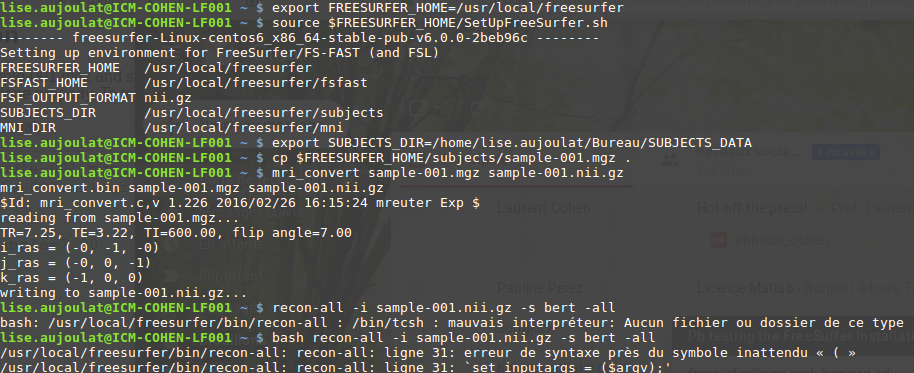
When trying to follow Example 2 ( https://surfer.nmr.mgh.harvard.edu/fswiki/DownloadAndInstall#Download), I get a "syntax error message":
lise.aujoulat@ICM-COHEN-LF001 ~ $ *export SUBJECTS_DIR=/home/lise.aujoulat/Bureau/SUBJECTS_DATA* lise.aujoulat@ICM-COHEN-LF001 ~ $
* bash recon-all -i sample-001.nii.gz -s bert -all/usr/local/freesurfer/bin/recon-all: recon-all: ligne 31: erreur de syntaxe près du symbole inattendu « ( »/usr/local/freesurfer/bin/recon-all: recon-all: ligne 31: `set inputargs = ($argv);'*
You can find a screen shot attached to this email. It seems that no one encountered this problem so far.
I had installed the macOS version some months ago on my personal computer and encountered no problem at that time.
How could I fix this?
Thanks for your help,
Lise

Hi Lise, recon-all is not a bash script, so prepending `bash` to the front of the command will break things. Just running `recon-all -i sample-001.nii.gz -s bert -all` should work fine.
best Andrew
From: freesurfer-bounces@nmr.mgh.harvard.edu on behalf of Lise_A aujoulat.lise@gmail.com Reply-To: FS Help freesurfer@nmr.mgh.harvard.edu Date: Thursday, January 31, 2019 at 9:14 AM To: FS Help freesurfer@nmr.mgh.harvard.edu Subject: [Freesurfer] Pb testing the FreeSurfer Installation
External Email - Use Caution Dear Sir or Madam,
I've just installed the last version of FreeSurfer for Linux (freesurfer-Linux-centos6_x86_64-stable-pub-v6.0.0.tar.gzhttps://surfer.nmr.mgh.harvard.edu/pub/dist/freesurfer/6.0.0/freesurfer-Linux-centos6_x86_64-stable-pub-v6.0.0.tar.gz), but I got some troubles testing it:
When trying to follow Example 2 (https://surfer.nmr.mgh.harvard.edu/fswiki/DownloadAndInstall#Download), I get a "syntax error message":
lise.aujoulat@ICM-COHEN-LF001 ~ $ export SUBJECTS_DIR=/home/lise.aujoulat/Bureau/SUBJECTS_DATA lise.aujoulat@ICM-COHEN-LF001 ~ $ bash recon-all -i sample-001.nii.gz -s bert -all /usr/local/freesurfer/bin/recon-all: recon-all: ligne 31: erreur de syntaxe près du symbole inattendu « ( » /usr/local/freesurfer/bin/recon-all: recon-all: ligne 31: `set inputargs = ($argv);'
You can find a screen shot attached to this email. It seems that no one encountered this problem so far.
I had installed the macOS version some months ago on my personal computer and encountered no problem at that time.
How could I fix this?
Thanks for your help,
Lise --
Lise AUJOULAT MSc student in Integrative Biology and Physiology, Sorbonne University, Paris, France. Phone number: + 33 6 87 97 30 32 Mail: aujoulat.lise@gmail.commailto:aujoulat.lise@gmail.com / lise.aujoulat@etu.upmc.frmailto:lise.aujoulat@etu.upmc.fr
External Email - Use Caution
Hi Andrew,
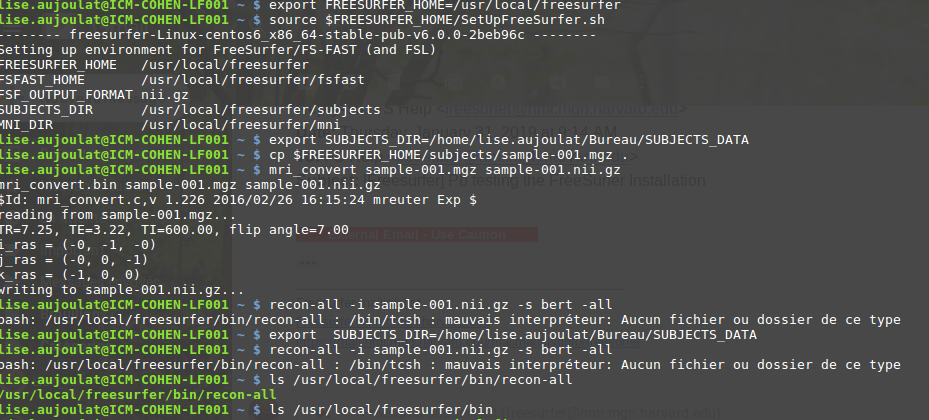
Thanks for your quick reply. I had already tried running the line without prepending "bash" to the front, but I would get another error message saying "there's no such file or directory":
*lise.aujoulat@ICM-COHEN-LF001 ~ $* recon-all -i sample-001.nii.gz -s bert -all bash: /usr/local/freesurfer/bin/recon-all : /bin/tcsh : mauvais interpréteur: Aucun fichier ou dossier de ce type
[image: image.png]
Where do you think the problem would come from?
Le jeu. 31 janv. 2019 à 18:02, Hoopes, Andrew AHOOPES@mgh.harvard.edu a écrit :
Hi Lise, recon-all is not a bash script, so prepending `bash` to the front of the command will break things. Just running `recon-all -i sample-001.nii.gz -s bert -all` should work fine.
best
Andrew
*From: *freesurfer-bounces@nmr.mgh.harvard.edu on behalf of Lise_A < aujoulat.lise@gmail.com> *Reply-To: *FS Help freesurfer@nmr.mgh.harvard.edu *Date: *Thursday, January 31, 2019 at 9:14 AM *To: *FS Help freesurfer@nmr.mgh.harvard.edu *Subject: *[Freesurfer] Pb testing the FreeSurfer Installation
External Email - Use Caution *Dear Sir or Madam,
I've just installed the last version of FreeSurfer for Linux ( freesurfer-Linux-centos6_x86_64-stable-pub-v6.0.0.tar.gz https://surfer.nmr.mgh.harvard.edu/pub/dist/freesurfer/6.0.0/freesurfer-Linux-centos6_x86_64-stable-pub-v6.0.0.tar.gz), but I got some troubles testing it:
When trying to follow Example 2 ( https://surfer.nmr.mgh.harvard.edu/fswiki/DownloadAndInstall#Download), I get a "syntax error message":
lise.aujoulat@ICM-COHEN-LF001 ~ $ *export SUBJECTS_DIR=/home/lise.aujoulat/Bureau/SUBJECTS_DATA* lise.aujoulat@ICM-COHEN-LF001 ~ $
- bash recon-all -i sample-001.nii.gz -s bert -all
/usr/local/freesurfer/bin/recon-all: recon-all: ligne 31: erreur de syntaxe près du symbole inattendu « ( » /usr/local/freesurfer/bin/recon-all: recon-all: ligne 31: `set inputargs = ($argv);'*
You can find a screen shot attached to this email.
It seems that no one encountered this problem so far.
I had installed the macOS version some months ago on my personal computer and encountered no problem at that time.
How could I fix this?
Thanks for your help,
Lise
--
Lise AUJOULAT
MSc student in Integrative Biology and Physiology, Sorbonne University, Paris, France.
Phone number: + 33 6 87 97 30 32
Mail: aujoulat.lise@gmail.com / lise.aujoulat@etu.upmc.fr _______________________________________________ Freesurfer mailing list Freesurfer@nmr.mgh.harvard.edu https://mail.nmr.mgh.harvard.edu/mailman/listinfo/freesurfer

External Email - Use Caution
Hi, Not Andrew but you need to install tcsh:
I guess you're on a Debian-based Linux system (e.g. Ubuntu)? If so, the following will do it:
sudo apt-get install tcsh
On Fri, Feb 1, 2019 at 9:59 AM Lise_A aujoulat.lise@gmail.com wrote:
External Email - Use CautionHi Andrew,
Thanks for your quick reply. I had already tried running the line without prepending "bash" to the front, but I would get another error message saying "there's no such file or directory":
*lise.aujoulat@ICM-COHEN-LF001 ~ $* recon-all -i sample-001.nii.gz -s bert -all bash: /usr/local/freesurfer/bin/recon-all : /bin/tcsh : mauvais interpréteur: Aucun fichier ou dossier de ce type
[image: image.png]
Where do you think the problem would come from?
Le jeu. 31 janv. 2019 à 18:02, Hoopes, Andrew AHOOPES@mgh.harvard.edu a écrit :
Hi Lise, recon-all is not a bash script, so prepending `bash` to the front of the command will break things. Just running `recon-all -i sample-001.nii.gz -s bert -all` should work fine.
best
Andrew
*From: *freesurfer-bounces@nmr.mgh.harvard.edu on behalf of Lise_A < aujoulat.lise@gmail.com> *Reply-To: *FS Help freesurfer@nmr.mgh.harvard.edu *Date: *Thursday, January 31, 2019 at 9:14 AM *To: *FS Help freesurfer@nmr.mgh.harvard.edu *Subject: *[Freesurfer] Pb testing the FreeSurfer Installation
External Email - Use Caution *Dear Sir or Madam,
I've just installed the last version of FreeSurfer for Linux ( freesurfer-Linux-centos6_x86_64-stable-pub-v6.0.0.tar.gz https://surfer.nmr.mgh.harvard.edu/pub/dist/freesurfer/6.0.0/freesurfer-Linux-centos6_x86_64-stable-pub-v6.0.0.tar.gz), but I got some troubles testing it:
When trying to follow Example 2 ( https://surfer.nmr.mgh.harvard.edu/fswiki/DownloadAndInstall#Download), I get a "syntax error message":
lise.aujoulat@ICM-COHEN-LF001 ~ $ *export SUBJECTS_DIR=/home/lise.aujoulat/Bureau/SUBJECTS_DATA* lise.aujoulat@ICM-COHEN-LF001 ~ $
- bash recon-all -i sample-001.nii.gz -s bert -all
/usr/local/freesurfer/bin/recon-all: recon-all: ligne 31: erreur de syntaxe près du symbole inattendu « ( » /usr/local/freesurfer/bin/recon-all: recon-all: ligne 31: `set inputargs = ($argv);'*
You can find a screen shot attached to this email.
It seems that no one encountered this problem so far.
I had installed the macOS version some months ago on my personal computer and encountered no problem at that time.
How could I fix this?
Thanks for your help,
Lise
--
Lise AUJOULAT
MSc student in Integrative Biology and Physiology, Sorbonne University, Paris, France.
Phone number: + 33 6 87 97 30 32
Mail: aujoulat.lise@gmail.com / lise.aujoulat@etu.upmc.fr _______________________________________________ Freesurfer mailing list Freesurfer@nmr.mgh.harvard.edu https://mail.nmr.mgh.harvard.edu/mailman/listinfo/freesurfer
-- Lise AUJOULAT MSc student in Integrative Biology and Physiology, Sorbonne University, Paris, France. Phone number: + 33 6 87 97 30 32 Mail: aujoulat.lise@gmail.com / lise.aujoulat@etu.upmc.fr _______________________________________________ Freesurfer mailing list Freesurfer@nmr.mgh.harvard.edu https://mail.nmr.mgh.harvard.edu/mailman/listinfo/freesurfer
External Email - Use Caution
Hi ! This worked just fine! Thank you!
Le ven. 1 févr. 2019 à 12:11, Niels Bergsland theniels@gmail.com a écrit :
External Email - Use CautionHi, Not Andrew but you need to install tcsh:
I guess you're on a Debian-based Linux system (e.g. Ubuntu)? If so, the following will do it:
sudo apt-get install tcsh
On Fri, Feb 1, 2019 at 9:59 AM Lise_A aujoulat.lise@gmail.com wrote:
External Email - Use CautionHi Andrew,
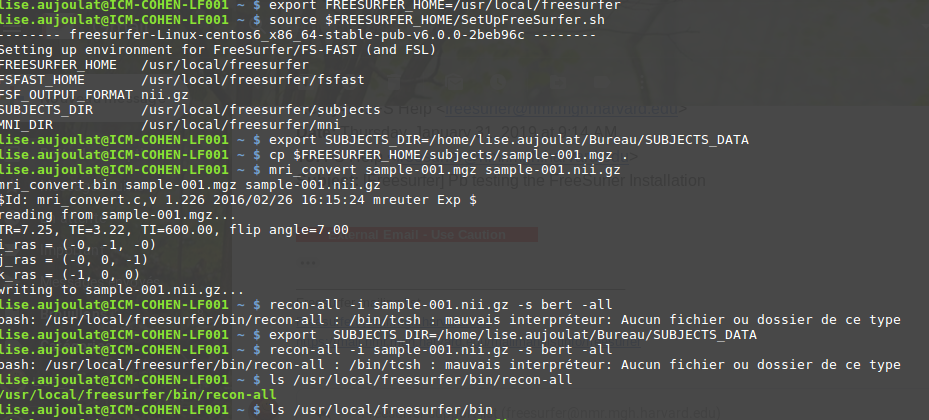
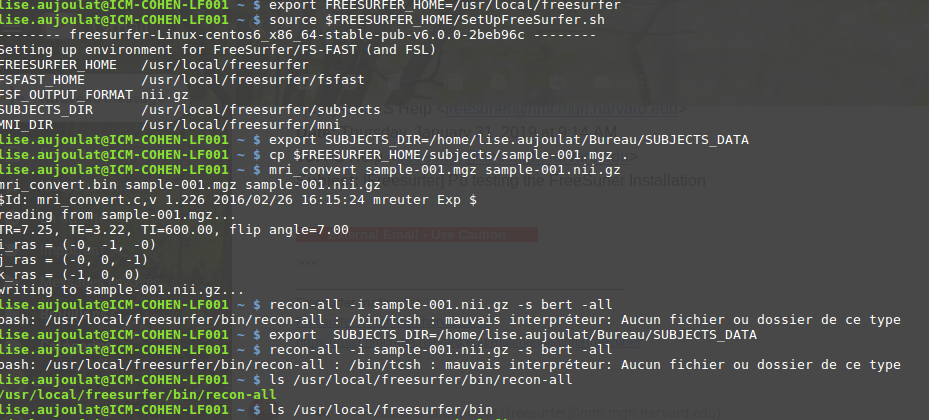
Thanks for your quick reply. I had already tried running the line without prepending "bash" to the front, but I would get another error message saying "there's no such file or directory":
*lise.aujoulat@ICM-COHEN-LF001 ~ $* recon-all -i sample-001.nii.gz -s bert -all bash: /usr/local/freesurfer/bin/recon-all : /bin/tcsh : mauvais interpréteur: Aucun fichier ou dossier de ce type
[image: image.png]
Where do you think the problem would come from?
Le jeu. 31 janv. 2019 à 18:02, Hoopes, Andrew AHOOPES@mgh.harvard.edu a écrit :
Hi Lise, recon-all is not a bash script, so prepending `bash` to the front of the command will break things. Just running `recon-all -i sample-001.nii.gz -s bert -all` should work fine.
best
Andrew
*From: *freesurfer-bounces@nmr.mgh.harvard.edu on behalf of Lise_A < aujoulat.lise@gmail.com> *Reply-To: *FS Help freesurfer@nmr.mgh.harvard.edu *Date: *Thursday, January 31, 2019 at 9:14 AM *To: *FS Help freesurfer@nmr.mgh.harvard.edu *Subject: *[Freesurfer] Pb testing the FreeSurfer Installation
External Email - Use Caution *Dear Sir or Madam,
I've just installed the last version of FreeSurfer for Linux ( freesurfer-Linux-centos6_x86_64-stable-pub-v6.0.0.tar.gz https://surfer.nmr.mgh.harvard.edu/pub/dist/freesurfer/6.0.0/freesurfer-Linux-centos6_x86_64-stable-pub-v6.0.0.tar.gz), but I got some troubles testing it:
When trying to follow Example 2 ( https://surfer.nmr.mgh.harvard.edu/fswiki/DownloadAndInstall#Download), I get a "syntax error message":
lise.aujoulat@ICM-COHEN-LF001 ~ $ *export SUBJECTS_DIR=/home/lise.aujoulat/Bureau/SUBJECTS_DATA* lise.aujoulat@ICM-COHEN-LF001 ~ $
- bash recon-all -i sample-001.nii.gz -s bert -all
/usr/local/freesurfer/bin/recon-all: recon-all: ligne 31: erreur de syntaxe près du symbole inattendu « ( » /usr/local/freesurfer/bin/recon-all: recon-all: ligne 31: `set inputargs = ($argv);'*
You can find a screen shot attached to this email.
It seems that no one encountered this problem so far.
I had installed the macOS version some months ago on my personal computer and encountered no problem at that time.
How could I fix this?
Thanks for your help,
Lise
--
Lise AUJOULAT
MSc student in Integrative Biology and Physiology, Sorbonne University, Paris, France.
Phone number: + 33 6 87 97 30 32
Mail: aujoulat.lise@gmail.com / lise.aujoulat@etu.upmc.fr _______________________________________________ Freesurfer mailing list Freesurfer@nmr.mgh.harvard.edu https://mail.nmr.mgh.harvard.edu/mailman/listinfo/freesurfer
-- Lise AUJOULAT MSc student in Integrative Biology and Physiology, Sorbonne University, Paris, France. Phone number: + 33 6 87 97 30 32 Mail: aujoulat.lise@gmail.com / lise.aujoulat@etu.upmc.fr _______________________________________________ Freesurfer mailing list Freesurfer@nmr.mgh.harvard.edu https://mail.nmr.mgh.harvard.edu/mailman/listinfo/freesurfer
Freesurfer mailing list Freesurfer@nmr.mgh.harvard.edu https://mail.nmr.mgh.harvard.edu/mailman/listinfo/freesurfer
freesurfer@nmr.mgh.harvard.edu
-
 Hoopes, Andrew
 -
 Lise_A
 -
 Niels Bergsland