
I am attempting to fix the aparc+aseg.mgz file for an image, and wanted to check to see if I am doing it correctly. What I was doing which seemed to be ineffective was 1)create a new point set of control points labelled control.dat 2)place control points along what should be white matter 3)save point set 4)run recon-all -autorecon2-cp -autorecon3 -subjid XXXX
Is this the correct way to go about fixing aparc+aseg files that are missing chunks of the brain? Is there a better way to go about this? Thanks for the help,
Nicholas Goh

Hi Nicholas
yes, possibly, depending on why you are missing chunks. If the white matter in the regions you are missing has intensity values significantly < 110 then what you are doing should help. The control.dat file must be place in the subject/tmp dir for us to find it.
cheers Bruce On Wed, 27 Sep 2017, Nicholas Goh wrote:
I am attempting to fix the aparc+aseg.mgz file for an image, and wanted to check to see if I am doing it correctly.What I was doing which seemed to be ineffective was 1)create a new point set of control points labelled control.dat 2)place control points along what should be white matter 3)save point set 4)run recon-all -autorecon2-cp -autorecon3 -subjid XXXX
Is this the correct way to go about fixing aparc+aseg files that are missing chunks of the brain? Is there a better way to go about this? Thanks for the help,
Nicholas Goh
Bruce,
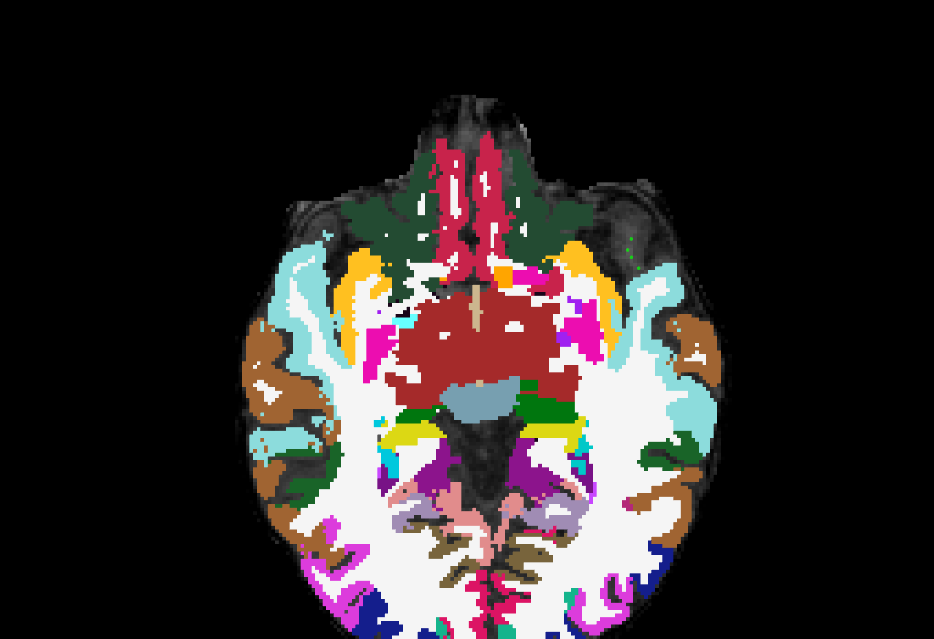
Thank you for the response. Attempting to use this method has not produced results, and I am unsure how to proceed or if I had performed it improperly. I have attached an example of the control points being placed, if that helps any. Thank you,
Nicholas Goh
On Wed, Sep 27, 2017 at 11:04 AM, Bruce Fischl fischl@nmr.mgh.harvard.edu wrote:
Hi Nicholas
yes, possibly, depending on why you are missing chunks. If the white matter in the regions you are missing has intensity values significantly < 110 then what you are doing should help. The control.dat file must be place in the subject/tmp dir for us to find it.
cheers Bruce On Wed, 27 Sep 2017, Nicholas Goh wrote:
I am attempting to fix the aparc+aseg.mgz file for an image, and wanted to
check to see if I am doing it correctly.What I was doing which seemed to be ineffective was 1)create a new point set of control points labelled control.dat 2)place control points along what should be white matter 3)save point set 4)run recon-all -autorecon2-cp -autorecon3 -subjid XXXX
Is this the correct way to go about fixing aparc+aseg files that are missing chunks of the brain? Is there a better way to go about this? Thanks for the help,
Nicholas Goh
Freesurfer mailing list Freesurfer@nmr.mgh.harvard.edu https://mail.nmr.mgh.harvard.edu/mailman/listinfo/freesurfer
The information in this e-mail is intended only for the person to whom it is addressed. If you believe this e-mail was sent to you in error and the e-mail contains patient information, please contact the Partners Compliance HelpLine at http://www.partners.org/complianceline . If the e-mail was sent to you in error but does not contain patient information, please contact the sender and properly dispose of the e-mail.

Hi Nicholas,
In such situations, I have learned that autorecon2-wm after adding WM voxels seems to work pretty well. Hope that helps.
Best Wishes, Elijah
On 27 September 2017 at 16:46:43, Nicholas Goh (ngoh95@gmail.com) wrote:
Bruce,
Thank you for the response. Attempting to use this method has not produced results, and I am unsure how to proceed or if I had performed it improperly. I have attached an example of the control points being placed, if that helps any. Thank you,
Nicholas Goh
On Wed, Sep 27, 2017 at 11:04 AM, Bruce Fischl fischl@nmr.mgh.harvard.edu wrote: Hi Nicholas
  yes, possibly, depending on why you are missing
  chunks. If the white matter in the regions you are
  missing has intensity values significantly < 110
  then what you are doing should help. The control.dat
  file must be place in the subject/tmp dir for us to
  find it.

  cheers
  Bruce
  On Wed, 27 Sep 2017, Nicholas Goh wrote:

        I am attempting to fix the
        aparc+aseg.mgz file for an image, and
        wanted to check to see if I am
        doing it correctly.What I was doing
        which seemed to be ineffective was
        1)create a new point set of control
        points labelled control.dat
        2)place control points along what should
        be white matter
        3)save point set
        4)run recon-all -autorecon2-cp
        -autorecon3 -subjid XXXX

        Is this the correct way to go about
        fixing aparc+aseg files that are missing
        chunks of the brain? Is
        there a better way to go about this?
        Thanks for the help,

        Nicholas Goh


  _______________________________________________
  Freesurfer mailing list
  Freesurfer@nmr.mgh.harvard.edu
  https://mail.nmr.mgh.harvard.edu/mailman/listinfo/freesurfer


  The information in this e-mail is intended only for
  the person to whom it is
  addressed. If you believe this e-mail was sent to
  you in error and the e-mail
  contains patient information, please contact the
  Partners Compliance HelpLine at
  http://www.partners.org/complianceline . If the
  e-mail was sent to you in error
  but does not contain patient information, please
  contact the sender and properly
  dispose of the e-mail.
_______________________________________________ Freesurfer mailing list Freesurfer@nmr.mgh.harvard.edu https://mail.nmr.mgh.harvard.edu/mailman/listinfo/freesurfer
The information in this e-mail is intended only for the person to whom it is addressed. If you believe this e-mail was sent to you in error and the e-mail contains patient information, please contact the Partners Compliance HelpLine at http://www.partners.org/complianceline . If the e-mail was sent to you in error but does not contain patient information, please contact the sender and properly dispose of the e-mail.
I am still having trouble with getting the aparc+aseg to recognize sections that should be white matter as such. Using the control points paired with recon-all -autorecon2-cp -autorecon3 -subjid XXXX did not work, after 4 or 5 attempts with different control points, and using recon-all -autorecon2-wm -s XXXX also did not yield appreciable results. Is there anything else that I might be able to try to fix this? Thank you for all the help,
Nicholas Goh
On Wed, Sep 27, 2017 at 12:49 PM, Elijah Mak fkm24@medschl.cam.ac.uk wrote:
Hi Nicholas,
In such situations, I have learned that autorecon2-wm after adding WM voxels seems to work pretty well. Hope that helps.
Best Wishes, Elijah
On 27 September 2017 at 16:46:43, Nicholas Goh (ngoh95@gmail.com) wrote:
Bruce,
Thank you for the response. Attempting to use this method has not produced results, and I am unsure how to proceed or if I had performed it improperly. I have attached an example of the control points being placed, if that helps any. Thank you,
Nicholas Goh
On Wed, Sep 27, 2017 at 11:04 AM, Bruce Fischl <fischl@nmr.mgh.harvard.edu
wrote:
Hi Nicholas
yes, possibly, depending on why you are missing chunks. If the white matter in the regions you are missing has intensity values significantly < 110 then what you are doing should help. The control.dat file must be place in the subject/tmp dir for us to find it.
cheers Bruce On Wed, 27 Sep 2017, Nicholas Goh wrote:
I am attempting to fix the aparc+aseg.mgz file for an image, and wanted
to check to see if I am doing it correctly.What I was doing which seemed to be ineffective was 1)create a new point set of control points labelled control.dat 2)place control points along what should be white matter 3)save point set 4)run recon-all -autorecon2-cp -autorecon3 -subjid XXXX
Is this the correct way to go about fixing aparc+aseg files that are missing chunks of the brain? Is there a better way to go about this? Thanks for the help,
Nicholas Goh
Freesurfer mailing list Freesurfer@nmr.mgh.harvard.edu https://mail.nmr.mgh.harvard.edu/mailman/listinfo/freesurfer
The information in this e-mail is intended only for the person to whom it is addressed. If you believe this e-mail was sent to you in error and the e-mail contains patient information, please contact the Partners Compliance HelpLine at http://www.partners.org/complianceline . If the e-mail was sent to you in error but does not contain patient information, please contact the sender and properly dispose of the e-mail.
Freesurfer mailing list Freesurfer@nmr.mgh.harvard.edu https://mail.nmr.mgh.harvard.edu/mailman/listinfo/freesurfer
The information in this e-mail is intended only for the person to whom it is addressed. If you believe this e-mail was sent to you in error and the e-mail contains patient information, please contact the Partners Compliance HelpLine at http://www.partners.org/complianceline . If the e-mail was sent to you in error but does not contain patient information, please contact the sender and properly dispose of the e-mail.
Hi Nicholas
why don't you tar, gzip and upload your subject and we will take a look. Make sure to tell us the coordinates of where you are trying to fix things
cheers Bruce
On Thu, 28 Sep 2017, Nicholas Goh wrote:
I am still having trouble with getting the aparc+aseg to recognize sections that should be white matter as such. Using the control points paired withrecon-all -autorecon2-cp -autorecon3 -subjid XXXX did not work, after 4 or 5 attempts with different control points, and using recon-all -autorecon2-wm -s XXXX also did not yield appreciable results. Is there anything else that I might be able to try to fix this? Thank you for all the help,
Nicholas Goh
On Wed, Sep 27, 2017 at 12:49 PM, Elijah Mak fkm24@medschl.cam.ac.uk wrote: Hi Nicholas,
In such situations, I have learned that autorecon2-wm after adding WM voxels seems to work pretty well. Hope that helps.
Best Wishes, Elijah
On 27 September 2017 at 16:46:43, Nicholas Goh (ngoh95@gmail.com) wrote:
Bruce, Thank you for the response. Attempting to use this method has not produced results, and I am unsure how to proceed or if I had performed it improperly. I have attached an example of the control points being placed, if that helps any. Thank you,
Nicholas Goh
On Wed, Sep 27, 2017 at 11:04 AM, Bruce Fischl fischl@nmr.mgh.harvard.edu wrote: Hi Nicholas
yes, possibly, depending on why you are missing chunks. If the white matter in the regions you are missing has intensity values significantly < 110 then what you are doing should help. The control.dat file must be place in the subject/tmp dir for us to find it. cheers Bruce On Wed, 27 Sep 2017, Nicholas Goh wrote: I am attempting to fix the aparc+aseg.mgz file for an image, and wanted to check to see if I am doing it correctly.What I was doing which seemed to be ineffective was 1)create a new point set of control points labelled control.dat 2)place control points along what should be white matter 3)save point set 4)run recon-all -autorecon2-cp -autorecon3 -subjid XXXX Is this the correct way to go about fixing aparc+aseg files that are missing chunks of the brain? Is there a better way to go about this? Thanks for the help, Nicholas Goh _______________________________________________ Freesurfer mailing list Freesurfer@nmr.mgh.harvard.edu https://mail.nmr.mgh.harvard.edu/mailman/listinfo/freesurfer The information in this e-mail is intended only for the person to whom it is addressed. If you believe this e-mail was sent to you in error and the e-mail contains patient information, please contact the Partners Compliance HelpLine at http://www.partners.org/complianceline . If the e-mail was sent to you in error but does not contain patient information, please contact the sender and properly dispose of the e-mail.
Freesurfer mailing list Freesurfer@nmr.mgh.harvard.edu https://mail.nmr.mgh.harvard.edu/mailman/listinfo/freesurfer
The information in this e-mail is intended only for the person to whom it is addressed. If you believe this e-mail was sent to you in error and the e-mail contains patient information, please contact the Partners Compliance HelpLine at http://www.partners.org/complianceline . If the e-mail was sent to you in error but does not contain patient information, please contact the sender and properly dispose of the e-mail.
freesurfer@nmr.mgh.harvard.edu
-
 Bruce Fischl
 -
 Elijah Mak
 -
 Nicholas Goh