
External Email - Use Caution
Dear all,
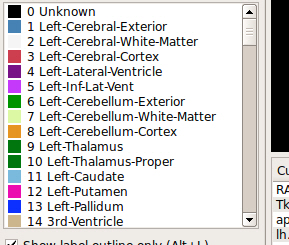
I would like to show several structures from the DKT (or the Desikan-Killiany) atlas alone on a "blank" fsaverage brain, rather than have all structures displayed in different colors (as happens by default). For instance, I'd like to just show "medialorbitofrontal" on its own, then "middletemporal" on its own, etc.
After I open the parcellation,
freeview -v /FS/fsaverage/mri/aparc+aseg.mgz:colormap=lut:opacity=0.4 -f /FS/fsaverage/surf/lh.white:annot=aparc.annot
, I expected to be able to turn each label in the list on and off like a layer, but this does not work. [image: 21-01-2019 14.48.54.jpg]
I hoped I could use Alt+F to hide/show each atlas label at a time (cf freeview tutorial https://surfer.nmr.mgh.harvard.edu/fswiki/FsTutorial/OutputData_freeview), but this instead toggles the entire external surface of the brain on and off.
Can anyone help? Thank you! --Francesco

HI Francesco,
The latest development version of freeview can do this. You can download it from here:
https://surfer.nmr.mgh.harvard.edu/fswiki/UpdateFreeview https://surfer.nmr.mgh.harvard.edu/fswiki/UpdateFreeview
Best, Ruopeng
On Jan 21, 2019, at 8:54 AM, Francesco Puccettone francesco.puccettone@gmail.com wrote:
External Email - Use CautionDear all,
I would like to show several structures from the DKT (or the Desikan-Killiany) atlas alone on a "blank" fsaverage brain, rather than have all structures displayed in different colors (as happens by default). For instance, I'd like to just show "medialorbitofrontal" on its own, then "middletemporal" on its own, etc.
After I open the parcellation, freeview -v /FS/fsaverage/mri/aparc+aseg.mgz:colormap=lut:opacity=0.4 -f /FS/fsaverage/surf/lh.white:annot=aparc.annot , I expected to be able to turn each label in the list on and off like a layer, but this does not work. <21-01-2019 14.48.54.jpg>
I hoped I could use Alt+F to hide/show each atlas label at a time (cf freeview tutorial https://surfer.nmr.mgh.harvard.edu/fswiki/FsTutorial/OutputData_freeview), but this instead toggles the entire external surface of the brain on and off.
Can anyone help? Thank you! --Francesco _______________________________________________ Freesurfer mailing list Freesurfer@nmr.mgh.harvard.edu https://mail.nmr.mgh.harvard.edu/mailman/listinfo/freesurfer
External Email - Use Caution
Hi Ruopeng,
Thanks! I took those steps to update Freeview, but when I try to start (the updated) Freeview, the command line returns "bash: /usr/local/freesurfer/bin/freeview: cannot execute binary file".
Maybe there is something wrong in the update instructions, possibly the library-update command (which has the -C option) or the chmod command?
I am using freesurfer-Linux-centos4-stable-pub-v5.3.0 inside an Oracle VM Virtualbox.
--F.
On Mon, 21 Jan 2019 at 19:30, Ruopeng Wang rpwang@nmr.mgh.harvard.edu wrote:
HI Francesco,
The latest development version of freeview can do this. You can download it from here:
https://surfer.nmr.mgh.harvard.edu/fswiki/UpdateFreeview
Best, Ruopeng
On Jan 21, 2019, at 8:54 AM, Francesco Puccettone < francesco.puccettone@gmail.com> wrote:
External Email - Use CautionDear all,
I would like to show several structures from the DKT (or the Desikan-Killiany) atlas alone on a "blank" fsaverage brain, rather than have all structures displayed in different colors (as happens by default). For instance, I'd like to just show "medialorbitofrontal" on its own, then "middletemporal" on its own, etc.
After I open the parcellation,
freeview -v /FS/fsaverage/mri/aparc+aseg.mgz:colormap=lut:opacity=0.4 -f /FS/fsaverage/surf/lh.white:annot=aparc.annot
, I expected to be able to turn each label in the list on and off like a layer, but this does not work. <21-01-2019 14.48.54.jpg>
I hoped I could use Alt+F to hide/show each atlas label at a time (cf freeview tutorial https://surfer.nmr.mgh.harvard.edu/fswiki/FsTutorial/OutputData_freeview), but this instead toggles the entire external surface of the brain on and off.
Can anyone help? Thank you! --Francesco _______________________________________________ Freesurfer mailing list Freesurfer@nmr.mgh.harvard.edu https://mail.nmr.mgh.harvard.edu/mailman/listinfo/freesurfer
Freesurfer mailing list Freesurfer@nmr.mgh.harvard.edu https://mail.nmr.mgh.harvard.edu/mailman/listinfo/freesurfer
External Email - Use Caution
As per an older thread https://mail.nmr.mgh.harvard.edu/pipermail//freesurfer/2016-November/048719.html, this might be in fact due to the VM being 32bit. It is mentioned there the 64bit VirtualBox image is widely available, but I on the main FS website I can only find the 32bit 5.3 version https://surfer.nmr.mgh.harvard.edu/fswiki/Installation/FreeSurferVirtualImage for VirtualBox.
I also have a FS 6.0 64bit installation on a Linux PC, and I tried the same update commands there. But there is still an error at the end when I try to start freeview:
*freeview: relocation error: freeview: symbol _ZN17QAbstractItemView11eventFilterEP7QObjectP6QEvent, version Qt_5 not defined in file libQt5Widgets.so.5 with link time reference*
Thanks still.. --Francesco
On Tue, 22 Jan 2019 at 11:20, Francesco Puccettone < francesco.puccettone@gmail.com> wrote:
Hi Ruopeng,
Thanks! I took those steps to update Freeview, but when I try to start (the updated) Freeview, the command line returns "bash: /usr/local/freesurfer/bin/freeview: cannot execute binary file".
Maybe there is something wrong in the update instructions, possibly the library-update command (which has the -C option) or the chmod command?
I am using freesurfer-Linux-centos4-stable-pub-v5.3.0 inside an Oracle VM Virtualbox.
--F.
On Mon, 21 Jan 2019 at 19:30, Ruopeng Wang rpwang@nmr.mgh.harvard.edu wrote:
HI Francesco,
The latest development version of freeview can do this. You can download it from here:
https://surfer.nmr.mgh.harvard.edu/fswiki/UpdateFreeview
Best, Ruopeng
On Jan 21, 2019, at 8:54 AM, Francesco Puccettone < francesco.puccettone@gmail.com> wrote:
External Email - Use CautionDear all,
I would like to show several structures from the DKT (or the Desikan-Killiany) atlas alone on a "blank" fsaverage brain, rather than have all structures displayed in different colors (as happens by default). For instance, I'd like to just show "medialorbitofrontal" on its own, then "middletemporal" on its own, etc.
After I open the parcellation,
freeview -v /FS/fsaverage/mri/aparc+aseg.mgz:colormap=lut:opacity=0.4 -f /FS/fsaverage/surf/lh.white:annot=aparc.annot
, I expected to be able to turn each label in the list on and off like a layer, but this does not work. <21-01-2019 14.48.54.jpg>
I hoped I could use Alt+F to hide/show each atlas label at a time (cf freeview tutorial https://surfer.nmr.mgh.harvard.edu/fswiki/FsTutorial/OutputData_freeview), but this instead toggles the entire external surface of the brain on and off.
Can anyone help? Thank you! --Francesco _______________________________________________ Freesurfer mailing list Freesurfer@nmr.mgh.harvard.edu https://mail.nmr.mgh.harvard.edu/mailman/listinfo/freesurfer
Freesurfer mailing list Freesurfer@nmr.mgh.harvard.edu https://mail.nmr.mgh.harvard.edu/mailman/listinfo/freesurfer

Hi Francesco, the linux dev distributions are built on 64bit centos6 and 7, so you’re right about your original issue being related to the 32bit vm. I think your newer Qt errors are related to out-of-date libraries supplied in the ‘Update Freeview’ instructions. I’ve just updated that wiki page (at https://surfer.nmr.mgh.harvard.edu/fswiki/UpdateFreeview) so it can account for changing Qt libraries. Can you give those new instructions a try and let me know how it goes?
thanks, Andrew
From: freesurfer-bounces@nmr.mgh.harvard.edu on behalf of Francesco Puccettone francesco.puccettone@gmail.com Reply-To: FS Help freesurfer@nmr.mgh.harvard.edu Date: Tuesday, January 22, 2019 at 5:40 AM To: FS Help freesurfer@nmr.mgh.harvard.edu Subject: Re: [Freesurfer] Highlighting single atlas structures in freeview
External Email - Use Caution As per an older threadhttps://mail.nmr.mgh.harvard.edu/pipermail/freesurfer/2016-November/048719.html, this might be in fact due to the VM being 32bit. It is mentioned there the 64bit VirtualBox image is widely available, but I on the main FS website I can only find the 32bit 5.3 versionhttps://surfer.nmr.mgh.harvard.edu/fswiki/Installation/FreeSurferVirtualImage for VirtualBox.
I also have a FS 6.0 64bit installation on a Linux PC, and I tried the same update commands there. But there is still an error at the end when I try to start freeview:
freeview: relocation error: freeview: symbol _ZN17QAbstractItemView11eventFilterEP7QObjectP6QEvent, version Qt_5 not defined in file libQt5Widgets.so.5 with link time reference
Thanks still.. --Francesco
On Tue, 22 Jan 2019 at 11:20, Francesco Puccettone <francesco.puccettone@gmail.commailto:francesco.puccettone@gmail.com> wrote: Hi Ruopeng,
Thanks! I took those steps to update Freeview, but when I try to start (the updated) Freeview, the command line returns "bash: /usr/local/freesurfer/bin/freeview: cannot execute binary file".
Maybe there is something wrong in the update instructions, possibly the library-update command (which has the -C option) or the chmod command?
I am using freesurfer-Linux-centos4-stable-pub-v5.3.0 inside an Oracle VM Virtualbox.
--F.
On Mon, 21 Jan 2019 at 19:30, Ruopeng Wang <rpwang@nmr.mgh.harvard.edumailto:rpwang@nmr.mgh.harvard.edu> wrote: HI Francesco,
The latest development version of freeview can do this. You can download it from here:
https://surfer.nmr.mgh.harvard.edu/fswiki/UpdateFreeview
Best, Ruopeng
On Jan 21, 2019, at 8:54 AM, Francesco Puccettone <francesco.puccettone@gmail.commailto:francesco.puccettone@gmail.com> wrote:
External Email - Use Caution
Dear all,
I would like to show several structures from the DKT (or the Desikan-Killiany) atlas alone on a "blank" fsaverage brain, rather than have all structures displayed in different colors (as happens by default). For instance, I'd like to just show "medialorbitofrontal" on its own, then "middletemporal" on its own, etc.
After I open the parcellation, freeview -v /FS/fsaverage/mri/aparc+aseg.mgz:colormap=lut:opacity=0.4 -f /FS/fsaverage/surf/lh.white:annot=aparc.annot , I expected to be able to turn each label in the list on and off like a layer, but this does not work. <21-01-2019 14.48.54.jpg>
I hoped I could use Alt+F to hide/show each atlas label at a time (cf freeview tutorialhttps://surfer.nmr.mgh.harvard.edu/fswiki/FsTutorial/OutputData_freeview), but this instead toggles the entire external surface of the brain on and off.
Can anyone help? Thank you! --Francesco _______________________________________________ Freesurfer mailing list Freesurfer@nmr.mgh.harvard.edumailto:Freesurfer@nmr.mgh.harvard.edu https://mail.nmr.mgh.harvard.edu/mailman/listinfo/freesurfer
_______________________________________________ Freesurfer mailing list Freesurfer@nmr.mgh.harvard.edumailto:Freesurfer@nmr.mgh.harvard.edu https://mail.nmr.mgh.harvard.edu/mailman/listinfo/freesurfer
External Email - Use Caution
Hi Andrew,
Thank you very much for this, I will give this a try when I next have access to that PC, which will unfortunately not be very soon.
Until then, since the task I set out to do is quite straighforward, I was wondering if there is a workaround to make the old Freeview (v5.3, which I still consider an excellent and versatile tool) to do it as well, that is, to highlight atlas parcels one at a time.
In either case I will report back once I am able to update those libraries.
Best, --F.
On Tue, 22 Jan 2019 at 17:16, Hoopes, Andrew AHOOPES@mgh.harvard.edu wrote:
Hi Francesco, the linux dev distributions are built on 64bit centos6 and 7, so you’re right about your original issue being related to the 32bit vm. I think your newer Qt errors are related to out-of-date libraries supplied in the ‘Update Freeview’ instructions. I’ve just updated that wiki page (at https://surfer.nmr.mgh.harvard.edu/fswiki/UpdateFreeview) so it can account for changing Qt libraries. Can you give those new instructions a try and let me know how it goes?
thanks,
Andrew
*From: *freesurfer-bounces@nmr.mgh.harvard.edu on behalf of Francesco Puccettone francesco.puccettone@gmail.com *Reply-To: *FS Help freesurfer@nmr.mgh.harvard.edu *Date: *Tuesday, January 22, 2019 at 5:40 AM *To: *FS Help freesurfer@nmr.mgh.harvard.edu *Subject: *Re: [Freesurfer] Highlighting single atlas structures in freeview
External Email - Use Caution *As per an older thread https://mail.nmr.mgh.harvard.edu/pipermail/freesurfer/2016-November/048719.html, this might be in fact due to the VM being 32bit. It is mentioned there the 64bit VirtualBox image is widely available, but I on the main FS website I can only find the 32bit 5.3 version https://surfer.nmr.mgh.harvard.edu/fswiki/Installation/FreeSurferVirtualImage for VirtualBox.
I also have a FS 6.0 64bit installation on a Linux PC, and I tried the same update commands there. But there is still an error at the end when I try to start freeview:
*freeview: relocation error: freeview: symbol _ZN17QAbstractItemView11eventFilterEP7QObjectP6QEvent, version Qt_5 not defined in file libQt5Widgets.so.5 with link time reference*
Thanks still..
--Francesco
On Tue, 22 Jan 2019 at 11:20, Francesco Puccettone < francesco.puccettone@gmail.com> wrote:
Hi Ruopeng,
Thanks! I took those steps to update Freeview, but when I try to start (the updated) Freeview, the command line returns "bash: /usr/local/freesurfer/bin/freeview: cannot execute binary file".
Maybe there is something wrong in the update instructions, possibly the library-update command (which has the -C option) or the chmod command?
I am using freesurfer-Linux-centos4-stable-pub-v5.3.0 inside an Oracle VM Virtualbox.
--F.
On Mon, 21 Jan 2019 at 19:30, Ruopeng Wang rpwang@nmr.mgh.harvard.edu wrote:
HI Francesco,
The latest development version of freeview can do this. You can download it from here:
https://surfer.nmr.mgh.harvard.edu/fswiki/UpdateFreeview
Best,
Ruopeng
On Jan 21, 2019, at 8:54 AM, Francesco Puccettone < francesco.puccettone@gmail.com> wrote:
External Email - Use Caution *Dear all,
I would like to show several structures from the DKT (or the Desikan-Killiany) atlas alone on a "blank" fsaverage brain, rather than have all structures displayed in different colors (as happens by default). For instance, I'd like to just show "medialorbitofrontal" on its own, then "middletemporal" on its own, etc.
After I open the parcellation,
freeview -v /FS/fsaverage/mri/aparc+aseg.mgz:colormap=lut:opacity=0.4 -f /FS/fsaverage/surf/lh.white:annot=aparc.annot
, I expected to be able to turn each label in the list on and off like a layer, but this does not work.
<21-01-2019 14.48.54.jpg>
I hoped I could use Alt+F to hide/show each atlas label at a time (cf freeview tutorial https://surfer.nmr.mgh.harvard.edu/fswiki/FsTutorial/OutputData_freeview), but this instead toggles the entire external surface of the brain on and off.
Can anyone help? Thank you!
--Francesco
Freesurfer mailing list Freesurfer@nmr.mgh.harvard.edu https://mail.nmr.mgh.harvard.edu/mailman/listinfo/freesurfer
Freesurfer mailing list Freesurfer@nmr.mgh.harvard.edu https://mail.nmr.mgh.harvard.edu/mailman/listinfo/freesurfer
External Email - Use Caution
PS: I guess this is possible in older versions as well based on figures in older papers (such as Fig 1 in this https://journals.plos.org/plosone/article?id=10.1371/journal.pone.0038511 one), that show certain ROIs on a blank fsaverage, just as I aim to do now. --F.
On Wed, 23 Jan 2019 at 10:06, Francesco Puccettone < francesco.puccettone@gmail.com> wrote:
Hi Andrew,
Thank you very much for this, I will give this a try when I next have access to that PC, which will unfortunately not be very soon.
Until then, since the task I set out to do is quite straighforward, I was wondering if there is a workaround to make the old Freeview (v5.3, which I still consider an excellent and versatile tool) to do it as well, that is, to highlight atlas parcels one at a time.
In either case I will report back once I am able to update those libraries.
Best, --F.
On Tue, 22 Jan 2019 at 17:16, Hoopes, Andrew AHOOPES@mgh.harvard.edu wrote:
Hi Francesco, the linux dev distributions are built on 64bit centos6 and 7, so you’re right about your original issue being related to the 32bit vm. I think your newer Qt errors are related to out-of-date libraries supplied in the ‘Update Freeview’ instructions. I’ve just updated that wiki page (at https://surfer.nmr.mgh.harvard.edu/fswiki/UpdateFreeview) so it can account for changing Qt libraries. Can you give those new instructions a try and let me know how it goes?
thanks,
Andrew
*From: *freesurfer-bounces@nmr.mgh.harvard.edu on behalf of Francesco Puccettone francesco.puccettone@gmail.com *Reply-To: *FS Help freesurfer@nmr.mgh.harvard.edu *Date: *Tuesday, January 22, 2019 at 5:40 AM *To: *FS Help freesurfer@nmr.mgh.harvard.edu *Subject: *Re: [Freesurfer] Highlighting single atlas structures in freeview
External Email - Use Caution *As per an older thread https://mail.nmr.mgh.harvard.edu/pipermail/freesurfer/2016-November/048719.html, this might be in fact due to the VM being 32bit. It is mentioned there the 64bit VirtualBox image is widely available, but I on the main FS website I can only find the 32bit 5.3 version https://surfer.nmr.mgh.harvard.edu/fswiki/Installation/FreeSurferVirtualImage for VirtualBox.
I also have a FS 6.0 64bit installation on a Linux PC, and I tried the same update commands there. But there is still an error at the end when I try to start freeview:
*freeview: relocation error: freeview: symbol _ZN17QAbstractItemView11eventFilterEP7QObjectP6QEvent, version Qt_5 not defined in file libQt5Widgets.so.5 with link time reference*
Thanks still..
--Francesco
On Tue, 22 Jan 2019 at 11:20, Francesco Puccettone < francesco.puccettone@gmail.com> wrote:
Hi Ruopeng,
Thanks! I took those steps to update Freeview, but when I try to start (the updated) Freeview, the command line returns "bash: /usr/local/freesurfer/bin/freeview: cannot execute binary file".
Maybe there is something wrong in the update instructions, possibly the library-update command (which has the -C option) or the chmod command?
I am using freesurfer-Linux-centos4-stable-pub-v5.3.0 inside an Oracle VM Virtualbox.
--F.
On Mon, 21 Jan 2019 at 19:30, Ruopeng Wang rpwang@nmr.mgh.harvard.edu wrote:
HI Francesco,
The latest development version of freeview can do this. You can download it from here:
https://surfer.nmr.mgh.harvard.edu/fswiki/UpdateFreeview
Best,
Ruopeng
On Jan 21, 2019, at 8:54 AM, Francesco Puccettone < francesco.puccettone@gmail.com> wrote:
External Email - Use Caution *Dear all,
I would like to show several structures from the DKT (or the Desikan-Killiany) atlas alone on a "blank" fsaverage brain, rather than have all structures displayed in different colors (as happens by default). For instance, I'd like to just show "medialorbitofrontal" on its own, then "middletemporal" on its own, etc.
After I open the parcellation,
freeview -v /FS/fsaverage/mri/aparc+aseg.mgz:colormap=lut:opacity=0.4 -f /FS/fsaverage/surf/lh.white:annot=aparc.annot
, I expected to be able to turn each label in the list on and off like a layer, but this does not work.
<21-01-2019 14.48.54.jpg>
I hoped I could use Alt+F to hide/show each atlas label at a time (cf freeview tutorial https://surfer.nmr.mgh.harvard.edu/fswiki/FsTutorial/OutputData_freeview), but this instead toggles the entire external surface of the brain on and off.
Can anyone help? Thank you!
--Francesco
Freesurfer mailing list Freesurfer@nmr.mgh.harvard.edu https://mail.nmr.mgh.harvard.edu/mailman/listinfo/freesurfer
Freesurfer mailing list Freesurfer@nmr.mgh.harvard.edu https://mail.nmr.mgh.harvard.edu/mailman/listinfo/freesurfer
External Email - Use Caution
Hello Andrew-or others who might wish to help :-]
I've had to come back to this task after a while. I no longer have access to the Linux PC, thus will need to do this on my Windows 10 installation of FS (Oracle VM). What is the easiest way of achieving the task I described (highlight a few brain regions in the DKT atlas)?
I tried updating FreeView as in the updated https://surfer.nmr.mgh.harvard.edu/fswiki/UpdateFreeview instructions, but I am getting some no-space errors that I'd need to fix; also, this update is in fact probably meant for direct Linux (not Windows VM) installations anyway.
I see there is now a non-VM way https://surfer.nmr.mgh.harvard.edu/fswiki/WindowsSupport of running FS on Windows. However, since figures in older papers (such as Fig 1 in this https://journals.plos.org/plosone/article?id=10.1371/journal.pone.0038511 one) exist that show certain ROIs on a blank fsaverage, I still wonder whether there is a way to do it with the standard VM image. The problem is, typing freeview at my command line there still returns "bash: /usr/local/freesurfer/bin/freeview: cannot execute binary file".
Thank you again for your help! --Francesco
On Wed, 23 Jan 2019 at 15:38, Francesco Puccettone < francesco.puccettone@gmail.com> wrote:
PS: I guess this is possible in older versions as well based on figures in older papers (such as Fig 1 in this https://journals.plos.org/plosone/article?id=10.1371/journal.pone.0038511 one), that show certain ROIs on a blank fsaverage, just as I aim to do now. --F.
On Wed, 23 Jan 2019 at 10:06, Francesco Puccettone < francesco.puccettone@gmail.com> wrote:
Hi Andrew,
Thank you very much for this, I will give this a try when I next have access to that PC, which will unfortunately not be very soon.
Until then, since the task I set out to do is quite straighforward, I was wondering if there is a workaround to make the old Freeview (v5.3, which I still consider an excellent and versatile tool) to do it as well, that is, to highlight atlas parcels one at a time.
In either case I will report back once I am able to update those libraries.
Best, --F.
On Tue, 22 Jan 2019 at 17:16, Hoopes, Andrew AHOOPES@mgh.harvard.edu wrote:
Hi Francesco, the linux dev distributions are built on 64bit centos6 and 7, so you’re right about your original issue being related to the 32bit vm. I think your newer Qt errors are related to out-of-date libraries supplied in the ‘Update Freeview’ instructions. I’ve just updated that wiki page (at https://surfer.nmr.mgh.harvard.edu/fswiki/UpdateFreeview) so it can account for changing Qt libraries. Can you give those new instructions a try and let me know how it goes?
thanks,
Andrew
*From: *freesurfer-bounces@nmr.mgh.harvard.edu on behalf of Francesco Puccettone francesco.puccettone@gmail.com *Reply-To: *FS Help freesurfer@nmr.mgh.harvard.edu *Date: *Tuesday, January 22, 2019 at 5:40 AM *To: *FS Help freesurfer@nmr.mgh.harvard.edu *Subject: *Re: [Freesurfer] Highlighting single atlas structures in freeview
External Email - Use Caution *As per an older thread https://mail.nmr.mgh.harvard.edu/pipermail/freesurfer/2016-November/048719.html, this might be in fact due to the VM being 32bit. It is mentioned there the 64bit VirtualBox image is widely available, but I on the main FS website I can only find the 32bit 5.3 version https://surfer.nmr.mgh.harvard.edu/fswiki/Installation/FreeSurferVirtualImage for VirtualBox.
I also have a FS 6.0 64bit installation on a Linux PC, and I tried the same update commands there. But there is still an error at the end when I try to start freeview:
*freeview: relocation error: freeview: symbol _ZN17QAbstractItemView11eventFilterEP7QObjectP6QEvent, version Qt_5 not defined in file libQt5Widgets.so.5 with link time reference*
Thanks still..
--Francesco
On Tue, 22 Jan 2019 at 11:20, Francesco Puccettone < francesco.puccettone@gmail.com> wrote:
Hi Ruopeng,
Thanks! I took those steps to update Freeview, but when I try to start (the updated) Freeview, the command line returns "bash: /usr/local/freesurfer/bin/freeview: cannot execute binary file".
Maybe there is something wrong in the update instructions, possibly the library-update command (which has the -C option) or the chmod command?
I am using freesurfer-Linux-centos4-stable-pub-v5.3.0 inside an Oracle VM Virtualbox.
--F.
On Mon, 21 Jan 2019 at 19:30, Ruopeng Wang rpwang@nmr.mgh.harvard.edu wrote:
HI Francesco,
The latest development version of freeview can do this. You can download it from here:
https://surfer.nmr.mgh.harvard.edu/fswiki/UpdateFreeview
Best,
Ruopeng
On Jan 21, 2019, at 8:54 AM, Francesco Puccettone < francesco.puccettone@gmail.com> wrote:
External Email - Use Caution *Dear all,
I would like to show several structures from the DKT (or the Desikan-Killiany) atlas alone on a "blank" fsaverage brain, rather than have all structures displayed in different colors (as happens by default). For instance, I'd like to just show "medialorbitofrontal" on its own, then "middletemporal" on its own, etc.
After I open the parcellation,
freeview -v /FS/fsaverage/mri/aparc+aseg.mgz:colormap=lut:opacity=0.4 -f /FS/fsaverage/surf/lh.white:annot=aparc.annot
, I expected to be able to turn each label in the list on and off like a layer, but this does not work.
<21-01-2019 14.48.54.jpg>
I hoped I could use Alt+F to hide/show each atlas label at a time (cf freeview tutorial https://surfer.nmr.mgh.harvard.edu/fswiki/FsTutorial/OutputData_freeview), but this instead toggles the entire external surface of the brain on and off.
Can anyone help? Thank you!
--Francesco
Freesurfer mailing list Freesurfer@nmr.mgh.harvard.edu https://mail.nmr.mgh.harvard.edu/mailman/listinfo/freesurfer
Freesurfer mailing list Freesurfer@nmr.mgh.harvard.edu https://mail.nmr.mgh.harvard.edu/mailman/listinfo/freesurfer
Hi Francesco,
You're not going to be able to run any of the dev-released binaries on a centos4 VM. That's quite an old version. The minimum centos version that we support now is v6. I think your best bet is download a centos 6 (or 7) VM and install freesurfer 5 on that along with the dev freeview update. Rob, cc'd, might have a FS 6.0 VM built somewhere, but even then you'll still need to update freeview.
best, Andrew
________________________________________ From: Francesco Puccettone francesco.puccettone@gmail.com Sent: Tuesday, February 4, 2020 11:51 AM To: Hoopes, Andrew; Freesurfer@nmr.mgh.harvard.edu Subject: Re: [Freesurfer] Highlighting single atlas structures in freeview
External Email - Use Caution
Hello Andrew-or others who might wish to help :-]
I've had to come back to this task after a while. I no longer have access to the Linux PC, thus will need to do this on my Windows 10 installation of FS (Oracle VM). What is the easiest way of achieving the task I described (highlight a few brain regions in the DKT atlas)?
I tried updating FreeView as in the updatedhttps://surfer.nmr.mgh.harvard.edu/fswiki/UpdateFreeview instructions, but I am getting some no-space errors that I'd need to fix; also, this update is in fact probably meant for direct Linux (not Windows VM) installations anyway.
I see there is now a non-VM wayhttps://surfer.nmr.mgh.harvard.edu/fswiki/WindowsSupport of running FS on Windows. However, since figures in older papers (such as Fig 1 in thishttps://journals.plos.org/plosone/article?id=10.1371/journal.pone.0038511 one) exist that show certain ROIs on a blank fsaverage, I still wonder whether there is a way to do it with the standard VM image. The problem is, typing freeview at my command line there still returns "bash: /usr/local/freesurfer/bin/freeview: cannot execute binary file".
Thank you again for your help! --Francesco
On Wed, 23 Jan 2019 at 15:38, Francesco Puccettone <francesco.puccettone@gmail.commailto:francesco.puccettone@gmail.com> wrote: PS: I guess this is possible in older versions as well based on figures in older papers (such as Fig 1 in thishttps://journals.plos.org/plosone/article?id=10.1371/journal.pone.0038511 one), that show certain ROIs on a blank fsaverage, just as I aim to do now. --F.
On Wed, 23 Jan 2019 at 10:06, Francesco Puccettone <francesco.puccettone@gmail.commailto:francesco.puccettone@gmail.com> wrote: Hi Andrew,
Thank you very much for this, I will give this a try when I next have access to that PC, which will unfortunately not be very soon.
Until then, since the task I set out to do is quite straighforward, I was wondering if there is a workaround to make the old Freeview (v5.3, which I still consider an excellent and versatile tool) to do it as well, that is, to highlight atlas parcels one at a time.
In either case I will report back once I am able to update those libraries.
Best, --F.
On Tue, 22 Jan 2019 at 17:16, Hoopes, Andrew <AHOOPES@mgh.harvard.edumailto:AHOOPES@mgh.harvard.edu> wrote: Hi Francesco, the linux dev distributions are built on 64bit centos6 and 7, so you’re right about your original issue being related to the 32bit vm. I think your newer Qt errors are related to out-of-date libraries supplied in the ‘Update Freeview’ instructions. I’ve just updated that wiki page (at https://surfer.nmr.mgh.harvard.edu/fswiki/UpdateFreeview) so it can account for changing Qt libraries. Can you give those new instructions a try and let me know how it goes?
thanks, Andrew
From: <freesurfer-bounces@nmr.mgh.harvard.edumailto:freesurfer-bounces@nmr.mgh.harvard.edu> on behalf of Francesco Puccettone <francesco.puccettone@gmail.commailto:francesco.puccettone@gmail.com> Reply-To: FS Help <freesurfer@nmr.mgh.harvard.edumailto:freesurfer@nmr.mgh.harvard.edu> Date: Tuesday, January 22, 2019 at 5:40 AM To: FS Help <freesurfer@nmr.mgh.harvard.edumailto:freesurfer@nmr.mgh.harvard.edu> Subject: Re: [Freesurfer] Highlighting single atlas structures in freeview
External Email - Use Caution As per an older threadhttps://mail.nmr.mgh.harvard.edu/pipermail/freesurfer/2016-November/048719.html, this might be in fact due to the VM being 32bit. It is mentioned there the 64bit VirtualBox image is widely available, but I on the main FS website I can only find the 32bit 5.3 versionhttps://surfer.nmr.mgh.harvard.edu/fswiki/Installation/FreeSurferVirtualImage for VirtualBox.
I also have a FS 6.0 64bit installation on a Linux PC, and I tried the same update commands there. But there is still an error at the end when I try to start freeview:
freeview: relocation error: freeview: symbol _ZN17QAbstractItemView11eventFilterEP7QObjectP6QEvent, version Qt_5 not defined in file libQt5Widgets.so.5 with link time reference
Thanks still.. --Francesco
On Tue, 22 Jan 2019 at 11:20, Francesco Puccettone <francesco.puccettone@gmail.commailto:francesco.puccettone@gmail.com> wrote: Hi Ruopeng,
Thanks! I took those steps to update Freeview, but when I try to start (the updated) Freeview, the command line returns "bash: /usr/local/freesurfer/bin/freeview: cannot execute binary file".
Maybe there is something wrong in the update instructions, possibly the library-update command (which has the -C option) or the chmod command?
I am using freesurfer-Linux-centos4-stable-pub-v5.3.0 inside an Oracle VM Virtualbox.
--F.
On Mon, 21 Jan 2019 at 19:30, Ruopeng Wang <rpwang@nmr.mgh.harvard.edumailto:rpwang@nmr.mgh.harvard.edu> wrote: HI Francesco,
The latest development version of freeview can do this. You can download it from here:
https://surfer.nmr.mgh.harvard.edu/fswiki/UpdateFreeview
Best, Ruopeng
On Jan 21, 2019, at 8:54 AM, Francesco Puccettone <francesco.puccettone@gmail.commailto:francesco.puccettone@gmail.com> wrote:
External Email - Use Caution
Dear all,
I would like to show several structures from the DKT (or the Desikan-Killiany) atlas alone on a "blank" fsaverage brain, rather than have all structures displayed in different colors (as happens by default). For instance, I'd like to just show "medialorbitofrontal" on its own, then "middletemporal" on its own, etc.
After I open the parcellation, freeview -v /FS/fsaverage/mri/aparc+aseg.mgz:colormap=lut:opacity=0.4 -f /FS/fsaverage/surf/lh.white:annot=aparc.annot , I expected to be able to turn each label in the list on and off like a layer, but this does not work. <21-01-2019 14.48.54.jpg>
I hoped I could use Alt+F to hide/show each atlas label at a time (cf freeview tutorialhttps://surfer.nmr.mgh.harvard.edu/fswiki/FsTutorial/OutputData_freeview), but this instead toggles the entire external surface of the brain on and off.
Can anyone help? Thank you! --Francesco _______________________________________________ Freesurfer mailing list Freesurfer@nmr.mgh.harvard.edumailto:Freesurfer@nmr.mgh.harvard.edu https://mail.nmr.mgh.harvard.edu/mailman/listinfo/freesurfer
_______________________________________________ Freesurfer mailing list Freesurfer@nmr.mgh.harvard.edumailto:Freesurfer@nmr.mgh.harvard.edu https://mail.nmr.mgh.harvard.edu/mailman/listinfo/freesurfer
freesurfer@nmr.mgh.harvard.edu
-
 Francesco Puccettone
 -
 Hoopes, Andrew
 -
 Ruopeng Wang