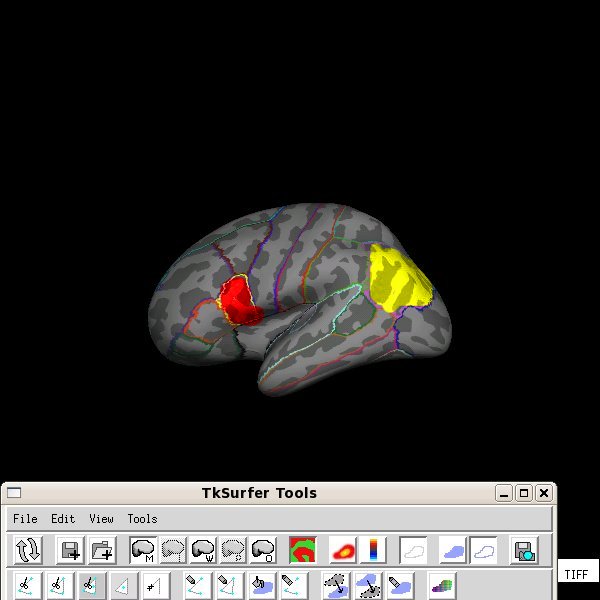
i´ll rephrase my question: can one display "filled" labels and other "outlined" labels at the same time in tksurfer? see my current attachment (made with help from Gimp..): surface+curvature+aparc (outlined)+some label (filled)+some label (filled).
mri_annotation2label will give me labels, fine, but it won´t solve my rephrased question, i think.
appreciate your help! -joost
Or do you want the separate units to have separate colors? If that's your
goal you can use mri_annotation2label to turn all the parcellation units into labels and only use the 2 (or more) that you want.
cheers, Bruce
On Wed, 19 Nov 2008, j janssen wrote:
Hi Bruce,
to be 100% sure that you guys understand what i want, i have attached the same attachment as before but now i quickly manually-painted in some regions using Gimp. Now, obviously i would like to do this not-manually and within FreeSurfer. is this possible?
you can use the "custom fill" tool to fill up to other labels.
how can i use "custom fill" to fill up a specific label, making it visible in tksurfer while keeping the other labels in 'outlined' status?
You can also start with "all marked vertices" and click in a number of
regions, then save them as a label (you can change its color with the "change label color" button on the 2nd row of icons near the right).
with "its" you refer to 1 label representing "all marked vertices" for which the color can be customized. look at the attachment, this is not what i would want. maybe i´m missing something obvious, apologies.
-joost
On Wed, 19 Nov 2008, j janssen wrote:
Hi,
using version 4.0.5
look at the attached picture. its the result of:
tksurfer code lh inflated -aparc aparc -gray
i have selected one region (yellow outline). i would like to
- fill this region and some other regions, *but not all regions*!
- give the filled regions different color-labelings
- i would like to display them (outlined and filled regions) at the
*same* time.
i have tried numerous ways, without result. any suggestions?
thanks, -joost