External Email - Use Caution
Hi Bruce,
Do you mean that I should re-do the recon-all process?
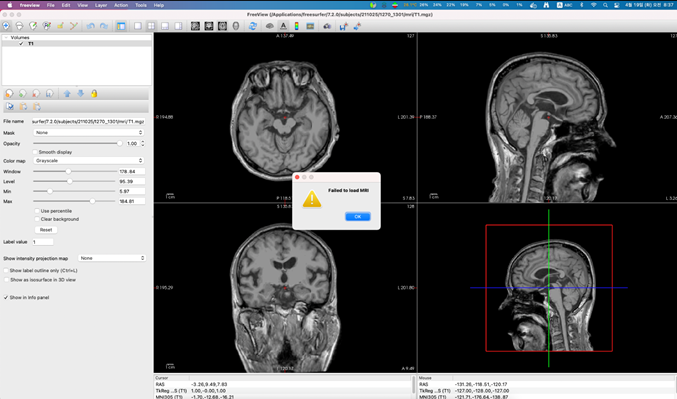
I tried to re run freeview but it did not work. And Yes I think the files have been overwritten at some point which I am trying to figure out to avoid making the same mistake in the future.
However, the question is I have done the exact same process I always did to view mri files on freeview. I have set and used the same subject directory, used the same code, and etc.
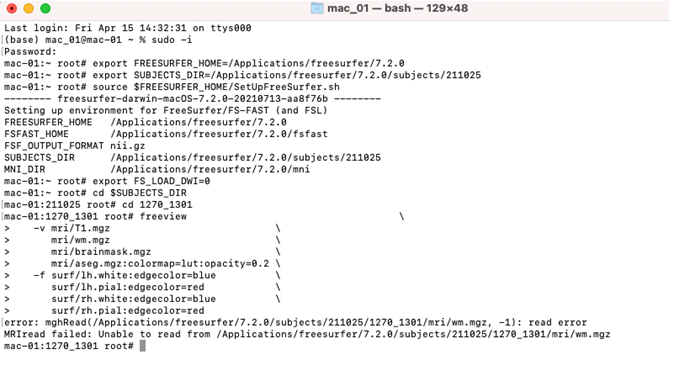
Here’s the code I used:
Which gives me this:
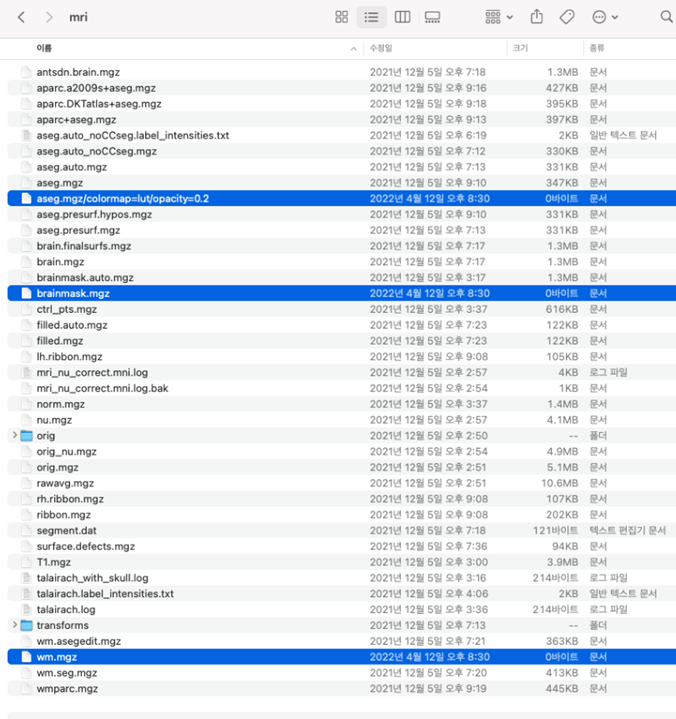
Then, when I check mri folder, notice the selected files have been overwritten (I think) and are shown as 0 byte in size.
Can you see where I went wrong to overwrite those files?
Thank you for your help.
Best, H
From: freesurfer-bounces@nmr.mgh.harvard.edu freesurfer-bounces@nmr.mgh.harvard.edu On Behalf Of Fischl, Bruce Sent: Monday, April 18, 2022 10:35 PM To: Freesurfer support list freesurfer@nmr.mgh.harvard.edu Subject: Re: [Freesurfer] Failed to load MRI error
Is this for a subject that you can’t load the wm.mgz for? It doesn’t show any errors. Is the wm.mgz zero length? I don’t see how those things can both be true unless you overwrote it at some point. If you haven’t manually edited this subject maybe you should just rerun it?
From: freesurfer-bounces@nmr.mgh.harvard.edu mailto:freesurfer-bounces@nmr.mgh.harvard.edu <freesurfer-bounces@nmr.mgh.harvard.edu mailto:freesurfer-bounces@nmr.mgh.harvard.edu > On Behalf Of HYE JUNG YOUN Sent: Monday, April 18, 2022 2:44 AM To: 'Freesurfer support list' <freesurfer@nmr.mgh.harvard.edu mailto:freesurfer@nmr.mgh.harvard.edu > Subject: Re: [Freesurfer] Failed to load MRI error
External Email - Use Caution
Hi Bruce,
Please find the attached log file.
Thanks.
H